The best photo booth printers for home offices make it easy to turn celebrations, creative projects, and everyday snapshots into physical keepsakes. This roundup includes compact wireless printers, complete touchscreen booths, and event-ready dye-sublimation models.
We compare print quality, connectivity, media costs, footprint, and ease of use so you can choose a setup that fits your available space and how often you plan to print.
Best 10 Photo Booth Printers for Home Offices Picks for 2026
Best Compact Bundle

- Includes paper, three color cartridges, and a cleaning cloth
- Produces durable 4x6 dye-sublimation prints
- Wireless and compact for home or event use
Best For: Home photo printing, small events, scrapbooking, and gifts
Best Full Photo Booth Setup
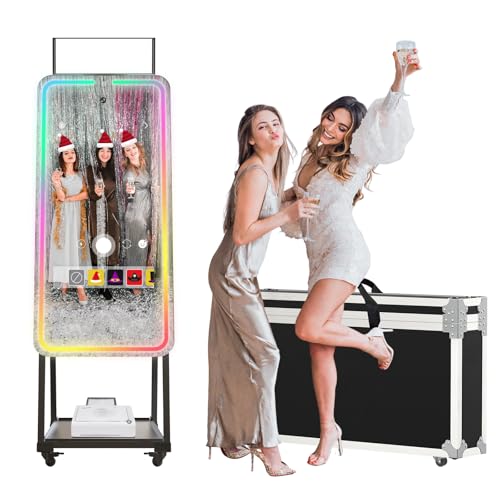
- Combines a 32-inch touchscreen with a 12MP camera
- Includes RGB lighting, effects, frames, and digital props
- Supports compatible USB printers and social sharing
Best For: Interactive parties, content creation, and complete photo booth setups
Best for Fast Event Printing

- Produces 4x6 prints in about 19 seconds
- Includes Wi-Fi and supports USB connectivity
- Offers glossy or matte finishes and up to 150 prints per roll
Best For: High-volume 4x6 printing, events, and dedicated photo stations
Best Standalone Booth for Sharing

- Features a 10.1-inch touchscreen, camera, and LED ring light
- Prints ink-free 3x4 ZINK photos
- Supports custom designs, QR sharing, and cloud storage
Best For: Home events, scrapbooks, photo walls, and easy digital sharing
Best Dual-Format Pick

- Prints 4x6-inch photos and 3x3-inch stickers
- Bluetooth and app-based printing
- Includes 80 sheets and two cartridges
Best For: Home offices needing flexible photo and sticker printing
Best Wide-Format Option
Epson Expression Photo HD XP-15000
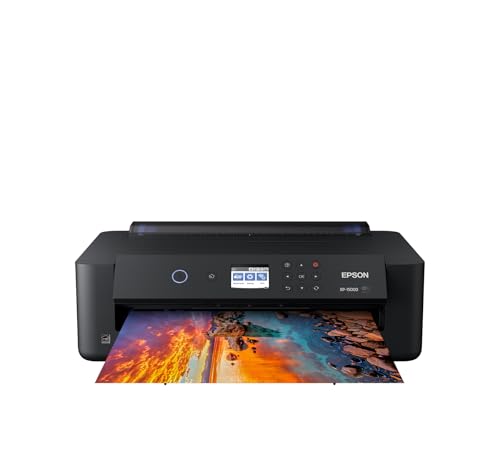
- Supports borderless prints up to 13x19 inches
- Six-color Claria Photo HD ink system
- Handles cardstock and automatic duplex printing
Best For: Home offices making large, high-quality photo prints
Best 4x6 Starter Bundle

- Includes 100 sheets and three cartridges
- Uses a built-in Wi-Fi hotspot
- Supports up to five connected devices
Best For: Simple shared 4x6 photo printing at home
Best Protective Stand
VANYA Photo Booth Printer Stand

- Lockable metal enclosure helps protect against theft and dust.
- Ventilation holes support extended printer operation.
- Detachable design simplifies transport to events.
Best For: Protecting and transporting compatible photo printers
Best High-Volume Printer
HiTi P525L Roll Photo Printer Bundle

- Produces 4x6-inch prints in approximately 12.8 seconds.
- Supports up to 280 prints per hour and 300 dpi output.
- Bundle includes media, carrying case, cables, and a three-year warranty.
Best For: High-volume 4x6 event and photo booth printing
Best All-in-One Booth
HP Sprocket Photo Booth Machine

- 10.1-inch touchscreen includes live previews and 250-plus creative options.
- Built-in lighting supports photo capture at events.
- Prints 3x4 ZINK photos without ink or toner and supports QR sharing.
Best For: Interactive home-office booths and small events
Best Compact Bundle – Canon Selphy CP1500
The Canon Selphy CP1500 is a practical pick for anyone comparing photo booth printers for home offices and wants a compact, ready-to-use setup. Its dye-sublimation printing produces water-resistant, fingerprint-resistant 4×6 photos, while the included paper, ink, and cleaning cloth reduce setup guesswork.
Best For: Home photo printing, small events, scrapbooking, journaling, and gifts.
Pros:
- Includes 108 sheets of KP-108 paper, three color cartridges, and a cleaning cloth.
- Produces vibrant 4×6 prints with a durable, water-resistant finish.
- Supports wireless printing from smartphones, tablets, and computers.
- Compact design fits desks, shelves, and travel bags.
Cons:
- Maximum media size is limited to 4×6 inches.
- It is a print-only device without scanning or copying functions.
For a home office that needs straightforward, polished photo output, this bundle offers a convenient balance of included supplies, wireless access, and portability.
Best Full Photo Booth Setup – Magic Mirror Photo Booth
The MWE Magic Mirror Photo Booth is designed for buyers who want more than a standalone printer when evaluating photo booth printers for home offices. It combines a 32-inch touchscreen, built-in 12MP camera, RGB lighting, photo effects, and support for compatible USB printers.
Best For: Interactive parties, content creation, social sharing, and users building a complete photo booth experience.
Pros:
- Built-in 12MP camera with a 76.3-degree wide-angle view.
- 32-inch touchscreen and integrated RGB lighting support interactive sessions.
- Software includes frames, digital props, stickers, music, effects, and one-click social sharing.
- Supports Android 13 and can also work with Windows 10 systems and compatible USB printers.
Cons:
- A printer may need to be selected separately or connected through USB.
- The large touchscreen format is less desk-friendly than a compact photo printer.
- Software VIP access is listed as six months.
This is better viewed as a complete interactive photo booth than a simple home-office printer. It makes sense when lighting, touchscreen controls, camera features, and social sharing matter as much as printed photos.
Best for Fast Event Printing – DNP QW410 Dye-Sub Printer
DNP QW410 4.5" Dye Sublimation Printer with WCM Plus Wi-Fi Module and 4x6" Printer Media Kit
Check Price On AmazonThe DNP QW410 is aimed at buyers who need a more event-ready option among photo booth printers for home offices. This dye-sublimation model includes a WCM Plus Wi-Fi module, supports USB connections, and produces glossy or matte prints at a listed 19-second speed for 4×6 photos.
Best For: High-volume 4×6 printing, events, photographers, and users who need flexible device connectivity.
Pros:
- Prints 4×6 photos in approximately 19 seconds.
- Supports iOS, Android, Windows, and macOS through Wi-Fi or USB.
- Offers glossy and matte finishing options with an overcoat layer.
- Supports 4×6 and 4.5×8 media with up to 150 prints per roll.
Cons:
- At 22.2 pounds, it is substantially less portable than compact home printers.
- Its listed maximum media size is 4×6 inches, despite support for 4.5×8 media.
- It is a print-only unit without scanning or copying functions.
The QW410 is a strong fit when speed, media flexibility, and professional-style output take priority. Its size and weight make it more suitable for a dedicated workspace or event station than casual travel.
Best Standalone Booth for Sharing – HP Sprocket Photo Booth
The HP Sprocket Photo Booth Machine is a self-contained option for shoppers comparing photo booth printers for home offices and small events. Its 10.1-inch touchscreen, built-in flash, LED ring light, customizable frames, and QR-code sharing make it easy to create and distribute photos without a separate camera.
Best For: Home events, scrapbooks, photo walls, guest-controlled booths, and quick digital sharing.
Pros:
- Built-in camera, flash, LED ring light, and 10.1-inch touchscreen create an all-in-one setup.
- Includes more than 250 frames and stickers plus customizable filters.
- ZINK prints use paper with embedded color and do not require ink or toner.
- Can print multiple copies or generate QR codes for digital sharing over Wi-Fi.
Cons:
- Only works with HP 3×4 ZINK paper.
- The paper tray holds up to 20 sheets.
- Print output is limited to 3×4-inch photos.
This model prioritizes simplicity and interaction over large-format or high-volume printing. It is especially useful when guests need to customize, print, stick, and share photos from one compact booth-style machine.
Best Dual-Format Pick – Liene Amber M110
For shoppers comparing photo booth printers for home offices, the Liene Amber M110 stands out for flexible, compact printing. Its dual tray supports standard 4×6-inch photos and 3-inch square sticker sheets, while Bluetooth connectivity and an accompanying app simplify phone-based printing.
Best For: Home-office users who want both traditional snapshots and small sticker-style prints.
Pros:
- Prints both 4×6-inch photos and 3×3-inch sticky-backed sheets.
- Thermal dye-sublimation output is designed to resist water, scratches, fingerprints, and fading.
- Bluetooth pairs in about 13 seconds and supports multiple connected devices.
- Includes 80 sheets and two cartridges in the listed package.
Cons:
- Limited to Liene-compatible 4×6 and 3×3 cartridges.
- Print size is limited to 4×6 inches and 3×3 inches.
- Its app-based workflow may be less suitable for users seeking a traditional document printer.
The M110 is a practical choice when a home office needs compact, app-controlled photo printing with more than one paper format. Its included media and portable design make it convenient for occasional creative projects and personal photos.
Best Wide-Format Option – Epson Expression Photo HD XP-15000
Among photo booth printers for home offices, the Epson Expression Photo HD XP-15000 is the choice for larger, more polished prints. It supports borderless output up to 13×19 inches, uses six-color Claria Photo HD ink, and adds wireless connectivity alongside office-friendly paper handling.
Best For: Home offices producing large photographs, specialty-media projects, and enhanced black-and-white prints.
Pros:
- Prints borderless photos up to 13×19 inches.
- Six-color ink system includes red and gray for a wide color gamut and improved monochrome output.
- Rear tray handles specialty media such as cardstock, while the front tray holds up to 200 sheets.
- Supports automatic two-sided document printing and wireless connectivity.
Cons:
- Significantly larger and heavier than portable photo printers.
- Designed for use with Epson Genuine Cartridges.
- Its wired and wireless setup may be more involved than a dedicated phone photo printer.
The XP-15000 makes the most sense when print size and color flexibility matter more than portability. It occupies more desktop space, but its wide-format support and specialty-media handling give a home office greater creative range.
Best 4×6 Starter Bundle – Liene M100 4×6 Photo Printer
The Liene M100 is a straightforward option for shoppers seeking photo booth printers for home offices without a complicated network setup. This compact dye-sublimation printer creates 4×6-inch color photos through its own Wi-Fi hotspot and comes with 100 sheets plus three color cartridges.
Best For: Home-office users who primarily print 4×6 photos from phones, tablets, PCs, or Macs.
Pros:
- Includes 100 sheets of 4×6 photo paper and three color cartridges.
- Built-in Wi-Fi hotspot avoids dependence on an outside network.
- Thermal dye-sublimation prints have a laminated surface designed to resist water, scratches, fingerprints, and fading.
- Supports up to five simultaneous connections for shared printing.
Cons:
- Prints only up to 4×6 inches.
- Uses proprietary Liene cartridges.
- The supplied guidance recommends cleaning the print head if smudges appear.
The M100 is a sensible fit for routine snapshot printing and shared household use. Its included supplies reduce the need for an immediate refill, while the independent Wi-Fi connection keeps setup relatively simple for phone-based printing.
Best Protective Stand – VANYA Photo Booth Printer Stand
For photo booth printers for home offices that also travel to events, the VANYA printer box adds a practical layer of organization and protection. Its metal enclosure is designed for compatible photo printers, including the P525L, with ventilation, cable access, and a lock for added security.
Best For: Home-office users and event operators who need a lockable, portable stand or enclosure for a compatible photo printer.
Pros:
- Lock helps deter theft and keeps dust away during storage.
- Rear ventilation holes support heat dissipation during extended operation.
- Detachable design, wiring holes, and included installation instructions aid transport and setup.
- Metal construction has scratch-resistant paint and a two-year manufacturer warranty.
Cons:
- It is a stand or enclosure rather than a complete printer.
- Compatibility is product-specific, so confirm that your printer matches the listed models.
The VANYA is most useful when protection, transport, and event security matter more than adding printing features. Verify dimensions and compatibility before ordering.
Best High-Volume Printer – HiTi P525L Roll Photo Printer Bundle
Among photo booth printers for home offices, the HiTi P525L stands out for users who need fast, event-ready output. This dye-sublimation printer produces 4×6-inch photos in about 12.8 seconds and includes media, a padded carrying case, and broad USB-based device compatibility.
Best For: Home-office creators, event photographers, and photo booth operators handling frequent 4×6-inch prints.
Pros:
- Prints up to 280 4×6-inch photos per hour according to the supplied specifications.
- 300 dpi dye-sublimation printing supports detailed color output.
- Supports roll media for 4×6, 5×7, and 6×8-inch formats, plus 2-up printing.
- Bundle includes paper, ribbon rolls, cables, a padded case, and a three-year warranty.
Cons:
- At 59.3 pounds, it is substantially less portable than compact photo printers.
- Its listed maximum media size is 6×4 inches, so larger-format needs may be limited.
- The printer is intended for print-only operation.
The P525L is a strong fit when throughput and professional-looking dye-sublimation prints outweigh size and weight concerns. The included case and supplies make it especially practical for recurring events.
Best All-in-One Booth – HP Sprocket Photo Booth Machine
The HP Sprocket combines capture, editing, and printing in one compact option for photo booth printers for home offices. Its 10.1-inch touchscreen, built-in lighting, Wi-Fi connectivity, customizable frames, and QR-code sharing make it suitable for casual events and creative home use.
Best For: Home offices and small events where an easy-to-use touchscreen booth, instant 3×4 prints, and digital sharing are priorities.
Pros:
- Built-in flash and LED ring light support photo capture in varied settings.
- 10.1-inch touchscreen provides live previews and access to 250-plus frames and stickers.
- ZINK prints require no ink or toner and are water-, smudge-, and tear-resistant.
- Guests can receive prints or share digital copies through QR codes and cloud storage.
Cons:
- It is compatible only with HP 3×4 ZINK paper.
- Its listed print speed is one page per minute.
- Prints are limited to the 3×4-inch format.
The HP Sprocket favors convenience and interactive booth features over high-volume speed or format flexibility. It is a compelling choice for home users who want straightforward operation and both physical and digital photo sharing.
How We Picked the Best Photo Booth Printers for Home Offices
We focused on the factors that matter most in a home-office environment: print quality, setup time, wireless or mobile connectivity, printer size, media availability, operating cost, and intended print volume. The selection includes compact 4-by-6-inch printers for casual use, wide-format inkjet models for creative projects, and complete photo booth systems with touchscreens, cameras, lighting, and built-in printing.
We also considered whether each option works best as a standalone printer or as part of a larger booth setup. Some products are designed for occasional family photos, while others are better suited to parties, classrooms, home businesses, or frequent event printing.
Quick Comparison
| Best For | Recommended Type | What to Prioritize |
|---|---|---|
| Everyday snapshots | Compact dye-sublimation printer | Wireless setup, low maintenance, affordable media |
| Parties and celebrations | Touchscreen photo booth | Camera, lighting, software, and user-friendly controls |
| Frequent event printing | Professional dye-sublimation printer | Print speed, media capacity, and durability |
| Art and larger prints | Wide-format inkjet printer | Color accuracy, paper support, and cartridge costs |
Key Buying Factors for Photo Booth Printers for Home Offices
Printer Type and Print Technology
Dye-sublimation printers are usually the easiest choice for photo booths because they produce consistent, smudge-resistant 4-by-6-inch prints with minimal cleanup. Inkjet printers can offer excellent color and larger sizes, but they require more maintenance and may have higher ongoing ink costs. Dedicated booth machines add a screen, camera, lighting, and software, but require substantially more space.
Size, Connectivity, and Workflow
Measure your desk or storage area before buying. Bluetooth models are convenient for phones, while Wi-Fi enables more flexible home-office placement and shared access. If several people will print photos at once, look for simple controls, quick pairing, and a generous media supply.
Media Costs and Print Volume
Compare the cost per print rather than the printer price alone. Bundles with paper and cartridges can be useful initially, but verify replacement media pricing and format compatibility. Home users may prefer smaller packs, whereas party hosts and small businesses benefit from high-capacity rolls or professional media kits.
Booth Features
For a complete booth, check camera resolution, touchscreen responsiveness, lighting adjustability, frame and filter options, privacy, and software compatibility. A printer-only model may be better if you already have a camera and tablet.
Who Should Buy Which Photo Booth Printers for Home Offices?
Choose a compact Canon or Liene-style printer if you want straightforward phone printing in a small office. Select an HP Sprocket touchscreen booth or Magic Mirror system if interactive guest use, lighting, and built-in controls are priorities. A DNP or HiTi dye-sublimation printer is better for frequent parties, side businesses, and higher-volume output. Choose the Epson wide-format model if your main goal is gallery-style photos, crafts, or larger prints rather than instant booth use. Finally, consider a dedicated stand or carrying case when protecting and organizing the printer is as important as print quality.