An RTX 5090 desktop can be a powerful tool for local AI, GPU rendering, and demanding creative projects—but the right configuration depends on more than the graphics card. Memory, storage, cooling, and expansion can determine whether a system fits your workflow.
These seven options span conventional single-GPU towers and specialized dual-GPU builds. Use the guide below to narrow the field by workload, budget, and the specifications worth confirming before you buy.
Best 7 Rtx 5090 Workstations Picks for 2026
Best for Large Projects
Sentinel Wood Ryzen 9 9950X Workstation

- 16-core Ryzen 9 9950X and RTX 5090
- 96GB DDR5 RAM; two 4TB Gen4 SSDs
- Windows 11 Pro; three-year limited hardware warranty
Best For: Creators with large video, 3D, or AI project files
Best Gaming Crossover
Skytech Blaze 5 Ryzen 9 9950X3D

- Ryzen 9 9950X3D and 32GB RTX 5090
- 64GB DDR5-6000 RAM; 4TB Gen4 SSD
- 360mm AIO cooler and Wi-Fi 7
Best For: Gaming and content creation on one desktop
Best Intel Capacity Pick
Sentinel Wood Ultra 7 270K Plus Workstation
- 24-core Core Ultra 7 270K Plus and RTX 5090
- 96GB DDR5 RAM; two 4TB Gen4 SSDs
- Windows 11 Pro; three-year limited hardware warranty
Best For: Intel-platform creators needing generous RAM and storage
Best Connected Tower
MSI Infinite ZS Ryzen 9 9950X3D
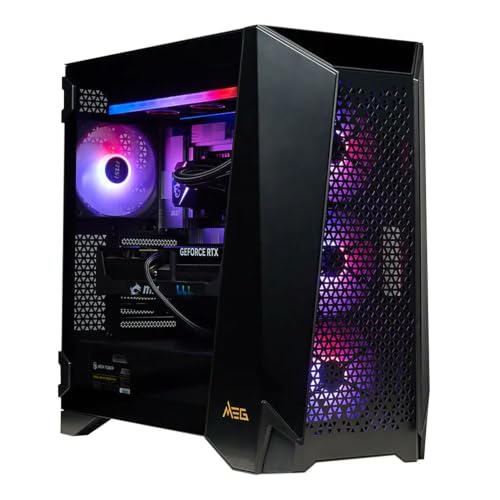
- Ryzen 9 9950X3D and 32GB RTX 5090
- Wi-Fi 7, Bluetooth 5.4, and 2.5GbE LAN
- 2TB Gen5 SSD; 360mm AIO cooler
Best For: Buyers prioritizing built-in connectivity and future memory expansion
Best Connectivity
APC ES620 Dual-RTX 5090 AI Workstation

- Dual RTX 5090 GPUs; 64GB combined GDDR7
- 256GB DDR5 and 8TB NVMe storage
- 5Gb Ethernet, Wi-Fi 7, and 15 USB ports
Best For: Dual-GPU buyers prioritizing connectivity and capacity
Best Single-GPU Option
Mantis V2 Ryzen 9 9950X3D Desktop

- Single RTX 5090 with 32GB GDDR7
- 16-core Ryzen 9 9950X3D; 64GB DDR5
- Three-year limited hardware warranty
Best For: Mixed gaming and creation on one GPU
Best 16-Core Dual-GPU Pick
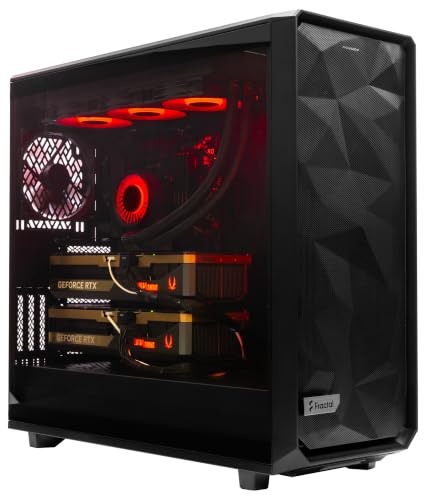
- Dual RTX 5090 GPUs; 64GB combined graphics memory
- 256GB DDR5 and 8TB NVMe storage listed
- Confirm conflicting RAM limit and CPU designation
Best For: Dual-GPU buyers willing to verify listing specifications
Best for Large Projects – Sentinel Wood Ryzen 9 9950X Workstation
Among RTX 5090 workstations, this Sentinel Wood configuration stands out for its 96GB of DDR5 memory and two 4TB Gen4 NVMe SSDs. The 16-core Ryzen 9 9950X and 32GB RTX 5090 suit demanding creative projects that need substantial working memory and local storage.
Best For: Creators who keep large video, 3D, or AI project files on their workstation.
Pros:
- 96GB RAM and 8TB total SSD storage provide room for large projects.
- Windows 11 Pro comes installed without bloatware.
- Three-year limited hardware warranty and lifetime technical and diagnostic support.
Cons:
- At 49.8 pounds, the tower is not easy to move.
- Only one HDMI and one DisplayPort output are guaranteed; additional outputs vary.
This is a practical pick when capacity and support matter more than a compact footprint. Confirm the exact display connections if your setup requires several monitors.
Best Gaming Crossover – Skytech Blaze 5 Ryzen 9 9950X3D
If your search for RTX 5090 workstations includes a machine that doubles as a high-end gaming desktop, the Skytech Blaze 5 is worth considering. It pairs a 16-core Ryzen 9 9950X3D with an RTX 5090, 64GB of DDR5-6000 memory, and a 4TB Gen4 NVMe SSD.
Best For: Buyers splitting time between gaming, content creation, and demanding desktop work.
Pros:
- Ryzen 9 9950X3D and 32GB RTX 5090 cover demanding graphics workloads.
- 64GB DDR5-6000 RAM and a 4TB SSD offer a strong starting configuration.
- Includes a 360mm AIO CPU cooler, Wi-Fi 7, and Bluetooth support.
Cons:
- Ships with Windows 11 Home rather than Pro.
- Parts-and-labor warranty lasts one year.
This is the gaming-first option in the group, with enough memory and storage for substantial creative work. Check whether your workflow requires Windows 11 Pro before ordering.
Best Intel Capacity Pick – Sentinel Wood Ultra 7 270K Plus Workstation
For buyers comparing Intel-based RTX 5090 workstations, this Sentinel Wood tower combines a 24-core Core Ultra 7 270K Plus with 96GB of DDR5 RAM and two 4TB Gen4 NVMe SSDs. Its RTX 5090 has 32GB of GDDR7 memory, while Windows 11 Pro is installed out of the box.
Best For: Intel-platform buyers who want ample RAM and local storage for creative projects.
Pros:
- 96GB RAM and 8TB total SSD storage accommodate large working files.
- 24-core Intel processor and RTX 5090 provide a high-end CPU and GPU pairing.
- Three-year limited hardware warranty plus lifetime technical and diagnostic support.
Cons:
- At 49.8 pounds, it is a substantial tower.
- Only one HDMI and one DisplayPort output are guaranteed; other ports may vary.
Choose this over the similarly equipped Ryzen Sentinel Wood if the Intel platform better fits your preferences. Verify the final port layout before planning a multi-monitor setup.
Best Connected Tower – MSI Infinite ZS Ryzen 9 9950X3D
The MSI Infinite ZS brings a networking-focused alternative to this selection of RTX 5090 workstations, with Wi-Fi 7, Bluetooth 5.4, and 2.5GbE Ethernet. Its Ryzen 9 9950X3D, 32GB RTX 5090, and 2TB Gen5 NVMe SSD also make it a capable gaming and graphics desktop.
Best For: Buyers who want strong built-in connectivity and plan to expand memory or storage as needed.
Pros:
- Includes Wi-Fi 7, Bluetooth 5.4, and 2.5GbE Ethernet.
- Ryzen 9 9950X3D and RTX 5090 support demanding gaming and graphics tasks.
- Gen5 SSD, 360mm AIO cooler, and nine USB ports are included.
Cons:
- 32GB RAM and 2TB storage are lower starting capacities than the other configurations here.
- Ships with Windows 11 Home and a one-year limited warranty.
The listed maximum memory is 256GB, making future RAM expansion an option. For large projects immediately, budget for more capacity or consider a higher-memory configuration.
Best Connectivity – APC ES620 Dual-RTX 5090 AI Workstation
Among rtx 5090 workstations, the APC ES620 stands out for pairing two RTX 5090 GPUs with 256GB of DDR5 memory and extensive connectivity. Its Ryzen 9 9900X, 8TB of NVMe storage listed as two 4TB drives in RAID, and Windows 11 Pro for Workstations make it a substantial prebuilt option for demanding local workflows.
Best For: Buyers who need a dual-GPU workstation with ample memory, storage, and modern networking.
Pros:
- Two RTX 5090 GPUs with 64GB of combined GDDR7 memory.
- 256GB DDR5 RAM and 8TB NVMe storage listed in a two-drive RAID configuration.
- 5Gb Ethernet, Wi-Fi 7, Bluetooth 5.4, and 15 USB ports.
- Windows 11 Pro for Workstations and a one-year parts-and-labor warranty.
Cons:
- 256GB is also the listed maximum RAM capacity, leaving no specified memory upgrade headroom.
- The 60-pound full tower needs significant desk or floor space.
This is the more connectivity-focused dual-GPU choice here. Confirm the RAID configuration suits your backup and storage plans before ordering.
Best Single-GPU Option – Mantis V2 Ryzen 9 9950X3D Desktop
If your search for rtx 5090 workstations does not require two GPUs, the Mantis V2 offers one RTX 5090 with 32GB GDDR7, a 16-core Ryzen 9 9950X3D, and 64GB DDR5. Its gaming-oriented configuration also suits buyers who split their time between content creation and play.
Best For: Creators and gamers who want a single RTX 5090 desktop rather than a dual-GPU tower.
Pros:
- 16-core Ryzen 9 9950X3D and RTX 5090 with 32GB dedicated GDDR7.
- 2TB PCIe Gen4 NVMe SSD and Windows 11 Pro.
- Three-year limited hardware warranty and lifetime technical and diagnostic support.
- Wired keyboard and mouse included.
Cons:
- 64GB installed RAM and 2TB storage are smaller than the listed dual-GPU systems.
- Only one HDMI and one DisplayPort output are guaranteed; other GPU outputs may vary.
Choose this model when the 9950X3D and a single high-memory GPU fit your workload; verify display outputs and any needed expansion with the seller.
Best 16-Core Dual-GPU Pick – MES2X RTX 5090 AI Workstation
The MES2X is one of the rtx 5090 workstations listed with two GPUs, 256GB DDR5, and 8TB of NVMe storage described as two 4TB drives in RAID. Its listed 16-core Ryzen 9 9950X3D2 makes it worth a look for buyers seeking a high-capacity, ready-to-work tower.
Best For: Buyers seeking two RTX 5090 GPUs and a listed 16-core CPU in a prebuilt system.
Pros:
- Two RTX 5090 GPUs with 64GB combined graphics memory.
- 256GB DDR5 RAM and 8TB NVMe storage.
- 1600W power supply and 360mm liquid CPU cooler.
- Windows 11 Pro and current drivers listed as preinstalled.
Cons:
- The notes list 256GB installed RAM but a 192GB maximum, an inconsistency to clarify before purchase.
- The listed CPU designation, Ryzen 9 9950X3D2, should be confirmed with the seller.
- The 60-pound tower is substantial.
The dual-GPU hardware is appealing on paper, but confirm the exact processor, memory specification, and RAID setup before committing.
How We Picked These Rtx 5090 Workstations
We compared the listed configurations by GPU count, CPU, system memory, storage, and intended use. Those specifications help distinguish a versatile desktop from a machine configured for larger local AI workloads. This is a specification-based comparison, not a benchmark or hands-on reliability test; confirm the final configuration with the seller before ordering.
Quick Comparison
For a single-GPU workstation with substantial memory and storage, the two Sentinel Wood configurations each list 96GB RAM and two 4TB SSDs. The Ryzen 9 9950X version is a straightforward AMD option; the 24-core version offers a different CPU configuration, but its processor identity and performance claims are worth verifying.
Skytech and the non-RGB Mantis V2 pair a Ryzen 9 9950X3D with 64GB RAM, making them worth comparing if the desktop will also see heavy gaming use. Skytech lists a 4TB SSD, while Mantis lists 2TB and Windows 11 Pro. The MSI Infinite ZS lists a Ryzen 9 9950X3D, 32GB RAM, and a 2TB Gen5 SSD; its lower listed RAM capacity matters more than SSD generation for many memory-intensive projects. APC ES620 and MES2X list dual RTX 5090 GPUs, 256GB RAM, and 8TB of storage across two SSDs. They warrant closer scrutiny of power, cooling, software support, and storage configuration.
Key Buying Factors for Rtx 5090 Workstations
GPU Count and Software Support
A second GPU helps only when your application can use it. Check your renderer or AI framework before paying for dual GPUs. Two 32GB cards do not automatically provide one shared 64GB memory pool; model size and multi-GPU scaling depend on the software.
RAM, CPU, and Storage
Choose system RAM around your largest projects and concurrent applications. The listed 32GB, 64GB, 96GB, and 256GB configurations serve very different needs, and upgradeability may matter as much as the starting capacity. CPU choice is important for simulation, preprocessing, compilation, and other tasks that cannot be offloaded to the GPU. Compare usable storage capacity, available SSD slots, and backup plans—not just the Gen4 or Gen5 label. If a listing says “RAID,” confirm the RAID level and whether the advertised capacity is usable capacity; RAID is not a backup.
Power, Fit, and Support
Before buying, verify the power supply rating, GPU clearance, airflow, electrical requirements, warranty terms, and service options. These checks are especially important for dual-GPU towers, where heat and power demands are higher.
Who Should Buy Which Rtx 5090 Workstations?
Choose a Sentinel Wood configuration if you want generous listed RAM and storage in a single-GPU desktop, subject to confirming its CPU and component details. Compare Skytech and Mantis if gaming is also a priority and 64GB RAM suits your work; consider MSI if its 32GB starting capacity is sufficient or upgradeable. Consider APC ES620 or MES2X only when your software can justify dual GPUs and you have verified the complete build. For most buyers, the best value is the least expensive configuration that meets their actual memory, storage, and support needs—not simply the one with the most hardware.