Need faster scratch storage, safer backups, or a cleaner multi-drive setup for your Mac Studio? The right enclosure or dock can make a real difference in performance and workflow.
Below, we focus on practical options for creators, editors, and power users who want dependable NVMe RAID storage without overpaying for features they will not use.
Best 10 Nvme Raid Storage for Mac Studio Picks for 2026
Best for Bare-Metal Speed
TERRAMASTER D4 SSD NVMe Enclosure

- 40Gbps-class external storage for heavy transfers
- Four NVMe bays, up to 32TB total capacity
- Active cooling supports sustained performance
Best For: Mac Studio owners who want very fast external NVMe storage and don’t mind software RAID setup.
Best Multi-Display Dock
RayCue 10-in-1 80Gbps Dock for Mac Studio

- Dual NVMe bays with RAID 0/1 support
- 2x HDMI 2.1 + DisplayPort 2.1 outputs
- CFexpress readers and Hi-Fi audio built in
Best For: Mac Studio owners who want fast RAID storage and pro-grade display expansion in one dock.
Best for RAID Expandability
OWC Express 4M2 USB4 RAID Enclosure

- Up to 3200MB/s real-world performance
- Supports 2230, 2240, and 2280 NVMe drives
- Works with SoftRAID, Disk Utility, and Windows RAID
Best For: Mac Studio owners who want a flexible, high-speed external RAID enclosure they can build out themselves.
Best Plug-and-Play Upgrade
2TB Mac Studio NVMe SSD Upgrade
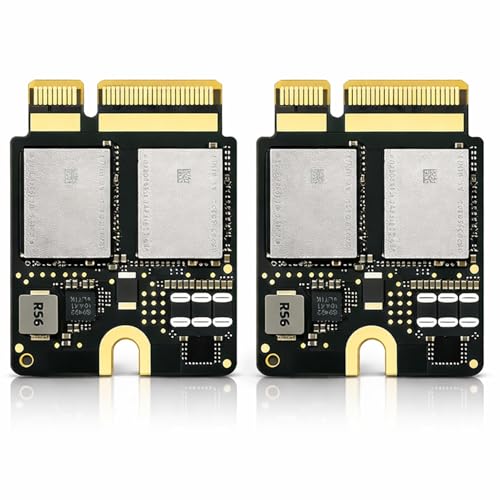
- 2TB internal capacity for larger project libraries
- Built for Mac Studio M2 replacement-style upgrades
- Includes installation tools for a smoother install
Best For: Mac Studio owners who want an easy internal SSD capacity upgrade.
Best Hybrid Capacity Pick
TERRAMASTER D5 Hybrid 5-Bay Enclosure

- Mixes 2 SATA bays with 3 NVMe slots
- 10Gbps USB 3.2 Gen 2 connectivity
- Tool-free trays with quiet cooling
Best For: Mac Studio users who want one enclosure for fast NVMe storage and larger backup drives.
Best Native SSD Upgrade
- Mac Studio M1-compatible internal SSD replacement
- 2TB capacity for large apps and project files
- Includes installation tools for the swap
Best For: Mac Studio M1 users who want a direct internal 2TB SSD upgrade.
Best for 4-Bay RAID Flexibility
JEYI 4-Bay NVMe RAID Enclosure

- 40Gbps USB4/Thunderbolt support
- Up to 32TB across four NVMe SSDs
- Turbo fan and aluminum cooling design
Best For: Mac Studio users who want flexible RAID modes and high-capacity NVMe expansion.
Best Desk-Saving NVMe Hub
UGREEN Mac mini M4 Dock with NVMe Enclosure

- Up to 8TB NVMe expansion in a compact dock
- 11-in-1 hub with 10Gbps USB and SD/TF reader
- Great for keeping a Mac mini setup tidy and fast
Best For: Mac mini M4 users who want expandable SSD storage and extra ports in one compact dock.
Best Hybrid Dock
ORICO MiniTower 2-Bay RAID Enclosure

- Hybrid design with 2-bay SATA plus one NVMe slot
- RAID 0/1, single-disk, and JBOD support for SATA drives
- Built-in USB and SD/TF hub adds desktop convenience
Best For: Users who want a space-saving storage dock with RAID flexibility and extra ports.
Best RAID Dock for All-in-One Expansion

- Dual M.2 bays with RAID 0/1/PM support
- 10-in-1 hub adds HDMI, Ethernet, USB, and card slots
- Offline cloning and active cooling for creator workflows
Best For: Mac Studio users who want RAID storage and a full desktop hub in one compact unit.
Best for Bare-Metal Speed – TERRAMASTER D4 SSD NVMe Enclosure
If you want nvme raid storage for mac studio without paying for a built-in RAID NAS, the TERRAMASTER D4 is a fast four-bay NVMe enclosure that can act as a high-speed external workspace or a software-RAID setup. It supports Thunderbolt 5/4/3 and USB4, reaches up to 40Gbps, and fits up to four M.2 2280 SSDs for serious scratch, media, or backup storage.
Best For: Mac Studio users who want expandable, ultra-fast external NVMe storage and are comfortable configuring RAID in software if needed.
Pros:
- 40Gbps-class throughput with strong real-world speeds for large transfers and editing
- Four NVMe bays with up to 32TB total capacity
- Active cooling helps keep performance stable under sustained workloads
- Works well as a bootable external drive or Mac mini/Mac Studio expansion
Cons:
- No built-in RAID, so RAID users must rely on third-party software
- Diskless enclosure means SSDs add significantly to the total cost
- Best performance depends on high-end NVMe drives and a compatible port
For buyers comparing nvme raid storage for mac studio, this enclosure is appealing if you want flexibility, speed, and capacity in one box, but it makes more sense for hands-on users than for anyone expecting turnkey hardware RAID.
Best Multi-Display Dock – RayCue 10-in-1 80Gbps Dock for Mac Studio
If you want nvme raid storage for mac studio and also need a dock that cleans up your whole workstation, this RayCue unit is built for exactly that kind of setup. Its dual NVMe bays, 80Gbps connection, and extra display/output options make it a strong fit for creators who want fast local storage plus a more capable desktop hub.
Best For: Mac Studio users who need expandable NVMe RAID storage, multi-monitor support, and pro media I/O in one dock.
Pros:
- Dual NVMe bays with RAID 0/1 support and up to 16TB capacity
- 2x HDMI 2.1 plus DisplayPort 2.1 for flexible multi-display setups
- CFexpress Type A/B readers and Hi-Fi audio for creative workflows
- Precision-aluminum build with passive cooling for a tidy Mac Studio match
Cons:
- Only makes sense if you’ll actually use the storage and display extras
- 45W PD input is modest compared with full laptop-dock charging
- Designed primarily for newer Mac Studio/Mac mini configurations
As a workstation accessory, this is less of a simple hub and more of a storage-and-connectivity expansion layer. If your priority is nvme raid storage for mac studio with room for multiple displays and media cards, it offers a compelling all-in-one route.
Best for RAID Expandability – OWC Express 4M2 USB4 RAID Enclosure
If you want nvme raid storage for mac studio that can scale from a simple single-drive setup to a fast multi-SSD RAID array, the OWC Express 4M2 is built for that job. It supports USB4, Thunderbolt, and USB-C Macs and PCs, and the enclosure itself is designed to keep NVMe drives cool and steady during heavier creative workloads.
Best For: Mac Studio users who want a flexible DIY NVMe enclosure for fast external RAID storage, with room to grow as their project demands increase.
Pros:
- Up to 3200MB/s real-world performance for demanding file transfers and media work
- Supports NVMe M.2 2230, 2242, and 2280 drives for easy drive selection
- Compatible with OWC SoftRAID plus Apple Disk Utility and Windows RAID options
- Aluminum build and smart fans help maintain consistent speeds under load
Cons:
- Enclosure only, so you must buy the NVMe SSDs separately
- Best performance depends on using quality drives and the right RAID setup
- More advanced than a plug-and-play single-drive enclosure
For creators comparing nvme raid storage for mac studio, this enclosure stands out for its mix of speed, cooling, and RAID flexibility rather than simplicity alone. It is a strong fit if you want a workstation-style storage box that can be tuned for performance, redundancy, or both.
Best Plug-and-Play Upgrade – 2TB Mac Studio NVMe SSD Upgrade
If you want a straightforward way to add fast local storage, this 2TB internal drive is a practical fit for nvme raid storage for mac studio setups that need more capacity without a full workstation overhaul. It’s aimed at Mac Studio owners who want a replacement-style upgrade with the right tools included, so installation is less intimidating than sourcing parts separately.
Best For: Mac Studio users who want a simple 2TB internal SSD upgrade with installation tools included.
Pros:
- 2TB capacity gives you plenty of room for media, project files, and app libraries
- Designed specifically for Mac Studio M2 internal upgrade use
- Includes installation tools, which helps simplify the upgrade process
- Good fit for users prioritizing clean internal storage over external enclosures
Cons:
- Requires opening the Mac Studio, so it is not a no-tools solution
- Not a full multi-drive RAID kit by itself
- Best suited to compatible Mac Studio configurations only
For buyers comparing nvme raid storage for mac studio, this model makes the most sense as a focused internal capacity upgrade rather than a complex storage expansion system. It is a good choice if you want more space, solid-speed local storage, and a cleaner setup with fewer extra accessories.
Best Hybrid Capacity Pick – TERRAMASTER D5 Hybrid 5-Bay Enclosure
If you want nvme raid storage for mac studio that mixes fast SSD scratch space with large-capacity drive bays, the TERRAMASTER D5 Hybrid is a flexible option. It combines 2 SATA bays and 3 M.2 NVMe slots in one USB 3.2 Gen 2 enclosure, making it useful when you need both speed and bulk storage without moving to a full NAS.
Best For: Mac Studio users who want a single enclosure for high-speed NVMe storage plus larger HDD or SATA SSD volumes for backups, media, and project files.
Pros:
- Hybrid 2+3 design lets you mix NVMe SSDs with larger SATA drives
- USB 3.2 Gen 2 supports up to 10Gbps for solid single-box performance
- RAID 0/1, Single, and JBOD support on the SATA bays adds flexibility
- Tool-free trays and temperature-controlled fan make day-to-day use easier
Cons:
- NVMe slots operate as individual disks, not a full NVMe RAID set
- 10Gbps USB limits peak speeds versus Thunderbolt enclosures
- Diskless setup means you’ll need to supply all drives separately
This is a smart pick if you want nvme raid storage for mac studio with a lot of flexibility rather than raw Thunderbolt speed. It’s especially appealing for creators who need fast working storage alongside roomy backup capacity in one enclosure.
Best Native SSD Upgrade – 2TB Mac Studio M1 NVMe SSD
If you want a straightforward internal capacity boost instead of juggling external drives, this 2TB upgrade is a practical option for nvme raid storage for mac studio workflows that need faster access to large projects, media libraries, and pro apps. It’s built for Mac Studio M1 compatibility and aims to improve responsiveness without changing your desktop setup.
Best For: Mac Studio M1 owners who want a simple internal 2TB NVMe replacement for heavier creative work.
Pros:
- Designed specifically for Mac Studio M1 internal SSD replacement
- 2TB capacity gives plenty of room for apps, files, and project caches
- NVMe performance can help reduce load times and improve system responsiveness
- Installation tools are included to simplify the upgrade process
Cons:
- Non-Apple OEM part, so it is not an original Apple component
- Professional installation is recommended for a safe swap
- Only suitable for Mac Studio M1 models, not a universal SSD solution
This is less of a flexible add-on and more of a targeted internal upgrade, which makes sense for users who want direct storage expansion inside their Mac. For nvme raid storage for mac studio setups, it works best as a single high-capacity replacement rather than a multi-drive expansion strategy.
Best for 4-Bay RAID Flexibility – JEYI 4-Bay NVMe RAID Enclosure
If you want nvme raid storage for mac studio with room to grow, this JEYI 4-bay enclosure is built around Thunderbolt 3/4 and USB4 speeds up to 40Gbps, plus multiple RAID modes for fast work files or mirrored backups. It’s a practical fit for Mac users who need flexible capacity without jumping to a full NAS.
Best For: Mac Studio owners who want a high-speed, multi-drive NVMe enclosure for RAID 0, RAID 1, or JBOD setups.
Pros:
- 40Gbps USB4/Thunderbolt support suits high-speed Mac Studio workflows
- 4-bay design supports up to 32TB total capacity
- Cooling-focused aluminum body with turbo fan helps sustained performance
- Mac-compatible RAID 0, RAID 1, and JBOD modes add flexibility
Cons:
- RAID setup requires a USB4 or Thunderbolt connection
- Some AMD systems may have compatibility issues on USB4/Thunderbolt ports
- Windows supports RAID 5, but Mac does not
This is a strong middle-ground choice if you need nvme raid storage for mac studio and care more about speed, cooling, and expandability than ultra-simple setup. Just make sure your Mac Studio is connected over Thunderbolt for RAID features to work properly.
Best Desk-Saving NVMe Hub – UGREEN Mac mini M4 Dock with NVMe Enclosure
If you want a cleaner, faster desktop setup, this UGREEN dock adds NVMe storage and a full USB hub in one compact base. It’s a practical option for anyone comparing nvme raid storage for mac studio-style workflows, especially if you need quick file access, extra ports, and a tidy footprint rather than a complex multi-drive array.
Best For: Mac mini M4 users who want expandable SSD storage, fast data ports, and an all-in-one dock for creative work or everyday productivity.
Pros:
- Supports M.2 NVMe SSDs up to 8TB for fast local storage expansion
- 11-in-1 hub adds multiple USB-A, USB-C, and SD/TF connections
- 10Gbps transfer speeds are useful for backups, media files, and 4K workflows
- Compact, Mac mini-matched design helps keep the desk neat
Cons:
- SSD is not included, so total cost depends on the drive you add
- Single-drive enclosure, not a true multi-drive RAID solution
- Designed for Mac mini M4/M4 Pro rather than Mac Studio
For buyers who want a simple way to add fast storage and ports without extra clutter, this is a smart desk-friendly pick. It won’t replace true nvme raid storage for mac studio, but it does deliver a very efficient single-SSD expansion setup for the right Mac mini workflow.
Best Hybrid Dock – ORICO MiniTower 2-Bay RAID Enclosure
If you want nvme raid storage for mac studio that also adds useful desktop I/O, the ORICO MiniTower is built around a hybrid storage layout: two 3.5-inch SATA bays, one NVMe slot, and a built-in hub for everyday peripherals. It’s a practical fit for creators who need a single enclosure to handle media storage, light RAID flexibility, and expansion ports without turning the desk into a cable mess.
Best For: Mac users who want a compact all-in-one storage dock with RAID options, NVMe speed, and extra USB/card connectivity.
Pros:
- Combines NVMe storage with two-bay SATA expansion in one enclosure
- Supports RAID 0, RAID 1, single-disk, and JBOD modes for the SATA section
- Includes USB-A, USB 2.0, and SD/TF card slots for added Mac mini-style convenience
- Aluminum build with fan-assisted cooling for better sustained performance
Cons:
- 10Gbps is solid, but not ideal if you need maximum NVMe throughput
- RAID applies to the SATA drives, not the NVMe slot
- Best suited to Mac mini users; Mac Studio buyers may find it less streamlined than a dedicated storage array
As nvme raid storage for mac studio, this ORICO unit makes the most sense if you value flexibility over pure speed: it gives you one box for bulk storage, a fast scratch-drive option, and handy front-end connectivity. It’s not the most specialized RAID enclosure, but it is one of the more versatile desktop storage hubs in this class.
Best RAID Dock for All-in-One Expansion – ORICO MiniRaid 10-in-1 Dock
If you want nvme raid storage for mac studio plus a full desktop hub in one device, the ORICO MiniRaid is built for that workflow. It combines dual M.2 SSD bays, hardware RAID modes, offline cloning, and a broad set of ports so you can simplify your desk without giving up speed or connectivity.
Best For: Mac Studio users who want RAID storage, card slots, and extra I/O in a single compact dock.
Pros:
- Dual-bay M.2 enclosure supports NVMe and SATA SSDs with RAID 0/1/PM modes.
- 10-in-1 hub adds HDMI 4K@60Hz, 10Gbps USB, Ethernet, SD/TF, and audio.
- Offline cloning makes backups and drive migration easier without a computer.
- Aluminum build with active cooling suits sustained creator workloads.
Cons:
- Mixed-protocol SSD use is limited, with only Slot 1 recognized in that case.
- PD60W may be lower than some users expect for busier laptop setups.
- Designed more as a desktop dock than a purely portable enclosure.
For buyers comparing nvme raid storage for mac studio, this model stands out because it does more than store data—it also replaces several desk accessories at once. That makes it a strong fit if you want RAID, hub features, and cleaner cable management in one enclosure.
How We Picked the Best Nvme Raid Storage for Mac Studio
We focused on build quality, Mac compatibility, supported RAID modes, connectivity, cooling, and real-world value. For Nvme Raid Storage for Mac Studio, stable Thunderbolt or USB4 performance matters as much as raw speed, especially when moving large media files or running scratch disks.
We also considered whether each product is better suited to direct storage expansion, desktop dock convenience, or internal SSD replacement, since not every buyer needs the same kind of upgrade.
Quick Comparison
Use multi-bay Thunderbolt or USB4 enclosures if you want the best blend of speed and flexibility. Choose dock-style models if you need extra ports, card readers, and display outputs alongside storage. Hybrid and USB 10Gbps units can make sense for backups or lighter workloads, but they are not the first choice for demanding RAID editing workflows.
Key Buying Factors for Nvme Raid Storage for Mac Studio
Connection Speed
Thunderbolt 4 and USB4 enclosures are usually the sweet spot for Mac Studio users. They offer far better throughput than standard USB 3.x, which helps when working with large photo libraries, ProRes media, or multi-stream timelines.
Bay Count and RAID Support
More bays can improve capacity and flexibility, while RAID 0 boosts speed and RAID 1 improves redundancy. If you need a balance of performance and protection, look for enclosures that support both individual drive mode and RAID configurations.
Cooling and Drive Compatibility
High-speed NVMe drives generate heat. A good thermal design, fan, or heatsink layout helps maintain performance during long transfers. Check supported M.2 lengths and capacities before buying, especially if you plan to reuse existing SSDs.
Dock Features Versus Pure Storage
Some buyers want only storage; others want a workspace hub. If you need HDMI, card readers, and USB ports, a dock can reduce cable clutter. If your top priority is storage performance, a dedicated enclosure is usually the cleaner choice.
Who Should Buy Which Nvme Raid Storage for Mac Studio?
If you are a video editor or motion designer, prioritize Thunderbolt 4 or USB4 multi-bay models for the best performance in Nvme Raid Storage for Mac Studio setups. If you want one device to replace several desk accessories, a dock with built-in storage may be the smarter pick.
For backups, archives, or lighter office workflows, a lower-cost USB enclosure or hybrid design can be enough. And if you only need more internal capacity, an SSD upgrade may be the simplest path rather than an external RAID solution.