When it comes to professional monitors, the EIZO ColorEdge series stands out for its exceptional color accuracy and advanced features. If you’re a creative professional, you’ll want to know which models are leading the market in 2025. From built-in calibration sensors to HDR support, these monitors are designed to enhance your workflow. Let’s explore the top contenders and find the perfect fit for your needs.
Eizo ColorEdge CG2700S-BK 27″ Class WQHD LCD Monitor – 16:9 – Black

The Eizo ColorEdge CG2700S-BK 27″ Class WQHD LCD Monitor is an excellent choice for creative professionals who demand exceptional color accuracy and detail in their work. With a stunning 2560 x 1440 resolution, it delivers four times the clarity of HD. The built-in calibration sensor guarantees consistent color precision, perfect for photography and graphic design. Its USB Type-C connectivity allows you to power and transmit data to devices easily. Plus, the HDR gamma support enhances image quality, making it ideal for gaming and multimedia. Weighing just 14.11 pounds, it fits seamlessly into your workspace, providing a reliable and vibrant viewing experience.
Best For: Creative professionals in photography, video editing, and graphic design who require high color accuracy and detail in their work.
Pros:
- Built-in calibration sensor ensures consistent color precision for accurate color reproduction.
- USB Type-C connectivity allows for video display, data transmission, and power supply, streamlining workstations.
- HDR gamma support enhances image quality, making it ideal for multimedia content and gaming.
Cons:
- Weight of 14.11 pounds may make it less portable for users needing to move their monitor frequently.
- Response time of 19 ms GTG may not meet the needs of competitive gamers looking for ultra-fast refresh rates.
- Higher price point compared to standard monitors might not be justifiable for casual users or general office work.
Eizo ColorEdge CG2700X 27″ Class 4K UHD LCD Monitor – 16:9 – Black

For creative professionals seeking superior color accuracy, the Eizo ColorEdge CG2700X 27″ Class 4K UHD LCD Monitor stands out as an exceptional choice. With a stunning 4K UHD resolution and over 8 million pixels, you’ll experience unparalleled detail. The monitor’s 500 nit brightness and HDR gamma support enhance your visuals, making it ideal for video editing and photography. Plus, its built-in calibration sensor guarantees your colors remain true. Connectivity options like USB Type-C and multiple USB ports streamline your workflow. Weighing just under 15 pounds, it’s easy to integrate into your workspace. Elevate your creative projects with this outstanding monitor.
Best For: Creative professionals in video editing, photography, and graphic design who require exceptional color accuracy and high resolution.
Pros:
- Built-in calibration sensor ensures consistent color accuracy for professional work.
- Multiple connectivity options, including USB Type-C, streamline workflow and device integration.
- High brightness and HDR gamma support enhance visual quality, making it ideal for high-resolution content.
Cons:
- Higher price point compared to standard monitors might not fit all budgets.
- Weight of nearly 15 pounds could make it less portable for those needing to move their setup frequently.
- Limited refresh rate of 60 Hz may not meet the needs of high-end gaming enthusiasts.
Eizo CS2731 27″ Coloredge LCD Monitor
Designed for professional creatives and graphic designers, the Eizo CS2731 27″ ColorEdge LCD Monitor delivers exceptional color accuracy and a stunning 2560 x 1440 resolution. Launched on March 10, 2023, this monitor has quickly garnered impressive customer ratings, achieving a perfect 5.0 out of 5 stars. While it ranks #631,950 in electronics, it stands out in the computer monitors category at #12,386. With options to report lower prices and a warranty available upon request, you’ll find value in this high-performance monitor. Elevate your design experience with the Eizo CS2731, where precision meets innovation.
Best For: Professional creatives and graphic designers seeking exceptional color accuracy and high-resolution display.
Pros:
- Exceptional color accuracy ideal for graphic design and photography work.
- High resolution of 2560 x 1440 provides sharp and detailed visuals.
- Positive customer feedback with a perfect rating indicates high satisfaction.
Cons:
- Sales ranking may suggest limited popularity compared to other monitors.
- Warranty information is not readily available without request.
- Price may be higher than standard monitors, which could limit accessibility for some users.
Acer 21.5 Inch Full HD IPS Ultra-Thin Computer Monitor (SB220Q bi)
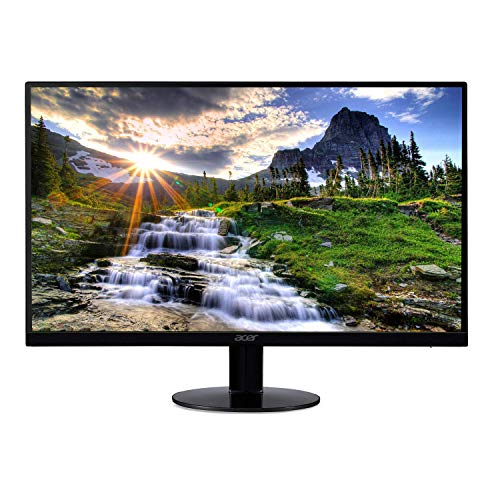
If you’re on the lookout for a compact yet powerful monitor, the Acer 21.5 Inch Full HD IPS Ultra-Thin Computer Monitor (SB220Q bi) stands out with its impressive resolution of 1920 x 1080 pixels. This monitor features a sleek zero-frame design and supports 16.7 million colors, delivering vibrant visuals. With a 75 Hz refresh rate and a 4 ms response time, you’ll enjoy smooth performance for gaming or streaming. It has a tilt angle of -5 to 15 degrees for comfortable viewing. Weighing about 5.47 pounds, it’s easy to fit in any workspace. Plus, it’s backed by a solid warranty.
Best For: Those seeking a compact, stylish monitor for gaming, streaming, or everyday use in limited workspace environments.
Pros:
- High Full HD resolution (1920 x 1080) for clear and vibrant visuals.
- Ultra-thin zero-frame design makes it aesthetically pleasing and space-efficient.
- Fast 75 Hz refresh rate and 4 ms response time enhance performance for gaming and streaming.
Cons:
- Limited tilt adjustment range (-5 to 15 degrees) may not suit all viewing preferences.
- No VESA mount compatibility restricts mounting options.
- Only one HDMI and one VGA port may limit connectivity with multiple devices.
EIZO EX 5 Colorimeter for Calibration for ColorEdge Series

The EIZO EX 5 Colorimeter stands out as an essential tool for professionals in graphic design, photography, and other color-critical fields who demand precision in their work. Specifically designed for EIZO ColorEdge monitors, this high-precision device guarantees accurate color calibration, empowering you to achieve the exact color measurements necessary for your projects. With easy installation and intuitive operation, you can quickly set up the colorimeter for professional calibration. Plus, its automation features enable automatic calibration processes, assuring consistent color accuracy that enhances your workflow and maintains the integrity of your visual work.
Best For: Professionals in graphic design, photography, and color-critical work environments who require precise color calibration.
Pros:
- High-precision color measurements ensure accurate calibration for EIZO ColorEdge monitors.
- Easy installation and intuitive operation streamline the calibration process.
- Automation features facilitate consistent color accuracy over time.
Cons:
- Exclusively designed for EIZO ColorEdge monitors, limiting compatibility with other brands.
- May be more expensive than entry-level calibration tools, which could deter budget-conscious users.
- Requires some initial setup time to get accustomed to the calibration process.
EIZO 31.5″ EV3240X-WT 16:9

For professionals in graphic design or video editing, the EIZO 31.5″ EV3240X-WT offers an impressive 4K UHD resolution that brings every detail to life. This monitor features a 16:9 aspect ratio and a total of four USB ports, making it versatile for multiple setups. With the PbyP function, you can display from two PC sources simultaneously, enhancing your workflow. Plus, the USB PD provides up to 94W for charging your laptop. Weighing just 20.7 pounds, it’s energy-efficient and designed to operate quietly. Rated 4.8 out of 5, it’s a top choice for demanding users seeking excellence.
Best For: Professionals in graphic design and video editing who require high-resolution displays for detailed work.
Pros:
- High 4K UHD resolution (3840 x 2160) provides exceptional clarity and detail.
- PbyP function allows simultaneous display from two PC sources, enhancing multitasking.
- Energy-efficient design with noiseless operation, ideal for quiet work environments.
Cons:
- Weighing 20.7 pounds, it may be cumbersome for some users to move.
- Limited warranty information available upon request, which may be a concern for some buyers.
- Higher price point may not fit all budgets in comparison to standard monitors.
ARZOPA 27″ 180Hz Gaming Monitor – 2K QHD PC Display

Gamers seeking an immersive experience will appreciate the ARZOPA 27″ 180Hz Gaming Monitor, which boasts a stunning 2K QHD display with a resolution of 2560×1440. With a 115% sRGB color gamut, you’ll enjoy vibrant visuals that elevate your gameplay. The impressive 180Hz refresh rate and 1ms response time minimize motion blur, ensuring smooth action during intense moments. Plus, Adaptive Sync technology eliminates screen tearing, providing a seamless viewing experience. Connectivity options like Display Port 1.4 and HDMI 2.0 make it easy to connect various devices, while VESA mounting compatibility allows for a personalized setup that fits your gaming space perfectly.
Best For: Gamers looking for a high-performance monitor that delivers stunning visuals and smooth gameplay.
Pros:
- Stunning 2K QHD resolution for vibrant and clear images.
- 180Hz refresh rate and 1ms response time for smooth and fluid gameplay.
- Adaptive Sync technology eliminates screen tearing for a seamless experience.
Cons:
- Limited to a maximum resolution of 2560×1440, which may not satisfy users needing higher resolutions.
- May require high-end graphics hardware to fully utilize the 180Hz refresh rate.
- VESA mounting hardware not included, which may add extra costs for mounting setup.
Acer SB243Y G0bi 23.8″ IPS Full HD Gaming Monitor

If you’re seeking an affordable yet high-performing monitor for immersive gaming and multimedia experiences, the Acer SB243Y G0bi 23.8″ IPS Full HD Gaming Monitor is a standout choice. With a 1920 x 1080 resolution and 99% sRGB color saturation, you’ll enjoy vibrant visuals and sharp details. Its 120Hz refresh rate and 1ms response time guarantee smooth gameplay, eliminating smearing and ghosting. The ultra-thin, zero-frame design adds a modern touch, while the tilt adjustment and VESA mount compatibility enhance ergonomics. Connectivity is easy with HDMI and VGA ports, making it a versatile option for your gaming setup.
Best For: Gamers and multimedia enthusiasts seeking an affordable monitor with high performance and vibrant visuals.
Pros:
- High refresh rate of up to 120Hz for smooth gameplay and fast-paced action.
- 1ms response time eliminates smearing and ghosting, enhancing the visual experience.
- 99% sRGB color saturation provides vibrant and sharp images for an immersive viewing experience.
Cons:
- Limited connectivity options with only HDMI and VGA ports.
- Brightness of 250 nits may not be sufficient for bright environments.
- Tilt adjustment only (-5° to 25°) may not suit all ergonomic preferences.
Eizo FlexScan EV2480-BK Monitor (23.8 inches, LED, 1920 x 1080)
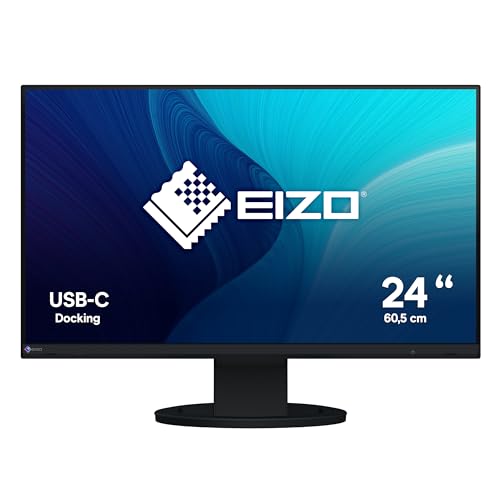
The Eizo FlexScan EV2480-BK Monitor stands out with its ultra-slim bezel, making it an ideal choice for professionals who prioritize a sleek aesthetic in their workspace. This 23.8-inch Full-HD monitor features IPS technology, delivering vibrant colors and wide viewing angles. With a USB-C port for easy connectivity and a 70-watt power supply, it simplifies your setup. Enjoy flicker-free visuals thanks to hybrid brightness control, while the Auto EcoView and EcoView Optimizer enhance power efficiency. Plus, the monitor’s pivot functionality and built-in speaker elevate your user experience, making it a solid investment for any workspace.
Best For: Professionals seeking a sleek, high-quality monitor with excellent color accuracy and ergonomics for their workspace.
Pros:
- Vibrant Colors: IPS technology provides superior color reproduction and wide viewing angles.
- Sleek Design: Ultra-slim bezel enhances the aesthetic appeal of any workspace.
- Power Efficient: Features like Auto EcoView and EcoView Optimizer contribute to energy savings.
Cons:
- Limited Resolution: Full-HD (1920 x 1080) may not meet the needs of users requiring higher resolutions.
- Built-in Speaker Quality: The sound quality of the built-in speaker may not be sufficient for audiophiles.
- Price Point: Compared to other monitors with similar specifications, it may be on the higher end of the price spectrum.
EIZO FlexScan EV2760-BK 27.0 Frameless Monitor

For professionals seeking a reliable and high-quality display, the EIZO FlexScan EV2760-BK 27.0 Frameless Monitor stands out with its impressive 2560 x 1440 resolution and anti-glare IPS technology. Its ultra-slim 1 mm bezel enhances your workspace, while the flicker-free image and EcoView features help reduce eye fatigue. You’ll appreciate the flexible positioning options and multiple connectivity ports, including USB 3.1 and various input options. Weighing just 18.7 pounds, it’s easy to move. With a solid 4.5-star customer rating and a five-year warranty, this monitor combines excellence in performance and ergonomics for any professional setting.
Best For: Professionals who require a high-quality display for work that minimizes eye strain and offers flexible connectivity options.
Pros:
- Impressive 2560 x 1440 resolution for sharp and detailed images.
- Anti-glare IPS technology enhances visibility and reduces eye fatigue.
- Multiple connectivity options including USB 3.1 and various input ports for versatile use.
Cons:
- Weight of 18.7 pounds may make it less portable for some users.
- Higher price point compared to basic monitors may not fit every budget.
- Limited adjustment features compared to more expensive ergonomic models.
Factors to Consider When Choosing Eizo Coloredge Monitors for PC
When choosing an EIZO ColorEdge monitor for your PC, you should consider several key factors. Screen size, resolution, color accuracy, connectivity options, and calibration capabilities all play an important role in your decision. Each of these aspects can greatly impact your overall viewing experience, so it’s essential to weigh them carefully.
Screen Size Selection
Selecting the right screen size for your Eizo ColorEdge monitor can greatly enhance your workflow and comfort. Reflect on your workspace and how you’ll use the monitor. A 27-inch display, for example, provides ample screen real estate for detailed color work, guaranteeing clarity with resolutions like WQHD or 4K UHD. The standard 16:9 aspect ratio is perfect for both multimedia content and graphic design, giving you a wide view. Larger monitors can reduce eye strain during long sessions by allowing larger text and images at a comfortable distance. Don’t forget to take into account the weight and dimensions of the monitor to make sure it fits your desk space and ergonomic setup, especially for larger models needing sturdier support.
Resolution Requirements
Finding the right screen size sets the stage for your Eizo ColorEdge monitor experience, but resolution plays a vital role in maximizing that potential. Higher resolutions, like 4K UHD (3840 x 2160), offer more detail and clarity compared to WQHD (2560 x 1440). With over 8 million pixels, 4K displays allow for precise color reproduction and sharper images, which is fundamental for color-critical tasks. If you opt for WQHD, you’ll still enjoy four times the detail of standard HD, making it suitable for high-definition visuals. Don’t forget to take into account the aspect ratio, as a 16:9 format enhances multimedia experiences. Finally, make certain your chosen resolution meets the needs of your software applications for peak workflow efficiency.
Color Accuracy Features
Color accuracy is essential for achieving stunning visuals and precise results in your work, especially in fields like photography, video editing, and graphic design. Eizo ColorEdge monitors come equipped with built-in calibration sensors that automatically adjust color accuracy, guaranteeing you get precise color reproduction when it matters most. The ColorNavigator 7 software lets you schedule recalibrations and manage various color modes, maintaining consistent performance across different applications. Supporting HDR gamma, these monitors enhance color and contrast, delivering superior visual quality for high-resolution content. With high-precision colorimeters, like the EIZO EX 5, you can secure ongoing calibration accuracy, allowing for exact color measurements and reliable monitor performance tailored to your color-critical tasks.
Connectivity Options
When choosing an Eizo ColorEdge monitor for your PC, you’ll want to prioritize the connectivity options that best suit your workflow. Many models come with multiple USB ports, including USB Type-C for video, data, and power, making it easy to connect various devices. Built-in LAN ports guarantee stable wired network connections, enhancing your overall productivity. You’ll also find a range of input options like HDMI, DisplayPort, and DVI-D, giving you flexibility in your setup. Some monitors even feature power delivery capabilities, allowing you to charge laptops and devices while working. Plus, with a USB hub that includes multiple upstream and downstream ports, connecting peripherals for efficient multitasking becomes a breeze.
Calibration Capabilities
If you’re serious about achieving accurate and consistent colors in your work, calibration capabilities should be high on your list of priorities when selecting an Eizo ColorEdge monitor. These monitors often come equipped with built-in calibration sensors that automate color accuracy, ensuring that your results remain consistent over time. With the ColorNavigator software, you can easily schedule recalibrations and manage different color modes, streamlining your workflow. Many models excel in color measurement precision, making them perfect for photography and graphic design. Additionally, their support for HDR gamma enhances image quality and color contrast, while color gamut coverage frequently exceeds 99% of Adobe RGB. This level of precision is essential for professionals requiring flawless color reproduction.
Performance Specifications
Beyond calibration capabilities, performance specifications play a significant role in choosing the right Eizo ColorEdge monitor for your PC. You’ll want to take into account the response time, which typically ranges from 13 ms to 19 ms GTG, ideal for color-critical tasks like photography and video editing. Look for brightness levels that can reach up to 500 nits, enhancing visibility in various lighting conditions. Eizo monitors also support high dynamic range (HDR) gamma, offering improved color and contrast for a vibrant display. Additionally, many models feature built-in calibration sensors to maintain consistent color accuracy over time. Finally, a refresh rate of 60 Hz guarantees smooth visual performance, perfect for your multimedia tasks.
Price Considerations
Choosing the right Eizo ColorEdge monitor for your PC involves careful consideration of price, which typically ranges from $1,000 to over $2,500. When selecting a model, consider the features that align with your needs. For instance, the CG2700S-BK offers a WQHD resolution and built-in calibration sensor at a lower price than the 4K UHD CG2700X. Investing in a ColorEdge monitor can save costs in the long run by minimizing the need for external calibration tools. Don’t forget to factor in warranty options, as longer warranties can add value, especially for professionals. Ultimately, consider the total cost of ownership, including calibration software and accessories, to guarantee you make a well-rounded decision.