Professional networking, AV, and equipment installations can generate substantial heat in enclosed cabinets and workspaces. The right router cooling fan helps maintain airflow without adding unnecessary noise, power demands, or installation complexity.
This roundup compares 10 practical options, from compact 80mm USB fans to larger dual- and four-fan systems, with attention to airflow, speed control, connectivity, and professional-use flexibility.
Best 10 Router Cooling Fans for Professionals Picks for 2026
Quiet Adjustable Pick

- Three-speed controller with off mode
- Up to 53.35 CFM of airflow
- Flat or upright placement with non-slip feet
Best For: Quiet, adjustable USB cooling for routers and AV equipment
High-Airflow Shelf Cooler

- Dual 120mm fans provide 102 CFM
- Three speeds from near-silent to maximum airflow
- USB-powered for shelves, racks, and AV cabinets
Best For: High-airflow cooling and continuous equipment operation
AC-Powered Workhorse
120mm Variable-Speed Axial Fan

- AC plug avoids dependence on USB power
- 700–2,800 RPM adjustable speed range
- Up to 95.8 CFM airflow
Best For: Fixed outlet-powered cooling and ventilation installations
Maximum Airflow Array
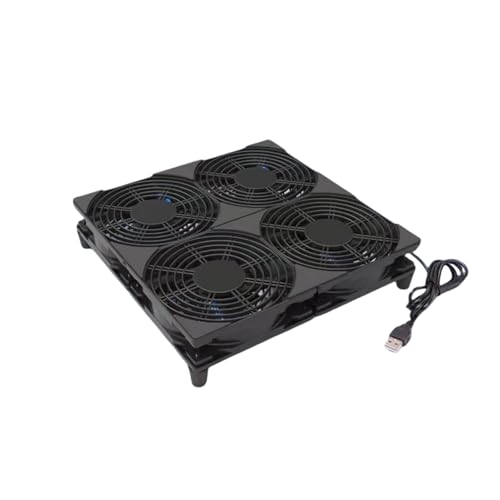
- Four fans deliver 152 CFM total airflow
- 20mm rubber feet add clearance and stability
- Plug-and-play USB setup with 28 dBA rating
Best For: High-airflow cooling for cabinets, racks, and larger equipment
Best Adjustable Dual-Fan Pick

- Dual 140mm fans deliver up to 53.35 CFM
- Three-speed controller supports quieter operation
- USB powered with a long 74.8-inch cable
Best For: Large routers and electronics needing broad, adjustable airflow
Best High-Capacity AC Option
4X 120mm Variable-Speed Cooler

- Four 120mm fans support broad cooling
- AC input works with 100V-240V outlets
- Adjustable speed ranges from off to full blast
Best For: Fixed cabinets and workbenches needing outlet-powered airflow
Best Compact Quiet Pick
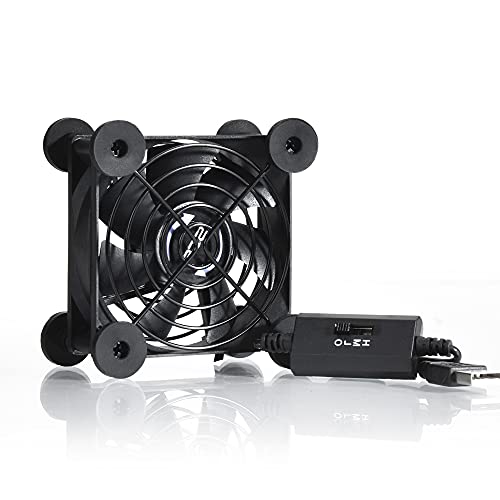
- Compact 3.64-inch square design
- Three speeds with 21 dB low-speed noise
- USB powered with up to 33 CFM airflow
Best For: Small shelves and devices requiring quiet, space-saving cooling
Best Dual-Fan Value

- Dual 120mm airflow design
- Three-speed USB controller
- Dual ball bearings rated over 50,000 hours
Best For: Adjustable cooling for routers, TV boxes, and mini computers
Best High-Airflow Option
VTRETU 120mm Router Cooling Fan

- Up to 56.7 CFM airflow
- 5V USB power with switch cable
- Rubber feet help reduce vibration
Best For: Supplemental cooling for network cabinets and hot-running electronics
Best Simple Pick

- Low/medium/high speed control
- Silicone vibration-damping feet
- Dual ball bearings with 50,000-hour lifespan
Best For: Quiet cooling for routers and USB-equipped media devices
Quiet Adjustable Pick – Dual 120mm Router Fan Cooler
For professionals comparing router cooling fans for professionals, this dual 120mm USB model offers adjustable airflow in a compact, easy-to-position design. Its three-speed controller and 74.8-inch cable make it practical for routers, AV equipment, consoles, and other electronics with USB power.
Best For: Quiet, adjustable cooling for routers, DVRs, receivers, gaming consoles, and compact equipment setups.
Pros:
- Three speed settings plus an off mode help balance airflow and noise.
- Dual 120mm fans provide up to 53.35 CFM of airflow.
- Non-slip feet reduce vibration and raise the fan for better air intake.
- Dual ball bearings are rated for a 60,000-hour lifespan and allow flat or upright placement.
Cons:
- Requires a USB power source rather than a dedicated wall adapter.
- Its 9.45-by-4.72-inch footprint may not suit very tight shelves.
This is a well-rounded choice when adjustable cooling and flexible placement matter more than maximum airflow. The long cable and quiet-focused design are especially useful in home offices, AV cabinets, and network equipment areas.
High-Airflow Shelf Cooler – GDSTIME 240mm Router Fan
This GDSTIME unit is a strong option for professionals seeking router cooling fans for professionals that can move substantial air across larger equipment. Its dual 120mm fan layout, 102 CFM airflow rating, and three-speed control suit network shelves, AV cabinets, and electronics operating continuously.
Best For: High-airflow cooling for routers, modems, amplifiers, gaming consoles, and crowded AV or network cabinets.
Pros:
- Dual 120mm fans deliver up to 102 CFM of airflow.
- Three-speed control supports near-silent low operation or maximum airflow.
- USB power works with Type-A ports, wall chargers, and power banks.
- Hydraulic bearing motor is designed for quiet, long-lasting 24/7 cooling.
Cons:
- At 9.45 by 4.72 inches, it needs more shelf space than a single fan.
- No dedicated power adapter is included; it relies on USB power.
Choose this model when airflow capacity and continuous operation are priorities. The included extension cable and inline speed controller make it easy to position under or on top of heat-generating equipment.
AC-Powered Workhorse – 120mm Variable-Speed Axial Fan
For installations where USB power is inconvenient, this AC-plug axial fan gives professionals a direct outlet-powered option among router cooling fans for professionals. Its 3V-to-12V controller adjusts the 120mm fan from low-noise operation to higher airflow for routers, servers, DVRs, and equipment cabinets.
Best For: Outlet-powered cooling and ventilation for routers, servers, DVRs, receivers, PCs, and enclosed equipment areas.
Pros:
- AC plug simplifies power delivery from a standard outlet.
- Variable control supports speeds from 700 to 2,800 RPM.
- Rated airflow reaches 95.8 CFM.
- Dual ball bearings are rated for a 50,000-hour lifespan.
Cons:
- Its listed noise level is under 41 dB, higher than the quietest USB options here.
- It uses an AC plug and may be less convenient for USB-only setups.
- The single 120mm fan provides less total airflow than multi-fan models.
This fan makes the most sense for fixed workstations, cabinets, or server areas with an available outlet. Its broad speed range offers useful control, but buyers should account for the higher stated noise level and single-fan layout.
Maximum Airflow Array – Four-Fan USB Cooling System
This four-fan array is designed for professionals who need high-capacity router cooling fans for professionals in rack, network, or audio-video environments. Four 120mm fans provide a combined rated airflow of 152 CFM, while 20mm rubber feet help create intake clearance and reduce slipping.
Best For: High-airflow cooling for network cabinets, routers, Mac minis, consoles, NVRs, and larger electronics projects.
Pros:
- Four 120mm fans provide a combined rated 152 CFM airflow.
- 28 dBA noise rating supports relatively quiet operation.
- 20mm non-slip rubber feet improve clearance and help reduce vibration.
- Plug-and-play USB design requires no assembly.
Cons:
- It has only one speed and no included power supply.
- The 9.45-by-9.45-inch footprint requires a broad, flat placement area.
- Sleeve bearings have a listed 35,000-hour lifespan, lower than some dual-ball-bearing alternatives.
This is the strongest fit when maximum listed airflow matters more than speed adjustment or compactness. Confirm the available surface area and USB power source before choosing it for a rack or cabinet project.
Best Adjustable Dual-Fan Pick – Dual 140mm Router Cooler
For professionals comparing router cooling fans for professionals, this dual 140mm USB cooler offers broad airflow coverage with three selectable speeds. Its long cable, upright-or-flat operation, and 26 dB noise rating make it practical for routers, modems, DVRs, receivers, and other electronics.
Best For: Larger networking or entertainment devices that need adjustable, wide-area cooling from a USB port.
Pros:
- Dual 140mm fans provide up to 53.35 CFM of airflow.
- Three-speed controller lets you balance cooling and noise.
- USB power and a 74.8-inch cable support flexible placement.
- Dual ball bearings are rated for a 60,000-hour lifespan.
Cons:
- The 11.02-by-5.51-inch footprint may be too large for compact setups.
- It requires a USB power source rather than a standard AC outlet.
This is a strong choice when coverage and speed control matter more than a small footprint. Non-slip feet also help reduce vibration while keeping the fan elevated for airflow.
Best High-Capacity AC Option – 4X 120mm Variable-Speed Cooler
Professionals who need router cooling fans for professionals in a fixed work area may prefer this four-fan setup with AC power and continuously adjustable speed. Its metal construction, protective grills, and DIY-friendly design suit cabinets, routers, networking equipment, game systems, and other electronics.
Best For: Workbenches, equipment cabinets, and installations where strong airflow and AC power are preferred.
Pros:
- Four 120mm fans provide a substantial cooling setup.
- Variable control ranges from off to full speed through a 3V-to-12V range.
- AC 100V-240V input supports outlet-powered operation.
- Dual ball bearings are rated for 65,000 hours.
Cons:
- Its AC plug makes it less portable than a USB-powered fan.
- The multi-fan design is better suited to larger spaces than compact router shelves.
- The supplied details do not state a specific noise rating.
This is the most installation-oriented option in the group. Choose it when you want four fans, outlet power, and fine speed adjustment for a cabinet or dedicated electronics workspace.
Best Compact Quiet Pick – 80mm USB Router Fan
For compact setups, this 80mm model is a practical entry in router cooling fans for professionals. It uses a USB connection, offers three speed settings, and measures just 3.64 inches square, making it easy to place beside a router, console, DVR, or receiver.
Best For: Small devices and crowded shelves where low-speed noise, portability, and simple USB power are priorities.
Pros:
- Compact 3.64-by-3.64-inch footprint fits tight spaces.
- Low-speed operation is rated at just 21 dB.
- Three speeds provide control over airflow and noise.
- USB power, protective iron grills, and shockproof feet support convenient placement.
Cons:
- Its 33 CFM airflow is lower than the larger multi-fan options.
- It is a single 80mm fan rather than a broad-coverage cooling array.
- It needs a USB port or compatible USB power source.
This fan makes the most sense when space and quiet operation outweigh maximum airflow. Its flat-or-upright positioning also helps adapt it to different router and entertainment-center layouts.
Best Dual-Fan Value – Dual 120mm USB Cooling Fan
For professionals comparing router cooling fans for professionals, this dual-120mm USB model offers adjustable airflow in a compact floor-mount design. Its three-speed controller, tool-free feet, and dual ball bearings make it a practical choice for routers, TV boxes, mini computers, and similar equipment.
Best For: Cooling a single networking or entertainment device where adjustable airflow and straightforward USB power are priorities.
Pros:
- Dual 120mm fans provide active airflow for compatible electronics.
- Three-speed button control allows adjustment for different environments.
- Dual ball bearings are rated for more than 50,000 hours of service.
- Includes four tool-free metal support feet for elevated airflow.
Cons:
- Requires an available 5V USB port for power.
- Its 9.45-by-4.72-inch footprint may not suit very tight spaces.
- The support feet require installation before use.
With a 31 dB noise rating and a 1.75-watt USB connection, this fan balances simple installation with controllable cooling. It is a sensible option for workstations or media setups that need extra ventilation without a dedicated power adapter.
Best High-Airflow Option – VTRETU 120mm Router Cooling Fan
This VTRETU model is a flexible pick for professionals evaluating router cooling fans for professionals across network cabinets, workstations, and entertainment equipment. It delivers up to 56.7 CFM of airflow through a 5V USB connection and includes rubber feet intended to reduce vibration on a desktop.
Best For: Cooling routers, modems, DVRs, streaming boxes, NVRs, gateways, and other equipment that benefits from stronger supplemental airflow.
Pros:
- Rated airflow reaches 56.7 CFM at 1,500 RPM.
- USB power and a removable switch cable simplify installation.
- Rubber shock-absorbing feet help limit desktop resonance.
- Includes a one-year quality assurance warranty.
Cons:
- Uses sleeve bearings rather than dual ball bearings.
- The 55 cm cable may be limiting for installations farther from the USB port.
- Only one finished fan product is included.
Its broad device compatibility and high stated airflow make it well suited to equipment racks and DIY cooling projects. Confirm the available space first, since the listed assembly is approximately 14.17 inches long and 4.72 inches wide.
Best Simple Pick – 120mm USB Router Fan Cooler
For quiet work areas and home-office equipment, this 120mm fan is a practical entry in the router cooling fans for professionals category. It combines USB power, dual ball bearings, silicone feet, and a low/medium/high controller for tuning airflow to the device and noise preference.
Best For: Quiet supplemental cooling for routers, receivers, DVRs, PlayStation systems, TV boxes, and other USB-equipped devices.
Pros:
- Three-degree controller cycles through high, medium, low, and off modes.
- Silicone feet are designed to absorb airflow shock and noise.
- Dual ball bearings support flat or upright placement and a 50,000-hour lifespan.
- Rated airflow is up to 53.35 CFM at 1,500 RPM.
Cons:
- Requires a compatible USB port and does not include a separate power adapter.
- Its 4.72-by-4.13-inch footprint may need careful placement around larger equipment.
- Airflow and noise levels vary with the selected speed.
The combination of adjustable operation and stated noise levels from 9.3 to 16.8 dBA makes this a strong fit where acoustic comfort matters. Its EMC and ROHS certifications also suit buyers seeking a documented general-purpose cooling accessory.
How We Picked the Best Router Cooling Fans for Professionals
We evaluated these Router Cooling Fans for Professionals by comparing the features that matter in real installations: fan size, airflow potential, speed adjustment, power connection, noise considerations, bearing design, cable reach, and suitability for racks, cabinets, workstations, and enclosed electronics.
Because cooling requirements vary widely, the selection includes compact single-fan units, dual-fan coolers, large 240mm assemblies, and four-fan systems. USB-powered models suit low-voltage installations and portable setups, while AC-powered fans may be more appropriate where continuous, direct mains power is available.
Quick Comparison
- Best for compact spaces: 80mm USB fan designs fit smaller shelves, cabinets, and equipment bays.
- Best balance of coverage and control: Dual 120mm coolers provide broad airflow with adjustable low, medium, and high settings.
- Best for larger enclosures: 140mm and 240mm systems can move air across wider equipment areas with fewer fan assemblies.
- Best for maximum airflow: Four-fan 120mm systems are suited to demanding rack, cabinet, or workstation cooling projects.
- Best for fixed installations: AC-plug models avoid reliance on an available USB port.
Key Buying Factors for Router Cooling Fans for Professionals
Airflow and Fan Coverage
Choose fan size and quantity according to the heat load and enclosure volume. Larger fans can cover more area and may move substantial air at lower rotational speeds, while multiple smaller fans allow more flexible placement.
Speed Control and Noise
A three-position controller is useful when equipment demands change throughout the day. Run the fan at a lower setting for quiet office or studio use, then increase airflow during heavier workloads or warmer conditions.
Power and Installation
Check whether the fan uses 5V USB power or a standard AC plug, and confirm that the included cable can reach the intended power source. USB models are convenient for routers, computers, media devices, and portable workstations; AC models are better when mains power is the preferred installation method.
Size, Clearance, and Durability
Measure the mounting area before buying. Account for cable routing, ventilation openings, nearby ports, and service access. Ball-bearing designs may be preferable for equipment that operates for long periods, but all fans should be kept clear of dust and obstructions.
Who Should Buy Which Router Cooling Fans for Professionals?
Choose a compact 80mm unit for a small router shelf or tightly packed media cabinet. A single 120mm fan is a sensible general-purpose choice for modest cooling needs, while dual 120mm or 140mm models offer broader coverage for network and AV cabinets. Select a 240mm or four-fan setup when the enclosure is large, heat output is high, or airflow must cover several devices. For permanent installations without convenient USB power, consider an AC-plug model. Always verify voltage, dimensions, noise expectations, and available ventilation before installation.