The right camera dolly can make a home-office video setup look more polished without requiring a dedicated studio. These compact options help create smoother pans, tracking shots, overhead demonstrations, and presentation footage.
We selected ten camera dollies for home offices across tripod-mounted, skater-style, track-based, and motorized designs. The best choice depends on your camera weight, available floor space, surface type, and whether you prefer manual control or repeatable automated movement.
Best 10 Camera Dollies for Home Offices Picks for 2026
Best Compact Pick
NEEWER SD001 Tabletop Camera Dolly

- Straight or circular movement
- Quiet rubber wheels
- Ball head and phone clamp included
Best For: Tabletop product shots, phone videos, and compact panoramic movements
Best Heavy-Duty Pick
SmallRig Quick-Lock Tripod Dolly

- 44.1-pound maximum payload
- Quick-lock tripod attachment
- Quiet 3-inch rubber wheels
Best For: Heavy tripods and studio-style home-office filming
Best Tracking Option
Zecti 24-Inch Carbon Fiber Camera Slider

- 24-inch camera travel
- Multiple operating orientations
- Adjustable legs and precision bearings
Best For: Longer product demonstrations and repeatable tracking shots
Best Tripod Upgrade

- 33-pound load capacity
- Adjustable tripod leg clamps
- Folding design with carry bag
Best For: Moving standard tripods, camcorders, and lighting setups
Best Motorized Pick
NEEWER DL400 Motorized Camera Slider Dolly

- Quiet dual-motor operation below 30dB
- App control with five speed settings
- Up to 6.6-pound load and five-hour battery runtime
Best For: Creators wanting quiet, app-controlled camera movement
Best Manual Skater Dolly
Vidpro SK-22 Professional Skater Dolly
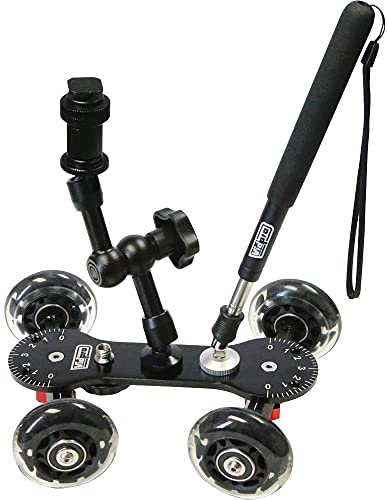
- 25-pound maximum weight recommendation
- Adjustable axles for lines, curves, and circles
- Seven mounting points plus handle and magic arm
Best For: Hands-on low-angle tracking and panning
Best Tripod Mobility Pick
NEEWER Photography Tripod Dolly

- 50-pound maximum load capacity
- Three-inch wheels with individual brakes
- Folding legs and adjustable clamps for tripod feet
Best For: Rolling tripods and light stands across hard floors
Best Heavy-Duty Monopod Base

- 66.1-pound maximum load
- Quiet two-inch damping wheels
- Folds compactly for storage
Best For: Monopod-based home-office rigs
Best Tripod Compatibility

- Fits most tripods and light stands
- Lockable rubber-surfaced wheels
- 66-pound capacity with carrying case
Best For: Mobile tripod and light-stand setups
Best Compact Pick – NEEWER SD001 Tabletop Camera Dolly
For home offices where space and setup time are limited, the NEEWER SD001 is one of the more flexible camera dollies for home offices. Its four-wheel design supports straight-line or circular movement, while the included ball head and phone clamp accommodate cameras and smartphones.
Best For: Tabletop product shots, phone videos, and compact panoramic movements.
Pros:
- Supports linear and circular movement by adjusting the wheels.
- Soft rubber wheel rings provide quieter movement on floors, tables, and sliders.
- Includes a 360-degree rotating, 90-degree tilting ball head and rotatable phone clamp.
- Compact 3.9-by-3.3-inch design weighs about 7.76 ounces.
Cons:
- Not suitable for telephoto lenses.
- Action-camera adapters may need to be purchased separately.
- Its small tabletop format is less suited to large or heavy camera setups.
The SD001 makes the most sense for creators who want portable motion control without dedicating much desk space. Its stated maximum weight recommendation is 6.6 pounds, but the compact form and telephoto limitation favor smaller cameras and phones.
Best Heavy-Duty Pick – SmallRig Quick-Lock Tripod Dolly
The SmallRig Quick-Lock Dolly is a strong choice among camera dollies for home offices when your camera is already mounted on a full-size tripod. Its adjustable legs, quick-lock buckle, foot-operated wheel brakes, and 44.1-pound payload are designed for stable repositioning of substantial setups.
Best For: Heavy tripods, studio-style home-office filming, and quiet floor movement.
Pros:
- Supports up to 44.1 pounds or 20 kilograms.
- Quick-lock buckle speeds tripod attachment and removal.
- Three-inch soft rubber wheels are designed for quiet movement.
- Folding design, carry handle, and included storage bag improve portability.
Cons:
- Fits tripods with an extension range of 280 to 450 millimeters.
- Not compatible with certain special-shaped tripod feet.
- At 5.73 pounds, it is less convenient for very small desk setups.
Choose this model when stability and capacity matter more than minimal size. Confirm your tripod’s leg dimensions and foot shape before buying, especially if you use a specialized SmallRig tripod.
Best Tracking Option – Zecti 24-Inch Carbon Fiber Camera Slider
The Zecti 24-inch slider offers a longer camera path than compact tabletop dollies for home offices. Its carbon-fiber rail system, four precision bearings, adjustable legs, and multiple mounting holes support controlled horizontal, vertical, diagonal, or sideways camera moves.
Best For: Longer product demonstrations, interview b-roll, and repeatable tracking shots.
Pros:
- Provides a 24-inch or 60-centimeter tracking path.
- Four precision bearings and dual interior carbon-fiber rails are designed for smooth movement.
- Adjustable legs, non-skid feet, and a bubble level help with positioning.
- Multiple 1/4-inch and 3/8-inch mounting holes support varied setups.
Cons:
- Supplied notes warn that overtightened screws can cause noise and rough movement.
- Maximum recommended load is 4.4 pounds.
- At 24 inches long, it needs more desk or floor space than a compact dolly.
This is better suited to a dedicated home-office filming area than a small desktop. Set the screws carefully and verify your camera setup stays within the 4.4-pound recommendation for the intended motion.
Best Tripod Upgrade – NEEWER NW-600 Tripod Dolly
The NEEWER NW-600 is a practical tripod accessory for home offices that need to move a camera, camcorder, or lighting setup as one unit. Its adjustable leg mounts, rubber wheels, folding design, and 33-pound capacity make it a useful alternative to lifting a full tripod between filming positions.
Best For: Moving standard tripods, camcorders, DSLR setups, and photo-video lights.
Pros:
- Supports loads up to 33 pounds.
- Adjustable leg extensions fit from 274 to 400 millimeters.
- Two-inch rubber wheels are designed for quieter movement.
- Folds for storage and includes a carrying bag and large handle.
Cons:
- It is a tripod dolly rather than a standalone tabletop camera dolly.
- Tripod leg size and clamp fit should be checked before purchase.
- The supplied details do not specify a foot-operated wheel-lock system.
The NW-600 is a sensible choice when your home-office camera is already on a compatible tripod. Its 33-pound rating offers useful headroom, while the folding format helps when the dolly must be stored between shoots.
Best Motorized Pick – NEEWER DL400 Motorized Camera Slider Dolly
For creators comparing camera dollies for home offices, the NEEWER DL400 adds quiet, app-controlled movement for tabletop videos, live streams, and time-lapse work. Its dual motors run below 30dB, while the included NP-F750 battery provides up to five hours of runtime.
Best For: Home-office creators who want remotely controlled, repeatable camera movement.
Pros:
- Quiet motorized operation below 30dB.
- Wireless control through the NEEWER App.
- Includes an NP-F750 battery with up to five hours of runtime.
- Supports up to 6.6 pounds and offers five speed settings.
Cons:
- A camera shutter cable is required separately for time-lapse photography.
- The unit weighs 3.75 pounds, which is less convenient for frequent repositioning.
- High-speed uphill starts can cause shaking.
The DL400 is the most feature-rich option here for a controlled home-office setup, especially when quiet operation and app access matter. Its battery and motion adjustments make it flexible, though users should plan around the separate shutter cable for time-lapse shooting.
Best Manual Skater Dolly – Vidpro SK-22 Professional Skater Dolly
The Vidpro SK-22 is a manual option for camera dollies for home offices, offering smooth low-level tracking and panning without motors or app setup. Its rubber wheels, adjustable axles, and multiple mounting points support straight moves, curves, and 360-degree circles.
Best For: Home-office filmmakers who prefer hands-on, low-angle camera movement.
Pros:
- Supports cameras and equipment up to 25 pounds.
- Adjustable axles allow straight lines, broad curves, and full circles.
- CNC-machined aluminum chassis and rubber wheels with stainless steel bearings.
- Includes seven 1/4-inch-20 mounting points, an extendable handle, and an articulated magic arm.
Cons:
- Manual operation requires the user to push or guide the dolly.
- Its 12-by-3-by-8-inch folded size may need more storage space than a compact slider.
- It is not water resistant.
The SK-22 suits deliberate, hands-on shots where a sturdy platform and flexible wheel angles are more important than automation. Its 25-pound capacity is generous for a desk-side setup, but it lacks the remote control and motorized consistency of the DL400.
Best Tripod Mobility Pick – NEEWER Photography Tripod Dolly
The NEEWER Photography Tripod Dolly is designed to move an existing tripod or light stand around a home office without lifting it. Its adjustable legs, locking clamps, larger wheels, and individual brakes make it a practical choice for repositioning a camera setup on hard floors.
Best For: Home-office users who need to roll a tripod or light stand between shooting positions.
Pros:
- Supports up to 50 pounds.
- Three-inch wheels include individual brakes for stability.
- Adjustable legs accommodate different tripod foot sizes.
- Folding design includes a carry handle and carry bag.
Cons:
- It moves the tripod rather than providing a dedicated camera-slider motion system.
- Designed for hard surfaces, so floor suitability should be considered.
- Setup requires aligning tripod feet and tightening the clamps.
This dolly is the practical choice when the goal is simply to reposition a heavy tripod, light stand, or camera rig. It offers the highest stated load capacity of the three, but it is not intended to create the motorized or low-level tracking shots offered by the other models.
Best with Extra Features – Wireless Video Camera Dolly
For creators comparing camera dollies for home offices, the NEEWER DL100 offers compact, motorized movement without requiring a track. Its remote control, adjustable wheels, and built-in battery make it practical for product demos, talking-head videos, and creative tabletop shots.
Best For: Home-office creators who want automated circular or straight-line camera movement.
Pros:
- Wireless remote adjusts speed, direction, and pause from up to 19.7 feet away.
- Three selectable speeds and 180-degree adjustable wheel angles support varied movement paths.
- Built-in 1,800mAh battery provides up to six hours of service time.
- Supports up to 6.6 pounds and includes convertible 1/4-inch to 3/8-inch mounting.
Cons:
- Accessories such as smartphone holders and action-camera adapters are not included.
- It is not water resistant, so it is better suited to indoor use.
The DL100 is the most feature-rich choice here for a home office, especially if you want repeatable motion without manually pushing a dolly. Check your camera and accessory mounting needs before buying.
Best Heavy-Duty Monopod Base – Foldable Monopod Dolly
The COMAN DF3 is a foldable monopod dolly for home offices that use a monopod or compact filming rig rather than a standard tripod. Its high load rating, silent swivel casters, and adjustable angles suit controlled tracking and repositioning on indoor floors.
Best For: Creators using a compatible monopod who need a sturdy, quiet rolling base.
Pros:
- Supports up to 66.1 pounds with reinforced CNC-machined aluminum construction.
- One-click snap-open design with automatic locking speeds up setup.
- Two-inch damping wheels are designed for smooth, quiet movement.
- Folds to about 10.63 inches and weighs approximately 3.04 pounds.
Cons:
- It is designed for monopods and may not replace a conventional tripod dolly.
- The 3/8-inch interface means compatibility should be checked before purchase.
The DF3 is overbuilt for many small home-office cameras, but that strength can be useful with heavier monopod-based setups. Its compact folded size also makes storage easier when desk or studio space is limited.
Best Tripod Compatibility – VX-600 Tripod Dolly
The YaeCCC VX-600 is a conventional tripod dolly for home offices that need to reposition a tripod, light stand, or similar studio support. Adjustable leg mounts, lockable rubber-surfaced wheels, and a 66-pound capacity provide a stable option for indoor filming setups.
Best For: Home studios using tripods or light stands that need mobile positioning and compact storage.
Pros:
- Designed to accommodate most tripods, light stands, and studio equipment.
- Lockable two-inch wheels and sliding foot locks help secure the setup.
- Adjusts from 27 to 34 inches and folds to 17.7 inches.
- Supports equipment weighing up to 66 pounds and includes a carrying case.
Cons:
- Its 17.7-inch folded length may require more storage space than a compact camera dolly.
- The six-month warranty is shorter than the warranty listed for the COMAN DF3.
The VX-600 is a practical choice when your home-office setup already uses a tripod or light stand. Confirm that your tripod legs fit the adjustable mounts, and use the wheel locks whenever the camera needs to remain stationary.
How We Picked the Best Camera Dollies for Home Offices
We compared these models by examining their movement style, stated load capacity, wheel or track design, portability, mounting compatibility, and usefulness in a compact workspace. Because home offices often serve as multipurpose rooms, we also considered storage, setup time, noise, and the amount of clear floor space each dolly needs.
The lineup includes simple tripod dollies for repositioning a camera, low-profile skater dollies for smooth tabletop or floor-level shots, track systems for controlled linear movement, and motorized options for repeatable filming. Always verify the manufacturer’s specifications before pairing a dolly with a heavier camera, lens, cage, or teleprompter.
Quick Comparison
| Dolly Type | Best For | Main Advantage | Watch For |
|---|---|---|---|
| Tripod dolly | Fast camera repositioning | Simple setup and portability | Needs a compatible tripod |
| Skater dolly | Low-angle and tabletop shots | Compact, creative movement | Works best on smooth surfaces |
| Track or slider dolly | Controlled linear shots | Predictable travel path | Requires room for the track |
| Motorized dolly | Repeatable movement | Consistent speed and timing | Needs charging and app or motor setup |
Key Buying Factors for Camera Dollies for Home Offices
Camera and Accessory Capacity
Check the rated load against your complete setup, not just the camera body. Include the lens, microphone, cage, monitor, phone clamp, and any other accessories. A higher capacity can improve stability, but the dolly must still fit your tripod or mounting hardware.
Surface, Wheels, and Movement
Rubber wheels are generally better for protecting floors and reducing vibration, while larger wheels can handle minor imperfections more smoothly. For desk or tabletop work, a compact skater dolly may be more practical than a full tripod wheel system. Track-based designs are preferable when you need a straight, repeatable path.
Space, Noise, and Storage
Measure the available route before buying. A dolly that looks compact can still require clearance for tripod legs or a long slider. If you record voiceovers or meetings, prioritize quiet rolling and avoid motorized operation when audible mechanical noise could be distracting.
Manual Versus Motorized Control
Manual dollies are quick and dependable for one-off shots. Motorized models are more useful for product demonstrations, tutorials, and repeated takes where consistent speed matters. App control can add convenience, but it also introduces batteries, pairing, and setup considerations.
Who Should Buy Which Camera Dollies for Home Offices?
Choose a tripod dolly if you mainly need to move a standard camera setup around a home office quickly. Pick a skater-style model for low-level product videos, tabletop scenes, and creative panning. A track or slider is the better fit for straight, cinematic movement in a controlled space. Choose a motorized dolly when repeatability, hands-free operation, or consistent motion is more important than the simplest setup.