When it comes to finding the right file server for your PC in 2025, several options stand out for their unique features and capabilities. You’ll want a solution that balances performance, security, and ease of use. Whether you need a compact NAS or a high-powered server, there’s something that can meet your specific requirements. Let’s explore the top contenders that might just suit your needs perfectly.
GMKtec Mini PC NAS (Upgraded G9)

The GMKtec Mini PC NAS (Upgraded G9) is an excellent choice for users who need a powerful yet compact file server solution. With its Intel Twin Lake N150 CPU and 12GB DDR5 RAM, you’ll experience smooth performance for file storage, backup, and streaming. The dual boot capability lets you switch between Windows 11 Pro and Ubuntu 24.10 seamlessly. Plus, its rich connectivity options, including dual HDMI ports and USB 3.2, support multiple devices. While it’s great for everyday tasks, it might struggle with heavy processing. Overall, it’s a versatile option for anyone looking to enhance their home network.
Best For: Users seeking a compact and versatile file server solution for home networking, storage, and everyday computing tasks.
Pros:
- Powerful performance with an Intel Twin Lake N150 CPU and 12GB DDR5 RAM for smooth multitasking.
- Dual boot functionality allows easy switching between Windows 11 Pro and Ubuntu 24.10, catering to different user needs.
- Rich connectivity options, including dual HDMI ports and USB 3.2, support multiple device connections for enhanced flexibility.
Cons:
- May struggle with heavy processing tasks and intensive gaming due to its hardware limitations.
- Some users report issues with dual screen setups in Ubuntu and sound output through HDMI.
- While offering good value, it may not meet the needs of power users requiring high-performance computing.
BUFFALO LinkStation 720 4TB 2-Bay NAS Storage

Looking for an affordable yet reliable NAS solution? The BUFFALO LinkStation 720 4TB 2-Bay NAS Storage might be just what you need. With a setup that supports RAID 1 for data redundancy or RAID 0 for maximum space, it offers versatile options. You’ll appreciate the easy setup and user-friendly web interface. Plus, it features a subscription-free personal cloud for safe storage of your files. While some users report slower transfer speeds and mixed reliability feedback, its budget-friendly pricing and essential functionalities make it a solid choice for basic file sharing and backup needs.
Best For: Individuals or small businesses looking for an affordable and user-friendly NAS solution for basic file storage and backup needs.
Pros:
- Affordable price with two 2TB drives for flexible storage options.
- Easy setup process and intuitive web interface for user convenience.
- Subscription-free personal cloud feature for secure file storage without ongoing fees.
Cons:
- Slower data transfer rates compared to some competitors.
- Mixed reliability feedback, with some users experiencing issues.
- Lacks advanced features and utilities for more demanding NAS users.
BUFFALO LinkStation 720 16TB NAS Storage
For home office users seeking reliable and spacious data storage, the BUFFALO LinkStation 720 16TB NAS is an ideal choice. With enhanced features and cloud capabilities, it’s up to 7x faster than previous models. You can easily back up multiple devices and set up automated backups for your important files. The 16TB capacity supports RAID configurations for data security, while SSL encryption guarantees safe file transfers. Although some users report slow transfer speeds, the overall ease of use and setup is praised. Plus, you’ll enjoy 24/7 US-based support for any installation questions.
Best For: Home office users looking for reliable, spacious, and secure data storage solutions.
Pros:
- Enhanced features with cloud capabilities, providing up to 7x faster performance than previous models.
- Supports RAID configurations for improved data security and automated backup options.
- User-friendly setup process with 24/7 US-based support for installation assistance.
Cons:
- Some users experience slow data transfer speeds compared to expectations.
- Mixed reviews on customer service and product reliability, with some dissatisfaction noted.
- Feedback indicates issues with outdated technology and misleading marketing claims.
Plugable USB Transfer Cable for Data Transfer Between Windows PCs
If you need a reliable way to transfer data between two Windows PCs, the Plugable USB Transfer Cable stands out with its easy-to-use functionality. Compatible with Windows 11, 10, 7, and XP, this 6-foot cable enables unlimited data transfers without a network connection. You’ll appreciate the included Bravura Easy Computer Sync software for seamless file management, allowing drag-and-drop transfers of documents, photos, and videos. While you may encounter slower speeds compared to network transfers, many users find it saves time compared to using external drives. Just remember to back up your data and install the latest software version for best results.
Best For: Users looking for an efficient and straightforward method to transfer files between two Windows PCs without requiring a network connection.
Pros:
- Easy setup and user-friendly functionality with drag-and-drop file management.
- Supports a wide range of Windows versions, ensuring compatibility for older PCs.
- No file size restrictions and ideal for environments with limited network access.
Cons:
- Slower transfer speeds compared to network transfers, which may impact large data transfers.
- Some users experience difficulties with the Bravura software and accessing transfer options.
- Programs and applications cannot be transferred; they require reinstallation on the new PC.
GMKtec M3 Ultra Mini PC with Intel Core i7 12700H

The GMKtec M3 Ultra Mini PC with Intel Core i7 12700H is a top choice for professionals who need powerful performance in a compact form. With its 14-core processor, reaching speeds up to 4.7 GHz, you’ll experience seamless multitasking. The integrated Intel Iris Xe Graphics supports triple 4K displays, perfect for your demanding visual tasks. You’ll appreciate the 1TB SSD storage, expandable to 4TB, ensuring you can handle heavy applications effortlessly. Plus, with WiFi 6 and 2.5 Gigabit Ethernet, your connectivity will be faster than ever. Compact, lightweight, and efficient, this mini PC is an excellent addition to your workspace.
Best For: Professionals and power users seeking high performance in a compact mini PC for multitasking and demanding visual applications.
Pros:
- High Performance: Equipped with a 14-core Intel Core i7-12700H processor for seamless multitasking and efficient handling of intensive tasks.
- Expandable Storage: Comes with 1TB SSD and supports up to 4TB, providing ample space for data-heavy applications.
- Triple Display Support: Ability to connect up to three 4K monitors enhances productivity and visual clarity.
Cons:
- Limited Upgrade Options: While RAM is expandable to 64GB, other components may have limited upgrade paths due to the compact design.
- Weight: At 3.3 pounds, it may be heavier compared to other mini PCs in the market.
- Price Point: Higher cost compared to basic mini PCs, making it a premium option for users on a budget.
Plugable USB 3.0 Transfer Cable for Windows PCs

High-speed data transfers make the Plugable USB 3.0 Transfer Cable an ideal choice for anyone needing to quickly move large files between Windows PCs. With speeds up to 3x faster than USB 2.0, you’ll experience real-world transfer rates around 49MBps. This cable supports Windows 11 to XP, excluding Windows S Mode and other operating systems. The included Bravura Easy Computer Sync software simplifies file transfers with drag-and-drop and customizable syncing options. While some users report challenges with software installation, Plugable offers lifetime support to assist you. For efficient large file transfers, this cable is a solid investment.
Best For: Individuals needing to transfer large files quickly between Windows PCs without relying on a network.
Pros:
- Fast transfer speeds: Achieves real-world rates around 49MBps, significantly faster than USB 2.0.
- Compatibility: Works with a wide range of Windows operating systems, from Windows 11 to XP.
- User-friendly software: Includes Bravura Easy Computer Sync for easy file transfers and customizable syncing options.
Cons:
- Software installation issues: Some users experience challenges with the installation process of the included software.
- Limited compatibility: Not compatible with Windows S Mode, macOS, Linux, or ChromeOS.
- Variable performance: Users have reported slower speeds and issues with hidden system folders during synchronization.
GMKtec Gaming Mini PC with AMD Ryzen 7 PRO 6850H
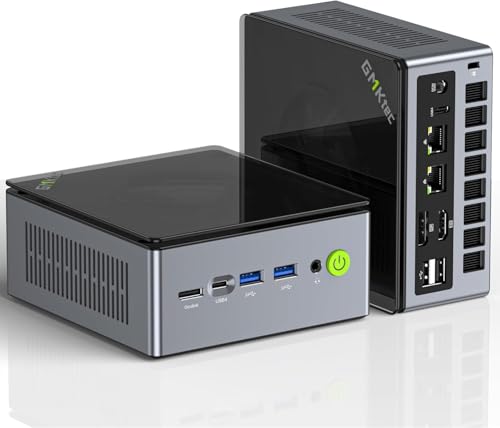
Looking for a compact yet powerful mini PC that can handle gaming, streaming, and everyday tasks? The GMKtec Gaming Mini PC with the AMD Ryzen 7 PRO 6850H is your solution. With an 8-core processor and integrated AMD Radeon 680M graphics, it delivers performance close to the NVIDIA GTX 1050 Ti. You’ll appreciate the 32GB DDR5 memory, upgradeable to 96GB, and a 1TB PCIe SSD that expands to 4TB. Its dual USB4 ports and support for quad displays enhance connectivity. Plus, the efficient cooling system keeps noise low, making it ideal for any setup. Enjoy versatility without sacrificing space!
Best For: Gamers and professionals seeking a compact mini PC that excels in performance for gaming, streaming, and multitasking.
Pros:
- Compact design makes it easy to fit into any workspace or gaming setup.
- Powerful performance with AMD Ryzen 7 PRO 6850H and integrated Radeon 680M graphics.
- Versatile connectivity options, including dual USB4 and support for quad display outputs.
Cons:
- Occasional Wi-Fi connectivity issues reported by users.
- Fan noise can be noticeable under heavy load.
- Concerns regarding warranty coverage for hardware upgrades.
Serversuperstore Proliant DL360 G9 Server (Renewed)

For those seeking robust performance in a compact design, the Serversuperstore Proliant DL360 G9 Server (Renewed) stands out with its dual Intel Xeon E5-2650 V3 processors, offering a total of 20 cores. With 32GB of DDR4 memory and a HPE Flexible Smart Array RAID controller, it’s well-suited for multi-networking experiments and RAID configurations. However, be mindful of its average 2.8-star rating, as some customers reported missing drive trays and damaged mounting ears. While it consumes around 120 watts at idle, it’s best for specific use cases and not ideal for NAS applications due to noise levels.
Best For: Those looking for a powerful server solution for multi-networking experiments and RAID configurations in a compact design.
Pros:
- High processing power with dual Intel Xeon E5-2650 V3 processors offering a total of 20 cores.
- Adequate memory capacity of 32GB DDR4, suitable for demanding applications.
- HPE Flexible Smart Array RAID controller enhances data management and protection.
Cons:
- Average customer rating of 2.8 stars, indicating potential quality concerns.
- Reports of missing drive trays and damaged mounting ears upon arrival.
- Loud fan noise during boot and under load, which may be distracting in quiet environments.
Dell PowerEdge R720 Server 2X E5-2690 2.90Ghz 16-Core 192GB H710 (Renewed)

The Dell PowerEdge R720 Server, featuring dual E5-2690 2.90GHz 16-core processors and a robust 192GB of memory, is an excellent choice for IT professionals and small to medium businesses seeking a reliable and powerful server for virtualization and data management. With upgradable memory, extensive RAID support via the H710 controller, and seven PCI slots, you can tailor it to your needs. Users appreciate its solid performance, handling multiple virtual machines with ease. Though some have noted minor setup issues, the server’s overall quality and Amazon Renewed Guarantee make it a smart investment for your infrastructure.
Best For: IT professionals and small to medium businesses looking for a powerful, cost-effective server for virtualization and data management.
Pros:
- High-performance dual E5-2690 processors with 16 cores each, providing excellent multitasking capabilities.
- Large memory capacity of 192GB, expandable to 384GB, allowing for significant workload management.
- Extensive RAID support and multiple PCI slots for flexible storage and expansion options.
Cons:
- Some users report minor setup issues, such as needing to reseat memory or thermal paste concerns.
- Only four drive caddies included, requiring additional purchases for full utilization of all eight drive bays.
- As a renewed product, there may be variability in condition upon arrival, despite quality assurances.
Beelink EQi12 Dual LAN Mini PC

Experience seamless connectivity and robust performance with the Beelink EQi12 Dual LAN Mini PC, making it an ideal choice for users who need a reliable file server solution. Powered by an Intel Core i3-1220P processor, it offers impressive speeds up to 4.4GHz and comes with 16GB of expandable DDR4 RAM. With a 500GB PCIe4.0 SSD, storage can expand to 4TB, ensuring quick access to your files. Dual 1000M LAN ports, WiFi 6, and Bluetooth 5.2 keep you connected, while its compact design and efficient cooling make it perfect for any workspace. Enjoy 4K display support for multimedia tasks effortlessly.
Best For: Users seeking a compact and powerful mini PC for media streaming, virtualization, or as a reliable file server solution.
Pros:
- High-performance Intel Core i3-1220P processor with speeds up to 4.4GHz.
- Dual LAN ports and WiFi 6 for enhanced connectivity and data transfer speeds.
- Compact design with efficient cooling system, suitable for various work environments.
Cons:
- Some users reported issues with sleep mode functionality.
- Physical power button activation may not be intuitive for all users.
- Limited pre-installed storage capacity, requiring expansion for heavy file users.
Factors to Consider When Choosing a File Server for PC
When choosing a file server for your PC, you need to contemplate several key factors. Think about your storage capacity needs, how fast you want the server to perform, and the network connectivity options available. Don’t forget to evaluate the ease of setup and the data security features to keep your information safe.
Storage Capacity Requirements
Choosing the right file server for your PC hinges on understanding your storage capacity needs. Start by evaluating the total amount of data you need to store, factoring in both current and future requirements. Consider RAID configurations; for instance, RAID 1 offers redundancy but only provides half the usable capacity of combined drives. Think about the type of data you’re storing as well—larger files like videos require considerably more space than smaller documents. Assess the server’s scalability options to guarantee it can accommodate future growth without needing a complete replacement. Finally, don’t forget to factor in backup solutions and redundancy needs, as these will also demand extra storage to maintain data integrity and security.
Performance and Speed
Performance and speed are critical factors in selecting a file server for your PC, as they directly impact how efficiently your server handles data requests. When choosing a server, consider the CPU capabilities; higher core counts and clock speeds enhance multitasking and processing efficiency. Memory capacity is key too—more RAM allows for quicker data access, especially when multiple users are accessing files. Data transfer speeds matter, with modern servers using USB 3.0 or higher achieving up to 5Gbps, compared to the 480 Mbps of USB 2.0. Finally, pay attention to storage configurations like RAID setups, as they influence both speed and data redundancy. A well-balanced setup guarantees ideal performance for your needs.
Network Connectivity Options
Selecting the right network connectivity options is essential for optimizing your file server’s efficiency. Wired Ethernet connections, like 2.5GbE or Gigabit Ethernet, deliver stable and high-speed data transfer rates, vital for quick file access and sharing. If you need flexibility, consider wireless options such as WiFi 6, which allow mobility without the hassle of cables. Dual LAN ports can provide redundancy and load balancing, ensuring reliable performance during peak times. Make sure your server supports multiple network protocols, including SMB, NFS, and FTP, for seamless compatibility across various operating systems. Additionally, advanced features like VLAN support can enhance network security and performance by segmenting traffic, improving your file server’s overall functionality in multi-user environments.
Ease of Setup
When setting up a file server, ease of installation can make all the difference, especially after you’ve considered your network connectivity options. Look for servers with quick setup guides and intuitive web interfaces to streamline the process. Servers pre-configured with user-friendly software can also simplify management and configuration, even for those without extensive technical skills. Additionally, check for the availability of online manuals and customer support resources, which can be invaluable if you face challenges during setup. Evaluate how complex the initial configuration is; simpler systems usually mean faster deployment. Finally, verify the server is compatible with your existing operating systems and network environments to facilitate smooth integration into your current setup.
Data Security Features
Data security features are essential to guarantee your files remain safe from unauthorized access and potential threats. Look for file servers that utilize SSL encryption to secure file transfers, ensuring sensitive information stays protected. Implementing a closed system can greatly reduce vulnerabilities by limiting server access and blocking external threats. You’ll want user-configurable access restrictions for folders, allowing you to control who can access specific data. Regular automated backups are vital, safeguarding your data integrity against accidental loss or hardware failure. Additionally, consider utilizing RAID configurations to enhance security through redundancy, which enables data recovery in case of a drive failure. Prioritizing these features will help you choose a robust file server for your needs.
Operating System Compatibility
Choosing a file server that aligns with your existing operating systems is essential for guaranteeing smooth integration and effective file sharing. Make sure the server’s OS is compatible with your network’s systems—be it Windows, macOS, or Linux. Check the specific version as some servers only support certain editions, which could limit functionality. A user-friendly interface can simplify management, making your experience better. Also, look for support for various file sharing protocols like SMB, NFS, and AFP to guarantee compatibility with multiple devices. Finally, assess the OS’s security features, such as encryption and access control, to protect sensitive data stored on your file server. Prioritizing these factors will lead to a more efficient and secure file sharing environment.