Choosing the right vr accessories for pc gaming can make a bigger difference than upgrading your headset alone. The best picks improve comfort, keep you connected, and help PCVR sessions feel more stable and immersive.
From link cables and wireless networking to grip covers, controllers, and head straps, this roundup focuses on accessories that solve real usability problems for PC gaming in VR.
Best 10 Vr Accessories for PC Gaming Picks for 2026
Wired PCVR Link Pick
Syntech 16FT USB 3.0 Link Cable

- 16-foot wired link for PCVR and SteamVR
- USB 3.0 with up to 5Gbps transfer
- L-shaped connector and strap for comfort
Best For: Gamers who want a long, stable Meta Quest or Pico PCVR cable
Grip-and-Control Upgrade
AMZDM Quest 3/3S Controller Grips

- Non-slip silicone grips for better control
- Adjustable knuckle straps and thumbstick covers
- Designed for Meta Quest 3 and 3S
Best For: Quest 3/3S owners who want steadier, more comfortable controller handling
Versatile Wireless Option
SteelSeries Stratus Duo Controller
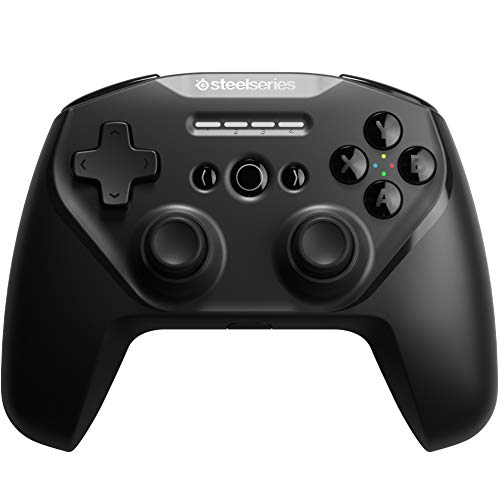
- Works with PC, Android, Chromebook, and VR
- 2.4 GHz, Bluetooth, and wired USB support
- 20-plus hour rechargeable battery
Best For: Players who want a flexible controller for PC and legacy VR devices
Official PCVR Cable

- Official Quest cable for PC VR gaming
- 16-foot fiber optic design stays light and flexible
- Actively powered to charge the headset while playing
Best For: Quest users who want an official long cable for PC-based VR titles
Dedicated VR Streaming Router
PC-VR Streaming Air Link Compatible with Meta Quest 3S/3/2 AX3000 WiFi6

- Dedicated PrismPulse mode for headset streaming
- Wi‑Fi 6 with up to 3000 Mbps total speed
- PrismXR Desktop adds one-click scan and fix
Best For: wireless PC VR players who want a dedicated streaming connection
Wired Link Cable Pick
10FT Link Cable for Oculus Quest 3/Quest 2

- 10-foot USB 3.0 to USB-C cable
- Up to 5 Gbps data transfer support
- Right-angle connector with up to 3A charging
Best For: Quest owners who want stable wired PC VR play with charging
Comfort Strap Upgrade
Kawaye for Meta Quest 3S/Quest 2/Quest 3 Head Strap

- Dual knobs help balance headset weight
- Thick cotton pads and rear cushion add comfort
- Built-in battery slot supports hot-swappable packs
Best For: players who want a more comfortable and adjustable Quest strap
Fast-Charging Pick
AMVR 16FT VR Charging Link Cable

- 5Gbps USB 3.0 data for PC VR
- Charges while playing with safety chip
- Includes USB A-to-C adapter
Best For: Players who want charge-while-playing convenience and PC port flexibility
Balanced Value Pick
Kuject Link Cable with Charging
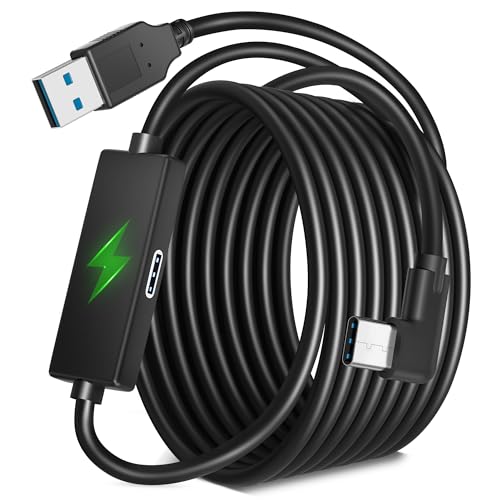
- USB 3.0 up to 5Gbps for PCVR
- Dedicated 9V 2A charging port
- Includes guide and 18-month warranty
Best For: VR players who want a long cable with dedicated charging support and easy setup
Durable Long-Reach Pick
16FT Nylon Braided VR Link Cable

- 5Gbps USB 3.2 Gen 1 transfer
- 16ft length for freer movement
- Nylon braided with aluminum alloy build
Best For: Players who want a long, lightweight tether with durable braided construction
Wired PCVR Link Pick – Syntech 16FT USB 3.0 Link Cable
If you want a simple, stable way to use vr accessories for pc gaming, this Syntech link cable is built for wired PCVR sessions with Meta Quest and Pico headsets. It supports SteamVR and PC VR content over USB 3.0, with a 16-foot reach that gives you room to move while keeping latency and signal issues to a minimum.
Best For: Players who want a long, reliable USB link cable for Meta Quest or Pico PCVR play.
Pros:
- Compatible with Meta Quest 3S, Quest 3, Quest 2, Quest Pro, and Pico 4
- USB 3.0 support with up to 5Gbps data transfer for low-latency PCVR use
- 16-foot cable length helps preserve movement during seated, standing, or room-scale play
- L-shaped USB-C connector and Velcro strap help reduce port strain and keep the cable secure
Cons:
- Not designed for charging the headset
- Wired play may not suit users who prefer a cable-free setup
For buyers who prioritize stable connection quality over wireless convenience, this cable covers the basics well. Its reinforced build, flexible feel, and headset-friendly connector make it a practical PCVR accessory for longer sessions.
Grip-and-Control Upgrade – AMZDM Quest 3/3S Controller Grips
For vr accessories for pc gaming that improve handling rather than connectivity, these controller grips are aimed at Meta Quest 3 and 3S users who want a steadier hold. The silicone covers, textured thumbstick covers, and adjustable knuckle straps are designed to add comfort, reduce slipping, and help protect your controllers during extended play.
Best For: Quest 3 and 3S players who want a more secure, comfortable controller grip.
Pros:
- Made specifically for Meta Quest 3 and Meta Quest 3S touch controllers
- Non-slip silicone surface helps reduce sweat, dust, and scratches
- Adjustable vegan leather elastic knuckle straps improve fit and control
- Includes textured joystick covers for added grip
Cons:
- Only compatible with Quest 3 and 3S
- Not a performance accessory for connectivity or tracking
This is a straightforward comfort and protection upgrade for players who spend long sessions in VR. If your main issue is controller slip or hand fatigue, these grips offer a low-fuss way to make gameplay feel more controlled.
Versatile Wireless Option – SteelSeries Stratus Duo Controller
If you’re comparing vr accessories for pc gaming and want one controller that can also move between other platforms, the SteelSeries Stratus Duo is a flexible pick. It supports Windows, Android, Chromebooks, and VR devices, with both 2.4 GHz wireless and Bluetooth connectivity, plus a wired USB option when you want to keep playing while charging.
Best For: VR and PC players who want a multi-device wireless controller with wired fallback.
Pros:
- Compatible with PC, Windows, Android, VR, and Chromebook devices
- Offers 2.4 GHz wireless, Bluetooth v4.1, and wired USB connectivity
- Rechargeable battery provides 20-plus hours of use
- Full-size ergonomic design is built for comfortable long sessions
Cons:
- VR compatibility is listed for Oculus Go, Gear VR, and Oculus Rift rather than newer headsets
- May be more controller than needed if you only want a dedicated Quest accessory
This controller makes sense if you want one gamepad for multiple systems instead of a single-purpose VR add-on. Its mix of wireless modes and long battery life gives it useful everyday versatility for PC and compatible VR play.
Official PCVR Cable – Meta Quest Link Cable 16FT
For buyers who want an official option in vr accessories for pc gaming, the Meta Quest Link Cable is designed to connect a Quest headset to a compatible gaming PC for PC VR play. Its 16-foot length, fiber optic core, and up to 5Gbps speed are aimed at keeping the experience smooth while giving you room to duck, move, and stay connected.
Best For: Quest owners who want an official cable for accessing PC-based VR titles.
Pros:
- Official Meta Quest accessory with broad compatibility
- 16-foot cable length supports comfortable movement during PCVR play
- Up to 5Gbps data capacity for a premium VR connection
- Fiber optic core keeps the cable light and flexible
- Actively powered design charges the headset battery while you play
Cons:
- Compatible gaming PC is required and not included
- Premium official pricing may be higher than third-party cables
This is the most direct choice if you prefer official hardware and want charging plus data in one cable. It is especially appealing for Quest users who value lightweight feel, easy compatibility, and a wired connection for a larger PCVR library.
Dedicated VR Streaming Router – PC-VR Streaming Air Link Compatible with Meta Quest 3S/3/2 AX3000 WiFi6
If you want a cleaner wireless setup for vr accessories for pc gaming, this dedicated PC-VR streaming router is built to keep your headset connection separate from the rest of the home network. It supports Quest 3S/3/2/Pro and Pico 4 headsets, uses Wi‑Fi 6 with 160MHz bandwidth, and is designed to reduce interference for more stable streaming.
Best For: Quest and Pico owners who want a dedicated wireless link for PC VR streaming without a complicated install.
Pros:
- Dedicated PrismPulse mode is designed to bridge your PC and VR headset with minimal interference.
- Wi‑Fi 6 hardware supports up to 3000 Mbps total network speed with 2×2 MIMO and 1024-QAM.
- PrismXR Desktop includes a 21-item one-click scan and fix for common setup issues.
- EasyLink Bluetooth pairing is meant to simplify setup without driver installation.
Cons:
- Does not include a C-C data cable.
- Works with Windows 10/11, so it is not a universal cross-platform pick.
For PC VR players who prefer wireless streaming, this is a focused networking accessory rather than a general-purpose router. Its biggest value is the dedicated headset connection and built-in setup tools that aim to make VR play feel smoother and more predictable.
Wired Link Cable Pick – 10FT Link Cable for Oculus Quest 3/Quest 2
For players shopping vr accessories for pc gaming, a dependable Link cable is still one of the simplest ways to connect a headset to a PC. This 10-foot USB 3.0 to USB-C cable is designed for Quest 3 and Quest 2 users who want data transfer, charging support, and a longer reach while playing.
Best For: Quest users who want a long wired PC VR connection with charging support.
Pros:
- 10-foot length gives you room to move during VR gameplay.
- USB 3.0/3.1 Gen1/3.2 Gen1 support is rated up to 5 Gbps data transfer.
- L-shaped 90° connector is designed to stay more secure and reduce accidental disconnects.
- Can provide up to 3A charging while in use.
Cons:
- Best speed depends on using a compatible USB 3.1/3.2 port.
- Long wired play can still feel less 자유 than a wireless setup.
This is a straightforward cable-first choice for PC VR users who want stable linkage and charging in one accessory. If your priority is dependable wired play over wireless convenience, the length and right-angle design make it an easy practical pick.
Comfort Strap Upgrade – Kawaye for Meta Quest 3S/Quest 2/Quest 3 Head Strap
Among vr accessories for pc gaming, a good head strap can make a bigger difference than many people expect. This adjustable replacement strap is built for Meta Quest 3S/Quest 2/Quest 3 users who want better weight balance, less facial pressure, and a more secure fit during longer sessions.
Best For: Quest players who want a more comfortable, adjustable head strap for long gaming sessions.
Pros:
- Dual knobs let you adjust the top and back for more even weight distribution.
- Two thick cotton pads and an oversized rear cushion are designed to reduce pressure.
- Includes a built-in battery slot for compatible hot-swappable battery packs sold separately.
- Flip-up design helps with quick glasses-friendly access.
Cons:
- Battery packs are not included.
- Only compatible with Meta Quest 3S/3/2 headsets.
If your current headset fit feels front-heavy or tiring, this strap focuses on comfort and support rather than extra tech features. The quick install and battery-ready design make it a useful upgrade for players who spend extended time in VR.
Fast-Charging Pick – AMVR 16FT VR Charging Link Cable
If you want one of the more practical vr accessories for pc gaming, this AMVR 16ft link cable is built around stable USB 3.0 data, charging support, and a flexible A-to-C adapter for different PC ports. It is designed for tethered play where you want low-latency headset connection without giving up battery management during longer sessions.
Best For: Players who want to charge while playing and need flexible USB-A or USB-C PC compatibility.
Pros:
- Supports 5Gbps USB 3.0 data transfer for PC VR gaming.
- Includes a USB A-to-C adapter for broader PC port compatibility.
- Built with nylon braiding and reinforced connectors for durability.
- Charging chip is designed to help keep headset battery in a safer range.
Cons:
- For best charging speed, you may need a higher-power charger adapter.
- It is not intended for charging phones, tablets, or computers.
- Charging performance depends on the setup used.
This is a strong pick if your priority is a durable tethered VR cable that can handle both data and charging at the same time. The combination of long reach, adapter flexibility, and protective design makes it a straightforward option for regular PC VR use.
Balanced Value Pick – Kuject Link Cable with Charging
This Kuject cable is aimed at vr accessories for pc gaming users who want a long tether with charging support and simple setup. It uses USB 3.0 for high-speed data, adds a dedicated charging port, and is built to keep the headset powered during VR sessions on a gaming PC.
Best For: VR players who want a long cable with dedicated charging support and easy setup.
Pros:
- USB 3.0 transfer up to 5Gbps for PC VR use.
- Dedicated 9V 2A charging port helps bypass low-power USB limits.
- Smart chip manages charging and helps keep battery around 78%.
- Includes a user guide and 18-month warranty.
Cons:
- Verified Quest speed is listed up to 3Gbps, below the cable’s maximum rating.
- Best performance depends on using a blue USB 3.0 or newer port.
- The charging setup requires an original charging cable and charger.
Overall, this is a practical choice if you want a long link cable with explicit charging support and some peace of mind from the included warranty. It is especially appealing for users who value convenience and straightforward setup over chasing the absolute highest data numbers.
Durable Long-Reach Pick – 16FT Nylon Braided VR Link Cable
For shoppers comparing vr accessories for pc gaming, this 16ft nylon braided link cable focuses on a stable tethered connection with enough length to move more freely. It supports USB 3.2 Gen 1 speeds and also provides 5V charging, making it a simple option for Steam VR and PC VR play.
Best For: Players who want a long, lightweight tether with durable braided construction.
Pros:
- USB 3.2 Gen 1 A-to-C cable supports 5Gbps transfer.
- 16ft length gives more room for movement during VR play.
- Nylon braided and aluminum alloy build resists stretching, abrasion, and kinks.
- Supports 5V charging while connected to a PC.
Cons:
- It is a data-focused cable, so charging support is basic compared with dedicated charging cables.
- There is no included adapter for alternate PC port types.
- Performance still depends on the PC’s USB port quality.
This cable makes sense if you mainly want a durable, long tether for PC VR and do not need a more advanced charging system. Its lightweight feel and reinforced materials make it a solid everyday option for extended play space.
How We Picked the Best Vr Accessories for PC Gaming
We prioritized accessories that address the most common PCVR pain points: cable reliability, charging while playing, controller comfort, headset fit, and wireless streaming stability. We also looked for broad headset compatibility, practical build quality, and features that matter in everyday use rather than gimmicks.
Quick Comparison
For most players, the fastest way to improve PCVR is to start with connectivity and comfort. If you want a wired setup, a quality Link cable or charging cable is the safest buy. If you prefer freedom of movement, a strong Wi‑Fi solution can matter more than another cable. For longer sessions, a better strap and grip covers often deliver the biggest comfort upgrade.
Key Buying Factors for Vr Accessories for PC Gaming
Connection Type
Decide whether you want wired PCVR, wireless streaming, or a hybrid setup. Wired options typically offer simpler performance tuning, while wireless setups depend heavily on router quality and local interference.
Comfort and Fit
Head straps, grip covers, and controller accessories should reduce fatigue without adding bulk. Look for adjustability, secure contact points, and materials that stay comfortable during long sessions.
Charging and Playtime
If you play for extended periods, charging-support cables and power-friendly accessories can prevent interruptions. Check whether a cable supports data only or data plus charging, since that changes how useful it is for marathon sessions.
Compatibility
Always confirm headset, controller, and platform support before buying. Many Vr Accessories for PC Gaming are made for Quest models first, but some also work with Pico or Steam VR setups.
Durability and Cable Management
Braided cables, reinforced connectors, and flexible strain relief can improve long-term reliability. A well-made cable matters more than raw length alone, especially if you move around a lot.
Who Should Buy Which Vr Accessories for PC Gaming?
If you want the simplest upgrade, start with a dependable Link cable or charging cable. If your main issue is comfort, choose a better head strap and grip accessories first. If you want more freedom of movement, invest in wireless streaming support and a strong home network. For mixed-use players who switch between devices, a versatile wireless controller can also be a smart add-on.
In short, the best choice depends on whether you value performance, comfort, or mobility most. Pick the accessory that removes your biggest friction point, and your PCVR setup will feel better immediately.