If you want smoother PCVR play, the right cable matters more than most buyers expect. A good link cable should deliver stable data, enough length to move naturally, and ideally charging support for longer sessions.
In this roundup of the best vr link cables for pc, we focus on practical choices for Quest, Pico, and other compatible headsets so you can pick a cable that matches your setup and play style.
Best 10 Vr Link Cables for PC Picks for 2026
Stable Wired Pick
Syntech 16FT USB 3.0 Link Cable

- Up to 5Gbps USB 3.0 transfer
- Works with Quest and Pico headsets
- L-shaped plug and Velcro strap
Best For: PCVR users who want a simple, stable 16-foot cable
Official Brand Choice

- Official Meta Quest accessory
- Charges headset while you play
- Lightweight fiber optic core
Best For: Quest users who want official compatibility and in-play charging
Long-Reach Charging Cable
Maxonar 20FT Charging Link Cable

- 20-foot cable for extra movement room
- 18W charging support for Quest devices
- Reinforced connector with safety chip
Best For: Users who want long reach plus headset charging support
Flexible 2-in-1 Option
Syntech 16FT 2-in-1 Link Cable

- USB-A/C adapter adds connection flexibility
- Up to 18W PD charging support
- 16FT cable with Velcro strap
Best For: Quest owners who want a flexible PC connection and charging support
Editor Pick
INIU 16ft Charging Link Cable for Quest 3/2/Pro

- USB 3.0 data plus separate USB-C charging port
- 16ft length supports freer movement in VR
- SmartProtect2.0 and 90-degree connector help stabilize use
Best For: Gamers who want a long PC VR cable with charging support
Value Upgrade
Maxonar 16ft VR Charging Link Cable

- 18W charging port plus USB 3.0 data support
- Reinforced L-shaped connector with Velcro strap
- 16ft cable is made for roomier PC VR movement
Best For: PC VR players who want charging support and a reinforced connector
Reliable Pick
INIU 16ft VR Link Cable with Separate Charging Port
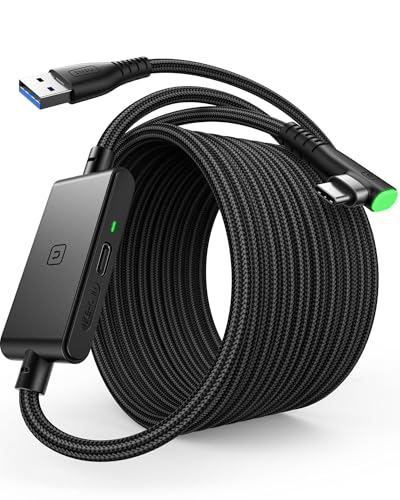
- USB 3.0 data with separate USB-C charging support
- SmartProtect2.0 helps manage charging and data sync
- 16ft FLYWEAVE cable and secure connector aid movement
Best For: VR players who want a dependable long cable with headset charging support
Dual-Port Pick
Syntech 16FT 2-in-1 USB 3.0 VR link cable

- USB-A and USB-C adapter support
- 16ft cable with velcro strap
- Over 5000-bend reinforced design
Best For: Users who want a long, flexible VR link cable with dual-port compatibility
SteamVR Access Pick
Kuject 16FT USB 3.0 VR link cable for PC
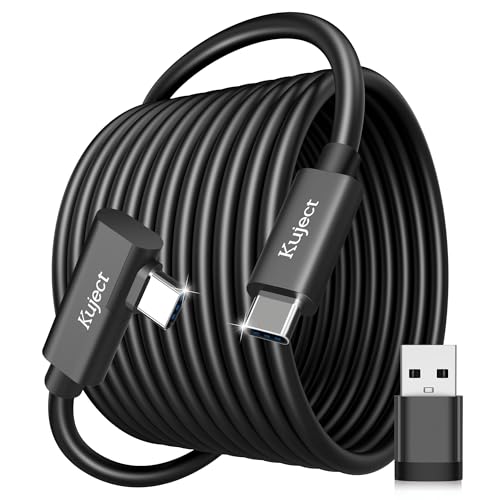
- Compatible with Quest and Pico headsets
- USB-A adapter included
- L-shaped connector with retaining strap
Best For: PC VR gamers who want simple SteamVR access and a durable cable
Powered Session Pick
JSAUX 16FT 18W charging VR link cable

- 18W charging during gameplay
- 5m cable with 90-degree connector
- Rated for over 45,000 bends
Best For: Players who want wired VR plus continuous charging for longer sessions
Stable Wired Pick – Syntech 16FT USB 3.0 Link Cable
If you want vr link cables for pc that prioritize stability and comfort, this Syntech 16FT option is built for long wired sessions with Meta Quest and Pico headsets. It focuses on low-latency PCVR play, adds a reinforced L-shaped USB-C connector, and includes a Velcro strap to help keep the cable secure while you move.
Best For: PC VR players who want a reliable 16-foot cable for Quest 3S/3/2 or Pico 4 with a simple, durable setup.
Pros:
- USB 3.0 support with up to 5Gbps data transfer for PCVR and SteamVR
- Compatible with Meta Quest 3S/3/2/Pro and Pico 4 headsets
- L-shaped USB-C connector helps reduce headset port strain
- Includes Velcro strap plus flexible, tangle-free cable design
Cons:
- Not intended for charging the headset
- USB-A connection means it depends on an available USB 3.0/3.1/3.2 PC port
Overall, this is a straightforward wired VR cable choice for users who care more about steady performance and headset comfort than extra charging features. The included warranty and support also add some peace of mind for regular PCVR use.
Official Brand Choice – Meta Quest Link Cable 16FT
For shoppers comparing vr link cables for pc, the official Meta Quest Link Cable stands out as the brand-matched option for Quest headsets. It offers a 16-foot reach, up to 5Gbps capacity, and a fiber optic core designed to stay light and flexible during PC VR gaming.
Best For: Meta Quest owners who want the official cable with built-in compatibility and headset charging while playing.
Pros:
- Official Meta Quest accessory with seamless hardware compatibility
- 16ft (5m) length gives room to move while connected
- Up to 5Gbps capacity for premium VR use
- Actively powered cable charges the headset built-in battery during play
Cons:
- Requires a compatible gaming PC, which is not included
- Only suited to Meta Quest ecosystem use rather than broader headset compatibility
If you want the most straightforward path to PC-based Quest play, this cable keeps things simple with official support and a lightweight build. Its main appeal is convenience: plug in, keep moving, and let the cable help maintain battery life during sessions.
Long-Reach Charging Cable – Maxonar 20FT Charging Link Cable
If you need vr link cables for pc that go beyond basic data transfer, this Maxonar 20FT charging cable adds headset power management to a long wired setup. It is designed for Quest and Pico headsets, supports USB 3.0 speed, and uses a reinforced L-shaped connector plus anti-slip design for active VR sessions.
Best For: Players who want a 20-foot cable with charging support for longer PCVR sessions and more freedom of movement.
Pros:
- 20ft length gives extra room for room-scale movement
- Includes 18W charging support for compatible Quest headsets
- USB 3.0 / 5Gbps design for PC VR and SteamVR use
- SmartProtect safety features and reinforced connector for durability
Cons:
- Charging performance depends on using a suitable high-power charger
- Not meant for charging phones, tablets, or laptops
- Bulkier 20-foot cable may be less convenient for compact setups
This is a strong pick if battery management matters as much as cable length. The tradeoff is that you need the right charger to get the most from its charging features, but the extra reach is useful for more active play styles.
Flexible 2-in-1 Option – Syntech 16FT 2-in-1 Link Cable
Among vr link cables for pc, this Syntech model is aimed at users who want both flexible connectivity and charging support. It includes a USB-A to USB-C adapter for broader PC compatibility, delivers a 16-foot run, and is built around a next-gen charging chip for Quest 3S/3/2 PCVR use.
Best For: Quest 3S/3/2 owners who want a 16-foot cable with both USB-A and USB-C PC connection options.
Pros:
- 2-in-1 connection with included USB 3.0 A to C adapter
- Supports 1.9–3.2 Gbps data transfer over the full 16FT length
- Up to 18W PD charging with a next-gen charging chip
- Velcro strap and triple-layer protection for more secure use
Cons:
- Charging and speed depend on using a USB 3.0 port and compatible PD/QC adapter
- Not designed for charging phones, tablets, or computers
- Notes show the product is optimized mainly for Quest 3S/3/2 use
This cable makes sense if you want a practical all-in-one solution for both connection flexibility and headset charging. It is especially useful for PC setups that may have either USB-A or USB-C available, while still keeping the focus on stable VR gameplay.
Editor Pick – INIU 16ft Charging Link Cable for Quest 3/2/Pro
If you want vr link cables for pc that can also keep a headset topped up, this INIU 16ft option is built for that job. It combines USB 3.0 data with a separate USB-C charging port, so you can play on a gaming PC while feeding the headset power through a fast adapter.
Best For: Players who want a long PC VR cable with charging support and a secure headset connection.
Pros:
- Separate USB-C charging port supports up to 3A power delivery with a PD/QC fast adapter
- 16ft length gives plenty of room for movement during VR sessions
- SmartProtect2.0 helps balance charging and data sync for safer battery use
- 90-degree USB-C connector and sticky buckle help keep the cable locked in place
Cons:
- Cable length can slightly affect transfer speed
- Not intended for charging phones, tablets, or laptops
- Fast charging depends on using a compatible PD/QC adapter
This is a practical pick if you value both play space and battery management. It is especially useful for longer VR sessions where a standard link cable alone may not be enough.
Value Upgrade – Maxonar 16ft VR Charging Link Cable
For shoppers comparing vr link cables for pc, this Maxonar model focuses on fast data, charging, and a sturdier build. It uses USB 3.0 data with an 18W charging port, so it is aimed at PC VR play on Meta Quest 3S, 3, 2, and Pico 4 devices.
Best For: PC VR players who want a charging link cable with a reinforced connector and long cable reach.
Pros:
- 18W charging port is built into the cable for gaming sessions with power support
- USB 3.2 Gen1 design supports up to 5Gbps data transfer
- 16ft length and flexible construction give more room to move
- Reinforced L-shaped Type-C connector, anti-slip design, and Velcro strap help keep it secure
Cons:
- Fast charging depends on using an official or higher-power charger
- USB-A must be connected to a USB 3.0/3.1/3.2 port for proper performance
- Some devices may need software or system updates if they are not recognized correctly
This is a strong choice if you want a cable that leans into both speed and battery care. The reinforced connector and built-in cable management make it well suited to more active VR play.
Reliable Pick – INIU 16ft VR Link Cable with Separate Charging Port
If you are shopping for vr link cables for pc and want a straightforward setup, this INIU 16ft cable is built around USB 3.0 data plus a separate charging port. It is designed for Meta Quest and Pico headsets, and it aims to keep gameplay going with safe charging through a fast adapter.
Best For: VR players who want a dependable long cable with separate charging support for headset use.
Pros:
- Separate USB-C charging port supports rapid 3A power delivery with a PD/QC fast adapter
- SmartProtect2.0 chip is designed to balance charging and data sync
- 16ft FLYWEAVE-coated cable gives a wider range of motion
- 90-degree USB-C hook, flexible joint, and sticky buckle help secure the connection
Cons:
- Cable length may slightly affect transfer speed
- Charging is intended for the VR headset, not phones or laptops
- Fast charging depends on using the right adapter
This model makes sense if you want a proven all-around cable with a focus on stability and battery support. The long reach and connector design are useful for players who dislike interruptions during play.
Dual-Port Pick – Syntech 16FT 2-in-1 USB 3.0 VR link cable
If you want a straightforward option among vr link cables for pc, this Syntech 16ft cable is built around wide headset compatibility and steady USB 3.0 data transfer. It includes both USB-A and USB-C connection options through the adapter, which makes it easier to match different PC setups while keeping the headset connection flexible during play.
Best For: Quest and Pico users who want a long, flexible cable with USB-A and USB-C support.
Pros:
- Works with Meta Quest 3S/3/2/Pro and Pico 4 accessories.
- Includes a USB 3.0 adapter for USB-A or USB-C ports.
- 16ft length and velcro strap help keep movement comfortable and secure.
- Reinforced build is rated for over 5000 bends.
Cons:
- Not a charging cable.
- Needs a USB 3.0 or higher port for best performance.
This is a practical pick if you mainly care about stable PC VR data and broad device compatibility. The focus here is durability and connection flexibility, not extra power delivery, so it suits users who already have their headset charging handled separately.
SteamVR Access Pick – Kuject 16FT USB 3.0 VR link cable for PC
For buyers comparing vr link cables for pc, this Kuject 16ft cable focuses on getting Quest and Pico headsets connected to SteamVR and Rift S games with a simple, wide-compatible setup. The included USB-A adapter and L-shaped connector make it easy to fit into more PC builds while keeping the cable secure during active use.
Best For: PC VR players who want a durable, straightforward link cable for SteamVR and Rift S access.
Pros:
- Supports Quest 3S/3/2/1/Pro and Pico Neo 4.
- Includes a USB-A adapter for more computer and laptop ports.
- USB 3.0 support up to 5Gbps, with verified speeds up to 3Gbps on Quest.
- L-shaped connector and retaining strap help keep the cable secure.
Cons:
- Best performance depends on using a blue USB 3.0 or newer port.
- It is a link cable first, not a charging-focused model.
This Kuject option is a sensible pick if you want broad headset support and a durable physical design without extra complexity. Its value is in reliable PC connectivity and an easier fit on active play spaces, especially when you want quick access to SteamVR titles.
Powered Session Pick – JSAUX 16FT 18W charging VR link cable
If you need one of the more practical vr link cables for pc, this JSAUX 16ft model adds 18W continuous charging while still handling USB 3.0 data transmission. That makes it a strong fit for longer sessions, since it is designed to keep the headset powered while supporting smooth PC VR play on compatible Quest and Pico devices.
Best For: Long VR sessions where keeping the headset charged matters as much as the PC connection.
Pros:
- Provides 18W continuous charging during gameplay.
- USB 3.0 data transmission is designed for stable VR performance.
- 16ft / 5m length gives plenty of room to move.
- 90-degree connector and 45,000-bend durability rating add security.
Cons:
- Fast charging depends on using the original Oculus wall charger and a separate charging port.
- Still requires compatible USB 3.0 setup for best data performance.
This cable stands out if battery life is your main frustration during wired VR play. It combines long reach, angled connector design, and charging support, making it a smart choice when you want fewer interruptions during extended sessions.
How We Picked These Vr Link Cables for PC
We prioritized cables that are designed for PCVR use, with emphasis on real-world convenience rather than marketing claims alone. That means solid USB 3.0-class data performance, dependable headset compatibility, useful cable lengths around 16 feet or more, and features such as charging support or reinforced connectors where they add value.
For Vr Link Cables for PC, the biggest difference usually comes down to stability and comfort during long sessions. A cable that maintains a clean connection and stays flexible is often a better buy than one that only advertises top speed.
Quick Comparison
At a glance, the main tradeoffs are simple: some cables focus on pure data transfer, others add charging, and a few bundle USB-A/USB-C adapters for broader compatibility. If you have a Quest 3 or Quest 3S, a USB-C option may be the cleanest fit, while mixed setups may benefit from a cable with adapter flexibility. Longer cables improve movement, but they can be slightly heavier or less flexible depending on build quality.
Key Buying Factors for Vr Link Cables for PC
Data Speed and Stability
Look for USB 3.0 or better, because consistent throughput is what keeps PCVR visuals and tracking responsive. The headline speed matters less than the cable’s ability to hold a stable connection without dropouts.
Charging Support
If you play for extended periods, charging support can be a major advantage. Not every cable delivers enough power to maintain battery level under heavy use, so check whether the listing specifies charging wattage or a separate power path.
Length and Flexibility
Most buyers are happiest with a 16-foot cable, which usually gives enough room to sit, stand, and turn without feeling pinned down. If you have a larger play area, a 20-foot option may be worth it, but only if the cable remains manageable and doesn’t create extra drag.
Connector Type and Compatibility
Match the connector to your headset and PC ports. Many Vr Link Cables for PC are built around USB-C to USB-C or USB-A to USB-C, and some include adapters. Confirm compatibility with Meta Quest, Pico, SteamVR, or Rift-based setups before buying.
Who Should Buy Which Vr Link Cables for PC?
If you want the simplest setup, choose a straightforward high-speed cable with the connector that matches your PC. If you play long sessions, prioritize a charging model. If your desktop or laptop has mixed USB ports, a cable with included adapters offers the most flexibility. For roomier setups or users who want extra freedom of movement, a longer reinforced cable can be the smarter investment.
In short, the best choice depends on whether your top priority is speed, charging, convenience, or range. Pick the cable that best matches how you actually use PCVR, not just the specs on the box.