When it comes to safeguarding your important files, finding the right offline cloud backup solution for your PC is essential. You want something reliable and secure, whether you’re a professional handling large projects or a home user with cherished memories. With various options available, you might wonder which one suits your needs best. Let’s explore the top choices that could provide the peace of mind you’re looking for.
BUFFALO LinkStation 210 4TB NAS Network Attached Storage

If you’re looking for a reliable offline cloud backup solution for your PC, the BUFFALO LinkStation 210 4TB NAS is an excellent choice. This 1-bay NAS offers 4TB of centralized storage, perfect for backing up your videos, music, and photos without subscription fees. Its easy setup process lets you quickly get started, while the NAS Navigator and automated backup features streamline management. You can even restrict access for secure sharing with family and friends. Although the transfer speeds may seem slow to some, its closed system design and SSL encryption guarantee your data’s security remains a top priority.
Best For: Users seeking a budget-friendly, subscription-free offline cloud backup solution for their personal media files.
Pros:
- Easy setup process with quick configuration using NAS Navigator.
- Centralized 4TB storage for backing up videos, music, and photos without subscription fees.
- Secure file sharing options with individual access restrictions for family and friends.
Cons:
- Transfer speeds may be considered slow, with data copying rates around 17 MB/s for one computer.
- Limited utilities and cumbersome data transfer between LinkStations compared to competitors.
- Mixed reviews on customer support and issues with warranty coverage for data recovery.
WD 2TB My Passport Ultra Portable External Hard Drive
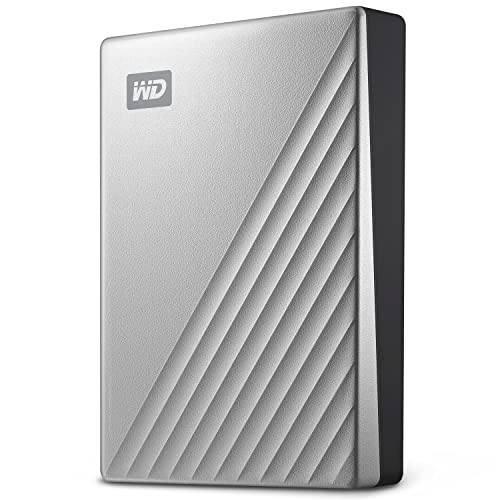
The WD 2TB My Passport Ultra Portable External Hard Drive is an ideal choice for users seeking a compact and reliable offline backup solution. Weighing just 4.6 ounces and measuring 4.33 x 3.21 x 0.5 inches, it’s easy to carry. With USB-C and USB 3.1 compatibility, setup is a breeze. It features 256-bit AES hardware encryption for data protection, ensuring your files stay safe. Many users appreciate its speed and durability, especially for Time Machine backups on macOS. However, some have noted issues with the USB cable quality. Overall, it’s a solid option for secure data storage.
Best For: Users seeking a compact and reliable offline backup solution with enhanced data protection features.
Pros:
- Plug-and-play functionality for immediate access to storage and backup.
- Lightweight and portable design makes it easy to carry.
- Strong data protection with 256-bit AES hardware encryption.
Cons:
- Reports of poor quality and fit of the included USB cable.
- Some users experienced issues with faulty drives having less storage than advertised.
- Quality control concerns have been noted by a portion of the user base.
LaCie Rugged Raid Shuttle 8TB External Hard Drive
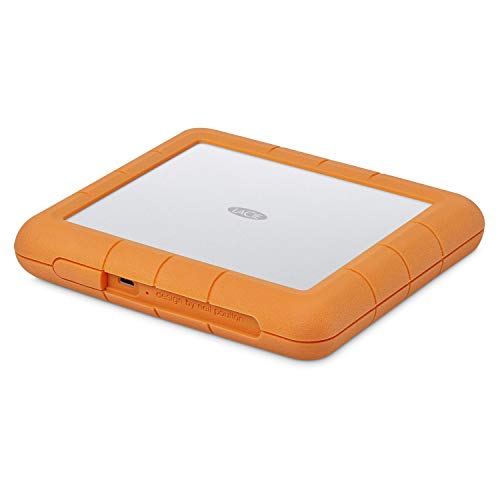
For creative professionals who need reliable and portable storage, the LaCie Rugged Raid Shuttle 8TB External Hard Drive stands out. With its massive 8TB capacity, you can store extensive content without worrying about running out of space. Its flat design fits perfectly in gear bags or shipping envelopes, making it easy to transport. You can easily configure RAID 0/1 using a step-by-step wizard, optimizing for performance or redundancy. Plus, the self-encrypting password system keeps your projects secure from unauthorized access. To top it off, you’ll receive a complimentary month of Adobe Creative Cloud, enabling powerful editing tools.
Best For: Creative professionals seeking reliable and portable storage solutions for extensive content management.
Pros:
- Massive 8TB storage capacity allows for extensive content storage without limitations.
- Flat design makes it easy to transport in gear bags or shipping envelopes.
- Self-encrypting password system ensures projects are protected from unauthorized access.
Cons:
- Higher price point compared to standard external hard drives.
- May require initial setup for RAID configuration, which could be complex for some users.
- Limited compatibility with older USB devices, as it primarily utilizes USB-C and USB 3.0.
beeto Phoxfer Backup Stick for iPhone and Android (256GB)
Looking for a hassle-free way to back up your iPhone or Android device? The beeto Phoxfer Backup Stick offers a massive 256GB storage capacity, letting you store thousands of photos and videos without worry. Its plug-and-play functionality means no software or complex setup is needed—just plug it in and transfer files quickly. Plus, with a one-time purchase, you’ll avoid annoying subscription fees, ensuring long-term savings. Built for durability, this solid stick is perfect for daily use, making it a reliable choice for anyone looking to secure their data efficiently. Backup your memories with ease!
Best For: The beeto Phoxfer Backup Stick is best for individuals looking for an easy, cost-effective solution to back up their iPhone or Android devices without the hassle of subscription fees.
Pros:
- Massive 256GB storage capacity allows for the backup of thousands of photos and videos.
- Plug-and-play functionality enables quick and easy file transfers without the need for extra software.
- Durable build quality ensures long-term use for daily data protection.
Cons:
- Limited to 256GB, which may not be sufficient for users with extensive photo and video libraries.
- No advanced features like automatic backups or cloud integration.
- Compatibility may vary with some devices, potentially requiring additional adapters.
Buffalo TeraStation WS5420RN Rackmount NAS with 40TB Storage

Designed for businesses that prioritize data security and seamless integration, the Buffalo TeraStation WS5420RN Rackmount NAS with 40TB storage offers a robust solution for offline cloud backup. With its native Windows Server IoT 2019, you can easily leverage features like Shadow Copy and Azure Sync. The 10GbE connectivity delivers lightning-fast transfer speeds, perfect for demanding environments. Pre-configured with NAS-grade drives, it guarantees data protection through RAID configurations. Plus, you can back up to and from cloud services like Dropbox and OneDrive, enhancing your disaster recovery plans while providing scalability to meet your growing storage needs.
Best For: Businesses prioritizing data security and seamless integration with Windows applications.
Pros:
- High storage capacity: Offers 40TB with options for RAID configurations, ensuring flexibility and data protection.
- Fast transfer speeds: 10GbE connectivity provides up to 10X faster data transfer compared to standard 1GbE connections.
- Cloud integration: Supports backup and replication with popular cloud services like Dropbox, Azure, and OneDrive, enhancing disaster recovery options.
Cons:
- Initial cost: Higher upfront investment compared to simpler NAS solutions with less storage.
- Complex setup: May require technical expertise for optimal configuration and integration with existing systems.
- Limited compatibility: Primarily designed for Windows environments, which may limit use in mixed OS scenarios.
BUFFALO TeraStation WS5420RN Rackmount NAS (32TB)
Ideal for small to medium-sized businesses needing robust data protection, the BUFFALO TeraStation WS5420RN Rackmount NAS (32TB) combines high-capacity storage with powerful features. With a native Windows Server IoT 2019, it offers essential tools like Shadow Copy and Azure Sync for efficient file management. This 4-bay NAS comes pre-configured in RAID 1 for reliable protection, and you can easily adjust settings for more capacity or redundancy. Plus, the 10GbE connectivity gives you lightning-fast transfer speeds, making backups and disaster recovery seamless. Integrate with Dropbox, Azure, and OneDrive for enhanced cloud solutions, ensuring your data’s safety and accessibility.
Best For: Small to medium-sized businesses needing reliable and high-capacity data storage solutions with robust protection features.
Pros:
- High-capacity storage with 32TB of space and four NAS-grade hard drives included.
- Fast 10GbE connectivity enables transfer speeds that are 10 times faster than standard Ethernet.
- Integrated cloud backup capabilities with synchronization options for Dropbox, Azure, and OneDrive.
Cons:
- Initial configuration in RAID 1 limits usable capacity to 24TB without adjustments.
- May require additional setup for businesses not familiar with Windows Server environments.
- Rackmount design may not be suitable for all office spaces, particularly those without dedicated server rooms.
Avolusion PRO-T8 Series 14TB USB 3.0 External Hard Drive

The Avolusion PRO-T8 Series 14TB USB 3.0 External Hard Drive is an excellent choice for users who need ample storage and reliable backup solutions for their PC. With its impressive 14TB capacity, you’ll have enough space for all your files, while the USB 3.0 interface guarantees speedy transfers at 5.0 Gbit/s. This drive is perfect for backing up your entire Windows OS and offers a silent fan-less design for unobtrusive operation. Pre-formatted for immediate use and compatible with various Windows versions, it’s a solid investment. Plus, it comes with a 2-year warranty, providing peace of mind for your data storage needs.
Best For: Users looking for a high-capacity external hard drive for reliable backups and storage expansion.
Pros:
- Fast data transfer rates with USB 3.0, reaching up to 5.0 Gbit/s.
- Ample 14TB storage capacity, ideal for extensive file collections and backups.
- Silent fan-less design and durable construction ensure reliable and unobtrusive operation.
Cons:
- Some users reported issues with wireless keyboard interference.
- Occasional failures noted by a few customers, affecting reliability.
- Limited compatibility as it is primarily designed for Windows OS.
Western Digital 4TB My Cloud Home Personal Cloud
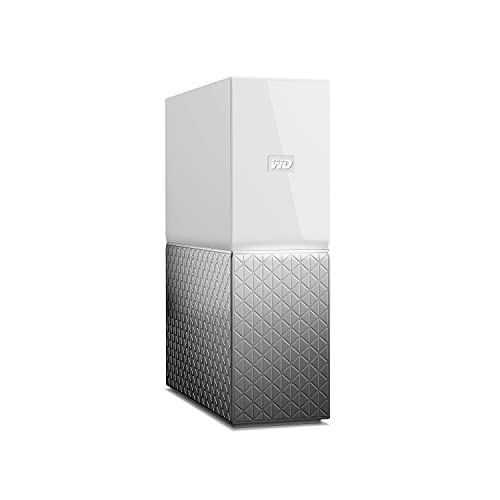
If you’re looking for a simple and effective way to centralize your digital life, the Western Digital 4TB My Cloud Home Personal Cloud is a standout option. This sleek white device offers 4TB of storage, perfect for backing up photos, videos, and files. Setting it up is a breeze using your mobile phone, and it automatically backs up mobile photos and videos. You can access, upload, and share your files from anywhere using the My Cloud Home apps. While some users report minor issues with compatibility, its flexibility and cost-effectiveness make it an attractive choice for secure offline cloud backup.
Best For: Those looking for a user-friendly and cost-effective solution to centralize and back up their digital media and files.
Pros:
- Easy setup via mobile phone for quick access to your files.
- Automatic backup feature for mobile photos and videos ensures your memories are safe.
- Accessible from anywhere with My Cloud Home apps, providing flexibility for users on the go.
Cons:
- Some compatibility issues reported with the latest MacOS versions.
- Mixed experiences with customer support, including delays in issue resolution.
- Users encountered challenges with accessing files, particularly with Time Machine backups.
BUFFALO TeraStation WS5420DN 32TB Desktop NAS
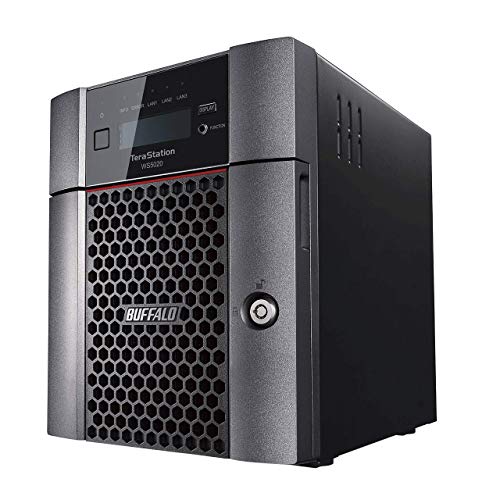
For professionals and small businesses seeking robust data protection, the BUFFALO TeraStation WS5420DN 32TB Desktop NAS stands out with its impressive 32 TB capacity and RAID 1 pre-configuration. With transfer speeds up to 10GbE, you’ll experience lightning-fast data access. The device supports various RAID configurations, allowing you to prioritize redundancy or maximum capacity. It runs on Windows Server IoT 2019, offering essential features like Azure Sync and Active Directory integration. Plus, its backup and disaster recovery options guarantee your data remains secure. Weighing 18.7 pounds, it fits seamlessly into your workspace, providing reliable offline cloud backup for your PC.
Best For: Professionals and small businesses looking for a high-capacity, reliable data storage solution with robust backup and disaster recovery features.
Pros:
- High Capacity: Offers 32 TB of storage, expandable through various RAID configurations for increased redundancy or full capacity.
- Fast Transfer Speeds: Achieves up to 10GbE speeds, allowing for rapid data access and transfer.
- Comprehensive Software Features: Integrates seamlessly with Windows Server IoT 2019, providing essential tools like Azure Sync and Active Directory.
Cons:
- Firmware Update Challenges: Users may experience difficulties with firmware updates.
- Drive Failure Alerts: Some users report receiving alerts about drive failures, which could cause concern.
- High Fan Noise: The device can produce high fan noise, particularly when USB HDDs are connected.
Factors to Consider When Choosing an Offline Cloud Backup for PC
When choosing an offline cloud backup for your PC, you need to take into account several key factors. Think about the storage capacity options, data transfer speed, and security features that meet your needs. Also, verify compatibility with your systems and ease of setup and configuration to make the process smooth.
Storage Capacity Options
Choosing the right storage capacity for your offline cloud backup solution is essential, as it directly impacts how well you can safeguard your data. Options typically range from 256GB for personal use to over 40TB for businesses. Consider how much data you currently have and anticipate future growth; a 4TB solution might suffice for home users, while enterprises may need 32TB or more. Pay attention to the number of bays in your storage system, as multiple bays allow for increased capacity and various RAID configurations, enhancing data protection. Select a solution that not only meets your current needs but also offers room for expansion, saving you from frequent upgrades and potential costs down the line.
Data Transfer Speed
After selecting the right storage capacity, the next consideration is data transfer speed, which can greatly impact how quickly you can back up and access your files. Typically, LAN speeds range from 8-10 megabits/sec, which might feel slow. However, using a network-attached storage (NAS) device can improve that to about 17 MB/s for a single computer and 24 MB/s with multiple devices. Opting for faster connection types like USB 3.0 or 10GbE can enhance transfer rates considerably, with 10GbE being ten times quicker than 1GbE. Additionally, higher rotational speeds of hard drives, such as 7200 RPM, can lead to faster data access. Choose user-friendly utilities to avoid delays during file transfers.
Security Features Available
Security is paramount in selecting an offline cloud backup solution for your PC, as it protects your valuable data from unauthorized access and potential breaches. Look for solutions that utilize strong encryption protocols, like 256-bit AES encryption, to safeguard your data during storage and transfer. Implementing multi-factor authentication (MFA) adds another layer of security, ensuring only authorized users can access sensitive information. Consider self-encrypting drives that automatically encrypt data at rest, reducing the risk of breaches. Regular software updates and firmware patches are essential to address vulnerabilities. Finally, user-defined access controls allow you to manage permissions, giving you the power to decide who can view, edit, or manage your backup data effectively.
Compatibility With Systems
When evaluating offline cloud backup solutions for your PC, compatibility with your system is a key factor that can greatly impact your backup experience. You should guarantee the solution works seamlessly with your operating system, as specific formats or configurations might be necessary. If you have both Windows and MacOS devices, look for a backup solution that supports both to cover your entire environment. It’s also essential to verify compatibility with older operating systems if you’re using legacy systems, as they may not support newer technology. Additionally, confirm that the backup software can handle your system’s file formats, like NTFS for Windows or HFS+ for Mac, and consider how easily it integrates with your existing applications to enhance usability.
Setup and Configuration
As you explore offline cloud backup solutions for your PC, the setup and configuration process plays a essential role in guaranteeing a smooth experience. Look for options with an easy setup, often accompanied by a quick guide or management utility that simplifies initial configuration. Automated backup features are critical, allowing you to set up backups for multiple devices without constant manual input. Additionally, check for individual access restrictions to safeguard sensitive data during setup. Consider solutions that support external drives via USB connections, expanding your backup capabilities. Finally, verify compatibility with your operating system to facilitate seamless integration and effective backup management right from the start.
Warranty and Support
After setting up your offline cloud backup solution, considering warranty and support is essential for long-term satisfaction. Warranty coverage can vary; some products only protect against hardware failures, while others include software issues. Look for longer warranties, as they often indicate greater reliability. However, be cautious—certain scenarios, like data recovery problems, might not be covered, leaving you responsible for your data management. Customer support experiences can also differ widely; some users face delays, while others receive quick assistance. To gauge the quality of support, read customer reviews. They can reveal common issues and how responsive the manufacturer is, helping you make an informed choice for a backup solution that meets your needs.