If you’re looking to upgrade your PC’s storage, you might want to contemplate the benefits of 3.5 inch to 2.5 inch adapters. These handy tools make it easy to convert your SSDs, maximizing internal space and improving data transfer rates. With a variety of options available, you can find the perfect fit for your setup. But before you choose, there are some key factors to keep in mind that could affect your decision.
ORICO 2.5 SSD to 3.5 Hard Drive Adapter Caddy Tray

If you’re looking to upgrade your old desktop with a faster SSD, the ORICO 2.5 SSD to 3.5 Hard Drive Adapter Caddy Tray is an excellent choice. This lightweight adapter converts 2.5-inch SATA drives to fit snugly in 3.5-inch bays, making installation a breeze. With a maximum data transfer rate of 6Gbps via SATA 3.0, you’ll enjoy speedy performance. Plus, it supports hot swapping, so you can easily plug and play without extra cables. Designed for ideal heat dissipation, it’s compatible with various SSD brands, ensuring you can boost your system’s speed and capacity with ease.
Best For: Users looking to upgrade older desktops by easily converting 2.5-inch SATA SSDs to fit in 3.5-inch drive bays.
Pros:
- Lightweight and easy installation: The design allows for quick mounting without adding bulk to your system.
- High data transfer rate: Supports up to 6Gbps, ensuring enhanced performance when upgrading from HDD to SSD.
- Hot swapping capability: Enables plug and play without the need for additional cables or drivers.
Cons:
- Limited to SATA drives: Only supports 2.5-inch SATA drives, which may not suit users with other types of drives.
- Not suitable for M.2 drives: Users with M.2 SSDs will require a different solution for installation.
- May have compatibility issues with some enclosures: While widely compatible, some older enclosures may not support this adapter effectively.
Corsair Dual SSD Mounting Bracket
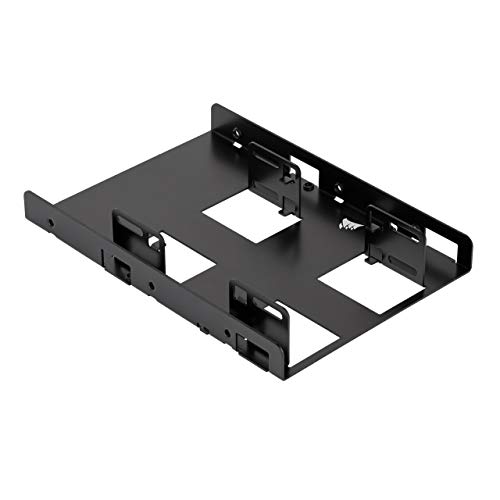
The Corsair Dual SSD Mounting Bracket is an ideal choice for those looking to maximize storage efficiency by converting a single 3.5” internal drive bay into space for two 2.5” SSDs. This bracket fits any desktop case with a standard 3.5” bay and supports both 7mm and 9.5mm SSD heights. Its adjustable mounting holes simplify installation, and the lightweight aluminum design guarantees durability. You’ll appreciate the clearance for easy SATA cable connections. Rated 4.7 stars, users praise its compatibility and ease of setup. Just be cautious with screws; a magnetic screwdriver can make installation smoother.
Best For: Those looking to enhance their desktop storage capacity by converting a single 3.5” drive bay into dual 2.5” SSD slots.
Pros:
- Easy installation with adjustable mounting holes and provided screws.
- Durable aluminum construction ensures longevity while remaining lightweight.
- Compatible with all brands of SSDs and supports both 7mm and 9.5mm heights.
Cons:
- Accessing certain screws can be challenging for some users.
- Requires a magnetic screwdriver for easier installation, which may not be included.
- Limited to installations in cases with a standard 3.5” internal drive bay.
SSD HDD Holder Mounting Bracket Adapter (2 Pack)

For those looking to upgrade their PC storage without breaking the bank, the SSD HDD Holder Mounting Bracket Adapter (2 Pack) is an excellent choice. Made of sturdy metal, these brackets allow you to convert 2.5” SSDs to fit standard 3.5” internal drive bays, making them compatible with all popular desktop cases. With straightforward installation using the included screws, you’ll appreciate the sleek black finish and secure fit. Users rate this product 4.4 stars, highlighting its quality construction and ease of use. Plus, with Amazon’s 30-day return policy, you can buy with confidence.
Best For: Users looking to upgrade their PC storage by converting 2.5” SSDs to fit 3.5” internal drive bays in standard desktop cases.
Pros:
- Sturdy metal construction ensures durability and a secure fit.
- Easy installation with included screws makes it user-friendly.
- Sleek black finish complements most PC setups aesthetically.
Cons:
- Some users report issues with screw fitting and quality control.
- May not fit cases that require bottom screws for mounting.
- Limited to compatibility with standard 3.5” internal drive bays.
2.5 SSD to 3.5 SATA Hard Disk Drive Adapter Caddy Tray

Designed for users looking to upgrade or repurpose existing setups, the DSLRKIT 2.5 SSD to 3.5 SATA HDD Adapter Caddy Tray seamlessly fits 2.5 SATA/SAS SSDs into standard 3.5 drive bays. Weighing just 0.12 kg, this lightweight adapter allows for easy installation, ensuring a secure fit in hot-swap capable drive cages. With a data transfer rate of up to 6000 MB/s, you’ll enjoy reliable performance without speed issues. Plus, its open design enhances airflow, promoting better cooling. Users rave about its durability and compatibility, making it a top choice for Lenovo Thinkstation, HP Pavilion, and iMac installations.
Best For: Users looking to upgrade their systems or repurpose existing setups by fitting 2.5 SSDs into standard 3.5 drive bays.
Pros:
- Durable construction with lightweight design for easy handling.
- High data transfer rate of up to 6000 MB/s ensures reliable performance.
- Open design enhances airflow, promoting better cooling during operation.
Cons:
- Limited to accommodating only one device at a time.
- May require additional screws for specific mounting configurations.
- Compatibility primarily focused on hot-swap capable drive cages, which may not be available in all systems.
SABRENT Internal Hard Disk Drive Mounting Bracket Kit (BK-HDDH)

Transforming a 2.5-inch hard drive into a 3.5-inch mounting solution is a breeze with the SABRENT Internal Hard Disk Drive Mounting Bracket Kit (BK-HDDH). This kit is compatible with all 2.5-inch drives, including SSDs, and fits seamlessly in 3.5-inch internal drive bays. Installation is quick, thanks to the included screw pack and versatile mounting options. Users appreciate the solid construction and ample airflow, though some have noted challenges with right-angle SATA cables. With an impressive average rating of 4.7 stars from nearly 20,000 reviews, this bracket is a reliable choice for your storage upgrade.
Best For: Those looking to convert a 2.5-inch hard drive or SSD for use in a 3.5-inch drive bay with ease and reliability.
Pros:
- Quick and easy installation with included screw pack and versatile mounting options.
- Solid construction with good airflow, enhancing overall performance and longevity.
- High customer satisfaction with an average rating of 4.7 stars from nearly 20,000 reviews.
Cons:
- Some users experience difficulty with right-angle SATA cables due to drive positioning.
- Limited cable routing options may not suit every setup.
- The design may not accommodate all drive configurations perfectly.
3.5 to 2.5 SSD Hard Drive Tray Adapter Bracket (2-Pack)

If you’re looking to upgrade your server’s storage capabilities, the 3.5 to 2.5 SSD Hard Drive Tray Adapter Bracket (2-Pack) is a top choice for users of Dell, HP, and Lenovo systems. This adapter set includes two brackets and eight mounting screws, ensuring a straightforward installation for various server models. It’s compatible with notable Dell and HP systems, making it a versatile option for your needs. With an average rating of 4.6 stars, users praise its sturdy design and ease of use. Plus, Maravi Canada offers a 30-day return policy, reflecting their commitment to customer satisfaction.
Best For: Users of Dell, HP, and Lenovo systems looking to upgrade their server’s storage capabilities with a reliable SSD adapter.
Pros:
- Sturdy design ensures durability and long-lasting performance.
- Easy installation with included mounting screws simplifies the setup process.
- Versatile compatibility with a wide range of server models from Dell and HP.
Cons:
- Some users report screw compatibility issues with specific server models.
- Additional support for SSDs could improve the design further.
- Limited warranty period of 30 days may concern some buyers.
8Pcs SSD HDD Hard Disk Drive Bays Holder Metal Mounting Bracket Adapter
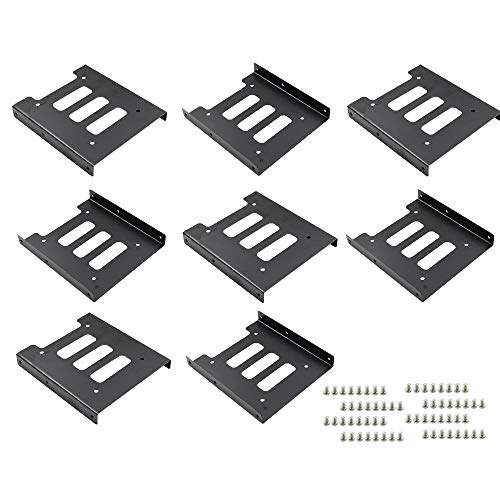
For PC enthusiasts looking to upgrade their storage options, the 8Pcs SSD HDD Hard Disk Drive Bays Holder Metal Mounting Bracket Adapter is an ideal solution. This package includes eight sturdy metal brackets and 64 screws, making installation a breeze. Measuring 4.72 x 3.94 x 0.55 inches, these brackets fit seamlessly in any 3.5-inch internal drive bay, accommodating both HDDs and SSDs. The durable metal alloy guarantees effective heat dissipation and protects your hard disks from deformation. Plus, you can stack two SSDs within a single bracket for added flexibility. Enjoy a 90-day satisfaction guarantee with your purchase!
Best For: PC enthusiasts seeking a reliable and efficient way to upgrade their storage options with easy installation and flexibility.
Pros:
- Durable metal alloy construction ensures longevity and effective heat dissipation.
- Easy installation process allows for quick setup, even for those with minimal technical skills.
- Flexibility to stack two SSDs within a single bracket, maximizing storage capacity in limited space.
Cons:
- Limited to 3.5-inch internal drive bays, which may not fit all devices.
- May require additional tools for installation if screws are not readily available.
- Stacking SSDs could complicate future upgrades or maintenance due to space constraints.
SSD Bracket 2.5 to 3.5 Mounting Bracket Hard Disk Adapter (2 Pack) (Black)

The SSD Bracket 2.5 to 3.5 Mounting Bracket Hard Disk Adapter (2 Pack) (Black) is an excellent choice for anyone looking to maximize their PC’s internal space while upgrading to SSD technology. Manufactured by ECKDZMY, this sturdy adapter supports 2.5-inch hard drives and is compatible with SATA I, II, and III. With quick installation using the included screws, you’ll have no trouble retrofitting SSDs into your 3.5-inch drive bays. Plus, it enhances your build’s aesthetic while providing solid functionality. Just keep an eye on compatibility for certain devices, and you’ll enjoy a seamless upgrade experience.
Best For: Users looking to upgrade their PC by retrofitting 2.5-inch SSDs into 3.5-inch drive bays for improved performance and internal space optimization.
Pros:
- Sturdy build quality ensures durability and longevity.
- Easy installation with included screws makes setup quick and straightforward.
- Maximizes internal space, allowing for efficient use of existing drive bays.
Cons:
- Compatibility issues reported with specific devices, such as the Synology DS224+.
- Some customers noted slight size discrepancies, which may affect fit.
- Packaging concerns have been mentioned, affecting the overall presentation.
PASOW 2 Pack SSD HDD Hard Disk Drive Bays Holder Adapter
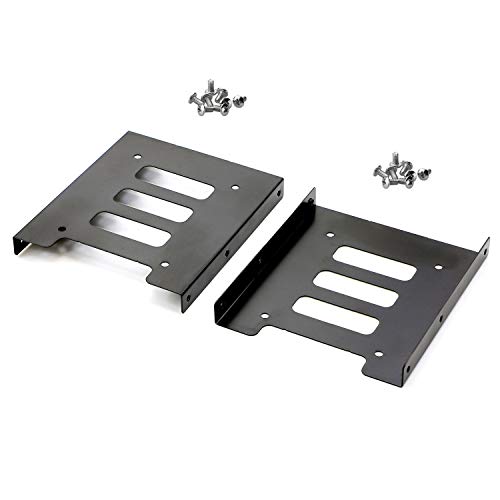
Looking to upgrade your PC’s storage capacity? The PASOW 2 Pack SSD HDD Hard Disk Drive Bays Holder Adapter is an excellent choice. This metal mounting bracket adapter converts your 2.5-inch SSDs and HDDs to fit into standard 3.5-inch drive bays, ensuring compatibility with any desktop. With dimensions of approximately 12x10x1.5 cm, it maximizes internal space for efficient usage. Plus, the package includes 16 screws for easy installation, making it a hassle-free upgrade. Say goodbye to storage limitations and enhance your PC’s performance with this reliable and practical adapter from PASOW!
Best For: Those looking to expand their desktop storage by converting 2.5-inch SSDs and HDDs to fit 3.5-inch drive bays.
Pros:
- Easy Installation: Comes with 16 screws, making it simple to mount the bracket onto your PC case.
- Space Optimization: Maximizes internal space within the computer case, enhancing storage efficiency.
- Universal Compatibility: Fits any desktop computer or device with a 3.5-inch internal drive bay.
Cons:
- Limited to 2.5-inch Drives: Only supports 2.5-inch SSDs and HDDs, not suitable for other sizes.
- Metal Construction: While durable, the metal material may add slight weight to the setup.
- No Additional Cooling Features: Lacks built-in cooling solutions for drives, which may be a concern for high-performance setups.
SABRENT 2.5” SSD & SATA Hard Drive to Desktop 3.5” SATA Bay Converter Mounting Kit
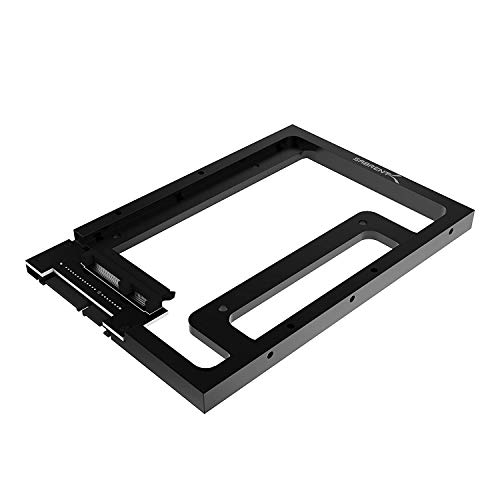
If you’re seeking a reliable solution to upgrade your PC’s storage, the SABRENT 2.5” SSD & SATA Hard Drive to Desktop 3.5” SATA Bay Converter Mounting Kit stands out as an ideal choice. This converter is compatible with any 2.5-inch SATA drive and fits seamlessly into 3.5-inch drive bays, ensuring maximum performance with SATA 3.0 compatibility. Its open design promotes airflow, keeping your drives cool. Installation is a breeze, thanks to included screws and a low-profile design that fits in tight spaces. With a solid aluminum build and positive customer feedback, it’s a practical upgrade for any PC enthusiast.
Best For: Users looking to upgrade their PC storage by replacing 3.5-inch HDDs with 2.5-inch SSDs in a compact and efficient manner.
Pros:
- Easy installation with all necessary screws included.
- Solid aluminum construction ensures durability and proper cooling.
- Low-profile design fits into various case types, even in tight spaces.
Cons:
- Some users report minor aesthetic issues related to paint and thread quality.
- May not be suitable for those needing to install multiple drives due to space constraints.
- Detachable SATA converter may be unnecessary for some setups, leading to potential confusion during installation.
Factors to Consider When Choosing 3.5 Inch to 2.5 Inch Adapters for PC
When choosing a 3.5 inch to 2.5 inch adapter for your PC, you need to take into account several key factors. Verify the adapter is compatible with your drive types and check how easy it is to install. Additionally, look at the material quality, heat dissipation design, and the maximum supported drive capacity to guarantee peak performance.
Compatibility With Drive Types
Choosing the right 3.5 inch to 2.5 inch adapter for your PC requires careful consideration of compatibility with different drive types. First, make sure the adapter supports both SSD and HDD, as some are limited to specific technologies. Check for compatibility with SATA I, II, or III interfaces, which guarantees peak data transfer rates and backward compatibility. It’s also essential to confirm that the adapter accommodates various thicknesses of 2.5-inch drives, typically between 7mm and 12.5mm. If you value convenience, look for adapters with hot-swapping capabilities, allowing easy installation and removal without powering down your system. Finally, verify that the mounting design aligns with your computer case’s internal drive bay specifications for a secure fit.
Installation Ease and Process
While selecting a 3.5 inch to 2.5 inch adapter, you’ll want to prioritize installation ease and the overall process to guarantee a smooth upgrade. Look for adapters that include all necessary mounting screws to save you time and avoid extra purchases. Adjustable mounting holes are a plus, as they allow flexible positioning of SSDs, fitting various drive bay configurations. Choose models that emphasize quick installation, ideally those that support plug-and-play functionality, so you won’t have to deal with complex setups. Lightweight designs make handling easier and assure secure fitting in the drive bay without adding bulk. Finally, check user reviews for insights; they often highlight ease of use or any challenges with screw placements.
Material Quality and Durability
The material quality of a 3.5 inch to 2.5 inch adapter is vital for guaranteeing durability and performance. Adapters made from high-quality metal or flame-retardant plastics tend to last longer and withstand heat better. Metal construction offers superior strength, preventing deformation, which keeps your drives securely in place. While a lightweight design can facilitate easier installation and portability, it shouldn’t compromise structural integrity. You want an adapter that protects your drives effectively. Quality control during manufacturing also plays a significant role; adapters that undergo strict inspections are less likely to have defects leading to failures. Investing in an adapter made from durable materials guarantees you won’t face issues down the line, giving you peace of mind with your storage upgrade.
Heat Dissipation Design
Heat dissipation is a critical factor when selecting a 3.5 inch to 2.5 inch adapter for your PC. Effective heat management guarantees peak performance and longevity of your SSDs and HDDs, especially in a 3.5-inch bay where airflow can be limited. Look for adapters that feature open layouts or ventilation designs to enhance airflow around the drive, preventing overheating during demanding tasks. Choosing metal brackets over plastic can also improve thermal conductivity. Some adapters come with airflow channels or heat sinks, specifically designed for high-performance setups. Additionally, make sure the adapter allows for sufficient space between the drive and enclosure, promoting better air circulation and further aiding in heat dissipation. Your components will thank you with improved performance!
Maximum Supported Drive Capacity
Choosing the right 3.5-inch to 2.5-inch adapter involves considering the maximum supported drive capacity, which can reach up to 10 TB for some models. Confirm the adapter you pick can handle larger SSDs, as this will future-proof your storage needs. It’s also vital to check the data transfer rates; models offering up to 6 Gbps with SATA 3.0 will enhance performance when using high-capacity drives. Don’t forget to verify backward compatibility with older SATA standards, as it may impact lower-capacity drives. Additionally, consider the weight limits of different adapters and choose one that can support the SSDs or HDDs you plan to install. Look for designs that promote airflow, helping maintain ideal temperatures during operation.
Included Mounting Accessories
When it comes to 3.5-inch to 2.5-inch adapters, included mounting accessories can make a significant difference in your installation experience. Make sure the kit includes essential mounting screws, as offerings can vary widely; you might find anywhere from 8 to 16 screws for a secure fit. Look for adapters that come with extras like screwdrivers or cable splitters, making installation smoother and enhancing compatibility. Adjustable mounting holes can also be a game-changer, allowing for flexible SSD placements. Consider how many adapters are in the package—options range from single units to multi-packs, perfect for multiple installations. Finally, check if a warranty or satisfaction guarantee is included, reflecting the manufacturer’s commitment to quality and your long-term satisfaction.
Price and Value Comparison
Finding the right 3.5-inch to 2.5-inch adapter for your PC can greatly impact your overall satisfaction and performance. Prices typically range from $10 to $25, making it easy to find an option that fits your budget. Look for adapters with customer ratings between 4.4 to 4.7 stars, which indicate a solid value-to-performance ratio. Many models support data transfer rates up to 6Gbps, enhancing your upgrade from HDD to SSD. Additionally, some adapters include screws and installation components, saving you from extra purchases. When choosing, prioritize affordability while ensuring you get the best functionality and build quality for your money. Balancing these factors will help you make a wise investment in your PC’s storage capabilities.