In 2025, optimizing your workspace is essential, and the right Thunderbolt dock can make a significant difference. With integrated storage solutions and robust connectivity options, these docks can streamline your setup and boost productivity. Whether you’re a professional or a creative, choosing the best dock tailored to your needs is vital. Explore the top options available and discover how they can elevate your tech experience. What features should you prioritize for your ideal setup?
Plugable Thunderbolt 4 Dock for M4 MacBook Air & Pro

If you own an M4 MacBook Air or Pro and need a versatile docking solution, the Plugable Thunderbolt 4 Dock is ideal for you. This 13-in-1 docking station offers a robust port configuration, including dual 4K HDMI outputs and multiple USB ports for seamless connectivity. With 100W host charging and data transfer speeds up to 40Gbps, it enhances your productivity considerably. The aluminum-clad design guarantees durability, while its plug-and-play functionality makes setup a breeze. Plus, you’ll benefit from lifetime support, assuring you always have assistance when needed. It’s a reliable choice for maximizing your M4 Mac’s capabilities.
Best For: Users with M4 MacBook Air or Pro who need a versatile docking solution for enhanced connectivity and productivity.
Pros:
- Robust Port Configuration: Includes dual 4K HDMI outputs and multiple USB ports for extensive connectivity options.
- High Performance: Supports 100W host charging and data transfer speeds up to 40Gbps.
- Durable Design: Aluminum-clad build ensures longevity and reliability.
Cons:
- Limited Ethernet Support: Only offers Gigabit Ethernet, lacking 2.5Gb Ethernet capabilities.
- Gaming Limitations: Not designed for ultra-high refresh gaming monitors; lacks support for 4K@120Hz.
- Missing Cables: HDMI cables are not included for dual monitor setup, requiring additional purchases.
Anker Prime TB5 Docking Station (14-in-1 Thunderbolt 5 Dock)

The Anker Prime TB5 Docking Station stands out as an exceptional choice for power users who need robust connectivity and performance. With 14 ports, including Thunderbolt 5, USB-C, and HDMI 2.1, you can effortlessly connect multiple devices. Experience lightning-fast file transfers—move 150GB in just 25 seconds—and enjoy dual 8K display support. Plus, the advanced cooling system keeps everything running smoothly. Although it’s a bit pricey, users appreciate the stylish design and high build quality. You’ll also get a 24-month warranty and extensive customer support, making this dock a reliable addition to your tech setup.
Best For: Power users and professionals seeking high-performance connectivity with multiple device support and dual 8K display capabilities.
Pros:
- Versatile 14-in-1 connectivity with Thunderbolt 5, USB-C, and HDMI 2.1 ports.
- Lightning-fast file transfer speeds, moving 150GB in just 25 seconds.
- Stylish design with high build quality and an effective advanced cooling system.
Cons:
- Price may be considered steep compared to other docking stations.
- Limited SD card reader speed (UHS-I) may not meet all users’ needs.
- Only one video output at a time (HDMI or DisplayPort) for certain configurations.
OWC Thunderbolt 5 Hub with 3 x Thunderbolt 5 Ports

For users seeking robust connectivity options, the OWC Thunderbolt 5 Hub stands out with its three Thunderbolt 5 ports, offering an impressive data speed of up to 80Gb/s. You can connect up to three 8K displays, ensuring stunning visuals for your projects. With a power delivery of up to 140 watts, it efficiently charges your devices. This hub is compatible with Thunderbolt 5, 4, 3, USB4, and USB-C, making it versatile for various setups. The fanless aluminum enclosure promises quiet operation, although some users have reported mixed experiences with device recognition on Windows. Overall, it’s a solid choice for enhancing your workspace.
Best For: Users looking for high-performance connectivity solutions with multiple display support and fast data transfer rates.
Pros:
- Supports up to three 8K displays, providing exceptional visual quality for creative professionals.
- High data speeds of up to 80Gb/s, ensuring efficient transfers for large files and quick device connectivity.
- Fanless aluminum design offers quiet operation, making it suitable for noise-sensitive environments.
Cons:
- Some users have reported issues with device recognition and software compatibility, particularly on Windows.
- Mixed feedback on customer service and product reliability, with some experiencing delays in order fulfillment.
- Notable concerns regarding Thunderbolt 3 compatibility on Windows devices, which may limit usability for some users.
Plugable Thunderbolt 4 Dock with 100W Charging (TBT4-UD5)
Engineered for professionals and creatives, the Plugable Thunderbolt 4 Dock with 100W Charging (TBT4-UD5) stands out with its ability to support dual 4K 60Hz displays or a single 8K display. You’ll appreciate its 13 high-performance ports, which allow for seamless connectivity with USB-C peripherals and high-speed storage. Experience ultra-fast 40Gbps speeds and reliable Ethernet with a built-in 1 Gbps port. While its design is sturdy, some users prefer a rear Thunderbolt port for a tidier workspace. With an average rating of 4.2 stars, you’ll find solid performance and responsive customer support from Plugable.
Best For: Professionals and creatives seeking a high-performance docking solution for dual 4K or single 8K display setups.
Pros:
- Supports dual 4K 60Hz displays or a single 8K display for enhanced multitasking.
- Offers ultra-fast 40Gbps speeds and reliable 1 Gbps Ethernet connectivity.
- Includes 13 high-performance ports for versatile connectivity with various peripherals.
Cons:
- Some users prefer rear placement of the Thunderbolt port for a tidier workspace.
- Occasional reports of intermittent disconnections during use.
- Setup difficulties with monitor assignments noted by some users.
Cable Matters 14-in-1 Thunderbolt Dock
![[Intel Certified] Cable Matters 14-in-1 Thunderbolt Dock, 100W Charging](https://m.media-amazon.com/images/I/41S-3RQEeyL._SL500_.jpg)
If you’re looking for a versatile docking solution, the Cable Matters 14-in-1 Thunderbolt Dock stands out with its ability to support dual 4K displays at 60Hz. With 14 ports, including HDMI, DisplayPort, and multiple USB options, you can easily connect all your devices. This dock delivers 100W charging and features Gigabit Ethernet for reliable connectivity. Its compact design and solid aluminum build make it a stylish addition to your workspace. Users appreciate its plug-and-play functionality and excellent audio quality, though some have noted minor flickering issues with 4K displays using KVM switches. Overall, it’s an affordable, high-performing option.
Best For: Those seeking an affordable and versatile docking station to connect multiple devices while supporting dual 4K displays.
Pros:
- Robust connectivity with 14 ports, including HDMI, DisplayPort, and various USB options.
- 100W charging capability for laptops and reliable Gigabit Ethernet for internet connectivity.
- Compact and stylish aluminum design with plug-and-play functionality for easy setup.
Cons:
- No power button, requiring the laptop display to be opened for activation.
- Minor flickering issues reported with 4K displays when using KVM switches.
- Customer support could be more thorough in troubleshooting user issues.
HP USB-C Dock G5 11-in-1 Adapter for Laptops and PCs
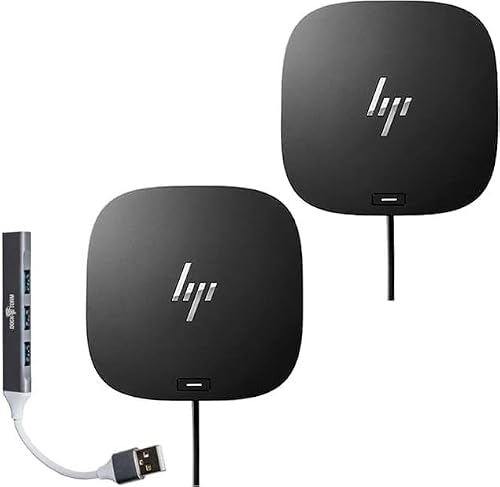
The HP USB-C Dock G5 11-in-1 Adapter is an ideal choice for professionals who need seamless connectivity across various devices and monitors. This compact dock, measuring just 4.8 x 4.8 x 1.77 inches, fits neatly on your desk while minimizing cable clutter. It connects to USB-C and Thunderbolt-enabled laptops, including popular brands like HP, Apple, and Dell. With a single cable, you can easily interface with up to three displays, supporting charging, networking, and data transfers. Plus, its advanced IT management features make tracking and firmware updates a breeze, ensuring you stay organized and efficient in your work.
Best For: Professionals seeking a compact and efficient docking solution for seamless connectivity across multiple devices and monitors.
Pros:
- Supports connection to up to three displays with a single cable, enhancing productivity.
- Compact design reduces desk clutter and saves space.
- Advanced IT management features facilitate easy tracking and firmware updates.
Cons:
- Some compatibility concerns reported with specific HP models.
- Limited to USB-C and Thunderbolt-enabled devices, which may exclude older laptops.
- Customer feedback indicates potential issues with certain USB devices.
CalDigit TS5 Plus Thunderbolt 5 Dock

For professionals and creatives who demand high-performance connectivity, the CalDigit TS5 Plus Thunderbolt 5 Dock stands out with its impressive array of 20 ports, including three Thunderbolt 5 connections that deliver lightning-fast data transfer rates. You’ll enjoy seamless connections with up to Dual 8K 60Hz displays and rapid file transfers via the 10GbE network. Plus, the dedicated 140W host charging port guarantees your power-hungry laptop stays charged. Its sleek aluminum chassis efficiently dissipates heat, while compatibility with Thunderbolt and USB4 devices maximizes performance. Experience the ultimate docking solution that meets your creative and professional needs effortlessly.
Best For: Professionals and creatives who require high-performance connectivity with multiple devices and displays.
Pros:
- 20 ports including multiple Thunderbolt 5 and USB ports for versatile connectivity options.
- High display support with capabilities for Dual 8K 60Hz displays, ideal for graphic design and video editing.
- Powerful charging capability with a dedicated 140W host port, ensuring laptops remain charged during intensive tasks.
Cons:
- Reduced functionality when connected to Thunderbolt 3 or 4 devices, limiting full potential.
- Higher price point compared to standard docks, making it less accessible for casual users.
- Limited compatibility with non-Thunderbolt or USB4 devices, restricting usage options.
Amazon Basics Thunderbolt 4/USB4 Pro Docking Station

Designed for users with Thunderbolt 4-capable devices, the Amazon Basics Thunderbolt 4/USB4 Pro Docking Station delivers exceptional versatility and connectivity. Weighing just 2.15 pounds, it fits seamlessly into your workspace. With dual Thunderbolt 4 USB-C ports, an HDMI 2.1 port, and multiple USB A connections, you can easily connect various peripherals. It supports dual 4K displays or an 8K screen, ensuring stunning visuals. Plus, the RJ45 Ethernet port provides fast internet speeds up to 2.5Gbps. Users appreciate its plug-and-play functionality and compact design, making it a reliable choice without breaking the bank. Enjoy enhanced productivity with this dock!
Best For: Users with Thunderbolt 4-capable devices seeking a versatile and cost-effective docking solution for enhanced productivity.
Pros:
- Excellent connectivity with multiple ports including Thunderbolt 4, HDMI 2.1, and USB A, accommodating various peripherals.
- Supports dual 4K displays or an 8K screen, providing stunning visual quality for multitasking or creative work.
- Compact and lightweight design makes it easy to integrate into any workspace without taking up much space.
Cons:
- Limited compatibility with certain laptops, leading to potential issues with audio output and monitor connectivity after sleep mode.
- Thunderbolt bandwidth is shared across devices, which may reduce display resolution and LAN speed when multiple high-bandwidth connections are used.
- Heat management may cause the docking station to reach temperatures of 122°F/50°C under full load, which could be a concern for some users.
Plugable Thunderbolt 5 Dock (TBT-UDT3)

Looking for a powerful solution to enhance your workspace? The Plugable Thunderbolt 5 Dock (TBT-UDT3) boasts 11-in-1 capabilities, featuring three Thunderbolt 5 ports that deliver up to 120Gbps and 140W power. You can connect dual 8K 120Hz displays on Windows or dual 6K 60Hz displays on Mac, thanks to its advanced bandwidth boost. With additional USB ports, SD, and MicroSD slots, plus 2.5Gbps Ethernet, it offers versatile connectivity. Compatible with Thunderbolt 5, 4, and full-featured USB4 systems, this dock meets all your needs while providing reliable support from North American experts. Enhance your setup with the TBT-UDT3 today!
Best For: Professionals and creatives using macOS or Windows systems who require high-resolution display capabilities and versatile connectivity options.
Pros:
- Supports dual 8K displays for Windows and dual 6K displays for Mac, enhancing your visual experience.
- Equipped with multiple ports including Thunderbolt 5, USB 10Gbps, and Ethernet, providing extensive connectivity options.
- Designed for reliability with lifetime support from North American connectivity experts.
Cons:
- Higher price point compared to standard docking stations may not be suitable for budget-conscious users.
- Requires Thunderbolt 5, Thunderbolt 4, or full-featured USB4 ports, limiting compatibility with older systems.
- May be overkill for users with basic connectivity needs, as its advanced features are geared towards high-performance setups.
Belkin Connect Thunderbolt 4 Docking Station (5-in-1 USB-C Multiport Hub)

The Belkin Connect Thunderbolt 4 Docking Station stands out as the ideal choice for users needing high-performance connectivity and versatile display options. With its 5-in-1 configuration, you get three Thunderbolt 4 USB-C ports, one USB-A port, and lightning-fast data transfer speeds up to 40 Gbps. You can easily connect a single 8K or dual 4K displays while delivering 96W of power to your devices. Its low-profile design integrates seamlessly into your workspace, and it supports daisy-chaining up to six devices. Plus, with a three-year warranty, you can trust in its long-term reliability and sustainable materials.
Best For: Users seeking a high-performance docking solution for multi-display setups and fast data transfer.
Pros:
- Fast Data Transfer: Up to 40 Gbps, significantly quicker than USB 3.0.
- Versatile Display Support: Connects single 8K or dual 4K displays effortlessly.
- Sustainable Design: Made with a minimum of 72% post-consumer recycled content and 100% plastic-free packaging.
Cons:
- Monitor Wake Issues: Some users experience difficulties waking monitors from sleep.
- Battery Charging Delays: May require unplugging for optimal charging performance.
- LED Indicator Confusion: Different LED colors may not be intuitive for all users.
Factors to Consider When Choosing Thunderbolt Docks With Storage for PC
When you’re choosing a Thunderbolt dock with storage for your PC, you should consider several key factors. Look at the variety and speed of ports available, as well as the power delivery capacity to keep your devices charged. Don’t forget to check compatibility with your devices and the quality of build and design for durability.
Port Variety and Speed
Choosing the right Thunderbolt dock for your PC hinges on the variety and speed of its ports. You’ll want to look for docks that feature multiple types of connections, like Thunderbolt 4, USB-A, USB-C, HDMI, and Ethernet, ensuring compatibility with your devices. Speed matters too; Thunderbolt 4 can deliver up to 40 Gbps, while Thunderbolt 5 pushes that to 120 Gbps, essential for efficient data management. Make sure the dock supports your display needs, with options for dual 4K or even 8K outputs. Also, check for high-speed card readers and extra USB ports for added functionality. This way, you can expand your storage and connect multiple devices effortlessly.
Power Delivery Capacity
Along with port variety and speed, power delivery capacity plays a significant role in selecting a Thunderbolt dock for your PC. Measured in watts (W), this capacity determines how much power can be supplied to connected devices. Common capacities range from 60W to 140W, with higher delivery, like 100W or 140W, being essential for power-hungry laptops. Many docks support Power Delivery (PD) 3.1, which enhances charging efficiency. Remember, the total power output is shared among all devices, so consider each peripheral’s power needs to avoid underpowering any of them. Some docks even feature dynamic power management, optimizing charging based on device requirements and reducing the risk of overload, ensuring a reliable setup for your PC.
Display Support Options
If you want to maximize your visual experience with a Thunderbolt dock, display support options should be at the top of your list. Consider whether you need dual 4K displays at 60Hz or even a single or dual 8K setup, depending on the dock’s capabilities. Be certain to check compatibility with your laptop’s graphics, as some docks may only support one external display on entry-level models. Look for docks featuring advanced technologies like HDMI 2.1 or DisplayPort 2.1 to enjoy higher resolutions and refresh rates. Additionally, assess the number of video output ports available and verify the dock’s bandwidth can handle multiple high-resolution displays effectively. Your visual experience hinges on these vital factors.
Build Quality and Design
When investing in a Thunderbolt dock, build quality and design are just as important as display support options. Look for docks made from aluminum rather than plastic, as aluminum provides better durability and heat management. A compact design helps reduce desk clutter, making it easier to manage cables and peripherals. Weight also matters; heavier docks typically offer a more stable base, preventing unwanted movement during connections. Pay attention to the dimensions too, as larger docks can hinder access to other devices and occupy valuable desk space. Finally, effective heat management features, like active cooling systems, are essential for high-performance docks to avoid overheating during intensive tasks, ensuring your setup runs smoothly.
Compatibility With Devices
How can you guarantee your Thunderbolt dock seamlessly integrates with your devices? First, verify the dock matches your device’s Thunderbolt version—whether it’s 3, 4, or 5—to access peak performance. Next, verify compatibility with your operating system, as some docks may have limited functionality with macOS base models like M1, M2, or M3. If you plan on using multiple displays, check if the dock supports dual or triple setups, as some only handle one external screen. Additionally, confirm the power delivery specifications to make sure it can charge your device while powering peripherals. Finally, look for support of various USB standards; docks compatible with USB4 or USB-C enhance connectivity across a broader range of devices.