When you’re working with high-resolution images and 8K RAW videos, having the right CFexpress reader can make all the difference. The market offers a variety of fast and reliable options tailored for photographers like you. These readers not only support different card types but also guarantee efficient data transfer, streamlining your workflow. Curious about which models stand out and why they might be essential for your setup? Let’s explore the top contenders.
BENFEI CFexpress Type A Card Reader with USB 3.2 (Gen 2)

If you’re looking for a reliable and fast solution to transfer data from CFexpress Type A memory cards, the BENFEI CFexpress Type A Card Reader with USB 3.2 (Gen 2) is your best bet. This card reader offers impressive data transfer speeds of up to 10Gbps, ensuring quick access to your files. Its 2-in-1 design features both USB-C and USB-A compatibility, making it versatile for different devices. With a durable braided nylon housing and an 18-month warranty, you can trust its quality. Plus, it’s plug-and-play across various operating systems, so you won’t need to deal with cumbersome drivers.
Best For: Photographers and videographers using CFexpress Type A memory cards who need a fast and reliable data transfer solution.
Pros:
- Fast data transfer speeds of up to 10Gbps for quick access to files.
- Durable build quality with braided nylon housing and aluminum alloy connectors.
- Plug-and-play functionality across multiple operating systems with no drivers required.
Cons:
- Limited compatibility as it only supports CFexpress Type A cards and not Type B or SD cards.
- Potential connection stability issues on specific devices noted by some users.
- Average customer ratings indicate that while generally positive, there are occasional concerns regarding performance.
Lexar Professional CFexpress Type B / SD USB 3.2 Gen 2 Reader

The Lexar Professional CFexpress Type B / SD USB 3.2 Gen 2 Reader is an ideal choice for professional photographers and videographers who demand high-speed performance and versatility. With transfer speeds of up to 10Gbps, it efficiently handles high-resolution images and 8K RAW videos. Its compact design and dual-slot functionality allow simultaneous offloading from CFexpress Type B and SD cards, making it perfect for on-the-go workflows. Weighing only 4.5 ounces, it’s easy to transport. While some users report issues with file corruption and overheating, its overall performance and robust build quality make it a worthwhile investment for serious creators.
Best For: Professional photographers and videographers who require high-speed performance and versatility for handling large volumes of files.
Pros:
- High transfer speed (10Gbps)
- Dual compatibility (CFexpress Type B and SD)
- Compact and portable design
Cons:
- Higher price point compared to some alternatives
- Some users report issues with file corruption
- Occasional overheating problems
BENFEI CFexpress Type B Card Reader (USB 3.2, 2-in-1 Adapter)

For photographers and videographers who rely on high-speed data transfer, the BENFEI CFexpress Type B Card Reader is an excellent choice. It supports USB 3.2 Gen 2, delivering impressive 10Gbps data transfer speeds, ensuring your files move quickly. With its 2-in-1 design featuring both USB-C and USB-A connectors, it works seamlessly with various computers and laptops. Built with durability in mind, the braided nylon housing withstands over 10,000 bends, while the aluminum alloy casing enhances reliability. Plus, you get an 18-month warranty and responsive customer support, making it a solid investment for your workflow.
Best For: Photographers and videographers who need a reliable and high-speed solution for transferring CFexpress Type B memory cards.
Pros:
- High-speed data transfer with USB 3.2 Gen 2, achieving up to 10Gbps.
- Durable design with braided nylon housing and aluminum alloy casing for enhanced reliability.
- Versatile compatibility with both USB-C and USB-A connectors, working across multiple operating systems.
Cons:
- Not compatible with XQD cards or CFexpress Type A/C, limiting its use to specific card types.
- Actual transfer speeds may vary depending on the card and USB slot type.
- Limited to USB 3.0 or USB Type-C ports for optimal performance, which may not be available on all devices.
Lexar Professional Workflow CFexpress Type B Card Reader

Designed for professional photographers and videographers, the Lexar Professional Workflow CFexpress Type B Card Reader offers lightning-fast data transfer speeds of up to 40Gbps, making it an essential tool for handling large files efficiently. It supports both CFexpress 4.0 and 2.0, ensuring versatile compatibility. The compact, aluminum design not only resists scratches but also makes it easy to transport. Plus, with a USB-C to USB-C cable included, you can connect seamlessly to various devices. While some users reported issues with file corruption, many praised its speed and build quality, making it a worthy investment for serious photographers.
Best For: Professional photographers and videographers looking for a reliable and fast card reader for handling large files.
Pros:
- Fast transfer speeds up to 40Gbps, ideal for large file batches.
- Dual compatibility for CFexpress Type B and SD cards, enhancing versatility.
- Sturdy aluminum build designed for frequent use and portability.
Cons:
- Higher price point compared to other card readers on the market.
- Some users have reported issues with bent pins or file corruption.
- Requires careful handling to avoid potential damage.
CFexpress Type B Card Reader with USB 3.2 Adapter

Whether you’re a photography enthusiast or a videographer, the CFexpress Type B Card Reader with USB 3.2 Adapter is an ideal choice for quick and efficient data transfers. It supports USB 3.2 Gen 2, enabling impressive speeds of up to 10Gbps, provided your device can handle it. With its 2-in-1 design featuring USB-C and USB-A connectors, it works seamlessly across various operating systems. Its compact, lightweight build makes it perfect for outdoor shoots, easily fitting in your pocket or bag. Plus, it comes with essential accessories and a one-year customer service guarantee, ensuring you’re supported whenever needed.
Best For: Photography and videography enthusiasts looking for a high-speed, portable data transfer solution.
Pros:
- Supports fast data transfer speeds of up to 10Gbps with compatible devices.
- Compact and lightweight design makes it easy to carry for outdoor photography.
- Compatible with multiple operating systems and features plug-and-play functionality.
Cons:
- Final transfer speeds depend on the card and USB slot type used.
- Does not include a power adapter for additional charging needs.
- Limited to CFexpress Type B cards, which may not be suitable for all users.
ProGrade Digital CFexpress Type B and SD UHS-II Dual-Slot Memory Card Reader

The ProGrade Digital CFexpress Type B and SD UHS-II Dual-Slot Memory Card Reader is an essential tool for professional filmmakers and photographers who demand speed and efficiency in their workflow. With impressive transfer speeds of up to 1.25GB/s, you can move data from both cards simultaneously, freeing up valuable time for creativity. Its portable design, featuring an adhesive metal plate, lets you create a compact workstation wherever you go. Built to withstand tough conditions, this reader guarantees durability and performance. Plus, with an industry-leading 2-year warranty, you’re covered for any issues, making it a reliable choice for your creative needs.
Best For: Professional filmmakers, photographers, and content creators seeking high-speed data transfer and portability in their workflow.
Pros:
- High transfer speeds: Transfers data at up to 1.25GB/s, allowing for efficient file management.
- Portable design: Includes an adhesive metal plate for easy attachment to laptops, ideal for on-the-go use.
- Durable construction: Built to withstand tough conditions, ensuring reliable performance in various environments.
Cons:
- Limited card compatibility: Designed specifically for CFexpress Type B and SD UHS-II cards, which may not accommodate other card types.
- Price point: May be considered expensive compared to standard card readers.
- Magnetic attachment: The adhesive metal plate may not adhere well to all laptop surfaces, potentially limiting usability.
CFexpress Type A and SD Dual-Slot Memory Card Reader

For photographers and videographers who rely on CFexpress Type A cards, the CFexpress Type A and SD Dual-Slot Memory Card Reader by Rocketek offers a seamless solution for fast data transfer. With a robust 10Gbps USB 3.2 Gen 2 interface, you can enjoy transfer speeds up to 1.25GB/s. It’s compatible with various systems, including Windows and Mac, and supports both CFexpress Type A and SD cards. The compact design makes it portable, weighing just 3.2 ounces. While some users reported overheating and connectivity issues, the overall rating of 4.3 stars reflects its reliability and performance for your editing needs.
Best For: Photographers and videographers seeking a reliable and fast data transfer solution for CFexpress Type A and SD cards.
Pros:
- Compact and portable design, weighing only 3.2 ounces.
- High transfer speeds of up to 1.25GB/s for efficient workflow.
- Compatible with multiple operating systems, including Windows, Mac, and Linux.
Cons:
- Some users reported issues with overheating during extended use.
- Occasional connectivity problems experienced by certain users.
- Mixed feedback on transfer speeds, with some users noting slower performance.
Lexar Professional CFexpress Type A / SD USB 3.2 Gen 2 Reader

Designed specifically for professional photographers and videographers, the Lexar Professional CFexpress Type A / SD USB 3.2 Gen 2 Reader delivers lightning-fast transfer speeds of up to 900MB/s for CFexpress Type A cards. It’s compact and portable, making it perfect for on-the-go shooting. With dual compatibility for CFexpress Type A and UHS-II SD cards, you’ll enjoy transfer speeds of up to 312MB/s. The included 2-in-1 cable adds versatility, while the sturdy build guarantees durability. With an average rating of 4.5 stars, users appreciate its performance, though some report concerns about cable length and occasional file corruption.
Best For: Professional photographers and videographers seeking fast and reliable data transfer for CFexpress Type A and UHS-II SD cards.
Pros:
- Fast transfer speeds of up to 900MB/s for CFexpress Type A and 312MB/s for UHS-II SD cards enhance workflow efficiency.
- Compact and portable design makes it convenient for on-the-go shooting.
- Durable build quality ensures reliability during frequent use.
Cons:
- Some users have reported issues with file corruption during transfers.
- The cable length may be too short for certain setups, limiting flexibility.
- Limited warranty period of two years may not meet the needs of all users.
Sony CFexpress Type A Card Reader, MRWG3
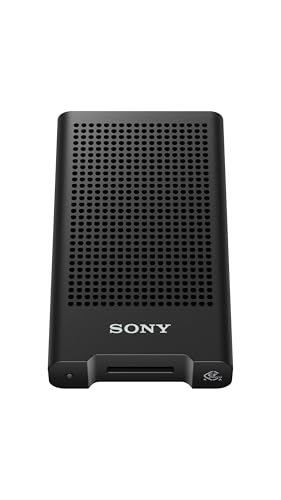
Sony’s CFexpress Type A Card Reader, MRWG3, is an excellent choice for photographers and videographers who demand high-speed data transfers. With USB 40Gbps support, it guarantees rapid file transfers, making it perfect for your CFexpress Type A version 4 and CEA-G series cards. Weighing just 6.4 ounces and measuring 4 x 2.38 x 0.68 inches, its compact design is ideal for on-the-go use. Compatible with most PCs, smartphones, and tablets, it offers versatility for your workflow. With a stellar 5.0 rating from customers, you can trust this reader to deliver the performance you need.
Best For: Photographers and videographers seeking high-speed data transfer for CFexpress Type A cards.
Pros:
- High-speed transfer capability with USB 40Gbps support ensures rapid file transfers.
- Compact and lightweight design makes it portable and convenient for on-the-go use.
- Broad compatibility with most PCs, smartphones, and tablets enhances versatility.
Cons:
- Limited to CFexpress Type A cards, which may not be suitable for users with other card types.
- Higher price point compared to standard card readers, which may deter budget-conscious buyers.
- Potential for restocking fees if returned due to misrepresentation or tampering.
OWC Atlas USB4 CFexpress Card Reader

The OWC Atlas USB4 CFexpress Card Reader is an ideal choice for photographers and videographers who demand high-speed data transfer and compatibility with both CFexpress Type B and Type A memory cards. With speeds up to 5000MB/s, you’ll experience rapid file transfers, especially when using the OWC Atlas Ultra memory card. Its compact design and fanless structure guarantee efficient thermal management during use. Plus, the included USB-C cable and Type A>B adapter make it versatile across various devices. With a solid 4.6-star rating, this reader delivers reliable performance without overheating, making it a smart addition to your gear.
Best For: Photographers and videographers seeking high-speed data transfer with compatibility for CFexpress Type B and Type A memory cards.
Pros:
- High-speed performance with transfer speeds up to 5000MB/s, enhancing workflow efficiency.
- Compact and fanless design ensures effective thermal management without overheating during extended use.
- Versatile compatibility with various devices including Macs, Windows PCs, tablets, and smartphones, along with included adapters and cables.
Cons:
- Not backwards compatible with older card types, limiting its use with legacy equipment.
- Performance may vary on different operating systems, particularly on Linux, which could affect user experience.
- Limited warranty period of only 2 years may be shorter than some users expect for high-end equipment.
Factors to Consider When Choosing Cfexpress Readers for PC
When choosing a CFexpress reader for your PC, you need to evaluate several key factors. Think about compatibility with your card types and the data transfer speeds that meet your needs. Additionally, don’t overlook build quality, portability, and the warranty options available for peace of mind.
Compatibility With Card Types
Choosing the right CFexpress reader for your PC hinges on compatibility with specific card types, primarily CFexpress Type A or Type B. It’s essential to guarantee that the reader you select aligns with the memory card type you plan to use. Some readers even offer dual compatibility, allowing you to use both CFexpress and SD cards, which is great if you have varied storage needs. Always check the specifications to avoid using an incompatible reader, as this can lead to non-functionality or even damage to your card. Additionally, make sure the reader supports the latest CFexpress specifications like 4.0, and verify that it’s compatible with your PC’s operating system for seamless integration.
Data Transfer Speed
Data transfer speed plays an essential role in selecting CFexpress readers for your PC. When you choose a reader, look for USB 3.2 Gen 2 models that offer speeds up to 10Gbps, efficiently handling large files. If you want even faster transfers, consider readers supporting USB4, which can reach up to 40Gbps, drastically cutting down the time it takes to move high-resolution images and 8K RAW videos. Keep in mind that the actual speed depends on the CFexpress card’s speed class and the USB port on your device. Always check the maximum speed the reader supports; lower-speed models can bottleneck high-speed cards. Ensuring compatibility with your CFexpress card and USB interface is key for ideal performance.
Build Quality and Durability
While considering your options for CFexpress readers, the build quality and durability of the device play an essential role in ensuring long-term performance. Look for readers made from materials like aluminum alloy and braided nylon, which enhance resistance to wear and tear. Many models undergo rigorous testing for bend resistance, with some rated for over 10,000 bends—ideal for frequent use. A robust design often includes heat-resistant connectors, preventing overheating during extended data transfers and preserving device integrity. Compact and lightweight construction also helps in transporting your reader without risking damage. Finally, consider warranty periods ranging from one to three years, reflecting the manufacturer’s confidence in the product’s durability and overall build quality.
Portability and Design
When you’re on the hunt for a CFexpress reader, portability and design should be at the forefront of your considerations. Look for compact and lightweight models that are easy to transport, perfect for your on-the-go photography needs. Dual-slot capabilities are a huge plus, allowing you to transfer data from both CFexpress and SD cards simultaneously, which boosts your workflow efficiency. Don’t overlook build quality; choose readers made from durable materials like aluminum or braided nylon to withstand travel. Opt for plug-and-play functionality for hassle-free use across different operating systems. Additionally, features like magnetic attachments or adhesive plates can enhance portability by enabling secure mounting to your laptop or workspace, keeping your setup organized.
Warranty and Support Options
Choosing a CFexpress reader isn’t just about performance; warranty and support options play a essential role in ensuring your investment is protected. Look for a warranty that ranges from 1 to 3 years, covering replacement, repair, or refunds for defects. It’s important to understand whether the warranty is unconditional or limited, as this impacts your coverage for specific issues. Additionally, consider the customer support options available. Accessible service for troubleshooting and warranty claims can greatly enhance your experience. Some manufacturers also offer helpful resources like user manuals and online support. Finally, check the return policy—knowing you can get a full refund or exchange if the product doesn’t meet your expectations adds peace of mind to your purchase.
Price vs. Performance Ratio
As you evaluate CFexpress readers for your PC, balancing price and performance is essential to making an informed choice. Budget options start around $20, but investing in higher-end models, often exceeding $100, can lead to considerably faster transfer speeds—up to 40Gbps. This speed reduces the time needed for transferring large files, enhancing your workflow. Additionally, many professional-grade readers feature dual-slot compatibility, allowing simultaneous use of different card types, which can further boost efficiency. Don’t overlook warranty periods; longer warranties usually reflect the manufacturer’s confidence in durability. Finally, check customer ratings and reviews; they can reveal which models deliver the best value based on real user experiences. Prioritize wisely to maximize your investment.