If you’re in the market for a compact yet powerful workstation, the GMKtec K6 and K8 Plus Gaming Mini PCs should be on your radar. These models combine advanced Oculink technology with robust AMD Ryzen processors, making them ideal for demanding tasks. But what exactly sets them apart? Let’s explore their specifications, graphics capabilities, and other crucial factors that could influence your decision.
GMKtec K6 Gaming Mini PC with AMD Ryzen 7 7840HS and eGPU Dock

If you’re a gamer or multimedia enthusiast looking for a powerful yet compact solution, the GMKtec K6 Gaming Mini PC is an ideal choice. Powered by the AMD Ryzen 7 7840HS processor, it delivers impressive performance with 8 cores and 16 threads, reaching speeds up to 5.1GHz. You’ll appreciate the 32GB DDR5 RAM and a 1TB SSD, expandable for your growing storage needs. Plus, the eGPU dock with an AMD Radeon 7600M XT graphics card guarantees smooth gameplay and stunning visuals. With versatile applications, this mini PC fits perfectly into your gaming, editing, or programming setup.
Best For: Gamers and multimedia enthusiasts seeking a powerful and compact computing solution for gaming, editing, and programming.
Pros:
- High performance with AMD Ryzen 7 7840HS processor and 32GB DDR5 RAM for seamless multitasking.
- Expandable storage options with 1TB SSD and dual slot support for up to 4TB.
- Enhanced graphics capability through the eGPU dock featuring AMD Radeon 7600M XT for superior gaming visuals.
Cons:
- Limited upgradability due to small form factor design, which may restrict future enhancements.
- Potentially high heat output during intensive gaming or rendering tasks requiring adequate cooling solutions.
- Price point may be higher compared to traditional gaming desktops, making it less budget-friendly for some users.
GMKtec K8 Plus Gaming Mini PC with AMD Ryzen 7 8845HS
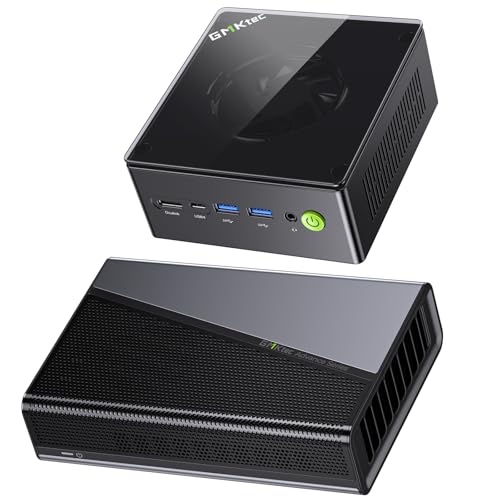
The GMKtec K8 Plus Gaming Mini PC, powered by the AMD Ryzen 7 8845HS, is an ideal choice for gamers and creative professionals seeking a compact yet powerful workstation. With 8 cores and 16 threads, it reaches speeds of up to 5.1GHz, ensuring excellent performance. The included AD-GP1 Oculink eGPU Dock with AMD Radeon 7600M XT elevates your graphics experience, making gameplay smoother and rendering faster. Plus, with 32GB of DDR5 memory, expandable storage up to 8TB, and dual Intel 2.5Gbps Ethernet ports, you’ll enjoy a seamless, high-speed experience tailored to your demanding needs.
Best For: Gamers and creative professionals seeking a compact yet powerful workstation for high-performance tasks.
Pros:
- High Performance: The AMD Ryzen 7 8845HS with 8 cores and 16 threads delivers exceptional processing power for demanding applications.
- Expandable Storage: With a 1TB PCIe 4.0 M.2 SSD and the ability to expand up to 8TB, it accommodates extensive storage needs.
- Enhanced Graphics: The included AD-GP1 Oculink eGPU Dock with AMD Radeon 7600M XT provides superior graphics performance for gaming and content creation.
Cons:
- Limited Max Screen Resolution: The maximum resolution is capped at 1920 x 1080, which may not meet the needs of users requiring higher display resolutions.
- Power Consumption: The CPU’s TDP range of 35-54W may still be higher than some ultra-compact solutions, impacting energy efficiency.
- Warranty Conditions: The 30-day return policy may have specific conditions that could complicate returns or warranty claims.
Factors to Consider When Choosing Mini Workstations With Oculink
When you’re choosing a mini workstation with Oculink, you’ll want to focus on several key factors. Performance specifications, graphics capabilities, and connectivity options can greatly impact your experience. Additionally, consider expandability and cooling solutions to guarantee your setup meets your evolving needs.
Performance Specifications Overview
Choosing a mini workstation with Oculink involves carefully evaluating several key performance specifications to guarantee it meets your needs. Start with the CPU; higher core counts and clock speeds enhance multitasking and processing. Next, consider memory capacity—options between 32GB DDR5 and 96GB can greatly impact performance, especially in demanding tasks. Expandable storage is vital, so look for support for PCIe 4.0 M.2 SSDs, allowing up to 8TB for larger workloads. Connectivity also matters; dual Ethernet ports secure stable wired connections, while WiFi 6 supports high-speed and low-latency network performance. By focusing on these specifications, you’ll make sure your mini workstation delivers the powerful performance you require in a compact design.
Graphics Capabilities Importance
Graphics capabilities play an essential role in the performance of mini workstations, especially for tasks like gaming, video editing, and 3D rendering that require powerful GPUs. When choosing a mini workstation, consider models with RDNA 3.0 architecture, which improves efficiency and clock speeds for an enhanced graphical experience. If you’re tackling complex visual tasks, look for workstations that support eGPU docks, as they provide dedicated graphics resources vital for peak performance. A powerful graphics card, like the AMD Radeon 7600M XT, enables higher resolutions and frame rates, ensuring smoother gameplay and faster rendering. Additionally, the ability to connect advanced graphics docks through Oculink technology allows for high bandwidth transfers, seamlessly integrating top-tier GPUs into your compact workstation.
Connectivity Options Available
As you explore mini workstations equipped with Oculink, it is crucial to evaluate their connectivity options for ideal performance. Oculink offers high-speed data transfer rates of up to 40 Gbps, ensuring efficient communication with external devices like eGPU docks. This connection supports advanced display capabilities, allowing for stunning 8K resolution at 60Hz, perfect for gaming and multimedia. You’ll also benefit from multiple USB4 ports, enabling versatile connections to various peripherals and storage devices. Look for dual Ethernet ports that provide stable, high-speed wired networking, essential for demanding workloads and online gaming. Additionally, integrated wireless options like WiFi 6 and Bluetooth 5.2 enhance your experience with low-latency connections and improved data transfer rates.
Expandability and Upgrades
When considering a mini workstation with Oculink, it’s important to think about expandability and upgrades to guarantee the system meets your evolving needs. Start by checking the maximum RAM capacity; some models support up to 96GB of DDR5 RAM, which is essential for heavy multitasking. Next, assess storage options—look for dual M.2 slots that allow for SSD expansion up to 8TB. An eGPU dock is also necessary for boosting graphics performance, enabling you to add extra graphics cards down the line. Additionally, consider the CPU’s power consumption; models with a TDP of 35-54W offer efficient performance. Finally, make sure it has advanced connectivity options like USB4 ports for high-speed data transfer and future upgrades.
Cooling Solutions Efficiency
Upgrading your mini workstation with Oculink isn’t just about expandability; it’s also about guaranteeing effective cooling solutions. High-performance components generate a lot of heat during intensive tasks, making efficient thermal management essential. Consider advanced cooling technologies like liquid cooling systems, which can notably enhance performance and prolong your workstation’s lifespan. Look for models with well-designed airflow paths to guarantee efficient heat dissipation, especially in compact designs. Pay attention to the thermal design power (TDP) of CPUs and GPUs, as this impacts your cooling requirements. Finally, don’t forget regular maintenance and monitoring of your cooling system. This helps prevent overheating, keeping your mini workstation operating within safe temperature ranges during demanding workloads.
Form Factor Considerations
Choosing the right form factor for your mini workstation with Oculink can greatly impact your overall experience and efficiency. Compact designs are essential, especially if you’re working in a small office or home setup, as they optimize space without sacrificing performance. Look for advanced cooling solutions to manage heat effectively during demanding tasks. Many mini workstations use small form factor components like M.2 SSDs and DDR5 RAM, allowing for impressive storage and memory capacities in a limited footprint. Additionally, consider models with eGPU docks to boost graphics capabilities while keeping a sleek design. Finally, pay attention to the layout and accessibility of ports and connectors to guarantee easy connections to your peripherals and external displays.
Power Consumption Management
Power consumption management plays an essential role in the efficiency of mini workstations equipped with Oculink. When you choose a workstation, consider systems featuring high-performance components like AMD Ryzen processors, which can have a TDP range from 35W to 54W. Look for models with advanced cooling solutions that help maintain optimal thermal conditions, preventing overheating and performance throttling. Additionally, the ability to monitor and adjust power settings enhances efficiency, allowing you to balance performance with energy savings based on your workload. Using energy-efficient components like DDR5 RAM and PCIe 4.0 SSDs can considerably cut overall power consumption while still delivering exceptional performance. Finally, dual Ethernet ports and WiFi 6 can boost network efficiency, minimizing the need for extra power-hungry hardware.