A 49-inch 240Hz ultrawide can replace two monitors while delivering a seamless, high-refresh gaming view. But similar-looking models can differ substantially in panel technology, curve, ports, and everyday usability.
These ten options cover QD-OLED and other curved DQHD designs. Use the comparisons below to narrow your choice before committing the desk space and budget.
Best 10 49 Inch 240hz Ultrawide Monitors Picks for 2026
OLED Laptop Hub

- 5120×1440 OLED at 240Hz
- 90W USB-C and RJ45
- PIP/PBP; adjustable stand
Best For: OLED gaming and laptop-based multitasking
VA Connectivity Pick

- Matte 5120×1440 VA panel
- 240Hz and listed 1ms response
- 65W USB-C and PIP/PBP
Best For: Matte-screen gaming with laptop connectivity
QD-OLED KVM Pick

- 240Hz non-glare QD-OLED
- KVM and 90W USB-C
- HDR400 True Black
Best For: Gaming and switching between two computers
Streamlined VA Pick
- 5120×1440 VA at 240Hz
- FreeSync and PIP/PBP
- Two-year manufacturer warranty
Best For: Dual-QHD gaming with basic multitasking
Best OLED Picture

- QD-OLED with deep blacks
- 240Hz and 0.03ms GTG
- 5120×1440 with Picture-by-Picture
Best For: OLED-focused ultrawide gaming
Best Work-and-Play Connections
Redragon 49-Inch 1000R Gaming Monitor

- 240Hz 5120×1440 VA panel
- USB-C PD90W and built-in KVM
- PBP and PIP multitasking
Best For: Gaming and two-computer desks
Best Built-In Audio Option
Gawfolk 49-Inch Curved Gaming Monitor

- 240Hz 5120×1440 VA screen
- Two HDMI 2.1 and two DP 1.4 inputs
- Built-in stereo speakers
Best For: Gaming setups needing integrated audio
Flexible Split-Screen Pick
Great voell 49-Inch DQHD Curved Monitor

- 5120×1440 VA panel with 32:9 layout
- Listed 240Hz with adaptive sync
- PIP/PBP and 100×100mm VESA support
Best For: Gaming and multitasking on one wide screen
Immersive HDR Pick
Samsung Odyssey G9 49-Inch 1000R

- 1000R curve and 5120×1440 resolution
- 240Hz, 1ms GtG, FreeSync Premium Pro
- DisplayHDR 1000 and adjustable stand
Best For: Wraparound gaming with HDR capability
Connectivity Pick
Gawfolk 49-Inch 1500R DQHD Monitor

- 5120×1440 VA panel with 1500R curve
- Listed dual HDMI 2.1 and dual DP 2.0
- 240Hz and adjustable stand
Best For: Multi-device setups needing flexible positioning
OLED Laptop Hub – INNOCN 49Q1S
Among 49 inch 240hz ultrawide monitors, the INNOCN 49Q1S stands out for pairing a 5120×1440 OLED panel with 90W USB-C power delivery. Its 32:9 screen gives games and workspaces room to spread out, while the 1800R curve and adjustable stand help position the wide display.
Best For: Gamers who also want a one-cable laptop connection and two-source multitasking.
Pros:
- 240Hz OLED panel with a listed 0.03ms response time.
- 90W USB-C, two DisplayPort 1.4 inputs, HDMI 2.1, and RJ45.
- PIP/PBP and tilt, swivel, and height adjustments.
Cons:
- Glossy finish may be less suitable for reflection-heavy rooms.
- Its 5120×1440 resolution demands more graphics power than a single QHD screen.
Choose this model if OLED contrast and laptop connectivity matter as much as refresh rate; plan your desk and PC setup around its 49-inch, dual-QHD canvas.
VA Connectivity Pick – INNOCN 49C1S
The INNOCN 49C1S is a VA-panel option among 49 inch 240hz ultrawide monitors, offering 5120×1440 resolution on a matte, 1800R curved screen. It combines a 240Hz refresh rate with a broad port selection for a gaming desk that also handles laptop work.
Best For: Buyers who prefer a matte VA display and need several inputs plus USB-C laptop charging.
Pros:
- 240Hz dual-QHD display with a listed 1ms response time and 3000:1 contrast.
- 65W USB-C power delivery, DisplayPort 1.4, HDMI 2.1, and RJ45 listed in the product notes.
- PIP/PBP supports viewing two input sources; the stand offers tilt, swivel, and height adjustment.
Cons:
- 65W USB-C delivery is lower than the 90W offered by some models here.
- The supplied specifications disagree on the HDMI port count, so confirm it before buying if multiple HDMI inputs are essential.
This is a practical choice when you want high-refresh VA contrast and flexible connections rather than OLED. Verify the exact port layout against the current listing before planning a multi-device setup.
QD-OLED KVM Pick – Deco Gear DGOLED49Pro240
For shoppers comparing 49 inch 240hz ultrawide monitors, this Deco Gear model combines a 5120×1440 QD-OLED panel, a 240Hz refresh rate, and a non-glare finish. Its KVM, PIP/PBP, and 90W USB-C connection make the wide screen useful beyond gaming.
Best For: PC gamers and creators switching between two computers on one expansive display.
Pros:
- QD-OLED with HDR400 True Black, listed 0.03ms response, and 99% DCI-P3 coverage.
- KVM, PIP/PBP, and 90W USB-C support a mixed desktop-and-laptop setup.
- Non-glare surface, adjustable stand, and 100×100mm VESA compatibility.
Cons:
- QD-OLED care remains worth considering for extended static desktop use, despite the listed anti-burn-in features.
- The supplied warranty is limited to one year.
Its combination of OLED image quality and computer-switching tools is particularly compelling for a shared gaming and work desk. The non-glare coating is another meaningful difference from glossy OLED alternatives.
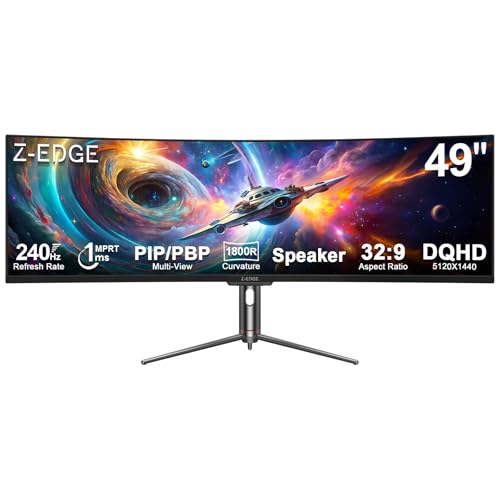
Streamlined VA Pick – Z-Edge UG49P
The Z-Edge UG49P covers the essentials buyers look for in 49 inch 240hz ultrawide monitors: a 5120×1440, 32:9 VA display, 1800R curve, and 240Hz refresh rate. Its matte finish, FreeSync support, and PIP/PBP modes suit a desk shared between gaming and everyday tasks.
Best For: Buyers seeking a high-refresh, dual-QHD VA screen with straightforward video connections.
Pros:
- 240Hz refresh rate, listed 1ms response, and FreeSync.
- 3000:1 contrast and stated 99% sRGB coverage.
- PIP/PBP, built-in speakers, and a two-year manufacturer warranty.
Cons:
- The notes specify USB-C video but do not state USB-C laptop charging.
- No KVM or USB hub is listed for sharing peripherals between computers.
Pick this one if screen space and smooth VA gaming are the priorities. If one-cable laptop power or shared keyboard-and-mouse control is central to your setup, compare the better-equipped models above.
Best OLED Picture – Samsung 49-Inch Odyssey G93SC
Among 49 inch 240hz ultrawide monitors, the Samsung Odyssey G93SC stands out for its QD-OLED panel, 5120×1440 resolution, and exceptionally fast 0.03ms GTG response time. Its 1800R curve offers a wider-feeling view without the tighter wrap of a 1000R screen.
Best For: Gamers who prioritize OLED contrast, fast response, and expansive 32:9 gameplay.
Pros:
- QD-OLED panel with DisplayHDR True Black 400 for deep blacks and rich contrast.
- 240Hz refresh rate and 0.03ms GTG response time.
- HDMI 2.1, DisplayPort, USB hub, and Picture-by-Picture support.
Cons:
- Its 47.1-inch width needs a substantial desk.
- The 1800R curve is gentler than a 1000R alternative, which may not suit buyers seeking a tighter wraparound view.
Choose this model when display quality and motion response matter most; its two-input Picture-by-Picture mode also makes the large screen useful beyond gaming.
Best Work-and-Play Connections – Redragon 49-Inch 1000R Gaming Monitor
The Redragon is one of the more connectivity-focused 49 inch 240hz ultrawide monitors here. Its 5120×1440 VA panel has a pronounced 1000R curve, while USB-C with 90W power delivery and a built-in KVM help it serve a two-device desk.
Best For: Buyers sharing one ultrawide between gaming and two connected computers.
Pros:
- 240Hz refresh rate with FreeSync Premium and G-Sync compatibility.
- USB-C PD90W, USB hub, and KVM simplify a multi-device setup.
- PBP and PIP modes make use of the wide 32:9 screen.
Cons:
- Its 1000R curvature may feel too pronounced for buyers who prefer a flatter screen.
- The listed 2.2ms response time is slower than the Samsung OLED model’s stated 0.03ms GTG.
This is a practical pick if switching between devices matters as much as high-refresh gaming. Check that the tight curve suits how far you sit from the screen.
Best Built-In Audio Option – Gawfolk 49-Inch Curved Gaming Monitor
The Gawfolk covers the core specifications shoppers expect from 49 inch 240hz ultrawide monitors: a 5120×1440, 32:9 curved VA screen and adaptive sync. Built-in stereo speakers and two HDMI 2.1 plus two DisplayPort 1.4 inputs are useful if you want fewer separate desktop accessories.
Best For: Buyers seeking a high-refresh super-ultrawide with built-in speakers and several video inputs.
Pros:
- 240Hz refresh rate and a stated 1ms response time.
- Four video inputs: two HDMI 2.1 and two DisplayPort 1.4.
- Built-in speakers and a 3000:1 stated contrast ratio.
Cons:
- The supplied specifications list both 350 and 330 cd/m² for brightness, so the exact figure is unclear.
- No USB-C input or KVM is listed.
Consider this model if integrated audio and multiple video connections are priorities. Confirm the brightness specification if it is important for your workspace.
Flexible Split-Screen Pick – Great voell 49-Inch DQHD Curved Monitor
Among 49 inch 240hz ultrawide monitors, the Great voell combines a 5120×1440 VA panel with a 32:9 layout that can stand in for two 27-inch displays. Its picture-in-picture and picture-by-picture modes also make the wide screen useful when work and gaming share a desk.
Best For: Buyers who want a high-refresh gaming screen that can also show multiple work windows or input sources.
Pros:
- Listed 240Hz refresh rate, 1ms response time, and FreeSync Premium and G-Sync Compatible support.
- 5120×1440 resolution, 3000:1 VA contrast, and HDR400 support.
- PIP and PBP modes, plus a 100×100mm VESA mounting option.
Cons:
- Stand adjustment is limited to tilt in the supplied specifications.
- Games need native 32:9 support or a mod to fill the screen as intended.
The combination of multitasking modes and gaming specs is appealing, but check your favorite games for 32:9 support. The supplied notes also conflict on refresh rate, mentioning 165Hz in one heading and 240Hz elsewhere, so confirm the supported mode before buying.
Immersive HDR Pick – Samsung Odyssey G9 49-Inch 1000R
The Samsung Odyssey G9 is a strong choice among 49 inch 240hz ultrawide monitors if you want a tightly curved 1000R screen and prominent HDR specifications. Its 5120×1440 VA display pairs a listed 240Hz refresh rate with VESA DisplayHDR 1000 certification.
Best For: Gamers prioritizing a wraparound view, HDR capability, and adjustable positioning.
Pros:
- 1000R curvature and 32:9 Dual QHD resolution create a wide, curved viewing area.
- Listed 240Hz refresh rate, 1ms GtG response time, and AMD FreeSync Premium Pro.
- DisplayHDR 1000 certification, PIP/PBP modes, and height, swivel, and tilt adjustments.
Cons:
- Its listed 45.2-inch width and 16.6-inch depth with stand require substantial desk space.
- Listed power consumption is 120 watts.
This is the option to consider when the deep curve and HDR specification matter as much as speed. Measure your desk first, especially if you plan to use the included stand rather than a compatible monitor arm.
Connectivity Pick – Gawfolk 49-Inch 1500R DQHD Monitor
The Gawfolk stands out among 49 inch 240hz ultrawide monitors for its listed pair of HDMI 2.1 inputs and pair of DisplayPort 2.0 inputs. Its 5120×1440 VA panel, 1500R curve, and 32:9 aspect ratio offer a continuous wide canvas for games and desktop work.
Best For: Buyers connecting several devices who also want a highly adjustable stand.
Pros:
- Listed native 240Hz refresh rate with FreeSync and G-SYNC Compatible support.
- Two HDMI 2.1 and two DisplayPort 2.0 inputs in the supplied notes.
- 3000:1 native contrast and height, tilt, swivel, and pivot adjustments.
Cons:
- Supplied warranty is one year.
- Its 75×75mm VESA pattern may require checking compatibility with your chosen arm.
Its input selection and stand flexibility are the main differentiators. If you’re planning to use a monitor arm or run the full resolution at a particular refresh rate, verify compatibility for your setup before purchase.
How We Picked the Best 49 Inch 240hz Ultrawide Monitors
We focused on the ten selected 49-inch models advertised with 240Hz refresh rates, then compared the specifications that matter most in daily use: resolution, panel type, curvature, connectivity, and stated gaming features. Manufacturer listings do not always describe features consistently, so treat specifications as a starting point rather than proof of identical performance. Confirm the exact model number, ports, warranty, and current price with the seller before ordering.
Quick Comparison of 49 Inch 240hz Ultrawide Monitors
Start with panel type. The INNOCN 49Q1S, Deco Gear QD-OLED, and Samsung Odyssey G93SC are the QD-OLED choices in this group; prioritize them if deep blacks and fast pixel transitions matter most. The Samsung Odyssey G9 is the strongly curved 1000R alternative with advertised DisplayHDR 1000 support. The remaining INNOCN, Z-Edge, Redragon, Gawfolk, and Great voell options give you more conventional DQHD choices to compare on price, curve, and connections. Check exact Gawfolk model listings carefully: two different Gawfolk monitors appear here.
Key Buying Factors
Resolution, Panel, and Screen Shape
Most listings in this roundup specify 5120 × 1440, often called DQHD: essentially two 2560 × 1440 displays side by side without a center bezel. Do not assume that a “5K” or “5K2K” label guarantees a taller 5120 × 2160 image; verify the native resolution in the detailed specifications. QD-OLED offers strong contrast but warrants attention to static-image retention precautions and warranty terms if you leave toolbars or spreadsheets on-screen for long periods. An LCD-based alternative may suit that routine better.
Curve ratings also change the feel of a 49-inch screen. A tighter 1000R curve wraps farther around your seating position than 1500R or 1800R. Consider whether you want immersion from one central seat or a gentler curve for shared viewing and desk work.
Getting 240Hz in Practice
A listed 240Hz refresh rate is only useful if your graphics card, cable, input, and chosen resolution support it together. Check the monitor’s input-specific refresh-rate table, especially if you plan to use HDMI, a laptop, or USB-C. Running new games at 5120 × 1440 and high frame rates also requires a capable GPU. Adaptive-sync support can smooth variable frame rates, but verify compatibility with your setup rather than relying on a logo alone.
Desk Fit and Everyday Connections
Measure desk width and depth, account for stand clearance, and check VESA mounting specifications if you plan to use an arm. For work, look beyond refresh rate: confirm the ports you need, whether USB-C carries video and power, and whether any picture-by-picture mode meets your two-computer workflow.
Who Should Buy Which 49 Inch 240hz Ultrawide Monitors?
Choose a QD-OLED model if gaming and cinematic contrast take priority and you are comfortable managing static content. Consider the Odyssey G9 if you specifically want a pronounced 1000R curve and its advertised HDR feature set. For mixed work and play, compare the other DQHD models by verified inputs, ergonomics, warranty, and delivered price. Whichever you choose, check the exact listing for resolution and 240Hz support before you buy.