In 2025, the market for 1440p ultrawide monitors is more competitive than ever, providing options that cater to both gamers and professionals alike. These monitors not only enhance your gaming experience but also boost productivity with their expansive display and vibrant visuals. With so many standout models available, it’s essential to know which ones truly offer the best features and value. Let’s explore the top contenders and see what makes them worth considering.
Sceptre 34-Inch Curved Ultrawide WQHD Monitor (C345B-QUT168)

If you’re a gamer seeking an immersive experience, the Sceptre 34-Inch Curved Ultrawide WQHD Monitor (C345B-QUT168) is a standout choice. With a stunning 3440 x 1440 resolution and a 21:9 aspect ratio, you’ll enjoy vibrant visuals and extensive screen real estate. Its 165Hz refresh rate and 1ms response time guarantee smooth gameplay, reducing ghosting during intense moments. The 1500R curvature enhances your field of view, while built-in speakers add convenience. Plus, setup is quick and easy, making it user-friendly. Overall, this monitor is an excellent value for both gaming and productivity. Don’t miss out on this impressive display!
Best For: Gamers and professionals looking for an immersive ultrawide monitor that enhances both gaming and productivity experiences.
Pros:
- Excellent refresh rate of up to 165Hz for smooth gameplay.
- 1ms response time minimizes ghosting and lag during fast-paced action.
- Vibrant colors with 99% sRGB color coverage for stunning visuals.
Cons:
- Some users report wobbly monitor stands affecting stability.
- Occasional complaints about soft text appearance when mirroring lower resolution screens.
- Mediocre black levels may not satisfy all users.
SANSUI 34-Inch Curved Gaming Monitor (ES-G34C5)

The SANSUI 34-Inch Curved Gaming Monitor (ES-G34C5) stands out with its impressive UWQHD 3440 x 1440 resolution, making it an excellent choice for gamers seeking immersive visuals. Its 1500R curvature enhances your viewing experience, while the 165Hz refresh rate and 1ms response time guarantee smooth gameplay. With FreeSync technology, you’ll enjoy tear-free action. The monitor covers 125% of sRGB and 95% of DCI-P3, delivering vibrant colors at 300 nits brightness. Ergonomic features like tilt adjustment and VESA compatibility add convenience. Plus, with multiple connectivity options and included accessories, you’re all set for an outstanding gaming experience.
Best For: Gamers seeking an immersive visual experience with high performance and vibrant colors.
Pros:
- 165Hz refresh rate and 1ms response time for ultra-smooth gameplay.
- Curved 1500R design enhances immersion and reduces eye strain.
- Wide color coverage (125% sRGB and 95% DCI-P3) for vibrant and true-to-life visuals.
Cons:
- No built-in speakers, requiring external audio solutions.
- Limited brightness (300 nits) may not be sufficient for bright environments.
- Tilt adjustment only; lacks height or swivel adjustment options.
SANSUI 34 Inch 240Hz Curved Ultrawide Gaming Monitor

Gamers seeking an immersive experience will appreciate the SANSUI 34 Inch 240Hz Curved Ultrawide Gaming Monitor. With its UWQHD resolution (3440×1440) and a stunning 240Hz refresh rate, your games will look incredibly smooth. The 1500R curvature enhances your field of view, making every moment more engaging. You’ll love the vibrant colors with sRGB 130% and DCI-P3 97% coverage, plus features like AI Crosshair and Game Mode to elevate your gameplay. While it lacks built-in speakers and has a non-adjustable stand, the overall value, along with a 30-day money-back guarantee, makes it a solid choice for gamers.
Best For: Gamers looking for an immersive and visually stunning experience with a high refresh rate and vibrant colors.
Pros:
- Excellent UWQHD resolution and 240Hz refresh rate for smooth gaming.
- Vibrant color coverage with sRGB 130% and DCI-P3 97%.
- Features like AI Crosshair and Game Mode enhance gameplay.
Cons:
- Non-adjustable stand may require an additional purchase for customization.
- Lacks built-in speakers, necessitating an external sound solution.
- Some users report potential syncing issues with MacBook and light bleeding.
KOORUI 34-inch Curved Ultrawide Gaming Monitor (34E6UC)

Designed for immersive gameplay, the KOORUI 34-inch Curved Ultrawide Gaming Monitor (34E6UC) boasts a stunning 165Hz refresh rate that guarantees smooth visuals, making it a top choice for competitive players. Its 1000R curvature and 21:9 aspect ratio enhance your field of view, while the 1ms response time assures you won’t miss a beat. With vibrant colors thanks to a 95% DCI-P3 wide color gamut, HDR400, and a 4000:1 contrast ratio, your gaming experience will be visually striking. Plus, ergonomic adjustments and multitasking capabilities like Picture-in-Picture make it perfect for both work and play.
Best For: Competitive gamers seeking an immersive and visually striking gaming experience with advanced features for both gaming and multitasking.
Pros:
- High refresh rate of 165Hz ensures smooth visuals and responsiveness during fast-paced gaming.
- Vibrant color reproduction with 95% DCI-P3 wide color gamut and HDR400 for enhanced visual quality.
- Ergonomic adjustments allow for customized viewing angles, enhancing comfort during long gaming sessions.
Cons:
- Limited HDMI options may restrict the maximum refresh rate on some devices (100Hz/120Hz on HDMI 2.0).
- Curved design may not be preferred by all users, particularly those who favor a flat screen.
- Potential for glare due to the glossy finish, which can affect visibility in bright environments.
MSI Optix MAG342CQR Curved Gaming Monitor

For those seeking an immersive gaming experience, the MSI Optix MAG342CQR Curved Gaming Monitor stands out with its stunning 3440 x 1440 resolution and 144Hz refresh rate. The 34-inch display features a 1500R curvature that enhances your field of view, making fast-paced games more exhilarating. With a 1ms response time and AMD FreeSync support, you’ll enjoy smooth gameplay without tearing. The adjustable stand guarantees comfort, while Mystic Light adds a modern touch. Users praise its vibrant colors and solid build quality, though some report minor oversaturation issues. Overall, it’s a fantastic choice for gamers looking for immersive visuals.
Best For: Gamers seeking an immersive experience with vibrant visuals and smooth gameplay in fast-paced titles.
Pros:
- High 3440 x 1440 resolution and 144Hz refresh rate for stunning visuals and smooth motion.
- 1500R curvature enhances immersion and field of view, ideal for gaming.
- Adjustable stand and Mystic Light feature add comfort and aesthetic appeal.
Cons:
- Some users report minor oversaturation issues that may require adjustments.
- HDMI connectivity limited to 100Hz, which may not utilize the full refresh rate potential.
- A few users have experienced manufacturing defects and display issues after initial use.
CRUA 34″ Ultrawide Curved Gaming Monitor

The CRUA 34″ Ultrawide Curved Gaming Monitor stands out with its impressive 165Hz refresh rate, making it an ideal choice for those who crave smooth visuals in fast-paced gaming sessions. Its 21:9 aspect ratio and 1500R curvature enhance immersion, while the sleek white design elevates your workspace. With a VA panel offering a 120% sRGB color gamut and 4000:1 contrast ratio, you’ll enjoy stunning, detailed visuals. Plus, FreeSync technology guarantees a tear-free experience. Connectivity options are extensive, featuring multiple HDMI and DisplayPort inputs. Overall, it’s a fantastic choice for both gaming and productivity.
Best For: Gamers and professionals seeking a high-performance ultrawide monitor with immersive visuals and extensive connectivity options.
Pros:
- High refresh rate of 165Hz ensures smooth gameplay and fluid video editing.
- Wide color gamut with 120% sRGB offers vibrant and accurate visuals for creative tasks.
- Versatile connectivity options make it compatible with various devices, enhancing user convenience.
Cons:
- Curved design may not be preferred by all users, particularly those accustomed to flat screens.
- Limited adjustments in height compared to some ergonomic monitors might affect comfort for certain users.
- Potential eye strain over prolonged use, despite low blue light mode and flicker-free technology.
Acer Nitro 34 Inch UWQHD Curved PC Gaming Monitor (EDA343CUR V3bmiippx)

Immersive gaming experiences come alive with the Acer Nitro 34 Inch UWQHD Curved PC Gaming Monitor (EDA343CUR V3bmiippx), thanks to its stunning 3440 x 1440 resolution and 1000R curvature. With a refresh rate of up to 180Hz and a response time of just 0.5ms, you’ll enjoy smooth, tear-free gameplay, especially with AMD FreeSync Premium technology. The monitor boasts a fantastic contrast ratio of 100,000,000:1 and supports HDR 10, ensuring vibrant colors and excellent clarity. While setup is easy, some users noted limited height adjustment and a stiff stand. Overall, it’s a top choice for gamers seeking an immersive experience.
Best For: Gamers looking for an immersive experience with high performance and vibrant visuals.
Pros:
- High refresh rate of up to 180Hz and a rapid response time of 0.5ms for smooth gameplay.
- Stunning 3440 x 1440 resolution with HDR 10 support for excellent color clarity and contrast.
- Easy setup process and compatibility with various power supplies.
Cons:
- Limited height adjustment options and a stiff stand may affect ergonomic setup.
- No built-in speakers, which could be inconvenient for some users.
- Initial setup can be challenging for MacBook users.
34 Inch Ultrawide Curved Gaming Monitor (3440x1440p, 165Hz)
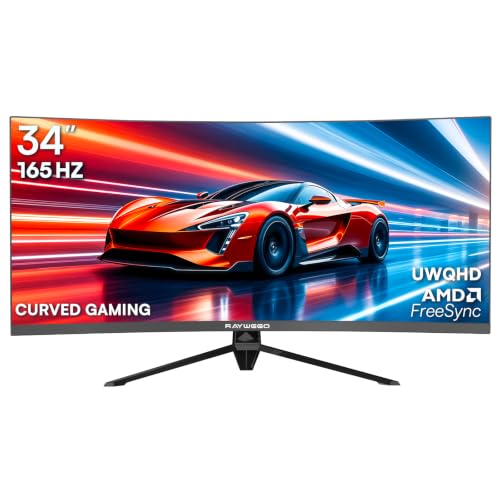
With a stunning 34-inch ultrawide curved screen and a WQHD resolution of 3440x1440p, this gaming monitor is perfect for serious gamers seeking an edge in their gameplay. It boasts a 165Hz refresh rate and a rapid 1ms MPRT, ensuring smooth, fluid visuals. Experience vibrant colors with 10.7 billion shades and impressive coverage of 127% sRGB and 98% DCI-P3. The 1500R curvature enhances immersion, while FreeSync technology minimizes screen tearing. Plus, it offers multiple connectivity options, including HDMI and DisplayPort. Its sleek design features RGB backlighting, making it an attractive choice for gamers and professionals alike.
Best For: This monitor is best for serious gamers, content creators, and professionals looking for high-performance visuals and immersive gaming experiences.
Pros:
- Exceptional picture quality with vibrant colors and high color coverage.
- High refresh rate and low response time for smooth gameplay.
- Curved design enhances immersion and provides a wider field of view.
Cons:
- May require a powerful graphics card to fully utilize its capabilities.
- The large size might not fit well in smaller workspaces.
- RGB backlighting may not appeal to all users, especially in professional settings.
Alienware 34 Curved Gaming Monitor (AW3425DWM)

Looking for an ultrawide monitor that elevates your gaming experience? The Alienware 34 Curved Gaming Monitor (AW3425DWM) is a fantastic choice. With its 34-inch WQHD display, 180Hz refresh rate, and 1ms response time, you’ll enjoy incredibly smooth gameplay. The 1500R curve immerses you in every adventure, while DCI-P3 95% color coverage guarantees vibrant visuals. Plus, AMD FreeSync Premium and VESA Adaptive Sync technology keep your performance fluid. Designed for comfort, it features a dedicated console mode and a hardware-based low blue light solution to reduce eye strain. This monitor truly enhances both casual and competitive gaming.
Best For: Gamers seeking an immersive and high-performance ultrawide monitor for both casual play and competitive gaming.
Pros:
- High 180Hz refresh rate and 1ms response time ensure smooth and responsive gameplay.
- The 1500R curvature provides an immersive viewing experience, enhancing gameplay in open-world settings.
- Features like AMD FreeSync Premium and low blue light technology improve performance and comfort during extended gaming sessions.
Cons:
- The monitor may be more expensive compared to standard flat monitors.
- Ultrawide aspect ratio may require additional desk space and compatibility checks with certain games.
- Limited VESA DisplayHDR 400 certification may not satisfy users seeking the highest HDR performance.
34 inch Curved Ultrawide Gaming Monitor 165Hz

The Sealan 34 inch Curved Ultrawide Gaming Monitor is an excellent choice for gamers seeking a competitive edge, thanks to its impressive 165Hz refresh rate and swift 1ms response time. With a 3440 x 1440 resolution and 1500R curvature, it delivers immersive visuals and enhanced depth perception. You’ll enjoy vibrant colors with 99% sRGB coverage and HDR400 technology, making every game visually stunning. The monitor also features AMD FreeSync for tear-free gameplay and multiple connectivity options, ensuring you can easily switch between devices. Plus, its eye care technology helps reduce strain during those extended gaming sessions.
Best For: Gamers looking for an immersive ultrawide experience with high refresh rates and vibrant visuals.
Pros:
- 165Hz refresh rate for smooth gameplay and reduced screen tearing.
- 99% sRGB color coverage and HDR400 technology for vivid and rich visuals.
- Multiple connectivity options for easy switching between devices.
Cons:
- Some users report reliability issues over time.
- Brightness level may be lower than expected for HDR content.
- Curvature might not be preferred by everyone, depending on personal taste.
Factors to Consider When Choosing 1440P Ultrawide Monitors for PC
When choosing a 1440p ultrawide monitor for PC gaming, you need to take into account several key factors. Think about the resolution and aspect ratio that best suits your gaming style, as well as the refresh rate for smooth visuals. Don’t forget to evaluate curvature preferences, connectivity options, and ergonomic features to guarantee a comfortable and immersive experience.
Resolution and Aspect Ratio
Choosing the right resolution and aspect ratio is essential for optimizing your gaming experience with 1440p ultrawide monitors. With a resolution of 3440 x 1440, you get around 5 million pixels, delivering sharp images and detailed visuals. The ultrawide aspect ratio of 21:9 expands your field of view, making games more immersive and enhancing productivity during multitasking. You’ll appreciate how much more content you can display side-by-side, boosting your efficiency. Plus, the higher pixel density contributes to clearer text and images, which helps reduce eye strain during long sessions. If you opt for a monitor with a curvature around 1500R, it’ll align with your natural eye curve, enhancing your overall viewing experience.
Refresh Rate Importance
While resolution and aspect ratio enhance your visual experience, refresh rate plays a vital role in how fluidly your games run. A higher refresh rate, like 165Hz or 180Hz, delivers smoother visuals and a more responsive experience during fast-paced action. Unlike standard rates of 60Hz or even 144Hz, these higher rates markedly reduce motion blur and ghosting, giving you clearer images when the action heats up. For competitive gaming, refresh rates above 144Hz are essential, as they minimize input lag and improve your reaction times. Plus, many modern ultrawide monitors support adaptive sync technologies like FreeSync or G-Sync, which thrive at higher refresh rates, eliminating screen tearing and stuttering for an immersive gaming experience.
Curvature Preferences
Curvature can greatly enhance your gaming experience, so considering it is essential when selecting a 1440p ultrawide monitor. The curvature, measured in radius, affects how immersive the display feels. A 1500R curvature closely mimics the natural curve of human vision, making it fantastic for gaming and multimedia, as it enhances depth perception and minimizes edge distortion. If you crave an even more enveloping experience, a 1000R curvature offers a pronounced field of view, perfect for fast-paced games. Additionally, curved monitors can help reduce eye strain by providing a consistent viewing distance, making long sessions more comfortable. Keep in mind that the curvature also influences your workspace’s aesthetic, with more pronounced curves leaning towards a futuristic look.
Connectivity Options Available
An immersive gaming experience isn’t just about curvature; connectivity options play a significant role too. When you choose a 1440P ultrawide monitor, consider the number and types of connections available, like HDMI 2.0, HDMI 2.1, and DisplayPort 1.4. These can affect compatibility with your devices. Look for multiple HDMI and DisplayPort inputs to easily switch between your PC, console, and laptop. Verify the monitor supports the latest standards for higher refresh rates and resolutions, especially for gaming. Check the maximum supported refresh rates across different ports, as DisplayPort often offers better performance than HDMI. Additional connections like USB ports can also enhance your overall usability and convenience. Choose wisely for the best experience!
Ergonomic Features Consideration
When selecting a 1440P ultrawide monitor, it’s vital to evaluate ergonomic features that enhance your comfort during long gaming sessions. Look for monitors with adjustable stands that allow you to tilt, swivel, and change the height, guaranteeing ideal viewing angles and minimizing neck strain. A curved screen design can improve immersion and reduce eye fatigue by offering a more natural viewing experience. VESA mount compatibility is significant if you prefer wall mounts or adjustable arms for better workspace organization. Additionally, monitors equipped with low blue light technology and flicker-free features help alleviate eye strain during extended use. Finally, consider the monitor’s weight and dimensions to confirm it fits well in your workspace and can be easily adjusted or relocated.