In 2025, the demand for high-quality displays is more critical than ever for professionals like you. Choosing the right 32-inch 4K monitor can greatly enhance your productivity and visual experience. With options that boast superior color accuracy, ergonomic designs, and advanced technologies, these monitors cater to a variety of tasks. Let’s explore the top picks that can elevate your work setup and help you make an informed decision.
Dell 32 Plus 4K Monitor (S3225QS)

If you’re looking for an outstanding display that excels in both work and play, the Dell 32 Plus 4K Monitor (S3225QS) is an exceptional choice. With a stunning 31.5-inch screen and 3840 x 2160 resolution, it delivers crisp visuals and vibrant colors, thanks to its 99% sRGB and 95% DCI-P3 coverage. It features a refresh rate of up to 120Hz, ensuring smooth gameplay and productivity. Plus, ComfortView Plus minimizes blue light emissions for eye comfort. Connecting is easy with multiple ports, including USB-C, making it compatible with various devices. You’ll appreciate its sleek design and flexible adjustments for a perfect viewing experience.
Best For: The Dell 32 Plus 4K Monitor (S3225QS) is best for professionals and gamers seeking a high-quality display with excellent color accuracy and smooth performance.
Pros:
- High resolution (3840 x 2160) provides stunning visuals and details for both work and entertainment.
- Supports AMD FreeSync Premium with a refresh rate of up to 120Hz, ensuring fluid motion in fast-paced games.
- ComfortView Plus technology reduces harmful blue light emissions, enhancing eye comfort during extended use.
Cons:
- Heavier weight (19.33 pounds) can make it less portable compared to lighter monitors.
- Limited built-in speaker capabilities may not satisfy audiophiles or those seeking high audio fidelity.
- Price point may be higher than basic monitors, making it less accessible for budget-conscious buyers.
Samsung 32 UJ59 Series 4K UHD Computer Monitor

The Samsung 32 UJ59 Series 4K UHD Computer Monitor is an excellent choice for professionals who demand exceptional display quality and vibrant colors in their work. With its widescreen UHD resolution, you’ll enjoy stunning visuals and less scrolling. It supports a billion color shades, making images incredibly vivid. The monitor also features seamless upscaling, enhancing lower-quality content to near UHD levels. For gamers, its AMD FreeSync technology guarantees smooth gameplay, while multitasking is a breeze with Picture-by-Picture and Picture-in-Picture options. Plus, the sleek design and eye comfort features make it a stylish and user-friendly addition to your workspace.
Best For: Professionals and gamers seeking exceptional display quality, vibrant colors, and enhanced multitasking capabilities in a sleek design.
Pros:
- Stunning UHD resolution provides more screen space and vivid images, enhancing productivity and gaming experiences.
- AMD FreeSync technology ensures smoother gameplay by reducing image tearing and stuttering.
- Multitasking features like Picture-by-Picture and Picture-in-Picture allow for efficient use of multiple devices and applications simultaneously.
Cons:
- The monitor’s size may be too large for smaller desks or limited workspaces.
- Limited adjustability in terms of height or tilt may affect ergonomic comfort for some users.
- Potentially high price point compared to lower-resolution monitors may not fit all budgets.
LG 32UR500K-B Ultrafine 32-inch 4K UHD Computer Monitor
For professionals seeking a high-quality display, the LG 32UR500K-B Ultrafine 32-inch 4K UHD Computer Monitor stands out with its vibrant color accuracy and impressive resolution. With a 3840 x 2160 resolution and 90% DCI-P3 color gamut, it delivers stunning visuals for any task. The HDR10 support enhances your viewing experience, while built-in speakers provide decent sound quality. Dynamic Action Sync and Black Stabilizer cater to gamers, reducing lag and improving visibility in dark scenes. Plus, the borderless design and ergonomic stand make it a stylish addition to your workspace. It’s a reliable choice for your professional needs.
Best For: Professionals and gamers seeking a high-resolution monitor with vibrant color accuracy and responsive features.
Pros:
- Excellent 4K UHD resolution (3840 x 2160) for sharp and vibrant visuals.
- Dynamic Action Sync and Black Stabilizer enhance gaming experience by reducing lag and improving dark scene visibility.
- Stylish borderless design with ergonomic stand suitable for any workspace.
Cons:
- Limited height adjustability may not suit all user preferences.
- Some users report high-frequency noise during use.
- Occasional quality issues noted after extended usage.
LG 32U631A-B 32-inch QHD IPS Computer Monitor

With its stunning QHD resolution and vibrant color accuracy, the LG 32U631A-B 32-inch IPS Computer Monitor is an ideal choice for professionals and creatives who demand high-quality visuals for their work. Featuring a 2560 x 1440 resolution, it supports HDR10 and offers up to 99% sRGB color gamut for exceptional picture quality. The virtually borderless design maximizes your viewing area, while the ultra-slim stand keeps your workspace tidy. With USB Type-C connectivity for quick charging and a 100Hz refresh rate, you’ll enjoy fluid motion and eye comfort throughout your tasks. Users rave about its color performance and wide viewing angles.
Best For: Professionals and creatives seeking high-quality visuals with excellent color accuracy and detail.
Pros:
- Supports HDR10 and 99% sRGB color gamut for vibrant and accurate colors.
- 100Hz refresh rate and 5ms response time provide smooth motion for gaming and video.
- USB Type-C connectivity allows for quick charging and reduced cable clutter.
Cons:
- Only one HDMI port may limit connectivity options for multiple devices.
- Non-adjustable height may not be suitable for all ergonomic setups.
- Some users report a lack of height adjustment as a downside.
32 Inch 4K UHD Monitor
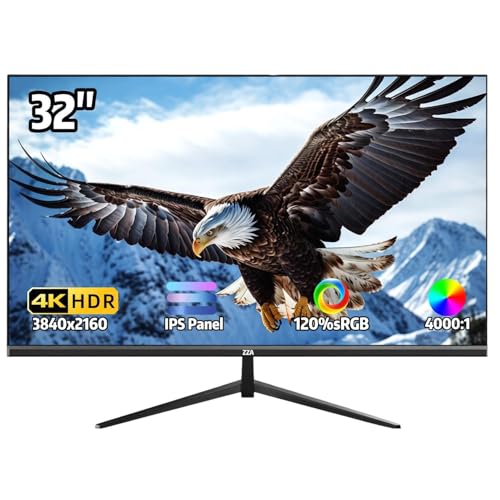
Searching for a monitor that perfectly blends stunning visuals and versatile functionality? The 32-Inch 4K UHD Monitor delivers with its impressive 3840×2160 resolution and vibrant IPS panel. You’ll enjoy a 100% sRGB color gamut, showcasing over 1 billion colors for rich visuals. With a smooth 60Hz refresh rate and AMD FreeSync technology, it’s ideal for casual gaming and multimedia tasks. Plus, its ergonomic design features an adjustable stand and ultra-thin bezel, maximizing your workspace. Connectivity options like HDMI 2.1 and DisplayPort 1.4 guarantee compatibility with your devices. Customer reviews praise its image quality and easy setup, making it a solid choice.
Best For: Casual gamers, creative professionals, and multimedia enthusiasts looking for a high-quality display with vibrant colors and versatile connectivity.
Pros:
- Stunning 4K resolution with vibrant IPS panel for rich visuals and a wide color gamut.
- Smooth performance with a 60Hz refresh rate and AMD FreeSync technology, making it ideal for gaming and video playback.
- Flexible connectivity options including HDMI 2.1 and DisplayPort 1.4, ensuring compatibility with various devices.
Cons:
- Some users report concerns about the dimensions and potential compatibility issues with certain interfaces or cables for full UHD enjoyment.
- Brightness level of 250 cd/m² may not be sufficient for bright environments or professional color grading.
- Weight of 13.82 pounds might make it less portable compared to lighter monitors.
ViewSonic VX3276-MHD 32 Inch 1080p IPS Monitor

The ViewSonic VX3276-MHD 32 Inch 1080p IPS Monitor stands out as an excellent choice for those seeking a balance between performance and affordability. With a sleek, frameless design and ultra-thin bezels, it enhances any workspace. Its IPS panel offers ultra-wide viewing angles and vibrant colors, while the 75Hz refresh rate guarantees smooth visuals. You’ll appreciate the flicker-free technology and Blue Light Filter that reduce eye strain during long hours. Featuring multiple connectivity options like HDMI and DisplayPort, it’s versatile for any setup. With a solid customer rating of 4.5 stars, it’s a reliable option for both home and office use.
Best For: Those seeking a high-quality, budget-friendly monitor for both productivity and casual gaming.
Pros:
- Excellent picture quality with vibrant colors and wide viewing angles due to the IPS panel.
- Flicker-Free technology and Blue Light Filter enhance viewing comfort and reduce eye strain.
- Versatile connectivity options (HDMI, DisplayPort, VGA) make it compatible with various devices.
Cons:
- Limited refresh rate of 75Hz may not satisfy hardcore gamers seeking higher performance.
- Brightness level of 250 cd/m² may be lower compared to some higher-end monitors, affecting visibility in bright environments.
- Lacks advanced gaming features such as G-Sync or FreeSync support.
LG Ultragear 32-inch Curved Gaming Monitor (32GS60QC-B)

For those who crave immersive gaming experiences, the LG Ultragear 32-inch Curved Gaming Monitor (32GS60QC-B) stands out with its stunning 1000R curvature and rapid 180Hz refresh rate. This monitor boasts a QHD resolution of 2560×1440, ensuring sharp visuals and vibrant colors with 99% sRGB coverage. With a lightning-fast 1ms GtG response time, you’ll enjoy smooth, tear-free gameplay thanks to AMD FreeSync and NVIDIA G-Sync compatibility. Its gamer-centric design features a virtually borderless display and customizable tilt. Rated 4.5 out of 5 stars, it’s a solid upgrade for both casual gamers and professionals seeking performance and quality.
Best For: Gamers seeking an immersive experience with high performance and vibrant visuals.
Pros:
- Excellent color accuracy with 99% sRGB coverage for stunning visuals.
- Fast 180Hz refresh rate and 1ms response time for smooth, tear-free gameplay.
- Versatile design with customizable tilt and a virtually borderless display.
Cons:
- May require additional washers for VESA mount installation.
- Some users may experience minimal IPS glow, affecting viewing angles.
- Limited connectivity options with only two HDMI ports and one DisplayPort.
LG 32 Class Ultrafine 4K UHD IPS Monitor (Renewed)

Looking for a monitor that delivers stunning visuals and versatility? The LG 32 Class Ultrafine 4K UHD IPS Monitor (Renewed) is perfect for you. With its 4K UHD resolution and HDR10 support, it produces vivid, lifelike images. The IPS panel guarantees wide viewing angles, maintaining consistent color and contrast. If you’re into gaming, AMD FreeSync technology minimizes screen tearing for a smooth experience. You’ll also appreciate the multiple connectivity options, including HDMI and DisplayPort, making it compatible with various devices. Plus, the tilt and height adjustable stand offers ergonomic comfort for extended use. This monitor’s built-in speakers complete your setup!
Best For: The LG 32 Class Ultrafine 4K UHD IPS Monitor (Renewed) is best for creative professionals and gamers seeking high-quality visuals and ergonomic comfort during extended use.
Pros:
- Stunning 4K UHD resolution with HDR10 support for vivid images.
- Wide viewing angles and consistent color accuracy thanks to the IPS panel.
- Ergonomic tilt and height adjustable stand for optimal comfort.
Cons:
- As a renewed product, it may have minor cosmetic imperfections.
- Built-in speakers may not provide the same sound quality as external speakers.
- Limited to specific connectivity options, which may not suit all devices.
ASUS TUF Gaming 32” 4K HDR Gaming Monitor (VG32UQA1A)

Designed with gamers in mind, the ASUS TUF Gaming 32” 4K HDR Gaming Monitor (VG32UQA1A) stands out for its impressive refresh rate that overclocks to 160Hz. With a stunning 4K resolution and 1ms response time, you’ll enjoy smooth and immersive gameplay. The Extreme Low Motion Blur Sync technology and FreeSync Premium guarantee tear-free visuals, enhancing your gaming experience. Plus, HDMI 2.1 support allows for native 4K 120Hz gaming on consoles like the PS5 and Xbox Series X. With a color accuracy of 120% sRGB, it’s perfect for both gaming and productivity tasks.
Best For: Gamers seeking high-performance visuals and fast response times for an immersive gaming experience.
Pros:
- High Refresh Rate: Overclocks to 160Hz for smooth gameplay.
- Tear-Free Experience: Features Extreme Low Motion Blur Sync and FreeSync Premium technology.
- Color Accuracy: Offers 120% sRGB for vibrant visuals, suitable for both gaming and productivity.
Cons:
- Reliability Issues: Some users report problems with power and product reliability.
- Technical Support Complaints: Customer feedback includes dissatisfaction with technical support experiences.
- Restocking Fees: Higher fees for damaged returns can be a drawback for customers.
CRUA 32″ Curved 4K UHD Monitor

The CRUA 32″ Curved 4K UHD Monitor stands out as an excellent choice for creative professionals seeking vibrant color accuracy and immersive viewing experiences. With its 1500R curvature and 120% sRGB coverage, you’ll enjoy rich, lifelike colors perfect for photo editing and content creation. The 75Hz refresh rate and AMD FreeSync support guarantee smooth, tear-free visuals for casual gaming and video playback. Plus, its sleek white design and built-in speakers add to its appeal. It’s wall mountable and equipped with HDMI 2.0 and DP 1.4 ports, making it a versatile addition to any workspace.
Best For: Creative professionals and casual gamers seeking a vibrant, immersive display with excellent color accuracy.
Pros:
- High color accuracy with 120% sRGB coverage, ideal for photo editing and content creation.
- Curved design enhances immersion, providing a more engaging viewing experience.
- Built-in speakers offer convenience, eliminating the need for external audio devices.
Cons:
- Limited stand adjustability may restrict optimal viewing angles for some users.
- Average brightness at 260 cd/m² might not be sufficient for well-lit environments.
- Bezel design has received mixed feedback, with some users finding it less appealing.
Factors to Consider When Choosing 32 Inch 4K Monitors for PC Work
When choosing a 32-inch 4K monitor for PC work, you should consider several key factors. Think about resolution and clarity, as well as color accuracy, to guarantee your visuals are sharp and true to life. Don’t forget to check the refresh rate, panel type, and connectivity options to match your needs and setup.
Resolution and Clarity
Clarity is essential in choosing a 32-inch 4K monitor for PC work. With a resolution of 3840 x 2160, you’ll experience four times the pixel density of Full HD, resulting in sharper and more detailed images. This high pixel density gives you more screen real estate, making it simple to view multiple windows side by side without losing clarity. The increased resolution is particularly beneficial for tasks that demand fine detail, like graphic design and video editing. Additionally, many 4K monitors support HDR, enhancing dynamic range and contrast, which leads to more vivid and lifelike images. When selecting your monitor, prioritize these clarity features to enhance your overall work experience.
Color Accuracy
A monitor’s color accuracy plays an essential role in producing work that truly reflects your creative vision. For tasks like graphic design, photo editing, and video production, opting for monitors with high color coverage—like 99% sRGB or 95% DCI-P3—ensures vibrant, true-to-life colors. A wide color gamut lets you see a broader range of hues, enhancing detail and depth in your projects. If you want a more immersive experience, look for models with HDR support, as they provide greater contrast and color depth. The panel type matters too; IPS panels generally offer better color consistency and accuracy. Finally, consider calibration capabilities to maintain color accuracy over time, ensuring your work always meets your specific standards.
Refresh Rate
While considering a 32-inch 4K monitor for your PC work, the refresh rate is an essential factor that can greatly enhance your experience. The refresh rate determines how many times the display updates per second. For general use, 60Hz is standard, but if you engage in gaming or video editing, look for monitors with 120Hz or higher. A 120Hz refresh rate reduces motion blur and improves clarity, which is particularly beneficial when watching action-packed content or gaming. Additionally, consider monitors that support adaptive sync technologies like AMD FreeSync or NVIDIA G-Sync, as they adjust the refresh rate to match the content’s frame rate, minimizing screen tearing and stuttering. Always balance refresh rate with response time for peak performance.
Panel Type
Choosing the right panel type for your 32-inch 4K monitor is essential to achieving the best performance for your specific needs. You’ll typically encounter IPS, VA, and TN panels. If you’re focused on color accuracy and wide viewing angles, IPS panels are your best bet, although they have slower response times. For those who love deeper blacks and vibrant colors, especially in dark environments, VA panels excel but may lag in response speed. On the other hand, if you’re into competitive gaming, TN panels offer the fastest response times, though they lack in color accuracy and viewing angles. Tailor your choice to your primary use: creative work, immersive viewing, or fast-paced gaming.
Connectivity Options
When you’re picking out a 32-inch 4K monitor, the connectivity options can make all the difference in your setup. Look for a variety of ports like HDMI, DisplayPort, and USB-C. HDMI 2.1 is essential for achieving native 4K resolution at higher refresh rates, especially if you’re into gaming or high-performance tasks. USB-C not only supports video output but can also deliver power, helping you reduce cable clutter. Multiple HDMI ports and at least one DisplayPort will give you flexibility in connecting devices without constant cable switching. Additionally, verify the monitor supports FreeSync or G-Sync through its ports to enhance your gaming experience by minimizing screen tearing and stuttering. Choose wisely for the best performance!
Ergonomics and Adjustability
A good 32-inch 4K monitor should prioritize ergonomics and adjustability to keep you comfortable during long work sessions. Look for models with adjustable stands that let you change the height, tilt, and angle, promoting better posture and reducing strain. Ergonomic designs that minimize screen glare and provide ideal viewing angles can enhance your comfort and productivity. If you multitask, consider borderless monitors for a seamless multi-monitor setup. Stability is also essential; make sure the stand supports the monitor’s weight, typically between 13-20 pounds, without wobbling. While features like flicker-free technology and blue light filters contribute to overall comfort, focusing on adjustability and ergonomic design will greatly improve your working experience.
Eye Comfort Features
To guarantee your eyes stay comfortable during long hours of work, it’s crucial to take into account various eye comfort features in a 32-inch 4K monitor. Look for models with ComfortView Plus technology to reduce harmful blue light emissions to ≤35%, minimizing eye strain. Flicker-Free technology is another key feature that eliminates flickering, preventing fatigue during long viewing sessions. Additionally, Reader Mode settings lower blue light levels, enhancing your reading experience. Fast response times (around 0.03ms to 5ms) and low input lag contribute to a smoother visual experience, easing stress on your eyes. Finally, adjustable stands for tilt and height modifications promote better ergonomic positioning, helping you maintain good posture and reduce neck strain.
Price and Warranty
Finding the right 32-inch 4K monitor for PC work involves more than just eye comfort features; price and warranty play significant roles in your decision. You should compare prices across different models, as they can vary widely based on features and brand reputation. Most monitors come with a manufacturer’s warranty, usually covering defects for one to three years. Don’t forget to check the return policy, as this can allow for a full refund within 30 days if the product is defective or misrepresented. Also, be mindful of additional costs, like shipping or restocking fees, which can affect the overall price of ownership. Look for promotions or bundled services, too, as they can enhance the value of your purchase.