When you’re looking to boost your laptop’s internet speed, 2.5GbE USB adapters offer a practical solution. These compact devices can markedly enhance connectivity for gaming, streaming, or heavy content creation. Several options on the market stand out for their speed and reliability. But not all adapters are created equal. Understanding the features that matter most can help you make the right choice for your needs. Let’s explore the top contenders and what sets them apart.
UGREEN USB to Ethernet Adapter 2.5Gb

If you’re looking to boost your laptop’s internet speed, the UGREEN USB to Ethernet Adapter 2.5Gb is an excellent choice. This adapter delivers speeds up to 2.5Gb, perfect for laptops without Ethernet ports. With the Realtek RTL8156BG chip, you’ll experience stable performance while minimizing power consumption and heat. You can easily upgrade your existing 1Gb networks by connecting to compatible routers or switches. Built from durable aluminum, it features reinforced ports for longevity and indicator lights for transmission status. It’s compatible with a range of devices, including MacBook Air/Pro and Dell XPS, ensuring you stay connected effortlessly.
Best For: Users with modern laptops lacking Ethernet ports who want to achieve high-speed internet connections.
Pros:
- High-speed performance with up to 2.5Gb internet speeds, ideal for gaming and streaming.
- Low power consumption and reduced heat dissipation for stable performance.
- Durable design with aluminum construction and reinforced ports to withstand frequent use.
Cons:
- Limited compatibility with some devices, such as certain Nintendo Switch models and Synology NAS.
- May require driver installation on some operating systems for optimal performance.
- Not wireless, which may limit flexibility in certain setups compared to Wi-Fi options.
SABRENT USB 3.0 to 2.5 Gigabit Ethernet Adapter
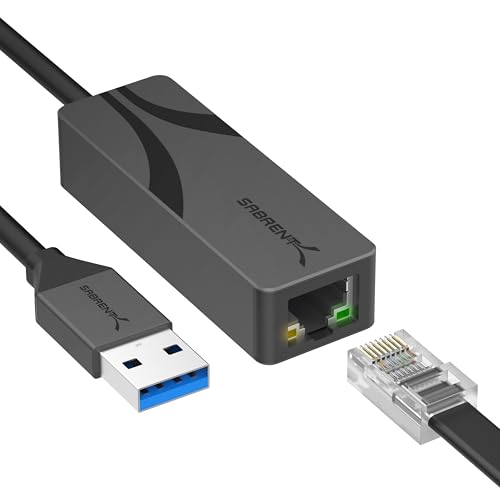
The SABRENT USB 3.0 to 2.5 Gigabit Ethernet Adapter stands out for its plug-and-play functionality, making it an ideal choice for users who need a hassle-free connection to high-speed networks. With its aluminum housing, this lightweight adapter guarantees durability while efficiently dissipating heat. It achieves speeds up to 2.5Gbps over 100m+ using CAT 5e or better cabling, thanks to its Realtek chipset. Compatible with multiple operating systems and devices, you won’t need to install drivers on most systems. Plus, the LED indicators help you monitor your connection status easily. Enjoy reliable connectivity with this well-rated adapter.
Best For: Users seeking a reliable and easy-to-use high-speed network connection for desktops, laptops, or tablets without the need for driver installation.
Pros:
- Plug-and-Play functionality allows for quick and easy setup without complicated installations.
- Lightweight aluminum housing provides durability and efficient heat dissipation.
- Wide compatibility across multiple operating systems, including Windows, macOS, Linux, and more.
Cons:
- Limited to USB Type-A connections, which may not be suitable for newer devices with only USB-C ports.
- Dependent on cable quality, achieving optimal speeds requires CAT 5e or better cabling.
- No advanced features like VLAN support or link aggregation, which may be necessary for specialized networking needs.
UGREEN USB C to Ethernet Adapter 2.5G

For those seeking lightning-fast internet speeds, the UGREEN USB C to Ethernet Adapter 2.5G stands out as an ideal choice. Supporting speeds up to 2.5Gb, it’s perfect for fast downloads, 4K/8K streaming, and gaming. You can easily connect your Type C devices, like MacBook Air/Pro and iPhone 17 Pro/Max, to RJ45 networks. Thanks to the Realtek RTL8156BG chip, it enhances older 1Gb networks seamlessly. Built with durable aluminum, it resists wear while indicator lights keep you updated on transmission status. With broad compatibility and a solid 4.5-star rating, this adapter is a reliable choice for your connectivity needs.
Best For: Users seeking high-speed internet connectivity for gaming, streaming, and fast downloads on Type C devices.
Pros:
- Supports speeds up to 2.5Gb, making it ideal for high-bandwidth activities like 4K/8K streaming and gaming.
- Durable aluminum construction ensures longevity and resistance to wear from frequent use.
- Compatible with a wide range of devices, including MacBook Air/Pro and iPhone 17 Pro/Max, enhancing versatility.
Cons:
- Requires devices to have Type C ports, limiting compatibility with older devices that use different ports.
- May not achieve 2.5Gb speeds if paired with older network infrastructure that does not support it.
- Limited warranty information may raise concerns for users looking for long-term assurance.
Cable Matters USB C to 5Gb Ethernet Adapter

Looking for a high-performance solution to elevate your laptop’s internet capabilities? The Cable Matters USB C to 5Gb Ethernet Adapter is a fantastic choice. It delivers a blazing-fast 5000 Mbps wired connection, perfect for UHD streaming, gaming, and transferring large files. Not only does it support USB4 and Thunderbolt devices, but it also features 140W charging capability. Its rugged aluminum housing guarantees durability, while the braided pigtail cable offers flexibility. Compatible with various laptops and devices, this compact adapter is ideal for both travel and desk setups. With a solid 4.6-star rating, it’s a reliable investment for your networking needs.
Best For: Those seeking a reliable, high-speed wired internet connection for their USB-C or Thunderbolt devices, especially for gaming and streaming.
Pros:
- Delivers up to 5000 Mbps for fast and stable wired networking.
- Compact and portable design is perfect for travel and desk setups.
- Rugged aluminum housing ensures durability and effective heat dissipation.
Cons:
- Not compatible with Android devices.
- Windows and some Linux users may need to install additional drivers for optimal performance.
- Full 5Gbps performance requires specific USB-C port and network equipment.
Wavlink USB C to Ethernet Adapter 2.5 Gbps
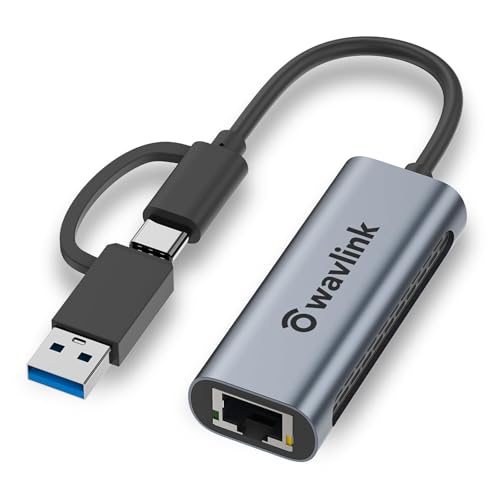
Offering blazing speeds of up to 2.5Gbps, the Wavlink USB C to Ethernet Adapter is perfect for users who demand high-performance connectivity for their laptops. This compact 2-in-1 adapter seamlessly converts USB-C to RJ45, ensuring compatibility with Thunderbolt 3 and 4, and various operating systems like Windows and macOS. You’ll enjoy double the speed of traditional gigabit Ethernet, while the premium aluminum design prevents overheating. Lightweight and portable, it’s ideal for both home and travel use. Plus, with a 2-year warranty and lifelong customer support, you can connect with confidence and ease.
Best For: Users seeking high-speed and reliable internet connectivity for their laptops with USB-C ports.
Pros:
- High Speed: Supports data transfer rates up to 2.5Gbps, offering double the performance of traditional gigabit Ethernet.
- Wide Compatibility: Works with multiple operating systems, including Windows, macOS, iPadOS, and Linux.
- Portable Design: Lightweight and compact, making it easy to carry for home or travel use.
Cons:
- Limited to USB 3.0: Requires USB 3.0 for full performance, potentially limiting older devices.
- Not Compatible with Smartphones: Designed specifically for laptops and not suitable for smartphone connections.
- Extra Setup Required: May require additional drivers or setup for certain operating systems.
SABRENT USB-C to 2.5Gbps Ethernet Adapter
The SABRENT USB-C to 2.5Gbps Ethernet Adapter is perfect for users needing a fast and reliable Ethernet connection on their laptops. This adapter (model NT-25GA) easily adds a 2.5 Gigabit Ethernet port via USB, supporting devices like MacBook Pro/Air and iPad Pro. You’ll enjoy impressive speeds over 100 meters with Cat5E cables or better, while it remains backward compatible with older technologies. Its aluminum construction guarantees durability and heat dissipation, making it travel-ready with an integrated USB-C cable. Plus, it’s bus-powered, eliminating the hassle of an external power source. Enjoy seamless connectivity wherever you go!
Best For: Users needing a fast and reliable Ethernet connection for their laptops, particularly those with USB-C ports.
Pros:
- Supports high speeds up to 2.5Gbps for improved internet performance.
- Durable aluminum construction enhances longevity and heat dissipation.
- Bus-powered design eliminates the need for an external power source.
Cons:
- Limited to USB-C devices, which may exclude some older laptops and desktops.
- Performance is dependent on the quality of the Ethernet cable used.
- May require driver installation for certain operating systems, potentially complicating setup.
StarTech.com 2.5GbE USB C to Ethernet Adapter

For content creators and power users seeking a reliable and high-speed connection, the StarTech.com 2.5GbE USB C to Ethernet Adapter (US2GC30) stands out as an ideal choice. This USB Type C adapter delivers 2.5GbE speeds over existing Cat 5e cables, ensuring seamless performance. With auto-negotiation for 2.5G, 1G, and 100 Mbps, it adapts effortlessly to your network. Compatible with high-performance laptops like MacBook Pro and Dell Precision, it supports various operating systems, including Windows and macOS. Plus, its bus-powered design and support for Wake on LAN make it a versatile solution for your connectivity needs.
Best For: Content creators and power users seeking high-speed Ethernet connectivity for their high-performance laptops.
Pros:
- High-speed performance: Achieves 2.5GbE speeds over existing Cat 5e cables, ensuring fast and reliable data transfer.
- Wide compatibility: Works with various operating systems and high-performance devices, making it versatile for different setups.
- Bus-powered design: Eliminates the need for an external power source, enhancing portability and ease of use.
Cons:
- Limited macOS support: Some features, such as 9K Jumbo frame, have restricted functionality on macOS.
- Backwards compatibility may be slower: While compatible with Gigabit LANs, users may experience reduced speeds when connecting to older networks.
- Potential cost: Compared to standard Ethernet adapters, it may be pricier, particularly for users not needing 2.5GbE speeds.
Plugable 2.5G USB-C and USB to Ethernet Adapter

Need a reliable way to upgrade your laptop’s internet speed? The Plugable 2.5G USB-C and USB to Ethernet Adapter is a perfect solution. With its dual-connector design, you can easily switch between USB-C and USB-A without needing new cables. It delivers impressive speeds, outperforming traditional Gigabit Ethernet adapters when paired with compatible switches or routers. Plus, it’s compatible with various operating systems, including Windows, macOS, and iOS (iPhone 15 & 16). Enjoy true plug-and-play functionality along with a 2-year warranty and lifetime support from Plugable’s North American-based team. Elevate your connectivity effortlessly!
Best For: Users looking to enhance their laptop’s internet speed with a versatile and easy-to-use Ethernet adapter.
Pros:
- High performance: Supports speeds up to 2.5Gbps, outperforming standard Gigabit Ethernet adapters.
- Dual-connector design: Easily switches between USB-C and USB-A without the need for new cables.
- Wide compatibility: Works with multiple operating systems, including Windows, macOS, ChromeOS, and iOS (iPhone 15 & 16).
Cons:
- Performance limitations: Actual speeds may vary based on internet service provider, network, and cables used.
- USB 3.0 requirement: Full performance is only achievable with USB 3.0 connections.
- Newer technology: May not be necessary for users with standard internet speeds or older devices.
StarTech.com 2.5GbE USB-C to Ethernet Adapter

Offering seamless network access through both USB Type-C and Type-A ports, StarTech.com’s 2.5GbE USB-C to Ethernet Adapter is perfect for those who want to enhance their laptop’s connectivity without overhauling existing infrastructure. This adapter auto-installs on most operating systems, ensuring a hassle-free setup. It supports 2.5Gbps speeds over existing Cat5e cables, making it ideal for quick file downloads and video conferencing. With a compact design and no need for an external power source, you can easily take it anywhere. Plus, you’ll enjoy reliable connections that surpass wireless alternatives, making it a must-have for IT professionals.
Best For: IT professionals and users needing reliable, high-speed wired network access without the hassle of infrastructure upgrades.
Pros:
- Supports 2.5Gbps speeds over existing Cat5e cables, enhancing network performance.
- Auto-installs on most operating systems, simplifying setup and usability.
- Compact design with no external power source required, making it portable and convenient.
Cons:
- May require software downloads on some Windows systems if drivers are not present.
- Customer feedback indicates a moderate rating of 3.8 out of 5 stars.
- Limited to existing Cat5e cables, which may not be suitable for future upgrades.
ASUS USB-C Wired Network Adapter (2.5Gbps)

The ASUS USB-C2500 V2 stands out as an ideal choice for gamers and content creators seeking ultra-fast, reliable internet connectivity. With its 2.5Gbps Type-C wired connection and RJ45 LAN, you’ll experience speeds 2.5 times faster than standard Gigabit adapters. It seamlessly integrates with modern devices, supporting Windows, macOS, and Linux. Enjoy lag-free gaming, smooth streaming, and rapid file transfers thanks to a data transfer rate of 2500 Megabytes per second. Compact and lightweight, it’s perfect for travel, and its plug-and-play functionality means you can connect instantly without drivers. Plus, it comes with a 3-year warranty for peace of mind.
Best For: Gamers and content creators who require ultra-fast and reliable internet connectivity for smooth performance.
Pros:
- High-speed performance with data transfer rates of up to 2.5Gbps, ideal for lag-free gaming and quick file transfers.
- Wide compatibility with major operating systems including Windows, macOS, and Linux, making it versatile for various devices.
- Compact and portable design that is travel-ready and features plug-and-play functionality for easy setup.
Cons:
- Limited to USB Type-C connectivity, which may not be compatible with older devices lacking this port.
- Higher price point compared to standard Gigabit adapters, which may not appeal to budget-conscious users.
- Potential for overheating during extensive use, which could impact long-term reliability.
Factors to Consider When Choosing 2 5Gbe USB Adapters for Laptops
When choosing a 2.5GbE USB adapter for your laptop, you’ll want to contemplate several key factors. Compatibility with your devices is essential, along with speed and performance to meet your needs. Don’t overlook build quality, design, and any driver requirements that might affect your setup.
Compatibility With Devices
Selecting the right 2.5GbE USB adapter hinges on compatibility with your devices. First, check the specific ports on your laptop, like USB Type-C or USB-A, to ascertain a proper connection. Next, confirm that the adapter supports your operating system—many work with Windows, macOS, Linux, and ChromeOS, but may need specific drivers for full functionality. It’s also wise to contemplate backward compatibility with older networking standards like 1Gb and 100Mbps, adding versatility to your setup. Additionally, look for features like Wake-on-LAN or PXE boot, which can enhance usability. Finally, ensure the adapter meets the required data transfer rates and protocols, such as IEEE 802.3bz, to guarantee reliable high-speed connectivity.
Speed and Performance
Speed and performance are crucial factors to take into account in 2.5GbE USB adapters, as they directly impact your network experience. Look for adapters that support speeds up to 2.5Gbps, greatly boosting performance over traditional Gigabit Ethernet. Make sure the adapter features a low-latency chipset, like the Realtek RTL8156BG, to maintain stable connections and reduce CPU load during high-speed transfers. The type of cabling matters too; using Cat5e or better will help you achieve sustained 2.5Gbps speeds over longer distances. Additionally, check for backward compatibility with older network standards (10/100/1000 Mbps) for seamless integration. Finally, evaluate the adapter’s auto-negotiation capabilities to automatically optimize performance based on your connected network equipment.
Build Quality and Durability
While you might be focused on speed and performance, build quality and durability are just as important when choosing a 2.5GbE USB adapter for your laptop. Look for adapters made from high-quality aluminum or other sturdy materials that can handle wear and tear from regular use. Models with reinforced ports can enhance longevity by reducing damage from physical stress. Additionally, some adapters feature built-in ventilation holes, which help dissipate heat and maintain performance during extended use. A lightweight and compact design also aids portability, making it easier to transport without risking damage. Finally, consider adapters with LED indicators to visually monitor data transmission, ensuring you’re always aware of the adapter’s performance.
Design and Portability
When it comes to 2.5GbE USB adapters for laptops, design and portability are key factors that can greatly enhance your experience. You’ll want to evaluate the material; aluminum housings are often best for durability and heat dissipation. The weight and dimensions matter too—look for lightweight, compact designs that fit easily into your bag if you travel often. Integrated cables or compact shapes help reduce clutter, making setups simpler. Additionally, assess adapters with LED indicators for real-time status updates on data transmission; this feature adds convenience in various environments. Finally, plug-and-play functionality is a huge plus, allowing you to connect instantly without fussing with drivers, perfect for users on the go.
Driver Requirements
Choosing the right 2.5GbE USB adapter for your laptop often hinges on understanding driver requirements. Many adapters are plug-and-play, making setup easy without extra installations on most operating systems. However, some adapters may need drivers installed for peak performance, especially on Windows and certain Linux distributions. It’s essential to check compatibility with your OS—whether it’s Windows, macOS, or Linux—as this can vary between models. Additionally, if you want features like Wake-On-LAN or PXE boot, be aware that specific drivers may be necessary. Finally, consider how easy it is to update drivers, as some manufacturers offer dedicated software or support to enhance your long-term usability.
Warranty and Support
Understanding driver requirements sets the stage for evaluating warranty and support, which are equally important factors in your selection process. When you choose a 2.5GbE USB adapter, pay attention to the warranty length offered. A longer warranty often indicates the manufacturer’s confidence in product durability. Look for adapters with a clear return policy, allowing you to return a defective or unsatisfactory item for a full refund. Some manufacturers even offer extended warranty options upon product registration, giving you extra peace of mind. Don’t overlook customer support quality; choose brands that provide responsive technical assistance and clear troubleshooting documentation. Finally, review user feedback ratings, as they can reveal insights into reliability and performance, often linked to better warranty and support experiences.
Price and Value
Evaluating price and value is essential for finding the right 2.5GbE USB adapter that meets your needs without breaking the bank. Start by comparing prices across various brands to guarantee you’re getting the best features for your budget. Don’t overlook the warranty duration and customer support, as a longer warranty adds value by protecting your investment. Aim for a good balance between price and performance, since higher-priced models often offer features that justify the cost. Research user reviews and ratings to assess reliability and durability within your budget. Finally, factor in any additional costs, like compatible cables or network equipment, as these can impact the overall value of your chosen adapter.