Choosing a 25gbe pcie card for workstation use is about more than raw speed. You need the right port type, driver support, and PCIe lane fit for your platform.
This roundup focuses on practical options for creative work, virtualization, shared storage, and fast local transfers in 2026.
Best 10 25gbe Pcie Card for Workstation Picks for 2026
Best for Virtualization and RDMA

- ConnectX-4 Lx chipset with dual SFP28 25GbE ports
- Supports RDMA, SR-IOV, iSCSI, DPDK, and more
- Good fit for workstation labs, storage, and multi-VM setups
Best For: Power users who want fast 25GbE networking for virtualization, storage, and lab workloads.
Best for Dual-25GbE Workstations

- Dual 25GbE SFP28 ports for fast workstation networking
- Includes two transceivers for an easier setup
- Compatible with Mac, Windows, and Linux
Best For: Dual-port optical networking for demanding workstations and shared storage setups.
Best for RDMA Workstations
Vogzone 25Gb Intel E810 Dual SFP28 NIC

- Intel E810 controller with SR-IOV stability features
- Dual SFP28 ports for 1GbE/10GbE/25GbE speeds
- RDMA, iWARP/RoCEv2, PXE, and virtualization support
Best For: Workstations and homelabs that need fast, Intel-based 25Gb networking with RDMA support.
Best for Synology Systems
Synology 2-Port 25GbE SFP28 PCIe Adapter

- Dual 25GbE SFP28 ports
- Failover and load balancing support
- 5-year warranty for compatible Synology systems
Best For: Synology users who need fast, redundant 25GbE networking for storage-heavy workflows.
Best Value Upgrade
TP-Link TX201 2.5Gb PCIe Ethernet Card

- 2.5GbE speed boost over standard gigabit
- Full-height and low-profile brackets included
- Works with Windows, Server, and Linux
Best For: Workstations and desktops needing an affordable 2.5GbE networking upgrade.
Best Multi-Port Option
Quad Port 2.5GbE PCIe Card for Workstation

- Four 2.5GbE ports in one PCIe x4 card
- Intel i226-V works well across popular OSes
- Ideal for workstations, servers, and router builds
Best For: Users who want multiple 2.5GbE connections from a single expansion card.
Best for High-Speed Workstations
Vogzone Intel E810 100GbE PCIe NIC
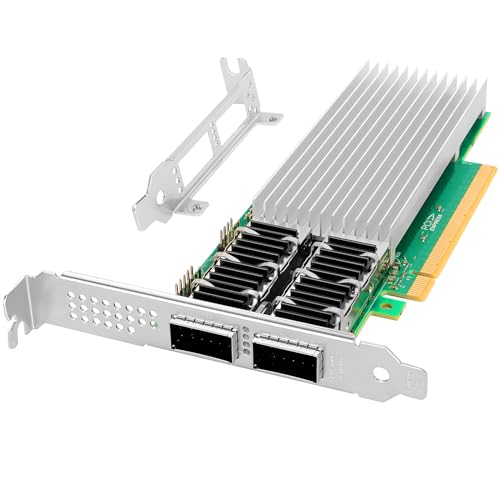
- Intel E810-CAM2 controller with SR-IOV and RDMA support
- Dual QSFP28 ports for 25/50/100GbE networking
- PCIe 4.0 x16 card with broad OS compatibility
Best For: Workstations and lab rigs that need an Intel-based NIC with serious bandwidth headroom.
Best for Dual-Port 25GbE
10/25GbE Dual SFP28 Mellanox ConnectX-4 Lx Card

- Dual SFP28 ports with 25GbE throughput
- RDMA and offload support with ConnectX-4 Lx
- Broad support for Windows, Linux, and VMware
Best For: Workstations, labs, and small servers that need dual 25GbE connectivity.
Best for Broadcom Compatibility
Vogzone 25Gb Broadcom BCM57414 NIC

- Broadcom BCM57414B controller with offload features
- Dual SFP28 ports support 1GbE/10GbE/25GbE
- Broad OS support for Windows, Linux, and VMware
Best For: Workstations and homelabs that need Broadcom-based 25GbE with broad compatibility.
Best for Virtualization and RDMA – Vogzone 25GbE Dual SFP28 NIC
If you need a reliable 25gbe pcie card for workstation use, this Vogzone adapter is a strong fit thanks to its Mellanox ConnectX-4 Lx chipset, dual SFP28 ports, and broad support for RDMA and virtualization features. It is aimed more at serious lab, storage, and multi-VM setups than basic desktop networking, but that also makes it a practical way to add low-latency 25GbE to an advanced workstation.
Best For: Power users building a workstation for virtualization, fast storage access, or high-throughput network tasks.
Pros:
- ConnectX-4 Lx chipset with dual SFP28 ports for 1/10/25GbE links
- Supports RDMA, SR-IOV, iSCSI, DPDK, and other advanced network features
- PCIe 3.0 x8 design works well in x8 or x16 workstation slots
- Wide OS compatibility for Windows, Linux, VMware ESXi, and more
Cons:
- Requires SFP28 optics or DAC cabling, which may add to setup cost
- Overkill for users who only need standard gigabit networking
Overall, this is a capable 25gbe pcie card for workstation builds that need serious bandwidth and low-latency features rather than simple plug-and-play Ethernet. If your workflow includes VMs, storage traffic, or lab environments, it offers a compelling balance of capability and compatibility.
Best for Dual-25GbE Workstations – Sonnet Twin25G PCIe Card
If you need a serious 25gbe pcie card for workstation use, the Sonnet Twin25G is built for fast file transfers, shared storage access, and dual-link networking from a standard PCIe slot. It’s a practical fit for editors, 3D artists, and IT setups that want 25GbE now while keeping 10GbE compatibility for mixed networks.
Best For: Workstations that need dual SFP28 ports for high-speed storage, media, or server networking.
Pros:
- Dual 25GbE SFP28 ports for high-throughput workstation networking
- Includes two SFP28 transceivers, reducing extra setup cost
- Backward compatible with 10GbE infrastructure
- Works across Mac, Windows, and Linux systems
Cons:
- Not ideal if you need RJ45 copper Ethernet instead of optical SFP28
- macOS 15.3.1 and 15.4 are currently not supported
- Requires a PCIe slot or Thunderbolt expansion system
This is a strong choice if your workstation needs dual-port optical networking and you want room to grow from 10GbE to 25GbE without replacing the adapter. For a focused 25gbe pcie card for workstation builds, it stands out for flexibility, included optics, and broad OS support.
Best for RDMA Workstations – Vogzone 25Gb Intel E810 Dual SFP28 NIC
If you need a 25gbe pcie card for workstation use with serious throughput, this Vogzone adapter is built around Intel’s E810 controller and adds dual SFP28 ports with 1GbE/10GbE/25GbE support. It’s a practical fit for fast NAS access, virtualization, and lab setups where PCIe 4.0 x8 bandwidth and advanced network features matter more than basic desktop Ethernet.
Best For: Workstations that need 25Gb networking, RDMA support, and Intel-based compatibility for pro workflows or homelab storage access.
Pros:
- Intel E810-XXVAM2 controller with SR-IOV and strong stability features
- Dual SFP28 ports support 1GbE, 10GbE, and 25GbE connections
- Supports RDMA, iWARP/RoCEv2, PXE, DPDK, and jumbo frames
- Works with Windows, Linux, VMware ESXi, FreeBSD, and UEFI
Cons:
- SFP28 transceiver or DAC cable is not included
- Requires the right switch, cabling, and a PCIe x8/x16 slot
- Overkill if you only need standard gigabit networking
This is a strong pick if you want a workstation-grade 25gbe pcie card for workstation workloads that can benefit from RDMA and Intel driver support. It’s not the simplest plug-and-play desktop upgrade, but for fast storage, virtualization, and pro networking, it has the specs to justify the slot.
Best for Synology Systems – Synology 2-Port 25GbE SFP28 PCIe Adapter
If you need a 25gbe pcie card for workstation-like storage performance inside a Synology environment, this dual-port adapter is built for exactly that job. It’s a strong fit for users who want fast transfers, link redundancy, and straightforward integration with compatible Synology hardware.
Best For: Synology NAS owners who want dual 25GbE connectivity for faster storage workflows, failover, and load balancing.
Pros:
- Two 25GbE SFP28 ports for high-throughput networking
- Supports failover and load balancing for better reliability
- Purpose-built for compatible Synology systems
- Backed by a 5-year warranty
Cons:
- Requires compatible Synology hardware and DSM 7.1.1-42962 Update 5 or later
- Not a universal pick for mixed-brand workstation builds
For buyers centered on Synology storage, this adapter is a practical 25gbe pcie card for workstation-style file transfers and shared storage workloads. It’s less about broad compatibility and more about delivering reliable, high-speed networking where Synology support matters most.
Best Value Upgrade – TP-Link TX201 2.5Gb PCIe Ethernet Card
If you want a practical 25gbe pcie card for workstation-style upgrades without overspending, the TP-Link TX201 is a straightforward way to move from basic gigabit networking to 2.5GbE. It’s a simple PCIe add-in card with broad OS support, a low-profile bracket for smaller cases, and useful extras like Wake on LAN.
Best For: Workstations, mini towers, and desktop users who need a reliable 2.5GbE step-up for faster file transfers and everyday network performance.
Pros:
- Up to 2.5 Gbps speeds for a noticeable jump over standard Gigabit Ethernet
- Includes both full-height and low-profile brackets for easier case compatibility
- Wide support across Windows, Windows Server, and Linux systems
- Wake on LAN and QoS add convenience for managed or gaming-focused setups
Cons:
- 2.5GbE is helpful, but it’s not a true multi-gig or 10Gb upgrade
- Best results depend on your switch, cabling, and network environment
For buyers who mainly need a dependable, affordable 25gbe pcie card for workstation use, the TX201 makes sense because it focuses on compatibility and easy installation rather than premium extras. It’s a solid utility pick when you want faster LAN access for shared storage, backups, and day-to-day transfers.
Best for Virtualization & RDMA – CX4121A Dual 25GbE SFP28 Adapter
If you need a 25gbe pcie card for workstation use that can also pull double duty in servers, the CX4121A is a strong fit. It combines dual 25GbE SFP28 ports, PCIe 3.0 x8 bandwidth, and ConnectX-4 Lx features like RDMA, SR-IOV, and overlay-network support, making it useful for fast storage, VM hosts, and high-throughput workflows.
Best For: Workstations and prosumer builds that need dual-port 25GbE, low-latency RDMA, and broad compatibility with SFP28 networking gear.
Pros:
- Dual 25GbE SFP28 ports with PCIe 3.0 x8 for serious bandwidth
- Supports RDMA over RoCE, SR-IOV, PXE, and iSCSI for advanced setups
- Compatible with Windows, Linux, VMware, and common OFED/WinOF-2 stacks
- Works with SFP28 DAC, AOC, and transceiver options for flexible installs
Cons:
- Overkill for basic desktop networking
- Requires SFP28 fiber/DAC infrastructure, not standard RJ45 cabling
- Best performance depends on a full PCIe 3.0 x8 slot and supported drivers
For users building a fast shared-storage rig or a lab machine, this 25gbe pcie card for workstation workloads stands out because it focuses on practical enterprise features rather than consumer extras. If your priority is high-speed networking with RDMA and virtualization support, it offers a very capable middle ground between server hardware and workstation convenience.
Best Multi-Port Option – Quad Port 2.5GbE PCIe Card for Workstation
If you need a flexible 25gbe pcie card for workstation-style networking without jumping to 10GbE pricing and power draw, this quad-port Intel i226-V adapter is a practical pick. It adds four 2.5GbE ports over PCIe x4, making it useful for a fast desktop, a small lab box, or a routing-focused build that needs multiple wired connections.
Best For: Workstations, home servers, and firewall/router builds that need multiple 2.5GbE ports in one card.
Pros:
- Four 2.5GbE ports provide plenty of connectivity for multi-device setups.
- Intel i226-V support is a strong fit for Linux, Proxmox, TrueNAS, pfSense, and OPNsense.
- PCIe x4 design keeps installation simple in compatible workstations and servers.
- Good value if you want several wired NIC ports from a single expansion slot.
Cons:
- 2.5GbE is not the right choice if you specifically need true 10GbE performance.
- Quad-port cards can be overkill for basic desktop networking.
Overall, this is a strong 25gbe pcie card for workstation buyers who care more about port count and compatibility than raw top-end speed. It makes the most sense when you want dependable multi-port networking for a workstation, homelab, or software router build.
Best for High-Speed Workstations – Vogzone Intel E810 100GbE PCIe NIC
If you need a 25gbe pcie card for workstation use that can also scale far beyond 25GbE, this Vogzone adapter is built around Intel’s E810-CAM2 controller with dual QSFP28 ports and PCIe 4.0 x16 support. It’s a strong fit for fast shared storage, virtualization labs, and bandwidth-heavy workflows where RDMA, SR-IOV, and broad OS support matter more than consumer gaming features.
Best For: Power users and workstation builders who want a future-proof Intel-based NIC for 25/50/100GbE networking, especially in pro or lab environments.
Pros:
- Intel E810-CAM2 controller with enterprise-focused features like SR-IOV and traffic management
- Dual QSFP28 ports support 25GbE, 50GbE, and 100GbE connections
- PCIe 4.0 x16 interface, with compatibility for PCIe 3.0 systems
- Works across Windows, Linux, VMware ESXi, FreeBSD, and UEFI environments
Cons:
- QSFP28 cable or adapter is not included
- More card than most everyday desktop users need
- Requires the right high-speed switch or DAC/transceiver setup to use its full potential
This is a capable choice if your 25gbe pcie card for workstation shortlist needs headroom for larger projects, not just a basic 25GbE uplink. The Intel platform and dual-port design make it especially appealing for advanced networking, virtualization, and storage workflows.
Best for Dual-Port 25GbE – 10/25GbE Dual SFP28 Mellanox ConnectX-4 Lx Card
If you need a 25gbe pcie card for workstation use, this dual-port SFP28 adapter is built for serious throughput, RDMA support, and broad OS compatibility. It fits PCIe x8 or x16 slots and can negotiate down to 10GbE or 1GbE, making it a flexible upgrade for editing rigs, lab machines, and compact servers.
Best For: Workstations and small server builds that need dual 25GbE ports, RDMA support, and wide driver compatibility.
Pros:
- Dual SFP28 ports with 25GbE performance and fallback to 10GbE/1GbE
- Mellanox ConnectX-4 Lx chipset adds RDMA, offloads, and strong throughput
- Works with Windows, Linux, VMware, and OFED-based environments
- Includes both low- and full-height brackets for broader case support
Cons:
- Requires matching 25GbE optics, DAC, or switch gear to run at full speed
- Not compatible with Windows 7 and does not support UEFI
Overall, this is a practical 25gbe pcie card for workstation users who want enterprise-style networking without moving to a more complex platform. Its dual-port design and Mellanox feature set make it a strong fit for high-bandwidth transfers, virtualization, and storage-heavy workflows.
Best for Broadcom Compatibility – Vogzone 25Gb Broadcom BCM57414 NIC
If you need a 25gbe pcie card for workstation use with strong driver support and flexible port speeds, this Vogzone adapter is aimed at exactly that kind of setup. Its Broadcom BCM57414B controller, dual SFP28 ports, and PCIe 3.0 x8 interface make it a practical pick for fast file transfers, virtualization, and lab or storage-heavy workstations.
Best For: Workstations, homelabs, and server-style PCs that want Broadcom-based 25GbE with broad OS support.
Pros:
- Broadcom BCM57414B controller with intelligent offloads for stable performance
- Dual SFP28 ports support 1GbE, 10GbE, and 25GbE connections
- Wide compatibility across Windows, Linux, VMware, and FreeBSD
- PCIe 3.0 x8 design suits many workstation and server builds
Cons:
- Requires SFP28 networking gear and compatible optics or DAC cables
- Not the simplest choice for users who only need plug-and-play Ethernet
For buyers comparing a 25gbe pcie card for workstation upgrades, this model stands out more for compatibility and flexibility than for simplicity. It is a smart fit if you already have SFP28 infrastructure and want a Broadcom-based adapter that can scale from 10GbE to 25GbE without changing cards.
How We Picked the Best 25gbe Pcie Card for Workstation
We prioritized workstation-friendly models with proven chipset support, sensible PCIe requirements, and broad OS compatibility. We also looked for cards that make sense outside of data-center racks, including options for Mac, Windows, Linux, and storage-focused systems.
For a 25gbe Pcie Card for Workstation setup, stability matters as much as peak throughput. That means checking vendor drivers, firmware maturity, cooling needs, and whether the card’s port style matches your switch, DAC, or fiber module plan.
Quick Comparison
In general, the list splits into three groups: true 25GbE adapters for maximum throughput, flexible multi-rate cards that can fall back to 1GbE/10GbE, and lower-speed 2.5GbE models for users who do not yet need full 25GbE networking. Dual-port cards are better for separating storage and general traffic, while single-port models are often easier to install and cool.
Key Buying Factors for a 25gbe Pcie Card for Workstation
PCIe Slot and Lane Requirements
Check whether your motherboard offers enough bandwidth. Most 25GbE adapters use PCIe 3.0 x8 or similar, which is usually fine, but a lane-starved system can bottleneck performance.
Port Type and Cabling
Most cards here use SFP28, so you’ll need compatible DAC cables, transceivers, or fiber infrastructure. If your network is QSFP-based, make sure the card matches the switch side or supports the right breakout configuration.
Chipset and Driver Support
Intel, Mellanox/ConnectX, Broadcom, and Synology-based solutions can all work well, but driver quality varies by operating system. If you use Windows 11, Linux, Proxmox, pfSense, or macOS, verify support before buying.
Use Case Fit
If you move large project files, edit directly from NAS storage, or run VMs and containers, a dual-port 25GbE card can be a smart upgrade. If your workflow is lighter, a 10GbE or 2.5GbE card may be enough and easier on cost and power.
Who Should Buy Which 25gbe Pcie Card for Workstation?
Power users with fast shared storage should focus on true 25GbE adapters with strong chipset support and dual ports. Virtualization users and homelab builders should favor cards known for RDMA, multi-OS drivers, and stable thermal behavior.
If you are upgrading a desktop or creative workstation on a budget, start by comparing the network speed you actually need. A 25gbe Pcie Card for Workstation use is ideal when your storage and switching hardware can keep up; otherwise, a 10GbE or 2.5GbE option may deliver better value.