A 10Gb SFP+ card can give a desktop or NAS a faster link to a switch or server without replacing the rest of the system. The right choice depends on more than the advertised speed: your PCIe slot, operating system, cabling, and switch port all need to match.
These 10 options include single- and dual-port adapters for straightforward upgrades, dedicated links, and more flexible network setups.
Best 10 Sfp Plus Network Card for PC Picks for 2026
Intel-Based Dual-Port Pick

- Dual 10Gb SFP+ ports
- Intel 82599ES controller
- Standard and low-profile brackets
Best For: Two 10Gb links in a desktop or server
Single-Link Intel Pick
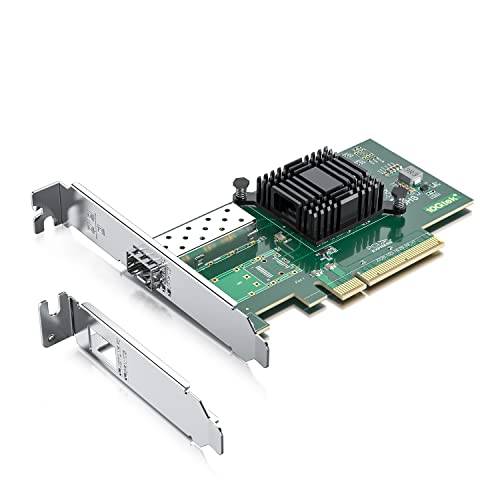
- Single 10Gb SFP+ port
- Intel 82599EN controller
- Three-year warranty listed
Best For: One 10Gb SFP+ link in a desktop or server
Dual-Port 1G-Capable Pick

- Dual 10Gb SFP+ ports
- Stated 1Gbps compatibility
- Broad OS support listed
Best For: Two SFP+ links with a 1Gbps option
Heatsink-Equipped Pick

- Dual 10Gbps SFP+ ports
- Windows 11 support listed
- Heatsink and two bracket sizes
Best For: Dual-port builds needing listed Windows 11 support
Windows Workstation Pick

- Single 1Gbps/10Gbps SFP+ port
- PCIe 3.0 x4 interface
- Standard and low-profile brackets
Best For: Windows desktops needing one 10Gbps SFP+ connection
Dual-Port Server Pick

- Dual 10GbE SFP+ ports
- Intel 82599ES controller
- Requires PCIe x8 or x16 slot
Best For: NAS, server, and desktop builds needing two SFP+ ports
Fiber-or-DAC Pick

- Single 10Gbps SFP+ port
- Fiber or direct-attach copper option
- Aluminum heatsink and built-in QoS
Best For: Desktops using a fiber or direct-attach copper link
Best for Dual-Port Builds
Binardat Intel X520 10G SFP+ Adapter

- Two open 10Gbps SFP+ ports
- PCIe x8 card; two bracket sizes
- Modules sold separately
Best For: PCs or servers needing two SFP+ links
Best for Slot Flexibility
YuanLey RTL8127AT 10G Network Card

- PCIe 4.0 x1 interface
- Full-height and low-profile brackets
- Confirm port and cabling details
Best For: Desktops with limited expansion-slot options
Best for a Single Intel-Based Link

- One 10GbE SFP+ port
- Intel 82599; PCIe 2.0 x4
- Two bracket sizes included
Best For: Single-link desktop or NAS upgrades
Intel-Based Dual-Port Pick – 10Gtek X520-10G-2S
If you need an sfp plus network card for pc or server with two 10GbE connections, this 10Gtek model offers dual SFP+ ports and an Intel 82599ES controller. It fits PCIe x8 or x16 slots and includes a low-profile bracket.
Best For: A desktop or server needing two 10Gb SFP+ connections and Intel 82599ES-based virtualization support.
Pros:
- Two ports accept 10Gb SFP+ modules, DACs, or AOCs.
- Supports iSCSI, FCoE, and NFS storage traffic.
- Includes standard and low-profile mounting options.
Cons:
- Does not support 1G, 2.5G, or 5G speeds.
- Windows 11 use requires correctly configuring the Windows 10 driver; hot swapping is not supported.
Choose this when two 10Gb links matter more than multigigabit flexibility. Check your operating system and SFP+ connection requirements before ordering.
Single-Link Intel Pick – 10Gtek X520-10G-1S
For a setup that needs just one 10Gb link, this sfp plus network card for pc and server use pairs a single SFP+ port with an Intel 82599EN controller. Its PCIe x8 interface also fits x16 slots.
Best For: A desktop or server needing one 10Gb SFP+ connection without paying for an unused second port.
Pros:
- Accepts a 10Gb SFP+ module, DAC, or AOC.
- Intel controller supports I/O virtualization.
- Includes a low-profile bracket alongside the standard bracket.
- Lists a three-year warranty.
Cons:
- Only one port; it does not support 1G, 2.5G, or 5G speeds.
- Windows 11 requires correct Windows 10 driver setup, and hot swapping is unsupported.
This is the simpler Intel-based choice if a single 10Gb connection covers your plans. Confirm driver compatibility before installing it in a newer Windows system.
Dual-Port 1G-Capable Pick – H!Fiber BCM57810S NIC
Among sfp plus network card for pc options, this H!Fiber adapter stands out for its stated 1Gbps compatibility alongside dual 10Gb SFP+ ports. It uses a Broadcom BCM57810S controller and a PCIe 2.0 x8 interface that fits x8 or x16 slots.
Best For: A Windows or Linux desktop or server needing two SFP+ ports and stated 1Gbps compatibility.
Pros:
- Two ports support 10Gb SFP+ modules, DACs, or AOCs.
- Also lists compatibility with 1Gbps connections.
- Includes full-height and low-profile brackets.
- Lists Windows, several Linux distributions, FreeBSD, and VMware ESXi support.
Cons:
- Does not support macOS or bypass mode.
- Requires an available PCIe x8 or x16 slot.
Consider this model if you want dual ports but may also need a 1Gbps connection. Match your exact operating-system version and SFP+ hardware to the listed support before buying.
Heatsink-Equipped Pick – VIMIN Dual SFP+ 10G NIC
This VIMIN sfp plus network card for pc or server use combines two 10Gbps SFP+ ports, an Intel 82599 chipset, and a heatsink. It supports PCIe x8 and x16 slots and comes with standard and slim brackets.
Best For: A Windows 11, Linux, or VMware setup seeking two SFP+ ports and a heatsink-equipped card.
Pros:
- Dual 10Gbps SFP+ connections.
- Lists Windows 7 through 11, Windows Server, Linux, and VMware compatibility.
- Includes standard and slim brackets for different case heights.
- Has a heatsink for thermal management.
Cons:
- No RJ45 port for directly connecting a standard Ethernet cable.
- Does not support 2.5Gbps or 5Gbps operation; the notes state it runs at 1Gbps with a 2.5G or 5G network device.
The VIMIN is worth considering when two SFP+ connections and the listed Windows 11 compatibility suit your build. Check your transceiver or cable choice carefully: this is not an RJ45 adapter.
Windows Workstation Pick – TRENDnet TEG-10GECSFP
If you need an sfp plus network card for pc with a single 10Gbps port, the TRENDnet TEG-10GECSFP turns a PCIe 3.0 x4 slot into a 1Gbps/10Gbps SFP+ connection. Its included standard and low-profile brackets give you options for different desktop cases.
Best For: Windows desktops needing one SFP+ port, with VLAN and jumbo-frame support.
Pros:
- Supports IEEE 802.1Q VLAN tagging and jumbo frames up to 16 KB.
- Includes standard and low-profile brackets.
- Lists compatibility with Windows 10/11 and several Windows Server releases.
Cons:
- Only one SFP+ port.
- Requires an available PCIe x4 slot.
This is a straightforward single-port choice when its listed Windows support fits your setup; choose a dual-port card if you need two connections.
Dual-Port Server Pick – LinksTek X520-DA2
For an sfp plus network card for pc or server that needs two connections, the LinksTek X520-DA2 provides dual 10GbE SFP+ ports on a PCIe 2.0 x8 card. Its Intel 82599ES controller and listed virtualization features make it worth considering for NAS and server builds.
Best For: Desktops and servers needing two SFP+ ports for LAN, storage, or virtualization workloads.
Pros:
- Two 10GbE SFP+ ports.
- Supports iSCSI, NFS, VMDq, and SR-IOV.
- Includes a low-profile bracket alongside the preinstalled full-height bracket.
Cons:
- Requires a PCIe x8 or x16 slot.
- Windows desktop versions listed in the notes require driver installation.
- Requires suitable SFP+ transceivers and LC cables, or compatible DAC/AOC cables.
Its second port adds flexibility, but check your slot, operating system, and planned SFP+ connection before buying.
Fiber-or-DAC Pick – ASUS XG-C100F
The ASUS XG-C100F is an sfp plus network card for pc buyers who want a single 10Gbps port with the option to use fiber-optic or direct-attach copper connections. It pairs its SFP+ cage with an aluminum heatsink and built-in QoS prioritization.
Best For: Desktop users planning a 10Gbps fiber or direct-attach copper link.
Pros:
- SFP+ cage supports fiber-optic and direct-attach copper connections.
- Aluminum heatsink provides built-in cooling.
- Built-in QoS prioritizes important streams or games.
Cons:
- Only one SFP+ port.
- Check driver support for your operating system; the supplied notes do not list compatible versions.
This is a focused desktop option if you want ASUS’s stated cooling and QoS features, but confirm operating-system compatibility before ordering.
Best for Dual-Port Builds – Binardat Intel X520 10G SFP+ Adapter
If you need an sfp plus network card for pc with two separate 10Gbps connections, this Binardat adapter offers dual open SFP+ slots and an Intel 82599 controller. It suits a desktop, workstation, server, or NAS with an available PCIe x8 or x16 slot.
Best For: Builds that need two SFP+ connections and have room for a PCIe x8 card.
Pros:
- Two ports support suitable SFP+ modules or direct-attach cables.
- Includes standard and low-profile brackets.
- Lists Windows, Linux, FreeBSD, and VMware ESX support.
Cons:
- Modules are not included.
- Requires a PCIe x8 or x16 slot; it is not for a legacy PCI slot.
Choose it when the second port matters more than conserving expansion-slot space. Check your transceiver or cable choice and driver availability before installation.
Best for Slot Flexibility – YuanLey RTL8127AT 10G Network Card
For an sfp plus network card for pc when expansion slots are limited, the YuanLey card stands out for its PCIe 4.0 x1 interface. Its listed features include 10G/1G operation, a Realtek RTL8127AT controller, and Wake-on-LAN.
Best For: Windows 11 or Linux desktops where a PCIe x1 card and remote wake-up are useful.
Pros:
- PCIe x1 interface offers more placement flexibility than an x4 or x8 card.
- Includes full-height and low-profile brackets.
- Supports Wake-on-LAN.
Cons:
- Provides one network port, not two.
- The notes describe both an SFP port and compatibility with Cat5e through Cat7 Ethernet cabling; confirm the physical port and required cable or module before buying.
This is the slot-conscious option, but the conflicting connection details warrant a closer look at the listing before you plan a fiber or copper setup.
Best for a Single Intel-Based Link – LinksTek X520-DA1 SFP+ Card
The LinksTek X520-DA1 is an sfp plus network card for pc buyers who need one 10GbE connection rather than two. It combines an Intel 82599 controller, a PCIe 2.0 x4 interface, and support for compatible SFP+ transceivers, DAC cables, or AOC cables.
Best For: A desktop or NAS build needing one SFP+ link in a PCIe x4, x8, or x16 slot.
Pros:
- Single SFP+ port supports the listed optical and direct-attach connection options.
- Fits PCIe x4, x8, or x16 slots.
- Includes a low-profile bracket alongside its preinstalled full-height bracket.
Cons:
- Offers only one port.
- Desktop Windows versions listed in the notes require a driver installation.
It is a practical choice when one Intel-based SFP+ connection is enough. Budget for a suitable transceiver and fiber cable, DAC, or AOC to complete the link.
How We Picked the Best Sfp Plus Network Card for PC
We focused on PCIe adapters with SFP+ ports that are relevant to desktop PCs and, where appropriate, NAS or server builds. The selection spans single- and dual-port designs, different controller families, and cards listed with varying slot and operating-system requirements. Product names and specifications are a starting point, not proof that a particular optical module, DAC cable, driver, or operating-system version will work. Confirm those details with the seller or manufacturer before ordering.
Quick Comparison: Which Type Fits?
Single-port cards suit a PC that needs one 10Gb link to a switch or another machine. They avoid paying for a second port you may never use. Dual-port cards make sense for two separate connections, a lab setup, or a machine that needs more networking flexibility; two ports do not automatically make a single file transfer twice as fast. Compare the listed PCIe interface, too: a card described as x8 needs an appropriate slot, while an x4 card may fit more builds. Check your motherboard’s slot wiring and clearance rather than relying on the connector’s appearance alone.
Key Buying Factors for an Sfp Plus Network Card for PC
Slot, Speed, and Cabling
Look for an available PCIe slot with enough lanes and bandwidth for the card, particularly if you plan to use both 10Gb ports. SFP+ is a socket for a compatible DAC cable or optical transceiver, not a built-in fiber connector. Choose the cable or module to match the switch, link distance, and supported media. Check whether modules are included and whether the card or switch restricts third-party optics.
Drivers and Real-World Compatibility
Match the exact card model and controller to your Windows, Linux, or VMware release; a broad compatibility claim may not cover your specific version. Check for current drivers and any firmware requirements. Also verify whether the listing supports 1Gb operation if you need to connect to existing 1Gb SFP equipment—do not assume every SFP+ slot negotiates down.
Physical Fit and Total Cost
Measure case clearance and check whether the included bracket fits your chassis. Allow for airflow, since 10Gb adapters and optics can run warm. Budget for a compatible DAC or transceivers, fiber if needed, and a 10Gb-capable port at the other end. Your storage and the rest of the network can also limit the benefit of the upgrade.
Who Should Buy Which Sfp Plus Network Card for PC?
For a simple desktop-to-switch upgrade, start with a single-port card whose drivers and cable options are confirmed for your setup. Choose a dual-port model if you have a defined use for two physical links, such as connecting separate networks or building a test lab. If you run a NAS, hypervisor, or older PC, prioritize verified OS support, available PCIe lanes, and chassis fit over headline specifications. The best Sfp Plus Network Card for PC is the one that works with your complete link—not merely the one with the most ports.