If you’re looking to upgrade your storage setup, the best 4-bay NAS solutions for PCs in 2025 are worth evaluating. These models combine impressive performance with user-friendly features, making them ideal for enthusiasts like you. From robust processors to advanced security measures, you’ll find options that fit your needs perfectly. Curious about which models stand out and what factors to evaluate? Let’s explore your ultimate storage solution.
UGREEN NASync DH4300 Plus 4-Bay Desktop NAS

If you’re looking for a powerful and cost-effective storage solution, the UGREEN NASync DH4300 Plus 4-Bay Desktop NAS is an excellent choice for both home and small business users. With a massive capacity of up to 120TB, you can store everything from millions of pictures to thousands of movies. The quad-core Intel N5105 CPU and 8GB of RAM guarantee speedy performance, transferring 1GB files in just 3 seconds. Plus, its user-friendly app makes setup and file sharing across devices seamless. At a one-time purchase of $629.99, you’ll save considerably compared to cloud storage over the years.
Best For: Users seeking a powerful, cost-effective storage solution for home or small business needs with high capacity and performance.
Pros:
- User-friendly app for easy setup and file sharing across multiple devices.
- Massive storage capacity of up to 120TB, supporting various file types.
- High-speed performance with the ability to transfer 1GB files in just 3 seconds.
Cons:
- Some software limitations and initial configuration security issues reported by users.
- Not ideal for those requiring advanced entertainment features or extensive software options without additional setup.
- Users recommend NAS-grade drives for optimal performance, which may incur extra costs.
UGREEN NASync DXP4800 4-Bay Desktop NAS

The UGREEN NASync DXP4800 4-Bay Desktop NAS is an ideal choice for professionals and content creators who need robust storage and fast data transfer speeds. With its Intel N100 quad-core CPU and 8GB DDR5 RAM, you’ll experience seamless performance. It supports up to 136TB of storage, allowing you to back up massive amounts of data quickly. You can enjoy transfer speeds between 240MB/s to 290MB/s, and even up to 730MB/s with cache drives. The user-friendly app makes setup easy, while advanced encryption guarantees your data remains secure. Plus, it’s quieter and more power-efficient than many competitors.
Best For: Professionals and content creators who require high-capacity storage and fast data transfer speeds.
Pros:
- Powerful Performance: Equipped with an Intel N100 quad-core CPU and 8GB DDR5 RAM for seamless multitasking and data management.
- High Storage Capacity: Supports up to 136TB of storage, ideal for backing up large volumes of data, including photos and videos.
- User-Friendly App: Simplifies setup and access across various platforms, ensuring easy remote management and file sharing.
Cons:
- Diskless Design: Requires users to purchase and install their own drives, which may be inconvenient for some.
- Weight: At 13.57 pounds, it may be heavier than some users prefer for a desktop NAS.
- Potential Noise Levels: Can operate at over 50 dB in full speed mode, which might be disruptive in quiet environments.
Synology 4-Bay DiskStation DS423 (Diskless) Black

For small offices and advanced home users seeking robust storage solutions, the Synology 4-Bay DiskStation DS423 (Diskless) Black stands out with its impressive maximum capacity of 72 TB. This NAS features a Realtek quad-core CPU and 2 GB of RAM, ensuring smooth performance. You’ll enjoy versatile RAID options, easy file sharing, and secure data management with AES-NI encryption. Setting it up is a breeze thanks to Synology’s user-friendly software. Plus, it supports multimedia streaming and can manage up to 30 IP cameras for surveillance. With a solid customer rating of 4.5 stars, this device is highly recommended for your storage needs.
Best For: Small offices and advanced home users looking for a robust and versatile network storage solution.
Pros:
- Supports up to 72 TB of storage with versatile RAID configurations for data redundancy.
- User-friendly setup and interface, making it accessible for users of all skill levels.
- Capable of streaming multimedia content and managing up to 30 IP cameras for surveillance.
Cons:
- Non-expandable RAM may limit performance for more demanding applications.
- Some users have noted issues with the cover design affecting overall durability.
- Requires additional licenses for managing more than 30 IP cameras, which could increase costs.
AOOSTAR WTR PRO AMD Ryzen 7 Mini PC
Designed with performance in mind, the AOOSTAR WTR PRO AMD Ryzen 7 Mini PC stands out as an excellent choice for users seeking a powerful NAS solution. Equipped with an AMD Ryzen 7 5825U processor and support for up to 4 x 22TB storage, this mini PC handles demanding tasks effortlessly. With dual-channel DDR4 RAM expandable to 64GB, it’s perfect for multitasking. Its robust connectivity options include dual 2.5G LAN and support for three 4K displays. Plus, the dustproof design and efficient cooling guarantee reliable long-term performance, making it an ideal choice for gaming, video editing, and office applications.
Best For: Users seeking a powerful and versatile mini PC for NAS, gaming, video editing, and office applications.
Pros:
- High-performance AMD Ryzen 7 5825U processor with 8 cores and 16 threads for efficient multitasking.
- Ample storage capacity supporting up to 4 x 22TB drives and dual M.2 NVMe slots for expanded storage.
- Robust connectivity options including dual 2.5G LAN and support for three 4K displays for enhanced productivity.
Cons:
- Non-ventilated HDD trays may lead to potential overheating issues.
- Some users reported mixed graphics performance for specific tasks, which may not meet all gaming needs.
- The weight of 11 pounds may be less portable compared to other mini PCs.
TERRAMASTER D4-320 External Hard Drive Enclosure (4bay USB 3.2 Gen2)

If you’re a creative professional or a small business owner needing substantial storage and fast data access, the TERRAMASTER D4-320 External Hard Drive Enclosure stands out as an ideal solution. With four bays supporting up to 120TB of total capacity, you can easily manage your data. The USB 3.2 Gen2 interface offers impressive speeds up to 10Gbps, ensuring quick file transfers. Its tool-free design and hot-swappable capabilities make upgrading drives a breeze. Plus, the intelligent fan keeps noise levels low while effectively dissipating heat. Overall, the D4-320 combines efficiency with user-friendly features, making it a top contender for your storage needs.
Best For: Creative professionals and small business owners seeking substantial storage and fast data access.
Pros:
- High Capacity: Supports up to 120TB of storage across four bays, accommodating large data needs.
- Fast Data Transfer: USB 3.2 Gen2 interface allows for speeds up to 10Gbps, ensuring quick file transfers.
- User-Friendly Design: Tool-free installation and hot-swappable capabilities simplify drive management and upgrades.
Cons:
- Power Supply Issues: Some users report problems with the power supply under peak loads.
- Durability Concerns: A few instances of unit failure have been noted, despite overall satisfaction in performance.
- Weight: At 3.1 pounds, it may be less portable compared to lighter alternatives.
AOOSTAR WTR PRO AMD Ryzen 7 Mini PC
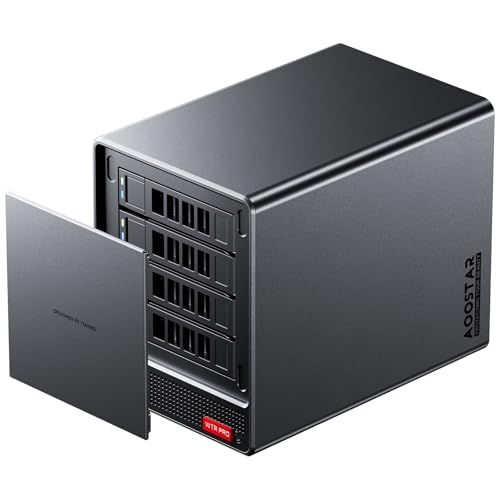
The AOOSTAR WTR PRO AMD Ryzen 7 Mini PC is an excellent choice for professionals and enthusiasts who demand high performance and versatility from their hardware. Featuring an AMD Ryzen 7 5825U processor with 8 cores and integrated Radeon Vega graphics, it handles gaming and video editing with ease. You’ve got four bays for storage, expandable to 88TB, and support for dual-channel 3200MHz DDR4 RAM. With the ability to connect up to three 4K displays, it’s perfect for multitasking. Plus, its smart cooling system guarantees silent operation, making it ideal for any environment.
Best For: Professionals and enthusiasts seeking a powerful and versatile mini PC for gaming, video editing, and multitasking.
Pros:
- Superior performance with AMD Ryzen 7 5825U processor and integrated Radeon Vega graphics.
- Expandable storage options with four bays supporting up to 88TB and dual-channel RAM up to 64GB.
- Capable of connecting three 4K displays simultaneously, making it ideal for multitasking.
Cons:
- Limited to a specific number of ports, which may require additional hub for more peripherals.
- Higher initial cost compared to basic mini PCs with lower specifications.
- Potentially overkill for users with basic computing needs, such as web browsing or document editing.
QNAP TS-464-8G-US 4 Bay High-Performance Desktop NAS

For those seeking a robust solution for media storage and backup, the QNAP TS-464-8G-US 4 Bay High-Performance Desktop NAS stands out with its powerful Intel Celeron Quad-core processor. With 8GB of DDR4 RAM, expandable to 16GB, it handles multiple tasks effortlessly. Dual 2.5GbE ports guarantee lightning-fast network connectivity, while M.2 PCIe slots enhance performance through SSD caching. The user-friendly setup process makes installation a breeze, and the integrated AES-NI encryption keeps your data safe. Although some users mention noise from fans, the overall reliability and performance make this NAS an excellent choice for your media library.
Best For: Those looking for a reliable and high-performance NAS solution for media storage and backup.
Pros:
- High-performance Intel Celeron Quad-core processor ensures smooth multitasking.
- Dual 2.5GbE ports provide fast network connectivity for efficient data transfer.
- User-friendly installation process and integrated AES-NI encryption for enhanced data security.
Cons:
- Some users report noise from fans and vibrations from hard drives.
- Limited transcoding capabilities for high-bitrate content may not suit all media needs.
- Diskless design requires users to purchase hard drives separately.
BUFFALO LinkStation 220 4TB NAS Network Attached Storage

Looking for a reliable and budget-friendly solution for centralized storage? The BUFFALO LinkStation 220 4TB NAS offers just that. With its two drive bays and RAID configuration, you can keep your data secure, using either 2TB in RAID 1 or the full 4TB in RAID 0. It’s compatible with both Windows and MacOS, making it versatile for your devices. Setup is quick and user-friendly, though some networking knowledge helps. While data transfer speeds are decent, you might find it lacking in advanced features. Overall, it’s a solid choice for basic needs without breaking the bank.
Best For: Budget-conscious users seeking reliable centralized storage for basic data backup and sharing needs.
Pros:
- Easy setup process with a quick installation guide, making it user-friendly for beginners.
- RAID configuration options provide data security and flexibility in storage capacity.
- Compatible with both Windows and MacOS, allowing for versatile use across different devices.
Cons:
- Data transfer speeds may be slow, particularly when copying between LinkStations.
- Limited advanced features compared to more modern competitors in the market.
- Some users report issues with reliability and customer service, leading to dissatisfaction.
TERRAMASTER F2-425 2-Bay NAS Storage

With its powerful Intel x86 Quad-Core CPU and 4GB of RAM, the TERRAMASTER F2-425 2-Bay NAS Storage stands out as an excellent choice for home users seeking reliable multimedia capabilities. It efficiently handles 4K transcoding, making it perfect for streaming via Plex or Emby. You’ll appreciate the tool-free HDD installation, which takes just 10 seconds, and the quiet operation at 19dB(A). Plus, with support for up to 60TB of storage, you can easily manage your media library. CloudSync guarantees your files stay backed up, while the user-friendly TNAS Mobile app simplifies setup and management.
Best For: Home users looking for a reliable and efficient NAS solution for media streaming and file management.
Pros:
- Efficient 4K transcoding capabilities perfect for streaming through Plex or Emby.
- Tool-free HDD installation allows for quick and easy setup.
- Quiet operation at 19dB(A) makes it suitable for home environments.
Cons:
- Outdated CPU performance may limit capabilities for advanced users.
- Users may experience issues with defective drives during setup.
- RAM upgrade is recommended for enhanced performance, which may be an additional cost.
DARKROCK Classico Storage Master ATX NAS Computer Case Mid Tower

The DARKROCK Classico Storage Master ATX NAS Computer Case is ideal for tech enthusiasts needing ample storage and cooling capabilities. With room for up to ten 3.5″ HDDs and three 2.5″ SSDs, you can easily handle data-heavy applications. Its mesh front and side panels promote efficient airflow, keeping your components cool, even under heavy load. You’ll appreciate the thoughtful layout for optimal cable management and the included 4 x 120mm fans. Rated 4.5 out of 5 stars, this case is a fantastic choice for home servers and workstations, providing excellent expandability and value for your investment.
Best For: Tech enthusiasts and professionals seeking a mid-tower case with extensive storage and cooling options for data-heavy applications.
Pros:
- Ample storage capacity for up to ten 3.5″ HDDs and three 2.5″ SSDs, ideal for large data needs.
- Excellent cooling performance with mesh panels and four included 120mm fans, maintaining low temperatures during operation.
- Positive user feedback on build quality and ease of assembly, making it a reliable choice for home servers and workstations.
Cons:
- Some users report challenges with tight cable routing and the need for right-angle SATA cables for better fit.
- Maintenance can be difficult due to limited space in certain areas.
- A heavier weight compared to smaller NAS enclosures may be a consideration for portability.
Factors to Consider When Choosing a 4 Bay NAS for PC
When choosing a 4-bay NAS for your PC, you need to take into account several key factors. Think about your storage capacity options, performance and speed, and the types of RAID configurations available. Also, pay attention to connectivity features and how easy the setup process is to guarantee it meets your needs.
Storage Capacity Options
Choosing a 4-bay NAS for your PC involves careful evaluation of storage capacity options. You’ll typically find maximum capacities ranging from 60TB to 136TB, perfect for extensive media libraries or backups. Check how many drives each bay supports; some units accommodate drives up to 30TB, maximizing your overall storage potential. It’s also important to contemplate NAS options that support various RAID configurations like RAID 0, 1, 5, and 10, as they enhance data redundancy and performance, affecting usable capacity. Additionally, look for models with cache drives or SSD slots to boost access speeds. Finally, think about future expansion; some NAS systems allow for larger drives or additional units as technology evolves, ensuring your storage needs grow with you.
Performance and Speed
To guarantee peak performance and speed from your 4-bay NAS, prioritize high-performance processors, such as quad-core CPUs, which enable smooth operations and effective multitasking. Look for models that boast impressive transfer speeds; some can back up 1GB of data in just 2 to 3 seconds, with typical rates between 220 MB/s and 290 MB/s. Evaluate support for SSD caching, as this feature can elevate throughput considerably, with some systems hitting speeds up to 730 MB/s. Don’t forget about network connectivity—dual 2.5GbE ports can enhance data transfer rates and improve overall network performance. By considering these factors, you’ll guarantee your NAS delivers the performance you need for seamless file sharing and storage management.
RAID Configuration Choices
Selecting the right RAID configuration for your 4-bay NAS can greatly impact both data security and performance. RAID 0 maximizes speed by striping data across drives, but it lacks fault tolerance—if one drive fails, you lose everything. On the other hand, RAID 1 mirrors your data, providing full redundancy; if one drive fails, your data remains safe on the other. If you’re looking for a balance, RAID 5 offers striping with parity, allowing one drive to fail without data loss while maintaining decent performance. Finally, RAID 10 combines the advantages of RAID 0 and RAID 1, offering high speed and redundancy but needing all four bays. Choose wisely based on your needs for speed, protection, and storage efficiency.
Connectivity Features
After deciding on the best RAID configuration for your 4-bay NAS, it’s time to evaluate how connectivity features can enhance your overall experience. Look for NAS systems with dual 2.5GbE network ports to boost data transfer speeds and improve network performance. Verify compatibility with multiple connectivity options like USB 3.2 Gen2 ports for fast data transfers with external drives. Check for support of protocols such as SMB, NFS, and FTP to guarantee seamless integration with various operating systems and devices. Consider NAS devices that include M.2 NVMe SSD slots for cache acceleration, greatly enhancing throughput. Finally, evaluate power consumption during operation and idle states to optimize energy efficiency in your setup.
Ease of Setup
Setting up a 4-bay NAS can be a smooth experience if you choose the right model. Look for a NAS that includes user-friendly apps and clear instructions to streamline the setup process. A beginner-friendly manual, along with video instructions, can provide valuable visual guidance and troubleshooting tips. Consider devices that support remote access configuration, allowing you to manage your NAS from outside your local network easily. Opt for models featuring tool-free designs for HDD installation, which make drive swaps and upgrades hassle-free. Finally, check user feedback on initial setup experiences to find NAS systems that are praised for their straightforward configuration and minimal technical knowledge requirements. This will save you time and frustration during installation.
Multimedia Support
When considering a 4-bay NAS for your PC, it’s crucial to prioritize multimedia support to guarantee an enjoyable media experience. Look for devices that offer 4K transcoding capabilities, ensuring smooth playback of high-resolution content across multiple devices. Compatibility with popular media server applications like Plex and DLNA is imperative for seamless streaming of videos, music, and photos. Additionally, consider NAS options with AI photo organization tools that categorize images by faces and scenes, helping you manage your multimedia library efficiently. Built-in HDMI output can also be a game-changer, allowing direct connections to TVs or monitors for easy viewing. Finally, evaluate maximum storage capacity and RAID configurations, as these factors greatly influence performance and redundancy for your media collection.
Security and Encryption
While you might be focused on storage capacity and multimedia features, security and encryption are just as important when choosing a 4-bay NAS for your PC. Look for NAS devices that offer advanced encryption standards like AES-NI 256-bit encryption to protect your data from unauthorized access. Make sure the NAS supports two-factor authentication (2FA) for an extra layer of security during login. Consider systems with integrated firewall features to safeguard against external threats. Flexible permission management is essential, allowing you to control access rights for individual users or groups. Finally, opt for NAS solutions that provide regular security updates and support the latest networking protocols to defend against vulnerabilities. Your data’s safety depends on these important features.
Power Consumption Levels
Power consumption levels are an essential factor to take into account when choosing a 4-bay NAS for your PC. These systems typically consume 9-10W in idle mode and up to 51W under full load, impacting your long-term energy costs. The components you select, like the CPU and RAM, can greatly affect power draw; more powerful processors usually require more energy. Opting for efficient cooling solutions can lower power consumption and create a quieter environment. Additionally, many NAS models feature energy-saving options, such as HDD hibernation, which considerably reduces power usage when inactive. By choosing a NAS with favorable power ratings, you can save substantially on energy bills, especially if your setup runs 24/7.