If you’re in the market for a high-performance NAS, you’ve come to the right place. In 2025, QNAP offers some impressive models that cater to various storage needs. Whether you’re a casual user or require robust multitasking capabilities, these systems provide unmatched solutions. Let’s explore which NAS models stand out and what key factors you should consider before making a decision. The right choice could greatly enhance your data management experience.
QNAP TS-473A-8G SAN/NAS Storage System, Black

The QNAP TS-473A-8G SAN/NAS Storage System is perfect for PC users who demand robust performance and expandability. With a powerful AMD Ryzen processor and 8 GB of DDR4 memory (expandable to 64 GB), you’ll handle intensive tasks effortlessly. This system supports up to four HDDs and offers various RAID configurations for data protection. You’ll appreciate its clever cooling design, ensuring reliability during heavy workloads. Plus, with 2.5 Gigabit Ethernet, your data transfer speeds will impress. Whether you need a media server or a backup solution, this NAS fits the bill, making it an excellent investment for your storage needs.
Best For: The QNAP TS-473A-8G SAN/NAS Storage System is best for medium-sized businesses and PC users who require high-performance storage solutions with expandability and robust data protection features.
Pros:
- Powerful AMD Ryzen processor enables efficient handling of intensive computational tasks.
- Expandable memory up to 64 GB allows for future-proofing and enhanced performance.
- Versatile RAID configurations provide excellent data protection and recovery options.
Cons:
- Plastic disk caddies may raise concerns about durability compared to metal alternatives.
- Lack of native graphics limits certain multimedia applications and performance.
- Inadequate cooling for M.2 disks can lead to potential overheating issues during heavy workloads.
QNAP TS-632X 6 Bay Desktop NAS

For PC users seeking a robust storage solution, the QNAP TS-632X 6 Bay Desktop NAS stands out with its impressive 10GbE connectivity, making it ideal for those who demand high-speed data transfers. Powered by a quad-core processor and 4 GB of expandable RAM, it delivers read speeds up to 1.1GB/s. With six bays, you can configure it for RAID 5 or RAID 6, enhancing data protection. Users appreciate its setup ease, though upgrading the RAM boosts performance considerably. Just remember to keep it secure with regular updates and strong passwords for best use in your home or small business.
Best For: Small businesses and home users seeking reliable, high-speed storage solutions for backups, media streaming, and surveillance.
Pros:
- High-speed connectivity with 10GbE and dual 2.5GbE ports for fast data transfers.
- Flexible storage options with 6 bays and RAID support for enhanced data protection.
- Expandable RAM allows for improved performance, especially when using SSD caching.
Cons:
- Limited expansion capabilities may not meet the needs of users requiring extensive drive configurations.
- Sluggish interface with 4GB RAM, necessitating an upgrade for optimal performance.
- Older technology may limit compatibility with newer advancements in storage solutions.
QNAP TS-464 4 Bay High-Performance Desktop NAS

If you’re a PC user seeking a reliable and high-performance NAS solution, the QNAP TS-464 4 Bay Desktop NAS stands out with its powerful Intel Celeron Quad-core processor. With 8GB of DDR4 RAM, expandable to 16GB, and dual 2.5GbE ports, it guarantees lightning-fast data transfers. The dual M.2 PCIe NVMe SSD slots allow for cache acceleration, enhancing your storage performance. Users appreciate its easy setup and robust build quality, making it ideal for centralizing media libraries. While some note fan noise, its overall performance and integrated encryption engine make it a top choice for your storage needs.
Best For: PC users looking for a reliable, high-performance NAS solution to centralize their media libraries and enhance data transfer speeds.
Pros:
- High-performance Intel Celeron Quad-core processor ensures smooth operations and efficient multitasking.
- Dual 2.5GbE network connectivity allows for lightning-fast data transfers and improved network performance.
- User-friendly setup and robust build quality make it ideal for both personal and family media storage.
Cons:
- Some users report fan noise and hard drive vibrations, which may be distracting in quiet environments.
- There are noted limitations in transcoding capabilities for high-bitrate content, which may affect media streaming.
- The absence of pre-installed drives means additional costs for purchasing storage separately.
QNAP TS-673A-8G High-Performance NAS

Packed with powerful features, the QNAP TS-673A-8G High-Performance NAS stands out as the ideal choice for PC users who crave exceptional speed and versatility. With dual 2.5GbE ports, you can achieve transfer speeds of up to 5 Gbps using port trunking. Expand your setup effortlessly through its two PCIe Gen3 slots, allowing you to add 10GbE ports or SSD caching. You’ll appreciate the support for entry-level NVIDIA graphics cards, enhancing video processing capabilities. Plus, with 8GB of DDR4 RAM, expandable to 64GB, and three USB 3.2 Gen 2 ports, it meets all your storage optimization needs.
Best For: The QNAP TS-673A-8G High-Performance NAS is best for PC users seeking high-speed data transfer and versatile storage solutions.
Pros:
- Dual 2.5GbE ports enable impressive transfer speeds of up to 5 Gbps with port trunking.
- Expandable RAM capacity up to 64GB for enhanced performance in demanding applications.
- Supports entry-level NVIDIA graphics cards for improved video processing capabilities.
Cons:
- Initial cost may be higher compared to basic NAS systems.
- Requires technical knowledge for optimal PCIe expansion and configuration.
- Limited to entry-level graphics cards, which may not meet the needs of high-end video editing.
QNAP TS-433-4G-US 4 Bay NAS

The QNAP TS-433-4G-US 4 Bay NAS stands out with its powerful ARM Cortex-A55 quad-core processor, making it an ideal choice for PC users who need reliable and efficient storage solutions. With 4 GB of DDR4 RAM and support for four SATA drives, you can maximize your storage up to 88TB. Enjoy fast access through its 2.5GbE and 1GbE ports, while AES-NI hardware encryption keeps your data secure. Though setup may present a learning curve, the user-friendly interface simplifies file management. It’s perfect for backup tasks, but keep in mind it may struggle with heavy multitasking or demanding applications.
Best For: Users seeking reliable and efficient storage solutions for backup tasks and multimedia streaming at home or in small office environments.
Pros:
- High-performance with an ARM Cortex-A55 quad-core processor and 4 GB DDR4 RAM.
- Secure data storage with AES-NI hardware-accelerated encryption.
- User-friendly interface simplifies file management and backup processes.
Cons:
- Steeper learning curve for setup and configuration, not always plug-and-play.
- May struggle with heavy multitasking and demanding applications such as Plex.
- Mixed customer support feedback, with some users facing reliability issues.
QNAP TS-216G-US 2-Bay Desktop NAS

For budget-conscious PC users seeking a reliable storage solution, the QNAP TS-216G-US 2-Bay Desktop NAS stands out with its impressive 2.5GbE ports, enabling fast file sharing and large transfers. Powered by an ARM Cortex-A55 quad-core 2.0GHz processor and 4 GB DDR4 RAM, it delivers solid performance for multimedia streaming and file storage. You’ll appreciate the AI acceleration for quick face and object recognition, enhancing your user experience. Effortlessly back up your data with QNAP’s NetBak Replicator software for Windows or Time Machine for Mac. Plus, with MyQNAPCloud, you can securely access your files from anywhere.
Best For: Budget-conscious PC users seeking a reliable and efficient storage solution for multimedia and file management.
Pros:
- Fast file sharing with 2.5GbE ports for accelerated transfers.
- Powerful performance driven by a quad-core processor and 4 GB DDR4 RAM.
- Convenient backup options for both Windows and Mac users.
Cons:
- Diskless design means additional costs for purchasing drives.
- Limited advanced features compared to higher-end NAS models.
- AI acceleration capabilities may not be fully utilized by all users.
MINISFORUM 5 Bay NAS N5 Pro P370 Network Attached Storage
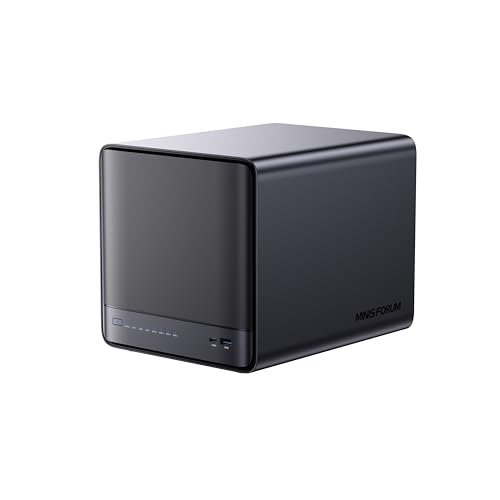
Designed specifically for power users, the MINISFORUM 5 Bay NAS N5 Pro P370 stands out with its AMD Ryzen AI 9 HX Pro processor, delivering top-tier performance for demanding applications. With support for up to 96GB of DDR5 ECC memory and a staggering 144TB storage capacity, it guarantees ample space for all your files. The dual 10Gbps and 5Gbps LAN ports enable lightning-fast data transfers, while the 8K HDMI support enhances your multimedia experience. Its modular design simplifies upgrades, and the advanced AI features make organizing your media seamless. With a 3-year warranty, you’re covered for peace of mind.
Best For: The MINISFORUM 5 Bay NAS N5 Pro P370 is best for power users and professionals who require high performance, extensive storage, and advanced multimedia capabilities.
Pros:
- High Performance: Equipped with an AMD Ryzen AI 9 HX Pro processor and supports up to 96GB DDR5 ECC memory for demanding applications.
- Massive Storage Capacity: Can hold up to 144TB, accommodating vast amounts of data across five mechanical hard disk slots and additional M.2 slots.
- Advanced Connectivity: Features dual LAN ports for ultra-fast data transfers and 8K HDMI support for enhanced multimedia experiences.
Cons:
- Weight: At 15.14 pounds, it may be heavier than some users prefer for a NAS device.
- Complexity for Beginners: The advanced features and modular design may be overwhelming for users who are not tech-savvy.
- Price Point: Being a high-performance NAS, it may be priced higher than basic storage solutions, making it less accessible for casual users.
QNAP TS-932PX-4G 5+4 Bay High-Speed NAS with Two 10GbE and 2.5GbE Ports

With its dual 10GbE and 2.5GbE ports, the QNAP TS-932PX-4G stands out as a top choice for PC users seeking high-speed data transfer and robust performance. This 5+4 bay NAS features a powerful AnnapurnaLabs quad-core processor, delivering impressive read speeds of 1.1GB/s and write speeds up to 750MB/s with SSD caching. Its user-friendly interface makes it accessible for all skill levels, supporting centralized media libraries and seamless backups. While it’s perfect for small businesses and home users, keep in mind the limited expansion options and guarantee regular software updates for peak security.
Best For: The QNAP TS-932PX-4G is best for small businesses and home users seeking a high-speed NAS for media streaming and data backup.
Pros:
- High-speed performance with read speeds of 1.1GB/s and write speeds up to 750MB/s.
- User-friendly interface suitable for both tech-savvy individuals and beginners.
- Versatile applications for centralized media libraries and seamless data backup.
Cons:
- Limited expansion options with only three USB ports and no support for extension cards.
- Sluggish interface even with memory upgrades.
- Not ideal for advanced RAID configurations or extensive upgrades.
QNAP TVS-h674-i5-32G-US 6 Bay High-Speed Desktop NAS

The QNAP TVS-h674-i5-32G-US stands out as the ideal choice for PC users who demand high-speed performance and versatility. With its Intel Core i5-12400 processor and 32GB of expandable RAM, you’ll experience seamless multitasking. Dual 2.5GbE ports guarantee rapid network connectivity, while support for dual M.2 NVMe SSDs accelerates cache performance. You can enjoy smooth 4K media playback and real-time transcoding, perfect for streaming. Plus, its robust backup capabilities and user-friendly setup make it an excellent option for SMBs. With a solid 4.6-star rating, it’s clear users appreciate its reliability and efficiency.
Best For: The QNAP TVS-h674-i5-32G-US is best for small to medium-sized businesses and PC users seeking high-speed performance and efficient multitasking capabilities.
Pros:
- Seamless performance: Equipped with an Intel Core i5 processor and 32GB of RAM for smooth multitasking.
- Rapid connectivity: Dual 2.5GbE ports ensure fast network speeds for data transfer and media streaming.
- Robust backup solutions: Offers advanced backup capabilities, including cloud data and VM backup/restore options.
Cons:
- Noise concerns: Some users reported noise issues with the fan operation under heavy load.
- Diskless model: Requires separate purchase of storage drives, which may increase overall setup cost.
- Limited HDMI output: Supports only HDMI 1.4b, which may not meet the needs for higher refresh rates at 4K resolution.
QNAP TL-D800S 8 Bay SATA JBOD Storage Enclosure

If you’re looking for a robust storage solution, the QNAP TL-D800S 8 Bay SATA JBOD Storage Enclosure is an excellent choice for PC users in 2025. This high-performance desktop enclosure supports 8 x 3.5-inch SATA drives, offering flexibility for your storage needs. With compatibility for both Windows and Ubuntu systems, you can easily expand your QNAP NAS or server. The included QXP-800eS-A1164 PCIe SATA interface card and two SFF-8088 connectors guarantee seamless integration. Plus, a 250W power supply keeps everything running smoothly. It’s optimized for QNAP QTS/QTS Hero operating systems, making it a smart choice for any user.
Best For: Users seeking a reliable and high-performance storage solution for expanding their QNAP NAS or server setups.
Pros:
- Supports up to 8 x 3.5-inch SATA drives, providing ample storage capacity for various applications.
- Compatible with both Windows and Ubuntu, ensuring flexibility for different operating environments.
- Includes a 250W power supply unit, ensuring stable power delivery for optimal performance.
Cons:
- Diskless design means additional investment is required to purchase SATA drives separately.
- Limited to QNAP QTS/QTS Hero software, which may not appeal to users preferring other operating systems.
- Bulkier design may not be suitable for users with limited desk space.
Factors to Consider When Choosing a Qnap Nas for PC
When choosing a QNAP NAS for your PC, you’ll want to think about several key factors. Consider your storage capacity needs, performance specs, and expansion options to guarantee it meets your future requirements. Don’t forget to evaluate connectivity features and budget constraints to find the perfect fit for your setup.
Storage Capacity Requirements
Choosing the right QNAP NAS for your PC involves several important factors related to storage capacity. First, consider the number of drive bays; more bays mean greater storage and RAID configuration options for redundancy. Evaluate the maximum supported capacity per drive—some models can handle up to 22TB each, offering significant overall potential. Look for NAS systems with expandable memory options, as upgrading RAM can enhance performance when managing large data sets. Confirm your NAS supports high-speed interfaces like 10GbE or dual 2.5GbE ports to facilitate faster data transfers, especially for large files. Finally, check compatibility with various drive types (HDDs vs. SSDs) since this will impact both performance and storage efficiency.
Performance Specifications
After determining your storage capacity needs, it’s time to focus on performance specifications that will guarantee your QNAP NAS operates efficiently. Look for models equipped with powerful processors, ideally quad-core or higher, to handle multitasking and assure smooth data transfers. Pay attention to RAM; starting with 8GB is good, but expanding to 16GB or more can greatly boost performance for demanding applications. Network connectivity matters too—multiple 2.5GbE or 10GbE ports offer faster data transfer speeds. Additionally, support for SSD caching and M.2 slots can enhance read/write speeds. Finally, assess the RAID configuration options, as extensive RAID support not only protects your data but also optimizes overall storage performance.
Expansion Options
Considering expansion options is essential for maximizing the potential of your QNAP NAS. First, check the number of PCIe slots; these allow for adding functionalities like 10GbE network cards or SSD caching, which can enhance performance. Next, evaluate the maximum RAM capacity and upgradeability, as higher RAM can boost multitasking and application efficiency. Look for models with M.2 NVMe SSD slots for cache acceleration, greatly improving read and write speeds. Assess the number of drive bays and their configurations to guarantee future storage expansion and flexibility in RAID setups. Finally, confirm the NAS supports USB expansion options for additional connectivity with external drives, making backups and data transfers seamless.
Connectivity Features
When evaluating a QNAP NAS for your PC, it’s crucial to prioritize connectivity features that can greatly influence your overall experience. Look for models with multiple Ethernet ports, like dual 2.5GbE or 10GbE connections, to guarantee faster data transfer speeds and improved network performance. Consider options that support PCIe slots for easy expansions, allowing for features like additional 10GbE ports or SSD caching. Evaluate the number of USB ports available, especially those with USB 3.2 Gen 2 for speedy backups at up to 10Gb/s. Verify compatibility with various network protocols, such as SMB and NFS, for seamless integration. Finally, check for link aggregation capabilities to enhance bandwidth and redundancy for your network.
Budget Considerations
Budget evaluations play an essential role in choosing the right QNAP NAS for your PC needs, especially since the initial purchase price is just the beginning. You need to factor in additional costs for hard drives, memory upgrades, and necessary software licenses to access full functionality. Assess your budget against the storage capacity and features of various models, as prices can vary considerably based on drive bays and processing power. Don’t forget to take into account future expenses for potential expansions or RAM upgrades, as some models have limited capacities. Evaluate warranty and support options, since extended plans can provide peace of mind. Finally, keep energy consumption in mind, as ongoing electricity costs can impact your total budget over time.