Choosing the right 4U rackmount workstation PC is about more than raw specs. You need the right mix of cooling, expandability, noise control, and rack compatibility for your workflow.
This roundup focuses on ten options that suit creators, engineers, and IT buyers who want dependable performance in a rack-friendly form factor.
Best 10 4u Rackmount Workstation PCs Picks for 2026
Best for AI Workloads
Quiet Rackmount Computer with Ryzen 9 9950X

- 16-core Ryzen 9 9950X for heavy multitasking
- RTX PRO 6000 with 96GB VRAM for AI and rendering
- 128GB RAM, 4TB Gen5 SSD, and 6TB HDD for fast storage
Best For: AI developers, 3D artists, and power users needing a quiet 4U rackmount workstation.
Best for Expansion
Chenbro RM41300-FS81 4U Rackmount Chassis

- EEB motherboard support for large workstation builds
- Eight full-height expansion slots
- Strong cooling layout with multiple fan positions
Best For: Custom workstation builders who need a spacious rackmount chassis with broad expansion support.
Best for DIY Rack Mounting

- 3.0 mm SPCC steel construction
- Mounts to wood cabinets or concrete walls
- Includes screws for easier installation
Best For: DIY users mounting 4U gear in cabinets or on walls.
Best for High-Airflow Builds
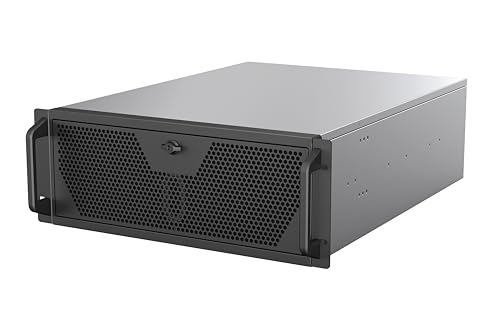
- E-ATX and SSI-EEB support for larger workstation builds
- 360mm AIO and 3x PWM fans improve cooling
- Front USB-C and multi-drive storage add practical usability
Best For: Builders who need a roomy 4U chassis for powerful, well-cooled workstation systems.
Best Rack-Filler Value
Leinuosen 4-Piece 4U Blank Rack Panel Set

- Four 4U panels cover multiple open rack spaces
- Metal build suits standard 19-inch cabinets
- Simple way to improve airflow and rack appearance
Best For: Buyers filling unused 4U spaces in server or workstation racks.
Best for Liquid-Cooled Workstations
SilverStone RM4A 4U Rackmount Chassis
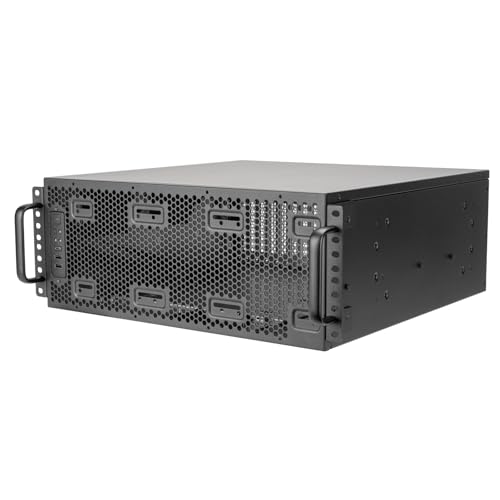
- Supports SSI-EEB workstation boards
- 360mm radiator and dual 80mm fan support
- Eight PCI slots with card retention bracket
Best For: Builders who want a rackmount chassis for high-heat workstation parts and multi-card expansion.
Best for Creator-Grade Power
Quiet Rackmount Ultra 9 285K 4U PC
- Ultra 9 285K CPU with RTX 5070 Ti graphics
- 32GB DDR5 RAM and 2TB Gen4 SSD
- 4U rackmount case with Windows 11 Pro
Best For: Creators and power users who want a rackmount workstation for editing, streaming, and gaming.
Best for Drive-Dense Builds
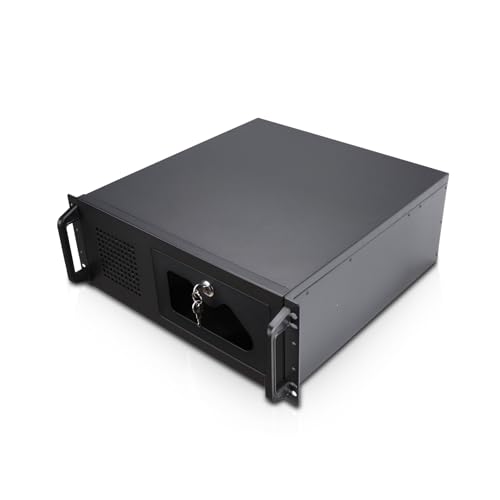
- 7 internal 3.5-inch bays for storage-heavy systems
- ATX/CEB support with 7 expansion slots
- Includes 3 PWM fans and front USB 3.0
Best For: Storage-focused builders who need a roomy 4U chassis with solid airflow and expansion.
Best for Quiet 2U Builds
Quiet Rackmount Computer 5700G, 32GB, 1TB

- Quiet-focused 2U rackmount workstation setup
- Ryzen 7 5700G with 32GB RAM and 1TB NVMe SSD
- Windows 11 Pro plus stress-tested USA assembly
Best For: Home offices, studios, and small businesses that want a quiet rackmount workstation with strong everyday performance.
Best for Compact Rack Builds
GeeekPi 4U Mini Server Rack Cabinet
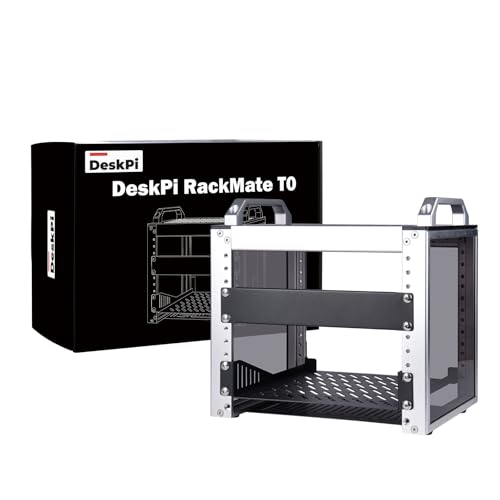
- 10-inch width saves desk and closet space
- Open frame improves access for cable routing and upgrades
- Perforated panels help keep compact systems cooler
Best For: Home labs and small offices that need a compact, ventilated 4U rack for workstation-style gear.
Best for AI Workloads – Quiet Rackmount Computer with Ryzen 9 9950X
If you’re comparing 4u rackmount workstation pcs for demanding creative, AI, or server-style workloads, this build stands out for raw compute and GPU memory headroom. The Ryzen 9 9950X, RTX PRO 6000 96GB, and 128GB of RAM make it a serious option for users who need a rack-ready machine that can stay on task under sustained load.
Best For: AI developers, 3D artists, and power users who want a quiet 4U workstation with workstation-class GPU memory and strong CPU performance.
Pros:
- Ryzen 9 9950X delivers high-end 16-core CPU performance for heavy multitasking and productivity
- RTX PRO 6000 96GB is ideal for large AI models, rendering, and GPU-accelerated workloads
- 128GB DDR5 RAM plus 4TB Gen5 SSD provides fast, roomy storage for active projects
- Liquid cooling and 4U rackmount chassis suit quiet 24/7 operation
Cons:
- Price will be far beyond what most general buyers need
- Large 4U form factor is better for racks than compact desk setups
- Overkill if you mainly browse, stream, or do light office work
For buyers focused on performance first, this is one of the most compelling 4u rackmount workstation pcs thanks to its exceptional GPU VRAM, high-core-count CPU, and enterprise-friendly chassis. It’s built for people who care more about sustained throughput than consumer gaming value.
Best for Expansion – Chenbro RM41300-FS81 4U Rackmount Chassis
Built for builders who need a roomy, server-style shell, the Chenbro RM41300-FS81 is a solid starting point for 4u rackmount workstation pcs that prioritize expandability over compact size. Its 4U layout, EEB motherboard support, and full-height expansion capacity make it a practical fit for multi-GPU or add-in-card builds.
Best For: Custom workstation builders who want a rackmount chassis with plenty of internal space for larger boards, multiple expansion cards, and robust cooling.
Pros:
- Supports EEB motherboards up to 12 x 13 inches
- Eight full-height expansion slots for flexible workstation builds
- Multiple fan mounts help with airflow in dense configurations
- Front USB ports add basic convenience for rack access
Cons:
- No power supply included
- Large 4U chassis takes up more rack space than slimmer cases
- More suited to custom integration than plug-and-play use
For buyers comparing 4u rackmount workstation pcs, this chassis stands out for its flexibility and compatibility rather than bundled extras. It is a strong pick when you want to build around your own components and need room to grow.
Best for DIY Rack Mounting – RIVECO 4U Rack Rails
If you’re building out a custom cabinet or wall-mounted setup for 4u rackmount workstation pcs, these RIVECO rails give you a straightforward way to add 4U support without buying a full rack. The 3.0 mm steel construction and included screws make them a practical choice for mounting gear like servers, patch panels, routers, and recording equipment.
Best For: DIY installers who want heavy-duty 4U rails for wood cabinets or concrete wall mounting.
Pros:
- Thick 3.0 mm SPCC steel feels sturdy for long-term use
- Works for wood cabinets or concrete wall installs
- Includes screws, so setup is more convenient
- Fits a range of studio, network, and server equipment
Cons:
- No unit-number markings on the rails
- Only the rails are included, not a full rack frame
- DIY installation may take careful alignment
For builders who want a flexible mounting solution, these rails are a solid way to support 4u rackmount workstation pcs inside a cabinet or on a wall. They’re especially appealing if you value heavy-duty steel over a more elaborate rack system.
Best for High-Airflow Builds – Rosewill 4U Rackmount Chassis
For buyers comparing 4u rackmount workstation pcs, this Rosewill chassis is a practical enclosure for high-wattage components, multi-drive storage, and liquid-cooled CPUs. It gives you a straightforward 4U foundation for building a workstation or server with strong airflow and modern front-panel connectivity.
Best For: Builders who want a 4U rackmount case for GPU-heavy workstations, virtualization, rendering, or AI-focused systems.
Pros:
- Supports E-ATX and SSI-EEB boards for larger workstation-class builds
- 360mm AIO support plus three pre-installed 120mm PWM fans for better cooling
- Front USB 3.2 Gen Type-C makes large file transfers faster and easier
- Flexible storage for up to 2 x 3.5-inch HDDs and 4 x 2.5-inch SSDs
Cons:
- It is a chassis only, so you still need to source all internal components
- Large 4U form factor may be overkill for compact desks or smaller racks
Overall, this is a strong fit if you want 4u rackmount workstation pcs with room for serious cooling, storage, and expansion. It leans more toward practical performance than fancy extras, which is exactly what many rack builders need.
Best Rack-Filler Value – Leinuosen 4-Piece 4U Blank Rack Panel Set
If you need a simple way to clean up open rack space, this 4-piece filler set is a practical add-on for 4u rackmount workstation pcs and other 19-inch enclosures. It helps close unused gaps, improve airflow management, and give your cabinet a more finished look without adding complexity.
Best For: Buyers who want an inexpensive, straightforward blank panel solution for filling empty 4U rack spaces in server or workstation cabinets.
Pros:
- Includes four 4U blank panels for multiple openings or spares
- Metal construction feels sturdier than basic plastic fillers
- Helps improve rack organization and appearance
- Fits standard 19-inch server/network cabinets
Cons:
- Not a powered component or functional workstation upgrade
- Only useful if you already have open 4U rack spaces to fill
For buyers comparing accessories for 4u rackmount workstation pcs, this is a no-frills maintenance item rather than a performance part. It makes the most sense when you want a tidy, uniform rack layout at a low cost.
Best for Liquid-Cooled Workstations – SilverStone RM4A 4U Rackmount Chassis
If you’re building one of the more demanding 4u rackmount workstation pcs, the SilverStone RM4A is a smart chassis pick thanks to its 360mm radiator support, SSI-EEB motherboard compatibility, and eight PCI expansion slots. It’s aimed at users who need serious cooling and room for multiple cards without giving up rackmount practicality.
Best For: Engineers, creators, and workstation builders who want a 4U chassis with strong liquid-cooling support and broad expansion.
Pros:
- Supports SSI-EEB motherboards for large workstation builds
- Handles a 360mm radiator plus two 80mm rear fans
- Eight PCI/PCIe slots make multi-card expansion easier
- Card retention bracket helps secure heavy add-in cards
Cons:
- Chassis-only purchase adds to total build cost
- Best suited to users who plan a high-power, cooling-heavy setup
For 4u rackmount workstation pcs that need both thermal headroom and expansion flexibility, the RM4A stands out as a well-balanced foundation rather than a barebones server box. It’s especially compelling if your build includes a large motherboard, discrete GPUs, or liquid cooling from the start.
Best for Creator-Grade Power – Quiet Rackmount Ultra 9 285K 4U PC
If you want one of the more powerful 4u rackmount workstation pcs for editing, streaming, and heavy multitasking, this build stands out with an Intel Core Ultra 9 285K, RTX 5070 Ti, 32GB of DDR5 RAM, and a fast 2TB Gen4 SSD. The 4U rackmount chassis makes it easier to slot into a studio, office, or server rack while still serving as a capable desktop for demanding creative or gaming workloads.
Best For: Creators, power users, and small businesses that need a rackmount system with high-end CPU/GPU performance and clean Windows 11 Pro support.
Pros:
- Ultra 9 285K and RTX 5070 Ti deliver strong performance for creation and gaming
- 2TB PCIe Gen4 SSD and 32GB DDR5 RAM support fast load times and smooth multitasking
- 4U rackmount case suits studio, office, and rack-based setups
- Includes Windows 11 Pro and wired keyboard/mouse for a ready-to-use setup
Cons:
- More expensive than entry-level rackmount workstation options
- Large 4U footprint is not ideal for tight desk spaces
- May be more power than casual office users need
This is a strong fit if you need serious performance in a rack-friendly format; among 4u rackmount workstation pcs, it leans toward creators and professionals who want high-end specs without building their own machine.
Best for Drive-Dense Builds – Rosewill 4U Rackmount Chassis
If you’re building 4u rackmount workstation pcs that need lots of storage in a straightforward chassis, the Rosewill RSV-R4100U is a practical pick. It focuses on drive capacity, standard ATX/CEB compatibility, and basic front-panel convenience rather than flashy extras.
Best For: Users who want a simple 4U rackmount case with strong HDD capacity, solid airflow, and room for expansion.
Pros:
- Holds up to 7 internal 3.5-inch drives for storage-heavy builds
- ATX and CEB support with 7 PCI expansion slots
- Three pre-installed PWM fans help maintain airflow and reduce noise
- Front USB 3.0 ports plus a lockable front panel add convenience and security
Cons:
- Not compatible with all HDD mounting hole patterns
- Bulkier and more utilitarian than tower-style workstation cases
- Best suited to storage-focused builds, not compact setups
Overall, this case makes sense for 4u rackmount workstation pcs where drive bays, expansion, and dependable cooling matter more than premium styling. It’s a no-nonsense chassis for builders who want room to grow without overpaying for extras.
Best for Quiet 2U Builds – Quiet Rackmount Computer 5700G, 32GB, 1TB
If you want one of the more practical 4u rackmount workstation pcs to buy for a home office, studio, or light business server role, this 2U rackmount system stands out for its quiet focus and solid everyday specs. The Ryzen 7 5700G, 32GB of RAM, and 1TB NVMe SSD make it a capable all-in-one option for multitasking, media work, and general productivity.
Best For: Buyers who want a quieter rackmount workstation with strong CPU performance, fast storage, and Windows 11 Pro already installed.
Pros:
- Ryzen 7 5700G delivers 8-core, 16-thread performance for work and light creation tasks
- 32GB DDR4 RAM and a 1TB PCIe NVMe SSD offer smooth multitasking and fast load times
- Windows 11 Pro is included, so it is ready to deploy right out of the box
- USA assembly, stress testing, lifetime support, and a 3-year hardware warranty add peace of mind
Cons:
- Integrated Radeon graphics are fine for basic use, but not ideal for heavy GPU workloads
- 2U rackmount design may be less flexible than a full 4U chassis for expansion and cooling
- More of a productivity workstation than a high-end gaming or render-focused machine
For shoppers comparing 4u rackmount workstation pcs, this model is appealing if quiet operation, ready-to-use specs, and dependable support matter more than maximum upgrade room.
Best for Compact Rack Builds – GeeekPi 4U Mini Server Rack Cabinet
If you need a space-saving enclosure for 4u rackmount workstation pcs, this 10-inch mini rack is a practical way to organize compact servers, networking gear, and AV equipment without taking over a desk or closet.
Best For: Home labs, small offices, and compact workstation builds that need a 4U rack with better airflow and easy access.
Pros:
- Compact 10-inch footprint helps fit tight spaces
- Open-frame design makes setup, wiring, and maintenance easier
- Perforated side panels support improved airflow for warm components
- 4U height gives room for small rackmount workstation pcs and accessories
Cons:
- Open design offers less dust protection than a closed cabinet
- 10-inch width limits compatibility with full-size rack gear
This is a smart pick if your priority is a compact, well-ventilated rack for 4u rackmount workstation pcs rather than maximum expansion. It is especially appealing when desk space is limited and easy access matters more than a fully enclosed server cabinet.
How We Picked These 4u Rackmount Workstation PCs
We prioritized a practical mix of complete systems, bare chassis, and rack accessories so buyers can match a purchase to their exact setup. The best 4u Rackmount Workstation PCs should offer strong airflow, sensible drive support, compatible motherboard sizing, and enough room for modern GPUs or high-core-count CPUs when needed.
We also looked at build flexibility, noise considerations, and whether each option makes sense for office studios, labs, server rooms, or mixed workstation deployments.
Quick Comparison
Some buyers want an out-of-the-box workstation with high-end CPU and GPU hardware. Others only need the enclosure, rails, or blanking panels to complete an existing build. In this list, complete systems serve users who need immediate deployment, while chassis-focused picks are better for custom integrations and future upgrades.
If your priority is rendering, AI workloads, or CAD, focus on the systems with stronger cooling and larger GPU support. If your goal is storage-heavy server duty or a budget-friendly rack build, a chassis with multiple drive bays may be the better fit.
Key Buying Factors for 4u Rackmount Workstation PCs
Cooling and Noise
Four rack units give you more thermal headroom than smaller rack cases, but airflow design still matters. Look for support for larger radiators, multiple fan mounts, or open internal layouts if you plan to run a hot GPU or high-wattage CPU.
Expansion and Compatibility
Check motherboard form factor support, PCIe slot clearance, GPU length, and PSU compatibility before buying. For 4u Rackmount Workstation PCs, the chassis should match your board size and leave enough room for storage, cabling, and power delivery.
Storage Needs
Think about whether you need NVMe performance, lots of 2.5-inch SSDs, or larger 3.5-inch drives for archives and media. A workstation used for content creation often benefits from a balanced mix of fast boot storage and high-capacity secondary drives.
Rack Fit and Accessories
Rails, mounting depth, blank panels, and cabinet compatibility can make installation easier than the raw case specs suggest. If you are building into a smaller rack or cabinet, confirm dimensions carefully before ordering.
Who Should Buy Which 4u Rackmount Workstation PCs?
Buy a fully built system if you want immediate performance for CAD, simulation, editing, or AI-assisted workflows. Choose a bare chassis if you already have components and need a flexible, serviceable enclosure.
If you are outfitting a rack room or studio, accessories like rails and blank panels can improve stability and airflow while keeping the installation neat. For budget-conscious buyers, a simpler chassis with solid drive support may deliver the best long-term value.
In short, the best choice depends on whether you need speed, storage, quiet operation, or infrastructure support. Match the chassis and hardware to your workload first, then compare cooling and expansion to narrow your final pick.