Choosing the right workstation for computer vision is less about raw specs and more about balancing GPU power, memory capacity, storage speed, and upgrade headroom.
Whether you are training models, running real-time inference, or building multi-camera pipelines, the best systems for this workload need to keep data moving fast and avoid bottlenecks.
Best 10 AI Workstation PCs for Computer Vision Picks for 2026
Best for Heavy AI Training

- 64-core Threadripper for sustained multitasking and model work
- RTX 5090 for top-tier GPU acceleration
- 256GB ECC RAM and 4TB NVMe for large datasets
Best For: Researchers and ML teams running demanding computer vision training and inference workloads.
Best for High-Bandwidth GPU Expansion
MINISFORUM MS-02 Ultra Mini Workstation PC
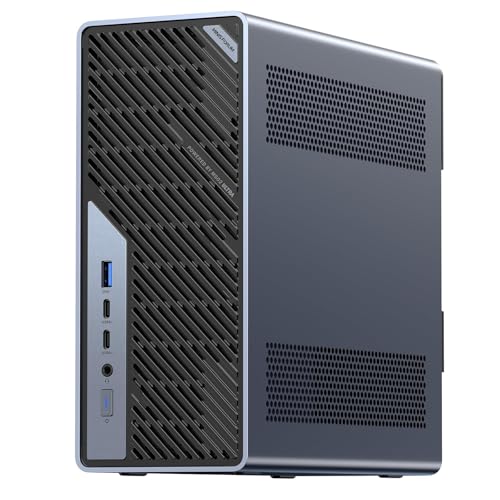
- Core Ultra 9 285HX with 13 TOPS NPU for AI workloads
- PCIe 5.0 x16 slot supports desktop-class GPU upgrades
- Dual 25GbE plus four DDR5 slots and four M.2 bays
Best For: Teams and builders who need a compact, expandable workstation for computer vision and AI development.
Best for Compact Local AI
Corsair AI Workstation 300 Desktop

- 4.4L compact workstation design
- 64GB LPDDR5X and 1TB SSD included
- Ryzen AI Max platform for local AI work
Best For: Developers and creators who want a space-saving workstation for local AI, prototyping, and inference.
Best for Balanced AI Workloads
Lenovo ThinkStation P2 Tower AI PC

- 64GB DDR5 for smooth multitasking
- 2TB SSD for large project storage
- Wi-Fi 7 plus 3-display 4K support
Best For: Developers and small teams needing a dependable AI-ready business tower for computer vision work.
Best for Local AI Models
GMKtec EVO-X2 Ryzen AI Max+ 395 Mini PC

- 128GB unified LPDDR5X memory for large local workloads
- Ryzen AI Max+ 395 with XDNA 2 NPU for on-device AI
- USB4, Wi-Fi 7, and 2.5GbE for a modern workstation setup
Best For: Developers and power users running local AI and vision workloads in a compact PC.
Best for Heavy Local AI
GMKtec EVO-X2 Ryzen AI Max+ 395 Mini PC

- 16-core Ryzen AI Max+ 395 with 50+ TOPS NPU
- 128GB LPDDR5X + 2TB SSD for large models and data
- USB4, Wi‑Fi 7, 2.5GbE, and multi-display support
Best For: Researchers and power users running local AI and computer vision workloads in a compact mini PC.
Best GPU-Ready Midrange

- Ryzen 9 7900X for fast multicore performance
- RTX 5070 12GB for NVIDIA-accelerated computer vision
- 32GB DDR5 RAM with 1TB NVMe SSD included
Best For: Developers and creators who want a ready-to-run desktop for computer vision and AI prototyping.
Best High-Performance Mini Workstation
GEEKOM A9 Mega AI Workstation PC

- 126 TOPS AI compute for local inference and model testing
- 128GB LPDDR5X memory with up to 96GB allocated VRAM
- Compact 2L design with USB4, Wi‑Fi 7, and 8K display support
Best For: Developers and creators who need a compact AI workstation for computer vision, LLMs, and demanding multitasking.
Best Dual-CPU Multitasker
Dual-CPU RTX 5060 Workstation PC

- 36 cores / 72 threads for heavy parallel workloads
- 128GB RAM for large datasets and multitasking
- 1TB SSD + 4TB HDD for fast access and big storage
Best For: Teams and solo builders running computer vision workflows, multitasking, and large local projects.
Best for Heavy AI Training – CLX Horus Creator Workstation
If you need a top-end tower for ai workstation pcs for computer vision, the CLX Horus Creator Workstation is built around workstation-class horsepower rather than consumer compromise. Its 64-core Threadripper, RTX 5090, and huge memory pool make it a strong fit for large datasets, model training, and GPU-heavy inference workflows.
Best For: Researchers, ML engineers, and content teams that want a no-compromise desktop for demanding computer vision pipelines and heavy multitasking.
Pros:
- 64-core Threadripper CPU with liquid cooling for sustained, high-thread workloads
- RTX 5090 delivers elite GPU performance for training and real-time vision tasks
- 256GB DDR5 ECC memory and 4TB NVMe SSD support large projects and fast data access
- Dual 10G/2.5G LAN plus WiFi 6E is ideal for lab and team environments
Cons:
- Very expensive, so it makes sense only for serious professional workloads
- Large, power-hungry build is not suited to small desks or portable use
- May be more machine than casual developers or light AI users need
This is one of the most aggressive ai workstation pcs for computer vision if your priority is raw throughput, memory headroom, and long-session stability. It is best viewed as a specialist investment for teams that will actually use its full compute and storage potential.
Best for High-Bandwidth GPU Expansion – MINISFORUM MS-02 Ultra Mini Workstation PC
The MINISFORUM MS-02 Ultra is a compact but unusually expandable option for ai workstation pcs for computer vision, especially if you need strong CPU throughput, fast storage, and room for a desktop-class GPU. Its Core Ultra 9 285HX, four DDR5 slots, four M.2 bays, and high-speed networking make it a serious fit for model development, data prep, and inference-heavy workflows.
Best For: Teams and solo builders who want a compact workstation with real GPU upgrade headroom, fast networking, and plenty of storage for computer vision projects.
Pros:
- Core Ultra 9 285HX offers strong multicore performance plus an integrated NPU for AI workloads.
- PCIe 5.0 x16 expansion and dual-slot GPU support give it real training and acceleration potential.
- Four DDR5 slots, ECC support, and four M.2 bays provide excellent memory and storage scalability.
- Dual 25GbE, 10GbE, 2.5GbE, and Wi‑Fi 7 are ideal for fast dataset transfer and lab networking.
Cons:
- Needs a discrete GPU to be a true heavy-training workstation.
- Premium expansion and networking features push it into a higher price tier.
- Compact design may be more complex to configure than a standard tower.
This is a compelling pick if you want ai workstation pcs for computer vision with workstation-class expandability in a much smaller footprint than a traditional tower. It stands out most when your workflow depends on fast storage, high-bandwidth networking, and flexible GPU upgrades.
Best for Compact Local AI – Corsair AI Workstation 300 Desktop
The Corsair AI Workstation 300 is a compact pick for buyers comparing ai workstation pcs for computer vision, local model testing, and on-device creative workflows. Its small 4.4L chassis, Ryzen AI Max platform, and unified memory design make it a practical option when you want serious AI capability without a full tower.
Best For: Developers, creators, and AI hobbyists who need a space-saving workstation for local inference, prototyping, and mixed AI workloads.
Pros:
- Very compact 4.4L design fits easily on tight desks or in portable setups
- Unified LPDDR5X memory and Radeon 8050S graphics are well suited to AI and creative workflows
- AMD Ryzen AI Max platform is built for local LLMs, AI development, and fast inference tasks
- Includes 64GB memory and a 1TB SSD for immediate out-of-box usability
Cons:
- Not as expandable as a full-size desktop workstation
- Integrated graphics will not match discrete-GPU rigs for heavier 3D or training jobs
- Premium pricing is likely compared with standard productivity desktops
For ai workstation pcs for computer vision, this Corsair system stands out when compact size and strong unified-memory performance matter more than maximum upgrade headroom. It is a smart fit for development, testing, and lighter production workloads where portability and efficiency are key.
Best for Balanced AI Workloads – Lenovo ThinkStation P2 Tower AI PC
If you want a practical desktop from the ai workstation pcs for computer vision category, the Lenovo ThinkStation P2 Tower is built for everyday model development, dataset prep, and multi-app workflows without going overboard. The Core Ultra 5, 64GB of DDR5 memory, and 2TB SSD make it a strong fit for teams that need a responsive Windows 11 Pro workstation with room to handle image labeling, inference testing, and general productivity.
Best For: Developers, analysts, and small teams who need a dependable AI-ready tower for computer vision work and business use.
Pros:
- 64GB DDR5 RAM supports heavier multitasking and larger datasets
- 2TB SSD gives generous local storage for projects, tools, and files
- Wi-Fi 7 and multiple 4K display outputs improve workstation flexibility
- Business-focused ThinkStation design suits office and lab environments
Cons:
- Core Ultra 5 is solid, but not ideal for the most demanding training jobs
- No discrete GPU listed, which limits high-end computer vision acceleration
- Tower form factor takes more desk space than compact systems
Overall, this ThinkStation is a sensible choice if you need one of the more balanced ai workstation pcs for computer vision and want memory, storage, and professional reliability to matter more than raw GPU power.
Best for Local AI Models – GMKtec EVO-X2 Ryzen AI Max+ 395 Mini PC
If you want one of the more capable ai workstation pcs for computer vision in a tiny footprint, the GMKtec EVO-X2 stands out with a Ryzen AI Max+ 395, 128GB of LPDDR5X memory, and a fast 2TB PCIe 4.0 SSD. It is built for local inference, multitasking, and light-to-moderate model development, while still giving you strong multi-display support and modern connectivity.
Best For: Developers and power users who want a compact machine for local AI workloads, vision pipelines, and large-memory multitasking without moving to a full tower.
Pros:
- Massive 128GB unified memory is helpful for larger local models and data-heavy workflows
- Ryzen AI Max+ 395 with XDNA 2 NPU is aimed at on-device AI acceleration
- USB4, Wi-Fi 7, and 2.5GbE make it easy to slot into a modern lab or desk setup
- Quad-display output supports busy monitoring and development workflows
Cons:
- Premium specs likely put it well above casual mini PC pricing
- Integrated graphics are strong for an iGPU, but still not a substitute for a high-end discrete GPU
- LPDDR5X memory is onboard, so upgrades are limited compared with socketed systems
For ai workstation pcs for computer vision, this is a compelling compact choice if your priority is memory capacity, fast local inference, and a modern I/O mix rather than maximum expandability. It makes the most sense for users who value convenience and high unified-memory headroom in a small form factor.
Best for Multi-Monitor AI Workflows – Dell Pro Tower Plus QBT1250 Business Desktop
If you want one of the more practical ai workstation pcs for computer vision that also doubles as a strong office desktop, this Dell Pro Tower Plus is a compelling pick. It focuses on fast everyday responsiveness, native triple-4K display support, and business-grade reliability rather than flashy gaming hardware, making it a smart fit for mixed productivity and light AI-assisted workflows.
Best For: Analysts, developers, and business users who need a stable tower for multi-monitor productivity, AI-assisted work, and moderate workstation tasks.
Pros:
- Intel Core Ultra 5 with NPU support for AI-assisted features and modern workloads
- 32GB DDR5 RAM and 1TB PCIe SSD help keep large projects and many apps moving smoothly
- Native triple 4K DisplayPort output is ideal for side-by-side dashboards, code, and reference windows
- Windows 11 Pro, TPM 2.0, and Dell’s commercial chassis add security and manageability
Cons:
- No dedicated GPU, so it is not built for heavy model training or advanced vision inference
- DVDRW and legacy connectivity add utility but also reflect a more traditional tower design
For buyers comparing ai workstation pcs for computer vision, this model makes the most sense when the priority is dependable business computing, lots of screen space, and AI-enhanced productivity rather than raw graphics acceleration. It is better suited to preprocessing, annotation, and multitasking than to serious GPU-heavy training jobs.
Best for Heavy Local AI – GMKtec EVO-X2 Ryzen AI Max+ 395 Mini PC
If you want one of the more capable ai workstation pcs for computer vision in a tiny footprint, the GMKtec EVO-X2 stands out with its Ryzen AI Max+ 395, 128GB of fast LPDDR5X, and strong integrated graphics. It is built for local inference, multitasking, and compact lab setups where you need serious CPU, GPU, and memory headroom without a full tower.
Best For: Researchers, developers, and power users running local AI models, vision pipelines, and mixed productivity workloads in a space-saving mini PC.
Pros:
- Ryzen AI Max+ 395 brings 16 Zen 5 cores, 32 threads, and a 50+ TOPS NPU for demanding AI tasks
- 128GB LPDDR5X and a 2TB PCIe 4.0 SSD give it lots of room for large models and datasets
- Strong Radeon 8060S-class integrated graphics help with computer vision and broader GPU-accelerated workloads
- USB4, Wi‑Fi 7, 2.5GbE, and multi-display output make it versatile for a modern workstation desk
Cons:
- Premium specs mean a premium price
- Integrated graphics are impressive, but still not a substitute for a discrete high-end workstation GPU
- On-board memory limits later RAM upgrades
This is a strong pick if you care more about compact power and large unified memory than about expandability. For ai workstation pcs for computer vision, it makes the most sense when you want a capable local inference box that can also handle editing, coding, and multi-monitor workflows.
Best GPU-Ready Midrange – iBUYPOWER Ryzen 9 RTX 5070 PC
If you want a capable desktop for ai workstation pcs for computer vision without jumping into workstation-grade pricing, this iBUYPOWER build is a strong middle-ground. The Ryzen 9 7900X and RTX 5070 12GB combination gives you solid CPU throughput and modern NVIDIA graphics support for training, inference, and model development.
Best For: Developers and creators who need a fast, ready-to-use Windows desktop for computer vision workflows, prototyping, and mixed productivity tasks.
Pros:
- Ryzen 9 7900X offers strong multicore performance for data prep and multitasking
- RTX 5070 12GB brings current-gen NVIDIA acceleration for vision workloads
- 32GB DDR5 RAM and 1TB NVMe SSD are a practical starting point for AI projects
- Includes keyboard and mouse, plus Wi-Fi and Windows 11 Home
Cons:
- 12GB of GPU memory may feel limiting for larger models or bigger batches
- 1TB SSD can fill up quickly with datasets and checkpoints
- Not a true pro workstation chassis with expanded upgrade headroom
Overall, this is a well-balanced pick for ai workstation pcs for computer vision if you care more about getting moving quickly than building a heavily expanded lab machine. It has the right mix of CPU power, modern NVIDIA graphics, and everyday convenience features to handle most entry-to-midlevel workflows well.
Best High-Performance Mini Workstation – GEEKOM A9 Mega AI Workstation PC
If you want one of the most capable ai workstation pcs for computer vision in a compact footprint, the GEEKOM A9 Mega is built around AMD’s Ryzen AI Max+ 395, huge unified memory, and a Radeon 8060S GPU. It’s aimed at users who need strong local AI inference, large model experimentation, and fast creative workflows without moving to a full tower.
Best For: Developers, researchers, and content creators who want a compact high-end AI workstation for computer vision, LLMs, and heavy multitasking.
Pros:
- Ryzen AI Max+ 395 with 126 TOPS total AI compute for demanding local workloads
- 128GB LPDDR5X memory and up to 96GB allocated VRAM help with large models and datasets
- Radeon 8060S, dual USB4, and 8K multi-display support make it versatile for pro setups
- Compact 2L design with advanced cooling and a 3-year warranty
Cons:
- Very expensive compared with mainstream mini PCs
- Integrated graphics may still trail a top discrete GPU for the heaviest training jobs
- Availability may be tight due to limited Strix Halo supply
This is a standout choice if you want ai workstation pcs for computer vision that prioritize memory capacity, AI acceleration, and space efficiency over traditional desktop expandability.
Best Dual-CPU Multitasker – Dual-CPU RTX 5060 Workstation PC
If you want ai workstation pcs for computer vision that can juggle training, inference, data prep, and content creation without slowing down, this dual-CPU tower is built for heavy parallel workloads. The 36-core/72-thread setup, 128GB of RAM, and RTX 5060 make it a practical choice for users who need lots of compute and plenty of memory in one machine.
Best For: Developers, researchers, and creators who need a high-thread-count workstation for computer vision projects, multitasking, and large local datasets.
Pros:
- Dual E5-2697 v4 CPUs deliver strong multi-threaded throughput for parallel workloads
- 128GB DDR4 RAM is well suited to large models, datasets, and heavy multitasking
- RTX 5060 adds modern GPU acceleration for AI-assisted graphics and vision tasks
- 1TB SSD plus 4TB HDD gives you both fast boot speeds and lots of storage
Cons:
- Older server-class CPUs may not match newer chips in single-core speed
- Large dual-CPU systems can be bulky and less efficient than newer workstations
- RTX 5060 is capable, but not the top tier for very large training runs
This is a strong fit if you value cores, RAM, and storage more than compactness or top-end efficiency. For ai workstation pcs for computer vision, it stands out as a high-capacity multitasker that can handle demanding pipelines without forcing you into a minimalist build.
How We Picked These AI Workstation PCs for Computer Vision
For AI Workstation PCs for Computer Vision, we focused on systems that can handle large datasets, model experimentation, and sustained workloads without quickly running out of memory or storage. Priority factors included GPU capability, high-capacity RAM, fast NVMe storage, CPU core count, and platform expandability.
We also considered practical deployment details such as display outputs, network options, ECC support where available, and case size. That matters because computer vision workflows often involve large image sets, multiple monitors, cameras, and frequent data transfers.
Quick Comparison
High-end tower systems are best for heavy training and larger batch jobs, especially when paired with top-tier discrete GPUs and 128GB or more of RAM. Compact mini workstations can be strong choices for edge development, inference testing, and lab environments where space and power efficiency matter. Midrange desktop towers tend to offer the best balance for engineers who want reliable performance for annotation, prototyping, and moderate model training.
Key Buying Factors for AI Workstation PCs for Computer Vision
GPU and VRAM
The GPU is usually the most important component for computer vision. More VRAM helps with higher-resolution images, larger batch sizes, and modern deep learning models. If you plan to train frequently, prioritize the strongest available discrete GPU or an accelerated integrated platform with ample shared memory and strong AI throughput.
Memory Capacity
For serious development, 64GB is a practical minimum, while 128GB or more is ideal for larger datasets, parallel tools, and heavier preprocessing. ECC memory is a bonus for long training runs and professional reliability.
Storage and Expandability
Fast NVMe storage reduces wait times when loading image libraries, datasets, and checkpoints. Multiple M.2 slots are useful if you want to separate OS, project files, and active datasets. Expandability also matters for future GPU, RAM, and storage upgrades.
CPU and I/O
A strong CPU helps with data loading, augmentation, and pipeline orchestration. Look for enough cores for multitasking, plus modern I/O such as USB-C, Thunderbolt, 2.5GbE or better networking, and support for multiple displays.
Who Should Buy Which AI Workstation PCs for Computer Vision?
If you are training larger models or working with demanding multi-stage pipelines, choose a high-end tower with the strongest GPU, lots of RAM, and room to grow. If your workflow is mostly inference, development, or lab integration, a compact mini PC can be a smart, efficient option. For mixed professional use, a balanced tower with solid CPU performance, 64GB to 128GB of memory, and fast storage offers the best all-around value.
In short, the best AI Workstation PCs for Computer Vision are the ones that match your dataset size, model complexity, and upgrade plans—not just the highest headline specs.