If you need reliable local compute for PyTorch, the right workstation can make model development faster, smoother, and far less frustrating. From compact mini PCs to full desktop towers, today’s AI systems cover a wide range of workloads and budgets.
This roundup focuses on practical choices for training, fine-tuning, inference, data prep, and everyday experimentation, with an eye on GPU capability, memory capacity, storage speed, and thermals.
Best 9 AI Workstation PCs for Pytorch Picks for 2026
Best for Local LLM Workloads
NVIDIA DGX Spark 2 Pack GB10 Desktop Supercomputer
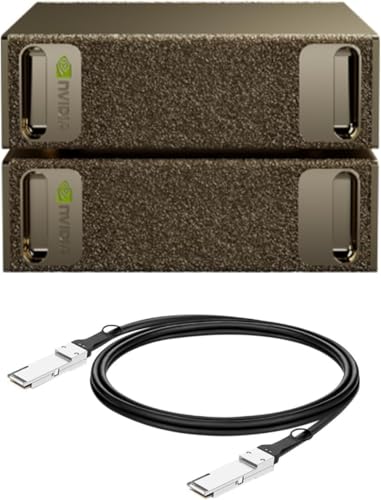
- Up to 1 petaFLOP of AI performance
- 128GB unified memory for large-model work
- Compact desktop design with NVIDIA AI stack
Best For: Researchers and AI developers who want a compact desktop system for local PyTorch prototyping and large-model experimentation.
Best for Local LLM Clusters
MINISFORUM MS-S1 MAX AI Workstation PC

- Ryzen AI Max+ 395 with 16C/32T CPU, RDNA 3.5 GPU, and 50 TOPS NPU
- 64GB LPDDR5x unified memory helps with larger local AI workloads
- Dual 10GbE, USB4 V2, and PCIe x16 slot make it highly expandable
Best For: Power users running local PyTorch workflows, inference, and small AI clusters.
Best for Heavy PyTorch Training
Sentinel RTX PRO 6000 AI Workstation

- 96GB RTX PRO 6000 GPU for large AI workloads
- 128GB DDR5 RAM for smooth multitasking
- 8TB total NVMe storage for fast project access
Best For: Developers and researchers running demanding PyTorch workloads that need lots of GPU memory and system RAM.
Best for High-Speed Networking
MINISFORUM MS-S1 Max AI Workstation

- 16-core Ryzen AI Max+ 395 with up to 126 TOPS
- 64GB LPDDR5, 2TB SSD, and expandable storage
- Dual 10G LAN plus Wi-Fi 7 for fast connectivity
Best For: Developers who want a compact AI workstation with fast networking and strong all-around performance.
Best for Heavy PyTorch Loads
NOVATECH i9 RTX PRO 6000 AI Workstation

- 96GB VRAM on RTX PRO 6000 for large PyTorch models
- 192GB DDR5 RAM and 10TB NVMe storage
- Liquid cooling and 1000W PSU for sustained stability
Best For: Researchers and power users training large PyTorch models or working with very large datasets.
Best Compact AI Workstation
Corsair AI Workstation 300 Desktop PC

- Ultra-compact 4.4L desktop for tight spaces
- 64GB LPDDR5X with unified memory architecture
- Ryzen AI Max platform with NPU and up to 48GB vRAM
Best For: Developers and creators who want a compact local-AI machine for PyTorch workflows.
Best for Compact AI Editing

- Intel Ultra 9 285H with claimed 99 TOPS AI performance
- 32GB DDR5 RAM and 1TB Gen 4 SSD for fast multitasking
- WiFi 7, dual USB4, and quad-display support
Best For: Developers and creators who want a compact AI-ready mini PC for editing, coding, and multitasking.
Best for Compact AI Power
GEEKOM A9 Mega Ryzen AI Max+ 395

- 126 TOPS AI compute in a compact 2L chassis
- 128GB RAM and 96GB allocated VRAM for larger models
- Dual USB4, Wi‑Fi 7, and 8K multi-display support
Best For: PyTorch developers and AI creators who want compact, high-memory workstation performance.
Best for Compact AI Workflows
Lenovo ThinkStation P3 Ultra Gen 2

- RTX 4000 SFF Ada with 20GB VRAM
- Core Ultra 9 + integrated NPU
- 64GB DDR5 and 2TB Gen 5 SSD
Best For: Developers and professionals who need a compact PyTorch-ready workstation for AI and creative workloads.
Best for Local LLM Workloads – NVIDIA DGX Spark 2 Pack GB10 Desktop Supercomputer
If you want one of the most capable ai workstation pcs for pytorch without moving to a full rack setup, the NVIDIA DGX Spark 2 Pack brings serious desktop-class AI hardware to a compact footprint. It’s aimed at developers who need fast local fine-tuning, inference, and experimentation with the NVIDIA software stack already in place.
Best For: Researchers, AI developers, and teams that want to prototype PyTorch workflows locally, handle large models, and keep iteration fast on the desk.
Pros:
- Up to 1 petaFLOP of AI performance for demanding local workloads
- 128GB unified memory supports large-model experimentation and fine-tuning
- Built around the NVIDIA AI software stack for smoother deployment paths
- Compact, energy-efficient design for a desk-friendly AI setup
Cons:
- Far more expensive than typical workstation PCs
- Overkill if you only need standard coding or light model testing
- Not the best value for buyers focused purely on general-purpose PC use
For teams that care more about accelerating experiments than saving space or money, this is a serious desktop AI system. Among ai workstation pcs for pytorch, it stands out for local model scale, memory headroom, and a software ecosystem built for AI work from the start.
Best for Local LLM Clusters – MINISFORUM MS-S1 MAX AI Workstation PC
If you want one of the most aggressive ai workstation pcs for pytorch in a compact desktop form, the MINISFORUM MS-S1 MAX is built around AMD’s Ryzen AI Max+ 395, unified 64GB LPDDR5x memory, and serious I/O for mixed AI and development workloads. It is especially appealing if you care about running local inference, testing larger models, or pairing your PyTorch workflow with fast networking and expansion options.
Best For: Developers and labs that need a compact AI box for local model work, multi-node experiments, and high-bandwidth data movement.
Pros:
- Ryzen AI Max+ 395 combines 16 cores, RDNA 3.5 graphics, and an NPU for strong all-around AI throughput
- 64GB LPDDR5x unified memory helps reduce VRAM-style bottlenecks for larger local models
- Dual 10GbE, USB4 V2, PCIe x16, and dual M.2 slots make it unusually expandable
- Cooling and 320W PSU are designed for sustained heavy-load operation
Cons:
- Price and spec level put it well above entry-tier AI desktops
- Unified memory is fast, but 64GB may still feel limiting for very large models
- Advanced features are more than casual users need
For buyers comparing ai workstation pcs for pytorch, this stands out when local inference, high-speed networking, and future expansion matter more than getting the smallest or cheapest box possible. It is a strong fit for power users who want a mini workstation that behaves more like a serious AI node than a typical mini PC.
Best for Heavy PyTorch Training – Sentinel RTX PRO 6000 AI Workstation
If you need a serious desktop for AI workstation pcs for pytorch, this build stands out for its RTX PRO 6000 GPU, 128GB of DDR5 RAM, and dual NVMe storage. It’s aimed at users running large models, multitasking across datasets, or keeping a local dev environment responsive while training and testing.
Best For: Developers, researchers, and content creators who want a high-memory, GPU-heavy workstation for PyTorch, 3D work, and demanding multitasking.
Pros:
- RTX PRO 6000 with 96GB GDDR7 memory is well suited to large AI workloads
- 128GB DDR5 RAM helps keep datasets, tools, and browser tabs moving smoothly
- 4TB Gen5 + 4TB Gen4 NVMe storage gives you fast room for projects and models
- Windows 11 Pro, Wi‑Fi 6E, and a 3-year warranty add practical workstation value
Cons:
- Expensive for buyers who only need entry-level PyTorch development
- Non-RGB tower design is understated, but not especially compact
- Included peripherals are basic compared with the core workstation hardware
Overall, this is a strong pick for ai workstation pcs for pytorch when GPU memory and system headroom matter more than price. It makes the most sense for heavier local training, large batch jobs, and workflows that benefit from workstation-class stability.
Best for High-Speed Networking – MINISFORUM MS-S1 Max AI Workstation
The MINISFORUM MS-S1 Max is a compact pick for buyers comparing ai workstation pcs for pytorch who want strong CPU headroom, integrated Radeon graphics, and unusually fast networking in one box. Its Ryzen AI Max+ 395 chip, 64GB of LPDDR5 memory, and dual 10G LAN make it appealing for local development, data transfer, and multi-device lab setups.
Best For: Developers and power users who need a compact AI workstation with fast wired networking, lots of display output, and solid all-around performance for PyTorch workflows.
Pros:
- Ryzen AI Max+ 395 brings 16 cores, 32 threads, and up to 126 TOPS for demanding workloads.
- 64GB LPDDR5 and a 2TB SSD give it a strong out-of-box starting point for local projects.
- Dual 10G Ethernet plus Wi-Fi 7 is excellent for fast transfers and lab/network use.
- Five display outputs support dense multi-monitor productivity and content work.
Cons:
- Integrated graphics are capable, but it is not a substitute for a high-end discrete NVIDIA GPU for training-heavy PyTorch jobs.
- Premium specs likely put it above budget-friendly mini PC options.
- Compact thermal design may still require attention under sustained heavy loads.
This is a smart fit if you want a compact workstation that emphasizes connectivity, memory, and modern AMD AI hardware over raw discrete-GPU training power. For ai workstation pcs for pytorch, it makes the most sense as a fast development and inference box rather than a top-tier CUDA training rig.
Best for Heavy PyTorch Loads – NOVATECH i9 RTX PRO 6000 AI Workstation
If you want ai workstation pcs for pytorch that can handle large models, faster training loops, and multitasking without constantly running out of memory, this NOVATECH tower is built for that kind of workload. The Intel Core i9-14900K, RTX PRO 6000 with 96GB VRAM, 192GB of DDR5 RAM, and 10TB of NVMe storage make it a serious pick for deep learning and data-heavy pipelines.
Best For: Researchers, engineers, and creators who need a high-VRAM desktop for PyTorch training, large datasets, and GPU-accelerated production work.
Pros:
- RTX PRO 6000 with 96GB VRAM is ideal for large-model PyTorch workloads
- 192GB DDR5 RAM and 10TB NVMe storage support data-intensive projects
- i9-14900K CPU helps with preprocessing, compiling, and general responsiveness
- Liquid cooling and a 1000W 80+ Gold PSU improve stability under sustained load
Cons:
- Very expensive compared with consumer GPU workstations
- Massive specs may be more than casual ML users need
- Large desktop footprint is not ideal for compact setups
This is a serious workstation first and a general-purpose PC second, so it makes the most sense when PyTorch projects are too large for mainstream desktops. For buyers comparing ai workstation pcs for pytorch, the high VRAM and memory capacity are the main reasons to consider it.
Best Compact AI Workstation – Corsair AI Workstation 300 Desktop PC
If you want a small desktop built for local model work, the Corsair AI Workstation 300 is a compelling pick among ai workstation pcs for pytorch. Its compact 4.4L design, Ryzen AI Max platform, and unified LPDDR5X memory make it a practical option for developers who need strong on-device AI capability without a bulky tower.
Best For: Developers, creators, and researchers who want a compact AI PC for local LLMs, prototyping, and mixed AI workloads.
Pros:
- Compact 4.4L chassis is easy to place on a desk or in a tight workspace
- Unified memory and up to 48GB of variable graphics memory help with AI workloads
- Ryzen AI Max platform and XDNA 2 NPU add dedicated AI acceleration
- Includes 1TB SSD and 64GB LPDDR5X memory for a ready-to-use setup
Cons:
- Integrated graphics won’t match a discrete GPU for heavy training
- Compact design may limit upgrade flexibility versus full-size workstations
- Pricing may be high for users who only need basic CPU compute
For buyers comparing ai workstation pcs for pytorch, this system stands out more for efficient local inference and development than for large-scale training. It’s a strong fit if you value portability, memory flexibility, and a modern AI-focused platform in a very small footprint.
Best for Compact AI Editing – GEEKOM IT15 Mini PC
If you want a small desktop that can handle creative workloads, light model work, and everyday productivity, the GEEKOM IT15 is a compelling option among ai workstation pcs for pytorch. Its Intel Core Ultra 9 285H, Arc 140T graphics, and 32GB of DDR5 memory give it the horsepower for coding, editing, multitasking, and AI-assisted tasks without taking up much desk space.
Best For: Developers, creators, and power users who need a compact AI-ready Windows mini PC for editing, coding, and multitasking.
Pros:
- Intel Ultra 9 285H with claimed 99 TOPS AI performance for AI-accelerated workloads
- 32GB DDR5 RAM and 1TB Gen 4 SSD support smooth multitasking and fast storage
- Dual USB4, dual HDMI, WiFi 7, and 2.5GbE make it easy to build a capable desk setup
- Supports up to four displays, which is useful for trading, coding, and content creation
Cons:
- Integrated graphics are fine for light gaming, but not a substitute for a strong discrete GPU
- Compact mini PC cooling and power limits may not suit heavier PyTorch training jobs
- Higher-end specs can push pricing above entry-level mini PC alternatives
For ai workstation pcs for pytorch, the IT15 makes the most sense as a compact development box for experimentation, data prep, and productivity-first workflows rather than a full-scale training rig. It stands out if you want a portable, well-connected machine that can support AI-adjacent work without sacrificing everyday usability.
Best for Compact AI Power – GEEKOM A9 Mega Ryzen AI Max+ 395
If you need one of the most capable ai workstation pcs for pytorch in a tiny chassis, the GEEKOM A9 Mega stands out with Ryzen AI Max+ 395 power, 128GB of fast LPDDR5X memory, and a large 2TB SSD for local datasets and model files. It’s aimed at developers and creators who want serious AI compute without moving to a full tower.
Best For: PyTorch developers, LLM tinkerers, and creators who want high memory capacity and compact workstation performance for local AI workflows.
Pros:
- 126 TOPS combined AI compute with Ryzen AI Max+ 395 and Radeon 8060S graphics
- Huge 128GB RAM and up to 96GB allocated VRAM for memory-hungry models
- Compact 2L design with dual USB4, Wi‑Fi 7, dual 2.5GbE, and 8K multi-display support
- 3-year warranty and vapor-chamber cooling add confidence for long sessions
Cons:
- Likely overkill if you only train small models or run light notebooks
- Premium specs mean a premium price
- Mini-PC form factor limits upgrade flexibility versus a full-size tower
For ai workstation pcs for pytorch, this is a compelling pick if you value memory capacity, integrated GPU power, and a space-saving build over raw expandability. It’s especially attractive for local experimentation, inference, and mixed AI plus creative workloads.
Best for Compact AI Workflows – Lenovo ThinkStation P3 Ultra Gen 2
If you need one of the most space-efficient ai workstation pcs for pytorch, the Lenovo ThinkStation P3 Ultra Gen 2 brings real workstation power into a tiny chassis. Its Core Ultra 9 CPU, NVIDIA RTX 4000 SFF Ada GPU, and 64GB of fast DDR5 memory make it a strong fit for local model development, inference, and mixed productivity workloads where desk space is limited.
Best For: Developers, engineers, and creative professionals who want a compact AI workstation for PyTorch, 3D work, and business use.
Pros:
- RTX 4000 SFF Ada with 20GB VRAM handles AI and professional graphics workloads well
- Core Ultra 9 and integrated NPU add extra headroom for multitasking and AI acceleration
- 64GB DDR5-6400 memory and 2TB Gen 5 SSD support fast loading and large projects
- Ultra-small SFF design fits easily into tight offices or labs
Cons:
- 330W power supply and small form factor limit upgrade flexibility
- Higher-end configuration may be more than casual users need
- USB-C front ports are data-only, so charging options are limited
This is a compelling pick if you want ai workstation pcs for pytorch in a compact, business-ready system that prioritizes reliability, speed, and pro-grade GPU capability over expandability.
How We Picked These AI Workstation PCs for Pytorch
We prioritized systems that make sense for real PyTorch workflows: strong CPU performance, enough RAM for datasets and preprocessing, fast NVMe storage, and GPU options that can handle CUDA-accelerated tasks when available. We also considered form factor, cooling, upgrade room, and whether each machine is better suited to development, inference, or heavier local training.
Quick Comparison
Compact mini PCs are best for portability, quiet office setups, and lighter experimentation. Midrange desktops offer a better balance of GPU power, memory, and expandability. Larger towers and workstation-class systems are the strongest choice for users who want more headroom for larger models, multitasking, and longer training sessions.
Key Buying Factors for AI Workstation PCs for Pytorch
GPU and VRAM
For PyTorch, the GPU often matters most. Look for enough VRAM to fit your model, batch size, and sequence length comfortably. More VRAM usually means fewer compromises and less need to offload work to system memory.
System Memory
32GB is a minimum for serious work, but 64GB or 128GB is much better for data loading, notebook multitasking, and larger preprocessing jobs. If you work with large datasets or multiple environments, memory becomes a major quality-of-life factor.
Storage and Thermals
Fast SSDs help with dataset access, environment setup, and checkpoint saving. Good cooling is equally important, especially if you plan to run long training jobs or sustained inference workloads. Small systems can be excellent, but they should have adequate thermal design for extended use.
Ports and Expandability
Multiple USB4, Thunderbolt, or high-speed PCIe options can make it easier to connect external storage, displays, and accelerators. Workstation buyers should also think ahead about RAM upgrades, extra SSD slots, and serviceability.
Who Should Buy Which AI Workstation PCs for Pytorch?
If you want the smallest footprint and mostly run development, prototyping, or lighter local models, a mini PC can be a smart fit. If you need a better all-around balance for PyTorch work, choose a desktop with stronger cooling and more memory. If your focus is heavier training, larger datasets, or long sessions with multiple tools open at once, a workstation tower with abundant RAM and a higher-end GPU is usually the best investment.
For buyers comparing AI Workstation PCs for Pytorch, the safest rule is simple: match the machine to your model size, dataset scale, and how long you expect to run workloads continuously.