If you’re looking to boost your workspace efficiency, Anker docking stations might be just what you need. With a variety of options that cater to different connectivity requirements, these devices offer impressive features like high-speed data transfer and multi-display support. From compact designs to robust multi-port hubs, there’s something for everyone. Let’s explore the top choices that can transform how you work and connect. You might find the perfect solution for your setup.
Anker Prime Docking Station (DL7400)
If you’re a multitasker who juggles multiple screens, the Anker Prime Docking Station (DL7400) is the perfect solution for you. With 14 ports, including dual HDMI and DisplayPort, you can connect up to three external monitors, one supporting 8K resolution. Its 140W maximum power keeps your laptop charged while enabling fast data transfers through various USB-C and USB-A ports. The built-in fan and ActiveShield 3.0 guarantee peak performance and cooling. Plus, it’s compatible with macOS and Windows, making it versatile for any setup. Just remember to install the latest DisplayLink driver to activate its full potential.
Best For: Multitaskers and professionals who need to connect multiple external monitors for enhanced productivity.
Pros:
- Supports triple external monitors, including one in 8K for superior multitasking.
- Provides 140W maximum power to charge laptops while enabling fast data transfers.
- Built-in fan and ActiveShield 3.0 ensure optimal performance and cooling.
Cons:
- Requires installation of the latest DisplayLink driver for full functionality.
- Front USB-C ports do not support media display.
- DRM-protected streaming may result in a black screen unless hardware acceleration is disabled.
Anker 13-in-1 USB-C Laptop Docking Station

The Anker 13-in-1 USB-C Laptop Docking Station is perfect for professionals and creatives who need extensive connectivity options. With 13 ports, including dual HDMI, DisplayPort, and multiple USB ports, you can easily connect all your devices. It supports triple displays at 1080p@60Hz, making multitasking a breeze. You’ll enjoy fast data transfer speeds of up to 10 Gbps on USB-C and 5 Gbps on USB-A. Plus, the 85W charging port guarantees your laptop stays powered throughout your workday. Weighing just over 13 ounces, it’s portable and designed for compatibility with various operating systems. Enjoy friendly customer support and an 18-month warranty.
Best For: Professionals and creatives who require extensive connectivity options and support for multiple displays.
Pros:
- Versatile Connectivity: Offers 13 ports, including dual HDMI and DisplayPort, allowing for seamless connection of multiple devices.
- Fast Data Transfer: Supports high-speed data transfer rates of up to 10 Gbps on USB-C and 5 Gbps on USB-A.
- Portable Design: Lightweight and compact, making it easy to carry and use in various settings.
Cons:
- macOS/iPadOS Limitations: Only supports Single-Stream Transport, meaning external monitors display identical content.
- Weight: While portable, it may still feel a bit bulky for some users compared to smaller hubs.
- Price Point: Higher cost than basic docking stations, which may not be justified for users with fewer connectivity needs.
Anker Prime TB5 Docking Station, 14-in-1 Thunderbolt 5 Dock

Looking for a powerful docking solution that maximizes your productivity? The Anker Prime TB5 Docking Station is your answer. With 14 ports, including Thunderbolt 5 and USB-C, it supports lightning-fast 120Gbps transfers and dual 8K displays. You can transfer a 150GB file in just 25 seconds! Plus, the active cooling system keeps it running smoothly. Enjoy 140W charging through the Thunderbolt 5 upstream port, while the front-facing USB-C ports deliver efficient power to multiple devices. Compact and lightweight, this docking station is designed for serious productivity. With a 24-month warranty, you can work confidently.
Best For: Professionals and power users who require high-speed data transfer, multiple connectivity options, and dual 8K display support.
Pros:
- Supports lightning-fast data transfers of up to 120Gbps and can transfer a 150GB file in just 25 seconds.
- Features a compact design with 14 ports, including Thunderbolt 5, USB-C, and HDMI 2.1, enhancing connectivity options.
- Comes with a 24-month warranty for peace of mind and includes essential accessories like a Thunderbolt 5 cable and AC power cable.
Cons:
- May be considered expensive compared to other docking stations with fewer features.
- The weight of 2.4 pounds may be less portable for users who frequently travel.
- Limited compatibility with non-Thunderbolt devices may restrict its use for some users.
Anker Nano Laptop Docking Station with Detachable Hub (13-in-1 USB-C)

For professionals who need versatile connectivity on the go, the Anker Nano Laptop Docking Station with Detachable Hub is an ideal solution. This 13-in-1 USB-C docking station supports a triple-screen setup, allowing you to expand your workspace effortlessly. With ports for USB-C, USB-A, HDMI, and more, you’ve got all your connectivity needs covered. Enjoy fast data transfers at 10 Gbps and power delivery up to 100W to your laptop. Its compact design makes it easy to carry, while the detachable hub guarantees mobile access. With a customer rating of 4.2 stars, it’s a reliable choice for enhancing productivity.
Best For: Professionals seeking versatile connectivity and a triple-screen setup for enhanced productivity on the go.
Pros:
- Detachable hub allows for easy mobile access and convenience.
- Supports up to 4K resolution on external displays, enhancing visual clarity.
- Fast data transfer speeds of 10 Gbps ensure efficient data handling.
Cons:
- Limited compatibility with some devices may restrict usability.
- May require additional adapters for certain connections or setups.
- Size might be bulkier compared to other simpler docking solutions.
Anker Laptop Docking Station Dual Monitor (8-in-1 USB C Hub)

Need seamless connectivity for your laptop? The Anker Laptop Docking Station Dual Monitor (8-in-1 USB C Hub) has you covered. With two HDMI ports, you can easily stream or mirror content in stunning 4K resolution. Its 85W Power Delivery guarantees your devices charge quickly, while the Ethernet hub and SD/microSD card reader expand your functionality. You’ll enjoy two USB-A data ports and a USB-C PD-IN charging port, all from a single connection. Compatible with Windows 10/11 and ChromeOS, this hub enhances productivity without the hassle. Remember, a charger isn’t included, so grab a 100W PD wall charger for peak performance!
Best For: Professionals and students seeking a versatile docking station to enhance their laptop’s connectivity and productivity with dual 4K display support.
Pros:
- Supports dual 4K monitors with two HDMI ports, enhancing multitasking capabilities.
- Offers 85W Power Delivery for fast charging while using multiple peripherals.
- Includes a variety of ports (USB-A, Ethernet, SD/microSD) for extensive connectivity options.
Cons:
- Charger is not included, requiring an additional purchase of a 100W PD wall charger.
- Does not support Linux operating systems, limiting compatibility for some users.
- macOS users may experience identical displays on external monitors, reducing flexibility.
Anker Prime Docking Station with 14 Ports and Dual 4K Displays

The Anker Prime Docking Station is the ultimate choice for professionals and content creators seeking seamless connectivity and powerful performance. With 14 ports, including USB-C, USB4, and Thunderbolt connections, you can easily charge and connect multiple devices. It supports dual 4K displays, allowing you to stream or mirror content effortlessly. Plus, with a total output of 160W, you can charge up to four devices at once. The 11 data ports offer impressive speeds up to 10Gbps, ensuring fast data transfer. Enjoy reliable connectivity with included audio and Ethernet ports, making your workspace more efficient than ever.
Best For: Professionals and content creators looking for a powerful docking solution with extensive connectivity options.
Pros:
- Supports dual 4K displays for enhanced productivity and multitasking.
- 14 ports with high-speed data transfer capabilities up to 10Gbps.
- 160W total output allows for simultaneous charging of multiple devices.
Cons:
- Not compatible with Linux operating systems.
- External monitors on macOS display identical images rather than extended desktop.
- Does not support 5120*1440 monitor resolution.
Anker Laptop Docking Station 14 in 1 USB C Hub

With its impressive 14 connectivity options, the Anker Laptop Docking Station 14 in 1 USB C Hub is ideal for professionals and creatives who require seamless multitasking. You’ll benefit from dual 4K HDMI ports and a 1080p VGA port, making it easy to set up triple displays. Plus, with 5 Gbps data transfer speeds across USB-A and USB-C ports, file transfers are quick and efficient. The 80W power delivery guarantees your devices stay charged while you work. Compatible with various systems like macOS and Windows, this hub combines versatility with performance, making it a top choice for your connectivity needs.
Best For: Professionals and creatives who need extensive connectivity options for multitasking across multiple displays.
Pros:
- Dual 4K HDMI and 1080p VGA ports allow for seamless triple display setups.
- High data transfer speeds of 5 Gbps on USB-A and USB-C ports enable quick file transfers.
- 80W power delivery ensures devices stay charged while in use, promoting uninterrupted productivity.
Cons:
- Wall charger not included, which may require an additional purchase for full functionality.
- Not compatible with Linux, limiting usability for users on that operating system.
- Weight of 134 grams may be considered slightly heavy for portable use.
Anker 675 USB-C Docking Station (12-in-1)

Perfect for professionals using Lenovo ThinkPad or MacBook Pro M1/M2, the Anker 675 USB-C Docking Station (12-in-1) streamlines your workspace with its impressive connectivity features. With 10Gbps USB-C ports, a 4K@60Hz HDMI display, and a wireless charging pad, you’re well-equipped for any task. You’ll enjoy multiple connectivity options, including a 100W USB-C upstream port, three USB-A ports, and SD/microSD card slots. This docking station also elevates your monitor to promote better posture, improving your overall work experience. Plus, its power management capabilities keep your devices charged and ready, backed by an 18-month warranty for peace of mind.
Best For: Professionals using Lenovo ThinkPad or MacBook Pro M1/M2 who need an organized and efficient workspace.
Pros:
- Multiple connectivity options with 10Gbps USB-C ports and a 4K@60Hz HDMI display for versatile device support.
- Workspace organization by elevating the monitor, allowing for better posture and efficient use of desk space.
- Power management capabilities with a 100W USB-C upstream port and wireless charging pad to keep devices powered.
Cons:
- Limited display output as the HDMI port is the only display option, and USB-C ports do not support video output.
- May not be compatible with non-Lenovo or non-MacBook devices, limiting its usability for all users.
- Potentially higher cost compared to simpler docking stations with fewer features.
Anker USB C Hub 11-in-1 Docking Station

For those seeking seamless connectivity and multiple display options, the Anker USB C Hub 11-in-1 Docking Station stands out as an ideal solution. This hub transforms a single USB-C port into eleven, featuring dual monitor support with 4K HDMI and DisplayPort outputs. You’ll enjoy rapid data transfer speeds of up to 10 Gbps via USB-C and USB-A ports. With 85W power delivery, it keeps your devices charged while you work. Compatible with macOS, Windows, and ChromeOS, it guarantees versatility for users. Plus, with an 18-month warranty and solid customer support, you can trust in its reliability.
Best For: Professionals and students who need extensive connectivity options and dual monitor support for enhanced productivity.
Pros:
- Versatile Connectivity: Transforms one USB-C port into eleven, accommodating various devices and peripherals.
- High-Speed Data Transfer: Offers data speeds up to 10 Gbps for efficient file transfers.
- Power Delivery: Provides 85W charging capability to keep your devices powered during use.
Cons:
- Not Linux Compatible: The hub does not support Linux operating systems.
- Separate Charger Required: Users must purchase a separate charger for power delivery.
- Display Limitations on macOS: macOS mirrors displays on external monitors, limiting dual display functionality.
Anker 10-in-1 USB C Docking Station
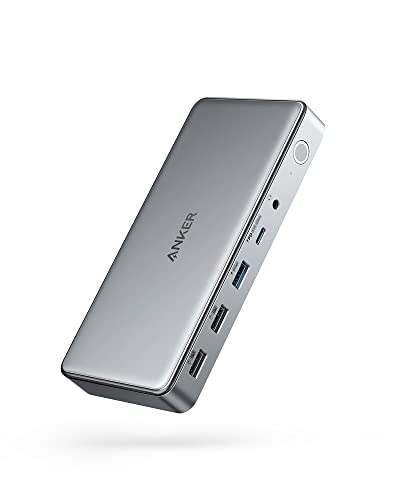
The Anker 10-in-1 USB C Docking Station stands out as an excellent choice for professionals who rely on multiple displays and high-speed data transfer. It converts a single USB-C port into two HDMI ports, a DisplayPort, and various USB ports, accommodating all your connectivity needs. Enjoy triple display support with up to 4K resolution, plus file transfer speeds of 5 Gbps. You can even charge your laptop with up to 100W while simultaneously powering your phone at 30W. Backed by an 18-month warranty, this compact docking station is designed for efficiency and reliability, making it a must-have for any workspace.
Best For: Professionals who require multiple display connections and high-speed data transfer in their workspace.
Pros:
- Triple display support with high-resolution output capabilities, ideal for multitasking.
- Fast file transfer speeds of up to 5 Gbps, enhancing productivity.
- High charging capabilities with up to 100W for laptops and 30W for phones, allowing simultaneous charging.
Cons:
- May require additional setup or software installation for optimal performance on certain systems.
- Limited compatibility with some older devices that do not support USB-C.
- Compact size may limit port spacing for larger connectors or devices.
Factors to Consider When Choosing Anker Docking Stations
When picking an Anker docking station, you should consider several key factors. Port variety and count, display capabilities, and compatibility with your devices will greatly impact your overall experience. Don’t forget to check power delivery specifications and data transfer speeds to guarantee you get the performance you need.
Port Variety and Count
Choosing the right Anker docking station often hinges on the variety and count of ports it offers. With options ranging from 8 to 14 ports, you can easily find a model that meets your connectivity needs. Look for a mix of port types like USB-C, HDMI, DisplayPort, Ethernet, and audio jacks to guarantee compatibility with your devices. Data transfer speeds can make a significant difference, so opt for models offering up to 10 Gbps for USB-C and 5 Gbps for USB-A. Additionally, consider charging capabilities, as some docking stations provide up to 140W of power delivery, perfect for charging multiple devices at once. With the right port variety and count, you’ll maximize your productivity effortlessly.
Display Capabilities and Support
Selecting a docking station with robust display capabilities can greatly enhance your multitasking experience. When choosing, consider how many external monitors you want to connect—options range from single to triple displays. Look for support for high resolutions, like 8K or dual 4K outputs, to maximize your visual workspace. Be mindful that some macOS devices only support Single-Stream Transport (SST), which limits your displays to mirroring content. Check the types of video outputs, such as HDMI, DisplayPort, and VGA, to verify compatibility with your monitors. Finally, opt for models utilizing the latest technologies like DisplayLink or Thunderbolt, which guarantee peak performance and minimal latency in your visual output, making your workflow smoother and more efficient.
Power Delivery Specifications
Power delivery specifications are a significant factor in ensuring your devices stay charged and ready for use. They indicate the maximum wattage a docking station can provide, with some Anker models delivering up to 140W, perfect for power-hungry laptops. A higher wattage means faster charging and the ability to power multiple devices at once, which is essential for your productivity. Many stations feature a USB-C Power Delivery port, supporting varying wattages like 85W or 100W. However, it’s important to check your devices’ compatibility, as not all laptops can handle higher wattage input. Additionally, some docking stations have extra USB-C ports that share power delivery, allowing efficient charging of multiple devices without exceeding the total output limits.
Compatibility With Devices
When considering an Anker docking station, compatibility with your devices is essential to guarantee seamless connectivity and functionality. First, check that the docking station works with your operating system—most support macOS 13.5+, Windows 10/11, and some even work with ChromeOS, but Linux may not be supported. Next, confirm compatibility with your specific laptop model, whether it’s a Dell, HP, Lenovo, or MacBook. Additionally, be aware of any display limitations, like macOS mirroring identical content on external monitors, which can affect your multitasking. Finally, review the number and types of ports available, such as USB-C, USB-A, HDMI, and Ethernet, to verify the docking station meets your connectivity needs while providing adequate power delivery for your device.
Data Transfer Speeds
Understanding data transfer speeds is essential for maximizing the performance of your Anker docking station. Anker offers a range of data transfer speeds, with USB-C ports typically supporting up to 10 Gbps for high-speed transfers. In contrast, USB-A ports usually provide 5 Gbps, with some including additional 480 Mbps ports for lower-speed devices. When choosing a docking station, think about how many high-speed ports you need for multitasking; some models feature multiple USB-C and USB-A connections. If you require even faster speeds, look for docks that support USB4, which offers enhanced data transfer rates and broader device compatibility. Always consider the specific data transfer speeds your devices require to guarantee peak performance and efficiency.
Size and Design
Choosing the right size and design for your Anker docking station can greatly impact your workspace experience. Consider the dimensions; if you need portability, a compact model might be your best bet. Heavier docking stations often provide additional features or stability, but they can be cumbersome to transport. Design elements, like elevated monitor stands, can improve organization and ergonomics, promoting better posture while you work. Don’t overlook aesthetics either—many Anker stations come in various colors and finishes, allowing you to match your style. Finally, think about the arrangement and number of ports; more connectivity options might require a larger size to accommodate all interfaces. Finding the perfect balance guarantees you maximize both functionality and visual appeal.
Warranty and Support Options
While selecting an Anker docking station, it’s essential to contemplate the warranty and support options available. Most Anker products come with an 18 to 24-month warranty, giving you peace of mind against manufacturing defects. You’ll also benefit from customer service support to assist with installation and troubleshooting. If you’re unsure about your purchase, the 30-day return policy through Amazon allows you to return the docking station if it doesn’t meet your needs. To access warranty information and support details, look for QR codes in the product packaging for quick assistance. Additionally, checking customer reviews can provide valuable insights into the reliability and support experience, helping you make an informed decision on your Anker docking station choice.