As you explore the best Kensington docking stations of 2026, you’ll discover how these innovative devices can transform your workspace. Each model offers unique features designed to enhance productivity and connectivity. From multi-monitor support to robust power delivery, there’s a docking station to fit your needs. But with so many options, how do you choose the right one? Let’s take a closer look at the top contenders and what sets them apart.
Kensington 11-in-1 USB-C Docking Station (K33622NA)

If you’re a professional looking to enhance your workspace, the Kensington 11-in-1 USB-C Docking Station (K33622NA) is an excellent choice. It supports up to three external monitors, including one 4K display, making multitasking a breeze. This dock is compatible with USB-C Alt Mode laptops like MacBook M1 through M4 and works with Thunderbolt and USB4 devices. You’ll enjoy up to 100W power delivery for charging, alongside multiple HDMI and USB-A ports. Plus, the free Kensington DockWorks software optimizes your connection. With a sustainable design and a 3-year warranty, it’s a smart, secure investment for your workspace.
Best For: Professionals and remote workers who need a versatile docking solution for multiple monitors and efficient connectivity.
Pros:
- Supports up to three external monitors, including one 4K display, enhancing multitasking capabilities.
- Provides up to 100W power delivery for laptop charging, reducing cable clutter.
- Compatible with a wide range of USB-C and Thunderbolt devices, ensuring versatile use.
Cons:
- DockWorks software is only available for Windows users, limiting optimization for macOS and Chrome OS users.
- Mounting bracket for zero-footprint option is sold separately, adding to the overall cost.
- May be overkill for users with simpler connectivity needs, making it less cost-effective for casual users.
Kensington SD5700T Thunderbolt 4 Docking Station

The Kensington SD5700T Thunderbolt 4 Docking Station is perfect for professionals using Thunderbolt 4 Windows laptops or MacBooks with macOS 11 or later. It seamlessly connects your devices, offering single 8K or dual 4K video output. With three Thunderbolt 4 downstream ports, you can daisy-chain up to five additional devices at impressive speeds. The 180W power supply charges your laptop while supporting peripherals without compromise. Plus, features like DockWorks WiFi Auto-Switch and Intel VT-d DMA protection enhance network reliability and security. Backed by a three-year warranty and lifetime support, this dock elevates your workspace effortlessly.
Best For: Professionals using Thunderbolt 4 Windows laptops or Thunderbolt 3/4 MacBooks who need a versatile docking solution for enhanced connectivity and power management.
Pros:
- Supports single 8K or dual 4K video output for high-resolution displays.
- 180W power supply efficiently charges laptops and peripherals simultaneously.
- Advanced security features like Intel VT-d DMA protection safeguard system memory.
Cons:
- Not compatible with Thunderbolt 3 Windows laptops.
- Adapters for external display connections are not included.
- Macs with M1, M2, or M3 chipsets are limited to a single monitor display.
Kensington SD5900T DisplayLink Docking Station for MacBook Pro/Air

For MacBook Pro and Air users seeking a powerful docking solution, the Kensington SD5900T DisplayLink Docking Station stands out with its impressive support for Quad 4K displays at 60Hz. With a 16-in-1 design, it offers multiple connectivity options, including Thunderbolt 4 and USB-C ports, ensuring you can connect all your peripherals effortlessly. You’ll appreciate the 100W charging capability, which powers your laptop while keeping your accessories charged. Plus, its sleek Midnight Blue finish and eco-friendly materials add a modern touch to your workspace. Enjoy peace of mind with a three-year warranty and lifetime technical support. Elevate your setup today!
Best For: MacBook Pro and Air users looking for a versatile docking station that supports high-resolution displays and offers extensive connectivity options.
Pros:
- Supports Quad 4K @ 60Hz for high-performance displays.
- 16-in-1 design provides multiple connectivity options for various peripherals.
- Eco-friendly construction with a sleek design enhances workspace aesthetics.
Cons:
- Off-host charging may not be suitable for all users.
- Mounting bracket sold separately for Zero-Footprint option.
- Limited to Thunderbolt 4 compatible devices for full functionality.
Kensington SD5800T Thunderbolt 4 Quad 4K Docking Station

Graphic designers, video editors, and animators will find the Kensington SD5800T Thunderbolt 4 Quad 4K Docking Station an indispensable tool in their workflow. This powerful docking station supports 40Gbps data transfer and boasts a versatile 16-in-1 configuration, including multiple HDMI and DisplayPort options. You can connect up to four 4K displays at 60Hz or even one 8K display. With up to 100W charging capability, it keeps your devices powered while you work. Plus, the built-in UHS-II SD and Micro SD card readers streamline your data transfer, making it a must-have for creative professionals seeking efficiency and performance.
Best For: Graphic designers, video editors, and animators seeking a high-performance docking station for enhanced productivity and connectivity.
Pros:
- Supports up to four 4K displays at 60Hz or one 8K display, providing exceptional visual clarity.
- Offers a wide range of ports (16-in-1) for versatile connectivity and peripheral support.
- Fast data transfer capabilities with built-in UHS-II SD and Micro SD card readers streamline workflows for creative professionals.
Cons:
- The mounting bracket for zero-footprint setup is sold separately, potentially increasing overall costs.
- May be overkill for casual users who do not require high-resolution display support or extensive connectivity options.
- Limited compatibility with older USB devices, which may require adapters for full functionality.
Kensington USB 3.0 Dual Display Docking Station (K33972US)

Ideal for professionals who rely on multiple displays, the Kensington USB 3.0 Dual Display Docking Station (K33972US) enhances productivity with its ability to support dual monitors at resolutions up to 2048×1152@60Hz. With two SuperSpeed USB 3.0 ports and four USB 2.0 ports, you can easily connect up to eight peripherals. This compact dock also features a Gigabit Ethernet port and audio jacks for your headphones and microphone. Setup is a breeze with a single USB-A connection, and it’s compatible with various laptops, including Surface Pro models. Enjoy a 2-year warranty and lifetime technical support for peace of mind.
Best For: Professionals who need to connect multiple displays and peripherals for enhanced productivity.
Pros:
- Supports dual monitors with high resolutions up to 2048×1152@60Hz, providing an expansive workspace.
- Offers a variety of ports, including two SuperSpeed USB 3.0 and four USB 2.0, allowing connection of up to eight peripherals.
- Easy installation with a single USB-A connection and comes with a 2-year warranty and lifetime technical support.
Cons:
- Does not provide power to laptops, requiring an external power source for the dock.
- May require additional driver downloads for MacBook users for full functionality.
- Limited to USB-A connectivity; may not be compatible with laptops that lack USB-A ports without an adapter.
Kensington USB-C Quad 4K Displaylink Docking Station

The Kensington USB-C Quad 4K Displaylink Docking Station is perfect for professionals who need to expand their workspace with multiple monitors. You can connect up to four displays with Windows or Chrome laptops, and three with your MacBook, thanks to Displaylink technology. It offers a variety of connectivity options, including six USB ports, a Gigabit Ethernet port, and even a combo audio jack. Plus, with 100W Power Delivery, you can charge your laptop and accessories simultaneously. Made with up to 50% post-consumer recycled plastic, it’s eco-friendly and comes with a 3-year limited warranty for peace of mind.
Best For: Professionals seeking to enhance their productivity with multiple monitor setups and extensive connectivity options.
Pros:
- Supports up to four external monitors for Windows or Chrome laptops, enhancing multitasking capabilities.
- Equipped with 100W Power Delivery, allowing simultaneous charging of laptops and accessories.
- Made with 50% post-consumer recycled plastic, promoting sustainability.
Cons:
- Limited to three external monitors for MacBook users, which may not meet all users’ needs.
- Requires Displaylink technology, which may necessitate additional software installation for optimal performance.
- The reliance on USB-C ports may be a limitation for users with older USB-A only devices.
Kensington SD4700P Displaylink Docking Station for MacBook and Windows

If you’re looking for a versatile docking solution that seamlessly integrates with both MacBook and Windows systems, the Kensington SD4700P Displaylink Docking Station is an excellent choice. It supports M1 to M4 MacBooks and Windows PCs, featuring dual 2K displays through HDMI and DisplayPort. With five SuperSpeed USB 3.0 ports, a gigabit ethernet port, and a 3.5mm audio jack, it covers all your connectivity needs. Plus, the included 135W power supply delivers up to 60W charging for compatible laptops. Backed by three years of coverage and lifetime tech support, it’s perfect for elevating your workspace setup.
Best For: Users seeking a reliable and multifunctional docking station for both MacBook and Windows laptops with high-resolution display support.
Pros:
- Supports dual 2K displays for enhanced productivity.
- Includes multiple USB ports and a gigabit ethernet connection for versatile connectivity.
- Backed by a 3-year warranty and lifetime technical support for peace of mind.
Cons:
- Requires installation of DisplayLink driver for full functionality on MacBooks.
- Limited laptop charging capability (up to 60W) may not suffice for high-power laptops.
- Additional adapter may be needed for USB-A laptops or Surface devices.
Kensington Triple Display USB-C Docking Station

Designed for professionals who demand seamless multitasking, the Kensington Triple Display USB-C Docking Station stands out with its ability to support three simultaneous 4K displays. Compatible with popular brands like Dell, HP, and Lenovo, this dock features four video-out ports, ensuring flexibility in your setup. It also offers 100W Power Delivery, keeping your laptop charged while you work. With three fast-charging USB ports and a gigabit Ethernet connection, your productivity won’t skip a beat. Plus, enjoy peace of mind with a three-year warranty and lifetime technical support. Elevate your workspace with this powerful docking solution.
Best For: Professionals and multitaskers who need to connect multiple displays and devices for enhanced productivity.
Pros:
- Supports triple 4K displays for an expansive and efficient workspace.
- 100W Power Delivery ensures your laptop stays charged during heavy use.
- Lifetime technical support and a three-year warranty provide peace of mind.
Cons:
- Limited to specific brands for optimal compatibility, which may exclude some users.
- Maximum resolution on triple displays caps at 30Hz, which may not be suitable for all applications.
- Bulky design may require more desk space compared to simpler docking solutions.
Kensington SD4780P USB-C Docking Station for Windows and MacBooks
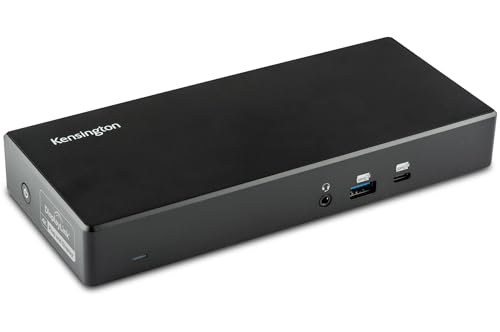
For professionals juggling multiple devices, the Kensington SD4780P USB-C Docking Station stands out as an essential tool that enhances productivity. This versatile dock supports Windows, MacBooks, Surface devices, and Chromebooks, offering dual 4K@60Hz video output through four ports. With a robust 135W power supply, it delivers up to 100W charging for your laptop. You’ll appreciate six USB ports, including fast charging options, plus a gigabit Ethernet port and audio jack for seamless connectivity. Weighing just 2.8 pounds, it’s both portable and powerful, making it an ideal companion for your dynamic workspace. Enjoy peace of mind with a three-year warranty and lifetime support.
Best For: Professionals seeking a versatile docking solution that enhances productivity across multiple devices including Windows laptops, MacBooks, and Chromebooks.
Pros:
- Dual 4K@60Hz video output enables high-resolution displays for expanded workspace.
- Robust power delivery provides up to 100W charging for laptops, reducing the need for multiple chargers.
- Multiple connectivity options with six USB ports, gigabit Ethernet, and audio jack facilitate seamless integration with various devices.
Cons:
- Weight of 2.8 pounds may be considered heavy for frequent travel.
- Restocking fees may apply for returns due to misuse or tampering, which can be a downside for customers.
- Limited customer rating of 3.9 out of 5 stars suggests mixed user experiences.
Kensington SD4750P USB-C Displaylink Docking Station

The Kensington SD4750P USB-C DisplayLink Docking Station stands out as the ideal choice for professionals and creatives who demand seamless dual 4K video output and versatile connectivity. With support for Windows, MacBook, Surface, and Chromebooks, you’ll enjoy flexibility through four video ports: 2 DisplayPort 1.2++ and 2 HDMI 2.0. This docking station features a powerful 135W adapter, delivering 85W for laptop charging, plus additional power for peripherals. Its six USB ports, Gigabit Ethernet, and audio jacks enhance your workspace. Plus, security’s covered with a Kensington lock slot, ensuring your setup remains safe and organized.
Best For: Professionals and creatives requiring dual 4K video output and versatile connectivity options.
Pros:
- Dual 4K@60Hz output enables high-resolution displays for enhanced productivity.
- Multiple connectivity options with four video ports and six USB ports cater to various devices and peripherals.
- Robust security feature with a Kensington lock slot helps keep your setup safe.
Cons:
- Weight of 2.7 pounds may make it less portable compared to lighter docking stations.
- Power delivery limited to 85W for laptop charging, which may not be sufficient for high-demand laptops.
- Requires a separate lock purchase for added security, which may be an additional expense.
Factors to Consider When Choosing Kensington Docking Stations
When choosing a Kensington docking station, you’ll want to contemplate several key factors. Think about compatibility with your devices, the variety of video output options, and how much power delivery you need. Additionally, the number of ports and overall performance can greatly impact your user experience.
Compatibility With Devices
How do you guarantee that a Kensington docking station works seamlessly with your devices? First, check compatibility with your laptop—some models support USB-C Alt Mode, while others are tailored for Thunderbolt 3 and 4 systems. Next, consider the operating system, as most stations work with Windows 10+, macOS 11+, and Chrome OS 114+, but specific features may vary. Evaluate the number of external displays you need; certain docking stations can support up to four monitors, while others may only handle two. Don’t overlook power delivery capabilities—some models can charge your laptop with up to 100W, while others may provide less. Finally, confirm the docking station supports the latest USB standards for peak performance.
Video Output Options
Choosing the right video output options is crucial for maximizing your Kensington docking station’s potential. Many models support various configurations, enabling you to connect dual or triple 4K displays, or even a single 8K display, depending on your needs. With DisplayLink technology, you can enjoy flexible video outputs across different operating systems, including Windows and macOS. Consider maximum resolution capabilities, as some models can reach up to 8K at 60Hz or quad 4K at 60Hz, perfect for graphic-intensive tasks. Look for combinations of HDMI and DisplayPort outputs to accommodate your display setup. Plus, compatibility with USB-C, Thunderbolt 3, and Thunderbolt 4 guarantees you can connect a wide range of devices while enjoying high-speed data transfer and video output.
Power Delivery Capability
Power delivery capability is a key factor to evaluate in your Kensington docking station selection, especially if you rely on multiple devices. Look for models that offer up to 100W power delivery for laptops and peripherals; this guarantees efficient charging. If you’ve got power-hungry devices, consider a docking station with higher wattage, like 180W, which supports charging several devices simultaneously without draining power from your host laptop. Many Kensington stations use Power Delivery 3.0 technology, providing faster and more efficient charging. Just make sure the docking station’s power delivery aligns with your laptop’s requirements to ensure ideal charging performance. This attention to power capability will enhance your workspace setup considerably.
Number of Ports
When evaluating Kensington docking stations, the number of ports plays an essential role in maximizing your device connectivity. A docking station with multiple ports allows you to connect various devices simultaneously, such as monitors, keyboards, and external drives. Many Kensington models offer up to 16 different connections, including USB-A, USB-C, HDMI, and DisplayPort. Having a range of USB ports enhances productivity by letting you connect peripherals like printers and storage devices without constantly swapping cables. Additionally, more video output ports enable support for multiple external monitors, which boosts workspace efficiency. Don’t forget to take into account the type and speed of these ports, as USB 3.2 Gen2 ports provide faster data transfer rates compared to older USB 2.0 ports.
Performance and Speed
To guarantee your Kensington docking station meets your needs, consider its performance and speed, as these factors greatly impact your overall user experience. Look for models with Thunderbolt 4 support, delivering data transfer rates up to 40Gbps, perfect for connecting multiple high-bandwidth devices. Display capabilities matter too; some stations enable Quad 4K resolution at 60Hz, ensuring sharp visuals on your monitors. Don’t overlook power delivery; stations that provide up to 100W charging keep your laptop and peripherals powered without sacrificing performance. Pay attention to port types as well; USB 3.2 Gen2 ports offer 10Gbps, while USB 3.0 ports support 5Gbps. Enhanced software features like DockWorks can further optimize performance and device management, enhancing your overall setup.
Design and Mounting Options
Choosing the right design and mounting options for your Kensington docking station can greatly enhance your workspace. Many models offer a zero-footprint mounting option, letting you attach the dock to the back of your monitor or under your desk, freeing up valuable desktop space. Look for security cable slots on various models; they enable you to secure your dock with a Kensington cable lock for theft protection. The design often includes multiple USB ports and video outputs, catering to your connectivity needs while keeping your workspace organized. Plus, some models feature eco-friendly materials like 100% post-consumer recycled aluminum, emphasizing sustainability. With compatibility across a wide range of devices, you can guarantee versatile connectivity for your setup.
Warranty and Support
Selecting a Kensington docking station means not only considering its design and mounting options but also understanding the warranty and support that come with your purchase. Most Kensington docking stations include a three-year limited warranty, giving you peace of mind about product quality and reliability. This warranty often covers defects in materials and workmanship, enhancing your investment’s longevity. Additionally, many models come with lifetime technical support, so you’ll have assistance whenever questions or issues arise. If you’re in a government or educational institution, check for TAA compliance on specific models. Finally, remember that you can take advantage of Amazon’s return policy for refunds on any products that arrive dead on arrival or damaged within a certain timeframe.