If you’re looking to enhance your gaming and productivity experience, AR glasses could be the solution you need. These innovative devices offer features that can transform how you interact with your PC, from ultra-high resolution displays to immersive audio. However, with so many options available, it’s essential to know what to take into account before making a choice. Let’s explore the top contenders that could elevate your setup.
RayNeo Air 3s Pro AR/XR Glasses

If you’re seeking a top-tier AR experience for gaming and streaming on your PC, the RayNeo Air 3s Pro AR/XR glasses are your best bet. With a stunning brightness of 1,200 nits and a Micro-OLED display, you’ll enjoy lifelike visuals and a massive 201” virtual screen. Designed for comfort, these glasses come with Low Blue Light certification and advanced brightness control, ensuring eye health during long sessions. The quad-speaker system provides immersive audio, while compatibility with various devices means you can easily connect your favorite gadgets. Elevate your gaming and streaming experience with the RayNeo Air 3s Pro.
Best For: Those looking for an immersive AR experience for gaming and streaming with high-quality visuals and audio.
Pros:
- High brightness of 1,200 nits and a Micro-OLED display for lifelike visuals.
- Low Blue Light certification and advanced brightness control for comfortable extended use.
- Quad-speaker system providing theater-grade surround sound and spatial audio algorithms.
Cons:
- May require adjustment period for users not accustomed to AR glasses.
- Vision correction setup may necessitate additional visits to local opticians.
- Higher price point compared to standard monitors or TVs.
XREAL One Pro AR Glasses with X1 Chip

The XREAL One Pro AR Glasses with X1 Chip stand out as an ideal choice for gamers and professionals who crave an immersive experience without sacrificing comfort or versatility. With native 3 DoF tracking and optional 6 DoF using XREAL Eye, you’ll enjoy a seamless interaction. The ultra-low 3ms latency guarantees responsiveness, while the stunning 57° field of view projects a virtual screen equivalent to a 171-inch display. Designed for comfort, these glasses fit over 95% of users with adjustable features. Plus, the integrated Bose audio delivers high-quality sound, making them perfect for gaming, movies, and calls.
Best For: The XREAL One Pro AR Glasses are best for gamers and professionals seeking an immersive augmented reality experience with a focus on comfort and high-quality audio.
Pros:
- Seamless interaction with native 3 DoF tracking and optional 6 DoF using XREAL Eye.
- Ultra-low 3ms latency ensures responsive performance during gaming and media consumption.
- Comfortable fit for over 95% of users with adjustable features and zero-pressure nose pads.
Cons:
- Limited to USB-C devices, which may exclude some older devices.
- Requires additional components (like XREAL Eye) for full 6 DoF functionality.
- Potential discomfort during extended use for users with different head shapes or sizes despite adjustable features.
RayNeo Air 3s AR/XR Glasses for Gaming and Video

Looking for a premium gaming and video experience? The RayNeo Air 3s AR/XR Glasses deliver with a stunning 201-inch virtual screen and 120Hz FHD micro-OLED display. Weighing just 2.88 ounces, they’re comfortable for long sessions. Enjoy sharp visuals and rich sound thanks to dual acoustic chambers and Whisper Mode 2.0, perfect for public use. With multiple display modes and compatibility with devices like the PS5 and Steam Deck, you’ll easily switch between gaming and movies. Reviewers praise their impressive quality, but consider checking device compatibility before purchasing for maximum enjoyment. Immerse yourself in entertainment with these lightweight glasses!
Best For: Gamers and movie enthusiasts seeking an immersive, high-quality visual and audio experience in a lightweight design.
Pros:
- Sharp, vibrant visuals with a 201-inch virtual screen and 120Hz micro-OLED display for an enhanced viewing experience.
- Comfortable fit with adjustable nose pads and soft-touch arms, perfect for extended use.
- Versatile compatibility with various devices, including PS5, Steam Deck, and iPhone, making it easy to switch between gaming and movies.
Cons:
- Device compatibility issues reported by some users, which may require additional adapters.
- Size perception concerns where the virtual screen may not appear as large as advertised.
- Frustrations with the return process, impacting overall customer satisfaction.
Rokid AR Spatial Black- Max2 AR Glasses & Station2 Spatial Computer

For anyone seeking an immersive experience in productivity, gaming, or entertainment, the Rokid AR Spatial Black-Max2 AR Glasses paired with the Station2 Spatial Computer stand out as an exceptional choice. Their unique 3-screen display lets you multitask effortlessly, and the 50% larger Micro OLED display guarantees stunning visuals with a 120Hz refresh rate. You’ll appreciate the comfort features, like adjustable IPD and lightweight design, making long sessions enjoyable. With robust battery life and smooth connectivity options, these glasses elevate your gaming and productivity experience, providing immersive enjoyment without slippage or fatigue.
Best For: Anyone looking for an immersive experience in productivity, gaming, or entertainment with advanced AR technology.
Pros:
- Unique 3-screen display allows for seamless multitasking across apps.
- Comfortable design with adjustable IPD and lightweight build enhances long-term wear.
- High-quality visuals with a 120Hz refresh rate and vibrant Micro OLED display.
Cons:
- Users with high myopia may require separate prescription lenses.
- Battery life of 3.5 hours may limit extended use without charging.
- The price point may be a consideration for budget-conscious buyers.
VITURE Luma Pro XR Glasses for iPhone and Android

Experience stunning visuals and immersive audio with the VITURE Luma Pro XR Glasses, the perfect choice for gamers and professionals alike. With a 152” virtual screen and 1200P resolution, you’ll enjoy a sharper, brighter display even in various lighting. These glasses offer comfort with flexible arms and customizable RGB lighting. Enhanced audio by HARMAN delivers immersive sound for gaming and calls. Plus, their industry-leading software supports real-time 2D-to-3D conversion, allowing multi-screen setups from your devices. Compatible with iPhone, Android, Mac, and more, the VITURE Luma Pro XR Glasses cater to all your gaming and productivity needs.
Best For: Gamers and professionals seeking an immersive audio-visual experience with versatile compatibility across multiple devices.
Pros:
- High-quality 1200P resolution and 1000 nits brightness for stunning visuals.
- Comfortable design with flexible arms and customizable RGB lighting for extended use.
- Advanced software supporting multi-screen setups and real-time 2D-to-3D conversion enhances productivity and entertainment.
Cons:
- May require adjustments for optimal fit depending on individual IPD.
- Battery life may vary with extensive use of features like RGB lighting and audio enhancements.
- Higher price point compared to standard VR glasses on the market.
XREAL One AR Glasses with X1 Chip

The XREAL One AR Glasses, powered by the innovative X1 Chip, are perfect for tech enthusiasts and professionals seeking an immersive experience. With native 3 DoF and a USB-C connection, you can enjoy stunning spatial screens without fuss. The 3 ms ultra-low latency guarantees your movies and games sync seamlessly. Featuring a 0.68-inch Sony Micro-OLED display, these glasses deliver visuals equivalent to a massive 4-meter projection. Plus, the adjustable lens transparency and IPD adjustment software assure a tailored fit. Coupled with high-quality audio tuned by Bose, you’ll get lifelike sound to elevate your entertainment and productivity.
Best For: Tech enthusiasts and professionals seeking an immersive augmented reality experience with high-quality visuals and audio.
Pros:
- High Performance: The X1 Chip offers enhanced performance with ultra-low latency for seamless usage in gaming, movies, and work.
- Immersive Visuals: Features a massive virtual screen size equivalent to a 4-meter projection with vivid brightness and stable visuals.
- Customizable Fit: Adjustable lens transparency and interpupillary distance settings ensure a comfortable and personalized viewing experience.
Cons:
- Device Compatibility: Requires USB-C video output, which may limit compatibility with some older devices without additional adapters.
- Additional Accessories Needed: Nintendo Switch users must purchase the XREAL Hub for connection, adding to the overall cost.
- Limited Glass Size: The compact design may not suit everyone, particularly those who prefer larger AR devices for extended use.
ANYLUV Blue Light Blocking Glasses for Men
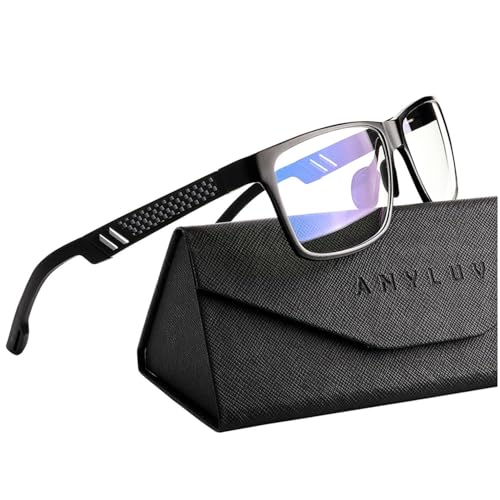
When you’re spending long hours in front of screens, ANYLUV Blue Light Blocking Glasses are an ideal choice for men seeking to protect their eyes without sacrificing style. With a 45% blue block rate, they filter harmful high-energy blue light while maintaining low color distortion for superior viewing quality. Lightweight and comfortable, the sturdy metal frame features an adjustable nose piece for a perfect fit. Users report reduced eye strain and headaches during extended use, enhancing focus for gaming or work. Plus, they come with a stylish carrying case and accessories, making them a great value and perfect gift option.
Best For: Men who spend long hours in front of screens and seek stylish eye protection from blue light exposure.
Pros:
- Lightweight and comfortable design with an adjustable nose piece for a personalized fit.
- 45% blue block rate effectively filters harmful blue light while maintaining low color distortion.
- Comes with a premium carrying case and accessories, making it a great value and gift option.
Cons:
- Some users report issues with glare and reflection that can be distracting.
- Pricing variations across platforms may cause confusion for consumers.
- Mixed feedback on comfort and fit, with some finding them less effective than expected.
INAIR Pod AR Glasses Dual-Function Host Unit
For tech enthusiasts seeking a powerful and versatile tool, the INAIR Pod AR Glasses Dual-Function Host Unit stands out with its sleek, compact design resembling a computer mouse. This hub integrates robust processing power with a spatial operating system, featuring a touch surface and haptic feedback. With a Qualcomm 7-series octa-core processor, 8 GB RAM, and 128 GB storage, it’s ready for anything. You can enjoy multiple apps simultaneously on the INAIR 2 Pro display, streaming seamlessly from your PC or smartphone. Plus, the AI assistant enhances your experience, making interaction effortless and intuitive. Elevate your gaming and productivity with this innovative device!
Best For: Tech enthusiasts and professionals seeking a powerful, versatile tool for entertainment and productivity.
Pros:
- Powerful Performance: Equipped with a Qualcomm 7-series octa-core processor, 8 GB RAM, and 128 GB storage for seamless multitasking.
- Immersive Experience: Supports multiple app windows on the INAIR 2 Pro display, allowing for a cinema-style viewing experience.
- Intuitive AI Integration: Features a built-in AI assistant for effortless interaction and real-time support for various tasks.
Cons:
- Limited Battery Life Under Heavy Use: While it has a month of standby time, intensive tasks may drain the battery quicker.
- Learning Curve: Users may need time to adapt to the spatial operating system and dual display modes.
- Price Point: As a high-tech device, it may be considered expensive for casual users.
INAIR 2 Elite Suite AR Glasses and Pod
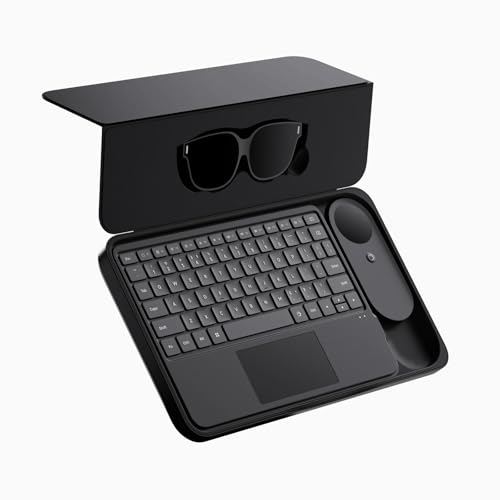
Looking for an immersive way to enhance your productivity? The INAIR 2 Elite Suite AR Glasses and Pod deliver a stunning experience with their multi-screen capabilities. You can run up to six windows simultaneously, switching between fixed and follow modes effortlessly. With a full Android environment, you can install and arrange your favorite apps side by side in AR. The AI spatial engine transforms flat images into 3D visuals, while dual-channel wireless connectivity mirrors your desktop onto a massive virtual display. Plus, with 135-inch Micro-OLED screens, enjoy crisp visuals and smooth motion for an engaging work or gaming environment.
Best For: Professionals and gamers seeking an immersive, multi-window productivity experience with advanced AR features.
Pros:
- Supports simultaneous use of up to six applications in a 3D spatial environment.
- Real-time 2D-to-3D rendering enhances visual content for a more engaging experience.
- Dual-channel wireless connectivity allows for remote desktop access on a large virtual display.
Cons:
- The device may require a learning curve for users unfamiliar with AR technology.
- High price point may not be accessible for all consumers.
- Battery life may vary depending on usage, potentially limiting extended use without charging.
Rokid AR Joy Pack AR Glasses

Rokid AR Joy Pack AR Glasses stand out for their lightweight design and high-quality Micro-OLED display, making them an excellent choice for gamers and movie enthusiasts who crave an immersive experience on the go. Weighing just 75g and featuring a 160 Micro-OLED display, these glasses guarantee comfort during extended use. With TüV Rheinland Eye Comfort certification and adjustable diopters, you won’t need corrective lenses. Enjoy seamless streaming from platforms like Hulu and Disney+ thanks to full access to Android TV 12. Plus, plug-and-play functionality with USB-C and HDMI connectivity makes setup a breeze, elevating your entertainment experience effortlessly.
Best For: Gamers and cinephiles seeking a portable, immersive entertainment experience without the need for corrective lenses.
Pros:
- Lightweight design at only 75g ensures comfort during long periods of use.
- TüV Rheinland Eye Comfort certification and adjustable diopters eliminate the need for corrective lenses.
- Full access to Android TV 12 allows streaming from popular platforms like Hulu and Disney+.
Cons:
- Limited battery life may require frequent recharging during extended use.
- Potential compatibility issues with some devices may arise despite extensive connectivity options.
- Higher price point compared to traditional screens may not appeal to all consumers.
Factors to Consider When Choosing AR Glasses for PC Use
When choosing AR glasses for PC use, you’ll want to pay close attention to several key factors. Consider display quality and resolution, as they greatly impact your visual experience. Also, think about compatibility with your devices, comfort, audio performance, and battery life to guarantee a seamless and enjoyable experience.
Display Quality and Resolution
Display quality and resolution play a vital role in your experience with AR glasses for PC use. High resolution is important, so look for options like 1200P or higher to guarantee sharper visuals and enhanced clarity. Brightness levels of 600 nits or above can greatly improve visibility in various lighting conditions, making your display easier to use. A high refresh rate, such as 120Hz, is essential for smooth visuals, especially during fast-paced gaming or multimedia. Color accuracy, ideally with DeltaE < 2, guarantees true-to-life colors, enhancing your overall viewing experience. Finally, aim for a wide field of view (FOV) of 50° or more to expand the immersive experience and let you perceive a larger virtual workspace around you.
Compatibility With Devices
Choosing the right AR glasses for PC use hinges on their compatibility with your devices. First, confirm they support USB-C connectivity, as many modern PCs require this for video output. You should also check compatibility with different operating systems like Windows and macOS to assure functionality across platforms. Look for support for native 3 DoF or 6 DoF tracking capabilities, which can greatly enhance your interaction and immersion in AR applications. Low latency is essential too; aim for specs under 5 ms to guarantee a smooth visual experience while gaming or using multimedia. Finally, verify that the AR glasses work with specific software applications you plan to use, as some might have limitations in app support.
Comfort and Ergonomics
After ensuring compatibility with your devices, comfort and ergonomics should be top of mind when selecting AR glasses for PC use. Look for glasses that feature adjustable nose pads and flexible arms, ensuring a snug fit without pressure or fatigue during long sessions. Opt for lightweight models, ideally around 75 grams or less, which can greatly enhance comfort. Check for TÜV certification for eye comfort, as this indicates reduced blue light exposure and flicker-free technology, minimizing eye strain. Additionally, choose models with adjustable interpupillary distance (IPD) settings to tailor the fit for your unique vision. Finally, soft-touch materials can provide a pleasant feel against your skin, allowing for longer wear without discomfort.
Audio Performance Features
Audio performance is a key factor that can make or break your experience with AR glasses for PC use. High-quality audio is essential for immersion, with many models featuring advanced sound systems tuned by professionals for clear, balanced sound. Look for spatial audio capabilities that adjust based on your head movements, enhancing realism and engagement. Dual acoustic chambers can improve bass response and overall audio fidelity, perfect for gaming or media consumption. Features like Whisper Mode direct audio to your ears, reducing sound leakage for private listening in public spaces. Finally, glasses that integrate audio technology from renowned brands greatly elevate sound quality, ensuring a fulfilling auditory experience no matter how you use them.
Battery Life and Durability
When considering AR glasses for PC use, you’ll quickly find that battery life and durability play vital roles in your overall experience. Look for models that offer at least 3.5 hours of continuous use, as this can greatly impact your productivity and gaming sessions. Durability is also important; lightweight yet sturdy materials can withstand everyday wear and potential drops. Features like IPD (interpupillary distance) adjustment enhance comfort and guarantee a secure fit, which contributes to long-term durability. Some glasses even come with a self-contained power source, eliminating the hassle of external batteries. Additionally, choose models with eye comfort certifications, as these prioritize your visual health during extended use, reducing fatigue and enhancing your overall experience.