As a PC gamer, optimizing your Oculus Quest experience in 2025 is essential. With the right accessories, you can enhance connectivity, comfort, and overall gameplay. Imagine enjoying longer sessions without interruptions or discomfort. From reliable link cables to efficient charging stations, these tools can greatly impact your performance. Curious about which accessories can elevate your VR experience? Let’s explore the must-haves that every serious gamer should consider.
Syntech Link Cable 16FT for Oculus/Meta Quest and PC/SteamVR

If you’re a serious PC gamer looking to elevate your VR experience, the Syntech Link Cable 16FT is a game-changer. This cable connects your Meta Quest devices to your gaming PC, ensuring compatibility with the latest models like Quest 3 and Pro. With USB 3.0 speeds up to 5Gbps, you’ll enjoy stable data and a smooth gaming experience. The 16ft length gives you freedom to move, while its durable design withstands over 5000 bends. Plus, the included velcro strap keeps everything secure. Remember, it’s not for charging, but it comes with an 18-month warranty for peace of mind.
Best For: Serious PC gamers who want to enhance their VR experience with a reliable and durable connection to their Meta Quest devices.
Pros:
- Supports high-speed USB 3.0 data transmission for smooth gaming.
- 16ft length allows for unrestricted movement in VR environments.
- Durable design with upgraded Type-C interfaces withstands frequent bending.
Cons:
- Not a charging cable; cannot be used for charging devices.
- Requires updated software for proper functionality with Quest 3.
- May be too long for users with limited space for movement.
Charging Station for Meta Quest 3 and Oculus Quest 3S
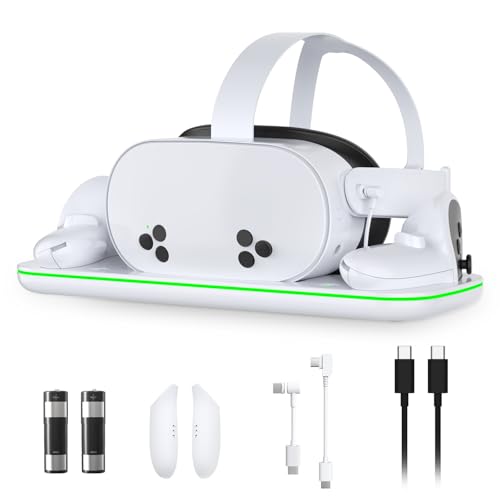
The Charging Station for Meta Quest 3 and Oculus Quest 3S is an essential accessory for dedicated VR gamers looking to streamline their setup. It powers up your headset and touch controllers efficiently, thanks to its intelligent charging system that prioritizes headset charging. With a magnetic design, placing your devices is effortless, while built-in overheating protection guarantees safety. The LED indicators keep you informed about charging status, and the included rechargeable batteries can be used up to 1000 times. Plus, its stylish design keeps your gaming area organized and clutter-free, making it a perfect addition to your gaming arsenal.
Best For: Dedicated VR gamers looking to efficiently charge their Meta Quest 3 and Oculus Quest 3S headsets and controllers.
Pros:
- Intelligent charging system prioritizes headset charging over controllers for optimal performance.
- Eco-friendly rechargeable batteries can be used up to 1000 times, reducing waste and replacement costs.
- Stylish design enhances gaming area organization while keeping accessories tidy.
Cons:
- Charging station may take up additional space in gaming setups.
- Magnetic charging design may require precise alignment for optimal charging.
- Limited to Meta Quest 3 and Oculus Quest 3S, not compatible with other VR headsets.
Syntech Link Cable 16FT for PCVR Compatible with Oculus/Quest

Gamers seeking an affordable and reliable solution for PCVR will find the Syntech Link Cable 16FT to be an excellent choice. Compatible with Oculus/Quest 3 and Quest 2, this cable supports USB 3.0 for high-speed data transfer, ensuring smooth gameplay in Steam VR games. Its 16 ft length gives you freedom of movement, while the L-shaped USB C design enhances comfort. While it’s not ideal for charging, it maintains battery levels effectively. Built with durability in mind, it resists bending and stretching. At around $17, it’s a cost-effective alternative to pricier options, making it a must-have for VR enthusiasts.
Best For: Budget-conscious gamers looking for a reliable and high-speed connection for PCVR gaming with Oculus/Quest headsets.
Pros:
- Supports USB 3.0 for high-speed data transfer, ensuring smooth gameplay.
- 16 ft length provides ample freedom of movement during gaming sessions.
- Durable construction resistant to bending and stretching, enhancing longevity.
Cons:
- Not recommended for fast charging of VR headsets over longer distances.
- Some users reported occasional connection issues, though rare.
- Flexibility could be improved based on user feedback.
INIU Link Cable with Charging for Meta Quest and Oculus VR Headsets
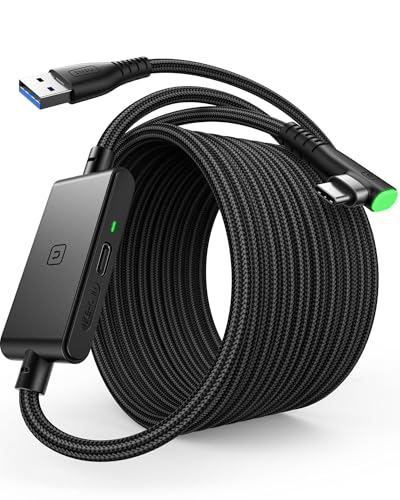
For PC gamers seeking a reliable and versatile connection to their Meta Quest or Oculus VR headsets, the INIU Link Cable with Charging stands out with its impressive 16ft length, allowing you to move freely while enjoying immersive gameplay. This USB 3.0 cable supports high-speed data transfer at 2.5 Gbps while charging, making it perfect for extended sessions. Its durable anti-wear design and 90° USB-C connector guarantee a secure fit and longevity. Users praise its flexibility and efficient charging capabilities, although some report occasional connection issues. With a 3-year warranty, it’s a solid investment for any VR enthusiast.
Best For: VR enthusiasts looking for a durable and flexible link cable for their Meta Quest or Oculus headsets that supports both charging and high-speed data transfer.
Pros:
- High-speed data transfer at 2.5 Gbps while charging, ideal for extensive gaming sessions.
- Long 16ft length provides freedom of movement during VR experiences.
- Durable anti-wear design and 90° USB-C connector enhance longevity and secure fit.
Cons:
- Some users report occasional connection issues after extended use.
- Customer support experiences can be inconsistent, making warranty resolution challenging.
- A few users have expressed concerns about build quality over time.
Link Cable for Meta/Oculus Quest VR Headsets (16FT Charging Cable)
If you’re a dedicated PC gamer looking to enhance your virtual reality experience, the Link Cable for Meta/Oculus Quest VR headsets is an excellent choice. This 16FT cable guarantees continuous gaming without low battery interruptions, thanks to its 3-in-1 USB C charging port. With a built-in Smart2.0 chip and USB 3.2 Gen1, it supports impressive data transmission speeds for smooth gameplay. Its durable braided nylon construction secures longevity, while the upgraded L-shaped interface provides a secure connection. Just plug it into your PC and headset, and you’re ready to immerse yourself in a seamless VR adventure.
Best For: Dedicated PC gamers seeking an uninterrupted and immersive virtual reality experience with their Meta/Oculus Quest headsets.
Pros:
- High-speed data transmission with USB 3.2 Gen1 for smooth gameplay.
- Durable braided nylon construction ensures longevity and flexibility.
- 16FT length provides freedom of movement for an immersive VR experience.
Cons:
- Some users experienced compatibility issues with certain PCs and headsets.
- Reported data speeds can be lower than the recommended for optimal performance.
- Initial setup may require device restarts for proper recognition.
Link Cable with 27W Charging Port for Meta Oculus Quest 2 and Pico 4

The Link Cable with a 27W Charging Port is an essential accessory for anyone looking to enhance their VR experience with the Meta Oculus Quest 2 or Pico 4. This 20FT cable connects directly to your VR device, allowing for seamless gameplay while charging. Its smart chip guarantees balanced current and data transmission, maximizing performance during use. With USB 3.0 support, you’ll enjoy high-quality VR experiences at impressive speeds. Just remember, it’s best to use a higher wattage charger for best results. The 90-degree connector design also gives you freedom of movement, making your gaming sessions even more immersive.
Best For: VR gamers looking for a reliable and long cable solution to enhance their experience with the Meta Oculus Quest 2 or Pico 4.
Pros:
- Supports high-speed data transfer with USB 3.0 at 5Gbps for immersive VR gameplay.
- 90-degree connector design allows for comfortable movement without the risk of unplugging.
- Equipped with a smart chip for balanced power delivery and data transmission during use.
Cons:
- Not compatible with Quest 3 version 79 without a system upgrade.
- Users report charging interruptions when using lower wattage chargers.
- Some connection stability issues noted by users during gameplay.
SUPERUS Facial Interface & Face Cover Pad for Oculus Quest 2
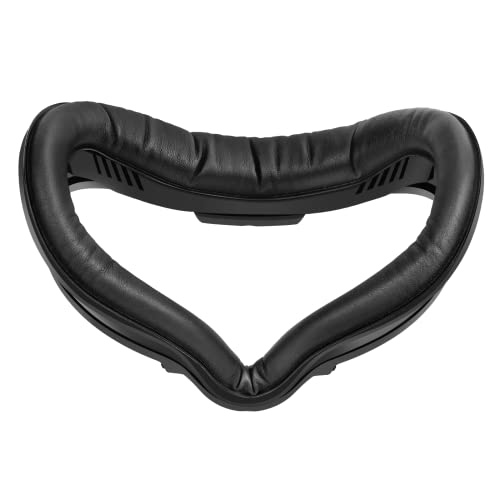
Elevating your VR experience, the SUPERUS Facial Interface & Face Cover Pad for Oculus Quest 2 is an excellent choice for gamers seeking enhanced comfort during long sessions. Designed to fit seamlessly with your headset, it reduces pressure and pesky red marks on your face. The sweat-proof PU foam cushion offers superior comfort and hygiene, making cleaning a breeze. With passive air vents, you’ll enjoy improved ventilation and reduced fogging. Installation is simple with its snap-in design, but some users note potential fit issues. Overall, this accessory is a solid upgrade for dedicated VR enthusiasts looking to enhance their gameplay.
Best For: Gamers and VR enthusiasts seeking enhanced comfort and hygiene during extended gameplay sessions.
Pros:
- Improved comfort with sweat-proof PU foam cushion that reduces pressure and red marks on the face.
- Easy to clean with PU leather and sponge foam materials, promoting better hygiene.
- Simple snap-in installation and passive air vents for enhanced ventilation and reduced fogging.
Cons:
- Some users report fit issues, particularly regarding thickness and nose guard slippage.
- Mixed feedback on comfort during prolonged use, with some finding it less comfortable than expected.
- Not considered a must-have upgrade for all users, particularly casual VR players.
16 Feet Link Cable for Meta Quest 3S and Oculus Quest 2

For gamers seeking an immersive PCVR experience, the 16 Feet Link Cable for Meta Quest 3S and Oculus Quest 2 stands out as an essential accessory. With a high-speed connection of 5Gbps, it guarantees higher display resolutions and refresh rates, enhancing your gaming visuals. This versatile cable is compatible with multiple devices and requires a USB 3.0/3.1/3.2 port for maximum performance. Its 16-foot length allows for flexibility during play, while the durable design withstands over 10,000 bends. Plus, it comes with Velcro tape for easy cable management, making it a smart addition to your gaming setup.
Best For: Gamers looking for an enhanced PCVR experience with flexible connectivity options.
Pros:
- High-speed 5Gbps connection ensures optimal performance for higher display resolutions and refresh rates.
- 16-foot length provides ample flexibility for movement during gameplay.
- Durable design withstands over 10,000 bends, ensuring long-lasting use.
Cons:
- Not recommended for charging, limiting its functionality to data transfer only.
- Requires a USB 3.0/3.1/3.2 port, which may not be available on all computers.
- L-shaped connector may not fit all cases, potentially causing compatibility issues with some setups.
Rcstyle Charging Dock for Meta Quest 3S/Quest 3

If you’re a PC gamer looking for a reliable charging solution for your Meta Quest 3S or Quest 3, the Rcstyle Charging Dock stands out with its magnetic wireless charging capability. It features a 20W fast charging power adapter, along with two rechargeable batteries and USB-C cables, fully charging your controller in just 2.5 hours. Made from durable ABS material, it reduces desktop clutter while providing a stable charging platform. The built-in intelligent protection system prevents overcharging, ensuring battery longevity. Although some users reported battery concerns, its convenience and design make it a worthy addition to your gaming setup.
Best For: Gamers using Meta Quest 3S or Quest 3 who need a convenient and efficient charging solution for their controllers.
Pros:
- Magnetic wireless charging provides a hassle-free connection and easy placement.
- Fast charging capability (2.5 hours) allows for quick turnaround between gaming sessions.
- Durable construction with an intelligent protection system enhances safety and longevity.
Cons:
- Some users reported battery quality issues, including failures within 30 days.
- Charging indicators can be misleading, showing green when batteries are actually dead.
- Mixed experiences with customer service regarding warranty and support for battery problems.
Face Cushion Pad for Meta Quest 2 VR

The Face Cushion Pad for Meta Quest 2 VR is a game-changer for anyone seeking an enhanced VR experience. Crafted from high-quality PU leather and foam, it guarantees improved comfort and a snug fit. You’ll love the soft, sweatproof material that keeps you cozy during long gaming sessions. Its unique L-shaped vent design manages airflow and prevents light leakage, addressing pesky issues around your nose. Plus, installation is a breeze with the Velcro attachment. When it’s time for a clean, just wipe it down with a microfiber cloth, guaranteeing hygiene for your immersive adventures. Upgrade your setup today!
Best For: VR enthusiasts looking for enhanced comfort and a better fit during extended gaming sessions.
Pros:
- Improved comfort with soft, sweatproof PU leather and foam material.
- Unique L-shaped vent design prevents light leakage and manages airflow.
- Easy installation and cleaning with Velcro attachment and microfiber cloth maintenance.
Cons:
- May not fit all users perfectly, depending on facial structure.
- Potential durability concerns with frequent use over time.
- Limited color options may not suit everyone’s aesthetic preferences.
Factors to Consider When Choosing Oculus Quest Accessories for PC
When choosing Oculus Quest accessories for your PC, you need to think about several key factors. Compatibility with your VR headset is essential, along with data transfer speed and cable length. Additionally, consider charging capabilities and the overall build quality to guarantee your gear lasts through intense gaming sessions.
Compatibility With VR Headsets
Choosing the right accessories for your Oculus Quest headset requires careful consideration of compatibility factors to assure a smooth gaming experience. First, verify the accessories you select are explicitly compatible with your specific model, like Quest 2, Quest 3, or Quest Pro. This avoids any functionality issues. Look for accessories that support USB 3.0 or higher for best performance. Keep your headset’s firmware updated, as some accessories might only work with certain software versions. Additionally, consider cable lengths; longer options allow for greater freedom of movement in larger play areas. Finally, features like L-shaped connectors or anti-tangle designs can enhance usability and prevent disconnections during your immersive VR sessions.
Data Transfer Speed
Understanding data transfer speed is vital for optimizing your Oculus Quest experience, especially when connecting to a PC. You’ll want accessories that support USB 3.0 for speeds up to 5Gbps, though practical speeds usually range from 2-3Gbps. Higher data transfer rates mean enhanced visuals and better display resolutions, important for immersive gameplay in PCVR applications. Look for cables that support USB 3.2 Gen1, providing speeds of 10Gbps for faster connections. Keep in mind that longer cables can lead to signal degradation, so find a balance between length and speed. Finally, always check for compatibility with the latest software and hardware updates to guarantee you’re maximizing data transfer speeds in your VR setup.
Cable Length and Flexibility
While you might be focused on the performance of your Oculus Quest, cable length and flexibility can greatly impact your VR experience. A cable length of 16 feet is often preferred, offering enough space for movement and reducing tripping hazards. If you’ve got a larger play area, consider going for a 20-foot cable for even more freedom. Flexibility is also key; look for cables with an L-shaped connector to minimize strain during intense gameplay. Additionally, choose a cable that can withstand over 10,000 bends to guarantee longevity. Anti-tangle features or Velcro straps can help manage your cable effectively, preventing interruptions and allowing for a more immersive experience. Prioritize these factors for peak VR enjoyment.
Charging Capabilities and Limitations
Maintaining a good charge while you game is just as important as having the right cable length. Many Oculus Quest accessories, especially link cables, focus on data transfer rather than charging, so make certain to check if a cable is labeled “not for charging.” Charging capabilities differ; some cables support rapid charging, while others only maintain battery levels. To optimize performance, always use the original charger or a high-wattage adapter, as low wattage can slow charging or interrupt gameplay. If you’re using a charging station, look for one that prioritizes headset charging to reduce downtime. Finally, remember that long charging cables can decrease efficiency, so consider the length and specifications carefully to guarantee a seamless gaming experience.
Build Quality and Durability
When you’re choosing Oculus Quest accessories for PC gaming, build quality and durability should be top priorities. Look for cables made with abrasion-resistant materials and thick sheathing to handle wear and bending. Reinforced connectors, like upgraded L-shaped Type-C interfaces, are vital; they can endure over 5,000 bends without damage. Opt for accessories that support USB 3.0 or higher for data transfer speeds up to 5Gbps, ensuring smooth gameplay. Additionally, anti-tangle designs and flexible materials enhance your movement during VR sessions, improving comfort and usability. Finally, check for warranties and customer support options, as they’re essential for addressing any durability issues that may arise over time, ensuring a reliable gaming experience.
Ease of Installation
How easily can you set up your Oculus Quest accessories? When choosing accessories, prioritize those with user-friendly installation features. Many products, like facial interfaces and charging docks, utilize snap-in designs or Velcro attachments, allowing for quick setups. Look for accessories that include user manuals or guides to simplify the process, ensuring you won’t face confusion. Seamless compatibility is essential; some face cushions attach securely to your Quest headset without any tools. Additionally, consider accessories with positive user reviews highlighting ease of installation. The quicker you can install or replace components like face pads or charging stations, the more enjoyable your gaming experience will be, minimizing downtime between sessions and keeping you immersed in your virtual world.
Price and Value Comparison
After ensuring your Oculus Quest accessories are easy to install, it’s time to evaluate their price and overall value. When comparing options, consider budget-friendly choices like the Syntech Link Cable at around $17, considerably cheaper than the official Meta Link Cable priced at $80. Accessories such as the INIU Link Cable also offer great value with rapid charging and a 3-year warranty. Charging stations vary widely; investing in advanced models can save money on battery replacements. Look for accessories that combine multiple functionalities, enhancing value without breaking the bank. While higher-priced options may seem steep, they often provide better durability and features, making them worthwhile for serious gamers seeking a high-quality experience.