If you’re looking to elevate your production quality, choosing the right broadcast SDI monitor is essential. These monitors not only provide high-resolution displays but also come packed with features like focus assist and customizable LUTs. With so many options available, finding the perfect fit for your PC studio can be overwhelming. But don’t worry, we’ve compiled a list of the top ten monitors that can meet your professional needs and enhance your workflow.
SEETEC P133-9HSD 13.3 Inch Pro SDI Broadcast Monitor

The SEETEC P133-9HSD 13.3 Inch Pro SDI Broadcast Monitor is an excellent choice for professionals in demanding PC studio environments, thanks to its impressive Full HD 1920×1080 resolution and a robust aluminum design. Weighing just 4.4 pounds and measuring 12.6 x 1.18 x 9.45 inches, it’s portable yet sturdy. With a brightness of 400 cd/m² and a contrast ratio of 1000:1, you’ll enjoy vibrant images from various angles. Multiple input options like 3G-SDI and HDMI guarantee compatibility with your equipment. Plus, features like Peaking Focus Assist help you achieve precise focus, enhancing your production quality considerably.
Best For: Professionals in video production and broadcasting requiring a reliable and portable monitor with high resolution and multiple input options.
Pros:
- High Full HD resolution (1920×1080) ensures clear and detailed images.
- Lightweight and sturdy aluminum design makes it easy to transport and use in various settings.
- Multiple input options (3G-SDI, HDMI, etc.) provide versatility and compatibility with different equipment.
Cons:
- Brightness of 400 cd/m² may be inadequate for very bright environments.
- The response time of 26 ms may not be suitable for fast-paced action shots.
- Limited customer ratings (3.7 out of 5) may indicate mixed user experiences.
SEETEC P173-9HSD-CO 17.3 Inch Broadcast Monitor

For professionals in the broadcasting field, the SEETEC P173-9HSD-CO 17.3 Inch Broadcast Monitor stands out as an essential tool, thanks to its Full HD resolution and durable aluminum body. You’ll appreciate its crystal-clear images, bright 300cd/m² output, and impressive 700:1 contrast ratio, perfect for detailed visibility. The monitor’s focus assist function and image freeze features enhance your shooting accuracy. Plus, the convenient Tally light system keeps you informed of recording status. With support for multiple input formats and a complete accessory package, this monitor elevates your production quality and guarantees you’re well-equipped for any project.
Best For: Professionals in the broadcasting industry seeking a reliable and high-quality monitor for production and playback.
Pros:
- High-resolution display with Full HD 1920×1080 for crystal-clear image quality.
- Durable aluminum body designed for portability and longevity in various shooting environments.
- Comprehensive monitoring features including focus assist and Tally light system to enhance shooting accuracy and workflow.
Cons:
- Larger size may be less portable compared to smaller monitors for on-the-go shooting.
- Brightness of 300cd/m² might not be sufficient for use in extremely bright outdoor conditions.
- Higher price point compared to basic monitors may not be suitable for every budget.
SEETEC WPC215 21.5 inch High Bright Broadcast Monitor

Designed specifically for professionals in film and video production, the SEETEC WPC215 21.5 inch High Bright Broadcast Monitor excels in delivering exceptional brightness at 1000 nits. With a Full HD resolution of 1920×1080 and a 16:9 aspect ratio, you’ll enjoy stunning visuals from any angle thanks to its 178° viewing angle. This monitor supports 32 custom LUTs and includes essential features like waveform, focus assist, and false color. Its dual SDI and 4K HDMI inputs make it compatible with various cameras, and it comes in a protective suitcase, ensuring durability in harsh environments.
Best For: The SEETEC WPC215 is best for professional filmmakers and video producers who require high-quality, portable monitoring solutions in demanding shooting environments.
Pros:
- Exceptional Brightness: With 1000 nits brightness, it performs well in various lighting conditions.
- Comprehensive Features: Supports 32 custom LUTs and includes essential monitoring tools like waveform and false color.
- Durable Design: Comes with a protective suitcase that is dust-proof, waterproof, and impact-resistant.
Cons:
- Weight: At 36 pounds, it may be heavier compared to other portable monitors.
- Price Point: May be considered expensive for amateur videographers or hobbyists.
- Limited Customer Ratings: Currently only has one customer rating, which may not provide a comprehensive view of overall satisfaction.
SEETEC P173-9HSD 17.3 Inch Desktop Monitor for Broadcast

With its Full HD 1920×1080 resolution and versatile connectivity options, the SEETEC P173-9HSD 17.3 Inch Desktop Monitor stands out as an ideal choice for broadcast professionals seeking reliable performance in PC studios. This monitor features a 16:9 aspect ratio and offers impressive brightness at 400 cd/m², ensuring clear visuals. Its 600:1 contrast ratio enhances image depth, while an 80° viewing angle provides flexibility for various setups. With multiple input and output options like 3G-SDI and HDMI, you can easily integrate it into your workflow. Weighing just 7.26 pounds, it’s portable yet sturdy, backed by solid customer ratings.
Best For: Broadcast professionals seeking a reliable and versatile desktop monitor for PC studios.
Pros:
- High Resolution: Full HD 1920×1080 ensures sharp and clear visuals for detailed work.
- Versatile Connectivity: Multiple input and output options such as 3G-SDI and HDMI allow for easy integration into various setups.
- Portable Design: Weighing only 7.26 pounds, this monitor is easy to transport while maintaining a sturdy build.
Cons:
- Response Time: A response time of 40 ms may not be ideal for fast-paced video editing or gaming.
- Limited Viewing Angles: Though the viewing angles are decent, they may not satisfy all users in multi-angle setups.
- Weight: While portable, some users may find 7.26 pounds a bit heavy compared to lighter alternatives.
Blackmagic Design Capture UltraStudio Monitor 3G BDLKULSDMBREC3G

The Blackmagic Design Capture UltraStudio Monitor 3G BDLKULSDMBREC3G is a game-changer for video editors seeking high-quality monitoring solutions. It’s perfect for editing on large screen TVs, projectors, and broadcast monitors, supporting formats up to 1080p60. With 3G-SDI and HDMI connectors, you’ll enjoy seamless connectivity, while Thunderbolt 3 technology boosts performance considerably. Its pocket-sized design makes it incredibly portable, allowing you to take it anywhere. Plus, you can capture and play back video in both uncompressed and compressed formats, ensuring you experience stunning 10-bit SD/HD quality. Elevate your editing workflow with this versatile monitor!
Best For: Video editors and content creators who need high-quality monitoring solutions for large displays and projectors.
Pros:
- High-quality video support for formats up to 1080p60, ensuring a professional editing experience.
- Versatile connectivity options with 3G-SDI and HDMI connectors for seamless integration with various devices.
- Portable design that is easy to carry, making it ideal for on-the-go editing setups.
Cons:
- Limited to 1080p60 resolution, which may not meet the needs of users working with higher resolutions.
- Requires Thunderbolt 3 connection, which may not be compatible with all computers or setups.
- Pocket-sized may compromise some durability, as small devices can be more susceptible to damage.
SEETEC P173-9HSD 17.3″ Broadcast Studio Video Monitor
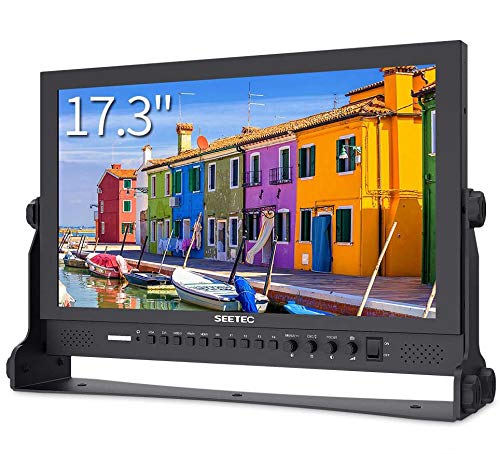
For professionals seeking high-quality visual monitoring in broadcast studios, the SEETEC P173-9HSD 17.3″ video monitor stands out with its Full HD resolution of 1920×1080 and IPS display technology. It offers a brightness of 400 cd/m² and a 600:1 contrast ratio, ensuring vibrant visuals. With multiple input options like 3G/HD/SD-SDI and HDMI, you’ll have flexibility in connectivity. Its advanced features, including Focus Assist and customizable markers, enhance your workflow. Built ruggedly with aluminum, it’s designed for durability. Weighing just 11.08 pounds, it’s portable while still providing exceptional performance for your studio needs.
Best For: Professionals in broadcast studios seeking a reliable and high-quality visual monitoring solution.
Pros:
- High Full HD resolution (1920×1080) and IPS display technology for vibrant visuals.
- Multiple connectivity options including 3G/HD/SD-SDI and HDMI for versatile setups.
- Durable aluminum construction and lightweight design, making it easy to transport.
Cons:
- Limited viewing angle for vertical positioning (60° for up/down).
- Weighs 11.08 pounds, which may be considered heavy for some portable applications.
- Advanced features may have a learning curve for new users.
FEELWORLD FW703 7 Inch On Camera Field Monitor
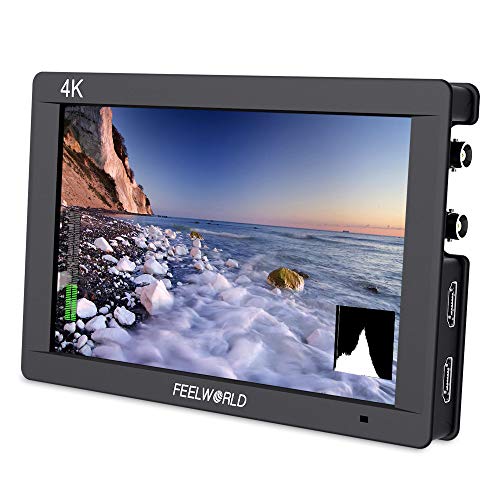
Designed for professional photographers and videographers, the FEELWORLD FW703 7 Inch On Camera Field Monitor delivers outstanding image quality with its Full HD 1920×1200 resolution. With a brightness of 450 nits and a pixel density of 323 PPI, you get sharp, vibrant visuals. This monitor’s professional color calibration guarantees true-to-life images, while its 3G-SDI and 4K HDMI inputs make it compatible with various cameras. Plus, built-in monitoring tools like waveform monitoring and vectorscopes help you achieve precise exposure and focus. Weighing just 1.85 pounds, it’s portable and perfect for on-the-go shooting.
Best For: Professional photographers and videographers seeking a portable and high-quality field monitor for precise image monitoring.
Pros:
- High-resolution Full HD display ensures exceptional image clarity and detail.
- Professional color calibration (Rec.709) provides accurate color reproduction.
- Lightweight design makes it easy to transport for on-the-go shooting.
Cons:
- Brightness may not be sufficient for very bright outdoor conditions.
- Some users may find the weight slightly heavier compared to other monitors in the market.
- Limited built-in battery options may require additional accessories for extended use.
FEELWORLD FW703 7 Inch On Camera Field Monitor

With its impressive 1920×1200 resolution and professional color calibration, the FEELWORLD FW703 7 Inch On Camera Field Monitor is an ideal choice for videographers and photographers seeking high-quality visuals. Weighing just 2.42 pounds, it’s portable and easy to mount on your camera. The 450 nit brightness guarantees clarity even in bright conditions. You’ll appreciate the advanced monitoring features like waveform monitoring and RGB histograms that help you manage exposure and focus accurately. Plus, with versatile input options, it’s compatible with various cameras, making it a valuable tool for any production setup. Enjoy professional quality wherever you shoot!
Best For: The FEELWORLD FW703 is best for professional videographers and photographers who need a portable and high-quality monitor for precise visual monitoring.
Pros:
- High-resolution 1920×1200 display ensures outstanding image quality and clarity.
- Professional color calibration offers accurate color reproduction, preventing distortion.
- Advanced monitoring features like waveform monitoring and RGB histograms aid in precise exposure and focus management.
Cons:
- Weighing 2.42 pounds, it may be slightly heavier compared to other smaller monitors.
- The brightness of 450 nit may not be sufficient for all outdoor shooting conditions.
- Limited customer ratings (only 7) might not fully reflect the product’s performance or reliability.
7 inch 1080P HD Camera Video Monitor Display

The 7 inch 1080P HD Camera Video Monitor Display stands out as an essential tool for professionals in broadcasting and film production. With its 1920 x 1080 resolution and 16:9 aspect ratio, it delivers stunning visuals. You’ll appreciate the HDMI/SDI input/output capabilities, perfect for seamless integration into any setup. This monitor is designed for various environments, operating efficiently in temperatures ranging from -20 to +70℃. Its lightweight design, at just 10.6 ounces, makes it portable for on-site production. Plus, the included accessories like the mini hot shoe mount enhance its versatility, ensuring you’re always ready to capture high-quality footage.
Best For: Professionals in broadcasting, film production, and outdoor events who require a portable and high-definition monitoring solution.
Pros:
- High resolution of 1920 x 1080 provides crisp and clear visuals.
- Lightweight design (10.6 ounces) enhances portability for on-site production.
- Versatile connectivity options with HDMI/SDI input/output for various setups.
Cons:
- Limited display size of 7 inches may not be ideal for all viewing preferences.
- Operating temperature range may restrict usage in extreme conditions.
- Warranty information is only available upon request, which may be inconvenient for buyers.
VILTROX DC-X3 2000 Nits 6 inch Touchscreen Camera Field Monitor

For filmmakers and content creators seeking uncompromising clarity, the VILTROX DC-X3 2000 Nits 6 inch Touchscreen Camera Field Monitor stands out with its incredible brightness and high-resolution display. With a true 2000 Nits brightness and 1920×1080 resolution, you’ll enjoy stunning visuals from any angle, thanks to its 160° ultra-wide viewing angle. This monitor supports 4K@30Hz input, guaranteeing lossless HD transmission. Plus, customizable features like 3D LUT and waveform monitoring help you achieve precise color grading. Its intuitive touchscreen interface and triple power options make it perfect for on-the-go shoots, while the all-aluminum body ensures durability and efficient cooling.
Best For: Filmmakers and content creators looking for a high-brightness, portable monitor that delivers exceptional clarity and customizable features.
Pros:
- True 2000 Nits brightness ensures visibility even in bright outdoor conditions.
- Intuitive touchscreen interface simplifies operation and enhances shooting efficiency.
- Multiple connectivity options (HDMI and SDI) allow for versatile setup and lossless HD transmission.
Cons:
- The size may be too small for some users who prefer larger monitors for detailed work.
- The all-aluminum body, while durable, may add some weight for extended handheld use.
- Custom 3D LUT functionality requires additional setup time for optimal use.
Factors to Consider When Choosing Broadcast SDI Monitors for PC Studios
When you’re choosing broadcast SDI monitors for your PC studio, several factors come into play. Consider the screen size, resolution, and brightness to guarantee you get the best visual experience. You’ll also want to think about connectivity options, portability, and any additional monitoring features that could enhance your workflow.
Screen Size Importance
Choosing the right screen size for your broadcast SDI monitors can greatly enhance your production experience. Larger monitors provide a more immersive and detailed visual experience, which is essential for precise editing and monitoring. Professional SDI monitors typically range from 7 to 21.5 inches, so you can select one that fits your workspace and viewing needs. A larger screen improves readability of vital on-screen information like waveforms and vectorscopes, helping you make informed adjustments during production. The standard 16:9 aspect ratio works best on larger screens, ensuring you don’t miss important details. Additionally, consider portability; smaller monitors are ideal for on-location shoots, while larger ones are better suited for studio setups. Choose wisely to maximize your workflow.
Resolution and Brightness
Screen size plays an essential role in your selection of broadcast SDI monitors, but resolution and brightness are just as important for achieving high-quality production. You’ll find resolutions ranging from Full HD (1920×1080) to 4K (3840×2160), with higher resolutions offering greater detail and clarity. Brightness can considerably impact visibility, especially in bright environments—look for monitors with brightness levels up to 1000 nits. A contrast ratio of at least 1000:1 is preferable, ensuring accurate image representation and better differentiation between dark and light areas. Also, consider response time; lower times, around 26 ms, help minimize motion blur during fast scenes. Finally, wide viewing angles of 170° horizontally and vertically maintain consistent colors and details from various positions.
Connectivity Options Available
As you evaluate broadcast SDI monitors for your PC studio, connectivity options are essential for ensuring seamless integration with your existing equipment. Look for monitors that offer multiple input options like 3G-SDI, HDMI, and YPbPr to accommodate various video sources. Outputs for looping signals are important if you plan on using multiple displays during production or editing. Don’t overlook audio capabilities; monitors with 3.5mm stereo jacks allow for direct audio monitoring alongside video feeds. Additionally, USB ports for firmware upgrades can enhance functionality over time. Finally, consider connectivity options such as DVI-I and Tally ports, which are critical for professional setups, enabling smooth integration with cameras and signaling equipment used in broadcast environments.
Portability and Design
While evaluating broadcast SDI monitors for your PC studio, portability and design play an essential role in ensuring flexibility for various shooting environments. Consider the weight and dimensions of the monitor; a lightweight option enhances portability for on-the-go setups. Durable materials like aluminum bodies can withstand diverse filming conditions, making them suitable for both studio and outdoor use. Look for designs that include features like detachable sunshades to minimize glare during bright shoots. Customizable mounting options, such as cold shoe adapters and 1/4″ screw interfaces, offer versatile attachment to tripods or camera rigs. Compact sizes, like 7-inch displays, are perfect for tight spaces, while larger screens provide enhanced visibility for detailed work.
Additional Monitoring Features
When selecting broadcast SDI monitors for your PC studio, advanced monitoring features can greatly enhance your production quality. Look for tools like focus assist, waveform monitoring, and vectorscopes to guarantee sharp focus and precise exposure. Features such as false color and histogram displays help you evaluate exposure levels and color balance, which are crucial for professional-quality footage. Monitors that support customizable 3D LUTs allow for real-time color grading and effects previews, giving you more creative control. Built-in tally light systems provide clear visual cues for recording status, while robust image control features like image freeze, pixel-to-pixel mapping, and aspect ratio adjustments enhance versatility across various shooting scenarios. These elements are necessary for achieving the best results in your productions.