In 2025, the right NDI camera can notably elevate your streaming experience. Whether you’re a content creator, educator, or passionate streamer, these advanced cameras offer features like high-resolution video and AI tracking to enhance engagement. As you consider your options, you’ll want to explore the best choices available. The following selection of NDI cameras might just be what you need to transform your setup and boost your production quality.
AVKANS NDI Camera with 20X Zoom and PoE IP Livestream Video Capabilities

If you’re looking for a versatile camera that excels in live streaming for events like church services or school functions, the AVKANS NDI Camera is an excellent choice. With its 20X optical zoom and 1080P at 60fps, you’ll capture stunning images even in low light. This camera supports simultaneous NDI, HDMI, SDI, and USB video outputs, making it compatible with popular streaming software like OBS and Zoom. Plus, its Power over Ethernet (PoE) feature simplifies setup. With AI auto-tracking in specific models, you can focus on your event while the camera handles the rest. It’s perfect for enhancing your streaming setup!
Best For: The AVKANS NDI Camera is best for churches, schools, and event organizers looking to enhance their live streaming capabilities with high-quality video and versatile connectivity options.
Pros:
- Supports multiple video outputs (NDI, HDMI, SDI, USB) for flexible integration with various streaming software.
- Exceptional image quality with 1080P at 60fps and 20X optical zoom, suitable for low light environments.
- Includes Power over Ethernet (PoE) support for easier installation and reduced cable clutter.
Cons:
- Some advanced features like AI auto-tracking may only be available in specific models.
- Weighs 6.09 pounds, which could be considered heavy for portable setups.
- Limited range for HDMI output (15m) compared to SDI (100m), which may restrict placement options.
AVKANS AI Auto Tracking PTZ Camera for Live Streaming

The AVKANS AI Auto Tracking PTZ Camera is perfect for content creators seeking a reliable solution for live streaming, particularly in church worship, media ministry, and live events. With NDI HX3 and HX2 support, it delivers stunning 1080P 60fps video via HDMI, SDI, or USB outputs. Its 20X optical zoom and built-in Tally Light enhance production quality. The advanced AI auto tracking allows you to customize settings for peak performance; however, it tracks only one person at a time. User-friendly setup and extensive support guarantee you can start streaming effectively, making it an excellent choice for professional installations.
Best For: Content creators in church worship, media ministry, and live events seeking a high-quality live streaming solution.
Pros:
- Supports NDI HX3 and HX2 technologies for seamless streaming and connectivity.
- User-friendly setup with comprehensive customer support and free CMS software.
- Includes a 20X optical zoom lens and built-in Tally Light for enhanced production quality.
Cons:
- AI auto tracking can only follow one person at a time, limiting its use in dynamic environments.
- May struggle to track fast-moving subjects like athletes effectively.
- Future updates may require additional user involvement for beta testing new features.
OBSBOT Tail Air NDI Streaming Camera 4K

For content creators seeking a versatile and compact camera solution, the OBSBOT Tail Air NDI Streaming Camera 4K stands out with its impressive AI tracking capabilities. Weighing just 1.76 pounds and smaller than a cola can, it’s perfect for any setup. Enjoy crystal-clear 4K resolution with 320° horizontal and 180° vertical rotation. Its multiple connection options, including USB-C and Ethernet, let you stream effortlessly to platforms like Facebook and Twitch. Plus, the Obsbot Start app allows you to customize settings and control the camera easily. With solid customer ratings and a 30-day return guarantee, it’s a reliable choice for your streaming needs.
Best For: Content creators and streamers looking for a compact, AI-powered camera with high-quality streaming capabilities.
Pros:
- Supports crystal-clear 4K resolution for high-quality video.
- Versatile AI tracking for humans, animals, and objects, enhancing content engagement.
- Multiple connection options (USB-C, Ethernet, wireless) for flexible streaming setups.
Cons:
- NDI License Key required for advanced streaming capabilities, which is an additional cost.
- Requires a U3 Micro SD card for firmware updates, adding to initial setup requirements.
- Limited to a 30-day return policy, which may not be suitable for all users.
NexiGo N60 1080P Webcam with Microphone for Video Calling

Looking for a reliable webcam that elevates your video calling experience? The NexiGo N60 1080P Webcam delivers stunning Full HD resolution at 30fps, thanks to its two-MP CMOS sensor and 3.6mm glass lens. With a wide-angle view of up to 110°, it’s perfect for presentations and personal adjustments. You’ll love the built-in noise-canceling microphone that enhances audio quality during calls on platforms like Zoom and Twitch. Plus, its plug-and-play functionality guarantees quick setup. The privacy cover adds peace of mind, making it a great choice for both individual users and businesses. It’s compatible with various operating systems, so you’re covered.
Best For: The NexiGo N60 1080P Webcam is best for individuals and businesses seeking high-quality video calls and presentations with ease of use.
Pros:
- High Definition: Full HD 1080P resolution at 30fps ensures clear and detailed video quality.
- Wide Compatibility: Works seamlessly with various operating systems without the need for additional drivers.
- Built-in Microphone: The noise-canceling microphone enhances audio quality, making it ideal for calls and streaming.
Cons:
- Limited Range: Fixed focal length may not suit all distance requirements beyond the specified range.
- Not Compatible with Consoles: Does not work with gaming consoles such as XBOX, PS4, or PS5.
- Audio Delay Issues: Users may need to contact support for firmware updates if they experience audio delays.
FoMaKo NDI PTZ Camera (FMK20UH NDI)

Designed with live streamers and content creators in mind, the FoMaKo NDI PTZ Camera (FMK20UH NDI) offers cutting-edge AI auto-tracking capabilities that make capturing dynamic shots effortless. With 20x optical zoom and full 1080P video output at 60fps, you’ll enjoy true-to-life colors. This camera is NDI 6 and NDI HX3 certified, ensuring stability even in low bandwidth. Its easy setup and versatile mounting options make it user-friendly. Plus, with a 3-year warranty and 24/7 customer support, you can stream with confidence. Activate tracking modes effortlessly via remote control for a seamless production experience.
Best For: The FoMaKo NDI PTZ Camera is best for live streamers and content creators seeking high-quality video production with advanced tracking features.
Pros:
- Supports full 1080P video output at 60fps for exceptional clarity and color accuracy.
- Offers advanced AI auto-tracking capabilities that simplify capturing dynamic shots.
- Easy installation and versatile mounting options provide flexibility for various setups.
Cons:
- The complexity of features may require a learning curve for new users.
- Limited to 20x optical zoom, which may not suffice for all shooting scenarios.
- Some users may find the reliance on remote control for tracking activation less convenient.
ZowieCAM 4K Native NDI HX3 POV Webcam Camera

The ZowieCAM 4K Native NDI HX3 POV Webcam Camera stands out as an ideal choice for content creators who need high-quality video without the hassle of a computer setup. Its 4K UHD CMOS sensor delivers clear, color-accurate video, even in low light. With interchangeable lenses and a miniature metal enclosure, it’s compact and versatile. You can stream directly to platforms like YouTube and Twitch with low latency using NDI|HX3 technology. Plus, control settings seamlessly through ZowieUI on any device. The TRS stereo audio input enhances sound quality, making it perfect for mobile video applications and live streaming.
Best For: Content creators and live streamers seeking high-quality 4K video with minimal setup and versatile mounting options.
Pros:
- 4K UHD sensor provides clear and color-accurate video, even in low light conditions.
- Standalone streaming capabilities allow direct broadcasting to platforms like YouTube and Twitch without needing a PC.
- Interchangeable lens and compact design make it versatile for various mounting situations and applications.
Cons:
- Limited compatibility with older SDI hardware, which may affect some users with existing equipment.
- Requires additional setup for audio integration through TRS input, which may not be ideal for all users.
- No built-in storage for recordings, necessitating an external device for saving streams.
FoMaKo NDI PTZ Camera with AI Auto-Tracking and 20X Optical Zoom

For content creators seeking seamless integration and high-quality streaming, the FoMaKo NDI PTZ Camera stands out with its impressive AI auto-tracking capabilities and 20X optical zoom. This bundle includes two KN20A cameras and a KC608 controller, supporting multiple connectivity options like NDI, HDMI, and USB3.0. With 1080p resolution and fast auto-focus, you’ll achieve crystal-clear video even during movement. The customizable tracking features allow you to adapt to various scenarios, from studios to theaters. Plus, you’ll benefit from 24/7 expert support and a generous warranty, making this camera a reliable choice for your streaming setup.
Best For: Content creators, educators, and event organizers looking for high-quality streaming solutions with advanced tracking features.
Pros:
- High-quality video with 1080p resolution and 20X optical zoom for clear imaging.
- Advanced AI auto-tracking features that can be customized for various scenarios.
- Multiple connectivity options (NDI, HDMI, USB3.0) allow for versatile streaming setups.
Cons:
- Higher price point compared to basic PTZ cameras.
- Learning curve may be required for full utilization of advanced features and settings.
- Limited number of presets that can be accessed via remote control (10 out of 255).
EMEET Piko 4K Webcam for Streaming

Looking for a webcam that delivers exceptional visual clarity? The EMEET Piko 4K Webcam is your perfect choice. As the world’s first dual-camera AI-powered webcam, it features a 4K main camera and an AI-assisted camera for rapid autofocus, even in low-light. With a 3-mic array offering noise canceling and live modes, your audio will be crystal clear. Plus, its sleek design and portability make it a stylish addition to any setup. Whether you’re streaming, teaching, or creating content, the Piko integrates seamlessly with popular platforms, enhancing your streaming experience like never before.
Best For: Content creators, professionals, and educators looking for high-quality video and audio performance in their streaming setup.
Pros:
- Exceptional 4K visual quality with dual-camera technology for enhanced focus and lighting.
- Superior audio performance with a 3-mic array and different sound modes to suit various environments.
- Sleek, portable design that complements any aesthetic and is compatible with major streaming platforms.
Cons:
- May be more expensive than traditional webcams due to advanced features.
- Limited color options might not cater to all personal preferences.
- The AI features may require some time to adjust for optimal performance in diverse lighting conditions.
AVKANS 20X NDI PTZ Camera Kits (2pcs with IP Joystick Controller)
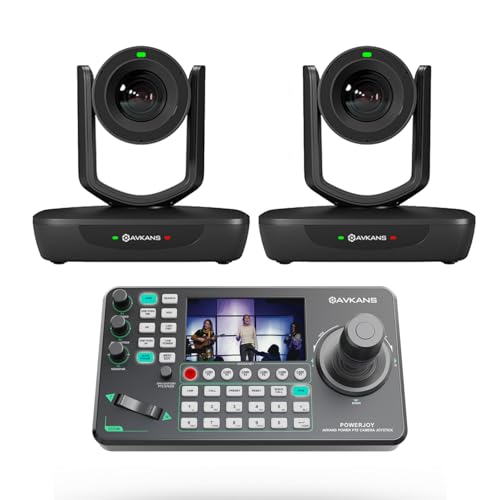
Ideal for churches, schools, and live event venues, the AVKANS 20X NDI PTZ Camera Kits deliver professional-grade video quality and seamless control. This package includes two 20X AI Auto Tracking NDI Cameras and a Super IP Joystick Controller, making setup a breeze. You can easily manage up to 255 cameras via a single Ethernet cable, ensuring your streaming needs are met with impressive 1080P at 60fps clarity. With a solid 4.6 out of 5-star rating from over 330 reviews, this kit stands out in the market, providing exceptional value and performance for your broadcasting requirements.
Best For: Churches, schools, and live event venues looking for professional-grade video streaming solutions.
Pros:
- High-quality video: Supports up to 1080P at 60fps, ensuring clear and professional visuals.
- Easy control: The joystick controller can manage up to 255 cameras with just one Ethernet cable.
- Strong customer satisfaction: Holds a 4.6 out of 5-star rating from over 332 reviews, indicating high reliability.
Cons:
- Weight: The package weighs 12.03 pounds, which may be cumbersome for some users to handle.
- Limited warranty information: Customers need to check the manufacturer’s guidelines for warranty details.
- Market presence: While rated well, it ranks #1,788 in Dome Surveillance Cameras, suggesting it may not be as widely recognized as other brands.
NDI PTZ Camera with 30X Zoom and AI Auto Tracking

The NDI PTZ Camera stands out with its impressive 30X zoom and advanced AI auto-tracking, making it a top choice for live event producers and broadcasters who demand high-quality, dynamic video production. With ultra-low latency under 3ms and dual encoding capabilities, you’ll enjoy seamless streaming. The triple AI tracking modes allow you to focus on presenters effortlessly while capturing the action. You can set it up quickly using a single Cat5/6 cable, ensuring a hassle-free experience. Plus, with 24/7 U.S. support and a 2-year quality assurance, you’re backed by a reliable team ready to assist.
Best For: The NDI PTZ Camera is best for live event producers, broadcasters, and churches looking for high-quality video production with advanced tracking capabilities.
Pros:
- Ultra-low latency of under 3ms ensures smooth streaming and real-time performance.
- Versatile AI tracking modes allow for dynamic framing of presenters and subjects, enhancing viewer engagement.
- Easy setup with a single Cat5/6 cable and PoE support, enabling a faster deployment compared to conventional PTZ cameras.
Cons:
- Price point may be higher than entry-level PTZ cameras, which could be a barrier for budget-conscious buyers.
- Learning curve for utilizing all AI tracking features effectively, potentially requiring additional training.
- Limited customer reviews (100 ratings) may not provide a comprehensive view of long-term performance and reliability.
Factors to Consider When Choosing Ndi Cameras for Pc Studios
When choosing NDI cameras for your PC studio, you’ll want to contemplate several key factors. Pay attention to resolution and frame rate, as these can greatly impact your video quality. Additionally, think about connectivity options and AI tracking capabilities, since they’ll affect how easily you can set up and control your gear.
Resolution and Frame Rate
Choosing the right resolution and frame rate for your NDI cameras can greatly impact the quality of your PC studio’s output. High-resolution capabilities, like 1080P or 4K, are essential for delivering clear, detailed video, especially during professional streaming or broadcasting. When it comes to frame rates, 30fps or 60fps are preferred to guarantee smooth motion and minimize blurring during fast-paced actions. Additionally, consider cameras with lower latency—ideally under 3ms—to enhance video feed responsiveness for live interactions. Keep in mind that higher resolutions and frame rates demand more bandwidth and processing power, which can affect overall performance. Finally, encoding formats like H.264 and H.265 can optimize streaming efficiency, especially with high-resolution outputs on limited bandwidth connections.
Connectivity Options Available
As you explore connectivity options for NDI cameras in your PC studio, it’s vital to contemplate how these choices will affect your setup. NDI cameras typically offer various connectivity options like HDMI, SDI, USB, and Ethernet, which provides flexibility for different configurations. Many models support Power over Ethernet (PoE), allowing both power and data transmission through a single cable—this simplifies installation considerably. If you need to cover long distances, consider cameras with SDI outputs that can reach up to 300 feet without extenders. Additionally, ensuring compatibility with popular streaming software like OBS and vMix is essential for a seamless integration into your existing workflow. Look for advanced protocols like NDI HX3 and NDI HX2 for ideal performance.
AI Tracking Capabilities
AI tracking capabilities can greatly enhance your live streaming experience, allowing NDI cameras to automatically follow subjects with precision. When choosing an NDI camera, consider customizable tracking modes like presenter tracking, zone tracking, and auto frame tracking to suit your needs. Advanced AI algorithms keep focus on moving subjects, dynamically adjusting the frame to guarantee key actions are always visible without manual input. You can also fine-tune settings for tracking sensitivity, speed, and area to optimize performance based on your environment. However, be aware of limitations—some cameras may only track one subject at a time or struggle with fast movements. Understanding these factors will help you select the right camera for your streaming setup.
Zoom Functionality Importance
When it comes to NDI cameras for PC studios, zoom functionality plays a pivotal role in enhancing your production quality. A camera with a higher optical zoom, like 20X or 30X, lets you capture clear close-ups from a distance without losing image quality. This is particularly beneficial for live broadcasts or presentations where detail matters. Unlike digital zoom, optical zoom maintains better resolution, ensuring your images stay sharp even when magnified. Advanced zoom features also allow you to dynamically adjust framing during a live stream, keeping viewers engaged by highlighting important subjects. Effectively controlling zoom can improve production quality, enabling seamless shifts and reducing the need for physically moving the camera.
Setup and Control Ease
Choosing the right NDI camera for your PC studio hinges on setup and control ease, ensuring you can focus on creating content rather than wrestling with technology. Many NDI cameras feature web-based interfaces or CMS software that make installation straightforward on both Windows and Mac PCs. If you’re looking to minimize cable clutter, consider models that support Power over Ethernet (PoE), allowing for a single cable connection for power and data. Advanced tracking features, including customizable AI auto-tracking, can enhance your experience by following subjects automatically, easily activated via remote control or presets. Plus, compatibility with popular streaming software like OBS, vMix, and Zoom means seamless integration into your existing workflow without complex setups.
Price and Warranty Considerations
While setup and control ease are important, price and warranty considerations play a significant role in selecting the right NDI camera for your PC studio. You’ll find a wide price range, from budget options to high-end models, influencing the features you get. Take note of warranty offerings, typically lasting one to three years, as they provide peace of mind about reliability. Also, check return policies—many brands offer a 30-day money-back guarantee, letting you test the camera in your setup. Don’t forget about potential extra costs, like NDI licenses or accessories; these can add up quickly. Finally, researching customer reviews will give you insights into long-term performance and satisfaction with warranty services.