Finding the right pen display does not have to mean overspending. The best budget pen display monitors now offer solid color, reliable pen control, and screen sizes that fit everything from sketching to everyday design work.
Below, we focus on value-first options for artists, students, and hybrid users who want a display that feels responsive without pushing into premium pricing.
Best 10 Budget Pen Display Monitors Picks for 2026
Compact Starter Pick
XP-PEN Artist12 11.6" FHD Drawing Monitor

- 11.6-inch Full HD IPS display
- Battery-free pen with eraser and nibs
- 6 shortcut keys plus touch bar
Best For: Beginners and students needing a compact pen display
Best Color-Accurate Midrange

- 13.3-inch laminated display with low glare
- Avg. ΔE<1.5 and 99% sRGB coverage
- USB-C single cable with dual dials
Best For: Artists who want accurate color in a portable display
DIY Budget Display
10.1" Touchscreen Monitor for Raspberry Pi
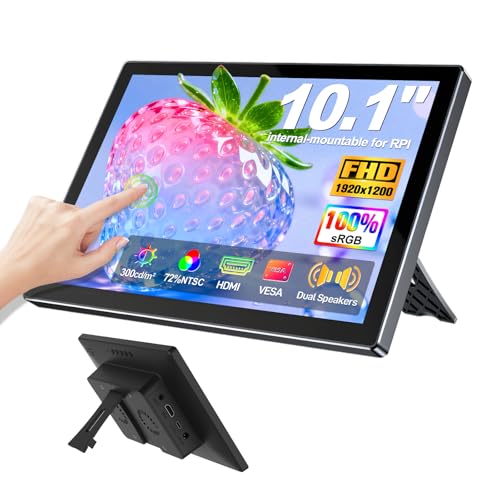
- 1920x1200 IPS touchscreen with 10-point touch
- Built-in enclosure and VESA mounting points
- Plug-and-play with Raspberry Pi and HDMI devices
Best For: DIY builders and Raspberry Pi users
Large-Format Workspace Choice

- 23.8-inch 2.5K QHD anti-glare display
- 118% sRGB, 84% NTSC, 90% Adobe RGB
- 20 shortcut keys and dual red dials
Best For: Creators who want a large pen display with strong workflow tools
Budget Touch Portable Monitor
InnoView 15.6" FHD Travel Display

- 10-point touch on a 15.6-inch 1080p IPS panel
- USB-C and HDMI connectivity for laptops and more
- Includes protective sleeve and built-in adjustable stand
Best For: Affordable portable touch use for work, travel, and casual setup
Entry Pen Display

- 13.3-inch fully laminated FHD pen display
- Battery-free stylus with 16,384 pressure levels
- Eight shortcut keys plus a red dial for workflow control
Best For: Budget-conscious artists who want a compact, capable drawing screen
Budget Touch Work Monitor
CUNPU 24" IPS Business Display

- 24-inch 1080p IPS panel with 100% sRGB
- 10-point touchscreen for productivity and navigation
- VESA mountable with tilt adjustment and eye-care features
Best For: Desk-based productivity and touch navigation on a larger budget screen
Premium Budget Pick
XPPen Artist Ultra 16 4K OLED Touchscreen

- 4K OLED panel with laminated anti-glare glass
- 99% Adobe RGB, 99% sRGB, 98% Display P3
- Touch gestures, dual styli, shortcut remote
Best For: Creators who want a compact, high-feature pen display with strong color accuracy
Value Workhorse
XPPen Artist 15.6 Pro Full-Laminated

- 15.6-inch full HD full-laminated screen
- 8192 pressure levels with battery-free stylus
- 8 express keys and a red dial
Best For: Artists and students who want a dependable, lower-friction drawing monitor
Shortcut Heavy Pick
Artisul SP1603 15.6" Pen Display

- 15.6-inch full-laminated display with anti-glare film
- 14 shortcut keys and a dial controller
- 8192 pressure levels with tilt support
Best For: Creators who want lots of shortcuts and broad compatibility in a slim display
Compact Starter Pick – XP-PEN Artist12 11.6" FHD Drawing Monitor
If you want budget pen display monitors for everyday sketching, the XP-PEN Artist12 keeps things compact and approachable. Its 11.6-inch Full HD IPS panel, pre-installed anti-reflective screen protector, and battery-free pen make it a practical entry-level choice for drawing, photo editing, and remote work.
Best For: Beginners, students, and creatives who want a small screen drawing monitor for basic digital art and note-taking.
Pros:
- 11.6-inch 1920×1080 IPS display with 72% NTSC / 100% sRGB color gamut
- Battery-free P06 pen with eraser and 8 replacement nibs included
- 6 customizable shortcut keys plus a programmable touch bar
- Compatible with Windows, Mac, and Linux, plus many creative apps
Cons:
- Must be connected to a computer to work
- Requires HDMI and USB-A ports, or an adapter
- Smaller 11.6-inch screen may feel cramped for larger workflows
The Artist12 is a straightforward pick if you want a low-cost pen display that covers the essentials without a lot of extras. It is best viewed as a compact desktop companion rather than a full-size studio monitor.
Best Color-Accurate Midrange – HUION Kamvas 13 (Gen 3)
Among budget pen display monitors, the HUION Kamvas 13 (Gen 3) stands out for its color-focused feature set and streamlined single-cable setup. The 13.3-inch fully laminated screen, anti-sparkle glass, and factory calibration report make it a strong fit for artists who want a more refined drawing experience.
Best For: Artists and designers who want a portable pen display with strong color accuracy and a cleaner workspace.
Pros:
- 13.3-inch fully laminated screen with reduced glare
- High color specs: Avg. ΔE<1.5, 99% sRGB, and Rec.709 coverage
- 16,384 pressure levels with 2g initial activation force
- USB-C single cable connection plus 5 shortcut keys and dual dials
Cons:
- Not a standalone device and must connect to a computer or compatible device
- Standalone use is not supported for this model
- Requires compatible ports and systems for full functionality
This is a strong choice if color accuracy matters more than screen size. It balances portability, calibration, and workflow controls better than many entry-level displays.
DIY Budget Display – 10.1" Touchscreen Monitor for Raspberry Pi
If your priority is a low-cost screen for tinkering rather than a dedicated art tablet, this 10.1-inch HDMI touchscreen fits the budget pen display monitors conversation from a DIY angle. It offers a 1920×1200 IPS panel, 10-point touch, and a built-in enclosure with VESA mounting points for Raspberry Pi projects and general plug-and-play use.
Best For: Raspberry Pi builders and DIY users who need a compact touch display for projects, testing, or casual use.
Pros:
- 10.1-inch IPS screen with 1920×1200 resolution
- 10-point touch support with quick plug-and-play setup
- Built-in enclosure and 75mm VESA mounting points
- Works with Raspberry Pi, PCs, game consoles, and other HDMI devices
Cons:
- Touch input is disabled on some devices with strict security protocols
- Not a pen display for stylus-based drawing workflows
- VESA stand is not included
For DIY projects, this display is more about versatility and easy integration than artist-grade drawing features. It makes sense if you want an inexpensive touchscreen monitor that can do a lot of non-art jobs.
Large-Format Workspace Choice – XPPen Artist 24 Pro 2.5K QHD
For buyers comparing budget pen display monitors with a larger canvas, the XPPen Artist 24 Pro offers a 23.8-inch 2.5K QHD screen and a feature set built for serious creative work. The anti-glare display, 20 shortcut keys, and dual red dials help make long drawing or editing sessions more efficient.
Best For: Designers, illustrators, animators, and editors who want a large, color-rich pen display with strong workflow controls.
Pros:
- 23.8-inch 2.5K QHD display with anti-glare film
- 118% sRGB, 84% NTSC, and 90% Adobe RGB color coverage
- 20 customizable shortcut keys plus dual red dial wheels
- Two battery-free styluses with tilt support and 8192 pressure levels
Cons:
- Larger size takes up significantly more desk space
- Designed to connect to a computer and is not standalone
- May be more display than needed for casual or beginner users
This model is best viewed as a desktop workstation display rather than a compact travel option. If you want more room to work and value shortcuts and color range, it is a very capable pick.
Budget Touch Portable Monitor – InnoView 15.6" FHD Travel Display
If you want budget pen display monitors-style flexibility without spending much, this InnoView 15.6-inch portable monitor is a practical pick for note-taking, touch control, and secondary-screen use. It offers 10-point touch, a 1080p IPS panel, and a lightweight build that makes it easy to move between a laptop setup, commute, or travel bag.
Best For: Travelers, students, and laptop users who want an affordable portable touch display for everyday work and casual creative use.
Pros:
- 10-point touchscreen support with full-featured USB-C on compatible laptops
- 15.6-inch 1080p IPS panel with 1200:1 contrast and HDR support
- Includes a protective sleeve and built-in 90-degree adjustable stand
- Two USB-C ports plus HDMI for broad device compatibility
Cons:
- Touch functionality depends on the correct cable and supported ports
- Some devices, including certain consoles and Apple mobile devices, do not support touch
- Brightness and volume may need a 15W+ power adapter, which is not included
This InnoView model is best viewed as a flexible budget companion rather than a dedicated artist display. It covers the basics well for portable productivity, and the included sleeve and stand add useful value for everyday carry.
Entry Pen Display – XPPen Artist 13.3 Pro
Among budget pen display monitors, the XPPen Artist 13.3 Pro stands out for artists who want a real drawing screen with strong color and low parallax. It pairs a 13.3-inch fully laminated FHD display with a battery-free stylus, making it a compact choice for illustration, photo editing, and animation work at home or on the go.
Best For: Beginners, students, and working artists who want an affordable pen display with useful shortcuts and a natural drawing feel.
Pros:
- Fully laminated 13.3-inch FHD display helps reduce parallax
- 88% NTSC color with wide viewing angles for vivid creative work
- Battery-free stylus with 16,384 pressure levels and 60-degree tilt support
- Eight shortcut keys and a red dial help speed up workflow
Cons:
- Must be connected to a computer or laptop to work
- Smaller screen size may feel cramped for some workflows
- Not as portable-friendly as a standalone tablet because it needs a host device
This is a solid value-focused pen display for anyone building a creative setup on a tighter budget. The laminated screen, shortcut controls, and included stylus accessories give it real utility without pushing into premium pricing.
Budget Touch Work Monitor – CUNPU 24" IPS Business Display
If your search for budget pen display monitors is really about a larger touch-enabled screen for workstations, this CUNPU 24-inch model is a useful value option. It combines 10-point touch, a 75Hz IPS panel, and 100% sRGB coverage, making it better suited to office tasks, browsing, and touch-based productivity than to pen input specifically.
Best For: Business users, desk setups, and multitaskers who want a larger affordable touchscreen monitor for productivity.
Pros:
- 24-inch 1080p IPS display with 100% sRGB and HDR10 support
- 10-point capacitive touch for quick navigation and multi-finger gestures
- 75Hz refresh rate, blue light filter, and flicker-free eye-care features
- VESA mount support and tilt adjustment for desk flexibility
Cons:
- Touch support requires the bundled USB-B and HDMI connection
- MacOS is not supported for the touch feature
- It is a touchscreen monitor, not a dedicated stylus pen display
This CUNPU display makes sense if you want a larger, touch-capable budget monitor for work rather than an artist-focused pen screen. Its color specs and desk-friendly design are strong for the price, but buyers should not expect stylus drawing support.
Premium Budget Pick – XPPen Artist Ultra 16 4K OLED Touchscreen
If you’re comparing budget pen display monitors and want the most advanced feature set in a compact size, the XPPen Artist Ultra 16 stands out for its 4K OLED panel, touch support, and strong color coverage. It still requires a computer or laptop, but it brings a premium drawing feel with fast response, laminated glass, and flexible USB-C connectivity.
Best For: Artists who want a feature-rich pen display with OLED image quality, touch control, and high color accuracy.
Pros:
- 15.6-inch 4K OLED screen with 100,000:1 contrast and under 1 ms response
- 99% Adobe RGB, 99% sRGB, and 98% Display P3 coverage for color-critical work
- Touch gestures plus customizable touch-area control for workflow flexibility
- Includes dual 16K pressure styli and an ACK05 shortcut remote
Cons:
- Must be connected to a computer or laptop to function
- Likely more feature-heavy than buyers need if they only want a basic pen display
This is the most capable option in the group, especially if you value display quality and touch interaction over a simple no-frills setup. It fits creators who want a compact pen display monitor with modern features and strong accuracy.
Value Workhorse – XPPen Artist 15.6 Pro Full-Laminated
For shoppers focused on budget pen display monitors, the XPPen Artist 15.6 Pro is a straightforward value pick with a full-laminated 15.6-inch screen, 8192 pressure levels, and practical shortcut controls. It is not a standalone tablet, so you’ll need to use it with a computer or laptop, but it covers the core features most artists and students want.
Best For: Buyers who want a dependable drawing monitor with solid color, pressure sensitivity, and easy workflow controls.
Pros:
- 15.6-inch full HD, full-laminated display for clear detail and reduced gap feel
- 8192 levels of pressure sensitivity with a battery-free stylus
- 8 customizable express keys plus a red dial for quicker workflow
- Works with major software and multiple operating systems
Cons:
- Requires connection to a computer; not a standalone tablet
- Color spec is good, but less ambitious than higher-end displays in the list
This model makes sense if you want a proven pen display monitor with a balance of price-conscious features and everyday usability. It skips the extras of premium models while still giving you the essentials for drawing, teaching, and remote work.
Shortcut Heavy Pick – Artisul SP1603 15.6" Pen Display
The Artisul SP1603 is a practical choice for budget pen display monitors if you care more about controls and workspace efficiency than premium display extras. It offers a 15.6-inch full-laminated screen, 8192 pressure levels, a tilt-support pen, and a generous set of shortcut keys plus a dial, but it must be connected to a PC, Mac, or Android device.
Best For: Creators who want a slim pen display with lots of shortcut controls and broad device compatibility.
Pros:
- 15.6-inch full-laminated HD display with anti-glare film
- 14 customizable shortcut keys plus a dial controller
- 8192 pressure levels, tilt support, and 5080LPI resolution
- Compatible with Windows, macOS, and Android
Cons:
- Not a standalone tablet; needs an external device to work
- Lower display resolution than some competing premium models
If your workflow depends on quick access buttons and a thin, portable body, this pen display brings a lot of control for the money. It is a sensible pick for artists, students, and remote workers who want a functional drawing monitor without paying for top-tier visuals.
How We Picked These Budget Pen Display Monitors
We prioritized display quality, pen responsiveness, usability, and overall value. The strongest Budget Pen Display Monitors balance a laminated screen, dependable pressure sensitivity, and a size that matches the way you work. We also looked at portability, connectivity, touch support, and whether the feature set feels realistic for the price.
Quick Comparison
Smaller models are usually best for portability, note-taking, and casual drawing, while 13- to 16-inch displays tend to give you a better balance of comfort and workspace. Larger screens suit illustration and more detailed editing, but they also take up more desk space and often cost more. Touch and dial controls can improve workflow, but only if you will actually use them.
Key Buying Factors for Budget Pen Display Monitors
Screen Size and Workspace
A 11- to 13-inch display is easier to travel with and cheaper to buy, but it can feel cramped for long sessions. A 15.6-inch or larger panel usually offers a more natural drawing area. If you work on detailed line art, animation, or multi-window layouts, larger is often better.
Resolution, Color, and Lamination
Higher resolution helps text and line work look cleaner, especially on larger panels. Color coverage matters if you do illustration, photo touch-up, or content creation. Full lamination can reduce the gap between pen tip and cursor, which makes the experience feel more precise.
Pen Performance
Look for strong pressure sensitivity, tilt support, and stable tracking. These features matter more than flashy extras. A battery-free stylus is usually more convenient and lower maintenance for everyday use.
Ports, Compatibility, and Setup
Check whether the display works with your laptop, desktop, or mobile device, and confirm the available ports before buying. Some Budget Pen Display Monitors are also touch displays or portable monitors, so make sure the model actually supports the workflow you need.
Who Should Buy Which Budget Pen Display Monitors?
If you want the most portable option, choose a smaller display around 11 to 13 inches. If you need the best all-around drawing balance, a 15.6-inch model is often the sweet spot. If you want the most room to work and plan to keep it on a desk, a 24-inch option is worth considering. For buyers who care more about touch input or general monitor use than pen drawing, a touchscreen model may be the better fit than a dedicated art display.
In short, the best choice depends on your space, your software, and how seriously you plan to draw every day. Focus on practical essentials first, and you will get much better value from Budget Pen Display Monitors.