Choosing the right streaming PC can make the difference between a smooth broadcast and constant dropped frames. The best systems for live streaming balance CPU power, GPU encoding, memory, storage, and cooling.
Below, we focus on live streaming computers that are practical for creators, gamers, and multi-platform streamers who want dependable performance in 2026.
Best 10 Live Streaming Computers Picks for 2026
High-Performance Pick
Ryzen 7 RTX 5060 Gaming Desktop for Streaming

- Ryzen 7 4700LE with 8 cores/16 threads
- RTX 5060 8GB for gaming and creation
- 1TB NVMe SSD, 16GB RAM, WiFi 6
Best For: Streamers and gamers needing a stronger all-around desktop
Compact Creator Choice
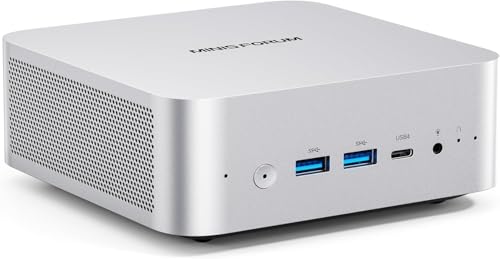
- Ryzen 7 255 with Radeon 780M graphics
- 32GB DDR5 RAM and 1TB M.2 SSD
- Wi-Fi 7, 2.5G LAN, USB4 support
Best For: Creators who want a small desktop with strong connectivity
Budget-Friendly Streamer Option

- Ryzen 7 4700LE with 8 cores/16 threads
- RTX 3050 8GB dedicated graphics
- 16GB RAM, 512GB NVMe SSD, WiFi 6
Best For: Budget-minded users wanting a prebuilt streaming desktop
Refurbished Value Pick
Dell OptiPlex 7050 SFF for Streaming Basics

- Intel i7-7700 with 32GB DDR4 RAM
- 1TB SSD and Windows 11 Pro included
- Compact SFF with HDMI and DisplayPort
Best For: Users wanting a refurbished PC for productivity and light streaming
Best for Easy Setup

- Ryzen 7 7735HS with 8 cores / 16 threads
- 16GB LPDDR5 RAM and 512GB SSD
- Triple-display support with 2.5GbE and WiFi 6
Best For: Streamers who want a compact, efficient PC for multitasking and light content creation
Value Streaming Tower
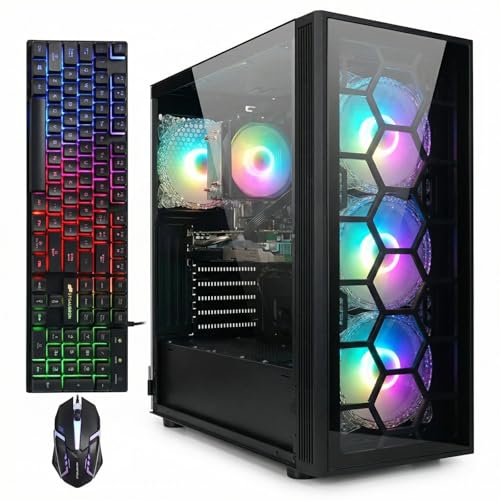
- Ryzen 7 5700X paired with RTX 3050 6GB
- 16GB DDR4 memory and 1TB SSD
- WiFi 6, Bluetooth 5.2, and RGB fan cooling
Best For: Streamers who want a ready-to-use tower for gaming plus live broadcasting
High-End Streamer Mini PC
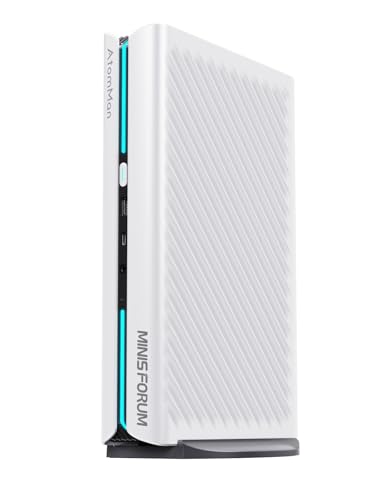
- Ryzen 9 8945HX with 16 cores / 32 threads
- RTX 5060 8GB plus 32GB DDR5 and 1TB SSD
- Four-display support with WiFi 7 and 5G LAN
Best For: Power users who want a compact machine for streaming, editing, and multi-monitor productivity
Value-Focused Streaming Starter

- Core i5 with 16GB RAM and 1TB SSD
- RX 590 8GB for 1080p gaming and streaming
- Wi‑Fi 6, Bluetooth 5.0, and RGB accessories
Best For: Budget-minded streamers and home users
Balanced Creator Pick

- Ryzen 5 5500 with 16GB DDR4 and 1TB NVMe
- RTX 3050 6GB for 1080p gaming and streaming
- ARGB cooling, Wi‑Fi, and plug-and-play setup
Best For: Creators wanting a modern all-around prebuilt
Heavy-Duty Multitasker
STGAubron Core i7 GTX 1660 Super

- 32GB RAM for heavier multitasking
- Core i7 plus GTX 1660 Super 6GB
- 1TB SSD with Wi‑Fi 6 and Bluetooth 5.0
Best For: Streamers juggling editing, gaming, and many apps
High-Performance Pick – Ryzen 7 RTX 5060 Gaming Desktop for Streaming
If you want one of the more capable live streaming computers in this group, this Ryzen 7 desktop is built to handle gaming, streaming, and multitasking at the same time. The RTX 5060 8GB, 16GB DDR4 RAM, and 1TB NVMe SSD give it the speed and storage needed for play sessions, editing, and day-to-day creator work.
Best For: Streamers and gamers who want a stronger all-around desktop for gaming plus creative tasks.
Pros:
- Ryzen 7 4700LE with 8 cores and 16 threads supports gaming, live streaming, and multitasking.
- GeForce RTX 5060 8GB is aimed at smooth 1080p/1440p gameplay and faster creative workflows.
- 1TB NVMe SSD and 16GB DDR4 RAM help with fast boot times and quicker file loading.
- 6 RGB cooling fans and a 650W PSU are built for steady long-session use.
Cons:
- Ships with DOS, so you’ll need to set up an operating system.
- Uses a full tower design, so it takes more desk space than a mini PC.
Overall, this is a strong pick if your priority is a prebuilt tower that can cover gaming, streaming, and content creation without feeling underpowered. Its feature set is more robust than a basic budget machine, especially for users who expect heavier multitasking.
Compact Creator Choice – Ryzen 7 Mini PC with Wi-Fi 7
This compact mini PC is a practical option for live streaming computers when you want a smaller setup without giving up modern connectivity. The Ryzen 7 255, 32GB DDR5 memory, and 1TB M.2 SSD are paired with HDMI, DisplayPort, and USB4 support for flexible multi-display use.
Best For: Streamers and creators who want a small desktop with strong connectivity and fast memory.
Pros:
- Ryzen 7 255 with Radeon 780M handles heavy office work, light gaming, and multimedia editing.
- 32GB DDR5 RAM and 1TB SSD provide fast loading and plenty of room for projects.
- Wi-Fi 7, 2.5G LAN, USB4, and OCuLink offer excellent connectivity options.
- Supports up to 4-screen display and includes dual speakers plus a built-in mic.
Cons:
- Best suited to light gaming rather than demanding AAA graphics workloads on its own.
- OCuLink expansion depends on compatible parts and setup.
For users who value a compact footprint and modern I/O, this is one of the more versatile live streaming computers here. It looks especially appealing for desk setups that need multiple displays, reliable networking, and a quiet everyday machine.
Budget-Friendly Streamer Option – Ryzen 7 RTX 3050 Desktop
If you’re shopping for live streaming computers on a tighter budget, this Ryzen 7 desktop gives you a capable mix of CPU power, dedicated graphics, and basic storage. It’s designed for gaming, streaming, and everyday use, with a 16GB RAM and 512GB NVMe SSD configuration that keeps startup and loading times moving.
Best For: Budget-minded users who want a prebuilt desktop for streaming, gaming, and general multitasking.
Pros:
- Ryzen 7 4700LE offers 8 cores and 16 threads for multitasking and streaming.
- RTX 3050 8GB supports gaming and visual workloads with dedicated graphics.
- 16GB DDR4 RAM and 512GB NVMe SSD improve boot speed and app loading.
- 6 RGB cooling fans, WiFi 6, and multiple display/USB ports add everyday usability.
Cons:
- 512GB storage is smaller than larger 1TB options.
- Ships with DOS, so an operating system setup is required.
This is a sensible entry point if you want a live streaming computer that can cover the basics without jumping to a higher price tier. It’s less expansive than the RTX 5060 build, but it still brings the essentials for streaming and daily use.
Refurbished Value Pick – Dell OptiPlex 7050 SFF for Streaming Basics
This renewed Dell OptiPlex is a straightforward choice for live streaming computers when you need a compact desktop for everyday productivity and lighter streaming tasks. With an Intel i7-7700, 32GB RAM, and 1TB SSD, it focuses on fast boot times, responsive multitasking, and practical office-style use.
Best For: Users who want a refurbished small-form-factor PC for productivity and light streaming setups.
Pros:
- Intel Core i7-7700 and 32GB DDR4 RAM support everyday multitasking.
- 1TB SSD offers fast boot and generous storage for files and applications.
- Includes Windows 11 Pro, wireless USB WiFi, keyboard, mouse, and power cord.
- Compact SFF design with HDMI and DisplayPort makes dual-monitor use easier.
Cons:
- Older 4-core processor is less powerful than newer Ryzen 7 options.
- Renewed condition may not suit buyers who want a brand-new system.
For basic streaming, office work, and daily computing, this refurbished desktop is a practical value play. It doesn’t target high-end gaming, but it does provide a ready-to-use setup with solid memory and storage for simpler workloads.
Best for Easy Setup – KAMRUI Ryzen 7 Mini PC
If you want live streaming computers that stay small on your desk but still handle multitasking, the KAMRUI mini PC is built around the Ryzen 7 7735HS and 16GB of fast LPDDR5 memory. It also adds a 512GB SSD, 4K triple-display support, and strong wired/wireless connectivity, making it a practical option for lean streaming setups.
Best For: Streamers who want a compact, efficient PC for live streaming, multitasking, and light content creation.
Pros:
- Ryzen 7 7735HS with 8 cores and 16 threads for responsive multitasking
- Supports 3 displays at once with HDMI, DP 1.4, and USB-C video output
- WiFi 6, Bluetooth 5.2, and a 2.5GbE Ethernet port for stable connectivity
- Small footprint with an airflow-focused cooling design
Cons:
- Integrated Radeon graphics are better for light gaming than demanding GPU workloads
- 512GB storage may feel limited if you keep large video files locally
Overall, this mini PC is a smart fit if you value space-saving hardware and dependable everyday performance over a full-size tower. It looks especially useful for streamers who juggle chat, browser tabs, and broadcast software at the same time.
Value Streaming Tower – STGAubron Ryzen 7 RTX 3050
For live streaming computers in a traditional desktop form factor, this STGAubron tower pairs a Ryzen 7 5700X with an RTX 3050 6GB GPU, 16GB of RAM, and a 1TB SSD. That combination gives it the kind of headroom many streamers want for gaming, streaming, editing, and day-to-day work in one machine.
Best For: Streamers who want a ready-to-use tower for gaming plus live broadcasting.
Pros:
- Ryzen 7 5700X processor with up to 4.6GHz boost
- Dedicated RTX 3050 6GB graphics for gaming and streaming tasks
- 1TB SSD and 16GB DDR4 memory for quick load times and multitasking
- Includes Wi-Fi 6, Bluetooth 5.2, and four RGB fans
Cons:
- Full tower design takes more desk space than a mini PC
- 16GB RAM is solid, but heavier creators may want more headroom later
This is a straightforward pick if you want a single system that can handle streaming and gaming without much setup fuss. The included keyboard and mouse also make it easy to get started quickly.
High-End Streamer Mini PC – MINISFORUM G1 Pro RTX 5060
If you need live streaming computers with real workstation-level muscle, the MINISFORUM G1 Pro brings a Ryzen 9 8945HX, 32GB DDR5 memory, a 1TB PCIe 4.0 SSD, and an RTX 5060 8GB graphics card. It is positioned for demanding gaming, video editing, and multi-monitor use, while still keeping a compact mini PC design.
Best For: Power users who want a compact machine for streaming, editing, and multi-monitor productivity.
Pros:
- Ryzen 9 8945HX with 16 cores and 32 threads for heavy workloads
- Dedicated RTX 5060 8GB graphics with ray tracing and DLSS support
- Supports four displays through 2x HDMI and 3x DisplayPort outputs
- WiFi 7, Bluetooth 5.4, and 5G LAN for fast connectivity
Cons:
- Premium hardware is more than casual streamers may need
- Compact design may offer less internal flexibility than a full tower
This model stands out when performance matters more than size. It makes sense for creators who stream, edit, and work across several monitors and want the strongest specs in the group.
Value-Focused Streaming Starter – STGAubron Core i5 RX 590
If you want live streaming computers that can handle everyday content creation without overcomplicating the setup, this STGAubron desktop is a practical entry point. It pairs an Intel Core i5, 16GB RAM, and a 1TB SSD with Wi‑Fi 6 and Bluetooth 5.0, giving you a straightforward machine for streaming, gaming, editing, and general productivity.
Best For: New streamers, students, and home users who want a plug-and-play desktop for streaming, light editing, and 1080p gaming.
Pros:
- Core i5, 16GB RAM, and 1TB SSD provide a responsive everyday streaming base.
- RX 590 8GB and 1080p support suit popular games and basic stream workloads.
- Wi‑Fi 6, Bluetooth 5.0, and HDMI/DisplayPort improve setup flexibility.
- Includes RGB keyboard and mouse plus lifetime tech support.
Cons:
- Best suited to 1080p use rather than higher-resolution workloads.
- DDR3 memory platform is not as current as newer builds.
This is a sensible all-in-one choice if you want a ready-to-use tower for streaming and gaming on a budget-minded path. It emphasizes convenience, storage, and enough graphics power for common 1080p tasks.
Balanced Creator Pick – Ryzen 5 5500 RTX 3050 Tower
Among live streaming computers, this prebuilt tower stands out as a balanced option for people who want stronger modern gaming support alongside content creation features. The Ryzen 5 5500, RTX 3050 6GB, 16GB DDR4 RAM, and 1TB NVMe SSD make it a solid fit for streaming, editing, and fast everyday use.
Best For: Streamers who want a well-rounded prebuilt for 1080p gaming, editing, and multitasking.
Pros:
- Ryzen 5 5500 6-core/12-thread processor handles multitasking and editing.
- RTX 3050 6GB supports high-frame-rate 1080p gaming with ray tracing.
- 1TB NVMe SSD and 16GB DDR4 3200MHz RAM keep load times and workflow snappy.
- ARGB air cooling and built-in Wi‑Fi help make setup simple and stable.
Cons:
- Designed around 1080p gaming rather than 4K play.
- Only one HDMI port is listed, which may limit some monitor setups.
This is the most balanced of the three if your priority is a modern-feeling streaming PC with enough graphics headroom for gaming and editing. It is a strong plug-and-play option when you want speed, cooling, and flexibility in one tower.
Heavy-Duty Multitasker – STGAubron Core i7 GTX 1660 Super
If your live streaming computers need extra memory for multitasking, this STGAubron desktop is built around that need. With a Core i7 processor, 32GB RAM, and a 1TB SSD, it is positioned for streaming, editing, study, and business tasks while still supporting popular games at 1080p.
Best For: Users who want more RAM for streaming, editing, and running multiple apps at once.
Pros:
- 32GB RAM is the biggest memory spec in this group for heavier multitasking.
- Core i7 and GTX 1660 Super 6GB support 1080p gaming and streaming.
- 1TB SSD, Wi‑Fi 6, and Bluetooth 5.0 make it ready for everyday use.
- Includes RGB fans plus RGB keyboard and mouse for an easy setup.
Cons:
- Still centered on 1080p use rather than higher-resolution gaming.
- Older Core i7 platform is less current than the Ryzen-based option.
This model makes the most sense if your streaming workflow involves lots of open apps, browser tabs, or editing alongside gameplay. The larger memory pool gives it an advantage for multitasking-heavy users who want a ready-to-go tower.
How We Picked the Best Live Streaming Computers
We compared each system for streaming-focused performance, prioritizing strong processors, capable graphics, fast storage, and enough memory for broadcasting while running chat, overlays, and browser tabs. We also looked at size, upgrade potential, and whether the machine is a better fit for gaming streams or lighter camera-and-capture workflows.
Quick Comparison
The strongest Live Streaming Computers in this roundup generally fall into three groups: full-size gaming desktops for higher frame rates and more headroom, compact mini PCs for smaller setups and quieter desks, and budget towers for entry-level streaming or non-demanding content. If you stream modern games, favor the systems with newer Ryzen CPUs and RTX-class GPUs. If your stream is mostly talk, education, or console capture, a well-equipped mini PC may be enough.
Key Buying Factors for Live Streaming Computers
CPU and GPU Balance
Streaming performance depends on both the processor and graphics card. A strong CPU helps with multitasking, scene switching, and software encoding, while an NVIDIA GPU can offload encoding through NVENC for smoother gameplay. For most creators, the sweet spot is a modern 6- to 8-core CPU paired with a current-generation midrange GPU.
Memory, Storage, and Connectivity
At least 16GB of RAM is the practical minimum for Live Streaming Computers, though 32GB is preferable if you keep many apps open or edit content on the same machine. A 1TB SSD gives you room for games, recordings, and project files. Also check for the ports you need: USB-C or USB4, multiple monitor support, Wi-Fi, and enough USB connections for capture devices, webcams, and audio gear.
Thermals and Noise
Long streams generate sustained heat, so cooling matters. Better airflow, larger cases, and efficient mini PC designs can improve stability and reduce fan noise. If you stream for hours at a time, avoid systems that look powerful on paper but have limited cooling headroom.
Who Should Buy Which Live Streaming Computers?
If you want the best overall performance for gaming streams, choose a desktop with a newer Ryzen processor and an RTX 5060- or RTX 3050-class GPU. If space is tight, a mini PC is a smart option for lighter streaming, dual-monitor work, or camera-based content. Budget buyers should look for 16GB to 32GB of RAM and an SSD first, then prioritize the newest CPU and GPU they can afford. In short, match the machine to your stream type: gaming needs graphics horsepower, while commentary, tutorial, and console capture setups can get by with more modest Live Streaming Computers.