Choosing among pen display monitors for beginners can feel overwhelming, especially when specs like pressure levels, screen size, and color coverage start piling up. The good news: you do not need the most expensive model to learn comfortably.
This roundup focuses on beginner-friendly pen display monitors that balance ease of use, solid pen performance, and practical features for drawing, note-taking, and digital art practice.
Best 10 Pen Display Monitors for Beginners Picks for 2026
Beginner-Friendly All-Rounder

- Fully laminated 13.3-inch FHD screen
- Red dial and 8 shortcut keys
- Battery-free pen with tilt and 16,384 pressure levels
Best For: New artists who want a compact, feature-packed pen display
Budget Starter Pick

- 11.6-inch Full HD IPS display
- Battery-free pen with eraser end
- 6 shortcut keys plus programmable touch bar
Best For: Students and beginners who want a compact entry-level display
Feature-Rich Midrange Choice

- Fully laminated 13.3-inch screen with anti-sparkle glass
- 16384 pressure levels and 2g IAF
- 5 shortcut keys, dual dials, and adjustable stand
Best For: Beginners who want better color accuracy and a cleaner setup
Large Learning Canvas

- Large 15.6-inch Full HD IPS display
- 8192-level battery-free pen with tilt support
- 10 shortcut keys and included adjustable stand
Best For: Beginners who want a bigger screen for art, teaching, or notes
Premium Portable Pen Display
ASUS ProArt PA169CDV 15.6 Inch 4K USB-C WACOM Display Portable Monitor

- 15.6-inch 4K IPS panel with anti-glare touchscreen
- Bundled ProArt Pen with Wacom EMR technology
- 100% sRGB and factory pre-calibrated Delta E < 2
Best For: Beginners who want a premium portable pen display with accurate color
Compact Starter Drawing Display
GAOMON PD1161 11.6" Drawing Tablet with Screen, Tilt & 8 Keys, Portable

- 11.6-inch Full HD IPS display
- Battery-free pen with 8192 pressure levels and tilt
- 8 shortcut keys and lightweight 866g body
Best For: Students and first-time artists who want a simple, portable starter display
Best Portable Feature Set
XPPen Artist 12 3rd 11.9" Drawing Tablet with Screen, 16K, X4 Pen, AG Glass

- 11.9-inch Full HD display with AG etched glass
- X4 pen with 16,384 pressure levels and tilt
- 99% sRGB, factory-calibrated, and USB-C ready
Best For: Beginners who want a compact, accurate pen display with advanced controls
Budget-Friendly Full-Size Pick
GAOMON PD2200 21.5" Pen Display
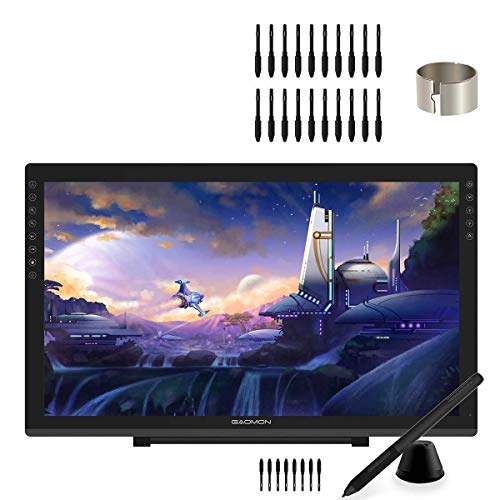
- 21.5-inch full-laminated screen
- 8192 pressure pen with tilt support
- 20 nibs plus 8 touch keys included
Best For: Beginners wanting a large, versatile pen display
Most Beginner-Ready Feature Set
XPPen Artist 16 3rd with 16K Stylus

- 16K pressure stylus with low activation force
- Anti-glare laminated glass with near-zero parallax
- 2 scroll wheels, 8 hotkeys, and stand included
Best For: New artists who want advanced controls and easy workflow
Portable Creator Choice
Artisul SP1603 15.6" Pen Display

- 15.6-inch full-laminated screen with anti-glare film
- 8192 pressure pen with ±60° tilt support
- 14 shortcut keys and a dial controller
Best For: Beginners wanting a thinner, portable display with lots of shortcuts
Beginner-Friendly All-Rounder – XPPen Artist 13.3 Pro 13.3"
If you want one of the more capable pen display monitors for beginners, the XPPen Artist 13.3 Pro is a solid place to start. It uses a fully laminated 13.3-inch FHD screen with strong color specs, plus shortcut controls that help new artists work faster without feeling overwhelmed.
Best For: Beginners who want a compact, feature-rich display for drawing, editing, or learning digital art on a computer.
Pros:
- Fully laminated 13.3-inch display helps reduce parallax while drawing.
- 88% NTSC color coverage and 178-degree viewing angle give vivid, detailed visuals.
- Red dial plus 8 customizable shortcut keys make navigation and workflow easier.
- Battery-free stylus includes tilt support, 16,384 pressure levels, and replacement nibs.
Cons:
- Must be connected to a computer or laptop to work.
- Setup may take a little more effort because it relies on the included cables and supported ports.
This model balances beginner usability with enough control features to grow with you. If you want a smaller screen that still feels close to a pro workflow, it is an easy contender.
Budget Starter Pick – XP-PEN Artist12 11.6" FHD
The XP-PEN Artist12 is one of the more approachable pen display monitors for beginners if you want a smaller screen and simple controls. It pairs an 11.6-inch Full HD IPS panel with a battery-free pen, making it a practical entry point for drawing, sketching, and remote teaching.
Best For: Beginners, students, and remote workers who want a compact pen display for basic creative tasks and note-taking.
Pros:
- 11.6-inch 1920×1080 IPS display with 72% NTSC / 100% sRGB color gamut.
- Battery-free P06 pen includes an eraser end and comfortable hexagonal design.
- 6 customizable shortcut keys and a programmable touch bar for faster workflow.
- Works with Windows, macOS, and Linux, and supports common creative and meeting apps.
Cons:
- Must be connected to a computer to operate.
- Some setups may need extra adapters if your device lacks HDMI or USB-A ports.
If you want a straightforward first drawing screen without jumping into a larger or more expensive model, this one keeps things manageable. It is especially appealing for learning the basics and using the tablet as an extended display.
Feature-Rich Midrange Choice – HUION Kamvas 13 (Gen 3)
For beginners who want a more polished experience, the HUION Kamvas 13 (Gen 3) stands out among pen display monitors for beginners thanks to its laminated screen, strong color accuracy, and easy-to-use shortcut controls. It is still a computer-connected display, but the single-cable option and included stand make it more convenient to live with.
Best For: Beginners who want a newer, more refined drawing display with strong color accuracy and an organized workspace.
Pros:
- Fully laminated 13.3-inch screen with anti-sparkle Canvas Glass 2.0 for reduced glare.
- 16384 pressure levels and 2g IAF support a responsive, natural pen feel.
- Avg. ΔE<1.5, 99% sRGB, and Rec.709 coverage help with color consistency.
- 5 shortcut keys, dual dial buttons, and an adjustable stand support smoother workflow.
Cons:
- Not a standalone device and still needs a computer or laptop.
- USB-C single-cable setup may depend on compatible hardware, and the full-featured cable is sold separately.
This is a strong choice if you want beginner-friendly usability without giving up more advanced display quality. The combination of calibration, shortcut controls, and pen performance makes it feel well prepared for long-term use.
Large Learning Canvas – GAOMON PD1561 15.6"
The GAOMON PD1561 is a larger-format option for pen display monitors for beginners who want more room to sketch, annotate, or practice digital art. With a 15.6-inch HD IPS screen, 10 shortcut keys, and an included stand, it gives you a roomy workspace without requiring professional-level complexity.
Best For: Beginners, students, and teachers who want a larger screen for drawing, teaching, or annotating documents.
Pros:
- 15.6-inch 1920×1080 IPS display offers a larger drawing area.
- 8192-level battery-free pen includes tilt support and 2 customizable buttons.
- 10 shortcut keys help speed up zooming, scrolling, and other common tasks.
- Includes an adjustable stand, gloves, pen holder, nibs, and pre-applied AG film.
Cons:
- Must be connected to a computer and is not a standalone device.
- Desktop users need to connect the HDMI cable directly to the graphics card.
If you want a bigger practice area from the start, this model is easy to recommend. It is especially useful for beginners who also plan to teach, annotate, or join online meetings from the same device.
Premium Portable Pen Display – ASUS ProArt PA169CDV 15.6 Inch 4K USB-C WACOM Display Portable Monitor
If you’re comparing pen display monitors for beginners but want something that can grow with you, this ASUS ProArt model brings a lot of polish. It combines a 4K IPS panel, bundled Wacom EMR pen support, and touchscreen input in a portable form factor, so it’s aimed at users who want a responsive drawing surface plus strong color accuracy from day one.
Best For: Beginners who want a premium, portable pen display with accurate color and room to grow into more advanced creative work.
Pros:
- 15.6-inch 4K UHD IPS screen with anti-glare finish and 10-point multitouch
- Bundled ProArt Pen uses Wacom EMR technology for a natural pen-on-paper feel
- 100% sRGB, Calman Verified, factory pre-calibrated to Delta E < 2
- USB-C connectivity, built-in speakers, and included accessories for a complete setup
Cons:
- More expensive and feature-rich than a typical entry-level pen display
- Portable monitor size may feel smaller than a full desktop drawing display
For beginners who care about image quality and want a device that doubles as a portable creative monitor, this is a strong but upscale pick. It is not the simplest budget choice, but the calibration, pen tech, and warranty make it a reassuring long-term option.
Compact Starter Drawing Display – GAOMON PD1161 11.6" Drawing Tablet with Screen, Tilt & 8 Keys, Portable
For beginners shopping for pen display monitors for beginners, the GAOMON PD1161 is the straightforward entry-level option here. Its 11.6-inch Full HD screen, battery-free pen, and eight shortcut keys keep the learning curve manageable while still giving you the basics needed for drawing, sketching, and annotation on a computer.
Best For: Students and first-time digital artists who want an affordable, portable pen display with simple controls.
Pros:
- 11.6-inch IPS display with 1920×1080 resolution
- Battery-free pen with 8192 pressure levels and tilt support
- 8 customizable shortcut keys for quicker workflow control
- Lightweight 866g design that is easy to carry
Cons:
- Requires connection to a Windows, Mac, or Chromebook computer
- Smaller screen may feel cramped for longer drawing sessions
This is the most beginner-friendly budget-style pick in the group because it keeps the essentials simple. If you want a portable pen display that covers practice drawing, online teaching, and basic design tasks, it fits that role well.
Best Portable Feature Set – XPPen Artist 12 3rd 11.9" Drawing Tablet with Screen, 16K, X4 Pen, AG Glass
If you want pen display monitors for beginners that still feel modern and refined, the XPPen Artist 12 3rd stands out for its strong feature set in a compact size. It combines an etched AG glass screen, a high-precision X4 pen, and useful controls like dual X-Dial wheels and shortcut keys, making it easier to learn digital art without feeling limited too quickly.
Best For: Beginners who want a compact display with premium pen feel, easy navigation, and strong color accuracy.
Pros:
- 11.9-inch Full HD display with AG etched glass and full lamination
- X4 pen offers 16,384 pressure levels and 60-degree tilt support
- 99% sRGB and factory calibration with ΔE<1.5 for color accuracy
- Dual X-Dial wheels, 8 customizable keys, and single USB-C cable support
Cons:
- Smaller screen size may not suit users who want a roomier workspace
- Feature-rich controls can take a little time to learn
This model is a strong step-up choice for beginners who want more precision and better ergonomics than the most basic options. Its portability and calibration make it especially appealing if you plan to study, sketch, or work across multiple devices.
Budget-Friendly Full-Size Pick – GAOMON PD2200 21.5" Pen Display
If you want pen display monitors for beginners, the GAOMON PD2200 is a practical full-size option with a 21.5-inch laminated screen, 8192 pressure levels, tilt support, and 20 replacement nibs in the box. It’s positioned for digital drawing, animation, online teaching, remote meetings, and file signing, so it can do more than just art.
Best For: Beginners who want a large pen display for drawing, teaching, and general annotation work.
Pros:
- Large 21.5-inch full-laminated display for a roomy drawing area
- 8192-level passive pen with tilt support for natural sketching
- Includes 20 pen nibs and 8 customizable touch keys
- Works with major software and supports Windows and Mac
Cons:
- 25ms response time is not the fastest option here
- Setup includes OSD and color-adjustment steps that may take a little learning
- Mac users on newer versions need to whitelist driver files
The PD2200 is a solid starter-friendly pen display if you value screen size and broad use cases over premium extras. It gives beginners a straightforward path into on-screen drawing while still handling teaching and annotation tasks well.
Most Beginner-Ready Feature Set – XPPen Artist 16 3rd with 16K Stylus
The XPPen Artist 16 3rd is one of the more beginner-friendly pen display monitors for beginners if you want strong specs without a lot of setup clutter. It pairs a 15.4-inch fully laminated screen with a 16K pressure stylus, anti-glare etched glass, two scroll wheels, eight hotkeys, and an included foldable stand.
Best For: New artists who want a polished, easy-to-grow-into display with extra control features.
Pros:
- 16,384 pressure levels and low activation force for precise line control
- Fully laminated anti-glare etched glass reduces parallax and glare
- Two scroll wheels, 8 hotkeys, and a foldable stand improve workflow
- Broad compatibility includes Windows, Mac, Android, ChromeOS, and Linux
Cons:
- Feature-rich design may be more than a very casual beginner needs
- Smaller 15.4-inch screen than some larger desktop-focused models
- Color-management options add flexibility, but also more controls to learn
This is a strong choice if you want a beginner display that feels advanced right away and still has room to grow with your skills. The combination of laminated glass, precise pen response, and physical controls makes it easy to stay organized while drawing.
Portable Creator Choice – Artisul SP1603 15.6" Pen Display
The Artisul SP1603 is a compact 15.6-inch option for buyers comparing pen display monitors for beginners who want a thinner, more portable setup. It offers a full-laminated tempered glass screen, 8192 pressure levels, tilt support, a dial controller, and up to 14 shortcut keys for faster work.
Best For: Beginners who want a slimmer pen display with plenty of shortcuts and a good color range.
Pros:
- Full-laminated display with anti-glare film and tempered glass
- 8192-level battery-free pen with ±60° tilt support
- 14 shortcut keys plus a dial controller for efficiency
- Thin aluminum body and 15.6-inch size make it easier to carry
Cons:
- USB-C 3.1 Gen2 cable is not included in all connection paths
- Must be connected to a PC, laptop, or compatible Android device
- Smaller workspace than the 21.5-inch alternative in this roundup
The SP1603 is a practical pick if you want a beginner display that balances portability with useful control features. It looks well suited to drawing, teaching, and general creative work without feeling oversized on a desk.
How We Picked These Pen Display Monitors for Beginners
We prioritized models that are easy to set up, comfortable for first-time users, and strong on the basics: reliable pen tracking, a usable drawing area, and display quality that helps new artists see their lines clearly. We also looked for helpful extras like shortcut keys, dial controls, laminated screens, and USB-C connectivity where available.
Quick Comparison: What Matters Most
When comparing Pen Display Monitors for Beginners, start with screen size, pen responsiveness, and portability. Smaller 11.6-inch to 13.3-inch displays are easier to manage and less expensive, while 15.6-inch and larger models offer more room to draw and can feel closer to a traditional sketchbook workflow. If you want a simpler desk setup, look for one-cable or USB-C support. If you plan to color or do detail work, better anti-glare glass and stronger color coverage can make a noticeable difference.
Key Buying Factors for Pen Display Monitors for Beginners
Screen Size and Workspace
Smaller tablets are great for travel, casual sketching, and tighter budgets. Larger screens are better if you want more elbow room, use menus often, or prefer less zooming while illustrating.
Pen Feel and Pressure Sensitivity
Higher pressure levels are not automatically better, but a responsive, stable pen matters a lot. For beginners, the goal is smooth line control, low cursor lag, and a tip feel that does not fight your hand.
Display Quality
Look for full lamination, etched or anti-glare glass, and decent brightness to reduce parallax and eye strain. Better color accuracy is especially useful if you want to move into illustration, photo editing, or design work later.
Controls and Comfort
Express keys, dials, and scroll wheels can speed up zooming, undoing, and brush size changes. They are not required, but they can reduce frustration as you learn your workflow.
Who Should Buy Which Pen Display Monitors for Beginners?
If you want the simplest entry point, choose a compact 11.6-inch or 12-inch model. If you expect to draw regularly and want more comfort, a 13.3-inch or 15.6-inch display is often the sweet spot. If you need stronger visual quality for creative work beyond sketching, consider a higher-resolution or better-calibrated option, even if it costs more. For shoppers focused on Pen Display Monitors for Beginners, the best pick is usually the one that fits your desk, budget, and learning style—not just the one with the longest spec sheet.