A wall-mounted control panel can make a smart home easier to use by putting lights, scenes, sensors, and connected devices in one accessible location. The best option depends on more than screen size: compatibility, wiring, relay capacity, hub support, and setup requirements all matter.
We compare 10 budget smart home control panels across touchscreen controls, voice assistants, Zigbee connectivity, IR features, built-in relays, and broader platform support so you can choose a practical panel for your rooms and automation plans.
Best 10 Budget Smart Home Control Panels Picks for 2026
Best Budget Scene Controller

- Dual-channel wall switch with touchscreen
- Built-in thermostat and temperature display
- Works with Alexa, Google Home, and eWeLink
Best For: SONOFF-focused homes seeking affordable scene and temperature control
Best Large-Screen Panel
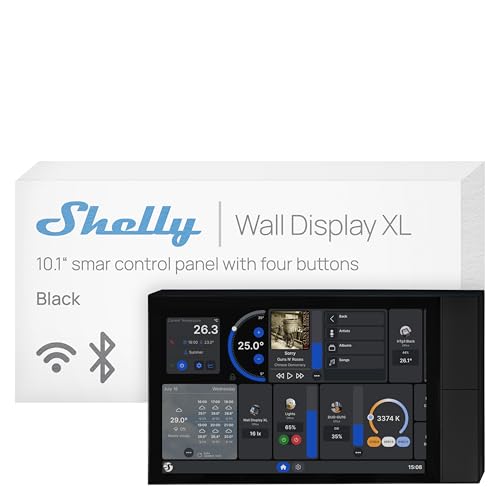
- 10.1-inch touchscreen with four buttons
- Built-in 5A relay for appliance control
- Supports Shelly, Home Assistant, Alexa, Google Home, and HomeKit
Best For: Large homes or shared spaces needing a broad, wall-mounted control interface
Best for Monitoring and Security

- 4.7-inch panel for central home control
- Supports cameras, thermostats, energy, and lighting
- Offers security modes with alarms and notifications
Best For: SONOFF users wanting compact monitoring and security features
Best Multi-Control Value
3.5-Inch Intelligent Home Control Panel

- Controls 200+ devices with touchscreen, app, and voice
- Built-in IR remote support and three relays
- Adds scenes, BT Mesh bridging, and security alarm
Best For: Compact installations needing broad device and IR control
Best Budget Alexa Panel

- Built-in Alexa voice control
- Integrated Zigbee gateway
- 5-inch touchscreen
Best For: Smart Life households wanting an all-in-one Alexa and Zigbee control point
Best for Everyday Use

- 4-inch HD multi-touch display
- Custom scenes and one-tap actions
- Tuya multi-device compatibility
Best For: Tuya users seeking compact scene and lighting control
Best Budget Android Panel
Smart Home Android Touchscreen Hub

- Customizable Android platform
- LCD touchscreen with vivid display
- Voice-control integration
Best For: Users wanting an adaptable Android-based automation panel
Best Tuya Compatibility
Voice-Control Smart Home Panel

- Supports Tuya, WiFi, ZigBee, and Bluetooth devices
- Controls up to 20 product types
- Shows time, weather, and customizable shortcuts
Best For: Tuya users seeking broad device compatibility and voice control
Best IR-Focused Design
Yunseity Touchscreen Control Panel

- Manages more than 110 device types
- Controls up to 12 infrared devices
- Includes multi-touch and adjustable indicator lighting
Best For: Compact in-wall Sigmesh and infrared device control
Best All-in-One Controls

- Supports 200+ devices and scenes
- Combines touch, buttons, app, voice, and IR control
- Includes three relays and BT Mesh gateway
Best For: Multi-method control with relay support and customizable scenes
Best Budget Scene Controller – SONOFF NSPanel Smart Switch
The SONOFF NSPanel is a practical pick for shoppers comparing budget smart home control panels, especially if you already use SONOFF devices. It combines a dual-channel wall switch, touchscreen controls, scene modes, temperature monitoring, and thermostat functions in one wall-mounted unit.
Best For: SONOFF-focused homes that want lighting control and basic temperature automation from one panel.
Pros:
- Combines two switches, touchscreen control, scene modes, and thermostat functions.
- Offers control through the panel, eWeLink app, Alexa, Google Home, and Siri Shortcuts.
- Displays time, date, weather, and indoor and outdoor temperature.
Cons:
- Pairing requires a 2.4GHz Wi-Fi connection and the eWeLink app.
- Its strongest device integration is with the SONOFF ecosystem.
The NSPanel offers a useful mix of wall-switch functionality and smart-home control at a relatively approachable level. It makes the most sense when its SONOFF compatibility and thermostat features match your setup.
Best Large-Screen Panel – Shelly Wall Display XL
The Shelly Wall Display XL is aimed at shoppers who want budget smart home control panels with a larger, more readable interface. Its 10.1-inch touchscreen, built-in 5A relay, four customizable buttons, and compatibility with Shelly Smart Control, Home Assistant, and several major platforms make it a flexible wall-mounted controller.
Best For: Homes, apartments, hotels, and commercial spaces that need a large touchscreen for Shelly devices and appliance control.
Pros:
- Provides a large 10.1-inch touchscreen plus four customizable buttons.
- Includes a built-in relay for controlling lights, fans, heaters, and other appliances.
- Integrates with Shelly Smart Control, Home Assistant, Alexa, Google Home, and HomeKit.
- Can control Bluetooth or Sonos audio from the display.
Cons:
- Requires a neutral wire for installation.
- The built-in relay is rated for 5A, so load compatibility should be checked.
With its oversized display and broad integration options, the Wall Display XL is more capable than a simple smart switch. Installation requirements and relay limits should be confirmed before purchase, but it is a strong choice for centralized control.
Best for Monitoring and Security – SONOFF NSPanel Pro 120
The SONOFF NSPanel Pro 120 is a good option for buyers seeking budget smart home control panels that do more than operate lights. Its 4.7-inch display can manage lighting and thermostats, show energy statistics, display compatible camera feeds, and provide basic security modes from a central location.
Best For: SONOFF users who want a compact panel for energy tracking, camera viewing, thermostat adjustment, and home security controls.
Pros:
- Supports lighting, thermostat, energy, camera, and security functions.
- Can display live views from supported cameras in multiple rooms.
- Tracks daily energy consumption over a week for devices with energy-statistics support.
- Includes customizable security arming modes with alarms and phone notifications.
Cons:
- The 4.7-inch display is smaller than the Shelly Wall Display XL’s screen.
- Camera viewing and energy tracking depend on compatible devices and supported functions.
The NSPanel Pro 120 is best viewed as a compact monitoring hub rather than only a wall switch. Its security, camera, and energy features add value for users building around compatible SONOFF devices.
Best Multi-Control Value – 3.5-Inch Intelligent Home Control Panel
This 3.5-inch intelligent panel stands out among budget smart home control panels by combining touchscreen control, physical buttons, app access, voice control, IR remote functions, and three relays. It is designed to bring lights, locks, cameras, air conditioners, thermostats, scenes, and alarms into one compact wall-mounted interface.
Best For: Homes, offices, or hotel-style installations needing broad device control, IR support, and customizable scenes in a compact panel.
Pros:
- Supports integration of more than 200 devices, including lights, locks, cameras, and AC units.
- Three infrared tubes control 12 categories of IR devices.
- Combines touchscreen, physical buttons, voice, and app-based control.
- Includes group control, scene modes, BT Mesh bridging, three relays, and a security alarm.
Cons:
- The 3.5-inch display is relatively compact for navigating a broad device list.
- Installation uses 100–240V wiring, so the electrical setup should be verified.
- The supplied notes do not specify included components.
This panel offers an unusually broad feature set for its compact size, particularly if IR control and multi-device scenes matter. Its smaller screen may be less convenient for detailed navigation, but it can reduce dependence on separate remotes and apps.
Best Budget Alexa Panel – MOES Smart Home Control Panel
For shoppers comparing budget smart home control panels, the MOES Smart Home Control Panel combines a 5-inch touchscreen, built-in Alexa, and a Zigbee gateway in one unit. It supports wired or wireless networking and can work with a broad range of Smart Life devices.
Best For: Smart Life users who want Alexa voice control and an integrated Zigbee hub without adding a separate gateway.
Pros:
- Built-in Alexa enables hands-free device and scene control.
- Integrated Zigbee gateway helps reduce the need for separate hub hardware.
- Compatible with Smart Life switches, bulbs, sockets, cameras, and door locks.
- Supports both Type-C and circuit-connected power options.
Cons:
- Its compatibility is described around Smart Life devices and may not suit every smart-home ecosystem.
- The supplied dimensions are listed as 1 x 1 x 1 inches, so installation fit should be verified independently.
This is a versatile choice when voice control, Zigbee connectivity, and broad Smart Life compatibility matter more than ecosystem flexibility beyond those platforms.
Best for Everyday Use – Tuya Zigbee Touch Panel
This Tuya touch panel is one of the more scene-focused budget smart home control panels, offering a 4-inch HD touchscreen for device control, lighting adjustments, and custom automations. It also supports remote operation through a mobile app.
Best For: Tuya households that want a compact wall-style panel for scenes, lighting, curtains, blinds, and other connected devices.
Pros:
- Supports custom application scenes and one-tap preset actions.
- Compatible with the Tuya ecosystem and multi-device control.
- 4-inch multi-touch display provides access to clocks, devices, and scene controls.
- Mobile app enables remote control when away from home.
Cons:
- The supplied notes indicate that a gateway is used for some control functions.
- Its 4-inch screen is smaller than some centralized touchscreen panels.
- The product information does not specify included gateway hardware.
Choose this panel if your home already relies on Tuya and you prioritize quick scene activation and centralized lighting control over a larger display.
Best Budget Android Panel – Smart Home Android Touchscreen Hub
For buyers seeking flexible budget smart home control panels, this Android touchscreen hub offers a customizable platform for managing lighting, security, and other automation functions. Its LCD display, voice-control integration, and 100–240V compatibility broaden its potential uses.
Best For: Users who want an Android-based central panel with app customization and broad voltage compatibility.
Pros:
- Android system supports a wide range of applications and customization.
- LCD touchscreen is designed for clear visuals and vivid colors.
- Voice-control integration supports hands-free smart-device operation.
- 100–240V compatibility suits diverse electrical environments.
Cons:
- The supplied notes do not identify specific device protocols or detailed compatibility lists.
- Included components are listed as none, so accessories or installation materials may require separate verification.
- The listed 12-volt operating specification may require attention during installation.
This panel stands out for software flexibility, but buyers should confirm ecosystem support, installation requirements, and included hardware before choosing it as a primary hub.
Best Tuya Compatibility – Voice-Control Smart Home Panel
For shoppers comparing budget smart home control panels, this wall-mounted option focuses on broad Tuya compatibility and simple centralized control. It supports Tuya, WiFi, ZigBee, and Bluetooth devices, while its 4-inch display adds useful at-a-glance information.
Best For: Tuya users who want voice control, app access, and a customizable central screen.
Pros:
- Compatible with more than 410,000 Tuya devices and up to 20 product types.
- Supports voice commands and app-based control from anywhere.
- Displays time, date, and live weather on its 4-inch LCD screen.
- Offers customizable shortcuts and automatic brightness adjustment.
Cons:
- Its IP20 rating is intended for indoor use rather than wet locations.
- The supplied specifications list a 12-volt operating voltage, so installation planning may be necessary.
This panel is a strong budget-minded choice when wide Tuya support matters most. Its screen customization and automatic brightness make it practical for everyday room-by-room control.
Best IR-Focused Design – Yunseity Touchscreen Control Panel
This Yunseity model is one of the budget smart home control panels to consider if you want a compact in-wall touchscreen with infrared control. Its 3.5-inch display combines multi-touch operation, adjustable indicator lighting, and support for more than 110 device types.
Best For: Homes that need centralized Sigmesh and infrared control in a compact wall-mounted panel.
Pros:
- Uses a capacitive multi-touch structure designed for precise operation and interference resistance.
- Supports more than 110 device types and up to 12 infrared devices.
- Built-in infrared LEDs are designed to improve the controllable angle.
- Adjustable firefly indicator lighting helps locate the panel in the dark.
Cons:
- The supplied notes do not specify voice control or app-based remote access.
- Its 3.5-inch screen is smaller than some dedicated smart displays.
Choose this panel when infrared equipment and a tidy in-wall installation are priorities. The adjustable indicator and multi-touch interface add convenience without making the unit physically large.
Best All-in-One Controls – 3.5-Inch Relay Touch Panel
Among budget smart home control panels, this 3.5-inch model stands out for combining touchscreen, physical-button, app, infrared, and voice-assistant control. It also includes three relays and support for more than 200 devices and scenes, making it suited to users who want several control methods in one wall-mounted unit.
Best For: Homes, offices, and other spaces needing relay control, infrared operation, and customizable scenes.
Pros:
- Supports more than 200 devices and scenes, including lights, cameras, thermostats, and locks.
- Offers touchscreen, three-button, voice-assistant, app, and infrared control.
- Includes three relays, a BT Mesh gateway, scene control, and security alarm functions.
- Home-page components can be added, deleted, and rearranged for quicker access.
Cons:
- The 3.5-inch display has a 480×320 resolution, so it is a compact rather than expansive screen.
- The supplied notes do not provide detailed installation or electrical specifications.
This is the most feature-dense option of the three for shoppers who value flexible control methods. Its compact touchscreen and customizable layout help consolidate many daily actions into one wall panel.
How We Picked the Best Budget Smart Home Control Panels
We focused on the features that affect everyday usability and installation value: display size, physical relay support, wireless standards, app and voice-assistant compatibility, automation controls, and whether the panel can act as a broader hub. We also considered different use cases, from replacing a conventional wall switch to managing scenes and multiple smart-home devices.
Because these products vary widely, verify electrical requirements and ecosystem compatibility before ordering. Some panels are designed for specific platforms such as SONOFF, Tuya, Shelly, or Zigbee, while others offer more general Android or Home Assistant support.
Quick Comparison
- Best for simple lighting control: Choose a panel with integrated relays and a familiar wall-switch layout.
- Best for larger dashboards: Look for a 10-inch-class touchscreen, such as the Shelly Wall Display XL.
- Best for Zigbee homes: Select a model with a built-in Zigbee hub, including compatible MOES or Tuya-based options.
- Best for voice control: Prioritize Alexa integration or a clearly supported voice-assistant platform.
- Best for advanced flexibility: Android- or Home Assistant-compatible panels may offer broader control, but setup can be more involved.
Key Buying Factors for Budget Smart Home Control Panels
Wiring and Relay Compatibility
Check voltage, neutral-wire requirements, gang count, relay ratings, and box depth before installation. A panel may look like a direct switch replacement but still require wiring or load conditions your home does not support.
Ecosystem and Wireless Standards
Confirm support for your existing app and devices. Zigbee can reduce Wi-Fi congestion and enable compatible sensors, while Wi-Fi panels may be simpler if your home already relies on cloud-connected products. Home Assistant support is valuable for local or multi-brand automation, but compatibility should be confirmed rather than assumed.
Screen and Control Experience
A larger display is useful for dashboards, cameras, scenes, and room-by-room control. Smaller panels can be better for quick lighting adjustments and fit more naturally in standard wall locations. Consider brightness, viewing angle, touch responsiveness, and whether physical buttons remain available.
Extra Features
Voice control, temperature monitoring, IR remote functions, built-in hubs, and scene support can reduce the need for separate hardware. Prioritize features you will actually use, since a simpler panel may be easier to configure and maintain.
Who Should Buy Which Budget Smart Home Control Panels?
Choose an integrated SONOFF panel if you already use SONOFF devices and want straightforward lighting or scene control. A Shelly display is a stronger fit for buyers who want a larger dashboard and are comfortable building around Shelly hardware. MOES and Tuya-style panels suit households seeking Zigbee connectivity and broad smart-home accessory support.
For renters or cautious upgraders, prioritize a panel that does not require complex rewiring and confirm installation constraints first. Buyers planning a multi-brand system should favor documented Home Assistant, Zigbee, or open-platform support. If you mainly want a convenient wall-mounted interface for a few lights, a compact three-gang relay panel may deliver better value than a feature-heavy hub.