As you consider the best all-in-one business printers with fax capabilities for 2025, it is crucial to weigh your options carefully. With devices like the HP OfficeJet Pro 9015e and Brother MFC-L2820DW leading the pack, functionality and efficiency are key. You’ll want to think about factors like speed, connectivity, and sustainability. Are you ready to discover which printers stand out in this competitive market?
HP OfficeJet Pro 8139e Wireless All-in-One Printer

The HP OfficeJet Pro 8139e Wireless All-in-One Printer is the perfect choice for busy home office professionals who need a reliable, multifunctional device. With print speeds of 10 ppm for color and 20 ppm for black, it delivers quality documents like reports and flyers efficiently. Its user-friendly 2.7-inch touchscreen allows easy navigation, while dual-band Wi-Fi guarantees seamless wireless connectivity. The printer also supports smartphone printing via the HP app. Plus, the 1-year Instant Ink trial assures you won’t run out of ink unexpectedly. With HP Wolf Essential Security, your data stays protected, making this printer a smart choice for your office.
Best For: Busy home office professionals who need a reliable and multifunctional printer for quality document printing.
Pros:
- User-friendly 2.7-inch touchscreen for easy navigation and operation.
- Fast print speeds of 10 ppm for color and 20 ppm for black, enhancing productivity.
- 1-year Instant Ink trial ensures convenient ink delivery and avoids unexpected shortages.
Cons:
- Monthly fee applies after the 1-year trial for the Instant Ink subscription.
- Designed to work only with HP cartridges, limiting third-party options.
- May require periodic firmware updates to maintain security features.
Epson EcoTank ET-4800 Wireless All-in-One Printer

For busy home office professionals seeking efficiency, the Epson EcoTank ET-4800 Wireless All-in-One Printer stands out with its cartridge-free printing system. You’ll love the high-capacity ink tanks that reduce waste and the EcoFit ink bottles that make refilling hassle-free. Thanks to Micro Piezo Heat-Free Technology, your prints will feature sharp text and vibrant colors. The high-resolution flatbed scanner and color display simplify copying and scanning tasks. With fax capabilities and versatile printing options, it’s designed to handle various paper types, making it a perfect fit for your home office setup. Enjoy a cleaner, greener printing experience with the EcoTank ET-4800.
Best For: Busy home office professionals seeking an efficient, eco-friendly printing solution.
Pros:
- Cartridge-free printing reduces waste and minimizes environmental impact.
- High-capacity ink tanks provide longer-lasting performance and less frequent refills.
- Versatile features including scanning, copying, and faxing streamline office tasks.
Cons:
- Initial cost may be higher compared to traditional printers.
- Requires occasional maintenance to keep the ink tanks in optimal condition.
- Limited mobile printing options compared to some competitors.
HP OfficeJet Pro 9125e Wireless All-in-One Printer

Need a reliable all-in-one printer that meets the demands of a busy office? The HP OfficeJet Pro 9125e is your go-to solution. With fast print speeds of up to 18 ppm in color and 22 ppm in black, it tackles large volumes effortlessly. Its 250-sheet input tray and auto document feeder make multitasking a breeze. Enjoy professional-quality prints, thanks to HP’s AI technology. Plus, easily connect via dual-band Wi-Fi or the HP app for mobile printing. With built-in security features and a sustainable design, this printer keeps your office efficient and secure while minimizing environmental impact.
Best For: Busy offices that require a reliable, efficient, and versatile all-in-one printer for high-quality printing, scanning, copying, and faxing.
Pros:
- Fast print speeds of up to 18 ppm in color and 22 ppm in black, making it ideal for high-volume tasks.
- Wireless connectivity and mobile printing options via the HP app for convenient printing from various devices.
- Built-in security features and sustainable design, ensuring data protection and reduced environmental impact.
Cons:
- Cartridge compatibility limited to HP cartridges only, which may restrict options for users seeking third-party alternatives.
- Monthly fee required after the 3-month Instant Ink trial unless canceled, which may not appeal to all users.
- Touchscreen size of 2.7 inches may be considered small for some users when navigating settings and options.
Brother MFC-L2820DW Wireless All-in-One Laser Printer

If you’re seeking an efficient, compact solution for your small office, the Brother MFC-L2820DW Wireless All-in-One Laser Printer stands out with its impressive print speed of up to 36 pages per minute. It offers versatile capabilities, including printing, copying, scanning, and faxing, all in a streamlined design. The printer features a 50-page auto document feeder, making multi-page tasks easier. With dual-band wireless, Ethernet, and USB options, you can easily connect to your devices. Plus, the 2.7” touchscreen simplifies navigation, while the Brother Mobile Connect app allows remote management, ensuring you stay productive on the go.
Best For: Small offices looking for an efficient and affordable all-in-one printer that can handle various tasks.
Pros:
- High-speed printing: Delivers print speeds of up to 36 pages per minute, enhancing productivity.
- Multi-functionality: Combines printing, copying, scanning, and faxing in one compact device.
- Versatile connectivity: Supports dual-band wireless, Ethernet, and USB connections, along with cloud printing options.
Cons:
- Monochrome only: Limited to black and white printing, which may not suit users needing color output.
- Compact paper capacity: The standard paper tray may require frequent refills for high-volume printing.
- Touchscreen size: The 2.7” touchscreen may be smaller compared to other models, potentially affecting ease of use.
Canon imageCLASS MF465dw II Wireless Duplex Laser Printer

The Canon imageCLASS MF465dw II Wireless Duplex Laser Printer stands out as an ideal choice for busy professionals who require a reliable all-in-one solution. With fast print speeds of up to 42 pages per minute and a first print time of approximately 5 seconds, you won’t waste time waiting. Its 5-inch color touchscreen makes accessing features intuitive. Enjoy easy mobile printing via Canon PRINT app, Apple AirPrint, and Mopria. Plus, the 250-sheet standard cassette and 50-sheet automatic document feeder enhance productivity. With high-capacity toner and auto duplex printing, you’ll save on supplies while maintaining exceptional quality.
Best For: Busy professionals who need a reliable, fast, and multifunctional printer for their office needs.
Pros:
- Fast printing speeds of up to 42 pages per minute, reducing wait times.
- Mobile printing compatibility with Canon PRINT app, Apple AirPrint, and Mopria Print Service for convenience.
- High-capacity toner and auto duplex printing contribute to cost savings on supplies.
Cons:
- Monochrome printing only, limiting options for color documents.
- Initial setup may require some technical knowledge for wireless connectivity.
- Additional paper trays are optional, which could increase overall cost.
HP OfficeJet Pro 8135e Wireless All-in-One Color Inkjet Printer
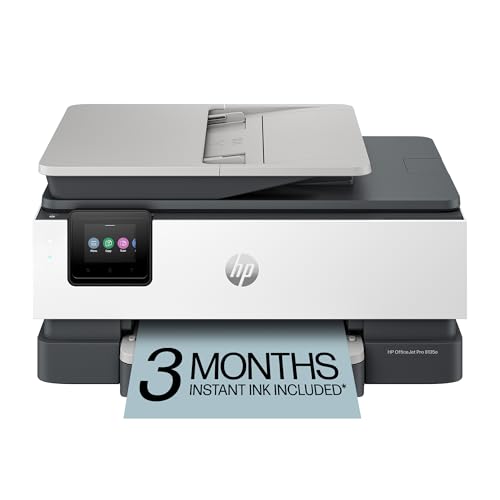
For busy professionals seeking efficiency and quality, the HP OfficeJet Pro 8135e Wireless All-in-One Color Inkjet Printer stands out with its impressive print speeds of up to 20 pages per minute for black and 10 pages per minute for color. This printer excels in functionality, offering printing, scanning, copying, and faxing capabilities. Its auto document feeder and 225-sheet input tray enhance productivity. Plus, with HP AI technology, you’ll enjoy perfectly formatted prints every time. Dual-band Wi-Fi guarantees seamless connectivity, while the HP app lets you manage tasks directly from your devices. You’ll also appreciate the included 3-month Instant Ink trial for convenience.
Best For: Busy professionals and home office users seeking an efficient all-in-one printing solution with high-quality output.
Pros:
- Fast printing speeds of up to 20 ppm for black and 10 ppm for color enhance productivity.
- Versatile functionality with printing, scanning, copying, and faxing capabilities, along with an auto document feeder.
- Seamless connectivity through dual-band Wi-Fi and convenient management via the HP app.
Cons:
- Monthly fees apply for the Instant Ink subscription after the 3-month trial period unless cancelled.
- Print quality may vary depending on the type of paper used and the print settings.
- Made with over 45% recycled plastic, which may affect overall durability compared to other materials.
HP Laserjet Pro MFP 3101fdw Wireless All-in-One Laser Printer

Designed with small teams in mind, the HP Laserjet Pro MFP 3101fdw stands out as an ideal choice for offices of up to seven people. This wireless black-and-white all-in-one printer efficiently handles printing, scanning, copying, and faxing professional-quality documents. With print speeds of up to 35 pages per minute and features like auto 2-sided printing and an auto document feeder, you’ll save time and boost productivity. Its intelligent Wi-Fi and Bluetooth connectivity allow seamless wireless printing from various devices. Plus, HP Wolf Pro Security guarantees your information remains secure, making it a reliable option for your business needs.
Best For: Small teams of up to seven people looking for an efficient all-in-one printing solution.
Pros:
- High print speeds of up to 35 pages per minute enhance productivity.
- Wireless connectivity options, including Wi-Fi, Bluetooth, and Ethernet, facilitate easy printing from multiple devices.
- HP Wolf Pro Security ensures the safety of sensitive information.
Cons:
- Limited to black-and-white printing, which may not suit all users’ needs.
- May require regular maintenance for optimal performance in busy office environments.
- Initial setup might be complex for users unfamiliar with wireless printers.
HP Color LaserJet Pro MFP 3301sdw Wireless All-in-One Printer

Small teams seeking a reliable and efficient printing solution will find the HP Color LaserJet Pro MFP 3301sdw Wireless All-in-One Printer an exceptional choice. With print speeds up to 26 pages per minute, it handles both black and color documents effortlessly. Its auto 2-sided printing and 250-sheet input tray boost your productivity. Plus, the next-generation TerraJet toner produces vivid colors and sharp details, ensuring professional-quality output every time. This printer only works with Original HP toner, maintaining peak performance. Trusted by many, it’s designed to meet high business demands while delivering consistent, award-winning reliability in your office environment.
Best For: Small teams looking for a reliable and efficient all-in-one printing solution that delivers professional-quality documents.
Pros:
- Fast print speeds of up to 26 pages per minute for both black and color documents.
- Next-generation TerraJet toner enhances color vividness, ensuring high-quality output.
- Auto 2-sided printing and a 250-sheet input tray increase productivity and reduce paper usage.
Cons:
- Only compatible with Original HP toner cartridges, which may limit cost-saving options.
- The printer may not be suitable for very high-volume printing needs due to its 250-sheet capacity.
- Firmware updates may be required to maintain cartridge effectiveness, which could be inconvenient.
Canon PIXMA TR8620a All-in-One Printer

The Canon PIXMA TR8620a All-in-One Printer stands out as an ideal choice for home office users who need versatility and efficiency in a compact design. With its wireless 4-in-1 capabilities, you can print, copy, scan, and fax effortlessly. It boasts a print speed of 15 ipm for black and 10 ipm for color, plus an auto 2-sided printing feature to save paper. Connect to Alexa for ink level notifications and easy reordering, ensuring you never run out. With a 200-sheet capacity and a duty cycle of 1,000 pages, this printer meets your demanding office needs while being ENERGY STAR certified.
Best For: The Canon PIXMA TR8620a All-in-One Printer is best for home office users seeking a versatile and efficient printing solution in a compact design.
Pros:
- Versatile 4-in-1 functionality: Print, copy, scan, and fax all from one device.
- Fast print speeds: Achieves 15 ipm for black and 10 ipm for color, enhancing productivity.
- Smart connectivity: Easily connects to Alexa for ink level notifications and reordering.
Cons:
- Limited paper capacity: Holds only 200 sheets, which may require frequent refills for high-volume printing.
- Duty cycle may be low for heavy users: A duty cycle of 1,000 pages might not meet the needs of larger offices.
- Dependence on wireless connectivity: Performance may be affected in areas with weak Wi-Fi signals.
HP OfficeJet Pro 8125e Wireless All-in-One Printer

For home office professionals seeking a reliable and efficient solution, the HP OfficeJet Pro 8125e Wireless All-in-One Printer stands out with its ability to produce high-quality documents quickly. It prints at speeds of up to 20 pages per minute in black and 10 in color. With features like auto duplex printing and a 225-sheet input tray, you’ll save time and effort. The dual-band Wi-Fi guarantees seamless wireless connectivity, and the HP app allows you to print or fax from any device. Plus, enjoy three months of Instant Ink with HP+ activation, keeping you stocked without hassle.
Best For: Home office professionals who need a reliable, efficient printer capable of producing high-quality documents quickly.
Pros:
- Fast print speeds of up to 20 ppm for black and 10 ppm for color.
- Convenient features like auto duplex printing and a 225-sheet input tray.
- Seamless wireless connectivity with dual-band Wi-Fi and mobile printing capabilities.
Cons:
- Monthly subscription fee for Instant Ink after the initial trial period.
- Only compatible with HP cartridges, limiting ink options.
- Firmware updates may disrupt functionality or require user intervention.
Factors to Consider When Choosing Business All in One Printers With Fax
When you’re selecting an all-in-one business printer with fax capabilities, it’s essential to evaluate several key factors. Think about your print speed needs, available connectivity options, and the features that will best support your workflow. Also, keep an eye on ink or toner costs, as well as the security and sustainability of your choices.
Print Speed Requirements
Choosing the right print speed is crucial for your business’s efficiency, especially if you often deal with high-volume tasks. Print speed, measured in pages per minute (ppm), varies considerably. Color printers typically offer speeds around 10-20 ppm, while monochrome laser printers can reach 30-42 ppm. For high-volume printing, opt for models with speeds of 36-42 ppm to enhance productivity and reduce wait times. Keep in mind that faster speeds might compromise print quality, particularly for color documents and photos. Regularly assess your printing needs; if demands fluctuate, investing in a printer with higher ppm capabilities can provide needed flexibility. Finally, verify the printer’s duty cycle aligns with your print volume to maintain consistent performance and avoid wear and tear.
Connectivity Options Available
High print speeds can greatly boost your business’s productivity, but they’re only part of the equation. You’ll want to ponder connectivity options to guarantee seamless operations. Look for printers with dual-band Wi-Fi capabilities that utilize both 2.4GHz and 5GHz bands for a reliable connection. Support for mobile printing, like AirPrint or Google Cloud Print, allows you to print directly from smartphones and tablets. Ethernet connectivity is essential for stable, wired connections in busy office environments. Don’t overlook USB interfaces, which provide a backup option if wireless issues arise. Finally, evaluate compatibility with cloud-based services, enabling remote access to printing, scanning, and document management from anywhere, enhancing your workflow even further.
Functionality and Features
To guarantee your business thrives, consider all the essential functionalities and features that an all-in-one printer with fax capabilities should offer. Look for models that combine printing, scanning, copying, and faxing to boost efficiency. Pay attention to printing speed, as higher pages per minute (ppm) can considerably enhance productivity in busy offices. Assess the input tray capacity; a larger capacity means fewer paper refills and a smoother workflow. Automatic document feeders (ADF) are vital for quickly handling multiple pages for scanning and copying. Finally, verify the printer supports auto-duplex printing for double-sided documents, helping you save paper and reduce overall printing costs. These features will help streamline your operations and support your business needs effectively.
Ink or Toner Costs
When it comes to managing your business printing costs, understanding ink or toner expenses is essential. Inkjet printers may seem cheaper at first, but if you’re printing a lot, those frequent ink cartridge replacements can add up. On the other hand, laser printers typically have higher upfront costs but offer lower per-page expenses, as toner cartridges last much longer. Consider the page yield of cartridges; high-yield options might be pricier initially but save you more over time. Also, think about subscription services for ink delivery, which can cut your costs by up to 50%. Ultimately, the type of printer you choose influences not just costs but also print quality and speed, affecting your productivity.
Security and Sustainability
As you weigh your options for an all-in-one business printer, security and sustainability should be at the forefront of your decision-making process. Look for printers equipped with advanced security features, like customizable settings to protect against cyber threats. Firmware updates that guarantee compatibility with authorized cartridges can further safeguard sensitive data.
Sustainability is also vital—many modern printers utilize a significant percentage of recycled materials, minimizing environmental impact. Opt for models with energy-efficient technologies and certifications like ENERGY STAR, which reflect a commitment to eco-friendly practices. Additionally, features like automatic duplex printing reduce waste and save costs over time. Prioritizing security and sustainability will not only protect your business but also contribute to a healthier planet.