If you’re a Mac user in 2025 looking for a reliable color laser printer, you’ve got some great options. The right printer can enhance your workflow with impressive print quality and seamless connectivity. You’ll want to evaluate speed, ease of use, and compatibility with your devices. In this guide, we’ll cover the top picks that meet these criteria, ensuring you find the perfect fit for your home or office needs.
HP Color LaserJet Pro MFP 3301sdw Wireless All-in-One Printer

If you’re part of a small team looking for a reliable and efficient printing solution, the HP Color LaserJet Pro MFP 3301sdw Wireless All-in-One Printer is an excellent choice. With print speeds up to 26 pages per minute for both black and color, you’ll enjoy quick output for your professional documents. Its auto 2-sided printing and auto document feeder streamline your tasks, while the 250-sheet input tray means less frequent refilling. Plus, the next-generation TerraJet toner enhances color vividness, ensuring high-quality results. Recognized for its reliability, this printer meets the demands of any busy office setting, boosting your productivity effortlessly.
Best For: Small teams seeking a reliable and efficient all-in-one printing solution for professional-quality documents.
Pros:
- Fast print speeds of up to 26 pages per minute for both black and color.
- Features auto 2-sided printing and an auto document feeder for enhanced productivity.
- Utilizes next-generation TerraJet toner for improved color vividness and print quality.
Cons:
- Designed to work only with HP cartridges, limiting compatibility with third-party toner options.
- May require firmware updates to maintain cartridge effectiveness, which could be inconvenient.
- The 250-sheet input tray may not suffice for larger print jobs or high-volume environments.
Canon Color imageCLASS MF662Cdw Wireless Duplex Laser Printer

The Canon Color imageCLASS MF662Cdw Wireless Duplex Laser Printer stands out as an excellent choice for Mac users seeking a reliable, multifunctional printing solution. With its 3-in-1 functionality, you can print, scan, and copy efficiently. Enjoy fast print speeds of up to 26 pages per minute and a quick first print time of about 10.3 seconds. The automatic duplex printing feature saves paper while the easy wireless setup lets you print directly from your mobile devices using the Canon PRINT app, Apple AirPrint, or Mopria. Plus, the 5-inch color touchscreen offers customizable access to all your favorite features.
Best For: Small to medium-sized businesses and home offices needing a reliable, multifunctional printer that supports wireless connectivity and efficient duplex printing.
Pros:
- Fast print speeds of up to 26 pages per minute for both color and monochrome documents.
- User-friendly 5-inch color touchscreen for easy navigation and access to features.
- Supports mobile printing through Canon PRINT app, Apple AirPrint, and Mopria Print Service.
Cons:
- Initial setup may require some technical expertise for wireless connectivity.
- High-capacity toner can be expensive to replace compared to standard toner cartridges.
- Larger footprint may take up more space in a small office or home environment.
Canon Color imageCLASS MF652Cw Wireless Laser Printer

For Mac users seeking a reliable and efficient printing solution, the Canon Color imageCLASS MF652Cw Wireless Laser Printer stands out with its impressive print speed of 22 pages per minute. You’ll appreciate the quick first print time of about 10.3 seconds. This multifunction printer allows you to print, scan, and copy seamlessly, and its mobile compatibility, including the Canon PRINT app, lets you print on-the-go. With a 250-sheet standard cassette and a 1-sheet multipurpose tray, handling paper is easy. Plus, the included Poster Artist Online tool enhances your design capabilities, making it a versatile choice for any office.
Best For: Users seeking a multifunctional printer that combines efficiency and mobile compatibility for home or small office use.
Pros:
- Fast print speeds of 22 pages per minute, making it ideal for high-volume printing.
- Mobile printing capability through the Canon PRINT app, allowing for convenient on-the-go printing.
- Versatile functionality with printing, scanning, and copying features, plus design tools like Poster Artist Online.
Cons:
- May have a higher initial purchase price compared to basic printers.
- Limited paper capacity with only a 250-sheet standard cassette and a single multipurpose tray.
- Potentially higher operating costs due to the need for Canon Genuine Toner.
HP Color Laserjet Pro 3201dw Wireless Color Laser Printer

Designed specifically for small teams, the HP Color Laserjet Pro 3201dw Wireless Color Laser Printer delivers professional-quality color documents with impressive efficiency. With print speeds up to 26 pages per minute for both black and color, you’ll keep productivity high. Its 250-sheet input tray and auto 2-sided printing streamline your workflow. Plus, the next-generation TerraJet toner guarantees vivid colors and exceptional print quality. Enjoy seamless wireless printing thanks to dual-band Wi-Fi with self-reset capability, resolving connectivity issues automatically. Recognized for reliability, this printer consistently meets business demands, though remember to use original HP cartridges and keep firmware updated for peak performance.
Best For: Small teams needing professional-quality color documents and efficient printing solutions.
Pros:
- Fast print speeds of up to 26 pages per minute for both black and color.
- Auto 2-sided printing and a 250-sheet input tray enhance workflow efficiency.
- Seamless wireless connectivity with dual-band Wi-Fi and self-reset capability.
Cons:
- Requires original HP cartridges, as non-HP cartridges will be blocked.
- Periodic firmware updates are necessary to maintain functionality.
- May be overkill for home use or very small teams with low printing needs.
Brother Color Laser Printer (HL-L3220CDW)

Looking for a reliable color laser printer that seamlessly integrates with your Mac? The Brother HL-L3220CDW is a fantastic choice. With print speeds up to 19 pages per minute and a resolution of 2400 x 600 dpi, your documents will look sharp and professional. It features automatic duplex printing, saving you time and paper. Weighing just 24.7 pounds, it’s compact enough for any workspace. Plus, its wireless connectivity allows you to print from your devices effortlessly. With a 250-sheet capacity and high-capacity toner, you can tackle high-volume tasks without frequent refills. This printer is built for efficiency and ease of use.
Best For: Small to medium-sized businesses or home offices looking for a reliable and efficient color laser printer.
Pros:
- Automatic duplex printing saves time and reduces paper usage.
- High-capacity toner provides excellent print quality and lowers operational costs.
- Wireless connectivity allows for seamless printing from various devices.
Cons:
- Some users may find the initial setup process challenging.
- The printer’s weight (24.7 pounds) may make it less portable.
- Limited to a maximum media size of 8.5 x 14 inches, which may not suit all needs.
Brother MFC-L3720CDW Wireless Color Laser Printer

The Brother MFC-L3720CDW Wireless Color Laser Printer stands out as an ideal choice for small business owners and home office users who demand high-quality, efficient printing. With print speeds up to 19 ppm, it delivers stunning laser-quality output. You’ll appreciate its 250-sheet capacity and 50-sheet auto document feeder, perfect for high-demand projects. Dual-band wireless networking guarantees seamless connections from any device, while the 3.5-inch color touchscreen allows for easy navigation and access to cloud services. Plus, its mobile printing features and Amazon Dash Replenishment readiness make managing supplies a breeze, keeping your workflow uninterrupted.
Best For: Small business owners and home office users who require high-quality, efficient printing solutions.
Pros:
- Fast printing speeds of up to 19 pages per minute ensure efficient workflow.
- Versatile functionality with scanning, copying, and faxing capabilities in one device.
- User-friendly interface with a 3.5-inch color touchscreen and customizable shortcuts for quick access.
Cons:
- Initial setup may be complex for users unfamiliar with wireless printers.
- Relatively large footprint may require significant desk space.
- Toner replacement costs can be high, especially for color printing.
Canon Color imageCLASS MF751Cdw II Wireless Duplex Laser Printer

If you need a reliable and efficient printing solution for your home office or small business, the Canon Color imageCLASS MF751Cdw II Wireless Duplex Laser Printer stands out with its robust 3-in-1 functionality—print, scan, and copy—all in one compact unit. With impressive print speeds of up to 35 ppm and a quick first print time of about 7 seconds, you’ll stay productive. The 5-inch color touchscreen simplifies navigation, while wireless capabilities allow easy mobile printing via Canon PRINT, AirPrint, and Mopria. Plus, the automatic duplex feature helps reduce paper waste, making it an eco-friendly choice for your printing needs.
Best For: Home office users and small businesses looking for a reliable all-in-one printer that delivers high-quality prints and efficient performance.
Pros:
- Fast Printing: Capable of printing up to 35 pages per minute in both color and monochrome.
- User-Friendly Interface: The 5-inch color touchscreen provides intuitive access to features and simplifies navigation.
- Mobile Printing Compatibility: Supports printing from mobile devices via Canon PRINT, Apple AirPrint, and Mopria, enhancing convenience.
Cons:
- Initial Cost: The upfront investment may be higher compared to basic printers.
- Size: The printer may take up more space than smaller, less capable models.
- Toner Replacement: While high-capacity toner offers fewer replacements, the cost of toner can add up over time.
Brother HL-L3280CDW Wireless Compact Color Printer

For small offices and home users seeking high-quality color printing, the Brother HL-L3280CDW Wireless Compact Color Printer stands out with its impressive print speed of up to 27 pages per minute. This printer delivers consistent laser-quality output, perfect for professional documents. You’ll appreciate the automatic duplex printing feature, which saves time and paper. With Brother Genuine TN229 or TN229XL toner, you can count on reliable results. The Refresh EZ Print Subscription Service guarantees you never run out of toner, while the integrated 2.7-inch touchscreen allows easy access to cloud printing apps. Plus, it’s Alexa-compatible for added convenience.
Best For: Small offices and home users looking for high-quality, efficient color printing.
Pros:
- Fast printing speeds of up to 27 pages per minute enhance productivity.
- Automatic duplex printing saves time and reduces paper usage.
- Cloud printing compatibility and Alexa integration provide convenient access and smart functionality.
Cons:
- Initial setup may require technical knowledge for wireless configuration.
- Toner replacement costs can add up, especially if not using the subscription service.
- Size may not be suitable for very small workspaces despite being labeled as compact.
Xerox C230dni Wireless Color Laser Printer
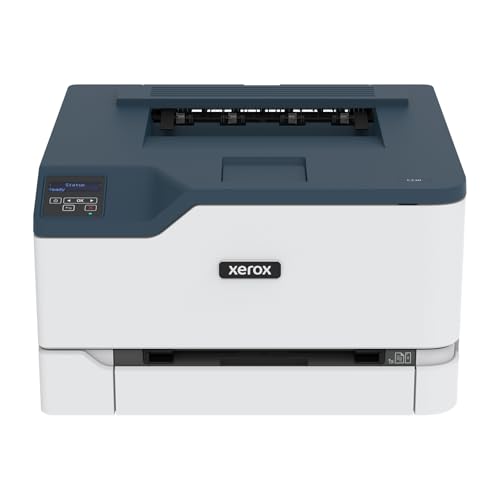
Ideal for home offices or small businesses, the Xerox C230dni Wireless Color Laser Printer offers seamless connectivity and ease of use for Mac users. With a quick setup via the Xerox Easy Assist App, you can get started without needing IT support. This printer’s built-in Wi-Fi supports Apple AirPrint, making printing from your devices a breeze. You’ll appreciate its advanced security features that protect your data while also being environmentally friendly, thanks to its ENERGY STAR certification and automatic 2-sided printing. Plus, using Genuine Xerox Supplies guarantees superior quality, backed by a standard one-year warranty.
Best For: Home offices or small businesses looking for a reliable, easy-to-use color laser printer with wireless capabilities.
Pros:
- Fast printing speed of up to 22 pages per minute.
- Supports a variety of connectivity options, including Apple AirPrint and Mopria.
- ENERGY STAR certified and features automatic 2-sided printing for eco-friendly use.
Cons:
- Limited to A4 paper size, which may not suit all printing needs.
- Requires Genuine Xerox Supplies for optimal performance, potentially increasing running costs.
- Standard one-year warranty may be shorter than some competitors, unless extended with specific conditions.
Canon imageCLASS MF465dw II Wireless Duplex Laser Printer

The Canon imageCLASS MF465dw II Wireless Duplex Laser Printer stands out as a top choice for Mac users seeking efficiency and versatility. With its 4-in-1 functionality, you can print, scan, copy, and fax effortlessly. Enjoy fast print speeds of up to 42 pages per minute and a first print time of just 5 seconds. The 5-inch color touchscreen allows for easy navigation and customization. You’ll love the wireless setup and compatibility with Apple AirPrint. Plus, the high-capacity toner guarantees quality prints while saving on replacements. With a 3-year limited warranty, you can trust its reliability for your printing needs.
Best For: The Canon imageCLASS MF465dw II Wireless Duplex Laser Printer is best for small businesses and home offices that require efficient and versatile printing solutions.
Pros:
- Fast print speeds of up to 42 pages per minute, enhancing productivity.
- 4-in-1 functionality allows for printing, scanning, copying, and faxing in one device.
- Easy mobile printing capabilities with compatibility for Canon PRINT app and Apple AirPrint.
Cons:
- Monochrome printing only, which may not suit users needing color prints.
- Initial setup may require some technical knowledge for wireless connectivity.
- Higher upfront cost compared to basic printers without advanced features.
Factors to Consider When Choosing Color Laser Printers for Mac
When choosing a color laser printer for your Mac, you’ll want to take into account several key factors. Confirm it’s compatible with macOS and offers reliable wireless connectivity. Additionally, evaluate print quality, speed, and the availability of toner cartridges to guarantee it meets your needs efficiently.
Compatibility With Macos
Choosing a color laser printer that works seamlessly with macOS can greatly enhance your printing experience. First, confirm the printer supports Apple AirPrint, allowing you to print wirelessly from your Mac devices without hassle. It’s vital to verify that the printer’s drivers are compatible with the latest version of macOS to prevent installation issues. Additionally, check for mobile printing capabilities that integrate well with macOS, like support for the Canon PRINT app. Easy wireless setup and connectivity options can simplify the connection process to your Mac. Finally, consider printers certified for macOS compatibility, as this can guarantee reliable performance and support, making your printing tasks smoother and more efficient.
Wireless Connectivity Options
How do you guarantee a hassle-free printing experience with your color laser printer? Look for wireless connectivity options that suit your needs. Built-in Wi-Fi lets you print from multiple devices without messy cables. Ascertain your printer supports mobile printing protocols like Apple AirPrint and Mopria, so you can easily print from your iPhone or iPad. Dual-band Wi-Fi, covering both 2.4GHz and 5GHz, enhances connection stability and speed, minimizing interference. If convenience is a priority, consider models with Wi-Fi Direct, allowing direct connections without a local network. Finally, opt for printers with easy wireless setup processes to simplify installation and get you printing in no time. These features will make your printing experience smooth and efficient.
Print Quality Standards
While wireless connectivity options enhance your printing experience, print quality standards are just as important when selecting a color laser printer for your Mac. Look for a printer with a high resolution, measured in dots per inch (dpi), as this indicates sharper and more detailed prints. Aim for a color depth of at least 24 bits per pixel (bpp) to enjoy over 16 million color variations. Advanced toner technologies can also make a difference, providing more vibrant and professional-looking documents. Additionally, make certain your printer can handle various media types, as this impacts the final output’s appearance. Finally, keep your printer’s firmware updated to maintain consistent print quality and optimize performance across different media options.
Speed and Efficiency
When selecting a color laser printer for your Mac, print speed and efficiency play essential roles in meeting your workflow demands. Many models can achieve up to 26 pages per minute (ppm) for both color and black-and-white documents, ensuring you stay productive. Consider printers with automatic duplex printing, which allows for double-sided printing without manual effort, further enhancing efficiency and saving paper. Fast first print times—often around 10 seconds—minimize waiting periods, making them perfect for busy environments. Additionally, a high-capacity paper tray that holds 250 sheets or more reduces the frequency of refills, allowing for uninterrupted printing. Finally, look for printers using high-yield toner cartridges, which maintain consistent quality and provide more prints per change.
Toner Cartridge Availability
Toner cartridge availability is essential for a smooth printing experience with your Mac. When selecting a color laser printer, make sure that the cartridges are easily accessible. Some printers only work with specific brand cartridges, which can limit your replacement options. Check if the printer supports standard or high-yield cartridges; high-yield options can lower your replacement frequency and overall costs. Also, consider the price of toner cartridges, as costs can vary greatly between manufacturers, impacting your total ownership expenses. Look for printers known for compatibility with third-party cartridges, offering potential savings if brand-specific cartridges are too pricey. Finally, verify any firmware requirements, as updates may be necessary for recognizing new or third-party cartridges, affecting usability.
Mobile Printing Features
As you explore color laser printers for your Mac, mobile printing features can greatly enhance your printing experience. Look for printers that support Apple AirPrint, allowing you to print directly from your Mac without needing extra drivers. Wireless printing capabilities, particularly dual-band Wi-Fi, let you print from anywhere within your network range, adding convenience. Additionally, some printers are compatible with third-party apps, giving you even more flexibility while on the go. Easy wireless setup is essential, as it simplifies connecting your Mac to the printer. Finally, consider models with touchscreen interfaces, as they provide direct access to mobile printing options, making it easier to manage print jobs and settings straight from the printer.
User-Friendly Interface
A user-friendly interface can make all the difference when choosing a color laser printer for your Mac. Look for models with an intuitive touchscreen or control panel that simplifies navigation, making it easy to access features. Customizable application libraries are a bonus, allowing you to quickly reach frequently used functions for better efficiency. Easy wireless setup options are essential, as they reduce the hassle of connecting the printer to your Mac or other devices. Verify the printer supports mobile printing capabilities, like Apple AirPrint, for seamless printing from your smartphone or tablet. Finally, clear user manuals or in-printer guidance are invaluable for troubleshooting and maximizing your printer’s functionality without needing extensive technical knowledge.