If you’re looking to boost your small business’s efficiency while keeping costs in check, ink tank printers might be your best bet. These printers offer high-capacity ink tanks, reducing the frequency of replacements and cutting down on waste. With options like the Epson EcoTank and HP Smart Tank, you can achieve both quality and affordability. But what features should you prioritize when selecting the right printer for your needs? Let’s explore some top contenders.
Epson EcoTank ET-4800 Wireless All-in-One Printer

The Epson EcoTank ET-4800 Wireless All-in-One Printer is perfect for small business owners who want to save on printing costs without sacrificing quality. With its cartridge-free printing and high-capacity ink tanks, you’ll enjoy significant savings and minimal waste. The EcoFit ink bottles make refilling a breeze, while Micro Piezo Heat-Free Technology guarantees sharp text and vibrant photos. Its high-resolution flatbed scanner and color display simplify navigation and document copying. Designed for home office environments, this versatile printer handles various paper types, making it an ideal choice for all your printing, scanning, and copying needs.
Best For: Small business owners looking for cost-effective printing solutions without compromising on quality.
Pros:
- Cartridge-free printing saves money and reduces waste.
- High-capacity ink tanks allow for less frequent refills.
- Versatile functionality includes printing, scanning, copying, and faxing.
Cons:
- Initial purchase price may be higher than traditional printers.
- Requires space for the larger EcoTank design.
- Limited compatibility with certain types of specialty paper.
HP Smart Tank 7602 Wireless All-in-One Ink Tank Printer
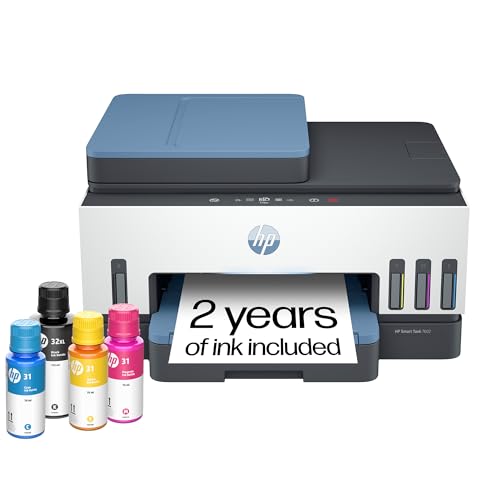
For small businesses seeking an efficient and cost-effective printing solution, the HP Smart Tank 7602 Wireless All-in-One Ink Tank Printer stands out as an ideal choice. This versatile machine lets you print, copy, scan, and fax, with impressive speeds of up to 15 pages per minute in black. You’ll love the two years of included ink, yielding up to 8,000 color pages, greatly cutting your costs. Thanks to its cartridge-free, mess-free refillable system, maintaining it is a breeze. Plus, with reliable Wi-Fi and HP’s security features, you can focus on your business without worrying about your printing needs.
Best For: Small businesses and home offices looking for an efficient, cost-effective, and multifunctional printing solution.
Pros:
- High-volume printing with 2 years of ink included, yielding up to 8,000 color pages.
- Versatile functions including printing, copying, scanning, and faxing with fast print speeds.
- Reliable connectivity options with self-healing Wi-Fi and HP app integration for mobile printing.
Cons:
- Initial setup may require time and technical knowledge for network configuration.
- Limited color print speed compared to some laser printers in the same price range.
- Bulkier design may require more desk space than compact printer options.
Epson EcoTank ET-2800 Wireless All-in-One Printer

Small businesses seeking a cost-effective printing solution will find the Epson EcoTank ET-2800 Wireless All-in-One Printer an ideal choice. With its innovative cartridge-free system, you can replace approximately 80 individual cartridges with just one set of ink bottles, drastically reducing waste. Enjoy vivid prints thanks to Micro Piezo Heat-Free Technology, with a print speed of up to 10 pages per minute. Plus, you’ll save up to 90% on replacement ink costs, as these bottles yield up to 4,500 pages in black and 7,500 in color. You’ll even get up to two years of ink included, minimizing frustrations.
Best For: Small businesses seeking a cost-effective and environmentally friendly printing solution.
Pros:
- Innovative cartridge-free system reduces waste by replacing approximately 80 individual cartridges with a single set of ink bottles.
- Cost-efficient with up to 90% savings on replacement ink, yielding up to 4,500 pages in black and 7,500 pages in color.
- User-friendly with up to two years of ink included, minimizing the chances of running out of ink unexpectedly.
Cons:
- Print speed of up to 10 pages per minute may not be sufficient for high-volume printing needs.
- Limited features compared to more expensive all-in-one printers that offer advanced functionalities.
- Initial setup may take longer due to filling the ink tanks compared to traditional cartridge systems.
HP Smart Tank 5000 Wireless All-in-One Ink Tank Printer

Designed with high-volume printing in mind, the HP Smart Tank 5000 Wireless All-in-One Ink Tank Printer is perfect for families or small businesses that require vibrant color documents and crisp text regularly. You’ll enjoy cartridge-free, refillable ink, plus two years of Original HP Ink included. With print speeds reaching 10 pages per minute in black and 5 in color, you’ll keep productivity high. The HP app simplifies printing, scanning, and copying from your smartphone. Plus, reliable self-healing Wi-Fi and HP Wolf Essential Security guarantee a secure connection. Experience low-cost, high-volume printing, making this printer a top choice for your needs.
Best For: Families and small businesses that require high-volume, vibrant color printing at a low cost.
Pros:
- Cartridge-free, refillable ink system allows for lower printing costs and less waste.
- Quick setup and user-friendly HP app make printing, scanning, and copying from smartphones effortless.
- Reliable self-healing Wi-Fi ensures a stable connection and minimizes disruptions during printing.
Cons:
- Print speeds may be slower for color documents compared to black and white.
- Initial setup may require some technical knowledge, particularly for connecting to Wi-Fi.
- Larger footprint compared to traditional ink cartridge printers, which may require more space.
Epson EcoTank ET-2800 Wireless All-in-One Printer

The Epson EcoTank ET-2800 Wireless All-in-One Printer stands out as the perfect choice for small businesses looking to cut costs without sacrificing quality. With cartridge-free printing, you’ll enjoy high-capacity ink tanks, allowing you to print up to 4,500 pages in black and 7,500 in color—equivalent to about 90 individual cartridges. Its EcoFit ink bottles make refilling a breeze, and the Micro Piezo Heat-Free Technology guarantees sharp text and vibrant graphics. Plus, with two years of ink included, built-in scanning and copying, and a two-year warranty, you can feel assured in your investment while reducing environmental impact.
Best For: The Epson EcoTank ET-2800 is best for small businesses and home users looking for cost-effective and sustainable printing solutions.
Pros:
- Cartridge-free design significantly reduces ink costs and waste.
- High-capacity ink tanks allow for extensive printing without frequent refills.
- Built-in scanner and copier add versatility for various office tasks.
Cons:
- Initial purchase price may be higher compared to traditional printers.
- Larger footprint may not be ideal for very small workspaces.
- Limited advanced features compared to higher-end models targeted at professional users.
HP Smart Tank 5101 Wireless All-in-One Ink Tank Printer

If your family or small business has high-volume printing needs, the HP Smart Tank 5101 Wireless All-in-One Ink Tank Printer is an ideal choice. It delivers fast print speeds of up to 12 pages per minute in black and 5 pages in color, plus it offers borderless printing. You’ll appreciate that it includes up to 2 years of ink, yielding up to 6,000 pages right out of the box. With its wireless capabilities and user-friendly app, printing and scanning becomes a breeze. Quick setup and reliable connectivity make this printer perfect for efficient, cost-effective operations.
Best For: Families or small businesses with high-volume printing needs looking for a cost-effective and efficient solution.
Pros:
- Fast print speeds of up to 12 pages per minute (black) and 5 pages per minute (color).
- Includes up to 2 years of ink, yielding up to 6,000 pages immediately.
- User-friendly app and quick setup with reliable wireless connectivity.
Cons:
- Wireless capabilities are compatible with 2.4 GHz networks only.
- Borderless printing may consume more ink than standard printing.
- Limited to basic functions of print, copy, and scan without advanced features like faxing.
Epson EcoTank ET-4950 Wireless All-in-One Printer
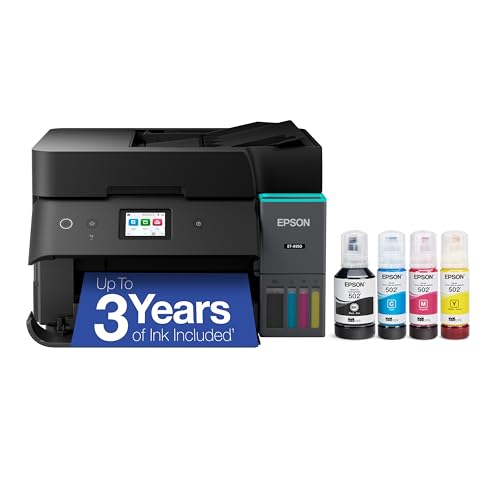
For small businesses looking to minimize printing costs without sacrificing quality, the Epson EcoTank ET-4950 Wireless All-in-One Printer stands out with its impressive capability of printing up to 6,600 black and 5,500 color pages on a single set of ink bottles. You’ll save up to 90% on replacement ink compared to traditional cartridges, with each set equating to around 80 cartridges. With fast print speeds of 18 black and 9 color ISO ppm and a high resolution of 4800 x 1200 dpi, you’ll achieve exceptional quality. Plus, the user-friendly design makes refilling and navigation a breeze.
Best For: Small businesses seeking to reduce printing costs while maintaining high-quality output.
Pros:
- Cost-effective: Save up to 90% on ink replacement costs compared to traditional cartridges.
- High-capacity printing: Print up to 6,600 pages in black and 5,500 pages in color on a single set of ink bottles.
- User-friendly features: Includes a color touchscreen and easy refilling with uniquely keyed EcoFit bottles.
Cons:
- Initial investment: Higher upfront cost compared to conventional printers.
- Size: Larger footprint may require more space in a home or office environment.
- Dependence on specific ink: Optimal performance is reliant on the use of genuine Epson ink.
HP Smart Tank 6001 Wireless All-in-One Printer

Looking for a versatile printing solution for your small business? The HP Smart Tank 6001 Wireless All-in-One Printer has you covered with its cartridge-free, refillable ink system. You can print, scan, and copy, plus enjoy automatic two-sided printing. With crisp text and vivid colors, you’ll achieve great print quality at speeds of up to 12 pages per minute for black and 7 for color. It comes with two years of ink, allowing for up to 8,000 color pages! Plus, HP’s security features keep your data safe, making this printer a trustworthy choice for your busy office.
Best For: Small businesses and home offices looking for a reliable, high-volume printing solution with low operating costs.
Pros:
- Cartridge-free refillable ink system saves money and reduces waste.
- High print yield of up to 8,000 color pages ensures long-lasting use between refills.
- Built-in security features protect sensitive data during printing.
Cons:
- Initial setup may take longer due to the refillable ink system.
- Limited color print speed compared to some laser printers.
- Dependence on HP Smart app for full functionality may not appeal to all users.
HP Smart Tank Plus 651 Wireless All-in-One Printer

The HP Smart Tank Plus 651 Wireless All-in-One Printer stands out as an excellent choice for small businesses and families that require high-volume printing without breaking the bank. It prints up to 11 pages per minute in black and 5 in color, making it perfect for busy environments. With two years of included ink, you can produce up to 8,000 color pages or 6,000 black pages at a low cost. Enjoy all-in-one functionality, including copying, scanning, and faxing. Plus, its reliable Wi-Fi and intuitive app guarantee quick setup and ease of use for your printing needs.
Best For: The HP Smart Tank Plus 651 Wireless All-in-One Printer is best for families and small businesses that require efficient, high-volume printing at an economical price.
Pros:
- Cost-efficient with 2 years of ink included, allowing for high-volume color and black printing.
- All-in-one functionality provides printing, copying, scanning, and faxing capabilities in one device.
- User-friendly with reliable Wi-Fi and an intuitive app for easy setup and operation.
Cons:
- Print speed may be slower compared to some laser printers, especially for color documents.
- Initial setup could be complex for users unfamiliar with wireless printers.
- Bulkiness may take up more space than smaller, traditional printers.
Canon MegaTank MAXIFY GX2020 All-in-One Wireless Color Printer

If you’re a small business owner seeking an efficient and cost-effective printing solution, the Canon MegaTank MAXIFY GX2020 All-in-One Wireless Color Printer stands out with its impressive printing capacity. You can print up to 3,000 black and white pages and 3,000 color pages with just one set of inks. Its compact design fits perfectly on your desk, while the 2.7” LCD color touchscreen simplifies navigation. Enjoy automatic features like 2-sided printing and a 35-sheet Auto Document Feeder for added convenience. Plus, the wireless functionality allows you to print, scan, and copy from anywhere in your home or office.
Best For: Small business owners looking for a reliable and cost-effective all-in-one printing solution.
Pros:
- Compact design fits well on any desktop, saving space.
- High printing capacity, allowing for up to 6,000 pages with a single set of inks.
- Wireless connectivity enables convenient printing, scanning, and copying from anywhere.
Cons:
- Initial investment cost may be higher compared to basic printers.
- Limited to basic functions; advanced features found in higher-end models may be lacking.
- Replacement ink bottles may be costly if not purchased in bulk.
Factors to Consider When Choosing Ink Tank Printers for Small Business
When choosing an ink tank printer for your small business, consider your specific printing volume needs and how often you’ll need to replace the ink. You’ll also want to evaluate the print quality and connectivity options available to guarantee they meet your expectations. Additionally, think about any extra features that could enhance your workflow and efficiency.
Printing Volume Requirements
Understanding your small business’s printing volume requirements is essential for selecting the right ink tank printer. Start by evaluating your average monthly print volume, as ink tank printers excel in handling high-volume needs efficiently. Look for models that boast impressive ink yields, like those producing up to 6,000 black pages or 8,000 color pages per set—this means fewer refills. Speed matters too; some printers can churn out 15 black pages per minute and 9 color pages, boosting productivity. Don’t forget the automatic document feeder (ADF) capacity; a 35-page ADF can streamline multi-page tasks. Ultimately, consider your long-term ink costs—choosing a printer designed for high-volume printing can save you up to 90% compared to traditional cartridges.
Cost of Replacement Ink
Selecting an ink tank printer for your small business means not just evaluating printing volume but also considering the cost of replacement ink. Ink tank printers can save you up to 90% on ink costs compared to traditional cartridges, which is a game-changer for high-volume printing. Many models come with high-capacity ink bottles that yield thousands of pages—up to 8,000 in color or 6,000 in black. Plus, the cartridge-free design considerably reduces waste, replacing around 80 individual cartridges with just one set. Often, you’ll find that your printer includes up to two years’ worth of ink in the box, easing your upfront costs and ensuring you’re never caught out of ink during vital projects.
Print Quality Expectations
Print quality is a crucial factor in choosing an ink tank printer for your small business, as it directly impacts the professionalism of your documents and marketing materials. Look for printers with higher DPI (dots per inch) values, as these deliver sharper text and vibrant colors. Advanced printing technologies like Micro Piezo or Heat-Free enhance print quality by ensuring precise ink placement. It’s also important to evaluate consistency in color reproduction; many ink tank printers offer vivid, detailed prints that meet your high expectations. Additionally, pay attention to printing speed, measured in pages per minute (PPM), which affects your overall productivity. An effective ink tank system minimizes ink waste and maintains print clarity, ensuring quality lasts over time.
Connectivity Options Available
When choosing an ink tank printer for your small business, connectivity options play an essential role in guaranteeing seamless operations. Look for printers with reliable wireless connectivity, such as dual-band Wi-Fi, to enhance network stability and speed. If you experience high printing volumes, consider models that support Ethernet connections for a more stable and secure setup. Mobile printing capabilities are also vital, allowing you to print directly from smartphones and tablets using compatible apps for added convenience. Additionally, printers with automatic updates for Wi-Fi connectivity can help maintain a consistent connection and resolve potential issues automatically. Finally, confirm compatibility with various operating systems and devices for smooth integration into your existing technology infrastructure.
Additional Functionality Needs
How can you guarantee that your ink tank printer meets your business’s diverse needs? Start by choosing a multifunctional model that can print, scan, copy, and fax. This versatility streamlines your office tasks and saves time. Automatic document feeders (ADF) are another must-have; they allow you to scan or copy multiple pages without manual effort, boosting efficiency. Look for printers that support automatic two-sided printing to cut paper costs, especially if you have high-volume printing. Additionally, wireless connectivity features let your team access the printer from different office locations, enhancing flexibility. Finally, a user-friendly interface and app integration will make managing tasks from smartphones or tablets a breeze, ultimately improving your overall productivity.
Space and Design Considerations
Choosing the right ink tank printer for your small business goes beyond just functionality; it also involves careful consideration of space and design. Start by evaluating the printer’s physical dimensions to guarantee it fits comfortably in your workspace, factoring in both horizontal and vertical space. Opt for compact designs or printers with vertical printing options to maximize desk space. Consider the printer’s placement in relation to power outlets and network connections to minimize cable clutter. Accessibility is key, so verify the control panel and paper trays are easy to reach without frequent movement. Finally, choose a printer with built-in wireless connectivity to reduce additional cables and enhance mobility throughout your office.
Ease of Use
To guarantee a smooth workflow in your small business, it’s vital to prioritize ease of use when selecting an ink tank printer. Look for models with user-friendly interfaces, like color touchscreens, which simplify navigation for all staff. Choose printers that offer easy setup processes, allowing quick integration without extensive training. A straightforward ink refill system, such as cartridge-free designs, can reduce mess during maintenance. Mobile printing capabilities are also important, letting employees print directly from their smartphones or tablets for added convenience. Finally, consider printers that include intuitive apps to facilitate printing, scanning, and copying, streamlining tasks and boosting productivity. Selecting a printer with these features guarantees your team remains efficient and focused on their core responsibilities.
Warranty and Support Services
When investing in an ink tank printer for your small business, warranty and support services play an essential role in ensuring your printing operations run smoothly. You’ll want to evaluate the length and terms of the warranty, as these can greatly affect your long-term maintenance costs. Look for printers that offer robust customer support, including technical assistance and troubleshooting, to reduce downtime during critical tasks. Some manufacturers even provide on-site support or extended warranty options, which can be a game-changer if you rely heavily on printing. Make sure the warranty covers damage from specific causes, like power surges. Finally, consider warranties that include ink or print head performance coverage to maintain consistent print quality without extra expenses.