If you’re considering a new printer for your home or office, the latest EcoTank models might be your best bet. These printers not only save you money with their cartridge-free systems, but they also help reduce environmental impact. With options like the Epson EcoTank ET-2800 and HP Smart Tank 7602, you can enjoy high-capacity ink tanks and hassle-free wireless connectivity. But which model truly stands out in 2025? Let’s explore the top contenders.
Epson EcoTank ET-2800 Wireless All-in-One Printer

The Epson EcoTank ET-2800 Wireless All-in-One Printer is perfect for anyone seeking an economical solution for home printing. It’s designed for your basic printing, scanning, and copying needs, making it incredibly versatile. With Micro Piezo Heat-Free Technology, you’ll enjoy vivid, detailed prints at speeds up to 10 pages per minute. Say goodbye to traditional cartridges; this printer uses a cartridge-free system, replacing about 80 cartridges with just one set of ink bottles. You can save up to 90% on ink costs, plus get up to two years’ worth of ink included, minimizing any out-of-ink frustrations.
Best For: Families or individuals looking for an economical and efficient all-in-one printer for basic home printing, scanning, and copying needs.
Pros:
- Cartridge-free system significantly reduces environmental impact and printing costs.
- High yield ink bottles can produce thousands of pages, providing excellent cost efficiency.
- Includes up to two years of ink in the box, minimizing the hassle of frequent replacements.
Cons:
- Print speed of up to 10 pages per minute may be slower compared to some other printers on the market.
- Limited advanced features may not meet the needs of users requiring professional-level printing or high-volume output.
- Wireless connectivity issues may arise depending on the home network configuration.
Epson EcoTank ET-4800 Wireless All-in-One Printer

Designed for busy home office users, the Epson EcoTank ET-4800 Wireless All-in-One Printer stands out with its cartridge-free printing system. You’ll appreciate the high-capacity ink tanks and EcoFit bottles that make refilling a breeze. With Micro Piezo Heat-Free Technology, your prints come out sharp and vibrant, whether it’s text or photos. Plus, this versatile printer includes a scanner, copier, and fax, complete with a high-resolution flatbed scanner and a color display for easy navigation. By choosing the ET-4800, you’re not only saving money but also reducing cartridge waste, making it an eco-friendly option for your printing needs.
Best For: Busy home office users looking for a cost-effective and eco-friendly printing solution.
Pros:
- Cartridge-free printing reduces waste and saves money on ink.
- High-resolution scanning and copying capabilities enhance document quality.
- Versatile all-in-one functionality includes printing, scanning, copying, and faxing.
Cons:
- Initial cost may be higher compared to traditional printers.
- Requires space for the larger tank system compared to compact cartridge models.
- Limited compatibility with certain specialty paper types may restrict printing options.
Epson EcoTank ET-2800 Wireless All-in-One Printer

For families or individuals seeking an efficient and cost-effective printing solution, the Epson EcoTank ET-2800 Wireless All-in-One Printer stands out with its cartridge-free design. This printer features high-capacity ink tanks and EcoFit ink bottles for easy refills. With Micro Piezo Heat-Free Technology, you’ll enjoy sharp text and vibrant color graphics. You can save up to 90% on ink costs, printing up to 4,500 pages in black and 7,500 in color—equivalent to about 90 cartridges! Plus, its built-in scanner and copier add to its versatility, making it a reliable choice for home printing needs while reducing environmental waste.
Best For: Families or individuals looking for a cost-effective and environmentally friendly printing solution.
Pros:
- Cartridge-free design significantly reduces printing costs, saving up to 90% on ink.
- High-capacity ink tanks allow for extensive printing, up to 4,500 pages in black and 7,500 pages in color.
- Built-in scanner and copier enhance functionality, making it a versatile all-in-one device.
Cons:
- Initial cost may be higher compared to traditional printers that use cartridges.
- Ink tank refills may require a bit more maintenance than standard cartridge replacements.
- Limited advanced features compared to higher-end printers, which may not suit professional users.
Epson EcoTank ET-4950 Wireless All-in-One Color Supertank Printer
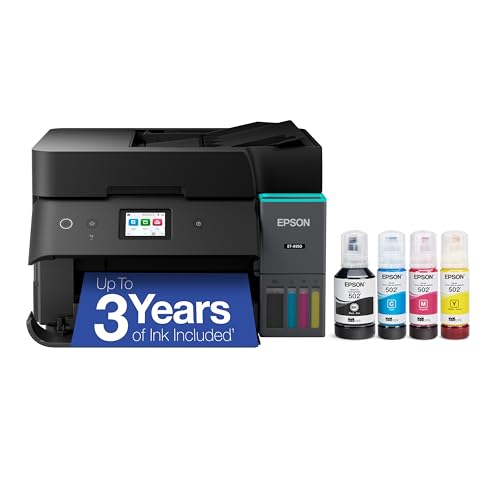
Looking for a printer that combines high-quality output with incredible cost efficiency? The Epson EcoTank ET-4950 Wireless All-in-One Color Supertank Printer is your answer. With up to three years of ink included, you can print an astonishing 6,600 pages in black and 5,500 in color. You’ll save up to 90% on replacement ink bottles compared to traditional cartridges, greatly reducing plastic waste. Enjoy fast print speeds and exceptional quality with a resolution of 4800 x 1200 dpi. Its user-friendly design, equipped with a 2.4″ touchscreen and wireless printing support, makes it a fantastic addition to any workspace.
Best For: The Epson EcoTank ET-4950 is best for small businesses or home offices that require high-quality printing and want to save on ink costs while reducing environmental impact.
Pros:
- Cost Efficiency: Save up to 90% on ink replacement costs compared to traditional cartridges.
- High Print Quality: Delivers exceptional prints with a resolution of 4800 x 1200 dpi.
- User-Friendly Features: Equipped with a 2.4″ color touchscreen and supports wireless mobile printing.
Cons:
- Initial Cost: Higher upfront cost compared to standard inkjet printers.
- Size: The printer may require more space due to its larger design for the EcoTank system.
- Ink Availability: Only genuine Epson ink is recommended, which may limit options for third-party alternatives.
Epson EcoTank ET-4950 Wireless All-in-One Supertank Printer

The Epson EcoTank ET-4950 Wireless All-in-One Supertank Printer stands out as an ideal choice for busy professionals and small businesses who need high-volume printing without the hassle of constant ink replacements. With refillable ink tanks that last up to three years, you can print 6,600 pages in black and 5,500 in color, saving up to 90% on ink costs. Its fast print speeds, auto duplexing, and auto document feeder enhance productivity. Plus, the high print resolution of 4800 x 1200 dpi guarantees stunning quality. Embrace eco-friendliness and enjoy mobile printing convenience with this exceptional all-in-one solution.
Best For: Busy professionals and small businesses seeking high-volume printing solutions with minimal ink replacement hassle.
Pros:
- Cost-efficient: Saves up to 90% on ink costs with refillable tanks that last up to three years.
- High productivity: Fast print speeds of 18 black and 9 color ISO ppm, along with auto duplex printing and an auto document feeder.
- Exceptional quality: Delivers high print resolution of 4800 x 1200 dpi for impressive photo and text output.
Cons:
- Initial investment: Higher upfront cost compared to traditional cartridge printers.
- Size: May occupy more space than standard compact printers.
- Limited compatibility: Best performance achieved with genuine Epson ink, which may restrict third-party ink options.
HP Smart Tank 5000 Wireless All-in-One Ink Tank Printer

Families with high-volume printing needs will find the HP Smart Tank 5000 Wireless All-in-One Ink Tank Printer an exceptional choice. This versatile printer, scanner, and copier comes with two years of Original HP Ink, ensuring you won’t run out anytime soon. With print speeds of up to 10 pages per minute for black and 5 pages for color, you’ll tackle any project quickly. The easy-access, cartridge-free design simplifies refills, while the HP app makes printing from your smartphone effortless. Plus, the self-healing Wi-Fi and robust security features keep your connection stable and your data safe.
Best For: Families with high-volume color document printing needs will benefit from the HP Smart Tank 5000 Wireless All-in-One Ink Tank Printer.
Pros:
- Cartridge-free, refillable design reduces waste and simplifies ink replacement.
- Quick setup and mobile app support make printing, scanning, and copying convenient from smartphones.
- Low-cost printing with up to 6,000 pages included ensures high-volume printing without frequent refills.
Cons:
- Print speeds may be slower compared to some higher-end models for high-demand printing tasks.
- Initial cost may be higher than traditional cartridge printers, despite long-term savings on ink.
- Limited advanced features for professional photo printing compared to dedicated photo printers.
Epson EcoTank ET-2400 Wireless All-in-One Printer

For budget-conscious home users seeking a reliable all-in-one solution, the Epson EcoTank ET-2400 Wireless All-in-One Printer stands out with its innovative cartridge-free printing system. This printer offers printing, copying, and scanning capabilities, making it a versatile addition to your office. With both wired and wireless connectivity, you’ll enjoy the convenience of a rear-feed input tray that holds up to 100 sheets. You can save up to 90% on ink costs, printing up to 4,500 pages in black and 7,500 in color. Plus, it reduces cartridge waste, supporting a greener environment for everyone.
Best For: Budget-conscious home users looking for a reliable all-in-one printer with cost-effective and eco-friendly features.
Pros:
- Cartridge-Free Printing: Eliminates the need for traditional ink cartridges, significantly reducing printing costs.
- High Page Yield: Capable of printing up to 4,500 pages in black and 7,500 pages in color from one set of ink bottles.
- Versatile Functionality: Offers printing, copying, and scanning capabilities, making it a comprehensive solution for home office needs.
Cons:
- Initial Cost: The upfront cost may be higher compared to traditional printers that use cartridges.
- Ink Bottle Refills: Users may need to purchase ink bottles separately after the initial supply runs out, which could be inconvenient.
- Limited Paper Capacity: The rear-feed input tray holds only 100 sheets, which may require more frequent reloading for larger print jobs.
Epson EcoTank ET-2850 Wireless All-in-One Supertank Printer
Looking for an efficient and eco-friendly printing solution? The Epson EcoTank ET-2850 Wireless All-in-One Supertank Printer is perfect for you. With cartridge-free printing, you can save up to 90% on replacement ink, using high-capacity tanks instead of traditional cartridges. Enjoy vibrant prints at a resolution of 4800 x 1200 dpi, and print up to 7,500 pages in black and 6,000 in color with ink included for up to two years. Its sleek design and wireless capabilities, including voice-activated printing, make it easy to use. Say goodbye to cartridge waste and embrace a greener way to print.
Best For: Users who want an eco-friendly printing solution with low running costs and high-capacity ink tanks.
Pros:
- Cartridge-free design allows for significant savings on ink costs, up to 90%.
- High print yields of 7,500 pages in black and 6,000 pages in color, reducing the frequency of refills.
- Wireless connectivity and voice-activated printing make it convenient to use with smart devices.
Cons:
- Initial investment may be higher compared to traditional inkjet printers.
- Limited media handling capacity with a maximum input sheet capacity of 100 sheets.
- Dependence on genuine Epson ink for optimal performance may limit refilling options.
Epson EcoTank Photo ET-8550 Wireless All-in-One Supertank Printer

The Epson EcoTank Photo ET-8550 Wireless All-in-One Supertank Printer is perfect for creative professionals and avid photographers who demand high-quality prints without the hassle of traditional ink cartridges. With print speeds up to 16 pages per minute, it’s ideal for various projects, from stunning photos to informative flyers. The printer uses ink bottles, ensuring vivid colors and eliminating cartridge waste. Enjoy versatile connectivity options, including wireless, Ethernet, and USB, plus mobile and voice-activated printing through popular apps. Its user-friendly 4.3-inch color touchscreen makes navigation a breeze, allowing you to print from virtually anywhere, enhancing your productivity.
Best For: Creative professionals and avid photographers seeking high-quality prints without the hassle of traditional ink cartridges.
Pros:
- Vivid Colors: Utilizes ink bottles for vibrant print quality and eliminates cartridge waste.
- Versatile Connectivity: Offers multiple connection options, including wireless, Ethernet, and USB.
- User-Friendly Interface: Features a 4.3-inch color touchscreen for easy navigation and operation.
Cons:
- Initial Cost: Higher upfront cost compared to traditional cartridge printers.
- Size: Larger footprint may not be suitable for small workspaces.
- Ink Refilling: Requires regular refilling of ink bottles, which may be less convenient for some users.
HP Smart Tank 7602 Wireless All-in-One Printer
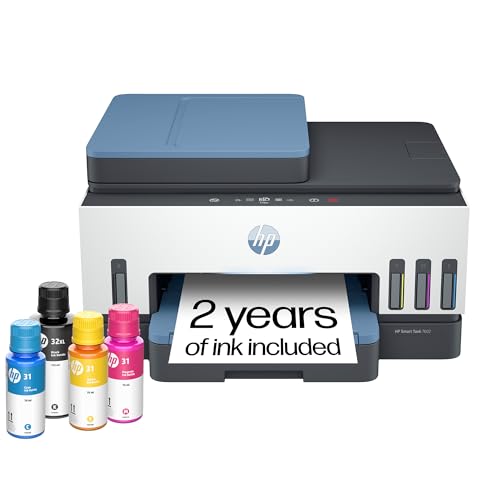
Ideal for home office setups, the HP Smart Tank 7602 Wireless All-in-One Printer combines efficiency and convenience with its cartridge-free refillable system. You’ll appreciate the included two years of ink, allowing you to print up to 8,000 color pages or 6,000 black pages without constant refills. With capabilities to print, scan, copy, and fax, it supports two-sided printing and features a 35-page auto document feeder. Its reliable Wi-Fi and HP app integration let you manage tasks directly from your smartphone. Plus, HP Wolf Essential Security guarantees your data stays safe, making it a trusted choice for families and small businesses.
Best For: Individuals and small businesses looking for a cost-effective, high-volume printer that combines multiple functions in one device.
Pros:
- Cartridge-free system reduces the hassle of frequent ink replacements and lowers printing costs.
- Fast printing speeds of up to 15 pages per minute for black and 9 pages per minute for color enhance productivity.
- Versatile features including scanning, copying, and faxing, along with a 35-page auto document feeder.
Cons:
- Initial cost may be higher compared to traditional printers, although it saves money on ink in the long run.
- Wi-Fi connectivity may experience occasional disruptions depending on network strength.
- Bulkier design may require more space compared to compact printers.
Factors to Consider When Choosing Eco Tank Inkjet Printers for PC
When choosing an eco tank inkjet printer for your PC, you should consider several key factors. Print quality, ink cost efficiency, and connectivity options can greatly impact your printing experience. Don’t forget to evaluate user-friendly features and the environmental impact to make the best choice for your needs.
Print Quality Considerations
Print quality is a crucial factor in choosing EcoTank inkjet printers for your PC, as it directly impacts the clarity and vibrancy of your documents and images. Look for models that offer high resolutions, like 4800 x 1200 dpi, to guarantee sharp text and colorful graphics. The printing technology, such as Micro Piezo Heat-Free, enhances quality by providing consistent ink placement and minimizing clogging. Many EcoTank printers also allow you to print borderless photos, delivering professional-quality results without margins. Additionally, if you opt for models with pigment-based inks, you’ll get long-lasting prints that resist fading and water damage better than dye-based inks. These features collectively guarantee superior print quality for your needs.
Ink Cost Efficiency
Considering the rising costs of printing, EcoTank inkjet printers stand out for their remarkable ink cost efficiency. By utilizing a cartridge-free system, you can replace individual ink bottles, yielding up to 80 cartridges’ worth of ink per set. This means you could save up to 90% on replacement ink compared to traditional cartridges, making EcoTank printers ideal for high-volume printing. With many models offering page yields of 4,500 pages in black and 7,500 pages in color, your per-page costs lower considerably. Plus, the initial purchase often includes enough ink to last two to three years, reducing frequent purchases. Easy refilling of high-capacity tanks minimizes waste and long-term expenses, making EcoTank an economical choice for your printing needs.
Connectivity Options Available
EcoTank inkjet printers not only excel in ink cost efficiency but also offer a variety of connectivity options that cater to modern printing needs. You can easily connect via wireless (Wi-Fi), allowing you to print from multiple devices without messy cables. If you prefer a more stable connection, some models come with Ethernet support, perfect for busy offices. Mobile printing is a breeze too; with apps like Epson Smart Panel and Apple AirPrint, you can print directly from your smartphone or tablet. Many printers also feature voice-activated printing, letting you start jobs with your smart assistant. Plus, remote printing options enable you to send documents via email or cloud services, making your printing experience even more convenient.
User-Friendly Features
How can you guarantee that your EcoTank inkjet printer meets your needs? Look for models with a color display, making navigation and operation a breeze. Wireless connectivity options, such as Wi-Fi and mobile printing, are essential for convenient printing from various devices. Opt for printers featuring a cartridge-free system with refillable ink tanks, simplifying refills and reducing ink change frequency. Additional features like auto document feeders (ADF) and duplex printing can streamline your tasks for multi-page jobs, enhancing efficiency. Finally, evaluate user-friendly interfaces and mobile apps that allow for remote printing and scanning, offering flexibility and ease of use. Prioritizing these features can greatly improve your printing experience and guarantee you get the most out of your EcoTank printer.
Environmental Impact Assessment
When selecting an EcoTank inkjet printer, it’s important to weigh the environmental benefits alongside user-friendly features. These printers utilize a cartridge-free system, drastically cutting down on plastic waste by replacing about 80 individual cartridges with a set of ink bottles. Many EcoTank models boast impressive ink yields, allowing you to print up to 7,500 pages in color and 4,500 in black. This means fewer ink replacements and less waste. Plus, most come with enough ink to last up to two years, reducing packaging waste and frequent purchases. By choosing EcoTank technology, you’ll not only enhance your printing efficiency but also considerably lower your carbon footprint, promoting sustainable practices in your everyday life.
Print Speed Evaluation
While evaluating your options, print speed is an essential factor that can make a significant difference in your overall printing experience. EcoTank models typically offer speeds ranging from 10 to 18 pages per minute (ppm) for both black and color printing. Don’t forget to assess the ISO print speed, as it provides a standardized measurement for normal conditions. If you have high-volume printing needs, higher print speeds can greatly enhance your workflow efficiency. Some EcoTank printers even feature auto duplex printing, saving you time on manual double-sided printing. By evaluating print speed in conjunction with ink yield and cost efficiency, you’ll be better equipped to find the perfect printer for your specific needs.
Versatility for Various Tasks
Evaluating print speed is just one part of the equation when selecting an EcoTank inkjet printer. These printers excel in versatility, handling printing, scanning, and copying, making them perfect for both home and office tasks. Many models support automatic duplex printing, which saves time and reduces paper waste. You’ll appreciate the high-capacity ink tanks that can yield thousands of pages—up to 6,600 in black and 7,500 in color—before needing a refill. Additionally, EcoTank printers offer various connectivity options like Wi-Fi and mobile printing, ensuring seamless integration into your workflow. With user-friendly interfaces, including color touchscreens, maneuvering through these printers becomes a breeze, enhancing your overall printing experience.
Warranty and Support Services
Choosing an EcoTank inkjet printer involves more than just print quality and speed; warranty and support services are essential factors that can greatly impact your experience. A warranty typically covers parts and labor for one to three years, giving you peace of mind against manufacturing defects. Many EcoTank printers also offer extended warranty options upon registration, which may include full unit replacement under specific conditions. Make sure to check the warranty terms for ink-specific coverage, as using third-party inks might void it. Additionally, robust support services, including online resources, customer service hotlines, and dedicated forums, can help you troubleshoot issues quickly, enhancing your overall satisfaction with the printer.