As you look to enhance your internet experience in 2025, choosing the right cellular modem for your PC is vital. With options tailored for various needs, from home use to business applications, you’ll find models that offer impressive speeds and reliability. But how do you know which modems truly stand out? Let’s explore the top contenders that promise to keep you connected and ready for anything.
NETGEAR 4G LTE Broadband Modem (LM1200)
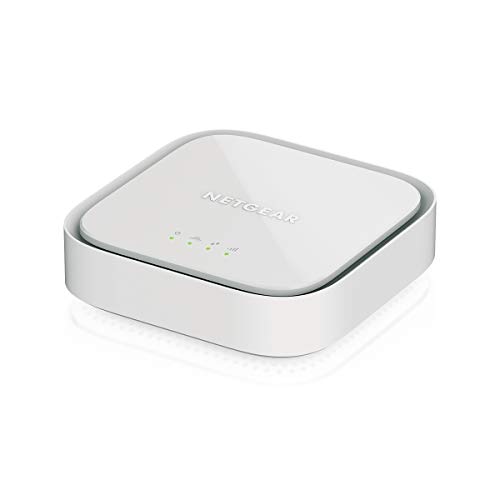
If you’re looking for a reliable cellular modem that offers seamless internet connectivity, the NETGEAR 4G LTE Broadband Modem (LM1200) is an excellent choice. It’s certified with AT&T, T-Mobile, and Verizon, ensuring compatibility with major carriers, though it doesn’t work with Sprint. You’ll need a Nano SIM card and a compatible BYOD data plan to get started. This modem serves as both a primary internet connection and a backup, automatically switching to LTE for uninterrupted service. With download speeds up to 150Mbps and two Gigabit Ethernet ports, it connects effortlessly to your devices, keeping you online even during outages.
Best For: Users seeking a reliable and versatile cellular modem for home or remote work, especially those needing backup internet solutions.
Pros:
- Compatible with major carriers like AT&T, T-Mobile, and Verizon.
- Fast download speeds of up to 150Mbps, providing a smooth internet experience.
- Automatic failover support ensures uninterrupted connectivity during outages.
Cons:
- Not compatible with Sprint, limiting carrier options for some users.
- Requires a Nano SIM card and activation of a BYOD data plan, which may involve additional setup.
- Performance may vary depending on proximity to the nearest cell tower.
Cudy AC1200 Dual Band Unlocked 4G LTE Modem Router
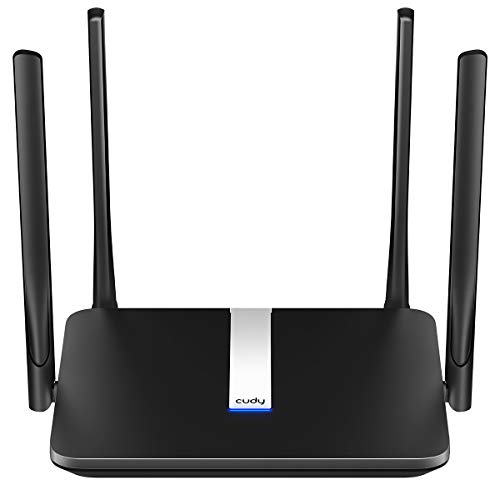
The Cudy AC1200 Dual Band Unlocked 4G LTE Modem Router stands out as an excellent choice for users who demand reliable internet connectivity on the go. With download speeds up to 150Mbps, it supports major 4G providers in North America. You can enjoy ultra-fast Wi-Fi with both 2.4GHz and 5GHz bands, reaching speeds of 867Mbps on the latter. Its four high-gain antennas boost sensitivity and signal quality, ensuring a strong connection. Plus, built-in VPN clients keep your data secure. Setting it up is simple: just insert your SIM card and enter the PIN on the web configuration page.
Best For: Users who need reliable, high-speed internet connectivity while traveling or in areas with limited fixed broadband access.
Pros:
- Supports major 4G providers in North America, ensuring compatibility for diverse users.
- Dual-band Wi-Fi capabilities provide ultra-fast speeds of up to 867Mbps on the 5GHz band, enhancing streaming and gaming experiences.
- Built-in VPN clients offer secure online data transport, protecting user privacy.
Cons:
- Dependent on SIM card availability, which may not be convenient for all users.
- Limited to 4G speeds, which may not meet the demands of users needing faster connections in areas with 5G availability.
- May require technical knowledge for optimal setup and configuration, potentially challenging for non-tech-savvy users.
Peplink Cellular Router MAX BR1 Mini Core

For businesses or individuals needing reliable and secure connectivity, the Peplink Cellular Router MAX BR1 Mini Core stands out with its high-speed performance of up to 150 Mbps on a single LTE modem. This compact router supports up to 60 users, ensuring everyone stays connected. It features three Gigabit Ethernet LAN ports and a configurable WAN port, giving you flexibility in networking. With redundant SIM slots and strict security compliance, it minimizes vulnerabilities by excluding Wi-Fi and GPS. Ideal for secure teleoperation, the MAX BR1 Mini Core is built to handle your connectivity needs efficiently and securely.
Best For: Businesses and individuals requiring secure and reliable connectivity solutions for teleoperation and remote networking.
Pros:
- High-speed performance with up to 150 Mbps on a single LTE modem.
- Supports multiple users, accommodating up to 60 devices simultaneously.
- Strict security compliance with minimized vulnerabilities by excluding Wi-Fi and GPS.
Cons:
- Limited to cellular connectivity, which may not be suitable for all environments.
- No built-in Wi-Fi, requiring additional hardware for wireless connections.
- Less suitable for heavy data users, as the throughput is capped at 300 Mbps.
Cudy 4G LTE Cat 6 WiFi Router
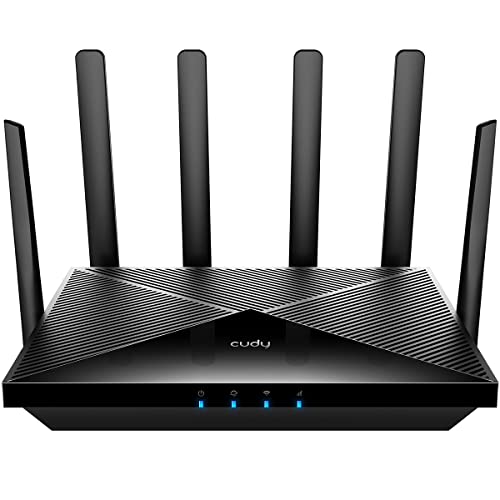
Designed for users seeking reliable internet access in remote or challenging environments, the Cudy 4G LTE Cat 6 WiFi Router brings robust connectivity with data speeds reaching up to 300 Mbps. Featuring a Qualcomm chipset and dual SIM slots, it guarantees redundancy and auto-selection for uninterrupted service. The AC1200 dual-band WiFi and four gigabit ports enhance your home network. Users praise its performance, especially with an external antenna, achieving speeds between 20 to 125 Mbps. However, keep in mind potential LAN port issues and placement concerns to avoid overheating. For ideal use, choose the right SIM based on your region.
Best For: Users seeking reliable internet access in remote or challenging environments where traditional broadband may not be available.
Pros:
- Fast 4G LTE Cat.6 connectivity with data rates up to 300 Mbps ensures reliable internet access.
- Dual SIM slots provide redundancy and auto-selection for uninterrupted service.
- AC1200 dual-band WiFi and four gigabit ports enhance overall network performance.
Cons:
- Some users have reported issues with LAN ports after a few months of use.
- Potential overheating concerns if placed in direct sunlight or poorly ventilated areas.
- Price point is higher than standard routers, which may not be justified for all users.
Tri Cascade VOS 5G Cellular Travel Internet Dongle

Looking for a compact solution for high-speed internet while traveling? The Tri Cascade VOS 5G Cellular Travel Internet Dongle might be your answer. Weighing just 2.4 ounces and measuring 3.45 x 1.53 x 0.83 inches, it’s easy to carry. With download speeds reaching up to 2.5Gbps, you can enjoy seamless streaming, fast downloads, and video conferencing. Plus, it connects directly to cellular networks, enhancing your security. Compatible with macOS, Windows, Linux, and iPadOS, setup is simple with the included T-Mobile SIM. Though some users report connectivity issues, its performance and privacy features make it a worthy travel companion.
Best For: Travelers seeking a secure and high-speed internet solution without relying on public Wi-Fi or hotspots.
Pros:
- High download speeds of up to 2.5Gbps for seamless streaming and fast downloads.
- Compact and lightweight design makes it easy to carry while traveling.
- Direct cellular connection enhances security and privacy.
Cons:
- Some users report connectivity issues and random restarts.
- Compatibility problems may arise with specific devices, particularly MacBooks and Androids.
- Primarily works with T-Mobile, with potential issues when using AT&T SIM cards.
NETGEAR 4G LTE Broadband Modem (LM1200)

The NETGEAR 4G LTE Broadband Modem (LM1200) stands out for users seeking a dependable internet solution without the hassle of complex installations. This modem delivers reliable LTE internet, with download speeds reaching up to 150Mbps, depending on your service provider and location. It’s compatible with AT&T, T-Mobile, and Verizon, but not Sprint. Setup is straightforward, using an Ethernet connection to your router. With dual Gigabit Ethernet ports and automatic failover, it guarantees you stay connected even if your primary internet goes down. However, be mindful of potential performance issues in low-signal areas.
Best For: Users looking for a reliable and easy-to-install LTE internet solution for home use, particularly in areas serviced by AT&T, T-Mobile, or Verizon.
Pros:
- Quick and simple Ethernet-based installation without the need for a service call.
- Automatic failover feature ensures uninterrupted connectivity during primary internet outages.
- Dual Gigabit Ethernet ports allow for direct connections to multiple devices.
Cons:
- Performance can vary significantly, with some users experiencing low speeds in weak signal areas.
- Internal antenna may struggle in low-signal environments, necessitating external antennas for better performance.
- Not suitable for high-demand applications like gaming due to latency issues and security concerns with configuration access.
G530 5G NR AX3000 WiFi 6 Router

If you’re seeking a powerful solution for reliable internet access in remote or rural areas, the G530 5G NR AX3000 WiFi 6 Router stands out. Delivering speeds up to 3.4 Gbps, it’s perfect for homes, RVs, or even pop-up stores. With Wi-Fi 6 technology, you’ll enjoy seamless streaming and gaming with speeds reaching 2402 Mbps on 5GHz. The intuitive FALCON app simplifies setup and management, letting you control settings like parental controls and guest networks. Plus, its dual-WAN auto-failover guarantees uninterrupted connectivity, making this router a top choice for diverse internet needs. Get connected effortlessly!
Best For: Those in need of high-speed, reliable internet access in rural or remote locations, as well as urban dwellers looking for an alternative to wired broadband.
Pros:
- High-speed performance: Delivers up to 3.4 Gbps on 5G, ensuring fast internet for streaming, gaming, and remote work.
- Versatile connectivity: Supports both 5G and wired broadband, providing redundancy for uninterrupted service.
- User-friendly management: The FALCON app allows for easy setup and configuration of parental controls and guest networks.
Cons:
- Dependency on 5G availability: Performance is contingent on the presence of a 5G network, which may not be accessible in all areas.
- Cost of 5G service: Utilizing 5G can be more expensive than traditional wired broadband options.
- Limited range for Wi-Fi: While it includes high-gain antennas, the overall Wi-Fi coverage may vary based on environmental factors.
4G LTE-Advanced USB WiFi Dongle & Mobile Hotspot Router

For travelers and business professionals in the U.S., the 4G LTE-Advanced USB WiFi Dongle & Mobile Hotspot Router is an ideal solution, combining portability with robust connectivity. This compact device, weighing just 2.08 ounces, connects to major U.S. carriers like AT&T, T-Mobile, and Verizon, providing download speeds of 5–15 Mbps. You can easily set it up in about five minutes, allowing multiple devices to connect simultaneously. It’s USB-powered, so no bulky adapters are needed. Customer feedback highlights its portability and reliable speed, although some users mention a need for clearer setup instructions. Overall, it’s a solid choice for on-the-go connectivity.
Best For: Travelers and business professionals in the U.S. seeking a portable and reliable mobile WiFi solution.
Pros:
- Compact and lightweight design, making it easy to carry.
- Quick setup process, typically within 5 minutes, and supports multiple devices.
- Compatible with major U.S. carriers, providing reliable connectivity.
Cons:
- Some users report a lack of clear setup instructions.
- Initial connectivity issues have been mentioned by a few customers.
- Limited to U.S. networks, restricting international use.
Cudy AC1200 Unlocked 4G LTE Modem Router

Looking for a reliable solution for internet access in remote areas or while traveling? The Cudy AC1200 Unlocked 4G LTE Modem Router offers speeds up to 1200Mbps, making it perfect for various online activities. Its dual-band Wi-Fi supports both casual browsing and high-demand streaming. Compatible with major North American and South American carriers, setup is straightforward with a simple SIM card insertion. Plus, with robust security features like VPN support and an easy-to-use interface, you can stay connected and secure. Its versatility as a modem, router, and hotspot makes it ideal for RV trips or holiday cabins.
Best For: Those seeking reliable internet access in remote locations, RV travelers, and users without traditional cable internet options.
Pros:
- High-speed performance: Offers speeds up to 1200Mbps for various online activities.
- Dual-band Wi-Fi: Supports both casual browsing and high-demand streaming with 2.4GHz and 5GHz bands.
- Versatile functionality: Acts as a modem, router, and hotspot, suitable for multiple devices.
Cons:
- Variable speeds: Some users report slower speeds compared to mobile phones.
- Manual setup required: May need manual APN entry for non-major carriers.
- Limited range in remote areas: Performance may vary significantly based on location and carrier coverage.
Cudy AX3000 WiFi 6 5G CPE Router

The Cudy AX3000 WiFi 6 5G CPE Router stands out as an excellent choice for users seeking high-speed internet solutions, especially in rural areas or as a reliable backup for traditional wired connections. With Qualcomm’s SDX62 modem, you can enjoy 5G speeds up to 2.5 Gbps and dual-band Wi-Fi reaching 3000 Mbps. Its dual SIM capability guarantees uninterrupted access, while multiple VPN support keeps your data secure. Users appreciate its stable connections and extensive range, covering up to 2,000 sq ft. Though some may face setup challenges, its performance makes it a top recommendation for streaming, gaming, and remote work.
Best For: Users seeking reliable high-speed internet solutions in rural areas or as a backup for traditional wired connections.
Pros:
- Dual SIM capability ensures uninterrupted internet access.
- High-speed performance with 5G speeds up to 2.5 Gbps and dual-band Wi-Fi up to 3000 Mbps.
- Extensive Wi-Fi range covering up to 2,000 sq ft, suitable for multiple users.
Cons:
- Some users may encounter issues connecting with specific carriers.
- Lack of responsive technical support from Cudy reported by several users.
- Complications noted during SIM card setup and HTTPS management causing GUI unresponsiveness.
Factors to Consider When Choosing Cellular Modems for PC
When you’re choosing a cellular modem for your PC, you’ll want to reflect on several key factors. Compatibility with your service provider, speed and performance ratings, and available connectivity options all play an essential role in your decision. Don’t forget to evaluate antenna quality and security features to guarantee a reliable and safe connection.
Compatibility With Service Providers
Choosing a cellular modem for your PC means paying close attention to its compatibility with your service provider, especially since not all modems work seamlessly with every carrier. First, verify the modem is certified with your preferred provider, like AT&T, T-Mobile, or Verizon. It’s essential to confirm that it supports the frequency bands your carrier uses, as this directly impacts connectivity. Check whether the modem requires a specific SIM card type, like a Nano SIM, and make certain you have an activated data plan. Additionally, be aware that some modems might not support certain carriers due to differing network technologies, so do your research. Compatibility is key to maximizing your modem’s performance and guaranteeing you stay connected.
Speed and Performance Ratings
Speed and performance ratings are essential elements to take into account when selecting a cellular modem for your PC, as they directly impact your internet experience. Cellular modems generally offer download speeds ranging from 5 Mbps to 2.5 Gbps, depending on whether you’re using 4G LTE or 5G technology. However, remember that real-world speeds may differ considerably due to factors like your proximity to cell towers and network congestion. Higher-category modems, such as CAT-6 or CAT-12, often deliver faster speeds and improved performance. User experiences reveal that most people see speeds between 20 to 125 Mbps, largely influenced by signal strength and antenna quality. So, prioritize these ratings to guarantee a smooth internet connection.
Connectivity Options Available
Understanding the connectivity options available is vital for optimizing your cellular modem experience. Look for modems that support both 4G LTE and 5G networks, as this can greatly impact your download speeds—up to 3.4 Gbps with 5G or 150 Mbps with 4G. Dual SIM slots are a great feature, allowing you to switch carriers for better coverage, especially in areas with spotty service. Some modems also function as routers, providing Wi-Fi to multiple devices and Ethernet ports for direct connections. Confirm compatibility with major U.S. carriers like AT&T, T-Mobile, and Verizon to avoid connectivity issues. Finally, consider models with automatic failover support to maintain your connection during outages, essential for remote work or online activities.
Antenna Quality and Design
When selecting a cellular modem for your PC, the quality and design of the antenna should be a top consideration since they directly impact signal strength and stability. High-gain antennas (5dBi or higher) can enhance reception in low-signal areas, making them essential for reliable connectivity. Look for modems featuring MIMO technology, as this allows multiple antennas to transmit and receive data simultaneously, improving overall performance. Detachable antennas offer the flexibility to upgrade or replace them with external options, which can boost coverage in challenging environments. Remember, the placement and orientation of antennas matter—elevated positions often yield better reception. Finally, verify the antennas are designed for the supported frequency bands to maximize compatibility and data rates.
Security Features Included
As you search for the right cellular modem for your PC, prioritizing security features is vital to protect your data. Look for modems that support multiple VPN protocols—like PPTP, L2TP, OpenVPN, and WireGuard—to guarantee secure data transport. Built-in security compliance measures are essential; opt for devices that minimize the attack surface by excluding unnecessary functions like Wi-Fi and GPS. Choose modems that provide private internet access without relying on public Wi-Fi, enhancing your browsing security. Additionally, check for SSID masking features to reduce hacking risks by not broadcasting your network name. Finally, verify the modem allows for secure remote management options, like DNS encryption with trusted providers, to further safeguard your privacy.