In today’s digital age, having a reliable LTE router is essential for enjoying fast internet speeds and stable connections. Whether you’re gaming, streaming, or working remotely, the right router can make a significant difference in your online experience. With so many options available, it can be tough to know which ones truly stand out. Let’s explore the top 10 LTE routers that can keep you connected effortlessly.
Cudy AC1200 Dual Band Unlocked 4G LTE Modem Router

If you’re looking for a reliable and high-speed internet solution, the Cudy AC1200 Dual Band Open 4G LTE Modem Router is an excellent choice for remote workers or anyone who needs stable connectivity on the go. It supports major 4G providers in North America, delivering download speeds up to 150Mbps. With dual-band capabilities, you can enjoy ultra-fast speeds of 867Mbps on the 5GHz band. Plus, its four high-gain antennas boost signal quality for both 4G LTE and Wi-Fi. Setting it up is a breeze—just insert your SIM card, enter the PIN, and you’re ready to connect securely wherever you are.
Best For: Remote workers and travelers seeking a reliable high-speed internet solution on the go.
Pros:
- Supports major 4G providers in North America with download speeds up to 150Mbps.
- Dual-band capabilities allow for ultra-fast speeds of 867Mbps on the 5GHz band.
- Equipped with four high-gain antennas to enhance signal quality for both 4G LTE and Wi-Fi.
Cons:
- Requires a compatible SIM card for operation, which may limit options based on provider.
- Maximum speed may vary based on network conditions and provider coverage.
- Setup involves entering a PIN which may be cumbersome for some users.
NETGEAR 4G LTE Broadband Modem (LM1200)
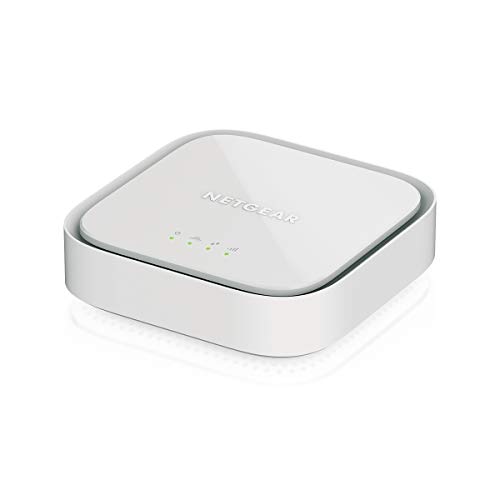
The NETGEAR 4G LTE Broadband Modem (LM1200) is an ideal choice for remote workers who need a reliable internet connection. It’s compatible with AT&T, T-Mobile, and Verizon, but not with Sprint, so make sure you have a Nano SIM card and a BYOD data plan. You can use it as your primary internet source or as a backup that automatically switches to LTE, ensuring you stay connected. With download speeds reaching up to 150Mbps, two Gigabit Ethernet ports allow direct connections to your devices, while automatic failover support keeps you online even if your cable internet goes down.
Best For: Remote workers needing a reliable internet connection with backup options.
Pros:
- Fast download speeds of up to 150Mbps, ensuring smooth browsing and streaming.
- Compatible with major carriers like AT&T, T-Mobile, and Verizon for flexible connectivity.
- Automatic failover support keeps you online even during cable internet outages.
Cons:
- Not compatible with Sprint, limiting options for some users.
- Requires a Nano SIM card and activation of a BYOD data plan, which may add extra steps for setup.
- Performance may vary based on proximity to the nearest cell tower, affecting reliability in some areas.
4G LTE Unlocked Wireless WiFi Router
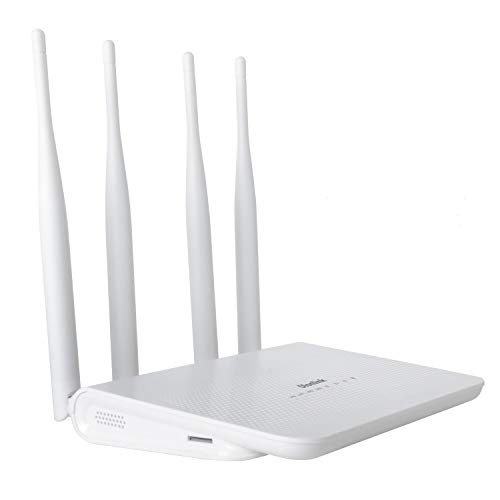
For those who need reliable internet on the go, the 4G LTE Open Wireless WiFi Router is an excellent choice. With download speeds of up to 150 Mbps and support for 32 devices, it’s perfect for sharing your connection. Its four antennas enhance signal coverage, making it ideal for various environments. Setup is straightforward—just insert a SIM card, and you’re ready to go. While many users praise its performance, a few have reported speed issues. It’s compatible with AT&T and T-Mobile, but not with Verizon or Sprint. Overall, it offers a solid solution for mobile connectivity.
Best For: Those seeking a reliable mobile internet solution for multiple devices, particularly users of AT&T and T-Mobile.
Pros:
- Easy setup with just a SIM card insertion.
- Supports up to 32 devices and covers a large area of up to 300 square meters.
- Four antennas enhance signal strength and coverage.
Cons:
- Not compatible with Verizon or Sprint networks.
- Some users report speed issues and connection drops.
- Mixed reviews on customer support responsiveness.
TP-Link AX1800 WiFi 6 Router (Archer AX21)

With its impressive Wi-Fi 6 technology, the TP-Link AX1800 WiFi 6 Router (Archer AX21) is an ideal choice for anyone seeking a reliable and high-speed internet connection for multiple devices. It delivers up to 1.8 Gbps, ensuring smooth streaming and gaming. The dual-band design supports simultaneous connections, while Beamforming technology and high-gain antennas provide expansive coverage. Plus, it’s compatible with major ISPs, making setup a breeze. Enjoy enhanced security features like VPN support and user access controls. With 24/7 technical support and a solid 4.4-star rating, you’ll feel confident in your choice for seamless connectivity.
Best For: Those seeking a high-speed, reliable Wi-Fi connection for multiple devices in homes of various sizes.
Pros:
- Supports Wi-Fi 6 technology for faster speeds and reduced network congestion.
- Enhanced coverage with Beamforming technology and high-gain antennas.
- User-friendly security features including VPN support and access controls.
Cons:
- Initial setup can be problematic for dual-band device compatibility.
- Performance may vary with distance and obstacles in the home.
- Some users report coverage issues potentially related to ISP or wiring.
GL.iNet GL-SFT1200 Portable WiFi Travel Router

Travelers seeking a reliable internet connection will find the GL.iNet GL-SFT1200 Portable WiFi Travel Router to be an excellent choice. Weighing just 145g, this compact device is perfect for on-the-go use. With dual-band speeds of up to 300 Mbps (2.4GHz) and 867 Mbps (5GHz), it guarantees smooth browsing. Its easy setup and handy VPN toggle make it user-friendly, while retractable antennas enhance signal reception. Plus, it features multiple ports for connectivity and VLAN support for hotel networks. Rated 4.3 stars by users, it’s a trusted companion for travel and home networking alike. Stay connected effortlessly!
Best For: Travelers and remote workers seeking a lightweight, portable router with reliable internet connectivity.
Pros:
- Easy to set up with user-friendly manuals and video guides.
- Dual-band speeds ensure smooth browsing and streaming experiences.
- Compact design and retractable antennas enhance portability and signal reception.
Cons:
- Some users reported initial confusion with setup instructions.
- Advanced features may be limited compared to larger models.
- Physical VPN toggle might be less convenient for frequent changes.
Cudy 4G LTE Cat 6 WiFi Router
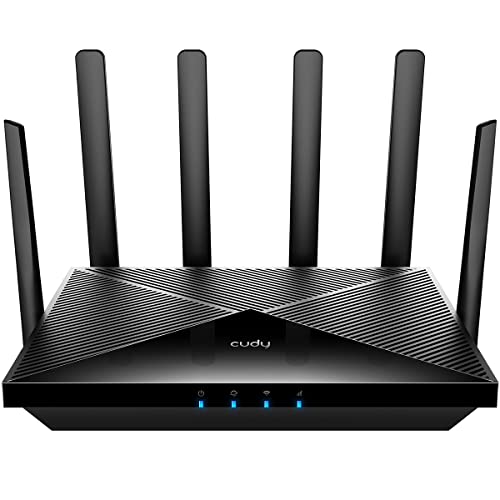
The Cudy 4G LTE Cat 6 WiFi Router is an excellent choice for those who need reliable internet connectivity in remote or challenging environments. With a Qualcomm chipset and dual SIM slots, it offers fast 4G LTE connectivity at data rates up to 300/50 Mbps. Its AC1200 dual-band WiFi and four gigabit ports guarantee robust performance. Users appreciate the ease of setup and improved signal strength with external antennas. Though some have reported issues with LAN ports, placing the router in an elevated position can enhance performance. Just be cautious about overheating and verify compatibility with your region’s SIM cards.
Best For: Those seeking reliable internet connectivity in remote areas or challenging environments where traditional broadband is unavailable.
Pros:
- Fast 4G LTE connectivity with data rates up to 300/50 Mbps, ensuring smooth browsing and streaming.
- Dual SIM slots provide redundancy and the ability to auto-select the best network for sustained connectivity.
- AC1200 dual-band WiFi and four gigabit ports support multiple devices with robust performance.
Cons:
- Some users reported issues with LAN ports after a few months of use.
- Potential overheating if placed in direct sunlight, impacting performance.
- Higher price point compared to standard routers, which may not be justified for all users.
Cudy AC1200 Unlocked 4G LTE Modem Router

For those seeking reliable internet access in remote areas or while on the go, the Cudy AC1200 Opened 4G LTE Modem Router stands out as an excellent choice. It delivers speeds up to 1200Mbps, making it perfect for streaming and gaming. With compatibility for major 4G providers and a user-friendly setup, you’ll be online in no time. Its dual-band Wi-Fi supports multiple devices, while the detachable antennas enhance connectivity. Plus, built-in VPN support keeps your data secure. Whether you’re in an RV or a cabin, the Cudy AC1200 offers versatility and performance for all your internet needs.
Best For: Those needing reliable internet access in remote locations, RVs, or holiday cabins.
Pros:
- Easy setup with quick SIM card insertion and web configuration.
- Dual-band Wi-Fi allows for efficient use across multiple devices, suitable for both casual browsing and bandwidth-intensive activities.
- Built-in VPN support and security features ensure safe data transport and privacy.
Cons:
- Some users have reported slower speeds compared to their mobile phones.
- Manual APN entry may be required for non-major carriers, complicating setup for some users.
- Performance may vary in extremely remote areas depending on the cellular signal strength.
Unlocked 4G LTE Mobile WiFi Router for Global Travel

When you’re on the go, an opened 4G LTE mobile WiFi router is your best bet for staying connected globally, as it supports high-speed Internet access up to 150Mbps. This portable hotspot allows up to 10 users to connect simultaneously, perfect for business travelers or outdoor enthusiasts. With a 2100mAh battery offering up to 10 hours of standby time, you won’t have to worry about losing connection. Simply insert a micro SIM card, and you’ll be ready to access the internet seamlessly on your mobile devices, laptops, and tablets. Just remember, it’s not compatible in the Americas, except for T-Mobile.
Best For: Business travelers, outdoor enthusiasts, and anyone needing reliable global internet access on the go.
Pros:
- High-speed internet access of up to 150Mbps for seamless connectivity.
- Supports up to 10 users simultaneously, making it ideal for group travel or business meetings.
- Compact and lightweight design with a 2100mAh battery for up to 10 hours of standby time, enhancing portability.
Cons:
- Not compatible in the Americas, except for T-Mobile users.
- Requires a micro SIM card for operation, which is not included in the package.
- Limited to 3G and 4G bands, which may not cover all regions effectively.
RM520N AX3000 WiFi 6 5G Router with Sim Card Slot

Experience lightning-fast internet with the RM520N AX3000 WiFi 6 5G Router, designed for users in rural or remote areas lacking reliable wired broadband. With 5G speeds reaching up to 3.4 Gbps, you’ll enjoy seamless connectivity for up to 128 devices simultaneously. Its 9 detachable high-gain antennas boost both 5G and Wi-Fi signals, ensuring peak performance. Plus, built-in VPN support keeps your online activities secure. The multi-WAN technology offers versatile connection options and load balancing for maximum bandwidth efficiency. Certified for AT&T and T-Mobile, this router transforms your internet experience, making it perfect for home or office use.
Best For: Users in rural or remote locations who require high-speed internet without access to wired broadband options.
Pros:
- High-speed 5G connectivity with speeds up to 3.4 Gbps, ideal for multiple devices.
- Equipped with 9 high-gain antennas for enhanced signal quality and range.
- Built-in VPN support ensures secure online activities and compatibility with various DDNS providers.
Cons:
- May require a compatible 5G SIM card for optimal performance.
- Performance can vary based on the availability of 5G network coverage.
- Initial setup may be complex for users unfamiliar with networking devices.
N300 WiFi Unlocked 4G LTE Modem Router

The N300 WiFi Unlocked 4G LTE Modem Router is perfect for users seeking reliable internet access in areas without cable connectivity, like holiday cabins or remote locations. With a SIM card slot and LTE Cat4 technology, it delivers download speeds up to 150Mbps. Equipped with four high-gain antennas, it guarantees strong signals over long distances. You can connect up to 32 devices, covering an impressive 300 square meters. Setting it up is a breeze—just insert your SIM card and log in to the user-friendly interface. Enjoy seamless browsing and streaming wherever you are, even off the beaten path!
Best For: Users in remote locations or areas without cable internet who need reliable and high-speed connectivity.
Pros:
- Supports download speeds up to 150Mbps and covers up to 300 square meters.
- Equipped with four high-gain antennas for enhanced signal quality and range.
- Easy setup process with a user-friendly interface for network management.
Cons:
- May require TTL adjustments for Verizon users based on different data plans.
- Limited to 4G LTE and may not support newer 5G networks.
- Performance may vary based on network provider and signal strength in the area.
Factors to Consider When Choosing LTE Routers for PC
When choosing an LTE router for your PC, you should think about a few key factors. Consider your connection speed requirements, network compatibility, and the quality of the antennas. Additionally, look into device connectivity options and the security features like VPN support that the router offers.
Connection Speed Requirements
Choosing the right LTE router for your PC hinges on understanding your connection speed requirements. For standard tasks, aim for routers that offer at least 150Mbps, while high-demand activities like gaming and streaming might require speeds of 300Mbps or more. Keep in mind that your router’s technology plays an essential role; dual-band routers typically provide faster speeds on the 5GHz band compared to the 2.4GHz band. Also, consider the maximum speeds supported by your LTE technology—LTE Cat 4 caps at 150Mbps, while LTE Cat 6 can hit 300Mbps. Remember, the number of connected devices shares bandwidth, impacting performance. Finally, proximity to cell towers and environmental factors can greatly influence your actual speeds.
Network Compatibility Considerations
Understanding connection speed requirements is just the first step in selecting an LTE router for your PC. You’ll want to guarantee that the router supports the frequency bands and technologies used by your mobile carrier, as compatibility can vary markedly. Check if it can handle multiple 4G LTE bands like B2, B3, and B12 to optimize signal reception and data speeds in different areas. It’s also essential to confirm that the router is unblocked, allowing you to use SIM cards from various carriers for flexibility in choosing a data plan. Additionally, consider routers that support both 4G LTE and WCDMA bands to guarantee compatibility with older networks, and look for certification with major carriers for added reliability.
Antenna Quality and Design
Antenna quality and design play essential roles in the performance of your LTE router, especially if you want reliable connectivity. High-gain antennas, typically rated around 5dBi, enhance signal sensitivity and range, making them ideal for challenging environments. Look for routers with multiple antennas and MIMO technology, as these features improve data throughput and maintain stable connections. Detachable antennas offer the advantage of customization, allowing you to upgrade to higher-performance options based on your coverage needs. Additionally, routers with external antenna connectors (SMA interface) let you install specialized antennas for better coverage in remote areas. This flexibility is vital, particularly in multi-user settings, as it helps reduce network congestion and keeps everyone connected seamlessly.
Device Connectivity Options
What factors should you consider when evaluating device connectivity options for your LTE router? First, verify your router supports multiple device connections; some can handle up to 32 devices, perfect for homes or offices. Look for routers with Gigabit Ethernet ports to provide high-speed wired connections for your PCs, gaming consoles, or smart TVs. Dual-band capabilities (2.4GHz and 5GHz) are also important, as they allow for simultaneous connections, catering to both basic tasks and bandwidth-heavy activities like streaming and gaming. Check the maximum download speeds, with many routers reaching 150Mbps or more for seamless internet experiences. Finally, consider features like WAN failover or multi-WAN capabilities for consistent connectivity in case one source fails.
VPN and Security Features
When choosing an LTE router for your PC, it’s crucial to prioritize VPN and security features that protect your online activity. Look for routers that support multiple VPN protocols, like PPTP, L2TP, OpenVPN, and WireGuard, offering various encryption options for secure data transport. It’s also beneficial to select models that allow easy configuration and management of VPN connections, giving you more control over your privacy. Consider routers with built-in VPN features that encrypt all traffic, safeguarding sensitive data across your entire network. Additionally, verify compatibility with popular DDNS providers for enhanced remote access and security. Finally, opt for routers featuring robust security measures, such as firewalls and advanced encryption standards, to defend against unauthorized access and cyber threats.
Ease of Setup
Choosing an LTE router for your PC should be straightforward, so you can quickly get online without hassle. Look for routers that allow easy SIM card insertion and feature intuitive web configuration pages. Clear user manuals or video guides can simplify the installation process, making it a breeze for you. Automatic APN settings are a plus, as they minimize the need for manual adjustments, ensuring seamless connectivity. A user-friendly graphical management interface can also enhance your experience, making network monitoring and configuration easier. Finally, consider routers that support multiple connection methods or failover capabilities, which improve reliability during setup and help you stay connected when it matters most.