If you’re looking to enhance your PC’s performance in 2026, selecting the right chiller-based cooling system is essential. With a variety of advanced options available, each boasting unique features, it can be challenging to determine which is best for your setup. From efficient airflow to customizable aesthetics, these systems cater to both gamers and enthusiasts. Let’s explore the top contenders that promise to keep your system cool and stylish.
CORSAIR Nautilus 360 RS ARGB Liquid CPU Cooler

If you’re looking for a powerful cooling solution that keeps your CPU running smoothly and quietly, the CORSAIR Nautilus 360 RS ARGB Liquid CPU Cooler is an excellent choice. Its 360mm AIO design offers high-performance cooling with whisper-quiet operation at just 20 dBA. You’ll appreciate the convex cold plate that maximizes CPU contact, ensuring efficient heat dissipation. Installation is a breeze thanks to pre-applied thermal paste and daisy-chain connectivity, allowing easy fan connections to your motherboard. With three RS120 ARGB fans, you get strong airflow and enhanced cooling, all while enjoying customizable RGB lighting to match your setup.
Best For: Gamers and PC enthusiasts looking for an efficient and customizable cooling solution for their high-performance CPUs.
Pros:
- Whisper-quiet operation at just 20 dBA, ensuring minimal noise during intense gaming sessions.
- Easy installation with pre-applied thermal paste and daisy-chain connectivity for simplified wiring.
- Customizable RGB lighting with three RS120 ARGB fans for enhanced aesthetics that match your setup.
Cons:
- Requires sufficient case space for the 360mm radiator, which may not fit in smaller cases.
- Potentially higher price point compared to standard air coolers.
- ARGB control may be limited if your motherboard lacks compatible headers.
Cooler Master 360L Core AIO CPU Liquid Cooler

The Cooler Master 360L Core AIO CPU Liquid Cooler is ideal for gamers and PC enthusiasts seeking outstanding cooling performance without the noise. With a 360mm radiator and three ARGB PWM fans, it delivers impressive airflow at 71.93 CFM while maintaining only 27.2 decibels of sound. The patented Gen S dual-chamber pump guarantees efficient water cooling, making it compatible with AMD AM5/AM4 and Intel LGA 1851/1700 sockets. Plus, the premium CryoFuze thermal paste provides excellent thermal conductivity. Its sleek, minimalist design with customizable ARGB lighting enhances your build’s aesthetics, proving this cooler’s performance and style go hand in hand.
Best For: Gamers and PC enthusiasts seeking high-performance cooling solutions with minimal noise and customizable aesthetics.
Pros:
- High cooling efficiency with a 360mm radiator and three ARGB PWM fans that provide excellent airflow.
- Quiet operation at only 27.2 decibels, making it suitable for noise-sensitive environments.
- Customizable ARGB lighting enhances the visual appeal of your PC build.
Cons:
- Large size may not fit in all PC cases, limiting compatibility.
- Installation can be complex for beginners, requiring careful handling of components.
- Price point may be higher compared to air coolers, making it less budget-friendly.
CORSAIR Nautilus 360 RS Liquid CPU Cooler

For gamers and PC enthusiasts seeking peak performance with minimal noise, the CORSAIR Nautilus 360 RS Liquid CPU Cooler stands out as an exceptional choice. This 360mm AIO cooler features a low-noise operation at just 20 dBA, ensuring your system stays quiet. It connects directly to your motherboard, simplifying installation and reducing cable clutter with its daisy-chain capability. The efficient RS120 fans enhance airflow and static pressure, thanks to CORSAIR AirGuide technology. With a 5-year warranty and easy installation, you can enjoy reliable cooling for Intel and AMD systems without hassle. Upgrade your cooling game today with the Nautilus 360 RS!
Best For: Gamers and PC enthusiasts seeking high-performance cooling with minimal noise levels.
Pros:
- Low-noise operation at just 20 dBA for a quieter computing experience.
- Easy installation with direct motherboard connection and daisy-chain capability to reduce cable clutter.
- High-performance cooling provided by RS120 fans featuring CORSAIR AirGuide technology for enhanced airflow and static pressure.
Cons:
- Requires a 4-pin PWM fan header for optimal functionality, which may limit compatibility with some motherboards.
- Higher price point compared to standard air coolers, which may not fit all budgets.
- Size may be an issue in smaller PC cases due to its 360mm design, requiring ample space for installation.
CORSAIR Titan 360 RX LCD Liquid CPU Cooler

Experience top-tier cooling performance with the CORSAIR Titan 360 RX LCD Liquid CPU Cooler, designed for gamers and PC enthusiasts who demand both efficiency and style. This 360mm AIO cooler features a high-performance FlowDrive Cooling Engine and a precision-engineered cold plate to guarantee maximum thermal contact with your CPU. You’ll enjoy vibrant visuals on the 2.1” IPS LCD display, showcasing real-time data and customizable graphics. With three RX120 RGB fans, iCUE LINK technology simplifies connections, while efficient cable management keeps your setup clean. Plus, the 6-year warranty guarantees lasting quality. Elevate your PC’s cooling and aesthetics with this exceptional cooler.
Best For: Gamers and PC enthusiasts seeking high-performance cooling with customizable aesthetics.
Pros:
- High-performance cooling with FlowDrive Cooling Engine and precision cold plate design for optimal thermal contact.
- Customizable IPS LCD display allows users to showcase real-time CPU data, animated GIFs, and vibrant graphics.
- iCUE LINK technology simplifies installation and reduces cable clutter for a cleaner setup.
Cons:
- Requires adequate space in the case due to its 360mm radiator size.
- Noise level of 36 decibels may be noticeable in quiet environments, especially at higher RPMs.
- Higher price point compared to standard air coolers, which may not fit every budget.
Minorsonic AIO CPU Cooler (360mm)

Designed for gamers and PC enthusiasts seeking top-tier cooling solutions, the Minorsonic AIO CPU Cooler (360mm) stands out with its high-speed ceramic bearing pump that runs at an impressive 3000 RPM. This cooler boasts an industrial-grade 3-phase motor to minimize vibration and noise while enhancing heat transfer. Its exclusive 12-channel radiator features a low-resistance hydraulic design for rapid heat dissipation. With three PWM ARGB fans that adjust speed based on system temperature, expect high airflow without the noise. Compatible with Intel and AMD sockets, this cooler simplifies installation with daisy-chained fans, making it a solid choice for peak performance.
Best For: Gamers and PC enthusiasts seeking efficient and quiet cooling solutions for their high-performance builds.
Pros:
- High-Speed Performance: The 3000 RPM ceramic bearing pump ensures maximum cooling efficiency and a long lifespan.
- Low Noise Operation: The industrial-grade 3-phase motor minimizes vibration and operates quietly at just 30 decibels.
- Easy Installation: Daisy-chained fans simplify setup and reduce cable clutter, making it user-friendly.
Cons:
- Size Constraints: The 360mm size may not fit in all cases, limiting compatibility with smaller builds.
- Requires Adequate Space: The radiator requires sufficient clearance for optimal airflow, which may be an issue in compact setups.
- Potential for Overkill: For non-enthusiasts or casual users, the advanced features may exceed cooling needs, making it an expensive choice.
CORSAIR Nautilus 360 RS ARGB Liquid CPU Cooler

The CORSAIR Nautilus 360 RS ARGB Liquid CPU Cooler stands out as an ideal choice for gamers and content creators seeking peak performance without the noise. With its whisper-quiet operation at just 20 dBA, you can focus on your games or projects without distractions. This 360mm AIO cooler features a convex cold plate and pre-applied thermal paste for superior thermal transfer. The RS120 ARGB fans, equipped with CORSAIR AirGuide technology, guarantee efficient airflow. Plus, customizable RGB lighting allows you to personalize your setup. With easy installation and compatibility across major sockets, this cooler truly enhances your PC’s performance and aesthetics.
Best For: Gamers and content creators looking for high-performance cooling solutions with minimal noise.
Pros:
- Efficient cooling performance with whisper-quiet operation at just 20 dBA.
- Easy installation with direct motherboard connection and compatibility with major CPU sockets.
- Customizable RGB lighting for personalized aesthetics.
Cons:
- Requires additional iCUE controller for advanced lighting control (sold separately).
- 360mm size may not fit in smaller cases.
- Noise level may increase under full load despite low idle noise.
PCCOOLER 360mm AIO Liquid CPU Cooler
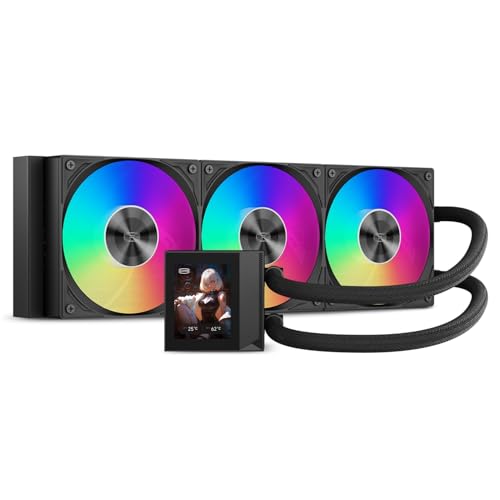
For gamers and performance enthusiasts seeking top-tier cooling, the PCCOOLER 360mm AIO Liquid CPU Cooler stands out with its impressive 2.4” IPS display. It features a high-performance pump running at 2600 RPM, ensuring your CPU stays cool under pressure. With three 120mm F5 ARGB fans, it delivers an airflow of 90.56 CFM while maintaining a whisper-quiet noise level of just 15 dBA. Installation is straightforward, thanks to universal mounting brackets and pre-applied thermal compound. Plus, it syncs effortlessly with RGB software, adding a personalized touch to your setup. Rated 4.4 out of 5 stars, it’s a solid choice for any build.
Best For: Gamers and performance enthusiasts seeking efficient cooling solutions for high-performance CPUs.
Pros:
- High-performance pump with a speed of 2600 RPM for effective cooling.
- Whisper-quiet operation at just 15 dBA, ideal for maintaining a peaceful gaming environment.
- Easy installation with universal mounting brackets and pre-applied thermal compound.
Cons:
- Larger size may not fit in all cases, limiting compatibility.
- Requires RGB software for full customization of lighting effects.
- Slightly higher price point compared to standard air coolers.
PCCOOLER Liquid CPU Cooler ARGB Display (GT360M Black)
Looking to elevate your gaming or content creation experience? The PCCOOLER Liquid CPU Cooler ARGB Display (GT360M Black) is your go-to solution. This 360mm AIO cooler features a striking 2.8-inch LCD screen that displays real-time temperature readouts and customizable visuals. Its high-efficiency copper micro-channel cold plate guarantees peak thermal conductivity, while the aluminum radiator enhances heat dissipation. With a ceramic bearing pump for quiet operation and three ARGB PWM fans providing impressive airflow, installation is effortless thanks to the hidden daisy-chain cable design. Rated 4.1 stars, it’s a solid choice for serious gamers and content creators alike.
Best For: Serious gamers and content creators looking for efficient cooling and customizable visuals.
Pros:
- High-efficiency cooling: The copper micro-channel cold plate and aluminum radiator ensure optimal thermal conductivity and heat dissipation.
- Customizable display: The 2.8-inch LCD screen allows for real-time monitoring and personalizing with logos and animations.
- Quiet operation: The ceramic bearing pump and ARGB PWM fans provide reliable performance with minimal noise.
Cons:
- Installation complexity: While the daisy-chain cable design simplifies setup, the overall installation may still be challenging for beginners.
- Noise level: Operating at 36 decibels may be noticeable in very quiet environments.
- Limited compatibility: Only compatible with specific Intel and AMD CPU sockets, which may restrict usage for some users.
CPU Cooler with Dual 120mm ARGB PWM Fans

Engineered for high-performance gamers and overclocking enthusiasts, the CPU cooler with dual 120mm ARGB PWM fans delivers exceptional cooling efficiency. Its dual-tower design, featuring six 6mm heat pipes and a pure copper base, guarantees rapid heat dissipation. With a maximum fan speed of 2000 RPM, these fans provide a powerful airflow of 74.9 CFM while maintaining a noise level below 27.8 dBA. Compatible with various AMD and Intel sockets, installation is straightforward with secure metal fasteners. Plus, the stunning ARGB lighting offers up to 16 modes, enhancing your rig’s aesthetic while keeping your CPU cool under pressure.
Best For: High-performance gamers and overclocking enthusiasts seeking efficient cooling solutions with stylish aesthetics.
Pros:
- Dual-tower design with effective heat dissipation and six 6mm heat pipes for optimal cooling.
- Maximum fan speed of 2000 RPM provides powerful airflow while maintaining a low noise level of ≤27.8 dBA.
- Compatible with multiple Intel and AMD sockets, ensuring versatile installation options.
Cons:
- The dual-tower design may be too large for compact cases, limiting compatibility with smaller builds.
- Requires connection to motherboard ARGB headers for full lighting effects, which may not be available on all motherboards.
- The maximum TDP of 265W may not be sufficient for extreme overclocking scenarios with high-end CPUs.
Thermalright FW360 Black ARGB CPU AIO Cooler

The Thermalright FW360 Black ARGB CPU AIO Cooler stands out with its impressive cooling performance, making it an ideal choice for gamers and overclockers seeking efficient thermal management. Its 397mm radiator and new-generation pump guarantee peak heat absorption while maintaining a noise level of just 23 dBA. With a maximum speed of 3000 RPM and an airflow capacity of 70.84 CFM, your CPU stays cool under pressure. The 2.4-inch IPS LCD allows you to monitor temperatures while showcasing customizable images. Plus, the ARGB lighting syncs seamlessly with your motherboard, enhancing your build’s aesthetics. Installation is straightforward, making sure you get up and running quickly.
Best For: Gamers and overclockers seeking efficient thermal management with customizable features.
Pros:
- High cooling efficiency with a maximum rotational speed of 3000 RPM and an airflow capacity of 70.84 CFM.
- Customizable display with a 2.4-inch IPS LCD that shows temperatures and allows for personalized images.
- Quiet operation at a noise level of just 23 dBA, ensuring a peaceful gaming experience.
Cons:
- Size may be an issue for smaller cases due to the 397mm radiator dimensions.
- Software installation required for full functionality, which may be cumbersome for some users.
- Limited compatibility with older CPU socket types, focusing primarily on newer AMD and Intel models.
Factors to Consider When Choosing Chiller Based PC Cooling Systems
When you’re choosing a chiller-based PC cooling system, several factors can make a big difference in performance. You’ll want to evaluate cooling efficiency metrics, compatibility with your components, and noise levels. Additionally, think about installation, maintenance, and any aesthetic features that might enhance your setup.
Cooling Efficiency Metrics
Choosing a chiller-based PC cooling system requires careful consideration of several key efficiency metrics. First, look at the thermal conductivity of the thermal paste; higher values, like 14W/mK, mean better heat transfer. Next, consider the noise level—quieter systems around 20 dBA provide effective cooling without annoying sounds. The maximum rotational speed of fans also matters; speeds over 2000 RPM can deliver airflow from 70 to over 90 CFM, enhancing cooling performance. Additionally, a well-designed cold plate, particularly with convex shapes, maximizes CPU contact for improved thermal transfer. Finally, the pump speed, typically around 2600-3000 RPM, is essential for efficient coolant circulation, boosting the overall cooling capacity of your system.
Compatibility With Components
To guarantee ideal performance from your chiller-based PC cooling system, compatibility with your components is essential. Start by confirming the coolant system matches your CPU socket type, like Intel LGA 1851/1700 or AMD AM5/AM4, to avoid installation headaches. Next, check the dimensions of the cooling unit, especially the radiator size, to verify it fits snugly in your case without interfering with other components. Don’t forget to verify the power connector types for the fans and pump—typically 4-pin or 3-pin—to ensure they connect properly to your motherboard. Also, confirm that the system’s wattage and thermal capacity can handle your CPU’s heat output, particularly for high-performance setups. Finally, consider aesthetic compatibility if RGB lighting matters to you.
Noise Level Considerations
How much noise can you tolerate while gaming or working on your PC? When choosing a chiller-based cooling system, pay close attention to noise levels measured in decibels (dBA). Look for models operating around 20-27 dBA for a quieter experience. The efficiency of the pump and fan design plays an essential role; advanced technologies, like magnetic bearings, help reduce noise. Higher fan speeds, such as 2100 RPM, can increase noise levels compared to those capped at 1600 RPM. Additionally, consider systems with noise-reduction features like optimized PWM fan curves that adjust speeds based on temperature. Finally, think about your sensitivity to noise and how you plan to use your PC, whether for gaming or content creation, to determine acceptable noise levels.
Installation and Maintenance
When installing a chiller-based cooling system, verifying compatibility with your motherboard and CPU socket types is vital to prevent damage and achieve peak performance. Most AIO coolers simplify the process, often including pre-applied thermal paste, which reduces setup time and minimizes the risk of improper application. Secure your radiator and pump in suitable locations to maximize airflow and cooling efficiency. If your AIO system supports daisy-chaining, you can connect multiple fans to a single motherboard header, cutting down on cable clutter. Regular maintenance is significant—check for dust accumulation on radiators and fans to maintain effective cooling. By following these guidelines, you can guarantee your cooling system operates efficiently and lasts longer.
Aesthetic Features and Lighting
While performance is essential, the aesthetic appeal of your chiller-based PC cooling system shouldn’t be overlooked. Many systems offer customizable RGB lighting, letting you personalize your setup with a variety of colors and effects. You’ll also appreciate units with daisy-chaining capabilities for fans and lighting, simplifying cable management and enhancing the visual presentation. The design of fan blades plays a role too; frosted or clear designs can create different lighting effects, amplifying your ARGB features. Advanced cooling solutions might even include LCD screens displaying real-time system info or customizable graphics, adding both functionality and style. Confirm compatibility with your motherboard’s RGB control software for synchronized lighting effects across all components, achieving a cohesive look in your PC build.