When it comes to keeping your AMD Threadripper Pro CPU cool, choosing the right cooler can make all the difference. With so many options available, it’s essential to find one that balances performance, noise levels, and compatibility. From high-performance air coolers to efficient liquid solutions, the choices can be overwhelming. Let’s explore the top contenders that guarantee your powerful processor runs smoothly, even under heavy workloads.
Noctua NH-U14S TR5-SP6 CPU Cooler for AMD Threadripper and Epyc 8004

If you’re looking for a high-quality cooling solution for your AMD Threadripper Pro or Epyc 8004 processor, the Noctua NH-U14S TR5-SP6 is an excellent choice. This premium 140mm CPU cooler boasts six heatpipes and a powerful NF-A15 fan, delivering superior cooling performance while remaining whisper-quiet at just 24.6 decibels. It’s compatible with both sTR5 and SP6 sockets, perfect for your high-end builds. You’ll appreciate the easy installation thanks to the pre-applied thermal compound and included mounting tool. With a six-year warranty and a solid customer rating, it’s a reliable option to keep your CPU running smoothly.
Best For: Users seeking a high-performance, quiet cooling solution for AMD Threadripper and Epyc 8004 processors in noise-sensitive environments.
Pros:
- Excellent cooling performance with six heatpipes and a powerful NF-A15 fan.
- Whisper-quiet operation at just 24.6 decibels, ideal for audio/video production.
- Easy installation with pre-applied thermal compound and included mounting tool.
Cons:
- Slightly heavier at 1.7 kilograms, which may affect compatibility with some cases.
- May not fit in smaller form factors due to its larger dimensions.
- Higher price point compared to basic cooling solutions.
Silverstone Technology XE360-TR5 360mm All-in-One Liquid Cooler
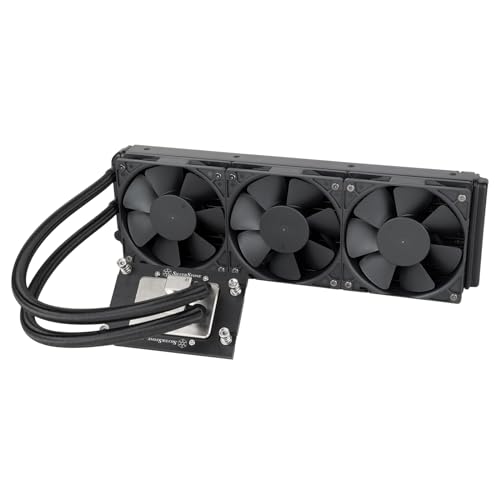
The Silverstone Technology XE360-TR5 360mm All-in-One Liquid Cooler stands out as an excellent choice for users of AMD’s Ryzen Threadripper 7000 series processors. With its nickel-plated copper water block and large micro-channel base, it optimizes heat dissipation effectively. The integrated pump design enhances heat transfer while prolonging the pump’s lifespan. You’ll appreciate the three 120mm PWM radiator-optimized fans, capable of reaching 2,800 RPM and providing airflow of 87.72 CFM. Weighing 5.86 pounds and backed by a 3-year warranty, this cooler earns high marks with an average rating of 4.6 stars, making it a reliable choice for demanding workloads.
Best For: Users seeking reliable, high-performance cooling solutions for AMD Ryzen Threadripper 7000 series processors.
Pros:
- High Efficiency: Nickel-plated copper water block with a large micro-channel base for optimal heat dissipation.
- Integrated Design: Pump located within the radiator enhances heat transfer and extends pump lifespan.
- Strong Performance: Three 120mm PWM fans with 2,800 RPM provide excellent airflow of 87.72 CFM.
Cons:
- Noise Level: Operating noise can reach up to 46 decibels, which may be noticeable in quiet environments.
- Size: The 360mm size may not fit in all cases, limiting compatibility.
- Weight: At 5.86 pounds, it is relatively heavy compared to some other cooling solutions.
be quiet! Pure Rock Pro 3 Black CPU Air Cooler

Looking for a reliable air cooler that can handle the demands of high-performance CPUs like the Threadripper Pro? The be quiet! Pure Rock Pro 3 Black CPU Air Cooler is a fantastic choice. With its six high-performance copper heat pipes and a 120mm Pure Wings 3 PWM fan, it efficiently manages heat while maintaining a quiet operation at just 34.8 decibels. Its compact design guarantees compatibility with various AMD and Intel sockets, making installation a breeze. Rated 4.7 out of 5 stars by users, this cooler combines elegance and power, assuring your CPU runs smoothly even under intense workloads.
Best For: Users seeking a high-performance CPU cooler that efficiently manages heat while maintaining a low noise level for demanding workstations and overclocked systems.
Pros:
- Efficient cooling: Six high-performance copper heat pipes ensure effective heat dissipation.
- Quiet operation: Operates at just 34.8 decibels, making it ideal for quiet builds.
- Wide compatibility: Supports various AMD and Intel sockets with an easy installation process.
Cons:
- Size limitations: May not fit in very compact cases due to its dimensions.
- Fan speed: Maximum rotational speed of 2000 RPM may not be sufficient for extreme overclocking.
- Thermal paste: Included thermal paste is not guaranteed to be of high quality.
ID-COOLING FX360 PRO Liquid CPU Cooler for Desktop

For those seeking exceptional cooling performance in high-demand environments, the ID-COOLING FX360 PRO Liquid CPU Cooler stands out with its impressive TDP rating of 350W. Its powerful pump runs at 2900RPM, effectively dissipating heat from your CPU. With three 120mm fans delivering airflow of 82.5CFM and air pressure of 2.55mmH2O, you’ll experience extreme cooling. The all-black design fits seamlessly into dark-themed builds, while the premium CD pattern on the water block adds a touch of flair. Plus, the daisy chain connector simplifies cable management, making installation a breeze. It’s compatible with various Intel and AMD sockets, ensuring versatility.
Best For: Gamers and high-performance PC users who require superior cooling solutions for their CPU.
Pros:
- High TDP Rating: Capable of supporting CPUs with a thermal design power (TDP) of up to 350W, ensuring effective cooling.
- Efficient Airflow: Three 120mm fans provide a maximum airflow of 82.5CFM for optimal heat dissipation.
- Aesthetic Design: The all-black layout and premium CD pattern on the water block enhance the visual appeal of any build.
Cons:
- Size Constraints: The 360mm size may not fit in smaller PC cases, limiting compatibility.
- Potential Noise Levels: Higher RPM of the pump and fans could generate more noise under heavy load.
- Installation Complexity: The setup may require more effort compared to simpler cooling solutions, particularly for beginners.
Noctua NH-D9 TR5-SP6 Premium Quality Quiet CPU Cooler for AMD Threadripper and Epyc 8004

Designed specifically for AMD Threadripper and Epyc 8004 CPUs, the Noctua NH-D9 TR5-SP6 stands out with its compact size and exceptional cooling performance. Its dual tower design features four heatpipes and two NF-A9 fans in a push/pull configuration, ensuring efficient heat dissipation. With a noise level of just 30.6 decibels, your system stays quiet while running cool. Installation is a breeze, thanks to the included mounting tool and pre-applied NT-H2 thermal compound. Weighing 769 grams, it fits perfectly in 4U chassis, making it a reliable choice for maximizing your CPU’s potential without compromising space.
Best For: Users seeking a high-quality, compact CPU cooler specifically designed for AMD Threadripper and Epyc 8004 CPUs.
Pros:
- Excellent cooling performance with a dual tower design and four heatpipes.
- Quiet operation at just 30.6 decibels, ideal for noise-sensitive environments.
- Easy installation with included mounting tool and pre-applied thermal compound.
Cons:
- Weighs 769 grams, which may be heavier than some users prefer for certain builds.
- Limited compatibility, as it is specifically designed for AMD Threadripper and Epyc 8004 CPUs only.
- Best sellers rank of #485 may indicate it’s not as widely recognized as other coolers.
Silverstone Technology IceMyst 360 PRO Liquid Cooler (SST-IM360-PRO)
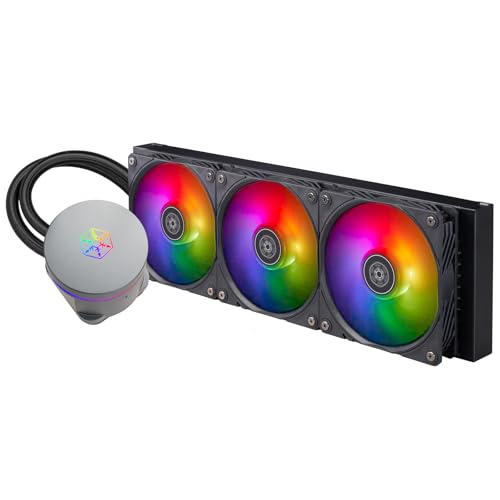
The Silverstone Technology IceMyst 360 PRO Liquid Cooler (SST-IM360-PRO) stands out as an exceptional choice for those running high-core-count processors like the AMD Ryzen Threadripper Pro. With its large copper base and next-gen motor, it delivers impressive cooling performance, ensuring your CPU runs smoothly even under heavy loads. The ARGB lighting adds a stylish touch, while the modular fan cables simplify installation and cable management. Plus, the expandable pump block allows for customization to meet your specific needs. With a one-year limited warranty, you can trust this cooler to keep your system performing at its best.
Best For: Those seeking high-performance cooling solutions for overclocked systems and workstations with high-core-count processors.
Pros:
- Efficient cooling performance with a large copper base and next-gen motor design.
- Stylish ARGB lighting and customizable pump block for personalized configurations.
- Simplified installation and cable management thanks to modular fan cables.
Cons:
- Limited to a one-year warranty, which may not be sufficient for some users.
- Higher price point compared to standard air coolers.
- Returns not accepted after 30 days, which could be a drawback for some customers.
be quiet! Pure Rock Pro 3 LX CPU Air Cooler
If you’re seeking reliable cooling for a high-performance system, the be quiet! Pure Rock Pro 3 LX CPU Air Cooler is an excellent choice. With six high-performance copper heat pipes and a 120mm quiet ARGB PWM fan, it delivers impressive cooling while maintaining a noise level of just 34.8 decibels. Weighing only 3 pounds, it fits seamlessly into your build, and the adjustable fan height guarantees RAM compatibility. Its stunning design features 16 LEDs for a personalized touch. Plus, it efficiently manages heat, even in overclocked situations, keeping your Threadripper Pro running smoothly.
Best For: Users looking for an efficient and aesthetically pleasing air cooler for high-performance CPUs, especially in overclocked systems.
Pros:
- Excellent cooling performance with six copper heat pipes and a powerful 120mm fan.
- Low noise level at just 34.8 decibels, making it suitable for quiet builds.
- Adjustable fan height for compatibility with RAM and VRM coolers.
Cons:
- May not be as effective as liquid coolers for extreme overclocking scenarios.
- Limited to specific Intel and AMD socket compatibility.
- The aesthetic design may not appeal to all users, especially those preferring a more minimalistic look.
ID-COOLING FROZN A620 PRO SE CPU Cooler

Looking for a reliable cooling solution for your high-performance Threadripper Pro setup? The ID-COOLING FROZN A620 PRO SE CPU Cooler is an excellent choice. Its dual-tower design features two 120mm PWM fans that guarantee efficient heat dissipation while keeping noise levels at a mere 27.2dB(A). With six Ф6mm copper heat pipes, it absorbs heat effectively, maintaining ideal CPU temperatures. Plus, its sleek blackout design fits seamlessly into your dark-themed builds. You’ll enjoy ample RAM clearance, accommodating standard heights up to 63mm. Trust the FROZN A620 PRO SE to keep your CPU running smoothly and quietly.
Best For: The ID-COOLING FROZN A620 PRO SE is best for users seeking an efficient and aesthetically pleasing cooling solution for their Intel or AMD CPUs, particularly in high-performance setups.
Pros:
- Excellent heat dissipation due to dual-tower design and six copper heat pipes.
- Ultra-quiet operation with a maximum noise level of only 27.2dB(A).
- Sleek blackout design enhances the aesthetic of dark-themed computer builds.
Cons:
- May be too tall (157mm) for some compact cases.
- Limited compatibility with certain older CPU sockets.
- The installation process may be more complex compared to simpler coolers.
Thermaltake AW360 Liquid Cooler (CL-W450-PL12BL-A)

For those tackling demanding workloads like 3D rendering or AI computing, the Thermaltake AW360 Liquid Cooler (CL-W450-PL12BL-A) stands out as an exceptional choice. Its 360mm radiator, paired with three powerful 140mm TOUGHFAN PROs, delivers impressive airflow and static pressure, ensuring your CPU stays cool under pressure. The nickel-plated copper water block guarantees superior heat dissipation, while the integrated pump minimizes noise, reaching speeds up to 4000 RPM. Compatibility with Intel LGA 4677 and AMD sTR5/SP6 makes installation a breeze, thanks to the 460mm sleeved tubing and standard 360mm sizing. This cooler keeps your Threadripper Pro running smoothly and efficiently.
Best For: Those seeking high-performance cooling solutions for demanding tasks such as 3D rendering and AI computing.
Pros:
- Exceptional cooling performance with a 360mm radiator and three TOUGHFAN PROs.
- High airflow and static pressure capabilities ensure optimal CPU temperatures.
- Easy installation with standard sizing and flexible sleeved tubing.
Cons:
- Larger size may not fit in compact cases.
- Requires adequate space for the radiator and fans.
- Higher price point compared to standard air coolers.
CORSAIR Nautilus 360 RS ARGB Liquid CPU Cooler

The CORSAIR Nautilus 360 RS ARGB Liquid CPU Cooler stands out as an exceptional choice for Threadripper Pro users who demand top-tier cooling performance without the noise. With a whisper-quiet operation at just 20 dBA, it guarantees your system runs smoothly. The convex cold plate and pre-applied thermal paste optimize thermal transfer, while RS120 ARGB fans boost airflow and static pressure. Installing it is a breeze, thanks to direct motherboard connections and daisy-chaining capabilities. Plus, customizable RGB lighting adds a stylish touch. Backed by a 5-year warranty, this cooler is a reliable and efficient solution for your CPU cooling needs.
Best For: Users looking for a high-performance CPU cooler that operates quietly while delivering efficient cooling for demanding applications.
Pros:
- Whisper-quiet operation: Functions at just 20 dBA, ensuring minimal noise disruption.
- Strong cooling performance: Features a convex cold plate and high-performance RS120 ARGB fans for optimal thermal transfer and airflow.
- Customizable RGB lighting: Eight RGB LEDs allow for personalized aesthetic options to match your build.
Cons:
- Weight: At 3.53 pounds, it may be heavier than some standard coolers, potentially impacting installation on lightweight cases.
- Price point: As a premium product, it may be more expensive than basic cooling solutions.
- Optional controller sold separately: Advanced lighting control requires an additional purchase of the iCUE controller for full functionality.
Factors to Consider When Choosing Cooling for Threadripper Pro
When choosing cooling for your Threadripper Pro, you need to take into account several key factors. Think about the cooling method that suits your needs, the noise levels you’re comfortable with, and whether the cooler is compatible with your socket. Don’t forget to assess size constraints and compare performance ratings to guarantee maximum cooling efficiency.
Cooling Method Selection
Choosing the right cooling method for your Threadripper Pro processor is essential, especially since its thermal design power (TDP) can reach up to 350W. Start by evaluating your workload; if you’re handling moderate tasks, a high-quality air cooler with multiple heat pipes might suffice. However, for intense workloads or overclocking, an All-in-One (AIO) liquid cooler is ideal due to its superior heat dissipation.
Also, verify the cooling solution fits your chassis and has enough clearance for RAM and GPU. Installation ease is another factor; air coolers are generally simpler to set up compared to liquid coolers, which may require more effort for installation and maintenance. Choose wisely to keep your CPU running smoothly!
Noise Level Considerations
While you might prioritize cooling performance for your Threadripper Pro, don’t overlook the impact of noise levels on your overall experience. Quieter models typically operate around 20-35 decibels, making them ideal for noise-sensitive environments. High-performance air coolers may reach noise levels of up to 34.8 decibels, while some liquid coolers can be even louder, hitting around 46 decibels under maximum load. Look for coolers that use PWM technology to adjust fan speeds dynamically, keeping things quiet at idle and ramping up only when needed. Additionally, consider models with larger fans, vibration-damping rubber pads, or optimized fan blade designs, as these features can greatly reduce noise without sacrificing cooling efficiency.
Compatibility With Sockets
Finding the right cooler for your Threadripper Pro goes beyond just cooling performance and noise levels; compatibility with the socket is essential. Verify your cooler supports the sTR5 socket, specifically designed for the 7000 series Threadripper processors. If you’re using Epyc 8004 processors, confirm that it’s compatible with the SP6 socket for proper functionality. Many high-performance coolers work with multiple socket types, so check for compatibility with other AMD and Intel sockets to enhance versatility. Review the cooler’s specifications for installation requirements, as some may come with specific mounting kits tailored for Threadripper sockets. Finally, confirm the cooler’s dimensions fit your chassis, considering that larger models may affect RAM clearance.
Size and Space Constraints
When selecting a cooler for your Threadripper Pro, understanding size and space constraints is essential to guarantee peak performance. Larger coolers can enhance cooling efficiency, but they may also block RAM slots or components in tighter cases. Make sure the cooler’s height and width fit your computer case, especially with tower-style air coolers that can be considerably taller than stock options. Liquid coolers often need more room due to radiator size and placement—check for adequate clearance for a 360mm radiator and suitable fan mounting points. Also, consider your motherboard layout and cooler orientation, as these can affect airflow and interfere with other parts. Always verify the manufacturer’s specifications for compatibility and installation ease.
Performance Ratings Comparison
Selecting the right cooling solution for your Threadripper Pro hinges on understanding performance ratings, which reflect how effectively a cooler can manage heat under load. With a TDP of up to 280W, efficient heat dissipation is essential. Generally, liquid coolers outperform air coolers; for instance, 360mm AIO liquid coolers boast airflow capacities over 80 CFM and pump speeds around 2900 RPM. However, high-quality air coolers with multiple heat pipes can also deliver effective cooling while maintaining noise levels around 30-35 dBA. It’s important to take into account noise, as top-performing coolers keep operational sound below 30 dBA, ensuring a quieter environment. Finally, check customer ratings—coolers scoring above 4.5 stars often indicate reliability and performance.
Installation Complexity Assessment
Installing a cooler for your Threadripper Pro can be straightforward or challenging, depending on several factors. First, consider the mounting mechanisms; air coolers often require different tools and steps than liquid coolers. Next, check if the cooler has a pre-applied thermal compound or if you’ll need to handle that yourself, as this can save time. Evaluate the space and clearance requirements, especially for larger air coolers, to guarantee they fit well with your case and RAM. Look for coolers with user-friendly installation kits that include clear instructions and all necessary hardware. Finally, keep in mind the weight of the cooler; heavier models may need extra support to avoid stressing your motherboard during installation.
Aesthetic Design Preferences
Choosing the right cooler for your Threadripper Pro isn’t just about performance; it’s also an opportunity to enhance the visual appeal of your build. Aesthetic design preferences can greatly elevate your setup, especially if you prioritize style alongside functionality. Many coolers now come with customizable RGB lighting, letting you create dynamic effects that match or contrast with your system’s components. You can find coolers in sleek black finishes or vibrant colors to suit your taste. Unique design elements, like rotatable pump tops and premium finishes, can serve as eye-catching focal points. Additionally, features like modular fan cables and vibration-damping designs not only improve aesthetics but also contribute to a cleaner, organized interior, appealing to those who value cable management.
Budget and Pricing Options
When it comes to finding the right cooler for your Threadripper Pro, budget is an essential factor that can greatly impact your decision. You’ll need to weigh the initial purchase cost against potential long-term savings on electricity and maintenance. High-performance cooling options generally range from $50 to over $200, depending on whether you choose air or liquid cooling and the brand’s reputation. Don’t forget to account for aftermarket solutions that might require additional investments in tools or thermal paste, adding to your overall costs. Look for products with longer warranty periods, as they often offer better value. Finally, consider future expenses for replacement parts or upgrades, especially with higher-end systems that may need specific components.