Choosing among commercial-grade large format scanners means balancing scan size, image quality, throughput, software support, and total operating cost. The right model can simplify everything from oversized drawings and maps to archival photos, books, and business records.
We compare 10 professional-focused options across flatbed, sheetfed, wide-format, and overhead designs so you can match scanner capabilities to your workload instead of paying for features you will not use.
Best 10 Commercial-Grade Large Format Scanners Picks for 2026
Reliable Wide-Feed Workhorse

- Wide feed for large and odd-shaped documents
- Straight paper path and jam-reduction features
- PaperStream ClickScan with TWAIN/ISIS support
Best For: Daily scanning of oversized or unusual office documents
High-Detail Graphics Specialist

- Scans reflective media up to 12.2 by 17.2 inches
- 2400 x 4800 dpi with 48-bit color
- Batch scanning, dust removal, and color restoration
Best For: Large-format photos, negatives, and graphic arts originals
Extra-Wide Technical Capture
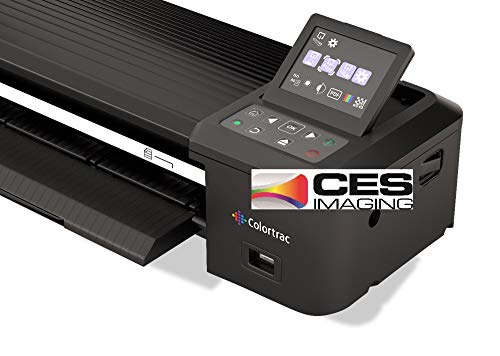
- 36-inch wide scanning capability
- 600 dpi resolution with 24-bit color
- Ethernet connection for workgroup use
Best For: Very wide paper documents and shared scanning environments
High-Capacity Sheetfed Option

- 600 dpi optical resolution
- 120-sheet capacity for batch scanning
- Supports cards, passports, postcards, and letters
Best For: Versatile sheetfed scanning of large documents and mixed media
Fast A3 Workflow Pick

- Four-second A3 color scans at 200 dpi under specified conditions
- Frameless glass and auto-scan support repetitive workflows
- Up to 2400 dpi optical resolution with 48-bit color
Best For: Fast scanning of A3 documents, CAD drawings, and blueprints
High-Detail Photo Specialist

- Handles reflective media up to 12.2 by 17.2 inches
- 2400 x 4800 dpi resolution with 48-bit color
- Includes restoration, batch-scanning, and SilverFast Ai software
Best For: Detailed photo, artwork, and archival scanning
Space-Saving Office Choice

- Handles paper up to 12 inches wide, including A3 and ledger
- Automatic size detection and blank-page removal simplify batches
- Stores upright and supports programmable job-button workflows
Best For: Mixed-size office documents, plans, and space-conscious workspaces
Best Commercial Workgroup Scanner

- 11.7 x 17-inch flatbed scanning
- TWAIN and ISIS drivers included
- Next-business-day replacement warranty
Best For: Office workgroups scanning oversized documents
Best A3 Flatbed Value

- 12 x 17-inch A3 scan area
- Batch scanning and OCR tools
- Windows, Mac, and Linux support
Best For: A3 documents, maps, drawings, and books
Best Overhead Book Scanner

- Captures A2 and A3 materials overhead
- 26MP imaging with enhanced 600 DPI
- Auto-flattening and multi-language OCR
Best For: Books, maps, manuscripts, and oversized bound materials
Reliable Wide-Feed Workhorse – Ricoh fi-7460
RICOH fi-7460 Wide-Format Color Duplex Document Scanner | Auto Document Feeder (ADF)
Check Price On AmazonThe Ricoh fi-7460 is a practical choice for organizations comparing commercial-grade large format scanners for mixed document workloads. Its wide feed mechanism handles large and oddly shaped documents, while the straight paper path and paper-handling features are designed to support safe, dependable scanning.
Best For: Offices and service teams scanning large, unusual, or customer-facing documents in daily batches.
Pros:
- Wide feed supports large and odd-shaped documents.
- Gentle, straight paper path helps protect important originals.
- 100-sheet capacity and jam-reduction technologies support productivity.
- Includes PaperStream ClickScan and TWAIN/ISIS compatibility.
Cons:
- Resolution is listed at 300 dpi, lower than some specialized graphics scanners.
- USB connectivity may be less convenient for network-based workflows.
- The supplied warranty description is limited to three months of basic onsite coverage.
Choose the fi-7460 when reliable handling and workflow integration matter more than high-resolution photo or graphics capture. Its wide feed and straight path make it especially useful for operational document scanning.
High-Detail Graphics Specialist – Epson Expression 12000XL-GA
The Epson Expression 12000XL-GA stands out among commercial-grade large format scanners for reflective media and graphics work. Its flatbed accommodates originals up to 12.2 by 17.2 inches and combines 2400 x 4800 dpi resolution with 48-bit color depth for detailed scans.
Best For: Graphic arts, photo, negative, and archival workflows requiring high-resolution flatbed capture.
Pros:
- Handles reflective media up to 12.2 by 17.2 inches.
- 2400 x 4800 dpi resolution and 3.8 Dmax support detailed image capture.
- 48-bit color depth and MatrixCCD imaging support vibrant reproduction.
- Batch scanning, dust removal, and color restoration improve productivity.
Cons:
- Flatbed design is less suited to high-volume loose-document feeding.
- USB is the listed connection type, with no network connection noted.
- At 31.5 pounds, it requires a substantial workspace.
This Epson is the stronger fit when image quality, color handling, and oversized flat originals are the priority. It is less of a conventional office document feeder and more of a professional graphics scanner.
Extra-Wide Technical Capture – Colortrac SmartLF 36-Inch
The Colortrac SmartLF is built for buyers seeking commercial-grade large format scanners with a 36-inch scanning width. Its 600 dpi resolution, 24-bit color depth, LED lighting, and Ethernet connection make it a specialized option for wide paper documents.
Best For: Workgroups handling very wide paper documents that benefit from Ethernet connectivity.
Pros:
- 36-inch wide scanning accommodates exceptionally broad documents.
- 600 dpi resolution supports detailed document capture.
- Ethernet connectivity can suit shared workgroup environments.
- LED light source supports consistent scanning operation.
Cons:
- The supplied notes identify paper as the media type, with no broader media support specified.
- 24-bit color depth is less extensive than the 48-bit depth listed for the Epson flatbed.
- At 31 pounds, it is not a lightweight desktop scanner.
The SmartLF is a focused wide-format choice rather than a general-purpose office scanner. Its 36-inch width is the key advantage for teams whose documents exceed the capacity of conventional large-format models.
High-Capacity Sheetfed Option – Epson WorkForce DS-30000
The Epson WorkForce DS-30000 is a sensible option for buyers comparing commercial-grade large format scanners for sheetfed document work. It supports large documents at resolutions up to 600 dpi, includes a 120-sheet capacity, and accepts a range of media including cards, passports, postcards, and letters.
Best For: Offices needing versatile sheetfed scanning for large documents and varied paper or card media.
Pros:
- Sheetfed design is well suited to large-document scanning.
- 600 dpi optical resolution supports detailed captures.
- 120-sheet capacity supports larger scanning batches.
- Handles business cards, passports, plastic cards, postcards, and letters.
Cons:
- USB is the listed connection type, with no Ethernet option specified.
- The supplied notes do not provide a maximum document dimension.
- Its 30-bit color depth is less than the 48-bit depth of the Epson Expression 12000XL-GA.
Consider the DS-30000 when throughput and media flexibility are more important than flatbed graphics scanning. Its larger sheet capacity and broad media support make it a practical document-focused choice.
Fast A3 Workflow Pick – VIISAN VF3240
The VIISAN VF3240 is a practical choice for offices and studios that need commercial-grade large format scanners for A3 documents, CAD drawings, blueprints, and other flat materials. Its headline strength is a four-second A3 color scan at 200 dpi, while the frameless glass and automatic scan function support efficient batch workflows.
Best For: CAD drawings, architectural plans, oversized business documents, and high-volume A3 scanning.
Pros:
- Scans A3 color documents in up to four seconds at 200 dpi under specified conditions.
- Frameless design supports edge-to-edge scanning, and auto-scan starts when the lid closes.
- Offers up to 2400 x 2400 dpi optical resolution and 48-bit color for detailed images.
- Works with Windows and macOS and includes a universal 100–240V power adapter.
Cons:
- Maximum scan speed depends on resolution, document size, and scan settings.
- Windows users have limitations at higher resolutions, including a 600 dpi WIA restriction.
- The CIS sensor is intended for flat paper materials rather than 3D objects or unusual media.
Choose the VF3240 when speed and straightforward A3 document handling matter most. It is especially well suited to flat engineering, office, and educational materials, with the caveat that operating-system and material limitations should be considered.
High-Detail Photo Specialist – Epson Expression 13000XL
The Epson Expression 13000XL is built for commercial-grade large format scanners users who prioritize image quality and color fidelity. Its 12.2-by-17.2-inch reflective-media capacity, CCD sensor, and 2400 x 4800 dpi resolution make it a strong fit for photographs, artwork, and other detailed originals.
Best For: Professional photo, artwork, archival, and batch image scanning.
Pros:
- Accommodates reflective media up to 12.2 by 17.2 inches.
- 2400 x 4800 dpi resolution, Micro Step Drive technology, and 3.8 Dmax support detailed scans.
- MatrixCCD and ReadyScan LED technologies are designed for accurate, vibrant color reproduction.
- Easy Photo Fix offers one-touch color restoration and automatic dust removal, while batch scanning improves productivity.
Cons:
- The scanner is large and heavy at approximately 25.8 inches wide and 31.5 pounds.
- Transparency scanning requires the optional unit, which is sold separately.
- Its stated power consumption is higher than the other listed models at 20 watts.
The 13000XL is the most image-focused option in this group. It makes sense for photo and archival workflows where color accuracy, restoration tools, and batch productivity outweigh its substantial desktop footprint.
Space-Saving Office Choice – Plustek S30
The Plustek S30 is a compact option for offices seeking commercial-grade large format scanners without adding a separate device for occasional wide documents. It handles paper up to 12 inches wide, including tabloid, ledger, and A3 materials, while automatic paper detection helps simplify mixed-size scanning.
Best For: Busy offices scanning mixed-size documents, plans, receipts, and fragile papers.
Pros:
- Scans documents up to 12 inches wide, including A3, ledger, and tabloid formats.
- Handles standard office paper and wide documents, potentially avoiding the need for a second scanner.
- Automatic paper detection identifies sizes, removes blank pages, and optimizes images during continuous scanning.
- Programmable job buttons support one-touch access to frequently used scanning tasks.
Cons:
- Its listed resolution is 600 dpi, below the higher-resolution VIISAN and Epson models.
- It connects by USB and lists Windows 7 as the minimum system requirement.
- Very large or fragile materials may require folding or a carrier sheet.
The S30 is a sensible office-first choice when space, flexibility, and mixed document handling are more important than maximum optical resolution. Its upright storage option and automatic detection are useful for shared workspaces.
Best Commercial Workgroup Scanner – Epson DS-50000
The Epson DS-50000 is a commercial-grade large format scanner for offices that need reliable flatbed scanning of documents up to 11.7 by 17 inches. Its CCD sensor, TWAIN and ISIS driver support, and optional network module make it a practical fit for established document workflows.
Best For: Offices scanning oversized documents, forms, drawings, and other materials that need crisp text, vivid color, and business-oriented software compatibility.
Pros:
- Scans documents up to 11.7 by 17 inches.
- Includes both TWAIN and ISIS drivers for software compatibility.
- Four-line CCD sensor supports sharp text and vivid color.
- Three-year limited warranty includes advance exchange with next-business-day replacement.
Cons:
- The optional network scan module is required for networked workgroup use.
- Its large, heavy design may be less suitable for compact workspaces.
- The supplied details list USB as the standard connection.
Choose the DS-50000 when office integration and support coverage matter as much as large-format capability. It is a substantial flatbed scanner, but its driver support and replacement warranty are useful advantages for regular business use.
Best A3 Flatbed Value – Plustek OpticPro A320E
The Plustek OpticPro A320E is a commercial-grade large format scanner built around a 12 by 17-inch A3 scan area. It combines broad operating-system support with batch scanning, OCR, and file-management tools for users handling maps, drawings, books, or multiple printed images.
Best For: Small offices, studios, schools, and home offices that need A3 flatbed scanning with OCR and flexible scan-to-file destinations.
Pros:
- Handles documents and media up to 12 by 17 inches.
- Supports Windows, macOS, and Linux with the appropriate drivers.
- Batch scanning can save multiple images to separate PDF files.
- Doc Action provides OCR and scan-to-print, email, folder, and FTP options.
Cons:
- Linux users may need to contact the seller for the SANE driver.
- Mac support is listed for macOS 10.13 through 13.x.
- The warranty is limited to one year.
The A320E is a versatile choice when A3 coverage and workflow convenience are priorities. Its batch and OCR features add practical value, especially for users who want more than basic image capture without moving to an overhead scanner.
Best Overhead Book Scanner – VIISAN S21 A2/A3 Scanner
The VIISAN S21 is a commercial-grade large format scanner for books, newspapers, maps, and other oversized materials that are easier to capture from above. Its A2 shooting area, 26MP resolution, and software-assisted page flattening make it especially suited to bound or delicate documents.
Best For: Libraries, archives, educators, and users digitizing books, manuscripts, newspapers, maps, odd-shaped items, or occasional 3D objects.
Pros:
- Captures A2-size materials up to 594 by 420 mm and adjusts for A3 use.
- Software can flatten curved pages, remove fingers, and split facing pages.
- Built-in OCR can export scans to PDF, Word, Excel, EPUB, and text formats.
- Foldable hinge, LED lighting, snapshots, video, and remote-collaboration support add flexibility.
Cons:
- Bundled OfficeCam software is not compatible with ARM-based devices such as Surface Pro X.
- It uses USB 2.0 connectivity rather than a faster listed interface.
- Glare-prone papers are not recommended, and the warranty is one year.
The S21 stands apart from conventional flatbeds by accommodating large, bound, and irregular materials without placing them under a lid. It is a strong fit for specialized digitization, provided your computer uses a supported x86 or x64 architecture.
How We Picked the Best Commercial-Grade Large Format Scanners
We focused on scanners designed for demanding office, archive, design, engineering, education, and reproduction workflows. Our comparison considers maximum scan area, optical resolution, color accuracy, duplex or batch capability, document handling, connectivity, driver support, and the practical needs of oversized or delicate originals.
We also separated true high-throughput document scanners from flatbed and overhead models. A scanner that excels at continuous paperwork may not be the best choice for artwork, bound books, maps, or fragile originals.
Quick Comparison
| Best For | Look For |
|---|---|
| High-volume office documents | Sheetfed handling, duplex scanning, reliable duty cycles, and TWAIN or ISIS support |
| CAD drawings and maps | Wide-format capacity, accurate line reproduction, and compatible large-format software |
| Photos and artwork | High optical resolution, strong color depth, and a flat, stable scanning surface |
| Books and delicate originals | Overhead capture, automatic flattening, page detection, and minimal contact |
| Occasional A3 or ledger work | A3 or 11-by-17-inch support without the cost or footprint of a specialty wide-format system |
Key Buying Factors for Commercial-Grade Large Format Scanners
Scan Size and Document Handling
Confirm the maximum scan area rather than relying on the word “large format.” A3 and ledger scanners handle documents up to roughly 11 by 17 inches, while wide-format systems are better suited to engineering drawings, maps, and larger plans. Flatbeds are flexible but slower; sheetfed models are faster for stacks of uniform pages.
Resolution and Image Quality
Optical resolution matters more than interpolated resolution. For ordinary documents, moderate resolution is usually sufficient. Photos, artwork, fine CAD lines, and archival material benefit from higher optical resolution, accurate color capture, and good shadow detail. High resolution also creates larger files and can reduce throughput.
Speed, Volume, and Workflow Integration
Check rated scan speed, feeder capacity, duplex performance, duty cycle, and warm-up behavior. For shared office use, TWAIN, ISIS, USB, and network compatibility can be as important as headline speed. Look for OCR, searchable PDF creation, batch separation, and reliable paper handling when digitizing records.
Software, Maintenance, and Total Cost
Include software licenses, replacement rollers, calibration tools, service coverage, and installation space in the budget. A less expensive scanner may be the better value for occasional work, while a supported commercial unit can reduce downtime in a daily production environment.
Who Should Buy Which Commercial-Grade Large Format Scanners?
Choose a high-speed sheetfed model if your priority is recurring batches of business documents. Choose a wide-format scanner when oversized drawings, maps, or plans are central to the workflow. A high-resolution flatbed is the stronger fit for photographers, museums, print shops, and anyone scanning artwork or reflective originals.
For schools, small offices, and home studios that mainly handle A3 or ledger pages, a compact large-format flatbed can provide the necessary coverage without the footprint of a professional wide-format system. If books, bound records, or delicate materials are common, an overhead scanner with automatic page correction may be safer and more efficient than a conventional flatbed.