Compact digital signage displays are a smart way to add polished, always-on messaging without taking up much room. They work well for counters, reception desks, menu boards, kiosks, and small retail spaces.
This roundup focuses on the best options for 2026, with attention to display size, brightness, touchscreen features, mounting flexibility, and ease of content management.
Best 10 Compact Digital Signage Displays Picks for 2026
Space-Saving Commercial Screen
Samsung 24-Inch Compact UHD Signage

- 24-inch compact commercial display
- Full HD with Home UI and favorites folder
- Built-in Wi-Fi and Samsung VXT remote management
Best For: Small offices, entrances, and promotional spaces
Countertop Menu Display
Canlarriz 18.5-Inch Countertop Signage

- 18.5-inch indoor countertop display
- Portrait and landscape stands included
- CMS publishing, USB playback, and scheduling
Best For: Checkout counters, reception desks, and waiting areas
Portable Poster Kiosk
MWE 32-Inch Portable Indoor Signage

- 32-inch FHD IPS display with wide viewing angles
- Foldable design with built-in wheels
- USB/HDMI, WiFi, CMS, and timed power settings
Best For: Stores and venues that need a movable indoor display
Smallest Multi-Use Sign
7-Inch Dual-Charge Android Tabletop Signage

- 7-inch compact tabletop digital signage
- Built-in phone charging and dual-sided display
- WiFi cloud CMS with battery-powered use
Best For: Small restaurant tables, counters, and reception desks
Portable Touchscreen Signage

- 15.6-inch FHD IPS screen with narrow bezel
- 10,000 mAh battery supports about 4 to 6 hours
- 10-point touch plus Android 11 and mirroring
Best For: Portable promotions and interactive counter signage
Countertop Menu Board

- 700-nit screen for commercial visibility
- Free lifetime cloud CMS with remote management
- Desktop stand supports portrait or landscape use
Best For: Countertops, cafes, and reception desks with frequent content changes
Battery Touch Signage
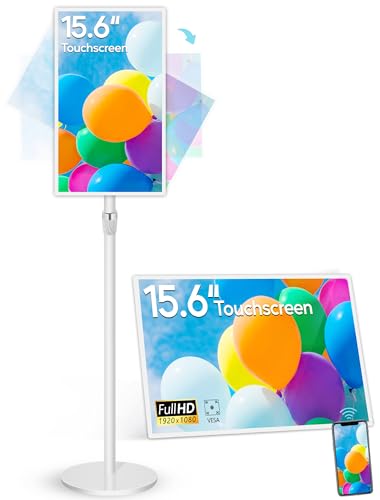
- FHD 15.6-inch touchscreen with 10-point input
- 10,000 mAh battery for 4 to 6 hours of use
- Android 13 with mirroring, autoplay, and app support
Best For: Portable indoor signage and light interactive use
Countertop Touch Kiosk
10.1" L-Shaped HD Signage Display

- 10-point touchscreen for interactive use
- App or USB updates simplify content changes
- Compact L-shaped design suits counters
Best For: Counters, desks, and tabletop customer-facing signage
Freestanding Interactive Totem
32" Touch Digital Signage Display

- 32-inch touch screen for public interaction
- 600 nits brightness with wide viewing angles
- Split-screen and Android tools for flexible content
Best For: High-traffic venues needing a larger interactive signage kiosk
Compact Tabletop Menu Board
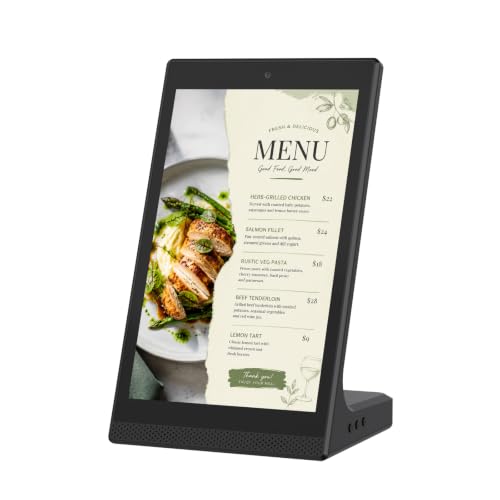
- Space-saving tabletop design for close viewing
- Wi-Fi and USB support simple content updates
- Touchscreen works for menus, notices, and promos
Best For: Indoor counters and desks needing simple digital signage
Space-Saving Commercial Screen – Samsung 24-Inch Compact UHD Signage
If you need compact digital signage displays for an entrance, office, or promotional area, this 24-inch Samsung commercial screen is built for efficient space use without sacrificing business-focused features. It combines Full HD resolution, a compact design, and remote management tools for straightforward day-to-day operation.
Best For: Offices, entrances, exits, and small promotional spaces that need a compact commercial display.
Pros:
- Compact design helps maximize limited wall space.
- Full HD resolution suits clear promotional and informational content.
- Home UI organizes popular categories on one screen for easier access.
- Built-in Wi-Fi, center IR, and Samsung VXT support remote control and management.
Cons:
- Single 24-inch format may be too small for larger viewing distances.
- Wall-mount setup may not fit every placement need.
This is a practical pick if you want a compact commercial display with simple controls and remote management rather than a feature-heavy kiosk. Its focus is on space efficiency and business signage basics done well.
Countertop Menu Display – Canlarriz 18.5-Inch Countertop Signage
This 18.5-inch model fits neatly into compact digital signage displays setups for counters, desks, and reception areas. It is designed for close-range indoor viewing with a 700-nit 1080p screen, flexible portrait or landscape placement, and remote content options for everyday business use.
Best For: Checkout counters, reception desks, cafes, salons, and other indoor counter placements.
Pros:
- Countertop form factor works well in high-traffic service areas.
- Includes both portrait and landscape stands for flexible placement.
- 700-nit 1080p display is suited to indoor close-up viewing.
- CMS publishing, USB playback, loop playback, and scheduling support content updates.
Cons:
- Designed for indoor counter use only, not outdoor conditions.
- Not a touchscreen tablet or POS terminal.
For businesses that want a compact countertop signage solution, this display balances size, flexibility, and content management features. It is especially useful where messages need to sit close to the customer before checkout or service.
Portable Poster Kiosk – MWE 32-Inch Portable Indoor Signage
If you want compact digital signage displays with a larger viewing area, this 32-inch MWE indoor kiosk adds portability to a commercial poster-style screen. It offers FHD visuals, wide viewing angles, auto loop playback, and CMS remote updates for flexible advertising and information sharing.
Best For: Retail stores, hotels, malls, restaurants, and event setups that need a movable signage screen.
Pros:
- IPS FHD panel with a 178° viewing angle improves visibility.
- Portable, foldable design with built-in wheels makes repositioning easier.
- USB/HDMI input and WiFi support flexible content loading.
- CMS remote publishing and timed power settings help manage updates and schedules.
Cons:
- Larger footprint than countertop or ultra-compact signage options.
- Best suited to indoor use rather than small desk-style placements.
This model works well when you need a movable signage display that still feels commercial and attention-grabbing. It is a strong fit for businesses that change promotions often or need a screen they can roll between locations.
Smallest Multi-Use Sign – 7-Inch Dual-Charge Android Tabletop Signage
This 7-inch unit is one of the most compact digital signage displays in the group, combining a customer-facing screen with built-in phone charging. It is designed for tables, counters, and reception areas where space is limited but you still want digital menus, ads, and practical utility in one device.
Best For: Restaurants, cafes, bars, hotels, and front desks that want a small display with charging features.
Pros:
- Very compact 7-inch tabletop design saves space.
- Dual-sided touchscreen can show menus, QR codes, and branded content.
- Built-in 23,000+ mAh battery supports long runtime away from an outlet.
- WiFi CMS supports remote content updates and image/video uploads.
Cons:
- Small screen size limits visibility from farther away.
- Primarily suited to tabletop and counter use, not larger display areas.
This is a smart choice when you want signage that does more than advertise. Its combination of compact screen size, battery power, and device charging makes it especially useful in customer-facing spaces with tight footprints.
Portable Touchscreen Signage – 15.6" FHD Battery Display
This compact digital signage display is a good fit when you want a small, interactive screen that can move between counters, lobbies, kiosks, and event spaces. The 15.6-inch FHD IPS panel, narrow bezel, Android 11 system, and built-in battery make it more flexible than a fixed menu board for short-term or mobile use.
Best For: Portable promotions, interactive counters, and battery-powered signage in mixed indoor settings.
Pros:
- 15.6-inch FHD IPS screen with a very thin 10mm bezel for a cleaner presentation
- Built-in 10,000 mAh battery supports roughly 4 to 6 hours of use
- 10-point capacitive touch supports interactive use at the counter or display stand
- Android 11, wireless screen mirroring, autoplay, and multiple ports add flexibility
Cons:
- Battery life is useful for portable sessions, but it is still limited for all-day unplugged use
- 15.6-inch size may be small for viewers who need signage from farther away
Overall, this model stands out for compact digital signage displays where portability and touch interaction matter more than maximum screen size. It is best when you want a tidy, all-in-one unit that can handle messaging, wayfinding, and light commercial engagement.
Countertop Menu Board – 18.5" 700 Nits CMS Display
If you need compact digital signage displays for a front counter or reception desk, this 18.5-inch menu board is built around visibility and easy content control. The 700-nit panel, landscape or portrait placement, and lifetime free cloud CMS make it practical for businesses that update promotions often.
Best For: Restaurants, cafés, retail counters, and reception areas that need remote content updates.
Pros:
- 700 nits brightness helps content stay visible in busy commercial spaces
- Free lifetime cloud CMS supports remote scheduling, playlists, split screens, and live updates
- Desktop stand supports both landscape and portrait orientations
- Android 12 with 2GB RAM and 32GB storage is designed for continuous business playback
Cons:
- Native resolution is 1366 x 768, so it is not a full-HD panel
- Best suited to countertop use rather than larger-area viewing
This is a strong pick if your priority is easy remote management and a durable desktop layout. Among compact digital signage displays, it is especially useful for venues that change menus, offers, or announcements throughout the day.
Battery Touch Signage – 15.6" Android 13 Display
This compact digital signage display is aimed at users who want a slim, interactive screen with broader app support and stronger hardware specs. The 15.6-inch FHD touchscreen, Android 13 system, 10,000 mAh battery, and adjustable stand make it suitable for commercial counters as well as light whiteboard-style use.
Best For: Businesses or multi-use spaces that want a portable touchscreen signage unit with Android 13 and easy screen sharing.
Pros:
- 15.6-inch 1920 x 1080 touchscreen with 10-point capacitive input
- Built-in 10,000 mAh battery supports about 4 to 6 hours of use
- Android 13 with 4GB RAM and 64GB storage allows app downloads and everyday multitasking
- Wireless screen mirroring, autoplay, reverse control, and multiple mounting options add versatility
Cons:
- 400 cd/m² brightness is solid for indoor use, but not targeted at outdoor visibility
- At 15.6 inches, it is still better for close viewing than larger public-facing signage
For buyers comparing compact digital signage displays, this model offers one of the most flexible feature sets in a small footprint. It works well when you want signage, light collaboration, and app-driven use in a single portable unit.
Countertop Touch Kiosk – 10.1" L-Shaped HD Signage Display
This compact digital signage display is built for close-range counters where you want quick updates and easy interaction. The 10.1-inch L-shaped touchscreen supports app or USB content management, making it a practical fit for small businesses that need to rotate menus, promos, or announcements without extra complexity.
Best For: Retail counters, restaurant menus, hotel desks, clinics, and other front-desk or tabletop setups that need a small interactive screen.
Pros:
- 10-point capacitive touchscreen supports smooth multi-touch interaction.
- LedArt app and USB playback make content updates simple for non-technical staff.
- L-shaped tabletop design helps the screen stay stable and easy to view.
- Includes Wi-Fi, Ethernet, Bluetooth, speakers, and a 2MP camera for flexible installations.
Cons:
- 10.1-inch screen is better for close viewing than larger public-facing spaces.
- 800×1280 resolution is modest compared with higher-resolution signage panels.
- Designed mainly for countertop use rather than wall-mounted or large-format deployments.
Overall, this is a solid pick if you want a space-saving digital signage display with interactive features and straightforward content control. It focuses on convenience, making it well suited to everyday commercial use at the point of service.
Freestanding Interactive Totem – 32" Touch Digital Signage Display
If you need a compact digital signage display with a bigger public-facing presence, this freestanding totem is built for visibility and flexibility. It offers touchscreen interaction, Android-based content control, and multiple input options, which makes it a strong fit for dynamic commercial messaging in high-traffic spaces.
Best For: Malls, airports, hospitals, retail entrances, and other busy public areas that need a freestanding interactive display.
Pros:
- 32-inch touch model provides a larger interactive surface for public engagement.
- IPS panel with 600 nits brightness and 178° viewing angle helps content stand out.
- Supports USB, HDMI, Wi-Fi, and Android apps for flexible content updates.
- Split-screen function lets you show multiple content types at once.
Cons:
- Freestanding format takes more floor space than countertop signage.
- Interactive totem design is more than many small businesses need for simple menu boards.
- Large-format deployment is less portable than tabletop units.
For businesses that want one display to handle advertising, information, and interaction, this model brings a lot of flexibility. It’s a practical option when visibility and multi-content presentation matter more than a minimal footprint.
Compact Tabletop Menu Board – 10.1" Android Touch Display
This compact digital signage display is designed for countertop information sharing where size, simplicity, and clear visibility matter. The 10.1-inch Android touchscreen supports Wi-Fi and USB content management, so it works well for menu boards, desk signage, and other everyday indoor uses.
Best For: Restaurants, cafés, reception desks, retail shelves, clinics, and other indoor spots that need a small tabletop display.
Pros:
- 10.1-inch tabletop form factor saves space while staying easy to read up close.
- Touchscreen supports simple tap-and-swipe navigation for on-screen browsing.
- Wi-Fi and USB connectivity make content updates straightforward.
- Suitable for menus, notices, product showcases, and customer-facing information.
Cons:
- Best suited to indoor close-range viewing rather than larger public areas.
- USB Type B hardware connectivity is limited compared with broader input setups.
- Geared toward routine signage tasks instead of advanced interactive applications.
This is a good fit if you want an easy-to-manage tabletop sign with touchscreen control and a clean business display. It keeps the focus on practical everyday signage rather than extra features you may not need.
How We Picked These Compact Digital Signage Displays
We prioritized screens that make sense for tight spaces while still delivering clear visibility, reliable playback, and practical business features. That means balancing screen size with brightness, resolution, touch capability, and content control options such as Android systems, CMS support, USB playback, or remote management.
We also looked for models that fit common real-world uses, including countertop promotions, menu boards, reception check-ins, and informational displays. The best Compact Digital Signage Displays should be easy to set up, simple to update, and durable enough for daily commercial use.
Quick Comparison
Smaller tabletop units are usually best for close-range viewing and interactive tasks, while 15.6-inch to 24-inch displays offer a more versatile balance of readability and footprint. If you need stronger visibility in brighter indoor environments, look for higher brightness ratings. If content changes often, choose a model with straightforward remote management or built-in media playback.
Key Buying Factors for Compact Digital Signage Displays
Size and Placement
Measure your counter, kiosk, or wall space before buying. A compact screen should leave room for cables, accessories, and customer interaction without feeling crowded.
Brightness and Readability
For indoor retail or lobby use, brightness matters as much as resolution. Higher-nit displays are easier to read under strong overhead lighting or near windows.
Touch and Interactivity
Touchscreen models are ideal for menus, wayfinding, appointments, and self-service applications. Non-touch displays can be better for passive promotions and looping content.
Content Management
Look for Android support, CMS tools, USB auto-play, or remote update options if you plan to refresh content often. Easier management saves time across multiple locations.
Power and Portability
If you need flexibility, consider battery-powered or adjustable-stand designs. These are especially useful for temporary promotions, events, or changing floor layouts.
Who Should Buy Which Compact Digital Signage Displays?
Choose a smaller tabletop model if you want a space-saving solution for menus, product highlights, or reception messaging. Go with a 15.6-inch or 18.5-inch display if you want a stronger balance of visibility and compact size. Pick a larger format only if you need a kiosk-style presentation or more distant viewing.
For most buyers, the best Compact Digital Signage Displays are the ones that match the viewing distance, update workflow, and placement constraints of the actual space. Start with those needs, then narrow by brightness, touch support, and software convenience.