Compact electronic writing tablets offer a quick, low-mess way to jot reminders, sketch ideas, practice handwriting, and keep children entertained without stacks of paper.
We selected 10 portable options across several sizes, pack configurations, and use cases—from pocket-sized doodle boards to larger tablets for home, school, and office notes.
Best 10 Compact Electronic Writing Tablets Picks for 2026
Best Lightweight LCD Memo Board
Mafiti 8.5-Inch Writing Tablet
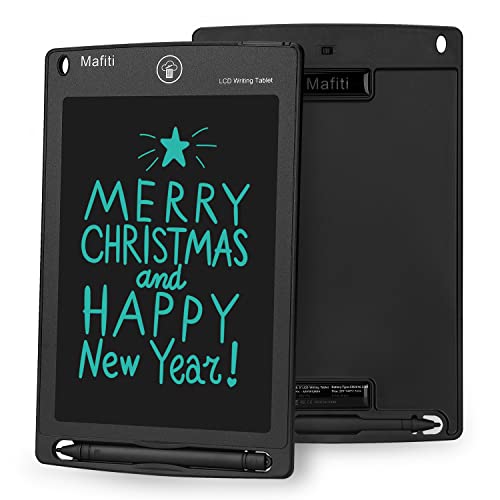
- Thicker, easy-to-see LCD writing
- Lock switch and one-button erase
- Stylus doubles as a kick-stand
Best For: Portable notes, doodles, and simple messages
Best for Digital Creativity
Wacom Intuos Small Drawing Tablet

- Battery-free pressure-sensitive pen
- 4,096 pressure levels and 4 ExpressKeys
- Works with major desktop platforms
Best For: Digital art, photo editing, and design
Best Two-Pack for Shared Notes

- Includes two reusable writing boards
- Brighter, thicker handwriting display
- Lock button protects notes from erasing
Best For: Shared home, school, or office notes
Best Pocket-Sized Travel Pad
Amoretti Sonnet 6.5-Inch Tablet

- Light 2.65-ounce pocket-friendly design
- Lock switch and quick erase button
- Replaceable battery rated for 100,000 cycles
Best For: Travel activities, kids’ games, and quick notes
Best for Portable Adult Note-Taking
12-Inch Rechargeable LCD Writing Tablet

- Spacious 12-inch screen in a slim 5.2mm profile
- Rechargeable via USB Type-C
- Foldable cover and erase-lock protection
Best For: Adults, office workers, teachers, students, and creatives needing a portable writing surface
Best Multi-Pack for Kids
4-Pack 6.5-Inch Color LCD Doodle Boards

- Four colorful tablets for shared use
- Lightweight and portable for travel
- Pressure-sensitive, reusable drawing surfaces
Best For: Children ages 3–8, families, classrooms, and gift-giving
Best for Double-Sided Notes
10.5-Inch Double-Sided LCD Writing Tablet

- Double-sided full-screen writing area
- About 0.2 inches thick and 6.8 ounces
- One-click clearing with one-year quality assurance
Best For: Students, teachers, and office users needing lightweight reusable notes
Protected 10-Inch Pick

- Bright, thick lines on a 10-inch LCD screen
- Protective cover doubles as a stand
- Lock function prevents accidental erasing
Best For: Students, teachers, and protected everyday note-taking
Smallest Portable Pick

- Weighs just 2 ounces
- Double-sided full-screen writing surface
- Includes an attached pen and clear key
Best For: Portable school notes, messages, and quick writing
Multi-Tablet Value Pick

- Includes three reusable 8.5-inch LCD boards
- Brighter, thicker handwriting with lock buttons
- Styluses and stylus docks support shared use
Best For: Families, classrooms, and offices needing multiple boards
Best Lightweight LCD Memo Board – Mafiti 8.5-Inch Writing Tablet
If you want compact electronic writing tablets for quick notes, doodling, or simple reminders, the Mafiti 8.5-inch model is a lightweight option for home, school, or office use. Its thicker writing display, one-button erasing, and lock switch keep everyday use simple.
Best For: Kids, students, and families who need a portable reusable doodle and memo board.
Pros:
- Thicker writing is designed to be easier to see.
- One-button erase function clears the screen quickly.
- Lock switch helps prevent accidental erasing.
- Built-in stylus storage and kick-stand functionality add convenience.
Cons:
- It is a basic LCD writing board rather than a computer-connected drawing tablet.
- The CR2016 coin-cell battery eventually needs replacement.
At just 3.84 ounces and about 1/8 inch thick, this Mafiti tablet is easy to carry and store. Choose it for handwriting and doodling without paper, not for saving digital work or using creative software.
Best for Digital Creativity – Wacom Intuos Small Drawing Tablet
Among compact electronic writing tablets, the Wacom Intuos Small is the choice for users who want a computer-connected tool for digital art, photo editing, design, and document markup. It pairs a battery-free pen with pressure sensitivity for more controlled creative work.
Best For: Students, teachers, artists, and creators working with compatible Mac, Windows, Android, or Chromebook devices.
Pros:
- Battery-free EMR pen is designed to feel like pen on paper.
- Offers 4,096 pressure levels for controlled strokes.
- Four ExpressKeys provide shortcuts for supported workflows.
- Includes access to creative software and Wacom online training after registration.
Cons:
- Requires a wired USB-A connection and a compatible computer or device.
- It has a 6-by-3.7-inch active area, so it is not a standalone writing screen.
The Intuos Small is substantially different from an erase-and-reuse LCD pad: it sends pen input to connected software instead of displaying a simple local note. Its compact footprint and professional-oriented pen technology make it a practical entry point for digital creativity.
Best Two-Pack for Shared Notes – TIQUS 9.25-Inch LCD Tablets
The TIQUS two-pack is a useful pick when you need compact electronic writing tablets for multiple rooms, family members, or shared school and office use. Each 9.25-inch LCD board is designed for handwriting, math practice, reminders, and quick sketches.
Best For: Households, classrooms, and adults who want two reusable boards for notes or writing practice.
Pros:
- Two 9.25-inch writing tablets are included in one pack.
- Upgraded design provides brighter, thicker handwriting than the older version.
- Lock button helps preserve notes from accidental clearing.
- Finger or included stylus input can be used for writing.
Cons:
- The supplied warning says it is not applicable to children under 15.
- It is a standalone LCD board without listed software or computer connectivity.
- The larger two-pack may be less convenient than a pocket-size single tablet for travel.
With two boards and a roughly 9.25-inch writing surface, this TIQUS set favors shared use and visibility over maximum portability. It is a sensible paper-saving option for temporary notes, homework practice, and household messages.
Best Pocket-Sized Travel Pad – Amoretti Sonnet 6.5-Inch Tablet
For travelers comparing compact electronic writing tablets, the Amoretti Sonnet 6.5-inch model prioritizes minimal size and weight. The slim LCD pad fits in a pocket and supports quick sketches, games, letter practice, and mess-free notes.
Best For: Road trips, children’s activities, and adults who want an exceptionally portable reusable notepad.
Pros:
- Weighs 2.65 ounces and is designed for pocket storage.
- Lock switch helps prevent accidental clearing.
- One-button erase clears the display quickly when unlocked.
- Replaceable battery supports up to 100,000 writing and drawing cycles.
Cons:
- The 6.5-inch display offers less writing space than larger pads.
- Display visibility is enhanced by ambient light, so bright surroundings are recommended.
- It is intended for temporary writing rather than storing digital notes.
This tablet is a strong fit when portability matters most. Its eye-protection-focused LCD, included stylus, lock feature, and one-year manufacturer warranty make it practical for travel and casual everyday activities.
Best for Portable Adult Note-Taking – 12-Inch Rechargeable LCD Writing Tablet
For shoppers comparing compact electronic writing tablets, this 12-inch model offers a spacious writing surface in a slim, notebook-like format. Its rechargeable USB Type-C battery, foldable cover, pressure-sensitive screen, and lock switch make it practical for notes, sketches, and workplace use without disposable batteries.
Best For: Adults, office workers, teachers, students, and creatives who want a large portable tablet for writing, drawing, or meeting notes.
Pros:
- Large 12-inch full-screen writing area with a slim 5.2mm profile.
- Rechargeable battery with USB Type-C charging eliminates routine battery replacement.
- Foldable PU cover helps protect the tablet during transport.
- Erase-lock switch helps prevent accidental loss of work.
Cons:
- The 12-inch format may be larger than needed for minimal carry.
- It is a standalone tablet with no required connectivity or operating system.
This is a strong choice when screen space and rechargeable convenience matter more than advanced digital features. The cover and lock switch add useful protection for commuting, meetings, and everyday idea capture.
Best Multi-Pack for Kids – 4-Pack 6.5-Inch Color LCD Doodle Boards
Among compact electronic writing tablets, this four-pack is designed for shared play, travel, and early learning. Each lightweight 6.5-inch board provides a pressure-sensitive, reusable surface for doodling, while the colorful assortment gives families or classrooms multiple tablets to use at once.
Best For: Children ages 3–8, families, classrooms, travel, and gift-giving occasions where multiple reusable drawing boards are useful.
Pros:
- Includes four 6.5-inch tablets in pink, green, light blue, and blue.
- Lightweight at about 80 grams per tablet and easy to carry.
- Pressure-sensitive screen supports varied line thicknesses.
- Erase button, lock key, and claimed 200,000-plus erasures support repeated use.
Cons:
- Small 6.5-inch screens are better for children’s doodles than large-format notes.
- Uses a replaceable button battery rather than rechargeable charging.
- The listed warranty is one month.
This pack prioritizes quantity, portability, and kid-friendly reuse. Its lightweight construction and four-color assortment make it especially practical for siblings, group activities, and keeping a spare board in a travel bag.
Best for Double-Sided Notes – 10.5-Inch Double-Sided LCD Writing Tablet
This double-sided model is a practical option among compact electronic writing tablets for students, teachers, and office users who want a thin digital notepad. It weighs about 6.8 ounces, measures roughly 0.2 inches thick, and is intended for quick notes, messages, teaching, editing, and sketching.
Best For: Students, teachers, office workers, and anyone needing a lightweight reusable surface for scratch notes or communication.
Pros:
- Double-sided full-screen design provides more writing capacity in a portable format.
- Very thin and lightweight at approximately 0.2 inches and 6.8 ounces.
- Attached pen and one-click clear key support quick note-taking.
- Includes a one-year quality assurance period.
Cons:
- Handwriting may be difficult to see in weak light; brighter lighting is recommended.
- The supplied notes do not identify connectivity or a supported operating system.
- Its listed screen size is 10.5 inches, despite a larger overall dimension listing.
The standout feature is the double-sided writing area, which can be useful when you want more usable space without carrying a thicker device. Consider it primarily for quick, erasable notes rather than a connected tablet replacement.
Protected 10-Inch Pick – Covered LCD Writing Tablet
For shoppers comparing compact electronic writing tablets, this 10-inch LCD model offers a roomier writing surface while remaining lightweight at 300 g. Its bright blue-green lines, protective cover, and foldable stand make it practical for notes, sketches, arithmetic, and everyday messages.
Best For: Students, teachers, home offices, and anyone who wants a protected standalone writing board.
Pros:
- 10-inch screen with brighter, thicker monochrome writing lines.
- PU cover provides all-around protection and folds into a stable stand.
- Lock function helps prevent accidental erasing.
- Pressure-sensitive LCD design avoids paper waste and glare.
Cons:
- Cannot connect to phones or computers or save notes digitally.
- Content is easiest to see in a well-lit area.
- Does not illuminate in the dark.
This is a sensible choice when screen space and physical protection matter more than digital file storage. To preserve a note, you will need to photograph or scan the board.
Smallest Portable Pick – Mini Double-Sided LCD Pad
This mini model stands out among compact electronic writing tablets for its 2-ounce weight and 0.2-inch thickness. The double-sided full-screen design gives you writing space on both sides, making it easy to carry for quick notes, schoolwork, messages, and simple sketches.
Best For: Students, commuters, and users who prioritize minimum size and weight.
Pros:
- Extremely lightweight at 2 ounces and only 0.2 inches thick.
- Double-sided full-screen LCD design adds usable writing space.
- Attached pen and one-click clear key support quick notes.
- Rated for 50,000–100,000 writing cycles.
Cons:
- Handwriting can be difficult to see in weak light.
- The compact 6.5-inch format offers less room than larger tablets.
- Designed for writing and erasing rather than connected digital storage.
Choose this tablet when portability is the deciding factor. Its low weight suits a backpack or desk drawer, but the stated low-light limitation makes bright surroundings important.
Multi-Tablet Value Pick – TIQUS 8.5-Inch 3-Pack
If you need several compact electronic writing tablets for a household, classroom, or office, this TIQUS set supplies three 8.5-inch LCD boards. Brighter, thicker handwriting, included styluses, and lock buttons make the set useful for math practice, reminders, and reusable notes.
Best For: Families, classrooms, offices, or shared spaces that need multiple writing boards.
Pros:
- Three 8.5-inch LCD writing tablets are included.
- Updated design provides brighter, thicker handwriting.
- Lock buttons help preserve displayed notes.
- Styluses are included, with a stylus dock for storage.
Cons:
- The supplied dimensions list each item as 8.86 by 8.86 inches, so it may be less slim to pack than the smallest models.
- Notes are erased using the remove button rather than stored as digital files.
- Product notes do not specify connectivity or computer compatibility.
This three-pack is most compelling when multiple people need a reusable board at the same time. It offers practical shared-use value, though it is better suited to temporary notes than permanent digital records.
How We Picked These Compact Electronic Writing Tablets
We focused on practical differences that matter in everyday use: screen size, portability, writing surface, erase method, durability, included accessories, and value. The lineup includes single tablets for personal use, multipacks for families or classrooms, and a pressure-sensitive graphics tablet for users who need computer connectivity rather than a standalone erasable board.
Because features can vary by model and seller, confirm current specifications such as battery type, lock design, stylus storage, and software compatibility before buying.
Quick Comparison
- Best for young children: Colorful 6.5-inch multipacks are easy to share and replace if misplaced.
- Best for portability: Six- to 6.5-inch models fit easily in a bag, drawer, or car console.
- Best everyday note size: Eight- to 10.5-inch tablets provide more room for lists and handwriting without becoming bulky.
- Best for larger notes: A 12-inch model suits household messages, planning, and more spacious writing.
- Best for computer drawing: The Wacom Intuos Small is designed to work with a computer and creative software, not simply erase like an LCD memo board.
- Best for shared use: Two- and three-packs make sense for households, classrooms, and offices with multiple users.
Key Buying Factors for Compact Electronic Writing Tablets
Screen Size and Portability
Choose a small model for quick reminders, travel, and children’s doodling. An eight- to 10.5-inch screen is a more comfortable compromise for notes, diagrams, and schoolwork. A 12-inch tablet gives the most writing space but takes up more room in a bag.
Erase Controls and Accidental Deletion
Most LCD writing tablets erase with a button, while some include a lock or switch to prevent accidental clearing. A lock is especially useful for important lists, school exercises, or children who may press buttons while carrying the tablet.
Power and Durability
Check whether the model uses a replaceable coin cell or rechargeable battery, and look for details about battery access. A protective cover, recessed erase button, sturdy casing, and attached or stored stylus can improve daily reliability.
Standalone Tablet or Computer Accessory?
LCD writing tablets are generally paper substitutes for temporary notes and drawings. A graphics tablet such as the Wacom Intuos connects to a computer and supports digital art, editing, and compatible software. Pick based on whether you need instant erasing or computer-based control and file saving.
Who Should Buy Which Compact Electronic Writing Tablets?
Parents and teachers should consider colorful multipacks or two-packs for shared activities, handwriting practice, and low-cost doodling. Students and office users may prefer an eight- to 10.5-inch tablet with a lock and cover for lists, calculations, and reminders. Travelers benefit from a compact six-inch model that slips into a small bag. Families and home organizers may appreciate a 12-inch option for kitchen messages and larger planning tasks. Digital artists should choose the computer-connected Wacom rather than a basic erasable LCD board.