When it comes to optimizing your home office, choosing the right compact printer can make a significant difference. You need a device that not only fits your small desk but also meets your printing needs efficiently. Whether you’re printing documents for work or personal projects, the best compact printers offer versatility without cluttering your space. Let’s explore some top options that might just be the perfect fit for your setup.
HP DeskJet 2827e Wireless All-in-One Printer

If you’re looking for a compact printer that fits seamlessly into your home office, the HP DeskJet 2827e Wireless All-in-One Printer is a fantastic choice. This versatile device offers color printing, scanning, and copying capabilities, making it perfect for your everyday tasks. With print speeds of up to 7.5 ppm for black and 5.5 ppm for color, you won’t be waiting long for your documents. Its reliable Wi-Fi guarantees easy connectivity, and the HP App lets you manage printing from your smartphone or tablet. Plus, its eco-friendly design, made with recycled materials, helps you stay sustainable while working efficiently.
Best For: Home users needing a compact all-in-one printer for everyday printing, scanning, and copying tasks.
Pros:
- Versatile functionality with printing, scanning, and copying capabilities.
- Eco-friendly design made with at least 60% recycled plastic.
- User-friendly connectivity via reliable Wi-Fi and the HP App for mobile management.
Cons:
- Limited print speeds may not meet the needs of high-volume printing environments.
- Subscription requirement for the Instant Ink service after the trial period.
- Non-HP cartridges are blocked, limiting users’ options for ink supplies.
HP Laserjet M110w Wireless Black & White Printer

The HP Laserjet M110w Wireless Black & White Printer is perfect for small teams of one to three users who need reliable, high-quality document printing in a compact design. As the world’s smallest laser printer in its class, it fits seamlessly into tight spaces. With impressive print speeds of up to 21 pages per minute, you’ll boost your productivity without hassle. Enjoy the freedom of wireless printing from any mobile device or computer, compatible with various operating systems. Plus, the HP Smart app enhances your experience by simplifying tasks and ensuring your printer stays secure and up-to-date.
Best For: Small teams of 1-3 users seeking a compact and efficient black and white printing solution.
Pros:
- Fast print speeds of up to 21 pages per minute enhance productivity.
- Wireless printing capabilities allow easy printing from various devices and operating systems.
- Compact design makes it ideal for small spaces.
Cons:
- Limited to black and white printing, which may not suit users needing color output.
- Requires original HP cartridges, which can be more expensive than third-party alternatives.
- Some users may find the printer’s features basic compared to more advanced models.
Brother HL-L2405W Wireless Monochrome Laser Printer

Designed specifically for homes and small offices, the Brother HL-L2405W Wireless Monochrome Laser Printer stands out with its impressive printing speed of up to 30 pages per minute. You’ll appreciate the flexible connectivity options, including dual-band wireless and USB, making it easy to connect multiple devices. The Brother Mobile Connect App enhances your experience, letting you manage print jobs and check toner levels from anywhere. With a 250-sheet paper tray and a manual feed slot, it handles everyday printing needs effortlessly. Plus, you’ll benefit from a 1-year warranty and support, ensuring you’re never left in the lurch.
Best For: Those seeking a reliable and efficient monochrome printer for home or small office use that offers fast printing speeds and flexible connectivity options.
Pros:
- High-speed printing of up to 30 pages per minute, enhancing productivity.
- Dual-band wireless connectivity allows for easy connection with multiple devices.
- Mobile printing capabilities via the Brother Mobile Connect App for convenient management on-the-go.
Cons:
- Limited to black and white printing, which may not suit users needing color output.
- The initial setup may require some technical knowledge, particularly for wireless configuration.
- Replacement toner can be costly, although savings are available through subscription services.
HP DeskJet 2855e Wireless All-in-One Printer

Ideal for home office setups, the HP DeskJet 2855e Wireless All-in-One Printer combines functionality and compact design, making it a perfect fit for small desks. This versatile printer lets you print, scan, and copy with ease, handling everything from to-do lists to financial documents. With speeds of 5.5 ppm for color and 7.5 ppm for black, you’ll get your tasks done quickly. Its wireless connectivity allows you to print from your smartphone or tablet, while the Instant Ink subscription guarantees you never run out of ink. Plus, its eco-friendly design uses recycled materials, making it a sustainable choice for your workspace.
Best For: The HP DeskJet 2855e Wireless All-in-One Printer is best for home users seeking an efficient and compact printing solution for everyday tasks.
Pros:
- Versatile functionality: Combines printing, scanning, and copying in one device.
- Wireless printing: Easily print from smartphones and tablets using the HP app.
- Eco-friendly design: Made with at least 60% recycled plastics and certified by ENERGY STAR.
Cons:
- Limited print speed: Slower print speeds compared to some higher-end models.
- Instant Ink subscription required: Monthly fee applies after the initial three months.
- Only compatible with HP cartridges: Non-HP cartridges are not supported, limiting options for ink replacement.
Canon PIXMA TS6420a All-in-One Wireless Inkjet Printer
For those seeking a reliable all-in-one solution for a small workspace, the Canon PIXMA TS6420a stands out with its compact design and versatile functionality. It effortlessly prints, copies, and scans, making it a true multitasker. You’ll appreciate the bright 4.4 OLED screen for easy navigation and setup, whether you’re using your smartphone or computer. With built-in Wi-Fi, you can print from any room and enjoy mobile printing through the Canon PRINT app, Apple AirPrint, or Mopria. Plus, explore your creativity with the Easy-Photo Print Editor and Canon Creative Park apps for unique printing projects.
Best For: Individuals and small businesses looking for a compact, all-in-one printer that offers versatile functionality and easy mobile connectivity.
Pros:
- Compact design makes it ideal for small workspaces.
- Versatile functionality allows for printing, copying, and scanning all in one device.
- Enhanced mobile printing capabilities enable printing from various devices easily.
Cons:
- May have slower print speeds compared to larger models.
- Limited paper capacity could require frequent refills for high-volume printing.
- Some advanced features may require additional app downloads or setup.
HP DeskJet 2755e Wireless Color Inkjet Printer
The HP DeskJet 2755e Wireless Color Inkjet Printer is a standout choice for anyone needing a compact, versatile printing solution for their small workspace. It prints, scans, and copies, making it perfect for everyday tasks like recipes or travel documents. With print speeds reaching 7.5 pages per minute in black and 5.5 in color, efficiency is key. Its dual-band Wi-Fi and easy setup via the HP Smart App guarantee you can print from your smartphone effortlessly. Plus, with an included six-month Instant Ink trial, you won’t have to worry about running out of ink anytime soon!
Best For: The HP DeskJet 2755e is best for home users who need an affordable, all-in-one printer for basic color printing tasks.
Pros:
- Compact design that fits easily in small spaces.
- Easy mobile printing through the HP Smart App.
- Includes a six-month Instant Ink trial for hassle-free ink supply.
Cons:
- Print speeds may be slower compared to higher-end models.
- Manual duplex printing can be inconvenient.
- Limited input capacity with only 60 sheets.
HP DeskJet 4227e Wireless All-in-One Printer
Designed to meet the needs of home users, the HP DeskJet 4227e Wireless All-in-One Printer excels in versatility and compactness. It’s perfect for printing to-do lists, letters, and recipes with speeds of 5.5 ppm in color and 8.5 ppm in black. Enjoy features like color printing, scanning, and copying, along with an auto document feeder and a 60-sheet input tray. With reliable Wi-Fi, use the HP app to manage printing from your devices effortlessly. Plus, its eco-friendly design, made from 60% recycled plastic, guarantees sustainability without compromising performance—ideal for your small desk setup.
Best For: Individuals and families looking for a versatile, compact all-in-one printer for home use.
Pros:
- User-friendly: Easy to set up and manage printing tasks via the HP app on smartphones and tablets.
- Eco-friendly design: Made from 60% recycled plastic and certified by ENERGY STAR and EPEAT for sustainability.
- Ink subscription service: Includes 3 months of Instant Ink service, ensuring you never run out of ink unexpectedly.
Cons:
- Limited print speed: Slower print speeds compared to some high-end models, at 5.5 ppm in color and 8.5 ppm in black.
- Dependency on HP cartridges: The printer only works with HP cartridges, blocking non-HP options.
- Monthly fee after trial: The Instant Ink subscription incurs a monthly fee after the initial 3-month trial period unless canceled.
HP DeskJet 2755 All-in-One Wireless Printer (Renewed)
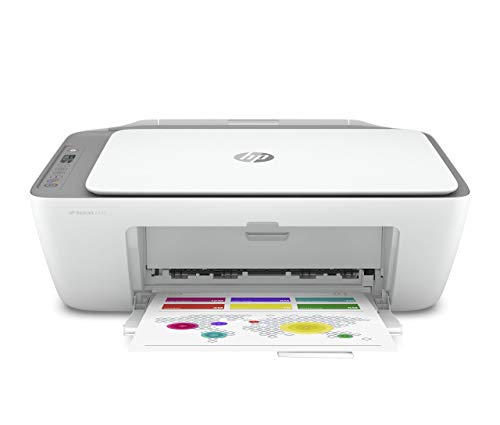
If you’re looking for a reliable all-in-one solution that fits snugly on your small desk, the HP DeskJet 2755 is an excellent choice. This compact printer offers print, copy, and scan functions, making it perfect for home or office tasks. With Wi-Fi connectivity and mobile printing via Apple AirPrint or the HP Smart app, you can easily send documents from your phone. It supports various media sizes and handles both plain and photo paper. Plus, with print speeds up to 7.5 ppm for black and a 60-sheet input tray, it keeps your workflow efficient and seamless.
Best For: Those needing a compact, all-in-one printer for home or small office tasks with mobile printing capabilities.
Pros:
- Versatile Functionality: Offers print, copy, and scan functions in one compact device.
- Mobile Printing: Supports easy printing from smartphones via Apple AirPrint and the HP Smart app.
- Efficient Workflow: Features a 60-sheet input tray and decent print speeds for quick document handling.
Cons:
- Limited Output Capacity: The 25-sheet output tray may require frequent emptying for larger print jobs.
- Print Speed: While decent, the speeds of 7.5 ppm for black and 5.5 ppm for color may not satisfy heavy printing needs.
- Ink Dependency: Requires specific HP ink cartridges, which could lead to higher ongoing costs.
Inkless Portable Printer for Travel

For busy professionals and students on the go, the Inkless Portable Printer offers a perfect blend of convenience and functionality. Weighing just 1.75 lbs and measuring only 1.7 inches thick, it fits easily into your backpack or briefcase. This wireless thermal printer uses advanced technology, eliminating the need for ink or toner, and works seamlessly with your iOS or Android device via Bluetooth. With the Jadens Printer app, you can print high-quality documents up to 8.5 x 11 inches. Plus, the built-in batteries provide up to 3 hours of continuous printing, making it an ideal travel companion for your printing needs.
Best For: Busy professionals and students who need a convenient and portable printing solution while traveling.
Pros:
- Compact and lightweight design makes it easy to carry in bags or briefcases.
- Inkless printing technology eliminates the hassle of replacing ink or toner.
- Long battery life allows for up to 3 hours of continuous printing, perfect for on-the-go needs.
Cons:
- Limited compatibility as it only works with Gloryang thermal paper.
- Requires app installation for smartphone printing, which may not be convenient for all users.
- Driver installation needed for printing from computers, adding extra steps to the process.
Canon PIXMA TS4320 Wireless Color Inkjet Printer

The Canon PIXMA TS4320 Wireless Color Inkjet Printer is an ideal choice for home users and hybrid workers seeking a compact yet powerful all-in-one solution. Its sleek design fits perfectly on small desks, while the 2-cartridge hybrid ink system guarantees sharp text and vibrant colors for documents and photos up to 8.5” x 11”. With integrated scanning and automatic 2-sided printing, you’ll save time and paper. Setting it up is a breeze with dual-band Wi-Fi and mobile printing options via the Canon PRINT App. Plus, its ENERGY STAR certification highlights its eco-friendly design, making it a smart choice for any workspace.
Best For: Home users and hybrid workers looking for a compact all-in-one printer that delivers quality performance without taking up much space.
Pros:
- Compact design makes it ideal for small workspaces.
- High-quality prints with sharp text and vibrant colors.
- Convenient mobile printing options enhance usability.
Cons:
- Limited paper size support, only up to 8.5” x 11”.
- 2-cartridge system may require more frequent ink replacements.
- Setup may vary in ease depending on network conditions.
Factors to Consider When Choosing Compact Printers for Small Desks
When you’re picking a compact printer for your small desk, you’ll want to think about size and dimensions first. Consider how print speed, connectivity options, and multi-functionality features fit into your needs. Don’t forget to evaluate whether ink or toner type works best for your printing habits.
Size and Dimensions
Finding the right compact printer for a small desk requires careful attention to size and dimensions. Consider the printer’s width, depth, and height to guarantee it fits comfortably without crowding your workspace. Aim for a footprint under 18 inches wide and 14 inches deep, as these dimensions typically suit most small desks. Weight matters too; choose a printer that weighs under 10 pounds for easier mobility. Don’t forget to evaluate the vertical height, since taller models may limit placement options if you have overhead storage. Finally, think about the design and how it complements your existing decor. Opt for sleek, modern designs that enhance your workspace while keeping it functional and clutter-free.
Print Speed Efficiency
While guaranteeing your compact printer fits your small desk is important, print speed efficiency plays a key role in your overall satisfaction. You’ll want to evaluate the printer’s pages per minute (ppm) rating, as black-and-white models typically boast higher speeds than color ones. For compact options, speeds can range from 5.5 ppm for color to 21 ppm for black-and-white. If you often print multiple documents, faster speeds can enhance your productivity and reduce waiting time. However, don’t sacrifice quality for speed; look for printers that deliver clear and professional outputs. Finally, assess your printing volume to guarantee the printer meets your needs without slowing you down when it matters most.
Connectivity Options Available
Selecting a compact printer involves more than just size; connectivity options are essential for a smooth printing experience. Look for models with dual-band Wi-Fi connectivity (2.4GHz and 5GHz) to guarantee reliable and fast connections. Mobile printing support, like Apple AirPrint or Google Cloud Print, allows you to print directly from your smartphone or tablet, adding convenience. Make sure the printer also includes USB connectivity for versatile options. Automatic Wi-Fi setup can simplify your initial connection, detecting and resolving issues effortlessly. Finally, check compatibility with various operating systems such as Windows, macOS, and Chrome OS, so you can easily use the printer with all your devices. Prioritizing these factors will enhance your overall printing experience.
Multi-Functionality Features
When considering a compact printer for your small desk, multi-functionality can greatly enhance your productivity. Look for models that combine printing, scanning, and copying capabilities, allowing you to accomplish various tasks without cluttering your workspace with multiple devices. Many compact printers also come equipped with AI technology that automatically formats documents and removes unwanted content for better print quality. Mobile printing options let you print directly from your smartphone or tablet, adding convenience to your workflow. Additionally, an auto document feeder can simplify scanning and copying multiple pages. Opting for a multi-function printer with energy-efficient certifications not only saves space but also supports sustainability while delivering versatile performance.
Ink or Toner Type
Choosing the right ink or toner type for your compact printer can make a significant difference in your overall printing experience. If you often print colorful images or photos, an inkjet printer with liquid ink cartridges might be the way to go. They’re cost-effective for color printing but do require more frequent replacements. On the other hand, if your focus is on high-volume black-and-white documents, a laser printer using toner could be ideal. Toner cartridges tend to last longer, reducing the hassle of constant replacements. Keep in mind the total cost of ownership—ink is cheaper upfront but pricier in the long run. Consider subscription services for supplies to manage costs and avoid running low on ink or toner unexpectedly.
Paper Handling Capacity
Understanding the paper handling capacity of a compact printer is essential for maximizing your small desk’s efficiency. Look for printers with input trays that can hold between 60 to 250 sheets, as this will reduce how often you need to refill paper. Make certain the printer includes a manual feed slot for printing on specialty media like envelopes or photo paper, which keeps your main tray free for standard printing tasks. Additionally, consider models with automatic document feeders (ADF) for easy multi-page scanning and copying. Finally, verify the printer supports various media sizes, including letter and legal, to accommodate all your printing needs while making the most of your limited desk space.
Energy Efficiency Ratings
Although you might prioritize size and performance when selecting a compact printer for your small desk, energy efficiency ratings should be high on your list of considerations. Look for ENERGY STAR and EPEAT certifications, which indicate that the printer meets specific energy-saving standards. These models not only lower your utility bills but also reduce their environmental impact. Energy-efficient printers often come with features like automatic sleep modes that conserve energy when not in use. By choosing a printer with a strong energy efficiency rating, you’ll enjoy long-term savings, as these devices typically have lower yearly energy costs. Don’t forget to evaluate both operational and standby energy consumption for a complete picture of efficiency.