If you’re looking to cut printing costs and reduce your environmental footprint, no-cartridge tank printers might be your best bet. These innovative machines use high-capacity ink tanks instead of traditional cartridges, making them both cost-effective and eco-friendly. With options like the Epson EcoTank and Canon MegaTank series, you’re poised to enhance your office productivity. But which models stand out the most? Let’s explore the top contenders on the market.
Epson EcoTank ET-4800 Wireless All-in-One Printer

The Epson EcoTank ET-4800 Wireless All-in-One Printer is perfect for busy home office professionals who want to eliminate the hassle of traditional ink cartridges. With its cartridge-free printing and high-capacity ink tanks, you’ll enjoy more efficient, cost-effective printing. The EcoFit ink bottles simplify the filling process, while the Micro Piezo Heat-Free Technology guarantees sharp text and vibrant color photos. Plus, it features a high-resolution flatbed scanner and a color display for easy navigation. Designed for versatility, the ET-4800 adapts to various paper types, making it an ideal choice for your home office needs while reducing environmental impact.
Best For: Busy home office professionals seeking efficient and eco-friendly printing solutions.
Pros:
- Cartridge-free printing reduces waste and lowers printing costs.
- High-capacity ink tanks provide more ink for extended use without frequent refills.
- Versatile features including scanning, copying, and faxing cater to various office needs.
Cons:
- Initial setup may require more time due to the filling of ink tanks.
- The size may be larger than traditional printers, taking up more desk space.
- Connectivity issues can arise with wireless printing depending on network conditions.
Epson EcoTank ET-2800 Wireless All-in-One Printer

If you’re looking for a reliable printer that meets basic home printing needs without the hassle of traditional cartridges, the Epson EcoTank ET-2800 Wireless All-in-One Printer is an excellent choice. This all-in-one printer not only scans and copies but also uses innovative Micro Piezo Heat-Free Technology for vivid prints at speeds up to 10 pages per minute. With its cartridge-free system, a single set of ink bottles replaces around 80 cartridges, saving you up to 90% on ink costs. Plus, you get up to two years of ink included, minimizing those frustrating out-of-ink moments.
Best For: Those seeking an economical and efficient home printer that offers scanning and copying capabilities without the hassle of traditional ink cartridges.
Pros:
- Cartridge-free system significantly reduces waste and environmental impact.
- Cost-effective with potential savings of up to 90% on ink compared to traditional cartridges.
- Includes up to two years of ink in the box, reducing the frequency of replacements.
Cons:
- Print speed of up to 10 pages per minute may be slower for larger print jobs.
- Limited advanced features compared to higher-end printers, such as photo printing or duplex printing.
- Initial cost may be higher than traditional printers, although offset by long-term savings on ink.
HP Smart Tank 5000 Wireless All-in-One Ink Tank Printer

For families needing a reliable printing solution, the HP Smart Tank 5000 Wireless All-in-One Ink Tank Printer stands out with its cartridge-free, refillable design. You’ll enjoy excellent print quality, producing crisp text and vivid colors at speeds of up to 10 pages per minute for black and 5 for color. Setting it up is a breeze, and you can print, scan, and copy directly from your smartphone using the HP app. With a self-healing Wi-Fi connection and built-in security features, your data stays protected. Plus, you get up to 6,000 pages of ink right out of the box, ensuring high-volume printing.
Best For: Families with high-volume color document printing needs who require a reliable and cost-effective solution.
Pros:
- Low-cost printing: Cartridge-free design allows for high-volume printing at a fraction of the cost.
- User-friendly: Easy setup and the ability to print, scan, and copy directly from smartphones using the HP app.
- Security features: Reliable self-healing Wi-Fi and built-in security options ensure data protection.
Cons:
- Print speed: While sufficient for everyday use, the print speeds may be slower compared to some competitors.
- Initial setup: Some users may find the initial ink refill process a bit messy if not done carefully.
- Size: The all-in-one printer may take up more space than compact alternatives.
HP Smart Tank 7602 Wireless All-in-One Ink Tank Printer
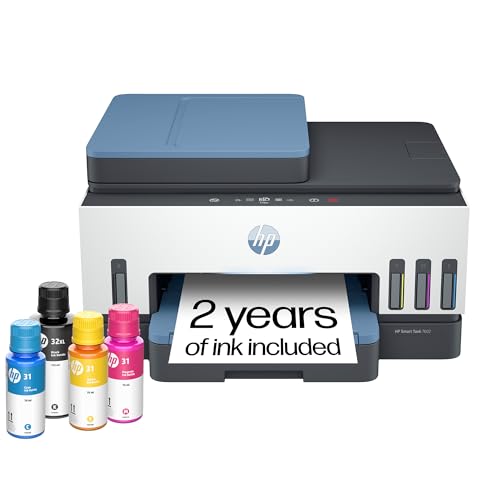
Designed with home offices in mind, the HP Smart Tank 7602 Wireless All-in-One Ink Tank Printer stands out for its cartridge-free refillable system, making it a perfect choice for those who prioritize cost efficiency and high-volume printing. With a 35-page auto document feeder, it effortlessly handles tasks like printing, scanning, copying, and faxing. You’ll enjoy impressive print speeds of up to 15 pages per minute in black and 9 in color. Plus, it includes two years of ink, yielding up to 8,000 color pages. Its reliable Wi-Fi connectivity and HP app enhance convenience, ensuring you stay productive.
Best For: The HP Smart Tank 7602 is best for home offices and small businesses that require cost-effective, high-volume printing with versatile functionality.
Pros:
- Cartridge-free design allows for easy and mess-free ink refills, reducing overall printing costs.
- Fast print speeds of up to 15 pages per minute (black) and 9 pages per minute (color) enhance productivity.
- Includes two years of ink with a high yield of up to 8,000 color pages, minimizing the need for frequent replacements.
Cons:
- Initial setup may require a learning curve for users unfamiliar with wireless printing technology.
- Larger footprint may not fit well in small workspaces or home offices.
- Limited advanced features compared to higher-end models, which may be missed by professional users.
Epson EcoTank ET-2800 Wireless Color All-in-One Printer

The Epson EcoTank ET-2800 Wireless Color All-in-One Printer is perfect for those who want to minimize printing costs without sacrificing quality. With its cartridge-free design, you’ll enjoy significant savings—up to 90% on ink replacements! You can print up to 4,500 pages in black and 7,500 in color, equivalent to about 90 individual cartridges. Its EcoFit ink bottles make refilling effortless, while Micro Piezo Heat-Free Technology guarantees sharp text and vivid graphics. Plus, you’ll contribute to a greener planet with zero cartridge waste. With a built-in scanner and copier, this printer’s reliability makes it an excellent choice for your office.
Best For: Those seeking an economical and eco-friendly printing solution for home or small office use.
Pros:
- Cartridge-free design allows for substantial savings on ink replacements, reducing costs by up to 90%.
- High-capacity ink tanks provide the ability to print up to 4,500 pages in black and 7,500 pages in color.
- Built-in scanner and copier add versatility, making it an all-in-one solution for various printing needs.
Cons:
- Initial setup may require some time and effort to fill ink tanks.
- Size may be bulkier compared to traditional printers, requiring more space.
- Limited advanced features compared to higher-end models, which may not suit all users’ needs.
HP Smart Tank 5101 Wireless All-in-One Ink Tank Printer

Families with high-volume printing needs will find the HP Smart Tank 5101 Wireless All-in-One Ink Tank Printer an excellent choice. It prints up to 12 pages per minute in black and 5 in color, making it efficient for busy households. You’ll enjoy borderless prints and the convenience of wireless capabilities with self-healing Wi-Fi. Plus, it comes with up to 2 years of ink, yielding around 6,000 pages straight out of the box. Its quick setup, easy operation, and user-friendly app enhance your printing and scanning experience, ensuring you stay productive without breaking the bank.
Best For: Families with high-volume printing needs looking for an efficient and cost-effective printing solution.
Pros:
- Includes up to 2 years of ink, allowing for high-volume printing without frequent replacements.
- Fast print speeds of up to 12 pages per minute (black) and 5 pages per minute (color).
- User-friendly app and quick setup enhance the overall printing and scanning experience.
Cons:
- Limited to 2.4 GHz Wi-Fi, which may not be compatible with all home networks.
- Print speeds may decrease with complex color documents.
- Borderless printing may require specific paper sizes, limiting flexibility.
HP Smart Tank 6001 Wireless All-in-One Printer

If you’re looking for an efficient printing solution that eliminates the hassle of cartridges, the HP Smart Tank 6001 Wireless All-in-One Printer is an ideal choice for small businesses or home offices. This versatile printer lets you print, copy, and scan with ease, and its automatic 2-sided printing saves paper. Enjoy crisp text and vivid colors at speeds up to 12 pages per minute in black and 7 in color. With 2 years of Original HP Ink included, you’ll print up to 8,000 color pages cost-effectively. Plus, the HP app guarantees seamless mobile printing and reliable connectivity with self-healing Wi-Fi.
Best For: Small businesses or home offices looking for a cartridge-free, cost-effective printing solution.
Pros:
- Cartridge-free design allows for high-volume printing without the hassle of replacing ink cartridges.
- Automatic 2-sided printing feature helps save paper and reduces printing costs.
- Mobile printing capabilities through the HP app enhance convenience for users on the go.
Cons:
- Initial setup may require time and effort for users unfamiliar with wireless printers.
- Print speeds, while decent, may not satisfy those needing extremely fast output for large print jobs.
- The bulk of the printer may not be ideal for users with limited space in their home office.
Canon MegaTank G3270 All-in-One Wireless Inkjet Printer

For those seeking a reliable and cost-effective printing solution, the Canon MegaTank G3270 All-in-One Wireless Inkjet Printer stands out with its impressive capability to print up to 6,000 black and white pages and 7,700 color pages on a single set of ink bottles. With up to two years of ink included, you’ll save around $1,000 on ink costs alone. This versatile printer also allows you to print, scan, and copy wirelessly, making it perfect for home use. Plus, the 1.35” square LCD display simplifies navigation, ensuring you can tackle your printing tasks with ease and efficiency.
Best For: Those looking for a reliable and economical home printer that offers high-volume printing capabilities.
Pros:
- Cost-effective with up to two years of ink included, saving approximately $1,000 on ink costs.
- Capable of printing a high volume of pages: up to 6,000 black and white and 7,700 color pages.
- Wireless functionality allows for easy printing, scanning, and copying from multiple devices.
Cons:
- Single-sided printing may be less efficient for users needing duplex printing.
- The 1.35” square LCD display may be considered small for some users seeking more detailed navigation options.
- Limited to home use as it may not meet the demands of a high-volume office environment.
HP Smart Tank Plus 651 Wireless All-in-One Printer

The HP Smart Tank Plus 651 Wireless All-in-One Printer is perfect for busy households that demand high-volume color printing. It prints up to 11 pages per minute in black and 5 pages in color, making it a reliable choice for your printing needs. With two years of included HP Ink, you can produce up to 8,000 color pages or 6,000 black pages at a low cost. Enjoy its all-in-one functionality with printing, copying, scanning, and faxing capabilities. The 35-page automatic document feeder and intuitive app make printing easy, while the crisp text and vivid colors guarantee impressive results every time.
Best For: Families and small businesses that require high-volume color printing at a low cost.
Pros:
- All-in-one functionality allows for printing, copying, scanning, and faxing, providing versatility for various tasks.
- Cost-efficient with two years of included HP Ink, yielding up to 8,000 color pages or 6,000 black pages.
- User-friendly features such as a 35-page automatic document feeder and a reliable mobile app for easy operation.
Cons:
- Print speed may be slower compared to other high-end printers, especially for color documents.
- Initial setup might be complicated for some users unfamiliar with wireless printers.
- Limited paper handling capacity could require frequent refills for high-volume jobs.
Epson EcoTank ET-4950 Wireless All-in-One Supertank Printer
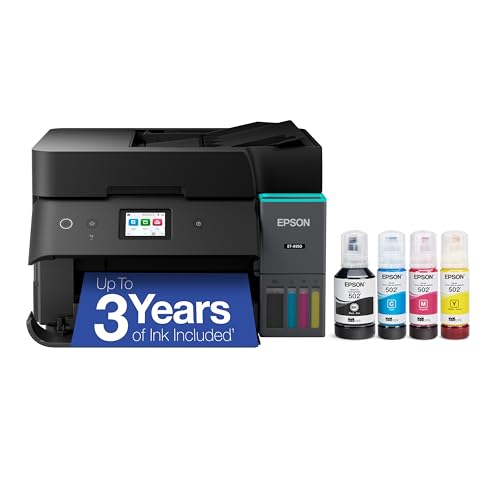
Designed for busy offices, the Epson EcoTank ET-4950 Wireless All-in-One Supertank Printer eliminates the hassle of frequent ink replacements. With up to three years of ink included, you can print an impressive 6,600 black and 5,500 color pages. You’ll save up to 90% on ink costs, as each bottle set replaces about 80 cartridges, reducing plastic waste remarkably. Enjoy fast print speeds of 18 black and 9 color ISO ppm, and an easy-to-use design featuring a 2.4″ color touchscreen. The EcoTank’s reliability and advanced features make it an eco-friendly choice for your professional printing needs.
Best For: The Epson EcoTank ET-4950 is best for busy offices and businesses looking to reduce printing costs while minimizing environmental impact.
Pros:
- Cost-effective with up to 90% savings on ink compared to traditional cartridges.
- High print quality and speed with 4800 x 1200 dpi resolution and fast printing rates of 18 black and 9 color ISO ppm.
- User-friendly features including a 2.4″ color touchscreen and easy refilling with EcoFit bottles.
Cons:
- Initial cost may be higher compared to standard printers due to the EcoTank system.
- Bulkiness might be an issue for smaller office spaces due to its size.
- Genuine Epson ink recommended for optimal performance, which can limit third-party options.
Factors to Consider When Choosing No Cartridge Tank Printers for Office
When choosing a no-cartridge tank printer for your office, you’ll want to take into account factors like print quality and speed to meet your needs. Don’t forget to analyze cost efficiency, as well as ink capacity and yield, to guarantee you’re making a smart investment. Additionally, check the connectivity options and user-friendly features to make your printing experience seamless.
Print Quality and Speed
Choosing the right no-cartridge tank printer for your office hinges on understanding both print quality and speed. High-resolution options, like 4800 x 1200 dpi, deliver sharp text and vibrant images, which are essential for professional documents. Speed also matters; some models can print up to 18 pages per minute in black and 9 pages per minute in color. However, speeds can vary greatly, so consider your office’s specific needs, as some printers may only achieve 5 to 15 pages per minute depending on settings. Additionally, features like Micro Piezo Heat-Free technology enhance print quality while lowering energy consumption. Automatic duplex printing can further improve efficiency and reduce paper usage, making it a valuable feature for busy workplaces.
Cost Efficiency Analysis
While the initial cost of a no-cartridge tank printer might seem high, the long-term savings on ink can make it a wise investment for your office. These printers can save you up to 90% on replacement ink costs compared to traditional cartridge systems, greatly cutting down your overall printing expenses. With many models providing enough ink to print thousands of pages—like up to 6,000 color or 8,000 black pages right out of the box—you’ll notice reduced ongoing costs. Refilling high-capacity ink tanks can replace around 80 individual cartridges, enhancing cost-efficiency further. Plus, by contributing to zero cartridge waste, you’re also making an eco-friendly choice that minimizes landfill impact. This makes no-cartridge tank printers a financially smart option for high-volume printing needs.
Ink Capacity and Yield
Understanding ink capacity and yield is vital for maximizing the performance of no-cartridge tank printers in your office. When reviewing these printers, consider the ink tank capacity, as it directly affects how often you’ll need to refill. High-capacity tanks can produce thousands of pages—some models print up to 8,000 color pages or 6,000 black pages per fill. Evaluating the ink yield per bottle is essential; some systems equate to about 80 individual cartridges, saving you money in the long run. Knowing the number of pages each tank can print helps you budget for ongoing costs. Plus, many no-cartridge tank printers come with up to two years of ink included, giving you extended service before needing to purchase more.
Connectivity Options Available
When selecting a no-cartridge tank printer for your office, connectivity options play an essential role in enhancing your printing experience. Many of these printers offer wireless connectivity, letting you print from smartphones, tablets, and computers without messy cables. Some models even feature self-healing Wi-Fi technology, automatically fixing any connection issues to keep your printing smooth and hassle-free. If you prefer a wired connection, look for printers with Ethernet ports for reliable performance in busy office environments. Mobile printing capabilities, such as Apple AirPrint and dedicated apps, make accessing your printer easy from anywhere. Additionally, compatibility with various wireless protocols, like dual-band Wi-Fi, helps reduce interference, ensuring seamless connectivity in your workspace.
User-Friendly Features
User-friendly features can greatly enhance your experience with no-cartridge tank printers in the office. Look for printers with color displays that make navigation simple, allowing you to access print, scan, and copy functions easily. Consider models that support mobile printing, so you can print directly from your smartphone or tablet using dedicated apps. Automatic document feeders (ADF) are a great addition, streamlining the scanning and copying of multi-page documents. Choose printers with user-friendly setups that minimize installation time and complexity, ensuring a hassle-free experience right out of the box. Finally, opt for models that provide clear instructions and intuitive interfaces, making them accessible for users of all technical skill levels.
Environmental Impact Considerations
Choosing no-cartridge tank printers for your office not only enhances productivity but also profoundly benefits the environment. These printers significantly reduce waste by eliminating disposable ink cartridges that often end up in landfills. With high-capacity ink tanks replacing around 80 individual cartridges, you’ll see a dramatic decrease in plastic waste. Many models come with up to two years’ worth of ink, cutting down on the frequency of replacements and their environmental impact. By utilizing refillable ink bottles, you encourage sustainable practices while saving up to 90% on ink costs. Adopting these printers aligns your office with eco-friendly solutions, helping minimize carbon footprints and promoting a culture of sustainability in your workplace.