Compact router cooling fans can help move trapped heat away from routers, modems, receivers, and other enclosed electronics without requiring a complicated installation. The right model depends on available space, noise tolerance, airflow needs, and the USB power source you already have.
This roundup compares 10 USB-powered options, from tiny 40mm fans for tight spaces to larger dual-fan designs for cabinets and entertainment centers. Use the guide below to narrow the choices by fit, control, and intended workload.
Best 10 Compact Router Cooling Fans Picks for 2026
Best Overall

- 104 CFM total airflow from two fans
- Quiet 19 dBA operation with speed control
- 67,000-hour dual-ball bearings
Best For: Quiet cooling for larger routers, cabinets, and entertainment setups
Best for Tight Spaces

- Tiny 1.57-inch square footprint
- Three-speed control for adjustable cooling
- 65,000-hour dual-ball bearings
Best For: Narrow router spaces and small DIY electronics projects
Best Dual-Fan Value
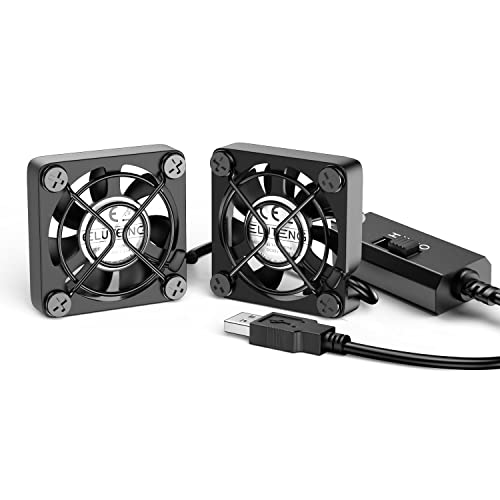
- Two fans provide multi-angle cooling
- Three speed settings for flexible control
- Compact 40mm design with metal guards
Best For: Targeted airflow around small routers and electronics
Best High-Airflow Option

- 56.7 CFM airflow for broad cooling
- USB 5V connection for easy setup
- Includes guard, feet, and mounting hardware
Best For: Larger routers, gateways, AV equipment, and enclosed shelves
Best for Easy Setup
ELUTENG Dual 80mm USB Cooling Fan

- Dual connected fans for stronger airflow
- Three speeds with USB plug-and-play power
- Protective grilles and rubber stabilizers
Best For: Quiet, adjustable cooling for routers and small electronics
Best Wide-Coverage Design
240mm Dual USB Router Cooling Fan
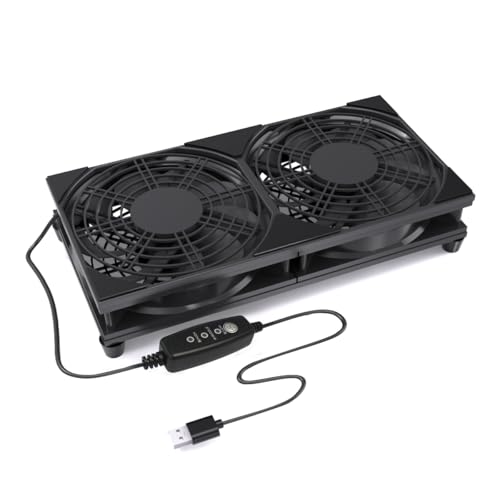
- Dual 120mm fans cover more surface area
- Three-speed inline airflow control
- Raised feet and protective top grilles
Best For: Routers, AV cabinets, and wider electronics shelves
Flexible USB Cooling
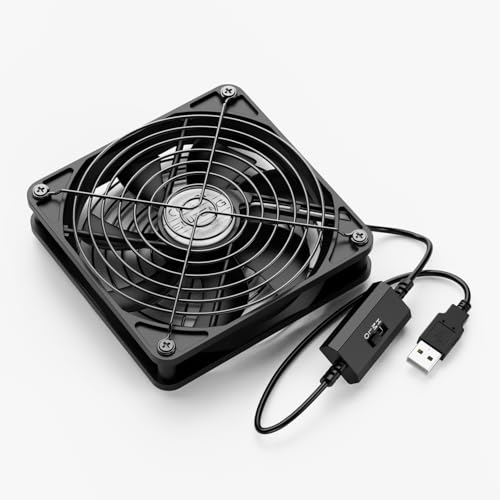
- Three adjustable speed settings
- 56 CFM airflow rating
- Flat or upright placement
Best For: Router shelves and electronics with room for a 120mm fan
Compact Quiet Cooling
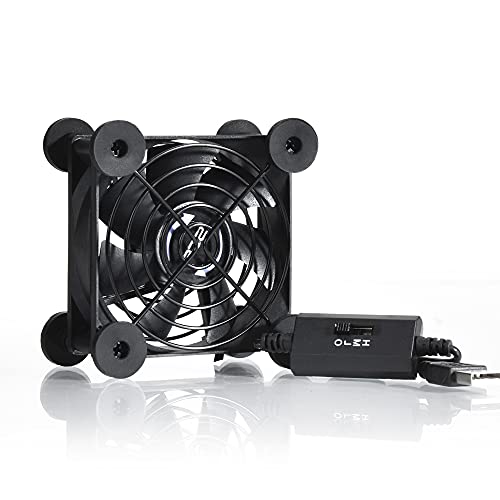
- Small 3.64-inch footprint
- Three speed settings
- 21dB low-gear rating
Best For: Small router spaces and noise-conscious setups
Ultra-Quiet Adjustable Cooling

- High, medium, low, and off modes
- Silicone vibration-reducing feet
- 53.35 CFM airflow rating
Best For: USB-equipped routers needing quiet, adjustable ventilation
Best Overall – Dual 120mm USB Cooling Fans
For broad, quiet coverage, the AC Infinity MULTIFAN S7 is a strong option among compact router cooling fans. Its two 120mm fans provide 104 CFM of total airflow, while the included controller lets you balance cooling and noise for a router, cabinet, console, or other electronics.
Best For: Quietly cooling larger networking or entertainment setups where two fans and adjustable airflow are useful.
Pros:
- Dual fans deliver 104 CFM of total airflow.
- Ultra-quiet 19 dBA operation with a multi-speed controller.
- USB power works with many AV devices and game consoles.
- Dual-ball bearings are rated for a 67,000-hour lifespan and support flat or upright placement.
Cons:
- Each fan measures 4.7 x 4.7 x 1 inch, so it is not suited to very small spaces.
- The two-fan design may provide more coverage than a single compact router requires.
The S7 is a practical pick when low noise matters as much as airflow. Its larger footprint and dual-fan layout make it better for shelves, cabinets, and broad equipment surfaces than tightly confined router enclosures.
Best for Tight Spaces – Mini 40mm USB Router Fan
This 40mm USB fan is designed for narrow placements, making it a natural fit for compact router cooling fans. Its tiny 1.57-inch square footprint, three-speed control, and 3.3-foot USB cable suit routers, TV boxes, Raspberry Pi projects, and other small electronics.
Best For: DIY cooling in cramped spaces where a lightweight, single-fan solution is needed.
Pros:
- Compact 40mm design measures 1.57 x 1.57 x 0.79 inches.
- Three-speed control helps adjust airflow for different setups.
- Dual-ball bearings are rated for 65,000 hours and allow flat or upright placement.
- Long 3.3-foot USB cable supports flexible positioning.
Cons:
- Its 8.71 CFM airflow is modest compared with larger fans.
- Listed noise is 31.3 dB, so it is not the quietest option.
- The small form factor requires careful size checking before purchase.
Choose this model when available space is the main constraint. It offers useful adjustability and easy USB power, but its lower airflow is best matched with a single compact device rather than a large cabinet.
Best Dual-Fan Value – ELUTENG Dual 40mm USB Fans
The ELUTENG dual 40mm set provides two compact fans for directing cooling from different angles. As compact router cooling fans, they fit narrow areas and offer three speed settings, USB power, metal safety guards, and a combined design intended for routers, PCs, hard drives, and AV equipment.
Best For: Users who want two small fans for targeted airflow around a router or compact electronics setup.
Pros:
- Two 40mm fans can cool from different angles at the same time.
- Three speed settings provide low, medium, and high control.
- Mini 40 x 40 x 25mm dimensions suit narrow spaces.
- Metal frames and finger protection add physical protection during use.
Cons:
- The listed airflow is 4.6 CFM, which is limited for larger equipment.
- Small fans may produce noticeable noise at higher speeds.
- Its listed dimensions and dual-fan layout may require more arrangement space than a single 40mm fan.
This set makes sense when targeted, multi-angle airflow is more useful than maximum volume. It is particularly practical for small routers or devices with hot spots, provided the modest airflow meets the cooling requirement.
Best High-Airflow Option – 120mm USB Router Cooling Fan
For buyers prioritizing airflow, this 120mm USB model offers 56.7 CFM at a listed 23 dBA. It is a larger choice among compact router cooling fans, but the included protective net, feet, and mounting hardware make it suitable for routers, modems, AV receivers, consoles, and other enclosed electronics.
Best For: Cooling larger routers, gateways, shelves, or entertainment equipment with a single high-airflow fan.
Pros:
- 56.7 CFM airflow helps move substantial air around equipment.
- USB 5V power supports simple installation with compatible devices.
- Includes a protective net, four feet, and mounting screws and nuts.
- 120mm format provides broad coverage for routers, modems, and AV equipment.
Cons:
- Its 4.7 x 4.7-inch fan size is too large for very tight spaces.
- The sleeve bearing has a listed 35,000-hour life, lower than the dual-ball-bearing options here.
- Only one fan is included.
This fan is a sensible choice when airflow and broad coverage matter more than minimal size. Its mounting accessories add flexibility, while the USB connection keeps setup straightforward for compatible router or home-theater equipment.
Best for Easy Setup – ELUTENG Dual 80mm USB Cooling Fan
For shoppers comparing compact router cooling fans, the ELUTENG dual 80mm model offers two connected fans, USB plug-and-play setup, and three adjustable speeds. Its flexible horizontal or vertical placement makes it practical for routers, TV boxes, receivers, and other heat-generating electronics.
Best For: Quiet, adjustable cooling in compact office, study, or entertainment setups.
Pros:
- Dual fans provide stronger airflow than a single compact fan.
- Three speed settings let you balance cooling and noise.
- Rubber shock absorbers, protective metal grilles, and a 1-meter cable support stable everyday use.
- USB power works with routers, PCs, consoles, and other compatible devices.
Cons:
- The dual-fan housing requires more space than a single 80mm fan.
- Maximum listed noise reaches 32.5dB at the strongest setting.
This is a well-rounded choice when you want adjustable airflow and flexible positioning without complicated wiring. Its compact dual-fan format is especially useful for cooling a router or enclosure in a quiet workspace.
Best Wide-Coverage Design – 240mm Dual USB Router Cooling Fan
This 240mm model is a practical option among compact router cooling fans when you need airflow across a broader surface. Its dual 120mm fans, raised base, protective grilles, and USB-powered design suit routers, modems, TV boxes, AV cabinets, and mini PCs.
Best For: Cooling wider devices or equipment shelves with a stable elevated fan platform.
Pros:
- Dual 120mm fans cover a wider area than smaller fan designs.
- Three adjustable speeds accommodate different devices and placement positions.
- USB plug-and-play power works with adapters, power banks, computers, TVs, and monitors.
- Raised feet improve air intake while keeping the unit stable.
Cons:
- The 240mm-wide design may not fit very tight router shelves or narrow spaces.
- The supplied details identify compatibility broadly with desktop devices rather than listing a specific router model.
Choose this fan when coverage and platform stability matter more than the smallest footprint. The elevated base and dual 120mm layout make it a sensible fit for entertainment centers, cabinets, and larger compact electronics.
Best for Comfort – X4 Dual 140mm USB Cooling Fan
For buyers seeking compact router cooling fans with higher stated airflow, the X4 uses dual 140mm fans and delivers a listed 65.8 CFM. It adds an 18dB operating noise level, one-touch control, stackable feet, and dual USB ports for flexible placement around routers, receivers, amplifiers, and consoles.
Best For: High-airflow cooling where a larger, sturdy platform is acceptable.
Pros:
- Dual 140mm fans provide a listed 65.8 CFM of airflow.
- 18dB operation is suited to offices, bedrooms, and gaming setups.
- Stackable raised feet create clearance and allow storage beneath the fan.
- Dual USB ports and a one-touch switch add convenient connectivity and control.
Cons:
- The 140mm dual-fan format is larger than many compact cooling solutions.
- It may be more airflow than a small router needs in a confined setup.
- The listed maximum rotational speed is 935 rpm, so airflow comes from the larger dual-fan design rather than very high speed.
This model stands out when you prioritize broad airflow, quiet operation, and a durable elevated platform. Confirm the available shelf or cabinet space first, since its larger footprint is the trade-off for the stronger cooling capacity.
Flexible USB Cooling – ELUTENG 120mm 3-Speed Fan
The ELUTENG 120mm is a practical choice among compact router cooling fans when you want adjustable airflow from a USB port. Its three-speed controller, 56 CFM airflow rating, and flat or upright positioning make it suitable for routers and other electronics in tight spaces.
Best For: Cooling routers, modems, receivers, consoles, and other electronics where flexible placement and adjustable airflow matter.
Pros:
- Three speed settings let you balance airflow and noise.
- USB-powered 5V design works with compatible electronics and power sources.
- Can sit flat or stand upright, with aluminum grilles on both sides.
- Dual ball bearings are rated for a 45,000-hour lifespan.
Cons:
- The 120mm frame takes more room than the smaller 80mm option.
- Its listed low-speed noise is 23dB, while the detailed specification lists 29dB.
Choose this model if you need stronger stated airflow and versatile positioning. It is especially useful for a router shelf or entertainment center where a USB connection is available.
Compact Quiet Cooling – Quiet 80mm USB Router Fan
This 80mm USB fan is a space-conscious option for compact router cooling fans. Its smaller footprint, three speed settings, shockproof feet, and stated 21dB low-gear noise make it a good fit for crowded desks, cabinets, and entertainment setups.
Best For: Routers and other compact electronics where minimizing occupied space and low-speed noise is a priority.
Pros:
- Compact 3.64-by-3.64-inch footprint fits smaller spaces.
- Three speed settings help adjust noise and airflow.
- USB power can connect to compatible audio-visual equipment and game consoles.
- Shockproof feet support flat or upright placement.
Cons:
- Its 33 CFM airflow rating is lower than the larger 120mm models listed here.
- The 80mm size may provide less coverage for larger enclosures.
This is the most compact choice in the group. Pick it when available space is limited and you prefer a low-speed setting rated at just 21dB.
Ultra-Quiet Adjustable Cooling – 120mm Router Fan Cooler
The 120mm Router Fan Cooler combines a large frame with adjustable USB-powered airflow, making it a strong candidate among compact router cooling fans for routers, modems, and media equipment. Silicone feet are designed to reduce vibration, while the controller cycles through high, medium, low, and off modes.
Best For: Routers and USB-equipped electronics needing adjustable ventilation with vibration-reducing feet.
Pros:
- Three speed levels plus an off mode provide flexible control.
- Silicone feet are designed to absorb airflow shock and reduce noise.
- 53.35 CFM airflow rating suits router and enclosure ventilation.
- Dual ball bearings are rated for a 50,000-hour lifespan.
Cons:
- The 120mm fan needs more space than an 80mm model.
- Its listed dimensions are 4.72 by 4.13 by 2.24 inches, so height should be checked before placement.
This model is a sensible pick when quiet operation and adjustable control are more important than the smallest possible footprint. Its USB connection also keeps installation simple for compatible routers and electronics.
How We Picked These Compact Router Cooling Fans
We selected models that are designed for USB-powered electronics cooling and cover a useful range of fan sizes, layouts, and controls. The list includes compact single fans, dual-fan assemblies, and larger 120mm to 240mm options. We also considered adjustable speed settings, portable designs, stated noise characteristics, and compatibility with common 5V USB power sources.
Because cooling performance depends heavily on cabinet layout and airflow obstruction, specifications such as fan diameter and speed control are more useful for comparison than a single advertised temperature claim. Always confirm dimensions and connector details before buying.
Quick Comparison
- Smallest installations: 40mm fans suit narrow vents, small enclosures, VR gear, and other space-constrained setups.
- Balanced everyday cooling: 80mm and 120mm fans offer a practical blend of airflow, noise, and easy placement.
- Broader cabinet coverage: Dual 120mm, dual 140mm, and 240mm designs can move more air across receivers, routers, and entertainment centers.
- More control: Models with three-speed selectors or controllers make it easier to balance airflow against noise.
Key Buying Factors for Compact Router Cooling Fans
Size and Placement
Measure the available opening before choosing a fan. A larger fan may provide broader airflow, but it needs sufficient clearance and may block ports, vents, or cables. For a tight router shelf, a 40mm or 80mm option is often easier to position.
Airflow Versus Noise
Higher fan speeds generally increase airflow and sound. Adjustable models are useful when equipment runs quietly most of the time but needs extra cooling during heavy use. For bedrooms, offices, or living rooms, prioritize quiet operation and a lower-speed setting.
Power and Controls
Most products here use 5V USB power, so check whether your router, power adapter, television, or power bank has a suitable USB port. A dedicated adapter may be preferable if the equipment’s USB port cannot provide enough power. Look for an accessible switch or controller if the fan will be difficult to reach.
Fan Arrangement and Airflow Direction
Dual-fan and larger assemblies can cool a wider surface, but they may require more room and careful positioning. Place the fan to support the equipment’s existing ventilation path rather than simply blowing into a blocked enclosure.
Who Should Buy Which Compact Router Cooling Fans?
Choose a 40mm model for very tight spaces or targeted cooling around a small device. Choose an 80mm fan when you want a compact installation with more airflow than a miniature fan can provide. Choose a 120mm model for general router, modem, DVR, or receiver cooling where shelf space is available. Choose a dual-fan or 240mm design for wide equipment surfaces, cabinets, and setups that need airflow across multiple hot spots.
Before installation, keep vents unobstructed, route the USB cable away from moving blades, and periodically remove dust from the fan grille. These simple steps help Compact Router Cooling Fans work more consistently over time.