Router heat can contribute to throttling, instability, and shorter component life—especially in crowded cabinets or during sustained workloads. The right cooling fan can improve airflow without adding distracting noise.
We compare 10 router cooling fans across single- and dual-fan designs, USB power options, speed controls, and sizes to help you choose a practical match for your setup.
Best 10 Router Cooling Fans Picks for 2026
Best Quiet Dual-Fan Pick

- Dual 120mm fans deliver 104 CFM total airflow
- 19 dBA operation with multi-speed control
- USB powered and positionable flat or upright
Best For: Quiet cooling for routers and AV electronics
Best High-Airflow Setup

- Four 120mm fans for high airflow
- AC-powered design reaches 2,000 RPM
- One-year free-replacement warranty
Best For: Large routers and electronics needing aggressive cooling
Best Simple USB Option

- Single 120mm fan with 56.7 CFM airflow
- USB powered with a 21-inch cable
- Includes guard, feet, screws, and nuts
Best For: Straightforward cooling for one router or device
Best Compact Adjustable Fan

- Dual 80mm fans fit tighter spaces
- Three adjustable speed settings
- USB powered with flat or upright placement
Best For: Compact setups needing adjustable router cooling
High-Output Choice
4-Fan Variable-Speed Cooling Pad

- Four 120mm fans for substantial airflow
- Adjustable 3V–12V speed control
- AC-powered with dual ball bearings
Best For: DIY cooling projects and larger electronics
Quiet Compact Pick
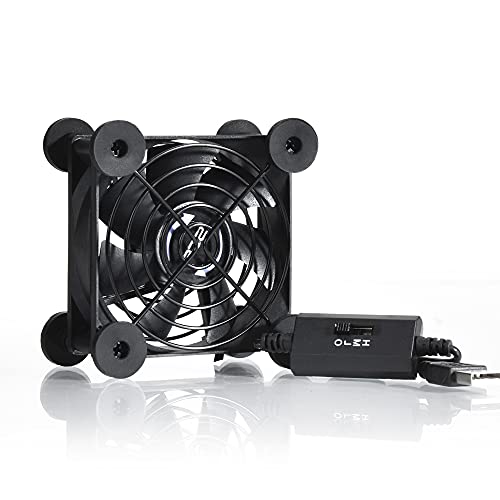
- Compact 80mm design for tight spaces
- Three speeds with 21dB low setting
- USB powered with flat or upright placement
Best For: Small electronics and USB-equipped routers
Wide-Coverage Value

- Two 120mm fans share one USB cable
- 56 CFM stated airflow for the setup
- Multi-speed, flat-or-upright design
Best For: Wide cooling coverage for routers and AV equipment
Quiet USB Router Cooling Fan

- Three speeds plus off
- USB-powered 5V design
- Silicone feet and dual bearings
Best For: Quiet cooling for routers and USB-equipped electronics
Dual-Fan Router Cooler

- Two 120mm fans
- Three-speed adjustment
- Tool-free support feet
Best For: Broader airflow coverage for indoor electronics
Extended-Cable Router Fan

- Dual 140mm fan format
- 74.8-inch cable
- Eight non-slip feet
Best For: Larger devices and flexible cooling setups
Best Quiet Dual-Fan Pick – AC Infinity MULTIFAN S7
If you want router cooling fans that balance airflow with low noise, the AC Infinity MULTIFAN S7 is a practical choice. Its two USB-powered 120mm fans deliver 104 CFM of total airflow, while the included multi-speed controller lets you adjust performance for your setup.
Best For: Quiet cooling for routers, receivers, DVRs, game consoles, and other electronics with an available USB port.
Pros:
- Dual 120mm fans provide 104 CFM of total airflow.
- Low 19 dBA noise rating with adjustable speed control.
- Can stand upright or lie flat, with dual-ball bearings rated for 67,000 hours.
- USB power works with many AV electronics and game consoles.
Cons:
- USB power may be less suitable where no nearby USB port is available.
- The two-fan design requires more placement space than a single fan.
With quiet operation, flexible placement, and durable bearings, this is a strong all-around option for keeping network and entertainment equipment cooler without adding much noise.
Best High-Airflow Setup – GDSTIME Router Cooling Fan
For demanding router cooling fans applications, the GDSTIME setup uses four 120mm fans and an AC adapter to prioritize airflow. The four-fan array is designed for compatible electronics and offers speed up to 2,000 RPM, though its higher airflow comes with more audible noise.
Best For: Large routers and electronics setups that have room for a four-fan cooling pad and access to an AC outlet.
Pros:
- Four 120mm fans provide a stated 4 x 66 CFM airflow configuration.
- AC adapter enables higher fan speed and outlet-powered operation.
- Rated for up to 2,000 RPM for high-performance cooling.
- Includes a one-year free-replacement warranty.
Cons:
- At 38 dBA, it is louder than the quieter options in this roundup.
- The approximately 9.65 x 9.65-inch fan array needs substantial space.
- Sleeve bearings have a shorter stated lifespan than the dual-ball-bearing alternative.
This is the airflow-focused pick for larger equipment or warmer environments. Measure your available space first, and expect a more noticeable operating sound than with compact USB fans.
Best Simple USB Option – 120mm Router Cooling Fan
This single 120mm model is one of the more straightforward router cooling fans for compact electronics setups. It connects through USB, includes a 21-inch cable, and produces 56.7 CFM of airflow for routers, modems, TV boxes, receivers, and similar equipment.
Best For: Simple plug-and-play cooling when you need one 120mm fan and a convenient USB power source.
Pros:
- USB connection makes installation quick and uncomplicated.
- 56.7 CFM airflow with a 23 dBA noise rating.
- Includes a protective net, foot columns, and mounting screws and nuts.
- Suitable for routers, modems, consoles, projectors, and other electronics.
Cons:
- Only one fan is included, so coverage is less extensive than dual- or four-fan designs.
- Uses sleeve bearings rather than dual-ball bearings.
- Requires a USB port for power.
Choose this fan when you want an affordable, uncomplicated way to move air around a single router or device. Its standard 120mm size and included mounting hardware make placement flexible.
Best Compact Adjustable Fan – ELUTENG Dual 80mm USB Fan
The ELUTENG dual 80mm unit gives router cooling fans shoppers a compact, adjustable design for tighter spaces. Its connected fans run from USB power and offer three speed settings, allowing you to trade airflow for quieter operation as needed.
Best For: Compact router, hard-drive enclosure, laptop, or AV equipment setups that need flexible positioning and adjustable airflow.
Pros:
- Dual connected 80mm fans provide stronger cooling than a single compact fan.
- Three speed settings support customized airflow.
- USB plug-and-play operation with horizontal or vertical placement.
- Rubber shock absorbers and protective metal grilles improve stability and protection.
Cons:
- The 80mm fans have less individual size than the 120mm alternatives.
- Noise increases from 25.6 dB at low speed to 32.5 dB at strong speed.
- USB power is required.
This model is a useful middle ground when space is limited but one fan is not enough. Its three-speed controller makes it easier to tune cooling for a quiet office, study, or equipment shelf.
High-Output Choice – 4-Fan Variable-Speed Cooling Pad
For setups that need substantial airflow, this router cooling fans option combines four 120mm fans with adjustable speed control. Its AC plug makes it suitable for longer-running electronics cooling around a router, modem, cabinet, DVR, or streaming setup.
Best For: DIY cooling projects and larger electronics that benefit from adjustable airflow and AC-powered operation.
Pros:
- Four 120mm fans provide strong, configurable airflow.
- Variable control ranges from off to full speed for noise and airflow tuning.
- Dual ball bearings are rated for a 65,000-hour service life.
- Metal grills and a durable speed-selection switch add practical protection.
Cons:
- The larger four-fan design may be excessive for compact router spaces.
- It uses an AC plug rather than simple USB power.
- Its 24-watt rating may be more than low-power cooling setups require.
This is the most versatile high-airflow choice of the three, especially when you want fine speed adjustment and a permanent outlet-powered installation.
Quiet Compact Pick – 80mm USB Router Fan
If you want convenient router cooling fans without adding a large setup, this compact 80mm USB model is easy to position flat or upright. Its three-speed controller lets you balance airflow and noise, with low-speed operation rated at 21dB.
Best For: Compact routers, DVRs, game consoles, and other electronics with an available USB port.
Pros:
- USB power works with compatible electronics, chargers, and power banks.
- Three speed settings help tune noise and airflow.
- Compact 3.64-inch square design fits smaller spaces.
- Protective iron grills and shockproof feet support flat or upright placement.
Cons:
- The 80mm fan has less airflow capacity than the larger multi-fan options.
- USB operation requires a suitable powered port or adapter.
- It is sold as a single fan.
This is a practical everyday choice when space, simple USB power, and lower noise matter more than maximum cooling coverage.
Wide-Coverage Value – Dual 120mm USB Cooling Fan
This dual-fan option is a useful middle ground for router cooling fans, combining two 120mm fans in a 240mm-wide cooling pad. It runs from USB, offers multiple speeds, and can sit flat or upright beside a router, receiver, TV box, or game console.
Best For: Broad surface cooling for AV equipment, routers, consoles, and other small-box electronics.
Pros:
- Two fans connect to one USB cable and operate together.
- Provides stated airflow of 56 CFM for the dual-fan setup.
- Multi-speed control supports airflow and noise adjustment.
- Square housing supports flat or upright placement.
Cons:
- The 240mm-wide design needs more horizontal space than a single compact fan.
- USB input is limited to a maximum of 5V/1A.
- The blades may not start smoothly at the lowest setting, and the fan is not waterproof.
Choose this model when you want wider coverage than an 80mm fan but prefer the convenience of USB power and a relatively simple placement-friendly design.
Quiet USB Router Cooling Fan – Adjustable 120mm Cooler
For shoppers comparing router cooling fans, this 120mm USB model offers a practical balance of adjustable airflow, low-noise operation, and flexible placement. Its 5V USB power makes it suitable for routers and other USB-equipped electronics.
Best For: Quiet cooling for routers, modems, DVRs, TV boxes, game consoles, and similar devices.
Pros:
- Three speed levels plus an off setting let you adjust airflow and noise.
- USB-powered design works with devices that have a USB interface.
- Silicone feet help reduce vibration and reported noise ranges from 9.3 to 16.8 dBA.
- Dual ball bearings are rated for a 50,000-hour lifespan and support flat or upright use.
Cons:
- It is a single-fan design, so coverage is more limited than dual-fan alternatives.
- The 120mm unit may not suit especially large devices or wide ventilation areas.
Choose this model when quiet operation and simple USB connectivity matter most. The three-speed controller also makes it easier to balance cooling performance with your preferred noise level.
Dual-Fan Router Cooler – 2x120mm USB Cooling System
This dual-fan option is worth considering if you want broader airflow from your router cooling fans. It combines two 120mm fans, tool-free support feet, USB power, and a three-speed controller for cooling routers, TV boxes, mini computers, and game consoles.
Best For: Wider airflow coverage under routers, TV boxes, mini computers, and other indoor electronics.
Pros:
- Two 120mm fans provide a larger cooling setup than a single-fan unit.
- Three speed settings allow airflow adjustment for different environments.
- USB power and a 39-inch cable support convenient placement.
- Dual ball bearings are rated for more than 50,000 hours of service.
Cons:
- The larger 9.45-by-4.72-by-2.36-inch footprint needs more room.
- Its listed noise level is 31 dB, so it may not be the quietest option in the group.
- The metal support feet must be installed before use.
For larger surfaces or devices that benefit from a dual-fan layout, this model offers useful coverage and straightforward controls. Its floor-mount design is best suited to stable indoor setups with available space.
Extended-Cable Router Fan – Dual 140mm USB Cooler
If you need larger coverage and more flexible placement, this dual 140mm model is a strong router cooling fans candidate. It pairs a two-fan layout with three speed levels, eight non-slip feet, and a long 74.8-inch cable for USB-equipped electronics.
Best For: Larger routers, consoles, receivers, and setups where extra cable length is useful.
Pros:
- Dual 140mm fans provide a larger cooling format than 120mm options.
- Three speed levels plus off allow control over airflow and noise.
- Eight non-slip feet help stabilize the unit, reduce vibration, and raise it for ventilation.
- Its 190cm cable offers flexible placement, while dual ball bearings are rated for 60,000 hours.
Cons:
- The 11.02-by-5.51-by-1.81-inch size requires a wider placement area.
- The supplied details list a 4-pin power connector rather than a standard USB connector.
- Its larger dual-fan format may be excessive for compact devices.
This is the better fit when you prioritize larger fan coverage, stability, and cable reach. Confirm the connector arrangement and available surface area before choosing it for a particular router or device.
How We Picked the Best Router Cooling Fans
We focused on the factors that matter most in real installations: fan size, airflow potential, noise control, power connection, speed adjustment, bearing design, and placement flexibility. The selection includes compact 80mm models, larger 120mm and 140mm fans, multi-fan arrays, and a 240mm option for broader equipment coverage.
Because router layouts vary widely, we also considered whether each design is suitable for a shelf, cabinet, entertainment center, modem stack, or DIY electronics project. A fan’s usefulness depends as much on fit and power access as on its advertised airflow.
Quick Comparison
| Best For | Recommended Design | Why It Stands Out |
|---|---|---|
| Small spaces | 80mm USB fan | Compact footprint and simple placement |
| General router cooling | Single 120mm fan | Good balance of airflow, noise, and size |
| Broad equipment coverage | Dual 120mm or 140mm fans | Moves air across wider components |
| DIY cabinets and shelves | Four-fan or 240mm setup | Useful for larger enclosures and custom airflow |
| Fine-tuning noise and airflow | Variable-speed model | Lets you adjust cooling to the workload |
Key Buying Factors for Router Cooling Fans
Size and Airflow Coverage
Measure the available space before buying. An 80mm fan is easier to position around a modem or router, while 120mm and 140mm models can move more air at lower speeds. Dual- and four-fan designs are better when several devices share a confined cabinet.
Power and Compatibility
USB-powered fans are convenient for routers, power banks, computers, and other electronics with an available USB port. Models with an AC plug may be better for permanent installations near a wall outlet. Check voltage and connector requirements rather than assuming every USB fan is interchangeable.
Speed Control and Noise
A speed controller gives you a practical way to balance cooling against sound. Run the fan slowly for ordinary browsing and increase speed when equipment is under sustained load or the cabinet becomes warm. “Quiet” performance still depends on placement, dust, vibration, and the selected speed.
Installation and Airflow Direction
Position the fan so it either supplies cool air or exhausts warm air, and avoid blocking the router’s own vents. Leave room around intake and exhaust openings. In a cabinet, a coordinated intake-and-exhaust arrangement can work better than simply adding the largest fan.
Who Should Buy Which Router Cooling Fans?
Choose an 80mm model if space is tight or you need targeted cooling beside a single device. A 120mm fan is the safest all-around choice for most home routers and modem setups. Select a dual 120mm or dual 140mm design for wider shelves, multiple devices, or warmer enclosed areas. For a custom cabinet, media center, or electronics project, a four-fan arrangement or 240mm cooler offers broader coverage. If noise is your priority, favor a quiet USB model with adjustable speed and run it only as fast as necessary.